Blog

  • Update Latest Android OS – Top reasons to upgrade Mobile OS

    Update Latest Android OS – Top reasons to upgrade Mobile OS

    Android has come up with even the most recent OS , it is like latest Android OS is the trend everyone look for . This version provides several good and catchy features to Android users and which have attracted many users towards it . We can find the constant demand of android users to Update Latest Android OS

    From multi-window support to improved battery life with Doze, a smarter settings menu, instant apps and many more things attracted every marshmallow user to it. Android releases another version 8.0 named as ‘Oreo‘ which have provided several features better than Nougat. This version provides 2X Android boot speed. It has also improved the problem of operating system update tackles with pesky background activities that drain a huge amount of battery. These things make ‘Oreo’ different from Android ‘Nougat’ and any other previous versions and that’s why every Android user wants to update to Android Oreo .

    Now many of us has a question that why to update to latest Android OS . What’s the need ?. The answer is simple, as the rule says , if you want to be successful , you need to be updated with the world. Every version is the best and it has overcome and fix all the bugs of previous versions. Now with these updates almost every year , we need to be updated and aware of these updates . But for this , firstly we need to learn how to update to latest Android OS. There are several mobile phones which automatically give this update and some don’t give updates as the new Android versions are currently not available for that device  .

    Read Also : Android Oreo Vs Android Nougat Vs Android Marshmallow Vs Lollipop

    Read Also : Convert 3G Phone to 4G Phone to support 4G Sim in 3G Mobile

    Why you Can’t Update Some phones to Latest OS ?

    A device manufacturer writes Android device drives for their hardware to make Android work on their hardware . These are closed-source and the device manufacturer have to himself update them.  It is not possible for Google to release a new version which works on all devices. Some Android versions comes with increased hardware requirements . That’s why sometimes you can’t get update to latest Android OS.

    So now the question is that , what do do with those mobile phones which doesn’t give the latest updates . 

    Today we will show you several methods to update your phone to latest android OS, so that you can easily update your android OS by yourself by following some simple steps .

    Method 1: Updating your Android OS using WiFi ( Update Latest Android OS )

    Step 1: Make sure your device has been connected to a working WiFi network .

    Step 2: Open your device settings.

    Step 3. In settlings , find About device and tap that to open it .

    Step 4: You will find an ‘Update’ option there. Tap it .

    Step 5: Now tap ‘Check for updates’ . Now your device will search for avialable updates.

    Step 6: If there is an update available an ‘Update’ option appears on the screen . Tap on it your update download will start .

    Step 7: Now an ‘Install’ button will appear on the screen . Install the update the device will be rebooted and after successful rebooting you will get updated OS in your device .

    Read Also : Android Vs iOS – Pros & Cons of Buying Android Vs iOS

    Read Also : iOS 11 Vs Android Oreo – Who wins gadget lover’s Heart

    Method 2: Updating using a Computer( Update Latest Android OS )

    Step 1: In desktop browser, open device manufacture’s official website .

    Step 2: Select your device there and download and install device management software .

    Step 3: Now return to the device manufacturer’s website and search for available updates .

    Step 4: Connect your device to the computer using USB cable.

    Step 5: Now open device management application .

    Step 6: Locate the update command . In Samsung phones , you will find this under ‘Tools’ drop down menu .

    Step 7: Click on the update command. After clicking , the update process will start .

    Method 3: Update using a rooted ROM ( Update Latest Android OS )

    Step 1: Firstly download a rooting software and install it in your computer .

    Step 2: Connect your device to your computer using an USB cable .

    Step 3: Open the rooting software in your computer .

    Step 4: Follow the on screen prompts and start the rooting process .

    Step 5: Now restart your device .

    Step 6: Install any Android version you want to use in your device .

    Step 7: Restart your device . Now your device will run on the Android version you have installed .

    Before doing the Method 3 , For precaution I will suggest you all to backup all your data as we know rooting can prove sometime dangerous for your device . It can harm your device and data. So , it will be better if we will backup our data to some USB or hard disk before updating to other android version.

    By using above simple methods and steps you can update any android device to latest android OS to use the more advanced and catchy features of these newer versions. But I will suggest you to first try Method 1 , as it is the safest and natural way to update you device and it will not cause any harm to your device . Method 2 and Method 3 are forcefully methods to Update Latest Android OS which can harm your android device and can lead to data loss . But if the Method 1 fails and you can’t restrict yourself from those catchy features of latest android OS then you can simply opt for Method 2 and 3 .

  • Ramadan Transformative Goals – How to transform yourself into a better version

    Assalamualaikum to all the readers !! We are in the holy month of Ramadan – the 9th month of islamic calender . Ramadan is the most awaited month for all believers of Islam . Though Ramadan is widely known for fasting observed by muslims . I would like to appeal to all fellow humanbeings to consider this month for life transformation . Because its a month full of opportunity to implement Ramadan transformative goals and you can transform yourselves into a better version of yourself

    To start with we know the significance of Quran reading in the month of ramadan . Its a act considered noble . So read and make others learn quran to understand message of quran

    You remember how allah describes Quran as ” Noorun ala Noor – Light upon light “

    Quran is as such a light of wisdom for those perceive it . 

    Do taraweah namaz , and other extra namaz to keep your body engaged in the heat of ramadan .

    Body cleansing happens during fasting as our internal organs are going through a different scientific mechanism in this month with fasting . Now the next part is do a spiritual cleansing of heart as well

    You know we all feel sometimes overburdened , hopeless etc .. but everything can be cleansed with quran and with the remembrance of allah .

    If you feel you have burden of worldly life which is more for you to handle then Remember to read Surah Inshirah ( alam nashrak surah) this will remind you that after a hardship there is a double assurance of ease from Allah . Read the surah Dhuha this surah will remind you that allah has never abandoned you and he will give you till your heart finds satisfaction . This surah certainly has a healing to remove all the stress and hopelessness one feel in their mind

    Then forgive people the way you want Allah to forgive yourself . Grudges should be washed away in Ramadan .

    Hatred never is pleasing in the eyes of Allah , so in case you hatred towards anyone just analyze if it is valid or not . If the hatred is valid forget them and leave the matter to the judgement of Allah . But in case you forgive them then do it with happy heart .

    Avoid all haram things , either it be a haram food , haram hobby , haram companionship or friendcircle that diverts you or even belittle your creator just say PEACE( Salam to them ) move miles away from such activity and company

    Ask forgiveness of Allah – best words as allah says about “there was a sect of people who used to say daily – RABBANA AAMANA FAGHFIRLANA WARHAMNA WA ANTA KHAIRUR RAAHIMEEN . So repeat this dua as you know allah never punishes one while they are seeking forgiveness .


    So make things easy for yourself with the remembrance of allah .

    Stay positive , stay healthy ,happy and may allah open the doors of sustenance to every halal seeker. 


  • Find the best radio station for iPod or iPhone FM Transmitter

    Find the best radio station for iPod or iPhone FM Transmitter

    Find the best radio station for iPod or iPhone FM Transmitter

    Here we will discuss about finding the best radio station for iPod or iPhone FM transmitter for car as well as finding best radio frequencies and best FM transmitters .

    Ever in your life have you ever been driving along in your car listening to your music either in your iPod/iPhone or any other music player with an FM Transmitter. Then one day all of a sudden your heart wrenching song gets interrupted by some disturbance. The radio waves can be really give you a lot of pain and be very annoying when you are using your iPod/iPhone in your vehicle. I am really grateful for some really informative pieces of knowledge which has helped me a lot and I was able to solve this issue. I will solve help you solve this issue with my personally developed methods. So here is the best radio station for iPod or iPhone FM Transmitter.

    SiriusXM

    SiriusXM is an app which provides an FM Channel Finder on their online web site where you are able to search for the best possible FM radio channel in or near your area which is relatively safe to use with the SiriusXM’s own Satellite Radio. You can also use this tool to find some really good and amazing radio stations for your personal listening in your iPod/iPhone along with either Zune or any other music player’s FM Transmitter and your work is done. All you have to do is punch in your area code and the this Frequency Finder will provide several available options for radio stations which you can easily program your FM transmitter to listen and then just sit back and enjoy the crystal clear music of your favorite album in your vehicle and then enjoy your ride but if you have an internet connection then whats the point of listening to FM right so here are some other ways which can prove to be of a better utility.

    Read Also : Top Satellite Car Radio Installation and specification guide

    Read Also : Best Smart Home Gadgets for Home automation- Smart home

    Humble FM transmitters

    Humble FM transmitters are the handy little devices which can plug into the dock of the connector either of your iPhone or iPod which basically creates their own sort of mini radio station.

    It transmits whatever song you are playing on your personal iPod app over such an FM radio frequency so that even your car’s radio can tune frequency just like it does generally with normal radio stations but be careful since this frequency has a range of about 10 meters so anyone else can also tune in to the station so try not play some personal phone recording or anything confidential to your life.

    Since these FM transmitters can be used send your music over a range as long as 10 meters which is more than enough for a use in a single car. Only thing you need to be concerned about is of finding an empty band on the spectrum or there is a possibility of a clash with other commercial broadcasts stations which are coming in that area. Every transmitter of FM comes in different shapes, sizes and at different price and with numerous functions. Few of them have charging cables and sometimes even their own apps so that you can select a clear and better frequency.

    You can find the Best FM Frequencies For Your Car Transmitter using –

    • ClearFM
    • Radio locator
    • SiriusXM Channel Finder

    For helping you selecting the best FM transmitter I have been on the road with many different devices and from many of them I am giving here my favorite five and all of them are with different manufacturers just so that you can put them all through the wringer.

    1. Belkin TuneBase FM LIVE

    2. Griffin iTrip Auto

    3. KitSound MY FM

    4. Logic 3 FM Transmitter Charger

    5. Monster iCarPlay Wireless 300

    The above given are the Best iPhone FM Transmitters for Your Car . This help you to find the best radio station.

    Read Also : Best iTunes Cleanup Software for better iTunes experience

    Ease of use

    The easiest of all the FM transmitters which are currently available in the market including the latest transmitters released till the date of this article’s publication it is relatively easier to use is the Belkin and the sole reason for using it is purely because the stand of Belkin basically aligns your iPhone every time in such a way that it is maintained at an eye level. As because of this really amazing feature all you have to do is only glance across at the dock and make a tap on the screen while it is running the Belkin ClearScan LIVE app to change things to set them as per your convenience so that you can easily use this app when required. This will make the accessibility of the so easy that you do not even need to change your iPod app to skip a track a track when you do not want to listen one which undeniably is the best feature of these FM transmitters.

    Most of the griffin generally takes the second place which is all thanks to having this amazing feature through which we can track all of the controls just through your at your finger tips using its own iPhone app. The Monster will come not because of it’s functionality or some other advantages it provides because it is a simple fault in their business model which is UI that is because of its old fashioned and classical display with frustrating control system.

    The concluding part will be that just having a FM transmitter and knowing how to use it is not just enough. You have to know about the utility and mechanisms as well will be useful to all of you in the longer run. So read the above written article as many times as you want and try to understand the basic mechanism of the working of FM transmitters and remember me when you use it :).

    Guess this serves the best in helping you to Find the best radio station for iPod or iPhone FM Transmitter

  • Download free eBooks For My Nooks or Kindle -Read eBooks

    Download free eBooks For My Nooks or Kindle -Read eBooks

    Reading is never an old hobby , but the mode of hobby has moved away from conventional way to latest technology like e-books , audiobooks etc. What more to come is still clueless with rapid AI e-books and AI assisted reading technologies. Reading as a hobby we wish to spend less so always we end up searching in google “how to download free eBooks ? ” “download harry-potter ebook / download best seller novel pdf , download ebook comics pdf  etc ..

    To be honest , my greed for books never end , so as my search queries in google in this aspect is way more funny .

    Download Free eBooks:

    Everything around us has become digital and so we call this a “Digital Era”. Don’t you think even our hobbies got digitized these days? Certainly, from letters to emails; SMS to messenger apps , board games to online games .And what not; from normal library rooms,our reading too has reached levels ahead . So here we are, to give the best on about a digitized hobby- “Reading”. All the Book lovers are requested to turn your attention to the different ways to Download Free EBooks for their Nooks or Kindle.

    But, remember, the fun in reading the Real books, visiting the Real libraries will never fade away from us. How would kids these days ever know enjoyment from such books, as they are already glued their eyes onto virtual ones- eBooks … So if you are being searching for the ways to Download free eBooks for  My Nooks and Kindle here is the solution for that .

    Kids these days have their eyes on certain gadgets from which they can have ‘Virtual Libraries’. They demand for tablets, or something new called Kindle, a new product from Amazon. On Kindle,  they could download free eBooks, they could read it anytime, anywhere.

     Let us get to know more about these ‘Virtual Books’ or ‘Libraries’.

    How To Get Free eBooks For Kindle or Nook:

    Most of Kindle and Nook owners agree that having an e-Reader would tempt you to read more.  However, these are not cheap, costing almost equal to that of hard-copy. There are a few tips to find the free eBooks for Kindle or Nook:
    • Search for “0.00“: This has been the oldest trick. Go to the Barnes&Noble or Kindle bookstore and search for “0.00“. The result would generate a collection of free eBooks which you could directly download into the device.
    • Swap books with strangers: You could find some books with the “lending” feature. Amazon and B&N wished that  lending feature would be enabled among friends. However, there are sites such as BookLending.com and eBookFling.com enable the users to have a list of eBooks and exchange them with anyone else.
    • Check out eBooks from Library: They might seem primitive, as libraries are trending with the provision for services like Overdrive.
    • Find free books online: There are books, more specifically classics like “Frankenstein” under Public domain authorization and have been turned into eBooks for pleasure in reading.

    What is Kindle?

    The Kindle is a chain of e-readers created and marketed by Amazon.com. Kindle devices let the users to browse, purchase, download, and read e-books, newspapers, magazines and other digital media through WiFi from Kindle Store. The hardware,on the other hand, developed by a division of Amazon- Lab126, had started as a single device, presently holds a range of devices,such as e-readers with E Ink electronic paper displays, Android tablets having color LCD screens and Kindle applications supporting all major platforms. Every Kindle device coordinates with contents of Kindle Store and as on January 2017, the store holds over five million e-books available in the US.

    You know in amazon-kindle many a times we can get books for 1 dollar or sometimes amazon-kindle free books are waiting to excite us . This week i have got few of the magazines for 0$ in amazon-kindle . All that it takes is to create amazon-kindle account .

    Read Also : Kindle Fire Silk Browser Alternatives

    Where To Download Free eBooks 

    It has been easier to download free eBooks, than you could imagine; just need to know where exactly to search for  them. There are a few websites which would take you through finding and downloading free eBooks on Kindle to start reading.

    No Kindle? No worries. You could get a free Kindle reading app for the browser, smartphone or tablet. Once the app has been installed, you could download free eBooks.

    If you check into U.S public library, you could download Overdrive Media Console. Being accessible to users of both Windows and Mac PCs, it would link to a variety of public library index, thus allowing to download free eBooks through Amazon. You could view your library’s Overdrive website from www.overdrive.com.

    Read Also : uBlock Origin Replaces Adblock plus(Best Adblock Plus Alternative)

    Overdrive Through Public Library :

    If your public library has subscribed for Overdrive, you could download free eBooks just like checking paperbook. You could use the LibrarySearch option that allows you to find the nearest library giving away Overdrive.

    BookLending :

    This service is similar to Overdrive, used when the library has no Overdrive subscription. Here, you could borrow as well as lend books for Kindle without checking in to your library. You could borrow free Kindle books for 14 days and would be returned to the owner at that time.

    If the classics are preferred, you could check on Project Gutenberg for a start. This version has been there, ever    since the Internet was introduced, having almost 50000 copyright-free eBooks. In OpenLibrary, there are even more choices of downloadable eBooks. An added advantage of OpenLibrary is that it has a lending system as in the real library which would not be seen in Kindles. There is one more ‘virtual’ library called archive.org wherein you could access  historical and other academic texts.

    Goodreads :

    This has a collection of more than 2,500  recent free books, and mostly in Mobi format. ManyBooks.net   is a combination of classics and self-published titles, with around 30,000 in store. More classics and self-published works could be found at FeedBooks. If there are fans of science fiction, they could download free eBooks by the publisher Baen.

    ManyBooks.net :

    This is yet another free website, that has ruled over the internet in finding the greatest and the latest free Kindle books.  Presently, there are over 33000 free eBooks in this website. You could browse free eBooks by the author, title, genres or languages; and download free eBooks as Kindle file (.azw) or any preferred file type.

    Mobipocket :

    As you cannot find free Kindle Books on Amazon easily, Mobipocket is specifically for them. This has been owned by Amazon, listing over 11500 free eBooks. Mobipocket is the only website except Amazon, from where you could download free eBooks  for Kindle. This is quite simple, as all they do is listing the books. The books here are all of public domain and the last set of books added to the catalog was in 2006.

    Baen Free Library :

    This is an online eBook store, selling eBooks from a set of publishers operating Baen Free Library. This library was established since it was more expensive to buy the books and do the marketing for them, than it would cost for the eBook version. This is why you could find newly released title in Free Libraries, rather than the literature classics.

    Though Baen is an eBook store, you could download free eBooks, without having to register or drop-in the email address. There would be some books in the Free library, with their status changed as Paid, so you need to double-check before you would download.

    OpenLibrary :

    This too serves to lend and download free eBooks for Kindle, having over 1 million eBook titles accessible. They have specialized in Classic Literature they could be searched by keyword or could be browsed by subjects, authors or genre. Each book could be downloaded in a different file formats such as MOBI, DJVU, EPUB, plain text and PDF.  

    Smashwords : This has been a great choice from where you could download free eBooks of independent authors     and publishers. IT has almost 200,000 titles in the index. Smashwords has played a vital role as source of newly launched independent eBooks. Smashwords would be a perfect choice for those looking for eBooks in languages      other than English. Besides, you could find eBooks even in your mother tongue. That was quite a ‘smash’.

    DigiLibraries :

    These usually gather the free Kindle books, from independent authors and publishers.

    Read Also : Enable / Disable JavaScript : Mozilla Firefox Hacks

    Nooks:

    The Nook Simple Touch or the Nook Touch, is the second generation Nook e-reader created by Barnes & Noble. This device comprises 600×800 E-link screen with a touchscreen facility, using a grid of infrared strips    above the surface of the screen. The device has been wirelessly connected through Wi-Fi 802.11 and a mini USB    port to charge and connect to the computer.

    During April 2012Barnes & Noble introduced  a Simple Touch Reader enabled with “Glowlight” LED technology. Barnes & Noble released the Nook Glowlight, thus replacing the Simple Touch with Glowlight version in October 2013. The Simple Touch was sold out and it had been stopped during late February 2014.

    Read Also : Enable / Disable Internet Explorer Extensions and Add-ons

    Where To Download Free eBooks For Nook :

    If you prefer to have a Nook reader, you would be more curious to know the source to download free eBooks. However, there are a few vital things to remember before you download free eBooks for the Nook device.

    The most important point is DRM or the Digital Rights Management, which prevents opening of files on unauthorized devices. Barnes&Noble accesses DRM from Adobe. DRM is also used on eBooks available on B&N websites for free. It should also be remembered that, while collecting free eBooks for Nook, one should also read     the eBook DRM for the same. The most compatible format to access or download free eBooks; may it be eReaders, tablets or eReading applications is the epub. The pdf format is also supported; yet it would not be          as easily readable as in epub format, specially on small screens.

    You could find over than 2 million free eBooks in epub format on the Web.  Among these, there are a few classic ones accessible in public subset. Before purchasing an eBook, you could download a free sample.

    One interesting fact is that, to download free eBooks you need to purchase a Nook device. You could download free app to check on B&N’s eBook community. Different versions are accessible on iPad &iPhone, tablets working on Android as well as Windows 8 platform.

    Best Websites To Download Free eBooks :

    Now, in this session we shall look at some of the top website to download free eBooks for the Nook e Reader.

    There are over a million free Nook books for both children and adults. You could browse for the free eBooks by category or subjects like Nature, Biography,Poetry,Romance and Fiction. You could also find books by filtering based on the age so as to find books suitable for teens or readers of similar age group.

    • Nook Store :

    The primary task is to check for the available items; considering the demerit; that the DRM needs to be balanced with the ease of using and handling downloaded books. The books bought on the Nook Store would be linked across the devices making it more convenient, so that even if  you begin reading from a Nook Simple Touch, it could be completed on the Android Smartphone having the Nook app installed in it. Another point to be remembered is that the free eBooks could be synced; however the samples of the paid eBooks cannot.

    A trendy way among the Nook fans to download free eBooks is the Nook Free Fridays. A good set of books would be offered FREE only on Fridays. The subscription could be done on The Nook Blog to be updated about the free Friday offers.

    When one looks, not just for free deals, but also for the discounted ones, Nook Daily Find would be the right choice. Reading buffs wanting the discounted Books could grab them at almost 50% on the daily basis.

    • Project Gutenberg:

    This is the most commonly checked place to download free eBooks; particularly for the Classics. This is the primary warehouse for free public domain eBooks. When the title gets included in  public domain, the copyrights to this work would be removed; thus being publicly available. In this specific storage place, all the books are Free.

    If you were looking out for the classics by Mark Twain or Jane Austen, make Project Gutenberg the first choice for the search.

    • Book Rix :

    It is of German origin, being a self-publishing podium presently holding around Twenty thousand publications in deal. This German origin publisher has a collection of novels, short stories, children’s books and poetry. There is a thick group of authors and readers. Book Rix comprises books mostly written by European authors.

    • GoodReads :

    There is a section called Free Nook Books, where users have put up the free Nook books that they have found. These are based on popularity and it would broaden your smile when you would find more than 700 free Nook books to choose from.

    These are some of the top places to download free eBooks for your Nook as well as Kindle device.

  • Dangerous Teabags – Brands making you Sick with Healthy Label

    Dangerous Teabags – Brands making you Sick with Healthy Label

    Today tea has become an unavoidable habitual beverage in our lifestyle . Not only for its taste but now it is becoming a special purpose drink . In fancy box with many reputed brand names we get teabags which we dip to hot water or milk and consume . If you are also one such habitual teabag addict then here is a shocking piece of info you must be aware that recently some famous tea brand and previously many other has failed to keep their promise of making their teabags healthy and safe . Now we can label those promises as Dangerous Teabags.

    Recently a famous tea brand’s healthy tea bags which is used for special purpose like weight loss in healthy way is criticized for finding Maggots in teabags.

    Can you think about it or believe it ?

    This can be even the brand you are relying upon or sometime this can happen with your tea brand as well.

    How disgusting to think that our favourite tea is made by boiling the tea leaves with maggots or any other creatures.

    And ladies have a crazy habit that’s to use the teabag for dark circles under-eye and puffiness . Now again imagine the thought of what’s the stuff that is sitting on your beautiful eye is boiled maggots.

    Bagged Tea on one side we cannot be sure about its safety secondly it has got environmental issues as well as harmful health effects . This makes us to call Dangerous Teabags must not be recommended . The trend started for tea leaves especially green tea bags which promoted the tea in bags to market.

    Product differentiation is of course a market strategy that attracts the consumers but food product safety is must .

    Why you should avoid using these Dangerous Teabags

    • Teabags or bagged tea for different purpose is not like normal tea . They are available in market with special promises like tea for weight loss , tea for immunity , tea for healthy skin. Seriously i got no idea to mention about all the brand’s promises . To some extend you can see that initial result is assured it is because of the Chemicals that is present in that . In the long term the process ends up without giving you any positive result. Instead of that you get some chronic health affects.

    It is just like medicine use . For a diabetic patient tablets work at initial and slowly after long usage the result goes diminishing so it needs us to switch to higher level of it. The same way to get result from drinking tea with added chemicals you need extra chemicals that are comparatively more powerful to give you further results.

    • These Tea bags are made of high melting plastics which are safe plastics but still when you boil it , your healthy cup of tea is having harmful chemical presence also.
    • Paper teabags this is not anything less harmful as it is made of paper . Your paper tea bag is chlorinated before it come to you . Chlorine on regular consumption increases very high health risk and when the most advised beauty tip of using tea bags for under eye dark circles this creates irritation to your eyes . As chlorine is harmful to eyes.
    • The real health benefit of green tea is utilized only when the green tea leaves are naturally brewed which makes the leaves to expand while boiling but inside a tea bag this process is not happening .
    • Artificial flavour on the teabags are really not safe for health .Your tea bags comes with different varieties like lemon , honey , cardamom flavour and so on.
    • Tea inside the tea bag is really not safe it has the pesticides aerially sprayed on it . Because the tea inside teabags are normally not washed well sometimes to say hardly washed before its put on the fancy tea bag.
    • Like now witnessed sometimes the content inside tea bag may have germs or insects like maggots . As we use it like dip and sip process we hardly realize the inner content of the tea bag.

    Ways to Get Benefits of Tea without actually drinking Tea ( Avoiding Dangerous Teabags )

    So if you don’t love tea and drinking tea aiming certain benefits then here is the ways to get benefits of tea without drinking tea.

    How to Lose weight without Drinking Green Tea or Lemon Tea 

    If you want to lose weight without drinking green tea or lemon tea or any other bagged tea that promises you to burn your calories and detox your body . Then you can follow healthy diets , good workouts and even yoga can help you with this.

    Read Also : Ketogenic diet Weight loss menu for Beginners -Ketosis

    Read Also : Weight loss booster Foods you should take before & after exercise

    Read Also : Amazing Fitness Apps To Track Calories & Keep You Motivated

    Some natural remedies also works out well for burning unhealthy fat and to get slim with home-made remedies –

    • Early morning yoga to reduce weight . Some of the most popular yoga posture for  weight loss includes – Warrior posture , bridge posture , boat posture etc.
    • Drinking Lemon and honey can help to reduce weight.
    • Apple cider vinegar boost weight loss easily.

    How to get rid of Stress and headaches without Drinking Tea

    There are people who gets headache when missed tea . Actually its like a belief to drink tea for headache and stress anger . But you have to switch to other safe things to deal with headache .

    • Meditation for headache cure
    • Listen to your favourite tracks , its actually a music therapy to cure headache .
    • Have a favourite food that can brighten up your mood .
    • Go for a walk when you feel stressed out.
    • Cold compress
    • Smell some good fragrance .
    • Massage neck and head

    Read Also : Reduce stress & anxiety with these amazing essential oils

    How to detox body and skin without Drinking Tea

    You can get glowing skin without drinking tea or detox body without tea . Its been heard that heral teas detox body and skin thus herbal tea gives  glowing skin .

    Read Also : Cancer fighting meal plan to healthy life – Cancer Types, Symptoms

    But this can actually be risky when you are drinking bagged tea with flavours. You can do it naturally by –

    • Brush skin regularly to improve the blood circulation to detox skin
    • To detox body have plenty of organic fruits that are alkaline rich in content.
    • Avoid soft drinks and carbonated soda.

    These are the ways you can stay away from the Dangerous Teabags and switch to healthy ways that can replace tea from your life but still you can get same benefits of using tea.

  • Garageband Alternatives- iPad / iPhone / Android

    Garageband Alternatives- iPad / iPhone / Android

    Garageband Alternatives- iPad/iPhone/Android

    Here we will discuss about the Garageband Alternatives  for iPhone ,iPad and Android.

    Speaking of olden days it was considered a break through when The Beatles were able to record their very first song at the Abbey Road studio by using the most popular twin-track vacuum-tube machine. The chance of dubbing the sessions were same just as if recording live performances. Diluting the information to common man “the legendary Fantastic Four had to record each of the songs precisely in only one shot. A single mistake could cost them their busy time and enormous amount of money since they had to re record each and everything from the start as a brand new.

    As speaking of today the 9 year olds can easily pirate those recording sessions using a normal smartphones. All this without any musical instrument whatsoever and that also with as many takes and retakes as wished by them. Today almost anyone could just come to a recording studio with virtually almost unlimited tracks in his/her pocket in the simplified form of an app. As this era can really be called as “The golden age” for all of our talented musicians.

    The GarageBand is an important foundation stone for music making apps to appeal the masses which even as of today remains unrivaled. The sad part is that the GarageBand is (You know I don’t like to say but always) available exclusively just for iPhones and iPads. There is no reason to worry as your savior is right here to help you out. So I have listed some alternatives for the GarageBand app after performing extensive amount of research which are absolutely free and work well. We will check out the Garageband Alternatives for iPad/iPhone and Garageband Alternatives for Android

    Read Also : Best iTunes Cleanup Software for better iTunes experience

    Read Also : Factory reset iPhone without password or iTunes with data backup

      • 1st Alternative – Magix Music Maker Jam

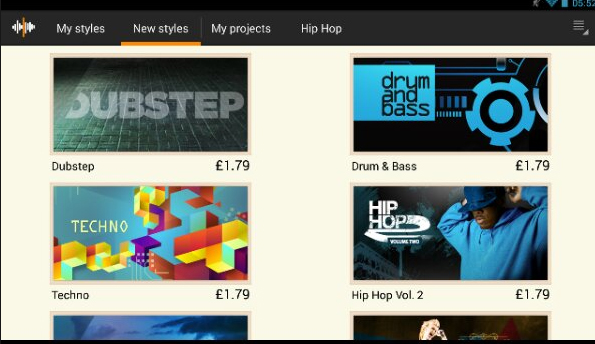
    This amazingly splendid app helps you to create your music by combining the loops which are basically short chunks of music which you can play over and over again in loops which justifies it’s unconventional name. It has around 100 different music styles and a total of 8 channel mixer which could give you enough room to channel every angle of your thoughts and emotions in the direction you wish.

    This beautiful app allows you to also record all the external voice and you can use this awesome feature to record your own singing, beat boxing, rapping or many other different kinds of sounds and you can also add all of them to your personal song. As soon as you have finished recording your amazing song, you can also share it with the entire world using the sharing feature of your smartphone. A new music discovery can also be done in the professional Music Maker community by sharing and testing your discovery with many other talented users.

    Read Also : Android boot Fix – Steps to Try When Your Android Won’t Boot

      • 2nd Alternative – PocketBand

    This awesome app is the combination of an utilitarian app and a professional and useful online service that can either help you generate and also share content with your fellow musicians who are located at different beautiful places of this amazing world. All you got to have is a valid account with an active internet connection along with almost every device you have to use it properly.

    This awesome app has the effect of 12-channel mixers along with the 3 band parametric equalizers and which comes with an automated pan and volume for each and every available track. The different loops can generate an amazing music piece because of using the audio recording feature which comes with the import recording pre built function from the music library or any other of your numerously installed music apps(Don’t tell me you do not have any).

    Read Also : How to reset iPod Nano or steps to unfreeze iPod Nano

      • 3rd Alternative – EasyBand Lite (Pro)

    In this app as its name says it focuses on the relatively easier side of music creation. A linear and straight forward music making process is by this app. All you have to do is simply drag and drop the chords into your timeline which would as per the chords generate a full band. The changes you can make are either edit the chord or change it to a major or minor or make it play lengthier or just a chunk while using many different styles and types of band. You can also modify the BPM (beats per minute) and drum fills with many other types of variations which completely depends on your creativity.

    The lite version of Alternative, EasyBand has partial functions like limited styles like cherry or dramatic mellow, either rock-it with piano or stinger and many more as well. Every version comes with numerous combination of different types musical tools and heart wrenching playing style. Though the Pro version has numerous different features and it gives you many more styles(but you know how to get Pro version right).

    Read Also : Exciting free Photoshop Alternatives for high quality photo edits

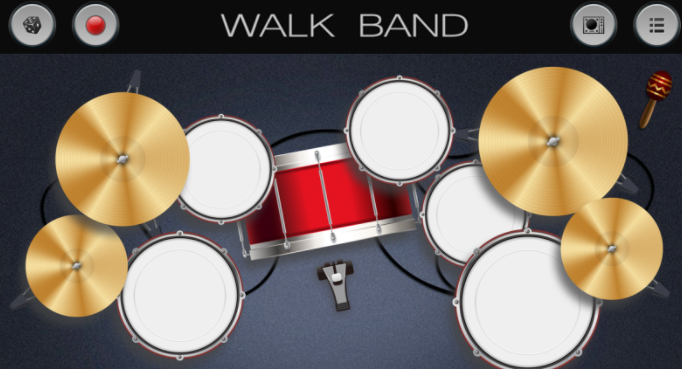
      • 4th Alternative- WalkBand

    As you can clearly see from the appearance of this amazing app along with it’s fast music creation process. This app named WalkBand might be almost same when you see the GarageBand compared to other Android driven music-making different applications. Depending on your mood you can either pick and play a single musical instrument like guitar or bass, piano or drum kit or even drum machine and you can use all these either individually or with a combination of as many instruments as you like and additionally you even digital loops.

    All the different and various instruments have their own personalized settings and one feature that I personally think is an interesting one is its capability to play a duet piano either with another person or each player plays at only one side of the phone in landscape mode(Similar to the games like ludo which are available in playstore). It comes with a feature of multi-track recording session which assigns just one instrument to only one track and mix all of its result into just one song.

    Everything is good and you are happy if you are one of the GarageBand users who has a skill to always find a similar app in the Android environment for every app in playstore. Though an important thing to note is that this app is not an add free one so it could interrupt the flow with which you are working. One way to remove all the ads is that you have to simply pay for an upgrade.

    Read Also : Android: Prevent apps from running at startup(Stop/Disable Apps)

    Conclusion

    So you must have known all the apps like garageband for iphone as well as apps like garageband for android & methods of almost every music making app you would ever find and if not go to start and read carefully. So by using anyone of the above given apps your need can be satisfied. If you have any query or problem do let me know and I will solve them asap and one important note do not download or copy the version because there is something known as intellectual rights. So as long as you want to maintain your authenticity I will say “Keep it Real”

    Just a note before concluding if you look for apps like garageband for Windows or MAC .You can Find it out on our portal .

  • Exciting free Photoshop Alternatives for high quality photo edits

    Exciting free Photoshop Alternatives for high quality photo edits

    As we all love to look picture perfect in social medias, all the Groupies, selfies, there is a strong demand for best photo editing software and applications. When it comes to photo editing the popular tool we all remember is Adobe Photoshop but we feel to see alternatives to everything that’s the genetic generation trend so here is some stuff for those who are in search of Free Photoshop Alternatives.

    Technology is revamping day by day & amid that electronic devices are upgrading & becoming better more increasingly, likewise, phone cameras are refining increasingly & passionate level DSLRs or professional cameras are furnished with brilliant sensors.

    But do you know that the best photos can benefit from a compact accommodation in post production?

    Adobe Photoshop is the pro photographer’s tool of choice, but it’s not certainly the only option, there are eminently influential photo editors available completely free of cost if you know where to look for.

    Why do you need a Photoshop & who?

    Are you a selfie fanatic or looks possessive person or an audacious, who wants to make his best-captured shots more captivating, then you might simply need a perfect photo editor, who can purely make your photo remarkably alluring & eye catchy.

    Usually,the best free photo editors offers all the key tools that you need to make your pictures look astonishing ,including curves,contrast & exposure intensification to strain colours,clone stamps & healing brushes to erase flaws,if any ,masks for isolating & editing areas & layers to help you mingle elements to combine effects.

    In this digital era, it isn’t anomalous to know that most people have been conditional to think about Adobe Photoshop whenever they hear about Photo editing. This full fledged photo editing suite from Adobe Inc has been an article of an admirable helping tool for many professionals from every possible diversion.

    If you’re looking for such analogous tools, you’re at the appropriate place, where we have introduced a checklist of best free photo editing tools, both from online & offline, so that you can resume working, even when you are not in contrast of your own PC or MAC. We have stipulated these told based on diverse factors, such as lucidity of the user interface, productivity as in terms of features & other user’s opinion. 

    Here we will have a look at the most popular Free Photoshop Alternatives.

    Exciting free Photoshop Alternatives for high-quality photo edits

    We hope this article will be helpful for those who need a free at the same time efficacious photo editor. Here is the list of Free Photoshop Alternatives

    • GIMP:

    An unprecedented free photo editor, GIMP is a virtuous rival to premier software.

    The elder opponent of free photo editing, GIMP, also known as GMP image manipulation program, is the most robust photo editor around. It’s packed with astounding tools that superbly match those that we usually get in premier software & is upgraded with more features timely.

    The photo editing toolkit is astonishing & includes layers, masks, curves & levels. You can obliterate flaws with the eminent clone stamp & healing tools, create custom brushes, apply perspective changes & apply changes to solitary areas with intelligent selection tools.

    GIMP is an open source project & its section of users & manufacturers has created a huge collection of plugins to amplify its potential even further to Photo Pos Pro:

    Well designed & easy to use -a novice photo editor with a few drawbacks.

    Photo POS Pro

    Photo POS Pro isn’t as popular as GIMP, but it’s another crest caliber free photo editor that’s packed with further image enhancing tools. Its interface is clever & more shrewd than GIMP’s array of menus & toolbars with everything arrayed in a logical & steady way. If it’s still too menace, there’s also an optional ‘novice’ layout that resembles ‘fotor’s’ filter based approach.

    This image editor is a Free Photoshop Alternatives which offers best to the beginners as well as professional photo editors. For the beginners, this software has one click filters and automatic adjustments of the photos. Both the options are well-designed and are more intuitive than the GIMP’s endless features.

    Just like Photoshop, this software provides layers and layer marks both and also offer superb clone and healing brushes. In this software, you can find all color refining tools. Also, you can get complete support for the batch editing and scripts such that you can save your time to do the routine tasks. This online photo editor allows you to directly images from a scanner or camera.

    This software also offers you with some extra frames as well as filters which can help you to create or just save your own filters to use in future.

    One of the main disadvantages of this software is that it has a limit on the size of saving the files. The size limit is 1024 x 2014 pixels. But, if you require more size then you can upgrade it to the premium version and will get the world class Photoshop alternative.

    It is one the best Free Photoshop Alternatives which can be used for Windows, Mac, and  Linux.

    Read Also : How to Fix “Cannot Take Photo” Problem on iPhone and iPad

    • Fotor:

    A prodigious anthology of filters for one – click intensification, plus manual controls. Fotor is a photo supplemental first & foremost, more than it is a Free Photoshop Alternatives, if there’s specific area of retouching you need doing with, say the clone brush or healing too,you’re out of luck. But it includes a pyramid of high-end filters that really do shine. There’ s an unerring tilt-shift tool & a raft of vintage & vibrant color tweaks, all easily accessed through Fotor‘s dexterous brighter menu system. You can manually alter your own curves & levels ,too, but without the convolution of high-end tools. 

    Read Also : Unavoidable Parental Control Apps ,Tools to monitor children

    • Pixlr:

    You might have discovered of Pixlr, as an online photo editor, obtainable the online version, Pixlr is now available s an application for desktop & it is indeed a free, reliable photo editor available now. When compared the that of Photoshop, Pixlr is known for its unchallenged installation & simple user interface. Taking some elements from the online version, it permits apply features & does other stuff within a few clicks.

    Paint.Net :

    Do not get confused about the paint that comes in built with the windows , Because we are talking about something that is really different. This is one of the best Photoshop alternatives which is featured with layering editing and a customizable interface with plenty of tools at your disposal with unlimited undo, tons of effects and filters and community of passionate users.

    Paint.NET is a free photo editor tool which can be used by the individuals who are looking to give a touch up a before going to post it on the web, resize or crop an image, or if anybody wants to do basic image editing. But, if you are using any other operating system then you can check out Pinta which is an open source platform modeled after this tool and available for Windows, Mac, and Linux.

    Read Also : The ultimate guide to make Windows run faster (Boost Computer Speed)

    PhotoScape:

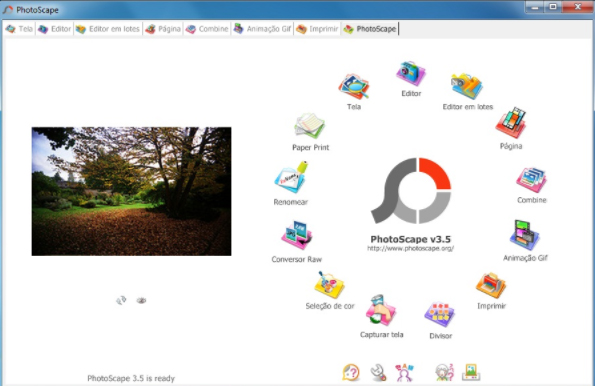
    This app offers a lot of usable feature with a minimum user interface so that you do not need to get confused with various toolbars. The PhotoScape can function as a viewer for viewing your photos, for creating the slideshows, and works as an editor with the basic photo with batch editing. Through this tool, you can easily view or edit the images without getting any distracting elements.  Opening up this tool can make you see various interfaces which are responsible for various roles. Also, there is a Mac version of this tool by the name PhotoScape X which has some advanced features such as collage maker.

    This Photo editor works for Windows and Mac.

    Be Funky :

    Do you love making a collage? Then Be Funky which is an online photo editor will work for you surely. This photo editor is a full-fledged editor available with a simple interface. This editor allows you to get photos from the desktop, capturing the photo from webcam, or some other sources such as Facebook or Dropbox. This editor has various features which are arranged in various categories such as editing, touch up, Effect, Graphics, etc.

    All the features of this tool have a simple interface through which you can select and apply the filter or effect in a minimum time. The graphic section f this tool is really superb and consisted of several graphical elements which can be easily inserted to upload the image. Editing the pic using this tool is really quick and you can easily learn this tool. Simply, you will love this tool.

    The basic drawback of this editor is that it only works for Windows.

    Read Also : Enable / Disable Windows File Protection & Fix Windows File errors

    PhotoCat :

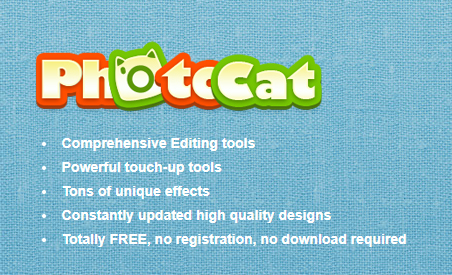
    The PhotoCat offers three options to deal with the images. This tool can help you to edit the image, retouch it using the pre-set filters, or creating the collage using different borders templates. This tool does not require much time to load so uploading on it is very easy.

    This online photo editor is free and has various features available in it such as editing which consists of different kinds of filters and retouch options and other extra elements. This online editor is not much colorful as compared to other editors but this has some standard features which are arranged in an easy access interface. This tool is just superb when you just want to edit the image without any ornamental design or any other kind of features. Thus making it one of the most favoured Free Photoshop Alternatives.

    SumoPaint :

    This online photo editor is a fully functional Photoshop alternative with the editing interface into web browser skin with every of feature you need such as the color picker, info about image, etc. With this tool, you can have multiple windows as you like as managing these windows is much easy. This online photo editor has set up the things altogether. The common interface of this tool only takes a small amount of time to load. This tool is also available in pro version for which you need to pay 4 USD per month, this can unlock various other exciting features of this tool.



    PhotoFiltre :

    PhotoFiltre is an online photo editor and acts a superb image editing software through which you can edit your photo easily and add the filters to make them attractive and professional.  This editor comes up with various features that are easy to be used. The user interface of this software provides complete support to the beginners to create their own masterpiece.

    This is a free photo editor and the best Free Photoshop Alternatives which is available with the image editing and effects package. Not considering the standard editing elements, the PhotoFiltre editor provides a wide range of image effects, photo masks, image adjustments, and thumbnail browser. This tool is worth to try for all the beginners as well as for the professionals.

    VSCO :

    This is one of the best Free Photoshop Alternatives software and camera app for the smartphones. This software has a minimalistic interface which does not look intuitive firstly, but they are a small selection of the professional features. In this tool, you will find a side panel that gives instant access to the grid, journal, store, and library with a button which will take you directly to the camera.

    Also, this software contains various special presets, although they are not very intuitive named the buttons to do feature thumbnail previews for one.

    This Free Photoshop Alternatives works on both Android and OS platform of the mobile.

    How to pick the best photo editors for you :

    All the photo editors we’ve reviewed above are magnificent, but divergent tasks call for different tools. If you’re already happy with the general look of your pictures & just want to augment them a little before sharing them online, a basic editor that permits you to resize, crop & apply filters will be ideal. Many of these have social media sharing built in, saving you the hassle of saving, then uploading them afterward. You are also required to ensure, that your free photo editor lets you work with large files, as having only some online tools won’t let you upload files over a certain size,& others won’t allow you to export high -resolution photos unless you pay for a subscription.

    We just picked the most widely user rated and our personal choice of photo editors as an alternative to Photoshop. But still, there are tons of many other excellent Photoshop alternatives that you can rely upon for high-class photo edits. If anyone got disappointed here due to the reason we failed to include your personal photo editor then we apologize for that with a promise we will give more on this topic some other time.

  • Ketogenic diet Weight loss menu for Beginners -Ketosis

    Ketogenic diet Weight loss menu for Beginners -Ketosis

    The Ketogenic diet  also called the “low carbohydrate high-fat diet” is the most effective and trending weight loss diet. Ketosis is a biochemical process that occurs in human body wherein fats are used up for fuel production instead of blood glucose, and this occurs only in the absence of carbohydrates. Thus when blood insulin is low, our body switches over to a process of ketosis.

    This is witnessed by an activity of adipocytes releasing fatty acids to be utilized as fuel which gets converted to Ketones. The main reason for adopting Ketogenic diet is for weight loss, as shown by several studies, which support the concept of low-carb diet being more effective than low-fat diet for weight loss.

    Our body requires energy which is supplied by adequate amounts of macronutrients like carbohydrates, proteins, and fats to carry out the physiological processes.Thus their intake has to be adequate as per the recommended dietary allowance, and this leads to weight loss. Consumption of fats gives a feeling of fullness and they are considered as space filling agents in high protein diet. The carbohydrates which are the sugar bomb are to be best avoided in this form of diet.

    Ketogenic diet Weight loss menu for Beginners

    Eat wise, drop a size is the best way Ketogenic diet is described. There are several types of Ketogenic diets available. It differs according to the different Ketogenic food list as well as the individual who is going through the Ketosis process . If its for a woman , then one must adopt to the female Keto diet plan or if it is for a body builder then he must choose Keto bodybuilding diet plan . Of these, the one that suits daily lifestyle, sustainable, and effective in weight loss is standard Ketogenic diet.

    There are lots of benefits with the Ketogenic diet. The mechanism of action of the Ketogenic diet is by reducing hunger, thus avoiding intake of food with empty calories.

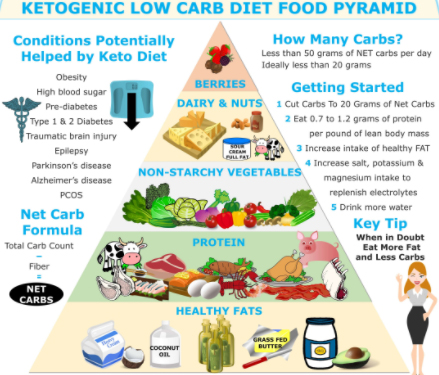
    The ideal way to start a ketogenic diet is to include one protein, two vegetables, and one fat in a meal. The average built man should include 15-20% protein, 70-75% fat, and 5-10 % carbohydrate of the total calorie intake.

    The general guidelines for weight loss for beginners

    • Eat till hunger subsidies and don’t over eat.
    • It must be made a habit to eat 1 to 2 cups of green salads and 1 cup of fibrous vegetables each day.
    • Intake of saturated animal fats is emphasized instead of vegetable oil, thus the intake of polyunsaturated fatty acids is reduced.

    Items to be included in the Ketogenic diet menu

    Here are the items or food to be included in your Ketogenic diet menu list .

    Healthy fats: The major source of calories in a ketogenic diet is from the natural fats such as meat, avocado, egg, butter and olive oil. These are saturated fats and are allowed on the Keto diet. These fats in the Ketogenic diet are nutrient-rich, so they fill up and hence need not eat too much. The meat should be obtained from grass-fed, antibiotic free animal.

    Protein: This is the second most consumed calorie portion in the Ketogenic diet. Most of the fat rich foods contain protein too. So, it should be kept in mind that protein intake should not be more than fat intake. This is to avoid proteins being used instead of fat as a source of fuel which is the basis of the Ketogenic The protein rich diet includes egg, nuts, nut butter without sugar, full-fat dairy products

    Vegetables: The best vegetables to eat in Keto diet are those that are low in carbohydrates and calories. Those vegetables that are grown in the ground are to be avoided. The organic ones are to be selected. The ideal vegetables to be included in the diet are green leafy vegetables, tomatoes, cucumbers, cabbage, and cauliflower. Root vegetables such as onions, mushrooms, and garlic are to be avoided.

    Fruits: Fruits are rich in sugar and calories. So it’s better to avoid fruits in the Keto diet. The exception to this is avocado. While choosing fruits it should be noted to choose the fruits low in calories and high in antioxidants like berries. Fruit juices are to be avoided. Dry fruits are to be avoided as they contain preservatives to extend their shelf-life. If fruits are to be consumed, the whole fruit has to be consumed as it is fiber rich and thus helps in digestion and aids in maintaining the blood sugar balance. The fruits to be included are berries, watermelon, oranges, and lemon.

    Read Also : Botox Injection As Cosmetic procedure Side effects & Benefits

    Read Also : Amazing Fitness Apps To Track Calories & Keep You Motivated

    Read Also : Cancer fighting meal plan to healthy life – Cancer Types, Symptoms

    Snacks: The concept of a Keto diet is to have a high-fat diet and in turn give a feeling of fullness. If snacks are to be consumed, high-fat snacks should be included in the diet but in small portions. The snacks that can be consumed in Keto diet include a hard boiled egg, handful of nuts, olives, cucumber slices, and full-fat yogurt.

    Drinks: Water is the best drink in Keto diet. Tea, caffeinated drinks, lemon drink without sugar is allowed. It is advisable to avoid alcohol and beer while on a Keto A glass of red wine can be consumed.

    Read Also : Hormonal Imbalance Signs and Treatment in Men & Women

    Foods that can be eaten occasionally

    Though the carbohydrate content should be below 5% of the total calorie intake, it is occasionally allowed to eat carbohydrates just to maintain blood sugar level in permissible range. Although dairy products are rich in fat they cannot be consumed daily as they are hard to digest. Some of the food items that can be consumed occasionally include apples, pears, bananas, pineapple, cherries, yogurt, and kiwis.

    Read Also : Hidden Poisonous Food In Our Kitchen

    Foods that have to be avoided

    Corn, rice, grains, and gluten are to be definitely avoided in a Keto diet. Some other food items with hidden sugar like sauces unless homemade, soy, gluten are contraindicated.

    Conclusion

    To conclude, following a low-carb, high-fat diet is very essential in weight loss.  It is essentially required to set a goal of weight loss, educate oneself about the Keto diet, make the food interesting to fulfill the criteria of a Keto diet and track your progress and thus be the best version of you.

  • Unavoidable Parental Control Apps ,Tools to monitor children

    Unavoidable Parental Control Apps ,Tools to monitor children

    Are you planning to gift your kid an Android phone or iPhone? Well, you want to have them a smartphone Well if you want them to have a smartphone so that they can stay in touch with you. Then, it is a good idea to make them in control by how they use the device. Making the calls in the smartphone is just one thing but accessing inappropriate content, inappropriate apps, and running up the bills in app purchases is just another. So there is a strong need to have certain Parental Control Apps.

    Trust me the internet is a much scary place and the danger of it can rattle the adult so it can also traumatize the child. On your desktop. you can employ the parental control software to watch the activity of your child, and same is true for the mobiles. Here with this article, I will discuss the apps for the parental control apps for Android and iPhone. Nowadays for the all individuals smartphones are just like toys, they use it for surfing the internet or to download other apps. But these activities can sometimes open up some serious online nastiness.

    What does Parental Control Apps do?

    Well before starting about what does this app do, it is important that you are aware of such software or you are unable to find that you felt was suitable. On the Android smartphones and tablets, if the parental control apps are installed then you can easily watch the activities performed by your child. Remember that using the parental control app software is basically for your offspring safety. This may not be much popular way, depending on the age of your children. Understanding the parenting control app can help you in making more informed decision.

    Read Also : Internet Safety Rules for Kids – Online Safety Tips

    Read Also : Improve The World With Smartphone -Top 10 Hacks

    Some of the Best Parental Control App for Android:

    Here is the list of Parental Control Apps for Android device is listed here.

    1. Kids Place:

    This is one of the best parental control apps which creates the safe environment in which the younger kids can experience the fun of technology. This app protects data as well restricts your kids have which is been approved by you. The kid’s place app prevents the kid from installing any new apps, making phone calls, texting or performing any other action which costs the money. This app allows your kid to have some fun time and also allows you to have some peace.

            Features of this app:

    • Custom home screen display which is authorized by the parents
    • Restrict to download the apps which cost money
    • It has timer feature which locks the app after some specified time
    • Block the incoming call too when it is running
    • Toddler lock gets restart which accidentally stopped by your kid
    • Has custom wallpaper which can customize child experience

    Read Also : Best free calling Apps for all Smartphones

    2. Net Nanny:

    This app gives your kid a freedom to surf the web without any fear of the inappropriate content. This app becomes your child default browser as it is a custom mobile browser. From the web based console, you can easily manage settings if your child device and other tasks such as viewing activity reports or adding the users, Also this app enable s you to receive the notification when a site is a block or a block is been overridden.

            Features of this app:

    • Show the apps being installed
    • See when new apps being install and block unwanted apps
    • offers the appropriate filtering through age
    • The filtering categories allow to allow, block or warm the specific content
    • Set the time controls when kid browse the web

    Read Also : Best Apple Watch Alternatives-Affordable Gadgets

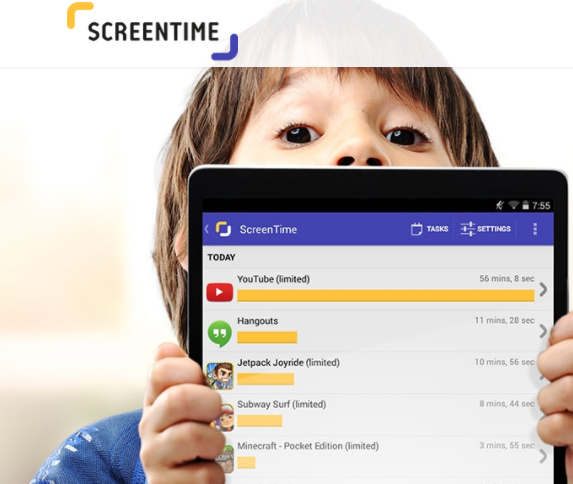
    3. Screen Time:

    This app helps you to manage the time which your kids spend on their tablets and smartphones. This app gets a level of specificity which allows some useful apps such as reading apps certain time but blocks the games. This app also lets you activate a full shut down of child’s device when needed with a push button from your device.

           Features of this app:

    • This app allows kid to earn extra time to complete tasks
    • Get the reports what your kid is looking
    • Block some apps completely
    • Provide an alert when your kid install any new app
    • Manage easily various no of kid through this app

    Read Also : Survive high interest student loans – Amazing Tips

    4.Toddler Lock App:

    This app is just perfect for the parents to download on their device if they occasionally use their device for help distract and engage their toddler. This app provides a colorful screen lock graphics and pleasing sound which keeps your kids entertained without being worry about them to delete any content of your device. This app also helps your kid to learn shapes and colors.

          Features of this app:

    • The airplane mode is optional and ensures no cell radiation
    • Your child can move their finger on the screen to make different shapes and colors
    • The time they touch the screen, they will listen some peaceful sound which varies in the pitch

    5. Norton Family:

    This app is for the teens and helps for safe online browsing as it allows the parents to supervise the activity of their child. This app blocks inappropriate content and teaches good internet browsing. This app offers a range of monitoring features for the parents to connect with kids.

          Features of this app:

    • Track the online activities done by your child
    • Keep whole track of site they visit or what they search
    • Block inappropriate content
    • Gives the alert if kid breaks any rule and thus you can have conversation to stay safe
    • This app provides the location of your child

    These are best apps to monitor kids for any android device.

    Best Parental Control Apps for iPhone/iPad :

    In the iPhone, you can use the restrictions which are also known as the parental control which is been used to block or limit the specific apps ass well as features on your iPhone or iPad.

    To turn on restrictions use:

    Go to settings> General> Restrictions

    After tapping on restrictions enable it

    Then, create a restriction passcode, which you need to change your settings or to turn off the restrictions.

    If you have forgotten your restriction passcode, then you need to erase the device and set up the passcode again. Change your Restrictions passcode and set up the passcode again. Change your Restrictions passcode

    To change the restriction passcode, follow these steps after turning on the restriction:

    • Go to the settings> =Click on General> Restriction
    • Enter the current restriction passcode
    • Click on disable restriction and enter the restriction passcode again
    • Again click on the enable restriction and enter new passcode restriction
    • Turning on the restrictions might make you unable to see some apps, features, and services. Also, check that you have not removed any built in apps.

    Features and Apps you can Restrict in iPhone:

    For seeing the list of the features which you can restrict, click on the settings> General>Restrictions to turn on or off just touch the slider next to app or feature.

    To check which app or feature is enabled, just check the checkmark if it enables the app or feature can be used otherwise not.

    The businesses and schools most often use the profiles, which can turn on restrictions. To check that your device has profile go to settings> general profile. For more information contact your administration who set up a profile.

    Conclusion:

    Now controlling your child is in your hand if he/she is using the smartphone. Also, remember giving the good habits to your child is your responsibility. Download parental control apps and keep the control in your hand.

  • PayPal Vs Venmo : Best Online Money Transfer System Compared

    PayPal Vs Venmo : Best Online Money Transfer System Compared

    PayPal Vs Venmo

    If you got ever confused which online platform of online payment service you should choose between then have a look at the differences between top 2 payment services that is PayPal Vs Venmo.

    If we take a look back at our lives, we notice how far we have come and how much we have grown as an individual and a human being. The world too has had a huge makeover. Hundreds of things have changed, technology has advanced, and by the looks of it, the world is moving into a digital era. Or should I say we have entered into the digital era?

    From shopping to dating everything is online. We sit in the comfort of our homes and enjoy these little luxuries. What about the payment? Yes, that too is online. Thanks to the online payment services who have made life easy for all of us. We don’t have to wait in long ATM queues or with cheques for them to be transferred. Online service is instantaneous and stress-free.

    A number of mobile wallet services have cropped up in the recent years. They compete with each other bringing out new and improved techniques the other doesn’t possess.

    PayPal is often the first choice; at the same, we have many other options like Amazon payments, Google wallets, Venmo etc.

    Here let’s take a look at PayPal and Venmo and their pros and cons.

    PayPal

    PayPal is a mobile payment app that is the fastest and safer way to buy and sell goods. A started online service in 2002 PayPal is an American company that deals with online payment solutions worldwide. They act as the mediator in processing the payments for auction sites, online vendors and other users at a minimal charge. Through PayPal users can donate money or receive donations, buy and sell goods.

    Venmo

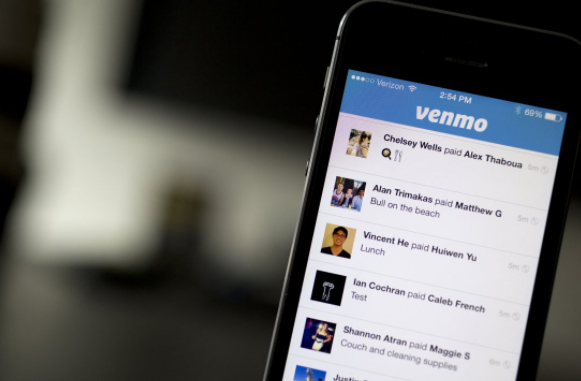
    Another mobile payment app started by two friends in 2009 is a subsidiary of PayPal. Generally preferred by youngsters as the website claims it’s made ‘for friends and those who trust each other’.

    Read Also : Venmo User Guide for Safe Transactions – Venmo payment

    Read Also : Cancel / Reverse Venmo payment : When a Venmo payment goes wrong

    PayPal Vs Venmo

    We will now see the comparison between PayPal Vs Venmo.

    • PayPal is used worldwide, whereas Venmo can be used only in the U.S
    • Both have free to download apps from play store and iTunes. Only a data connection or a Wi-Fi is required along with a login.
    • PayPal and Venmo are free if using bank transfers or wallet balance. A 3% fee is charged in Venmo for credit card transaction and 2.9% in PayPal for debit and credit card transactions.
    • Weekly transaction limit for PayPal is nil, while a cut-off of $299.99 per week is seen with Venmo further if you provide ZIP code, link the Facebook account, last four digits of SSN number and birth date the limit is upped to $2999.99.
    • Handling money is the same with PayPal and Venmo. During a transaction, if there’s a wallet balance first that balance is used and then the remaining is retrieved from the primary linked source i.e. bank account, debit or credit card. These transactions are instant. However, if it’s through bank accounts then Venmo takes up to 2 days and PayPal 3-4 days.
    • The main feature that stands out in Venmo is its ability for social connections through news-feed like format. The users can share a transaction they made that can be viewed and commented by other users. This has caused quite uproar with the teens.

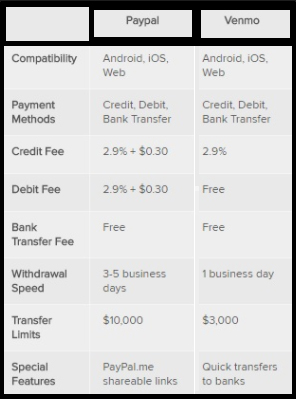
    The table gives the comparison between PayPal Vs Venmo based on their compatibility , payment methods , Credit fee , Debit fee , Bank transfer fee , Withdrawal speed , transfer limits , Special features.

    • An important feature in PayPal is their One Touch option. This allows the user to stay logged in for faster and easier log outs with different vendors.
    • And if you prefer to keep it low and simple PayPal is the option. It’s more of a formal way that is preferred by small time business groups and other e-commerce sites.
    • A danger than anyone can face with these mobile wallets is losing your phone and having some stranger access your accounts. Nonetheless, this can be avoided with these 2 apps for you can out a PIN lock for the apps apart from the phone lock. Venmo and PayPal also cater to an authentication process via SMS text message.
    • Speaking of security of Venmo and PayPal has the same standards as that of Visa, MasterCard, and American Express. They have a 24/7 risk protection and fraud service.
    • PayPal has also had an optional security key to strengthen against frauds. Apart from the login ID and password the user is prompted for a six digit security code shared via SMS. The user can change the code and use his/her personal code.
    • Whilst PayPal as secure systems for buyer seller, Venmo doesn’t offer buyer seller protection. Hence should be avoided for goods and services.

    With Venmo you can pay the other person even if they don’t have Venmo. The only drawback is supposed you send the amount to the wrong person it’s not retrievable. The only way to get it back is to ask politely, which again depends on the person on the receiving end.

    Read Also : Safe Online transactions Tips & top 12 safe online transactions methods

    Read Also : Purchase without credit card top hacks

    Conclusion

    Mobile wallets are quite essential for easy and stress-free transactions. We can travel anywhere in the world and not carry cash at all. It’s much lighter and secure. You don’t have the fear of leaving the wallet at home or not having enough cash. People love to travel light and this is the best option and also the best which many are following in the present day.