Blog

  • Weight Loss Diet plan for Different Age & Different diet methods

    Weight Loss Diet plan for Different Age & Different diet methods

    Diet is a common term, used to describe the sum of food consumed by a person or any living organism. It literally means specific intake of food that supplies nutrition for the purpose of maintaining good health or for weight-management reasons. Health and weight are often related. Almost every diet that we follow are inline with our culture, religion and geography. A healthy diet comprises of complete nutrition which can be got from vitamins, minerals, carbohydrates, proteins and fats. A healthy diet improves and maintains optimal health. Many people choose to forgo certain foods like meat and meat products, milk and dairy products, for health reasons, or due to moral issues, or by an environment friendly attitude. So today we will focus on Weight Loss Diet plan for Different Age & Different diet methods.

    Weight loss is another trending subject in today’s world. In medicine, it refers to the state of physical health or fitness characterised by reduction in the total body mass, which is because of loss of fat (adipose  tissue) tissue, water (fluid accumulated),  the bone minerals, muscle mass and other tissue that builds up the body.    Intentional weight loss means losing weight for the purpose of growing thinner. Unintentional weight loss is mostly related to some chronic health condition, a medical health problem.

    Weight management is a continued approach to a healthy living. It requires maintaining equilibrium between energy expenditure and energy intake. This is achieved by weight loss and a healthy lifestyle. Weight loss is not possible by using a particular diet plan. It has to be clubbed with adequate physical activity.

    There are several Weight Loss Diet plans available for weight loss. Not all plans suit a person. To consider a diet plan accepted by an individual it depends on the person’s physical and mental state of health. Some of the well accepted and popular diet plans are discussed here.

    Weight Loss Diet plan for Different Age & Different diet methods

    Weight Loss Diet will not be same for every age group . It really depends upon one’s age and physical health condition and responding of body to choose the correct weight loss diet plan based on Age

    # Paleo Diet

    Paleo diet is the ultimate perfect solution for weight loss. It is also called the caveman’s diet. The word caveman brings to our mind picture of a masculine man with broad shoulders  and a muscular body who hunts and kills wild animals as part of his routine and also eats what he hunts after cooking them over flame. This is a DIY diet depending on calories This is the most primitive form of eating which includes enjoying food and feasting.

    Read Also : Cancer fighting meal plan to healthy life – Cancer Types, Symptoms

    Aim / benefit of Paleo Diet

    The primary goal of paleo diet is to train the body to crave foods high in nutrition. This also teaches to thoroughly enjoy the food through eating with own hands and taking time to savor each meal. It promotes healthy lifestyle through fasting between feasting which balances the calories.

    What you can eat in Paleo Diet ?

    Paleo diet food menu stresses on eating the same way as humans were designed to eat before agriculture were developed. The method followed here is fasting for long intervals of time followed by feasting. The foods like lean meat, raw vegetables, large quantities of water, raw fruits and nuts are to be eaten. Carbohydrate rich diet and dairy has to be avoided. These foods are the highlight in this kind of Weight Loss Diet.

    Pros and Cons of Paleo diet

    The main advantage or Pros of Paleo diet is that it stresses on the intake of healthy. The main disadvantage or cons of Paleo diet is long periods of fasting is not advisable for weight loss and inconsistent eating habits can lead to binge eating and food obsession. In this diet there is complete nulling of sugar and dairy which can lead to certain dificiencies in the body. Hence it is not advisable for long time.  It is little expensive as foods should be organic and naturally available like what our ancestors ate.

    Paleo diet is a best Weight Loss Diet because can help shed those few extra pounds along with a whole life holistic approach by detoxifying our body completely.

    Read Also : Dangerous Teabags – Brands making you Sick with Healthy Label

    Read Also : Tea Vs Coffee – The Best Energy Drink Motivating Healthy Life

    #Atkins Diet 

    This is a type of ketogenic diet where the main focus is on controlling the levels of insulin in the body by adapting a low carbohydrate diet. Consumption of fats and proteins in large quantities as compared top carbohydrates is advised here.

    It is well known as low carb weight loss diet. It acts by reducing appetite and thus decreases the calorie intake.

    How Atkins diet works 

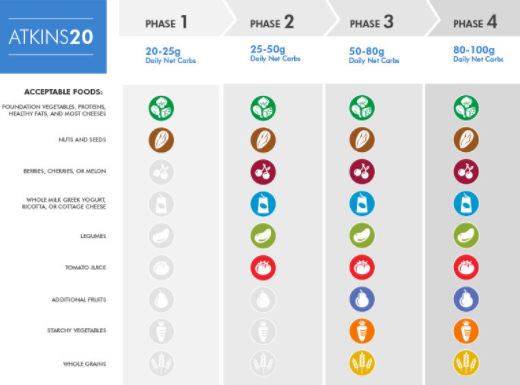
    Atkins diet is split into 4 phases.

    1. Induction phase: During this phase less than 20 grams of carbs is taken per day for 2 continuous days. Weight loss starts here
    2. Balancing phase: Here small amounts of carbs, nuts, and small quantity of fruits are introduced.
    3. Fine-tuning phase: After meeting the desired goal, carbs are increased to slow down loss of weight.
    4. Maintenance phase: This stage is feasting on carbs but without increasing weight.
    What to eat and not to eat in Atkins diet 

    Soft drinks, juices, ice cream, grains, vegetable oils, trans fats, high carb vegetables, high carb fruits like banana, oranges, apples and grapes, potatoes,  are avoided except in the induction phase. Meat, sea food and fish, full fat diary, low carb vegetables, eggs, nuts and seeds are to be eaten in this diet.

    Pros and Cons of Atkins diet 

    The advantage is atkins diet is a flexible diet. After the induction phase is over, healthier carbohydrates like fruits, berries, potatoes, legumes, oats, and rice can be introduced back into the diet. This has to be in moderate levels.

    This is an easier, sustainable and ideal diet for losing weight with visual results.

    Read Also : Water Fasting Benefiting conditions and Risky Water Fast

    #Ketogenic Diet

    Ketogenic diet also called the “low carbohydrate high fat diet” is the most effective and trending weight loss diet. Ketosis is a biochemical process that occurs in human body wherein fats are used to energise the body instead of what blood glucose does and it happens in the absence of carbohydrates only. So, when there is low insulin, human body starts the ketosis.  This is witnessed by an activity of adipocytes releasing fatty acids to be utilized as fuel which get converted to ketones. The main reason for adapting ketogenic diet is for weight loss, as shown by  various studies that support low carb diet to be effective over low fat diet for weight loss.

    The best practice to initiate ketogenic diet is by including one protein, two vegetables and one fat in each meal considering the calorie intake totally.

    Read Also : Ketogenic diet Weight loss menu for Beginners -Ketosis

    What to eat in Ketogenic diet

    Healthy fats:  The major source of calories in a ketogenic diet is from the natural fats such as meat, avocado, egg, butter and olive oil. These are saturated fats and are allowed in the keto diet. Here is the ketogenic diet chart .
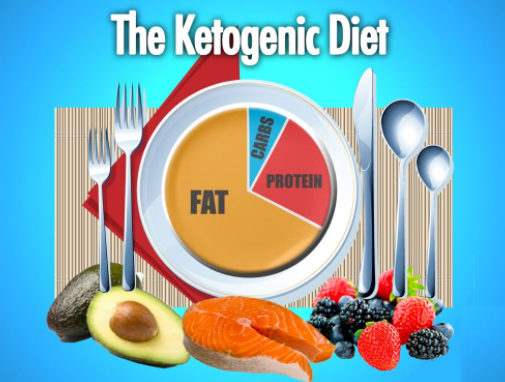
    Protein: This is the second most consumed calorie portion in the ketogenic diet. Most of the fat rich foods contain protein too. It is important to observe that protein intake doesnt go higher than fat intake.

    Vegetables:  The best vegetables to eat in keto diet are those that are low in carbohydrates and calories. Those vegetables that are grown in the ground are to be avoided. The organic ones are to be selected.

    Fruits: Fruits are rich in sugar and calories. So it’s better to avoid fruits in the keto diet. The exception to this is avocado. While choosing fruits it should be noted to choose the fruits low in calories and high in antioxidants like berries. Avoid fruit juices.

    You all know that this is a highly trending Weight Loss Diet .

    #South Beach Diet

    South beach diet was designed to lower the risk of developing cardiovascular disease. This is a much accepted friendly diet for weight loss.

    This is not a traditional low carb diet. In this diet it is recommended to eat the right carbohydrate, with low glycemic index.

    What to eat in South beach diet

    These include whole grains, specific fruits and vegetables, appropriate fats such as olive oil, and lean protein sources.

    Phases of South beach diet

    The 3 phases are:

    1. Phase 1: This lasts for about 2 weeks and aims at kick starting the weight loss process. Here there may be rapid weight loss as it aims to eliminate cravings for sugar rich foods and starch, thus stabilizing blood sugar levels. Bread, rice, potatoes, cake, cookies, ice cream, fruits, alcoholic drinks are to be avoided.
    2. Phase 2: Achieving the target weight. This continues till achieved weight is lost. In this phase weight remains steady. In this stage, carbs are reintroduced little by little. If the person is uncomfortable at any time, it is advised to return to phase 1 till stabilized.
    3. Phase 3: Adopting a lifestyle. It is maintaining an ideal body weight and thus experiencing better health.

    Read Also : Amazing Fitness Apps To Track Calories & Keep You Motivated

    Pros and Cons of South beach diet 

    It leads to quick weight loss. People enjoy better health and feel satisfied with the food they eat. Foods rich in high glycemic index are allowed in this diet which contain high sugar and will remain high for long periods of time and thus not advised.

    This is a scientifically proven diet for weight loss.

    #Dukan Diet 

    This diet was created by Pierre Dukan, a French general practitioner and a nutritionist. The theory behind this diet is limiting carbohydrates forces body to burn fat.

    Lean protein, oat bran, water and daily 20 minute walk are the components of this diet plan. In this a person is given the opportunity to eat unlimited quantities of approved foods, which include very few carbs.

    What to eat in Dukan diet 
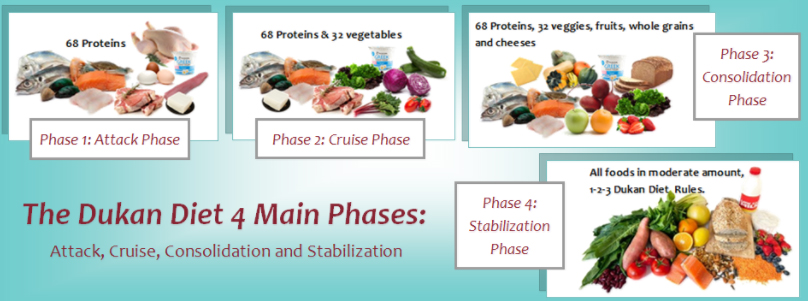
    Dukan diet emphasizes eating lot of protein and oat bran.

    This diet is followed in 4 phases.

    1. Attack phase (1-10 days): This includes eating lots of lean protein, oat bran – 1.5 tbsp and a minimum of 6 cups of water everyday.
    2. Cruise Phase (lasts several months): This includes addition of low carbohydrate vegetables every other day plus an extra table spoon of oat bran.
    3. Consolidation : During this phase, veggies can be consumed every day with 1/2 fruit pieces, wheat grain bread, and 1 serving of hard cheese. During these phase there can be 1 or 2 celebration meals.
    4. Stabilization phase: Is a maintenance phase. In this for one day a week, all protein rules from attack phase is followed.

    These are the phases of Dukan diet for Weight Loss Diet.

    Spices, tea and coffee unsweetened, sugar-free gum, artificial sweeteners are allowed. A glass of wine can be consumed per day in consolidation and stabilization phase. It is important to take a 20 minute walk during this diet.

    Pros and Cons of Dukan diet 

    It is an easy diet to plan, shop, and prepare meals. This diet is not advisable for elderly, diabetics, patients with renal and heart disease, and on medications. This diet does not teach lifelong healthy eating habits. Until the desired weight is lost it is advised to continue with the consolidation phase, but this on long term will cause deficiency of adequate nutrition.

    To conclude, this diet is very effective for weight loss as it is a protein rich diet. It results in significant weight loss as only few carbohydrates are allowed.

    Read Also : Weight loss booster Foods you should take before & after exercise

    #Vegan Diet 

    Vegan refers to vegetarians who do not consume eggs, dairy, or animal products.  This group of people does not consume meat. Veganism these days is defined as living a lifestyle free from all sorts of cruelty (including hurting/killing animals).

    What to eat in Vegan diet 

    Vegans avoid foods containing any ingredients that come from animal. These include shellfish, meat, chicken, fish, eggs, diary, and honey.  They eat variety of plant foods including beans, nuts, seeds, fruits, and vegetables.

    Pros and Cons of Vegan diet 

    Several studies were done in comparison between the vegetarians and the non vegetarians. It was found that the vegans lost more weight and within a shorter span of time as compared to non vegetarians. This is because of lower calorie intake. Since no animal, egg, and dairy products are consumed it is though that this diet is beneficial in losing weight.

    Nutrients such as Vitamin B12, iodine, calcium and iron are absent in the Vegan diet. Omega-3 fatty acids as they eliminate animal foods completely. It is a major cons of vegan diet while vegan diet has a great role in reducing cholesterol , heart disease risk that becomes the highest pros of vegan diet .

    #Low Carb Diet

    Low carb diet is rich in fats, proteins. The carbohydrate intake is restricted here. It causes significant weight loss.

    What to eat in Low carb diet

    Lean meat, fish, eggs, fruit, vegetables, nuts, high dairy fat, and fats and oils in restricted quantities can be consumed in this diet. Nuts and cheese has to be consumed in moderation.  Foods rich in carbs have to be strictly avoided like pasta, pastries, vegetables grown underground, processed food, juices, and high omega-6 oils.

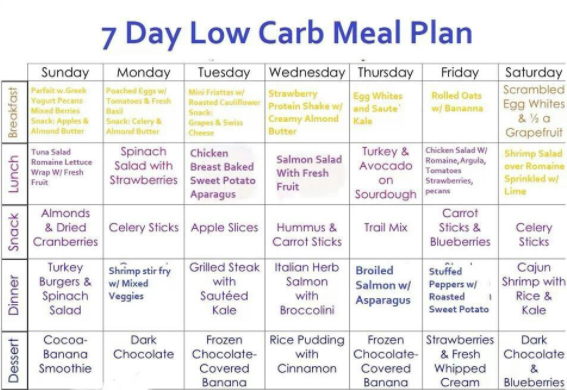
    Here is the Low Card diet Food chart for week to boost weight loss .
    Pros and Cons of Low carb diet

    This diet can be followed by a healthy individual.  Anyone suffering from any underlying disease or on medication cannot continue with this diet.

    Low carb diet is an ideal as Weight Loss Diet with little supervised eating.

    #Ultra Low Fat Diet

    This Ultra Low Fat Diet is only useful in very obese individuals. There is very low fat (10 % calories),  low in proteins (10%), and rich in carbohydrates (80%) in this diet.

    It is ideal diet for morbid obesity.

    Fats are required to serve function sin our body. An ultra low fat diet is unpleasurable to eat as it lacks taste and also various nutrients.

    In general, it is not efficient in losing weight except in cases of morbid obesity.

    #The HCG Diet 

    This is an extreme weight loss diet plan where a person looses 500 grams to 1 kg of body weight per day. HCG is human chorionic gonadotropin, a hormone present during pregnancy. It can be also be a symptom of cancers like ovarian, placental, and testicular cancers.

    HCG is known to boost metabolism and thus helps in losing large amounts of fat. During this diet phase the hunger is totally suppressed.  It is also claimed that along with loss of fat mass, it causes reduction in muscle mass too.

    Here is the HCG Diet chart for weight loss .
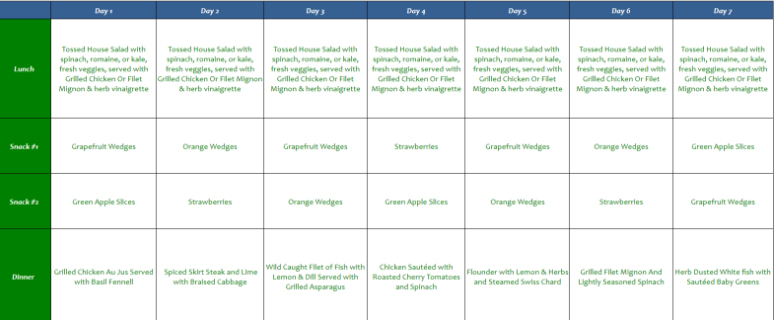
    HCG diet consisted of 2 main components:

    1. An ultra low calorie diet of 500 calories per day.
    2. The HCG hormone is administered via injections.

    It is generally divided into 3 phases:

    1. Loading phase: This phase includes Taking HCG and eat plenty of high-fat, high calorie diet food for 2 days.
    2. Weight loss phase: HCG should be taken with 500 calories per day for 3 to 6 weeks.
    3. Maintenance phase: HCG is stopped and glucose intake is increased. Starch and sugar are to be avoided for 3 weeks.

    For people with less weight to lose it is recommended to continue this diet for 3 weeks.  And for more weight loss at least 6 weeks is advised.

    Pros and Cons of HCG diet

    HCG diet helps in losing weight significantly.  HCG has lots of side effects such as headache, fatigue, and depression.

    Any diet with low calorie intake of 500 calories per day will cause weight loss.

    To conclude, none of these diets alone can lead to weight loss. Adequate portion control along with physical exercise is necessary to maintain good weight and health. Whatever suits the best to an individual has to be adapted and strictly followed for optimum weight reduction.

  • Skype for Business: Fix “Cannot sign in because the server version is incompatible with Microsoft Lync” error

    Skype for Business: Fix “Cannot sign in because the server version is incompatible with Microsoft Lync” error

    Skype for Business: Fix “Cannot sign in because the server version is

    incompatible with Microsoft Lync” error

    The basic and first question that arises is that: What is Skype for Business

    The idea of using Skype for business is very old and it’s use for business started very soon after it’s inception. There are many cases in which one organization or professionals from very far away want to collaborate with someone else or have a meeting to discuss things out. There is no way that either of those parties want the conversation to be compromised so here Skype comes in picture. It provides live video call with security to it’s users and also allows big companies to have conference meetings and discuss their propaganda through this virtual meetings. Thus Skype has been really a boon for business through which many deals have taken place. So these are the different uses of Skype and it’s variety of features which make Skype so popular.

    Read Also : Fix “Voice search has been turned off” error for google now

    In 2014 Microsoft announced that their product named as Lync could be replaced by Skype for Business in 2015. They claimed that it would combine features of consumer Skype software which was their best feature and in April 15 Microsoft officially launched Skype for Business which gave Skype a bit of a shock. In September-October Skype for Business for Mac client was released which was an initiative by apple to make Skype compatible with their machines.

    If you ever use your Skype for Business you might have noticed that your Lync client will automatically get upgraded to the latest version from itself without any hassle but if you are in a rather older Office Communication Server (OCS) version or an environment. Then this could cause an incompatibility problem and you might have to do it all by yourself but relax since you are at the right place. The error which you might get could be of following type: “Cannot sign in because the server version is incompatible with Microsoft Lync “. Contact your support team with this information. And specifically and fortunately for this most common problem there is a registry hack that will get you working again as smooth as before.

    Read Also : Best free calling Apps for all Smartphones

    Fix “Cannot sign in because the server version is incompatible with Microsoft Lync” error : Skype for Business

    The usual simple and easy steps are as follows:-

    Step 1) Select “Start” > “regedit” > and then press this keyword carefully which is “Enter”.
    Step 2) Now all you have to do is to navigate to this path: HKEY_LOCAL_MACHINE / SOFTWARE / Policies / Microsoft / Office / 16.0 / Lync
    Step 3) Thank me and enjoy since it is done

    Read Also : 10+ Best Alternatives to Whatsapp you will love this year

    So technically you need to add a Registry Key to tell your Microsoft Lync client to ignore the server compatibility check. Another similar but a slightly different approach would be:-

    Step 1) Run regedit and for some mind blowing geniuses. (Open command prompt, type regedit)
    Step 2) You now have to navigate to the path HKEY_CURRENT_USER > Software > Policies > Microsoft > Communicator.
    Step 3) You now have to right-Click, Select New > DWORD (32-bit) Value.
    Step 4) You now have to enter the Name exactly as “DisableServerCheck”.
    Step 5) You now have to right click on the new Registry key you just created and select Modify.
    Step 6) You now have to enter value data of 1 (Base = Hexadecimal).
    Step 7) Click OK(again most difficult step among all the steps mentioned above).
    Now when you attempt to sign in again you should be greeted with success which is completely yours.

    Well there is no conclusion but all I can say is try to keep yourself updated and be safe and secure. Till then good day or night depending on when are you reading this article and keep sharing.

  • Fix “Voice search has been turned off” error for google now

    Fix “Voice search has been turned off” error for google now

    Fix “Voice search has been turned off” error for google now

    I have got an error of “Voice search has been turned off” error from google now which was weird at first and I did not understand how on the earth was that possible.

    The options on official website of Google was good but it did not help me much so finally my brain came to my rescue and I decided to research on it. The research part is quite boring but the results are equally exciting and fruitful so I decided to sit down with my pen and paper and decided to solve this issue with a better approach. My research yielded well and today I will share both the solution and also the approach to solve such various types of problem.

    So after gathering as much information as I could about the issue I started by debugging and I am here sharing my method with you so that you can also solve Voice search has been turned off error .

    What Is Google Now ?

    It is basically an intelligent and a smart personal assistant (or just an artificially intelligent AI software piece) which was developed by google to give better quality service to their customers.

    Google Now has been launched integrated in the Google app for both the Android and also the iOS. This particular service had became available specially for iOS since the 29th of April in 2013 with an exclusion from most of the features available today.

    Google Now Vs Google Assistant ?

    Basically there is a comparison between both that is Google Now Vs Google Assistant .

    Google Now is basically a voice responsive personal assistant. But unlike Siri and Cortana like AI’s Google Now is not a platform specific since this app works on both Android and iOS devices. This amazing app lets you quickly and efficiently search the web and perform a variety of tasks(logically you do not have to type and perform operations) such as scheduling events and alarms or adjusting your volume and even posting to social media all this using your own commands in person (or voice commands). You can do Voice search on Google Now .

    Whereas Google Assistant is technically a next generation of Google Now meaning it does most of the things similar to Now but including a friendlier and more conversational interface which is better. It basically performs all the same tasks as Google Now which are events and alarms or adjusting your volume and even posting to social media using your own commands directly in person (or voice commands).

    Read Also : How to Use Google Assistant on Android Devices (Without Root)

    What To Check When Google Now Voice Search Is Not Working ?

    When you find that Google Now Voice search Is not working then check out certain things .

    There are various methods to check and What I did was basically hook up a microphone and tested it using my favorite operating system windows(do not ask me which version of windows did I use). After a long time I was nearly ready to start yelling out loud like a mad man “OK Google” just so that I could bring up the Google Now screen to perform voice searches but to my surprise it did not work and after that I was pretty sure that the microphone had no issues what so ever and it was something else i was looking for so instead of directly bringing up the search screen I did it manually and the chrome browser threw a message saying that said “Voice search has been turned off”.

    Read Also : Use Kindle Fire as Second PC Screen / Display Ultimate Guide

    At this point of time I was really confused not realizing that the solution was right in front of me. So my view got stuck to details tab and I selected the “Details” link which was not at all useful not really that much, and I was again not able to find the solution of the issue. After banging my head with the floor for quite some time fortunately and finally I was able to fix this problem of Voice search has been turned off with just a few steps and I realized how easy it was to solve this issue.

    After my research I was not only able to find a single solution but I developed two solutions after that I was at the top of the world and really happy. So now my friend I will state not one but two methods on how to solve this issue.

    Easiest Method to ” Fix Google Now Voice search error” is to utilize Address Bar for enabling

    When you are on the same google page where you received this annoying message of “Voice search has been turned off” you can observe a bit closely to check that if you see an icon there that has appeared previously in your address bar just next to the bookmark star. All you have to do is put your mouse over it and if and only if it says “This page has been blocked from accessing your microphone“, then you are in no trouble since from there you have to perform these simple steps:

    • All you have to do is select the icon in your address bar and then you have to choose or tick on “Always allow www.google.com to access your microphone.” and that’s it. This basically gives the access to your microphone which was not given before.
    • After you have to select the microphone you were using from the drop-down menu you see.
    • Finally the most difficult step is here so take note, you have to select ‘Done’ and just remember me for solving your problem.

    The second Method by Chrome Settings are useful for enabling Google Now Voice search

    Here you have to open google chrome and select the Menu button which will be located at the upper-right corner and if you do not find it probably it is time for you to wear glasses.

    • You have to select select Settings.
    • Then you have to open the “Advanced” tab which will be at the bottom and if you do not see it just leave it and screenshot your error in comment section.
    • Then you have to go in the “Privacy and security” section and when you are in it you have to select “Content settings” option to move further and if you do not see this then probably commenting a screenshot in the comment section would be a better choice.
    • Then after you have completed the above mentioned steps successfully you have to select the “Ask when a site requires access to your microphone (recommended)” option(If it is selected then deselect it and then again select it) or you can simply skip this step and directly select the “Allow” option. Then you have to add “https://www.google.com” to this list and then set it so that it allows audio.

    After you have successfully implemented one of the above mentioned methods then you should now be able to use Google Voice commands with Google Chrome without a problem. If there is any error then repeat the above mentioned method once again and refresh your page. At last you have to share this article so that maximum people can read it and comment any suggestions you would like me to include.

  • Use Kindle Fire as Second PC Screen / Display Ultimate Guide

    Use Kindle Fire as Second PC Screen / Display Ultimate Guide

    Kindle Fire is voted as one of the top e-reader which is even considered better than iPad . Kindle Fire is actually a Google Android Operating System based tablet from Amazon . Kindle Fire has 7 inch display screen that is really idle for using it for reading e-books as well as to watch movies . Today we will give guide on how to Use Kindle Fire as Second PC Screen / Display .

    Ever wondered that the use of an Android tablet is beyond the means you have used till date . Then it is for those wondered folks that you can turn your Android tablet as second PC Screen / Monitor . I mean Android tablet can be converted as Second PC Monitor Easily .

    Today Particularly we will deal about the methods to Convert Kindle Fire as Second PC Monitor . Also a short hack to Use Kindle Paperwhite as Second PC Screen / Display .

    Read Also : Kindle Fire Silk Browser Alternatives

    Use Kindle Fire as Second PC Screen / Display Ultimate Guide

    In your Kindle Fire you can find a socket for HDMI connecting by just plugging into it you cannot Use Kindle Fire as Second PC Screen . This HDMI socket is only for output not for Input configuration . To make Amazon Kindle Fire as Second PC Monitor you have to do just install good fire applications . This helps in sending data via WiFi by using Fire tablet as second PC screen.

    Read Also : Download free eBooks For My Nooks or Kindle -Read eBooks

    Method 1 – Use Kindle Fire as Second PC Screen / Display Using :  iDisplay 

    iDisplay is actually a paid application that is available for both Android and iOS to mirror any android or iOS device to Windows or Mac PC . The app connects the android /iOS device to your PC ( Mac / Windows) via WiFi. So you can make use of the resources of the PC on the device you connected . You can Use Kindle Fire as Second PC Screen using iDisplay app .

    Step 1 – Go to Android store .

    Step 2 – Now you have to download the iDisplay application for Android as you know Kindle Fire operates on Android OS. Also ensure to install associated softwares from the website.

    Step 3 – Now on your PC whether it be Windows or Mac , open the downloaded software and run it .

    Step 4 – Ensure both Kindle and your PC is running on same network .

    Step 5 – Open iDisplay application on Kindle Fire Tablet .

    Step 6 – From the given option find Computer and select in the iDisplay app .

    Step 7 – Now you can see that your Kindle Fire screen acts as a second monitor to your PC  . Now you can control the resources using the software in PC . This helps really good in dragging and dropping certain windows which you want to work on Kindle Fire instead of PC .

    This has got some minimal time lag but works absolutely fine . This is ideal to Use Kindle Fire as Second PC Screen .

    Read Also : Connect Google Pixel to TV Easily with these Exclusive Guide

    Read Also : Connect dual displays / monitors to one computer on Windows & MAC

    Method 2 – Use Kindle Fire as Second PC Screen / Display Using :  AirDisplay

    Same as that of iDisplay application only this AirDisplay app also works with WiFi to make your Android /iOS  device as the second monitor to Windows / Mac PC. AirDisplay is also a paid application . You can Use Kindle Fire as Second PC Screen using AirDisplay app.

    Step 1 – Download the AirDisplay application from the application store .

    Step 2 – Also install the related supporting software for AirDisplay app .

    Step 3 – Same like for iDisplay , you have to run the software on your Computer . Also ensure the same local network prevails on both Kindle as well as the Computer System.

    Step 4 – Choose Computer option in the app .

    Step 5 – You can try to drag one window from the PC and that window will be visible on the connected Kindle Fire screen thus it will act as the second monitor to PC .

    Read Also : Battery Health : How to keep your phone or tablet battery healthy

    The other apps that makes tablet as second PC screen includes two more as best in the prevailing industry –  Splashtot app , TwomonUSB .

    You can use a Remote desktop software and connect the Kindle Fire to Raspberry Pi then make an adhoc network set up with Pi to make it function like as router . This helps to use Kindle Fire as second screen display to Raspbery Pi .

    The same you can Use Kindle Paperwhite as Second PC Screen . So this is all about the simple and easily structured steps to help you to Use Kindle Fire as Second PC Screen.

  • Credit Card Debt Pay Off- 5 Things to Consider About Debt Pay Off

    Credit Card Debt Pay Off- 5 Things to Consider About Debt Pay Off

    Credit cards, when used correctly, can help build your credit score.Many people strive to be debt-free, but some debt can actually be your friend. Keeping a manageable amount of debt helps you receive financing for large purchases, such as a house. But when your debt becomes unmanageable, it can scar your credit report for years, keeping you from finding necessary financing.So you have to consider certain things before Credit Card Debt Pay Off.

    Credit Card Debt Pay Off- 5 Things to Consider About Debt Pay Off

    We have to consider certain things before Credit Card Debt Pay Off  which are discussed here.

    Debt as a Friend

    Our credit-reporting system is set up to reward people who pay consistently on existing debt. That means that people who prefer a cash-only lifestyle are penalized when they decide to get a loan or a credit card. A lack of debt history often makes securing financing as difficult as bad debt history. If you keep your debt under control and pay on time each month, you can build a high credit score.

    Read Also : Worst Financial Mistakes to avoid in life

    Credit Cards

    Credit cards are one of the fastest ways to build or ruin your credit scores. It’s best to have more than one credit card so you don’t charge too much on any one card. Credit bureaus lower your score if you use too much of your available credit, so keep your card utilization below 30 percent on each card. For example, if your card has a $1,000 limit, don’t maintain a balance of more than $300 on that card at any one time. More than that charged on your card leads the credit bureaus to think you’re living beyond your means and are, therefore, a credit risk.

    Although having several cards keeps you from overcharging one card, keep the number of cards you keep reasonable to make sure you can keep up with the monthly payment dates without paying any late. Keep a close eye on your interest rates because credit card companies tend to change the rates often. They may also lower your available credit if you keep a low balance, resulting in a higher utilization percentage. Instead of closing these cards, stop using them but keep the accounts open to lower your overall utilization percentage of outstanding debt vs. available credit.

    Read Also : PayPal Vs Venmo : Best Online Money Transfer System Compared

    Read Also : Forex trading beginner’s Guide to Earn without Loss in Forex

    Loans

    Revolving debt, such as personal loans or home and auto financing, helps show stability to potential creditors if the payments are always made on time. But too many loans can hurt your credit score, even if payments are made on time. Creditors often look at your debt-to-income ratio, which compares your income to the amount of your debt and the monthly payments required to maintain it. If the ratio is too high, you won’t be able to secure more loans. However, a debt consolidation loan may help by tying other debt into a single loan payment. This is sometimes possible through a home equity loan, although this raises the amount you owe on your home, making it harder to sell when you’re ready to move.

    If you are worried about your poor credit score then find how to get instant loan with bad credit score

    Collateral

    Credit cards are usually considered unsecured debt, which means there’s no collateral required to use the credit lines. Many loans, however, require collateral before the banks give you financing. The collateral may be your house, your car or a cash investment, such as a certificate of deposit. Before agreeing to post collateral, make sure you can pay the loan even in a financial emergency. If you use your house as collateral for a business loan, for example, can you afford to personally pay that loan if you go out of business? If not, you could lose your house as well as your business.

    Savings

    There’s much debate on whether to invest in savings or pay off existing debt. Having some money in savings is a key to your financial stability. It’s best to have enough in savings to pay all your bills – including your debt payments.If you don’t have income for several months, such as if you lose your job. In a booming economy where jobs are plentiful, three months’ worth of savings may be enough. In a depressed economy, shoot for eight to 12 months’ worth of savings. Instead of using extra money to pay down your credit cards each month, pay the minimum payments and put the rest in savings until you have a comfortable amount saved. This won’t hurt your credit score, and it gives you a cushion to prepare you for emergencies. If the worst happens and you lose your income, you won’t have to lose your credit score because you’ll have saved the necessary money to continue your payments.

    With some oriented strategies it is really easy for any person to pay off credit card debt quickly . I mean to eliminate credit card debt is not as hard as you might think. Just a lack of proper plan and understanding it would be. Follow this four golden rules to Credit Card Debt Pay Off.

    • Request to lower your credit card debt interest rate this would ease your burden.
    • You may have more than one credit card and it is likely to happen that you may have to pay off cards in full . But in that case it is recommended to focus on one card at a time. It doesn’t mean to neglect the other card.But focus more to reduce credit card debt than to rush  to pay off debt fully.
    • Make a budget that includes the priority and plans to pay off debt.
    • In case of how to pay off debt when you have no money look for grants provided by government .
    • Use a credit card debt calculator and stay alert about your debt.

    This is guideline on Credit Card Debt Pay Off in easiest way .

    Now find the  top myths on credit card which would help you to get a clear ide about the use of credit card in best way.

  • Lip Reduction Vs Lip Filler -Cosmetic trend on Lip Beautification

    Lip Reduction Vs Lip Filler -Cosmetic trend on Lip Beautification

    Lips are an integral part of facial beauty. These pretty part of our face can be either full or thin and wired or average, whether prominent or retruded lips add to a ‘beautiful face and smile.’ The volume of lips is of prime importance in an individual’s face. Lip augmentation and reduction are the commonly used procedures to manipulate the lips to enhance facial beauty. So here we will discuss about the cross comparison between Lip Reduction Vs Lip Filler -Cosmetic trend on Lip Beautification .

    Lip Reduction Vs Lip Filler -Cosmetic trend on Lip Beautification

    Here we will discuss about Lip Reduction Vs Lip Filler , Botox versus lip fillers as well as natural methods to get fuller lips at home also about  silicone lip implants .

    Read Also : Cosmetic Surgery a Detailed guide on different cosmetic treatments

    Lip fillers

    Lip filler is a commonly used cosmetic procedure for lip augmentation done to get fuller, plumper lips. These days inject able dermal fillers are widely used. These fillers are injected into the lip and their effect weans off gradually in 3 to 6 months. Some commonly used dermal fillers are collagen, hyaluronic acid, and also fat injections and implants. Collagen fillers were commonly sued, but not used today because of the side effects and its effect does not last long. Fat injections and implants uses the person’s own to make the lips plumper.

    Read Also : Astonishing Laser Skin Resurfacing Alternatives For Perfect Skin

    Lip Filler Effects , Side effects and Lip Filler Lasting 

    Hyaluronic acid is a natural substance found in our body and the fillers are called as hyaluronic acid fillers. The most common are the Restylane, Juvederm, and Belotero and calcium fillers like Radiesse. They improve the volume of lips by adding to the shape and structure of the lips. The effects of hyaluronic acid fillers last for about 6 months and the same can be repeated to get plumper lips. Hyaluronic acid fillers are preferred over others because there is control over lip volume, treatment can be carried out gradually, lesser side effects for Lip Filler , and it causes less bruising. These fillers are available with local anesthetics. The effect after the injection is immediate. It is a day care procedure. The side effects are minimal are short living. There might be slight redness and pain at the site of injection associated with very minimal bleeding and swelling. Chances of infection, ulceration, and scarring are minimal. The cost depends on the number of preloaded syringes used. While when you talk about Lip Reduction Vs Lip Filler the side effects also varies.


    Permanent lip fillers

    Permanent lip fillers are available. This option is for those who do not want frequent injections, where temporary fillers are not satisfactory. The effect of Permanent lip fillers last for almost 10 years or so. Since mouth moves a lot there is a chance of re-absorption of the tissues. Fat transfers are considered the best among the permanent lip fillers. This involves using one’s own fat from areas like abdomen, hips, inner thighs, and this fat is transferred to the lips. Liposuction is done from a small area and this does not cause any trauma. This treatment requires many sessions. Compared with the temporary fillers this causes a bigger swelling which lasts a little longer and the lips are completely anesthetized. Once permanent lip fillers are used, further lip enhancement is recommended with permanent lip fillers only. Lip Reduction Vs Lip Filler in this reduction is permanent surgery while to do plum lip you can even have occasional lip fillers if you don’t want permanent lip fillers.

    Silicone lip implants

    The other permanent lip fillers are the silicone lip implants. The beauty of silicone lip implants is the firm shape of the implant gives a nice look to the lips as the lips are pushed upward and forward. The possible side effects with this form of treatment are the body reacting to the foreign substance the silicone. This may create severe scar tissue known as granulomas. Silicone lip fillers are not approved by the FDA.

    Read Also : Breast Sagging – Things that every women must know

    Natural Ways to Get Fuller lips at Home – Fuller Lips Home remedy 

    There are options which can be tried at home to get fuller lips. They cause lip irritation, thus causing a vasodilating effect. This increased blood flow to the lips due to vasodilation increases the volume of the lips. At home, lip plumper’s can be prepared by having a base and active ingredient. The base is mostly the carrier oil, which is either solid or liquid. Solids can be Vaseline, cocoa butter, bees wax, and coconut butter. Liquids can be vitamin E oil, olive oil, almond oil. Active ingredients increase the blood flow making the lips look plumper. They can be cinnamon oil, cayenne powder, peppermint essential oil, black pepper, and ginger oil/powder. Cinnamon oil is the best lip plumper. Prior skin testing has to be done before using these homemade lip fillers to check for sensitivity. After application of these homemade lip fillers there will be slight irritation initially, this causes vasodilation and increases the lip volume.

    Read Also : Naturally Thick Eyebrows In A Week Ultimate Guide

    Botox versus lip fillers

    Botulinum toxin is a natural, purified protein which relaxes facial muscles. The trade name is Botox. It is used for medical and cosmetic reasons. Botox effect wears off around the fourth month. Botox is best used in areas of facial expression. Botox is used on wrinkles whereas fillers add volume to the skin. Around the mouth Botox cannot be used frequently as the ability to eat, kiss, and smile will be lost.

    Read Also : Astonishing Botox Uses To treat different medical conditions

    Read Also : Botox Safe or Risk – Must Know before Using Botox

    Read Also : Botox Injection As Cosmetic procedure Side effects & Benefits

    Lip reduction

    Full plump lips are most wanted these days to enhance the value of the face. Lips out of proportion with other facial features are cosmetically not appealing and they also interfere with eating, drinking, and speaking. Although lip augmentation is commonly done, there are some individuals who feel lip reduction is necessary. Individuals with large lips feel self conscious about it and undergo lip reduction surgeries. These surgeries are carried out by a plastic surgeon. This is a cosmetic surgery where the lip size is reduced to match the size of the face. The reduction in lip size is permanent.

    Individuals with naturally large lips are considered the ideal candidates for this treatment modality. This can be also done on patients who are not happy with the previous permanent lip augmentation procedure.

    How Lip Reduction Happens 

    This is an outpatient procedure. It is usually done under local anaesthesia. General anaesthesia can also be used. The plastic surgeon initially creates a horizontal incision on the inner aspect of the lip. Then the excess fat and tissue is removed before closing the lip incision with stitches. Lip reduction can be performed both on the upper and lower lips at the same time to enhance the facial beauty. The procedure takes about an hour to complete.

    Risks and Side Effects of Lip reduction Surgeries 

    There are risks and side effects associated with lip reduction surgery. The common side effect of lip reduction procedure or surgery includes little or more pain, swelling, redness in the treatment area, and bruises. These effects usually subside within a few days after the surgery. This can be reduced by using ice application to the area immediately after the surgery. The serious side effects are infection and also allergy to the anaesthetic agent used. Additional risks involves asymmetry, numbness feel , scarred in the tissue, and most commonly dissatisfaction with the results of the surgery. In spite of lip reduction being permanent, if the results are not satisfactory then lip augmentation can be done.

    Lip Reduction Recovery and Healing 

    The recovery from lip reduction is quick. The sutures used are dissoluble and need not be removed at a later date. Patient can return to their work after 1 week of the procedure. The best results are observed about 2 to 3 months after the surgery.

    The price depends on whether both lips are treated, the extent of treatment, and the surgeon. In India, the cost of a lip reduction is somewhere between 35,000 and 65,000 INR.

    The physical appearance matters a lot. Cosmetic surgery is of great help to get youthful look. Lip Reduction Vs Lip Filler , both are the widely used cosmetic surgeries to enhance the looks of an individual. These procedures sculpt a youthful look by either reducing or augmenting the lip volume.

    So to conclude we have given more than a comparison of Lip Reduction Vs Lip Filler . Because both has its two aspects and both are varied choice depending on your lip size and your choice of beautification .

  • Water Fasting Benefiting conditions and Risky Water Fast

    Water Fasting Benefiting conditions and Risky Water Fast

    Water fasting is also known as water cleanse. It is one of the most intense fasting options available in recent times. It has been advocated as the best ways for detoxification and to bring about therapeutic changes. Water fasting is a zero calorie diet. It is very much different from calorie restriction in which a person’s daily calorie intake is reduced by 20-40%.

    Water fasting is not suitable for everyone and not at all times. It is done based on religious or spiritual reasons, to raise awareness for a particular cause, to reduce weight, lower blood cholesterol and heart rate, reduces body fat, and even reduces the risk of serious conditions.

    The first few days of fast are difficult. The emotional challenge of not consuming any food is very challenging. After 2 to 3 days the body goes into a state of ketosis but its not a ketogenic diet , where it generates fuel by burning fat stores in our body.

    Benefits of water fasting :

    • As water fasting is zero calories intake it leads to burn out approximate 1 pound of fat per day. Hence it is considered as the fastest weight loss method.
    • With water fasting there is less fluctuation in blood sugar levels, thus increasing insulin sensitivity.
    • After an episode of infection and inflammation water fasting helps in improving body repair, recovery, and healing.
    • This zero calorie diet is known to lower blood pressure, and stress levels.
    • It reduces the cancer cell proliferation.
    • Water fasting is known to increase immunity.
    • Water fasting has potential effects on reducing the risk of heart diseases.
    • It is known to slow down ageing and cognitive decline.
    • Water fasting is ideal in those having gastrointestinal problems such as gastritis, irritable bowel syndrome, constipation, diarrhoea, loss of appetite, acid peptic disease, and sensation of bloating.
    • Water fasting is an excellent opportunity for spiritual and emotional introspection.

    Read Also : Tea Vs Coffee – The Best Energy Drink Motivating Healthy Life

    Who can do Water fasting :

    Water fasting is for those who are medically fit. The individual should be able to cope up with intense calorie deprivation. Underweight people might feel this fast too hard to follow, as they can experience more fatigue compared to the others. It is ideal to consult a medical professional before starting this water fast.

    Obese people tend to lose weight with this form of diet. However, the weight reduced will return as soon as the calorie rich diet is reintroduced. So its highly recommended way to quick weight loss for Obese people.

    Read Also : Astonishing Botox Uses To treat different medical conditions

    Read Also : Botox Injection As Cosmetic procedure Side effects & Benefits

    Read Also : Botox Safe or Risk – Must Know before Using Botox

    How to do Water fasting :

    Water fast requires dedication. It is not a simple fast. It requires perseverance and dedication for 7 to 14 days for the actual procedure.

    1. Planning : It is very essential to prepare the body for the fast. Setting the mind to accept the various bodily reactions encountered during fast is very essential.
    2. Before the fast : It is needed to follow with alternatives to water before the fast.
    3. How long to fast : It is common to fast for 4 to 7 days. The fatter an individual, fasting for longer periods is possible
    4. Water fast : While on water fast it is advised to have only mineral water. At least a minimum of 2 to 3 liters of water should be consumed per day.
    5. Weight loss : This is observed in the initial few days.
    6. Body reactions :  Women take about 2 days and men take 3 days for their body’s to get adjusted to this fast. For the initial few days there will be hunger pangs associated with dizziness, weakness, nausea encountered. After 2 to 3 days these reaction subside and the body feels energetic.
    7. Rest : Plenty of rest is advised before commencing and during the fast allowing the body to detoxify and heal itself.
    8. Break the fast : Just after breaking the fast it should be kept in mind not to over-indulge. Easily digestible items should be started immediately after breaking the fast.
    9. After the fast : There is a sense of well-being after the fast.

    Read Also : Hormonal Imbalance Signs and Treatment in Men & Women

    Conditions where water fasting is beneficial:

    Water fasting is beneficial for many conditions those include –

    1. Water fasting motivates Weight loss : This is the most important benefit of water fast. As the body goes into a state of ketosis, the internal fat stores are being used up for energy. In water fasting a state of ketosis is achieved faster than any other diet plan. Thus weight loss is drastic with this type of fast.
    2. Water fasting cures Hypertension : Medically supervised water fasting is the treatment for hypertension.
    3. Water fasting Slows down aging : Water fasting reduces the oxidative damage and inflammation and thus slows aging. It is a known fact that no force on earth can reduce aging. Water fast helps in slowing the process of aging.
    4. Water fasting Improves cell recycling : Water fasting encourages body’s natural healing mechanisms to destroy and recycle the damaged tissues.
    5. Water fasting reduce cancer risk : Decreased incidence of cancer and metabolic syndrome.

    Read Also : Cancer fighting meal plan to healthy life – Cancer Types, Symptoms

    Read Also : Hidden Poisonous Food In Our Kitchen

         6. Water fasting helps in Colon cleanser :  water fast helps in colon diseases by cleaning the colon of the toxic wastes and aids digestion.

    Complications or Risks of water fasting : Is it water fasting risky ?

    Water fasting has got lot of its own benefit as pros but there cons of water fasting which is mainly because there are so many complications or health issues with water fasting.

    1. Electrolyte imbalance s observed first.
    2. Cardiac arrhythmias, nephrolithiasis, gout.
    3. It lowers the blood pressure significantly especially on standing, causes anaemia, and gouty arthritis.
    4. The chances of sudden death are also noted.

    Who should not do Water fasting :

    Everyone cannot do water fasting only very healthy persons can try water fasting . If you have certain medical conditions water fasting is risky for you .

    1. People who are emaciated.
    2. Pregnant and nursing mothers.
    3. Diabetic patients.
    4. Those on medications.

    Medically supervised water fasting appears to be safe and effective means to maintain healthy life style. Water fasting is an essential way to reset the system and to experience health benefits. It is an opportunity to abandon bad eating habits and start with good eating habits after the fast.

    Water fast is the ideal fast with lot of benefits. Weight loss is significant with water fast. It is an awesome way to burn fat for energy. Water fast though hard on the body is an excellent way to rejuvenate our physical and mental health. Thus water fasting is considered as the ultimate fat burner and body detox cleanser.

  • Tea Vs Coffee – The Best Energy Drink Motivating Healthy Life

    Tea Vs Coffee – The Best Energy Drink Motivating Healthy Life

    Some have the habit of drinking coffee and some tea in the morning to start off the day. It is not only refreshing but also has health benefits when consumed in a limited quantity. If you have that question in mind – Tea or Coffee? then here is an article to help you compare Tea Vs Coffee .

    The two most common beverages consumed all over the world are tea and coffee. There have been wars raged in the past for access to these products. Tea is obtained from leaf of a plant whereas coffee is from the bean.

    Tea Vs Coffee – Caffeine

    Both coffee and tea are believed to be addictive as they contain a natural chemical that provides stimulation, the caffeine. Hence both are hazardous to health if consumed in large quantities. Caffeine tolerance varies among individuals, with some being more sensitive than the others.

    Read Also : Dangerous Teabags – Brands making you Sick with Healthy Label

    When we speak about the caffeine in Tea Vs Coffee , It is a myth that the caffeine content in tea is more than that of coffee. This is true while measuring coffee or tea in dry forms, but false when measuring brewed coffee and tea. Also the quantity of tea required to prepare a cup is much lesser as compared to coffee for the same quantity of water. Therefore, coffee is the most widely used psychoactive substance followed by tea.

    The amount of caffeine in both Tea Vs Coffee , that is on these two beverages depends on various factors. Some of these are the method and length of brewing or steeping. Also the positions of leaves on the plants affect the concentration of caffeine. The highest leaves on the plant being the youngest contain the greatest concentration of caffeine and antioxidants.

    Tea– Has approximately 55 mg of caffeine per cup. The caffeine content varies among the different types of tea. Green tea has the least content of caffeine. The caffeine present in the tea is said to increase the concentration, and also increase the sense of taste and smell. The caffeine in tea takes a long time to enter our blood system and thus effects of tea are observed late in our body. Tea also has tannin, catechin, vitamin E, Vitamin C, natural fluorine, and polysaccharides.

    Tea is used as a drink to reduce stress . But rather than depending on tea to reduce headache / stress there are ways to effectively reduce stress . Also some of the best aromatic oils relieves stress quickly than a caffeinated tea or coffee.

    Coffee – Has approximately 125-185 mg of caffeine per cup. The caffeine in coffee is associated with a lift followed by a letdown. As compared to tea, the caffeine effects in coffee are immediate. Coffee is known to arouse feelings of anxiety known as coffee jitters. Coffee has caffeine, trigonelline, chlorogenic acid, phenolic acid, amino acid, carbohydrates, minerals, organic acids and aldehydes, ketones, esters, amines, and mercaptans.

    There are studies studying that Tea Vs Coffee in moderation have no harmful effects. About 2 cups of coffee a day and 4 or 5 cups of tea are said to be harmless to our system.

    Read Also : TMJ Headache Must be Treated – Symptoms & treatments

    Benefits of tea and coffee

    Both these beverages have benefit. But it is difficult to pinpoint what those are due to the large amount of contradictory studies. Researchers have focused on benefits of coffee.

    It is shown that coffee can reduce the incidence of dementia or Alzheimer’s disease or even type 2 diabetes. Caffeine in coffee can also relax the lung airways and thus help people with bronchial asthma. Caffeine in coffee can narrow the blood vessels and thus reduce migraines and is also good in reducing hangover.

    Tea has loads of antioxidants, tannin, and catechin which can fight against cancer and also prevents heart disease.

    Why not coffee or tea?

    Caffeine is bad when consumed in large quantities. So tea or coffee in large quantities results in increased tachycardia, anxiety, heart palpitations, insomnia, restlessness, and nausea. High amounts of coffee are known to increase the LDL, the bad cholesterol because of the presence of a fat-like chemical, called cafestol. Coffee is more acidic than tea. Due to this it is known to cause heart burn, GERD, and acid reflux.

    Tea contains fluoride, which is good for teeth, but too much of it can increase risk of brittle bones and osteofluorosis. Tea reduces the absorption of iron and certain medications.

    Read Also : Obstructive sleep apnea treatments ,therapies that really works

    Which one is better Tea Vs Coffee ?

    There have been plenty of surveys done on the topic – tea Vs. Coffee.

    Tea Vs Coffee has been an interesting topic for debate for years for the researchers. Based on these research studies it is proved that tea tops the list among these two beverages. Drinking tea has lots of benefits.

    1. Tea replenishes the fluid intake and thus hydrates the body. Tea is generally pure with just water and the awesome tea flavour. On a sunny hot day, tea can replace fluids lost by sweating and can keep our body hydrated quicker.
    2. Several studies show that tea reduces the risk of developing certain cancers and tumours. This has been noted by emperors in China almost five thousand years ago.
    3. Tea with less amounts of caffeine can keep you going longer as compared to coffee which will give a bigger rush of caffeine nd has depressing effect compared to tea.
    4. In modern world, it is much easier to prepare tea as compared to coffee.
    5. Tea is loaded with antioxidants compared to coffee. Antioxidants rejuvenate the body and are of various other benefits to the body. Tea has plenty of them.
    6. Tea helps in losing those extra pounds as it is a calorie free drink.
    7. Tea is a good drink for teeth as compared to coffee. Tea has fluoride required for healthy teeth.
    8. Tea consuming people are found to be having strong bones and were having less chance of developing osteoporosis. Tea also helps in promoting healthy bone formation.
    9. Tea reduce stress and strengthens the immune system.

    Coffee versus tea

    Coffee versus tea is a lot like politics. By all means it is good to drink tea or coffee. The important thing is how we use them. Moderate daily consumption is safe and also provides health benefits.

    The effects of coffee are felt instantly, as caffeine is absorbed quickly. So it can be used for a quick rush of energy, thus making it very popular first thing in the morning. Tea, on the other hand, gives “slow burn” sustained energy boost. Tea requires time for preparation and time to sip. Thus it is considered as a beverage of soothing.

    So thus now the choice is yours to sip Coffee or tea .

  • Google Pixel WiFi Calling Enable and Disable

    Google Pixel WiFi Calling Enable and Disable

    The newly introduced Google Pixel phone has a wonderful camera which can work awesome especially in a lower light. Google Pixel phone is highly and elegantly designed to match your needs and The Google Assistant answers your voice in a more natural way and with a greater human approach. Google Pixel WiFi Calling feature is a vital improvement in the technology of phones. This article explains the feature in detail and how to use it for better call experiences.

    Features of the Google Pixel phone

    Before discussing Google Pixel WiFi Calling enable and disable let’s have a look at Google Pixel .

    To put it in short Google Pixel phone is a high-end Android phone. It is a smartphone which was launched in the month of October 2016.

    There is a 5.00-inch touchscreen display and the resolution is 1080 pixels by 1920 pixels at a PPI of 441 pixels per inch. The RAM is about 4 GB and comes with 1.6GHz quad-core Qualcomm Snapdragon 821 processor. It carries a 32 GB internal storage memory and it cannot be expanded further.

    Read Also : Google Pixel Dictionary – Add words / Phrases to Dictionary

    The camera specification is like 12.3-megapixel primary camera on the rear and an 8-megapixel front shooter for selfies. It basically runs Android 7.1 and has a power of 2770mAh no removable battery. The measurement of the battery is as 143.80 x 69.50 x 8.60 (height x width x thickness) and weigh 143.00 grams. The Connectivity options of the Google Pixel includes Wi-Fi, GPS, Bluetooth, NFC, 3G, and 4G. The Wi-Fi standards supported is as 802.11 a/b/g/n/a. The WLAN features are as follows:  Wi-Fi 802.11 a/b/g/n/ac, with a dual-band, with a direct connection to Wi-Fi, DLNA, hotspot. It accepts only a Nano SIM. Using the Google Pixel WiFi Calling application one can identify the number of other devices which are connected to the Wi-Fi network which you are using. As you are using the Pixel W-Fi and the device you are using is rooted you can even re-open any of the sessions which are opened by any of the other devices which basically used your same Wi-Fi network connection.

    How to use Google Pixel WiFi Calling

    The main and most popular feature of any smartphone is Wi-Fi Calling as they ensure there is an increase in call quality. This feature especially works well when the signals are poor. Most of the mobile phones use the age old technology for voice calls and that is the main reason that most of the voice calls are not as crispy and clear as that of any of the VoIP calls which are made via Skype. In case if you own a Google Pixel phone with a Wi-Fi calling ability then even when there is a poor cellular reach which would be unable to penetrate into the building where your home or office is located, you can go ahead and place a call rather than depending on the cellular radio.

    To enable Wi-Fi calling in your Google Pixel phone you need to install the USB drivers in your phone device. Google enables a list of few of the universal USB drivers and it is not necessary and it also depends on your operating system.

    Read Also : WhatsApp Exclusive Guide – Everything about WhatsApp Features

    Initially, you need to download the ADB binary for the particular operating system you are using like Windows, Mac, Linux etc. These links will automatically download the latest version and there is no need for the user to source it from the web.

    Read Also : Android: Prevent apps from running at startup(Stop/Disable Apps)

    You need to extract the zip file into a folder which you think can quickly access. Then in your phone enter the settings tab and click on About phone. You need to scroll down to find the Build number and to enable the developer options one needs to tap it almost 7 times. After hitting the enter key on the developer options and finding the USB debugging enable the same. As most of the phones do not allow the user to enable ADB charge only mode the user need to plug in the phone device to the computer and change it from the charge the only mode to the file transfer mode which is otherwise known as MTP mode.

    Read Also : Connect Google Pixel to TV Easily with these Exclusive Guide

    After opening a command prompt in the ADB folder holds the shift key and select the open command prompt here option. What is to be done now is you need to re-run the ADB devices command and a serial number will be printed by the terminal. After doing this hit on the ADB shell command.

    Once the ADB shell prompts to hit the command settings put global wfc_ims_mode 2 and you are done. Need to toggle the airplane mode on and off and go to the Wi-Fi section after opening the settings tab and the preferred Wi-Fi settings should be active.

    Read Also : 10+ Best Alternatives to Whatsapp you will love this year

    Steps to Enable or Disable Google Pixel WiFi Calling

    1. Open the “Phone” app.
    2. Select “Menu” in the upper-right corner.
    3. Choose “Settings“.
    4. Select “Calls“.
    5. Select “Wi-Fi Calling“.
    6. Set the slider to “On” (to enable) and “Off” (to disable)

    If you open the settings directly, then follow step 3 to step 6 only.

    Read Also : Google Pixel Haptic Feedback / Vibration Mode Enable or Disable

    Google Pixel WiFi Calling Advantages

    The main advantage of using Wi-Fi calling using a pixel phone is that when you have a weak carrier coverage you can use the settings and make calls. This works especially when the user is traveling to a remote village or country side or residing in a building which has a spotty reception. A built in Wi-Fi connection has definitely an added advantage over few third party services like Skype WhatsApp, Facebook Messenger, Viber who uses voice over Internet Protocol to place a call either using a Wi-Fi connection or a cellular data connection. If the Wi-Fi you are using is carrier branded it would be definitely a different one. As it is directly infused into your device directly the user need not connect to any of the services to use it. It can be set as a default way of placing a call using Wi-Fi and in case if the phone loses out the signal it will immediately switch over to Wi-Fi calling.

    Read Also : Skype for Business: Fix “Cannot sign in because the server version is incompatible with Microsoft Lync” error

    As the service is built in one need not have to add contacts separately as we do with other services. It will access the existing phone and the one you are calling need not download any third party service calling to receive the call. It all needs very little effort to set up the calling and other services.

    Conclusion

    Thus basically these Pixel phone using Wi-Fi connections are a great boon and can be used from any place even in a remote village even though the network from the other carrier gives out very low signals.