Author: Shamna

  • How to update iPhone / iPad to the Latest iOS update

    How to update iPhone / iPad to the Latest iOS update

    Apple being one of the famous brand always upgrade Operating system for its devices . As you may be very well aware that the operating system Apple make use of is the iOS . Soon after the release of three new flagship iPhones here comes the most awaited latest iOS version . Here we will learn about How to update iPhone / iPad to the Latest iOS update .

    Answering the most awaited question about iOS 12 release date , the new iOS got released for 2018 also on September . Those who wanted to upgrade iOS and update iPhone with Latest iOS . Then read this piece , because its just written for you.

    The history of iOS versions begins from the release of iPhone OS 1 , iPhone OS 2 , iPhone OS 3 , iOS 4 , iOS 5 , iOS 6 , iOS 7 , iOS 8 , iOS 9 , iOS 10 ,  iOS 11 , iOS  12, the latest .

    Read Also : Improve The World With Smartphone -Top 10 Hacks

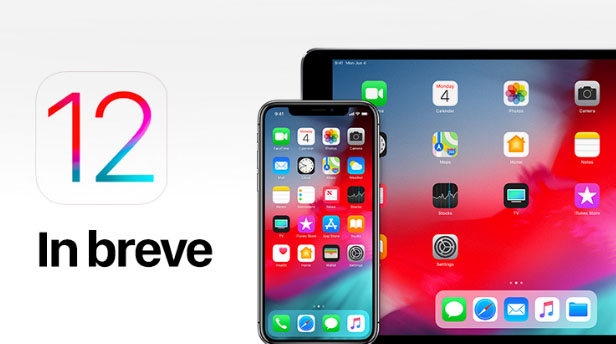
    iOS 12 Released 

    Finally the most awaited latest Apple OS for iPhone and iPad is released. After iOS 12 beta now iOS is official . It is evident that most of the iOS 11 supported devices will support iOS 12 .

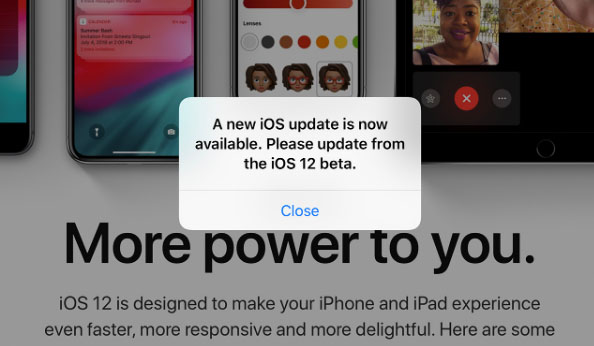
    You can update iPhone to iOS 12 by checking out whether your iPhone OS can be upgraded .

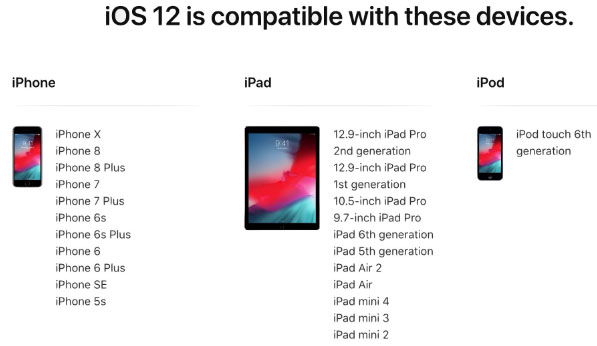
    iOS 12 Supported Device list

    Given below is the devices that use iOS 12 and also list of devices where you can upgrade iOS .Here is the list of Apple devices capable to do iOS 12 download. We will also guide you about how to update iPhone with latest iOS  .

    iPod Touch

    On the series of iPod touch devices the iPod Touch 6 (iPod 6th generation) is compatible for iOS update . You can download iOS 12 for iPod Touch 6 . The iPod touch 6 G that initially was iOS 8 which can be now updated. So you can update iOS 8 to iOS 12 .

    Read Also :  38 Best iPhone games you should play

    iOS 12 for iPod Touch – How to Install iOS 12 On iPod Touch

    In order to update iPod touch with iOS 12 follow the given steps –

    • First take a iTunes Backup / iCloud Backup of your iPod Toch device
    • Install latest iOS (download iOS 12) either by wireless method or by iTunes

    The steps to installation of iOS is same for iphone , ipad and iPod .So read the common section for understanding how to update iPod software .

    iPad iOS update Supported Devices 

    Given is the list of iPad devices that can be upgraded to iOS 12 . So lets see how to update iOS on iPad .

    • iPad Air – Initially used iOS 7 , now this can be updated from iOS 7 to iOS 12

    • iPad Air 2 – Initially used iOS 8 , now this can be updated from iOS 8 to iOS 12

    • iPad 2017 – Initially used iOS 10.2.1 can be upgraded to iOS 12

    • iPad 2018 – Initially used iOS 11.3 can be updated from iOS 11 to iOS 12

    • iPad Mini 2 -Initially used iOS 7.03 can be updated to iOS 12

    • iPad Mini 3 -Initially used iOS 8.1 can be upgraded to iOS 12

    • iPad Mini 4 -Initially used iOS 9 can be now updated from iOS 9 to iOS 12

    • iPad Pro (9.7 inches) , iPad Pro (10.5 inches) , iPad Pro (12.9 inches ) Generation 1 and 2 – Initially used iOS 9.1 can now be upgraded with latest iOS 12 .

    iPhone iOS 12 supported

    Here is the list of iPhone that can be available for iPhone software update to the latest iOS 12 . These devices can be upgraded to iOS 12

    • iPhone 5S – Initially run on iOS 7 can be now upgraded to iOS 12

    • iPhone 6 – iOS 8 to iOS 12 can be updated for iPhone 6 users

    • iPhone 6 Plus – This iPhone 6 Plus users using iOS 8 can update it to iOS 12

    • iPhone 6S & iPhone 6S Plus -Initially run on iOS 9 can be upgraded to iOS 12

    • iPhone SE – updating iOS for iPhone SE is available , here you can upgrade iOS 9.3 to iOS 12

    • iPhone 7 – iOS 10 to iOS 12 software update is available for iPhone 7 series

    • iPhone 7 Plus – iOS 10 to iOS 12 update is possible for even iPhone 7 Plus

    • iPhone 8 – You can update the old iOS in iPhone 8 which was iOS 11 to iOS 12

    • iPhone 8 Plus – iOS 11 is the OS running on iPhone 8 plus hich was available for iOS 11 update earlier . Now you can upgrade iPhone 8 Plus to iOS 12 .

    • iPhone X – iOS 11 was the iPhone X OS , now those who are using iPhone X can update iPhone to iOS 12

    • iPhone XS – iOS 12 is the OS for the new flagship Apple phone

    • iPhone XS Max – This apple flagship phone uses iOS 12

    • iPhone XR – Most modern apple phone , iPhone XR runs on iOS 12

    Why iOS 12 – Best Features of iOS 12 

    The newly released iOS 12 has so many features to make you fall in love with iOS 12 . Let’s take a look at some of the most exciting and best iOS 12 features –

    Navigation Apps is Not Limited Anymore 

    You may be aware that earlier versions of Apple OS has allowed its users to rely upon only the Apple Navigation app , that is the Apple Maps . Those who had voted more for Google Maps on a comparison between Google Maps Vs Apple Maps , can be happy now . Your iOS 12 allows you to use Google Maps and other third party navigation apps with the Apple CarPlay .

    That’s quote a good news , isn’t . Don’t worry we will guide you on how to Google Maps with Apple CarPlay in our upcoming write up.

    Group FaceTime Call is Latest in iMessage Group Chat

    Now , this feature is not live but it will be rolled out soon in iOS 12 . Thus allowing the iPhone , iPad and Mac users to enjoy group Facetime Call with new iOS .

    Read Also : Best Triple Camera Phones to Buy This Year

    iOS with More App updates

    Seriously not a major app updates but yes there are few excellent app updates with the iOS 12 .

    • Apple News App with a scroll option in iPad.
    • Stock Analysis , Performance and top stock related news updates throughout the day.
    • iPad now gets Voice memo apps . Also there is iCloud support to sync your Voice memo with other Apple devices .
    • iBooks turned to be Apple Books . It has got Book store feature and Reading now feature to make it much more easy to use .

    Access Apple TV with Apple Control Center 

    Add Apple TV tile to your iOS 12 Control center , now just swipe and tap to access Apple TV

    Managing Screen Time

    Now iOS 12 lets the Apple iPhone and iPad user to understand the pattern of their device usage time , a clear and detailed summary of how much you have used your device . Also which app you spend more time etc.

    App Limit Feature 

    Along with managing screen time , apple also introduced an efficient and smart feature that allows the users to limit their usage by setting time limit for each apple apps . So that’s how the App Limit feature adds more power to the screen time management feature in iOS 12.

    Downtime Feature in iOS 12

    This is a boon to parents where they can remotely manage their kid’s apple device usage with Family sharing app . The downtime feature in iOS 12 aims at helping parents to limit their kid’s access to apps or websites and even set time to each applications .

    Bye bye to Long list of Notifications

    No more irritating thread by thread notifications to pile up your home screen . Everything is now sent as a grouped notification on a single thread . This single thread notification is one of the best things that happened with iOS 12

    Read Also : iPhone Vs Samsung which is better – iPhone Vs Galaxy Compared

    Do Not Disturb & Critical Alerts

    Set time to enable Do not disturb and toggle on Do not disturb whenever you want to stay away from getting distracted because of mobile. But one better thing is Critical alerts from healthcare persons will work even when your Do not disturb is enabled .

    There are more features like – iOS Photos – For You Tab , Siri shortcuts for iOS 12 , ARKit 2.0 , USDZ format , Add 2 Face Id Profiles , Better password manager , Apple camera app with Improved Portrait mode , better battery health , better QR scanner , Better screenshots on iPhone , New Apple map design , location sharing , Animoji and memoji trends , iOS 12 Siri suggestions improved .

    How to update iPhone / iPad to the Latest iOS update

    Now let us dive into the core topic ,that is how to update iPhone/iPad with latest iOS . Before you do iPhone Sofware update you have to backup iPhone /iPad before you update iOS .

    How to Backup iPhone /iPad /iPod before updating to iOS 12 

    Before you download iOS 12 , You have to backup iPhone /iPad /iPod to prevent loss of data while software upgrade.

    You may be aware that there are two methods to update iPhone –

    1. Update iPhone using iTunes
    2. Update iPhone using iCloud

    Now before that all you need is to learn to back up iPhone / iPad /iPod

    Read Also : Factory reset iPhone without password or iTunes with data backup

    How to Take iTunes Backup of iPhone/iPad/iPod

    To prevent iPhone data loss before you update iPhone or any of your iOS device , take a iTunes backup . Follow the given steps –

    • Ensure that you have updated latest iTunes version , if no install latest iTunes version first .
    • Now open iTunes
    • Connect your iPhone/iPad/iPod to your computer
    • Now you will be asked to verify the computer by entering the passcode .
    • Next you have to enter your Passcode information correctly .
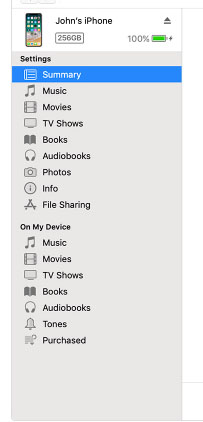
    • Now select your device on iTunes window’s left corner .
    • You have to click on the Summary option that you can see on the left corner of the window
    • At this time yo can see your device information on centre of the window displayed out . Also there you can find an option This Computer
    • Toggle it and below that there is an option Encrypt device backup , Click that and enable tick mark for that to protect it with password
    • Now on Manually backup and restore option click on Backup Now
    • Click done .

    Read Also : Best iTunes Cleanup Software for better iTunes experience

    This is how you can restore iPhone/iPad /iPod using iTunes . Make sure that you do take a back up iphone /ipad before updating to ios 12 .

    How to update iPhone / iPad to the Latest iOS update

    Now let us learn how to download iOS and install latest iOS on your iPhone , iPad and iPod . So i guess you have taken back up of your iPhone . If so proceed on how to download latest iOS ( How to dowload iOS 12 ) –

    • To update iPhone with latest iOS 12 you must either take iClod / iTunes backup of your device first
    • Now to install iOS 12 using iTunes follow the given steps
    1.  Go to iTunes
    2. Plug your Device , that is plug iPhone / iPad / iPod
    3. Now select the device icon that can be found at top left
    4. Go to Summary
    5. Now click on Check for Update
    6. Select Download and update option
    7. Now click Agree button mentioning you agree to all the terms and conditions
    8. Enter your device passcode
    • Now to install iOS 12 using iPad / iPhone software update follow these steps to update iPhone iOS with iOS 12
    1.  Take iCloud Backup
    2. Go to device Settings option
    3. Go to General 
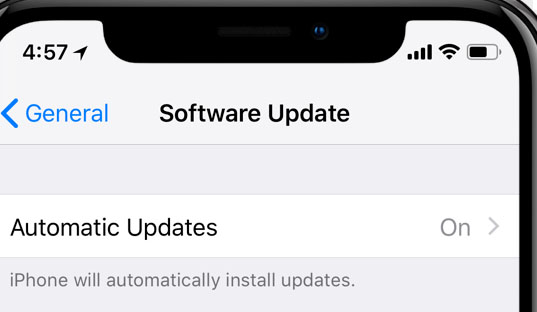
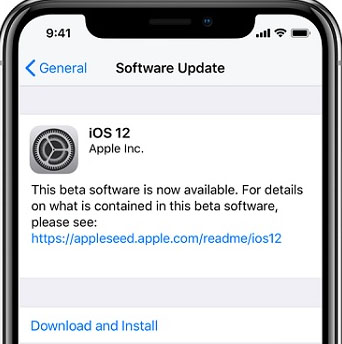
    4. Now click on the Software update 
    5. There you can see and option called Download and Install , just click that
    6. Proceed with entering your device passcode and simple agree to terms and conditions4
    7. Click Agree to confirm

    That’s it , this is how to update iPhone with iOS 12 , hope you are clear with how to download iOS 12 and install iOS 12 .

    Android Vs iOS – Comparing Android P Vs iOS 12

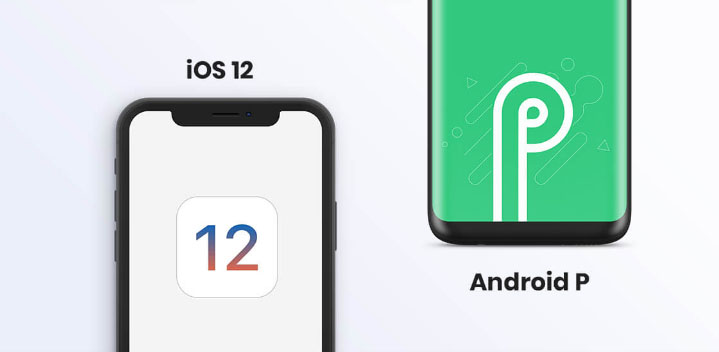
    After Android O (Android Oreo) google has released Android P , that is Android Pie , the very latest Android OS . So with the release of iOS 12 , most of the users have a confusion which is the best Android Vs iOS ( On a cross comparison between Android or iOS) . So here we will take a look at Android P Vs iOS 12 .

    Many of the devices are apt for Android 9 Pie as OS . And we have already discussed iOS 12 supported devices and how to upgrade to iOS 12 . Google Pixel 3 XL will come with Android 9.0 (Android P) . And in many other devices using Android Oreo you can update Android Oreo to Android Pie ( Android O to Android P )

    Read Also : Android Oreo Vs Android Nougat Vs Android Marshmallow Vs Lollipop

    Now lets take a look at iOS 12 Vs Android P –

    • iOS 12 Vs Android 9.0 comparison Google’s Android P is the best with respect to maps and navigation performance when your compare with iPhones. So google maps is best when compared to apple maps .
    • While encountering comparison between the virtual voice assistants in Android P and iOS 12 , Android wins the heart . Even though Apple has brought so much of new updates to Siri , still Google assistant remains favourite for majority .
    • Digital health aspects is taken more carefully by iOS than Android , so in that case iOS is winner

    Read Also : iOS 11 Vs Android Oreo – Who wins gadget lover’s Heart

    Read Also : Update to Latest Android OS : Android Pie -Stay with Nougat / Marshmallow/ Oreo

    Read Also : Backup Android Device to PC or Google

    There are more differences that will be discussed separately and in detail .

    So i guess we have given our users a very detailed idea on iOS 12 and iOS 12 supported devices , a cross comparison between iOS 12 Vs Android P & our core point how to update iPhone / iPad / iPod to latest iOS 12.

  • Best Triple Camera Phones to Buy This Year

    Best Triple Camera Phones to Buy This Year

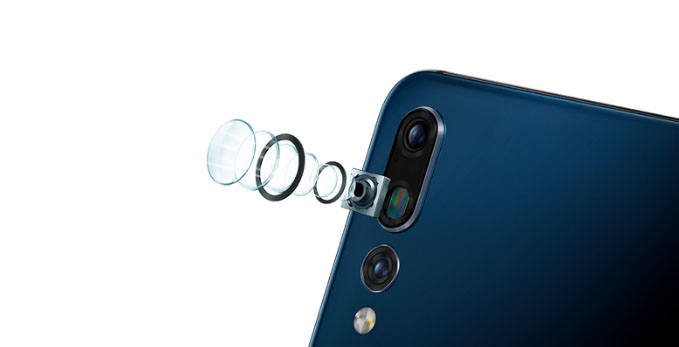
    Camera , Photography , Selfie , Bothie and so on has become one of the exciting features that the generation wants as the best in their Smartphone . Recent trend in Smartphone photography is hiking with new models of Smartphones with exciting features . Here comes the new trend setter Smartphone Camera feature after Nokia Bothie app .That is the rise of Triple Rear Camera feature , so let’s find out the list of Best Triple Camera Phones .

    Best Triple Camera Phones to Buy This Year

    You may be very much familiar with dual camera smartphones in market , but there are only few handpicked brands and smartphone models that fall under the category of Best Triple Camera Phones .

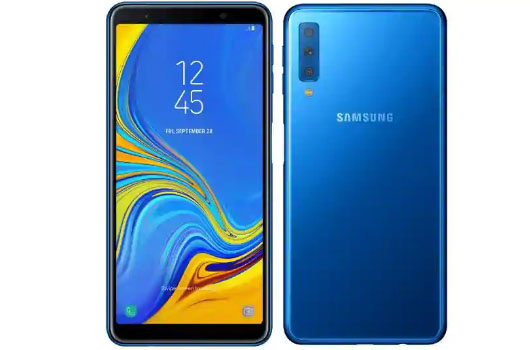
    Samsung Galaxy A7 

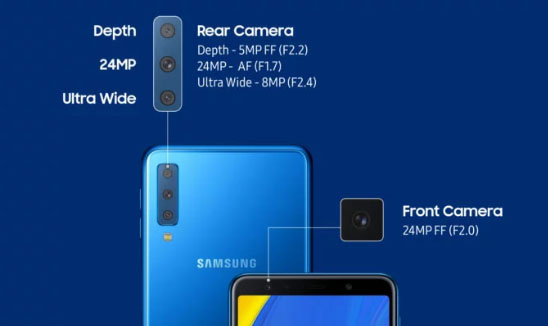
    Samsung will introduce their very first smartphone with triple cameras . Samsung Galaxy A7 will be one of the Best Triple Camera Phones .

    Samsung Galaxy A7 will be one of the best camera smartphone of the year to buy .

    Features of Samsung Galaxy A7

    Now let us analyse the features of Samsung Galaxy A7  –

    Memory –  6 GB RAM , 128 GB Storage & 4 GB RAM , 64 GB Storage with 512 GB expandable memory

    Colours –   Three colours will be available that is Black , blue and gold

    Dimension – 7 inches FHD

    Display – AMOLED screen

    Samsung Galaxy A7 price will range at Rs.28,990 for 6GB RAM and Rs.23390 for 4GB RAM . This is the first triple camera phone from Samsung brand . So the highlight of this phone is all about Camera .

    So what’s special about this best Triple Camera Phones –

    This will be one of the Best Triple Camera phone in the market right now and it offers higher camera quality then iPhone latest models also. Samsung A7 offers triple rear camera when all the old models offer dual camera . This will be a flipkart exclusive to buy .

    iPhone XR Vs Samsung Galaxy A7  Camera 

    Since the most pricey phone on market is iPhone XR , let’s take a look at the iPhone XR Camera Vs Samsung Galaxy A7 Camera . Also fingerprint sensor is a highlight to point out in Samsung Galaxy A7 . This will add more competition to Oppo F9 Pro , Xiaomi Poco F1 , Viv V11 Pro smatphones .

    Triple Camera Vs Dual Camera 

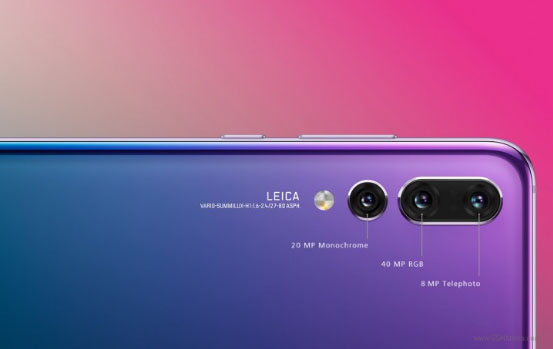
    The triple lens camera can be giving far better experience than dual camera . Best Triple Camera can be now witnessed in Samsung A7 and earlier Huawei P20 Pro . Samsung offers 24 MP low light front facing camera , 8 MP sensor  with 120 degree field view with its ultra wide lens . 5 MP depth Sensor with Live view sensing focusing on bokeh photography.

    Triple Camera / Multiple Camera Vs Dual camera in smartphones , i would say multiple cameras and triple cameras would be the trend in the future just because of this reasons –

    • Wide angled shots
    • Depth shots by detecting depths
    • Low light camera feature
    • Better HDR Experience with camera
    • Zoom high and zoom better

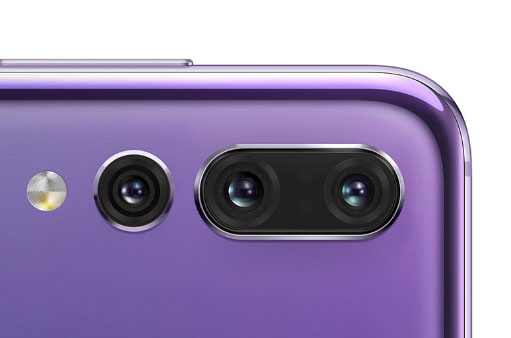
    Huawei P20 Pro

    The very first smartphone that came with triple camera was Huawei P20 Pro , this was a different experience to the camera lovers to use such an efficient smartphone.

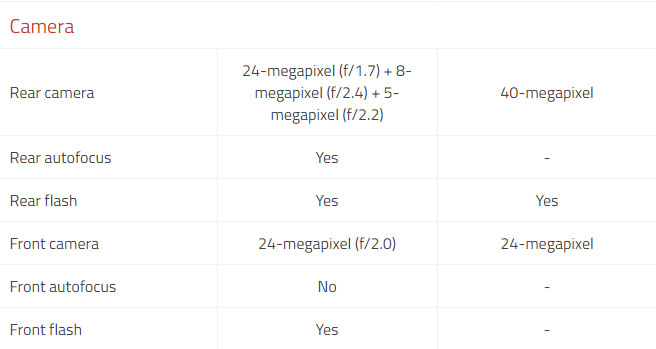
    Huawei P20 Pro Vs Samsung Galaxy A7

    Here is the comparison between Huawei P20 Pro Vs Samsung Galaxy A7 Camera feature compared

    Also Huawei P20 Pro confirmed that its upcoming upgrade will come with large storage space and Huawei P20 Pro will disable AI Scene recognition and will disable

    Ulefone Gemini 4G Phablet 

    This is not a quite popular name in smartphone brands but , Ulefone Gemini 4G Phablet offers triple cameras  , take a look at the camera specifications of Ulefone Gemini 4G


    Multiple Camera Smartphones  

    On the saga of smartphones , many brands will pose competition to each other with their multiple rear camera smartphones .

    Upcoming on the list is –

    • Light Phone with 9 camera (To become the 9 camera smartphone on market)
    • After bothie feature , Nokia to come up with 5 lens camera smartphone , thus Nokia to offer 5 Camera smartphones
    • Also LG to come up with multiple camera smartphone soon with their LG V40 ThinQ 5 camera smartphone

    So let us know which one is your favourite and  Best Triple Camera Phones to buy . If you look for better camera then forget iPhone XR also .

  • Use Old Reddit Layout – How to opt out New Reddit Design

    Use Old Reddit Layout – How to opt out New Reddit Design

    Everyone would be aware that Reddit has come up with their new design ever since its launch , this is the first redesign . So as there is mixed response to the new Reddit design from Reddit lovers around the globe. Some of the old Reddit users find it annoying on how to use the latest Reddit redesign . If you are one such person , who is madly in love with the old Reddit Layout here is the guidance on how to opt out New Reddit design and Use Old Reddit Layout again.

    There are so many changes in Reddit Old and Reddit New features . You can find some features of old Reddit is missing , so if you want to use old Reddit with all its feature here is the steps you should follow. Likewise for the new Reddit design lovers you can try out the Reddit Night mode .If you have opted to use old Reddit then you will miss this Night mode feature .

    How to Use Old Reddit Layout and opt out of New Reddit Design

    We believe that now you are on the new Reddit layout and looking forward to use old Reddit design again.

    Now carefully understand the simple steps to switch between new Reddit to Old Reddit –

    • First Go to Reddit website and use your Reddit username and password to Log in to your Reddit Account.
    • Now you are on its New layout , we assume .
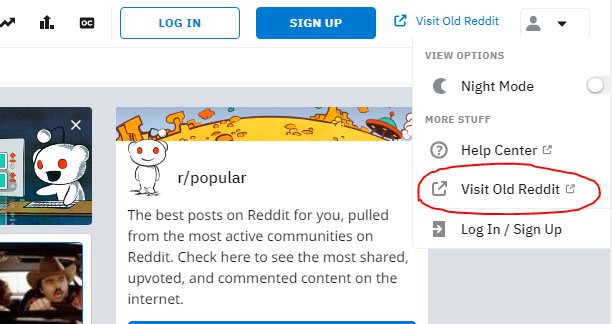
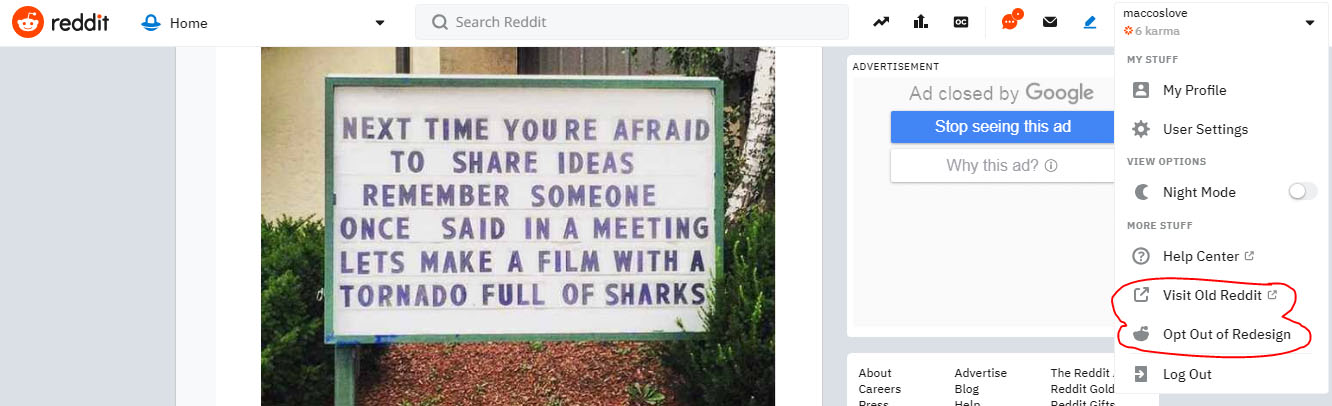
    • Look at the right side top corner , where you can find an option with a link named Visit Old Reddit

    • Just click on that , you will be directed to old Reddit design .

    ( or )

    Suppose you couldn’t find that option then try this method if you Cannot switch back to old Reddit –

    • Login to your Reddit profile
    • Click on the Reddit profile icon of yours on the right end upper corner .
    • You can find option Visit old Reddit

    • Just click on that , you are done you will be able to access old Reddit again.

    ( or )

    We started the instructions with an assumption that you are on new reddit design , supose you are still using the old Reddit and sometimes your old Reddit is opening as New Reddit design then you have to change certain settings in your Reddit Account .

    • Go to your Reddit Profile
    • On the right end upper corner you get an option preferences 
    • Click on that and on the settings page scroll down remove the tick marks for ” use redesign as default experience ” and for “world like to test out beta features “

    • Just save the preferences

    You are done with it now you will be able to use old Reddit for all Reddit websites and apps.

  • Enable Reddit Dark Mode : How to turn on Reddit Dark Theme

    Enable Reddit Dark Mode : How to turn on Reddit Dark Theme

    If you are a Reddit lover , who always wanted to use Reddit dark theme , then you are at the right place . Here we will tell you how to enable Reddit dark mode .

    So let me tell you that switching to Reddit dark theme / Reddit night mode is not a tech stuff as you have seen in the YouTube android night mode  .

    How to enable Enable Reddit Dark Mode

    As officially announced Reddit night mode theme is now open to the Reddit users around the globe. You can use this dark theme on both the Reddit desktop version as well as on the Reddit mobile app.

    Inorder to enable Reddit dark mode or Reddit dark theme you should be using the latest redesigned Reddit version . You may be aware that Reddit beta design is already out , if you haven’t taken a look to try new Reddit then you must do that first . Even though the new Reddit design is cool , some of the users prefer it in the old look .

    Don’t worry you can still use the old Reddit layout . But you cannot use Reddit dark mode with the old Reddit design. So in order to enable Reddit dark mode you must enable Reddit redesign .

    We have already discussed about how to switch back to old Reddit layout .

    Enable Reddit Dark Mode : How to turn on Reddit Dark Theme

    So now let’s learn how to enable Reddit Dark mode or Reddit Nigh mode . It is very easy to turn on Reddit Night Mode , not like the complex steps encountered with YouTube Dark mode on Android .

    Let us dive deep into the process of Turning on Reddit Night mode  –

    • In order to enable Reddit Dark mode you have to switch to New Reddit design . If you don’t know to switch to Reddit New layout , you can read it in our previous post or click on the enable Reddit redesign link inside the content.

    Assuming you are using the latest Reddit redesign, now follow the steps –

    • Log in to Reddit using your account username and Reddit password .
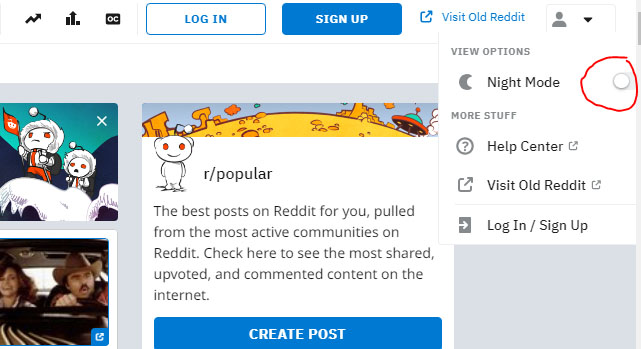
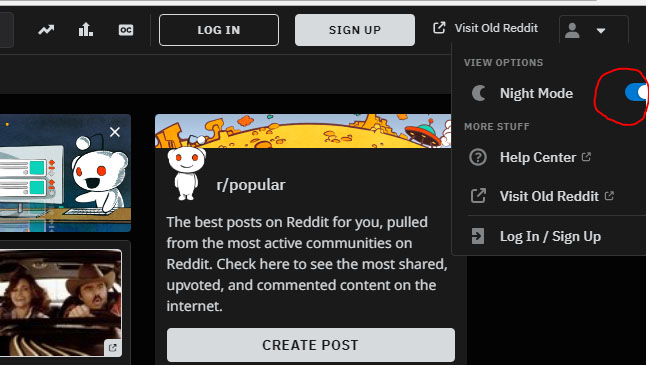
    • Now on the profile section , just click . You can now see View Option
    • Under the View Option you can find out the Night mode option with a toggle button
    • Toggle Night mode button on

    That’s it you are done with the process and successfully you can View Reddit Night mode now .

    In order to Disable Reddit Night Mode or to turn of Reddit Dark mode all you have to do is follow all the above said steps and the last step you have to toggle off Night mode in Reddit .

    You might be now comfortable about How to disable / Enable Reddit Dark mode .

  • New Reddit Design – Switch from Classic Reddit to Reddit Redesign

    New Reddit Design – Switch from Classic Reddit to Reddit Redesign

    Reddit being one of the favourite spot for all the internet users to get every latest updates in the globe . This American news aggregator website has finally come up with a new design , a new Reddit layout is finally here . After a decade the New Reddit Design has finally happened . Even though the Reddit beta design was not open to all the Reddit users , now the new Reddit design is available to all the Reddit users .

    So here will learn how to Switch from Classic Reddit to New Reddit Design , if you have got bored from using the old Reddit theme you can use these steps to enable Reddit redesign .

    Read Also : Pinterest Tips and Tricks to use Pinterest like a Pro

    Read Also : Alexa Tips, Tricks and Commands

    Reddit New Design – Highlights of New Reddit Design 

    New Reddit layout is entirely a different visual retreat to all the new age users who hated the old Reddit theme . You can find some of the important Reddit features in new Reddit redesign theme . Some of the highlight features to be noticed are –

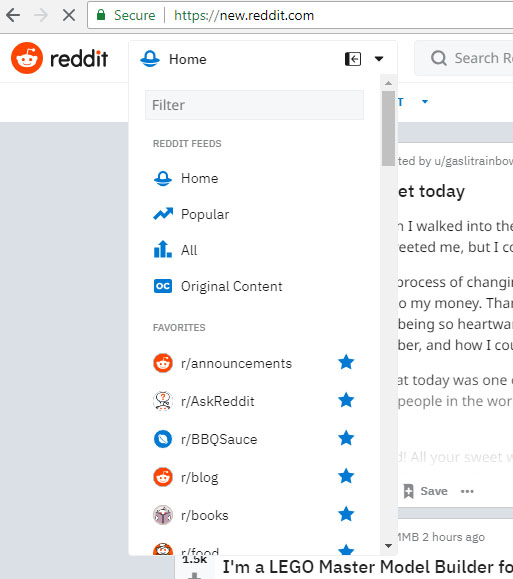
    • Menu button replaced the navigation bar from the old Reddit . This is just like the most of the popular website theme available online . The Reddit Menu option in the left corner will give links to the following such as Reddit feeds , Reddit favourite subreddits , subscriptions , user profiles , messages etc .

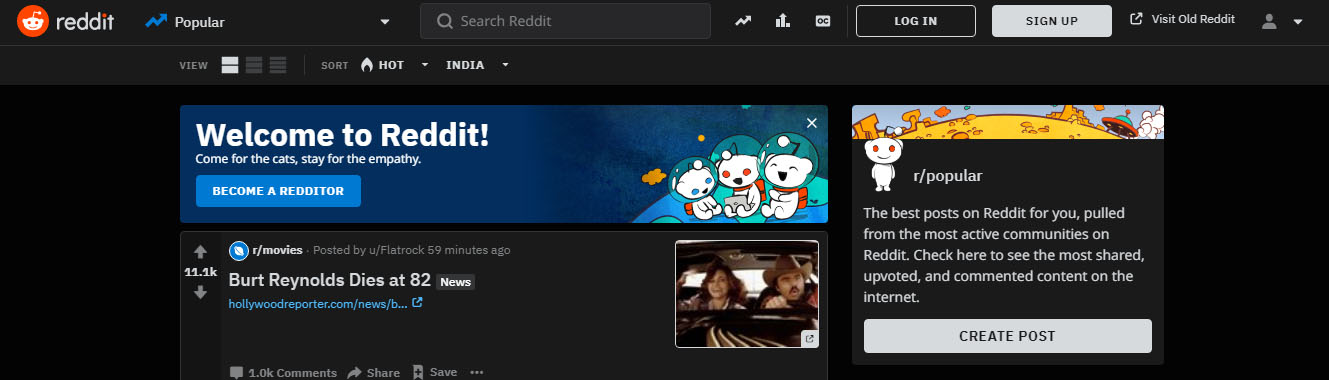
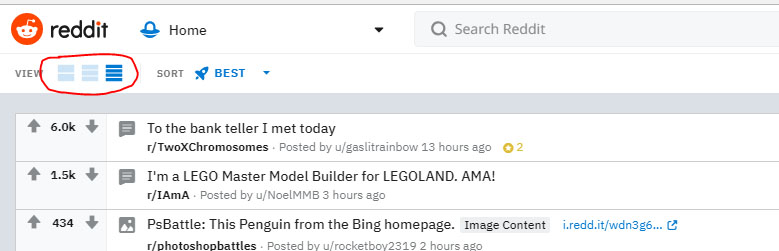
    • The second major highlight feature of new Reddit theme is you can view the website in three different modes – Reddit Card View , Reddit Classic View and finally Reddit Compact view .

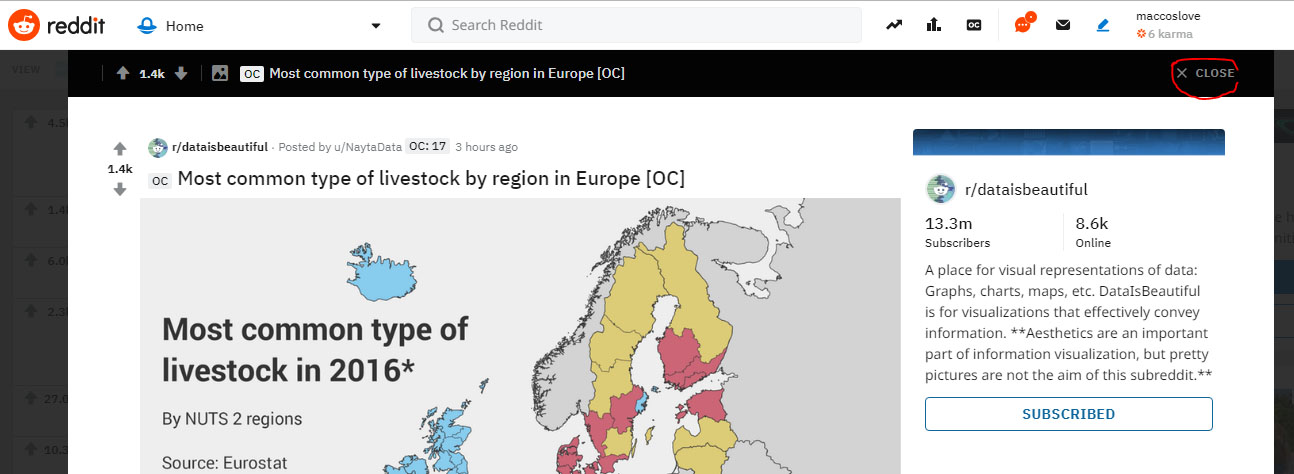
    • You can read any Reddit Posts and stay on the same Reddit Page now . This is because when you open any Reddit posts that will open up in a box with an option to close . So after reading when you close the post , you can still view the same page . Look at the image to understand better .

    • Since the new Reddit design is not much welcomed by the old Reddit users , they can opt for the choice to use the Old Reddit theme. They can Visit Old Reddit with just a click and even Opt out of Redesign in Reddit to view the old Reddit theme .

    So these are the important changes in Reddit new version .

    Note – You can visit Reddit old website through Reddit Old link directly and you can switch to Reddit New Design by directly accessing Reddit New Link .

    New Reddit Design – How to Switch From Old Reddit Layout to New Reddit Layout 

    You can easily switch from old Reddit website to new Reddit website layout . Follow the given simple steps to access Reddit New Redesign and its features .

    1 . Go to Reddit website and Login to Reddit with your Reddit username and password.

     2 . Now you can see the same old boring Reddit theme which you have been using since a decade . Now near to your Reddit username there is an option named preferences , just click on that .

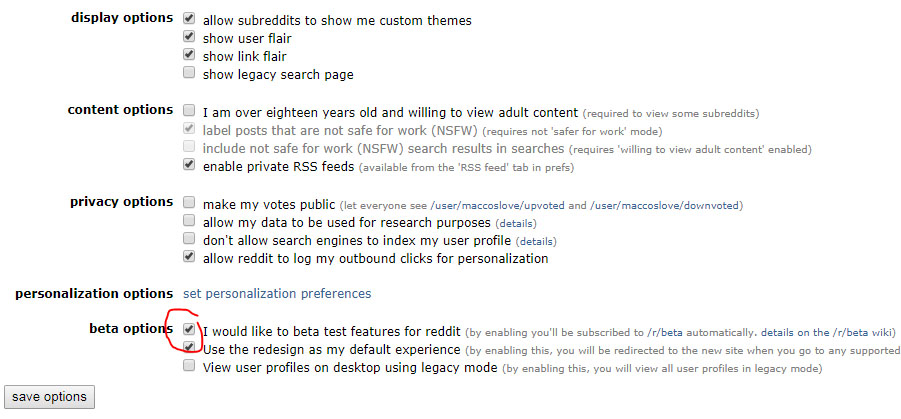
    3 . Now you will be taken to the Reddit Settings page , scroll down you can find beta options . Now in the beta option click tick mark for the first two options in order to use the Reddit new theme .

    That’s it you will be directed to the New Reddit Website theme .

    You can directly visit the new Reddit with the url as mentioned in this article’s note . Also there is one more easy option to access new Reddit site .

    Soon after Logging In to Reddit instead of checking the preferences , you can click on the Visit New Reddit option which can be found on the upper left corner of the Reddit Old site .

    So that’s all this is how you can use New Reddit version easily .

  • YouTube Dark Mode Android Version Without Rooting

    YouTube Dark Mode Android Version Without Rooting

    For all the android YouTube app lovers who are equal lovers of dark mode apps / night mode apps . We know that one of the eagerly waiting Android update for YouTube is to use the night mode . So don’t wait , here we have discovered something exciting which will allow you to use / enable YouTube dark mode on Android without rooting.

    I guess all our readers know how to enable YouTube Dark mode on Windows / Mac . Even if you don’t know , then we are here to help you with . Moving on to YouTube Dark Mode Android Version Without Rooting let’s learn how to enable YouTube night mode on Android phones.

    YouTube Dark Mode Android Version Without Rooting / Modifying APK 

    If you want to use YouTube dark mode on Android without rooting your android device or even without modifying your Android Package Kit (APK) then read the steps and instructions given below very carefully .

    As per the reports that are rolling out on the web world , some of the android device users can use YouTube Dark mode for android with some simple settings change .

    Read Also : Streaming Services – YouTube Vs Netflix Vs Prime Vs Hulu Vs Sling Vs Directv Now etc

    Enable YouTube dark mode via Android Phone Settings 

    Follow these simple steps to turn on Android YouTube dark mode easily –

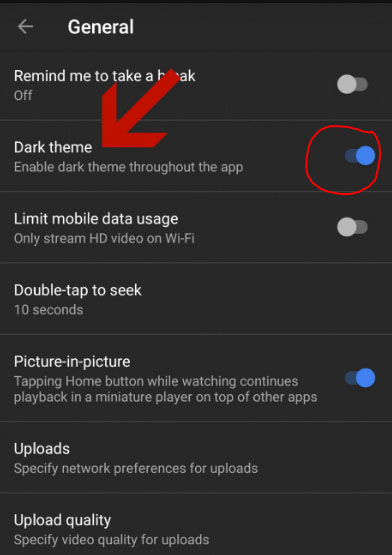
    • Go to YouTube App on your Android phone (make sure your YouTube app is updated )
    • Go to your profile icon and launch into YouTube General Settings
    • You can find an option called Enable Dark Theme 
    • Toggle it on so that the dark theme works for the entire YouTube app till you disable dark theme for YouTube app.
    • In-order to turn off YouTube dark mode  toggle off the enable dark theme option

    So that’s it !!!

    If this doesn’t worked out for you then try this way (not too techy but not as easy as above ). Don’t worry let me try to make it more simple in my explanation.

    Read Also : Best Torrent Managers for Computer & Smartphone

    Enable YouTube dark mode YouTube ADB backup

    So you may be aware that the feature of YouTube dark theme mode is based on the already defined preference on the youtube.xml file . This is because XML files are the place where the app settings are set to the preference . To change this manually you have to do rooting . But there is a way to change XML file app settings without rooting , that is with the help of a ADB backup .So this involves a tool for assistance .

    • First setup an ADB (Android Debug Bridge ) access for your Android phone . This helps you to use so many debugging features .
    • Keep your YouTube app on android updated to the latest version from Google play store.
    • Now from AndroidFileHost download the zip file called YouTubeDarkTheme_XDA.zip
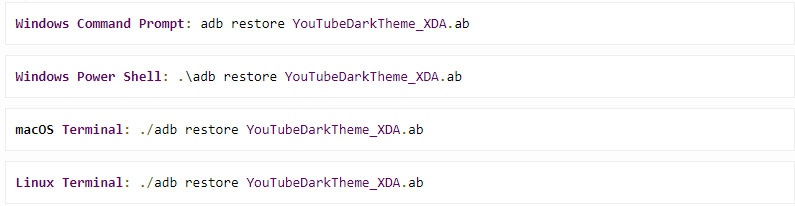
    • Open up command prompt window in ADB located directory .
    • Now depending upon the type of the Operating System enter the command .
    • You can read a message like this “Now unlock your device and confirm restore option”
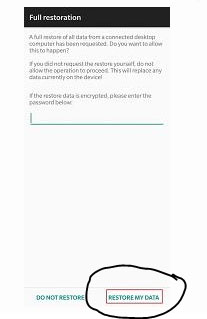
    • Now a Full restoration window appears and you be asked to enter a password.
    • Don’t give any password .
    • Just click on the Restore my data option
    • That’s it , the full restoration window disappears . If you are already in YouTube app you can find that it is working in dark mode . Else go to YouTube and enjoy YouTube Android dark theme

    Benefits of using YouTube Dark mode 

    YouTube has recorded a higher number of users around the world , also the number of android users are more high when you take in account of the ratio of Android Vs iPhone users statistics .Watching videos longer consumes your battery charge to a wide extend . So using dark mode can save your Battery life more . That’s why dark mode for YouTube app is highly beneficial and preferred .

    So we hope this tutorial on how to enable YouTube Dark Mode Android Version Without Rooting wa useful to all YouTube Dark theme Android lovers

  • How to Reset Instagram Password – Top 4 Methods

    How to Reset Instagram Password – Top 4 Methods

    We have discussed how to change your Instagram password when you remember them , but most cases we are forgetful people. So what if you forgot your Instagram password ? Answer is quite simple you should reset Instagram Password . So let’s learn more about How to Reset Instagram Password .

    Basically there are 4 ways to Reset Instagram Password . It can be done as usual using your Instagram username , the process is quite similar like that of how you reset Facebook password when you forget them.

    How to Reset Instagram Password – Top 4 Methods

    If you tend to forgot your password what can you do ? I know you can’t afford to lose your Instagram account that you build up very well. So let’s discover the 4 methods to reset your Instagram password .

    Resetting Password is different from how you Change Instagram Password .

    How to Reset Instagram Password via Instagram Username

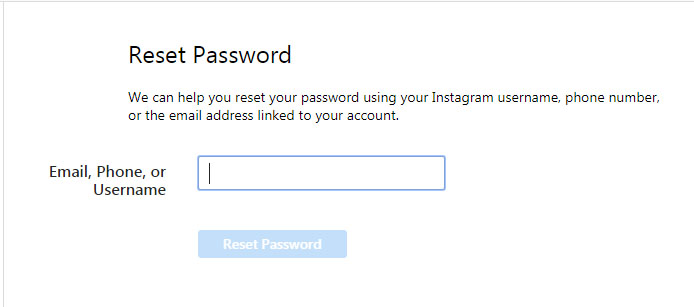
    If you forget your Instagram Password and do remember your Instagram username then you can reset your Instagram password easily –

    • Tap the Instagram app icon on your phone with the Instagram logo.
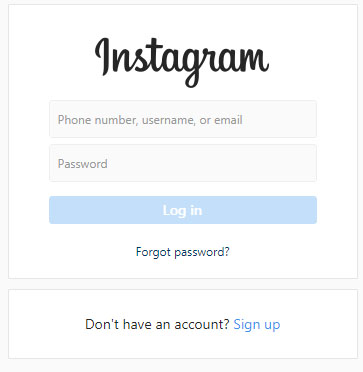
    • Now on your login section , you can find an option Get help Signing In
    • Click on that
    • Then you get option to enter your username .
    • Now you will be asked to choose either Send email or log in Facebook option.
    • Click on send email option where you get a login link to reset password on your Instagram registered email id .
    • Go to email and open the mail that you received from Instagram .
    • Click on the reset link and tap the reset your Instagram Password option
    • Now enter a new password and verify it y typing it once more then reset it .
    • That’s it you are all done with the process .

    Read Also : Instagram tips and tricks to be a Pro Instagrammer

    How to Reset Instagram Password via Facebook

    • Go to Instagram app by tapping on that Instagram icon your phone
    • Now go to the login page where you can find an option Get help signing In
    • Now click on the Log In with Facebook option (To get this done you must have already established link between your Facebook account and Instagram account )
    • Now you can proceed with resetting password .

    So you must know to Link Instagram Account with Facebook Account.

    How to Reset Instagram Password via Phone Number

    • As the above said process Tap on the app- login page-Get help Signing in
    • Click on send SMS option
    • Enter your phone number registered with Instagram Profile.
    • Tap send login link
    • Now go to your phone’s message inbox you can find Instagram’s SMS with a link to reset Instagram password.
    • Click on the link that will open up a new window where you can enter password twice and reset your old password

    How to Reset Instagram Password via Email Id

    Now this doesn’t really a great explanation because the steps are almost . But still let me explain it in short. In-order to reset Instagram password using email id you have to follow these steps –

    • Launch to the Instagram app – Go to login page
    • Click on Get help signing in / Forgot Password just below the Instagram Log In option
    • Now choose the mailing option an enter your registered email id
    • Go to mail box you would have received the Password reset link from Instagram .
    • Type a new password and re-type it to verify it gain.
    • You are done.

    So that’s it using these instruction you can reset a new password when you Forgot Password for Instagram.

  • How to Change Instagram Password

    How to Change Instagram Password

    Hey Guys , on our Instagram series of post you would be learning so many Instagram tips , tricks and shortcuts like never before . Hoping to give you lot more on the same . So for all Instagram Account holders you might at least once faced a need to Change Instagram Password . So here are the steps given to change your Instagram Password .

    How to Change Instagram Password 

    You can change Instagram password easily and the very common way is to change Instagram password with username . So now let’s take a look into the step by step process on How to change Instagram password using all these methods .

    Remember If you remember your Instagram password you can change that .

    Why you should Change Instagram Password ?

    You might be aware that the chances of getting your Instagram account hacked is very high . It purely depends upon your profile strength and your Instagram followers number . If you are an Instagram Celebrity or a Viral Instagrammer then make sure you don’t lose your Instagram account because of a weak password . Never keep your passwords as easy to guess ones.

    What if I forgot my Instagram Password – Then you have to Reset Instagram password , for which there are 4 different methods to do it.

    Note – Here we have mentioned about how to change password when you actually remember your old Instagram Password.

    How to change Instagram password via Instagram App

    You can change your Instagram password through your smartphone . You will be having the Instagram app downloaded on your Smartphone .

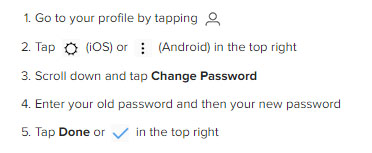
    • Just tap on the Instagram app first .
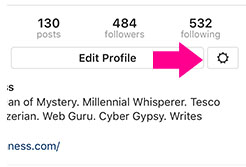
    • Go to your Instagram Profile and tap on the settings icon which is at the right corner near Edit profile option.
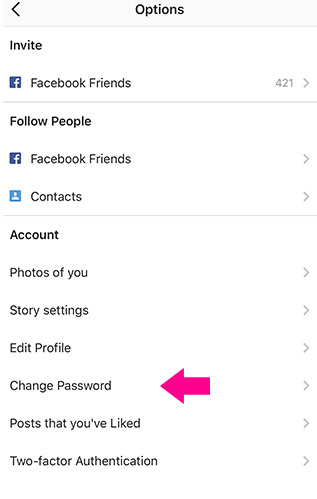
    • Now on the Options page , you can find the Account section with an option called Change Password .
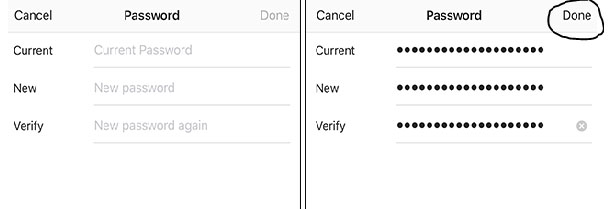
    • Now Password page opens up with requesting Old and new passwords .
    • Since you know your old password type that and enter your new password and repeat the same once again to Verify it .
    • Click Done

    That’s it you have successfully changed your Instagram password .

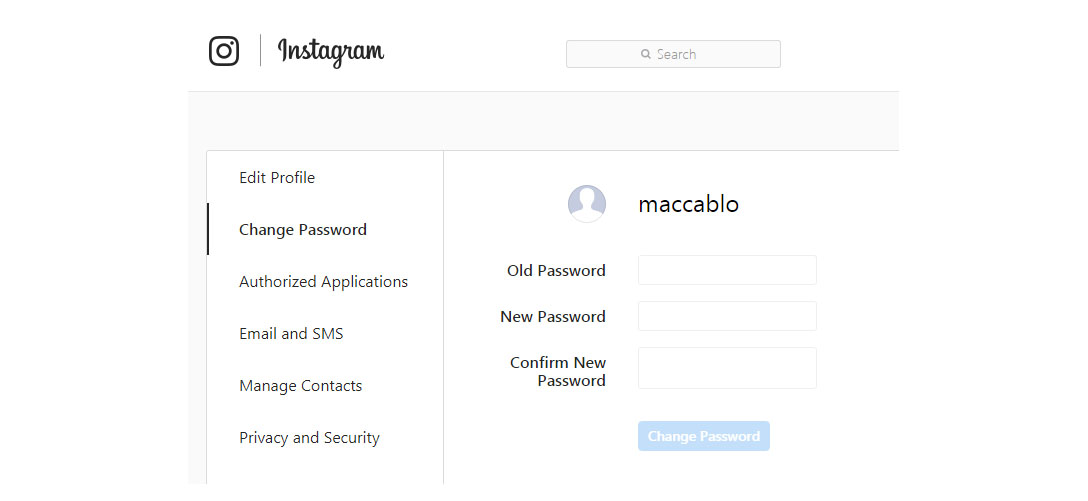
    How to change Instagram password via Desktop

    So if you don’t have access to your smartphone Instagram app still you can change your instagram password via desktop/web .

    Read Also : Instagram for PC – How to use Instagram for Desktop ?

    How to Make a Strong Instagram Password 

    Make sure you are keeping a long password but not a same password for all your accounts . Use alpha-numeric-symbolic combination passwords . Don’t make it as a series like 123.. abc.. keep your each digit of password as far away combination .A robust password must be something that you alone know. Never make anything that’s your favourite as your password.You can find out some very rarely used idiomatic phrases or even misspell your favourite tough word and combine it with numerical and symbolic combination.

    You must be aware about how to secure Instagram account that you own . And make sure that you are changing your passwords regularly . Also securing your email address is also important enough to prevent and protect your Instagram account from Black hatters of the web world . In case you feel your account is still not safe , then simply turn on two factor authentication for Instagram account . A double lock is always better than a single lock Guys !

    Read Also : Contact Instagram Help Center Support for Any Assistance

    To those who find that it was a common stuff that didn’t needed an attention to be written then sorry guys its for those who are not aware of these . You may be smart but everyone won’t be as smart as You 🙂

  • Disable Instagram Activity Status Feature – Privacy Tip

    Disable Instagram Activity Status Feature – Privacy Tip

    Internet lurkers , social media introverts and privacy focusing social media users , hope you are aware of the new Instagram feature that is the ” Active Status ” Green dot . So here we are going to help you with that by giving you tips to toggle off activity status on Instagram , that is on how to disable Instagram Activity Status Feature .

    What is the Instagram Activity Status 

    So this is just a newly added Instagram feature ” Activity Status ” . This green dot will be shown whenever you are using Instagram app , whenever your Instagram app is running on mobile .

    Read Also : Instagram for PC – How to use Instagram for Desktop ?

    Read Also : Contact Instagram Help Center Support for Any Assistance

    Read Also : Instagram tips and tricks to be a Pro Instagrammer

    Sometimes it can be seriously affecting your privacy online . Because you may get disturbed when you are just there on Instagram to browse the insta-stories .

    How annoying it can to get messages from random followers whenever you are online . And often there are situations where we are online just to stalk and not let others know we are online on Instagram.

    So if you want to stay relaxed and not let anyone know when you are online on Instagram then you have to toggle off / Disable Instagram Activity Status .

    How to  toggle off / Disable Instagram Activity Status ?

    When you toggle off activity status on Instagram remember that you can’t also see other’s Activity Status on Instagram . So once you disable activity status on Instagram you are safe locking your online presence and not able to find who is online also.

    So let’s see how to  toggle off / Disable Instagram Activity Status –

    It is basically a privacy option on Instagram to toggle off Activity status . You can enable Instagram Activity Status anytime you want .

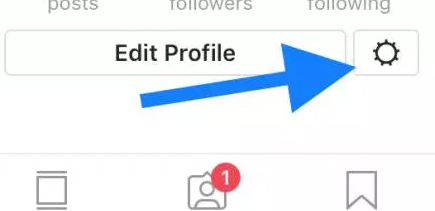
    •  Do you see a gear icon on your Instagram page on right end corner .
    • So click on that Instagram settings button.

    • Now click on the “Privacy and security ” option that you find there.
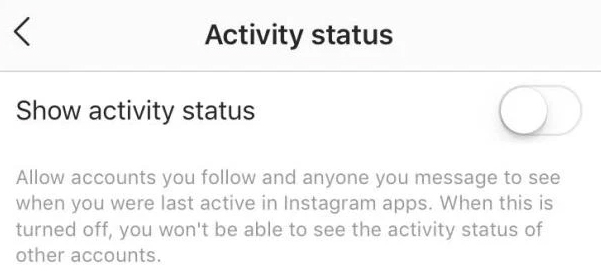
    • Now from that click on the “Show activity status ” option.

    • Toggle it off to Disable Instagram Activity Status.
    • Toggle it on to Enable Instagram Activity Status.

    Hope this privacy feature on Instagram helps most of the users to hide your online status on Instagram .