Blog

  • WhatsApp Data Sharing Disable Methods to Protect WhatsApp Data

    WhatsApp Data Sharing Disable Methods to Protect WhatsApp Data

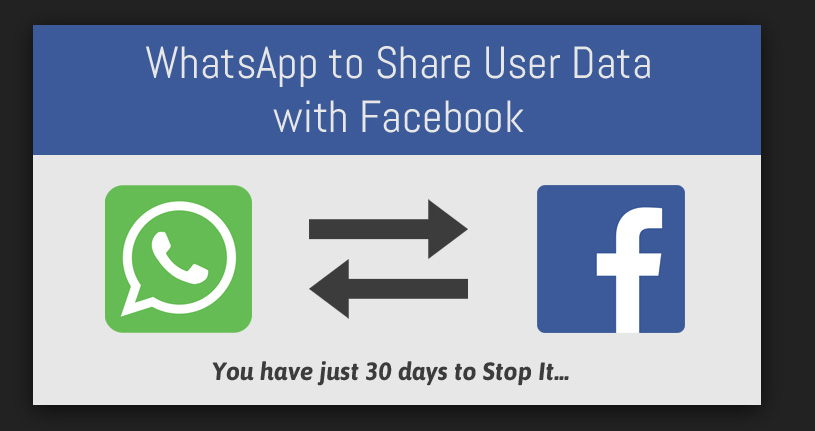
    WhatsApp is one of the popular messaging app ever since it was launched. Now recently WhatsApp announced that it will be sharing its users data with Facebook . WhatsApp Data Sharing news has put all its users in confusion about how much their privacy is protected and how safe it is to use WhatsApp further.Here in this session you will be finding answers for your WhatsApp Data Sharing, Privacy and security concerns and Tips to be safe on WhatsApp.

    watsapp-data-sharing-disable-methods-to-protect-watsapp-data

    WhatsApp Data Sharing with Facebook – What Account Information is Shared.

    Taking into account of the latest news about WhatsApp. One top news on board is WhatsApp use data privacy policy earlier but now its parent Company Facebook have put an end to the data privacy on WhatsApp .

    By this Facebook will be getting certain information about You. WhatsApp will share these account information about your account –

    • Phone number which you have registered and verified with your WhatsApp account will be available for Facebook Family of Companies.
    • Your WhatsApp account activity like when was the last time you used WhatsApp and how you use the services of WhatsApp.

    Why Facebook wants your WhatsApp Account Information – Pros & Cons of Enabling WhatsApp Data Sharing 

    Facebook is a big data mining whale in the internet world . Facebook , the parent company of WhatsApp has changed their WhatsApp Terms & Conditions.

    Why Facebook wants your WhatsApp Account Data ?

    • The main reason that the Facebook spokesperson say is that this is for improving the services of both Facebook users and also WhatsApp users.
    • Secondly Facebook by interfering on the WhatsApp Privacy policy will have an eye on the data that they retrieve and it will be for monitoring the unique users and reduce spam and abuse on WhatsApp.
    • Your account info will be used to Improve ads on Facebook .

    WhatsApp Users Benefit on Data Sharing 

    • You can get better friend suggestions in facebook according to your WhatsApp contacts also you will get to know better advertisements based on your interest .

    This can be pros to someone while it will be cons to someone . So we say it as let this be your subjective aspect in deciding whether you want to enable/disable WhatsApp data sharing. 

    Your WhatsApp Account Information That will not be shared with Facebook.

    WhatsApp insists that certain account information of WhatsApp are safe and it will not be affecting WhatsApp users privacy . WhatsApp insists that the user account information like their phone number will not be sold to any advertisers or any other third party & your messages, photos and certain account information will not be shared with facebook.

    How to Opt out of Data Sharing on WhatsApp

    You cannot completely opt out from sharing your account information on WhatsApp with facebook. But still you can partially opt out of Data sharing on WhatsApp.

    If you are thinking what is this partial opt out and what is its effect on securing your WhatsApp data then i will explain it . Facebook will be monitoring your account but they will not be using your data for advertisement purposes . This is the only way on which all WhatsApp users have to move on . We cannot say that privacy is assured well as always facebook will be monitoring your account information on WhatsApp in the name of improving your experience on both Facebook & WhatsApp.

    Here are the top methods to opt out from Data sharing on WhatsApp- 

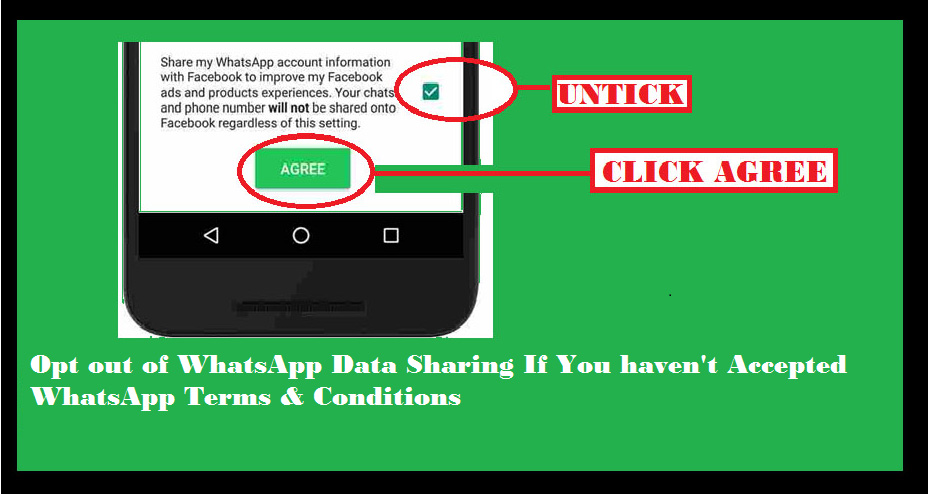
    Method 1 – If You haven’t Accepted WhatsApp Terms & Conditions

    If you haven’t already accepted the terms and conditions of WhatsApp then you have to follow this steps to opt out of Data sharing on WhatsApp.opt-out-of-data-sharing-on-whatsapp


    • Open WhatsApp on your device.
    • You can see the newly updated terms & services of WhatsApp.
    • Click on Readoption.
    • Scroll the terms & condition page until you find an option with check box.
    • If you are sure that you want to opt out from data sharing on WhatsApp then untick the check box .
    • Finally click the “Agree” button.

    That’s it , you have opt out of WhatsApp data sharing .This is the only available method to opt out of WhatsApp data sharing after accepting terms & conditions.

    Method 2 – If You have already Accepted WhatsApp Terms & Conditions

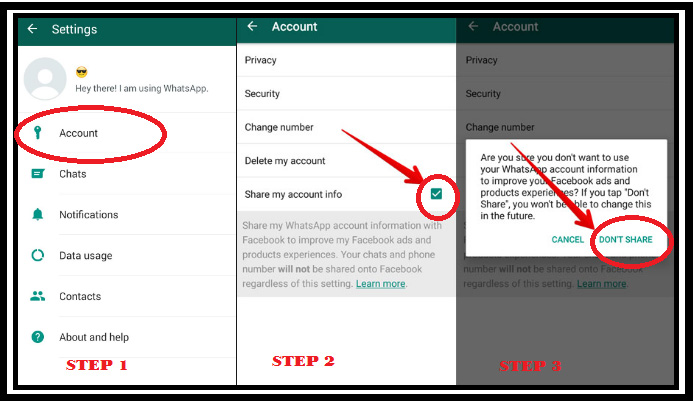
    If you have already accepted the terms and conditions of WhatsApp then you have to follow this steps to opt out of Data sharing on WhatsApp. You don’t have to worry if you have agreed to the latest terms & conditions because WhatsApp gives you a 30 days time to partially opt out of WhatsApp data sharing

    how-to-opt-out-of-watsapp-data-sharing-when-already-accepted-the-terms-and-conditions-of-watsapp

    • Open WhatsApp on your device.
    • Go to Settings option in WhatsApp.
    • Click on Account option.
    • There you can see an option with a check box as Share my account info 
    • Uncheck the option

    You are done with it .

    Method 3- Reinstall WhatsApp to Opt out of Data Sharing with Facebook

    If you are not able to solve the issue by following method 1 & 2 then here is the solution. Just uninstall WhatsApp application from your device and reinstall it.

    Now you can easily follow the steps of Method 1 . This will help you to opt out of WhatsApp data sharing. 

    You can do the necessary steps as we have given you a detailed idea to clear all the queries that was raised regarding the Safe way of using WhatsApp and how to opt out of WhatsApp data sharing with Facebook.

  • Guarded Women Long distance Relationship Emotions Hardly Revealed

    Guarded Women Long distance Relationship Emotions Hardly Revealed

    Most of you may be knowing that dating a guarded women is not so easy and more than that to be in a Long distance relationship is again like crossing a single threaded bridge . Imagine when one enters into this combination like dating a guarded girl that too in a LDR. Oh god that’s gonna sweat his head than he could ever imagine .

    The chance of breakup in this kind of relationship is really high in this .

    Guarded girl is a term used to call women who seem to be more confident , independent but they are “personally closed box individuals “. Not cynical but mostly realistic but scared of being unsafe . Love and a guarded women are not like romeo & juliet .They hardly fell in love but doesn’t mean they would never .

    She will hardly give a man a space in her life but if she does that then it means that she is madly in love with him .

    Read Also : Love and relationship – Read Before you Breakup

    Read Also : 38 Signs He’s Cheating in your Relationship

    How someone becomes a guarded personality ?

    It is not a sudden change or never a hereditary trait in a person. Deepest hurts of past makes people guarded personality. And to those who think that the deepest hurt could only be a ruined past relationship etc , i would like to correct you because different situations can be the reason behind ones deep hurt feels of past . Say loss of a loved one or failure in life like lost ambitions or aims , gone through worse emotional situations , anything it would be .

    So her recovery generally makes her to be a strong than what they were in the past.

    If you think you are dating a Guarded Women in a long distance relationship kindly know what you feel on her emotions will be wrong .

    Here before beginning let me clear something between cheating girlfriends vs guarded girlfriend in a online long distance relationship .This is a ridiculous thing that raise question on most good relationship even. Haven’t met in person but in a long distance relationship , reduced calls or hardly calls , no skype .

    Point 1 – If she is a online flirting or making time pass with you then be sure that she will not be calling you always but you will get her calls or go for a video call .This is unfortunately common sign in a guarded women also . So to find out the thin line between two – check out her identity whether she is really the person whom she portrays her character is to be.

    Point 2 – A timepass girl is not going to be emotionally attached to you nor going to mean you so much .

    Point 3 – Guarded women surely would give you her positive words and assurance to compensate what she steps back now .

    One question guys who love a guarded women and in LDR is that why haven’t you felt this love on those who meet face to face and know much more ?

    And if your girl is someone who is personally depended like a family pampered personal life and educationally or professionally independent . For her taking into both parts is important . She priors both the family and you alike . From her guarded nature she would have done many thing that she never did before to give you more space in her life . But everything would  have been a sneak peak at the possible ways .Now there comes your desperate question of meeting or Skype talks . Somewhere you get convinced but never fully then think from her angle that doesn’t she really have a wish or desire to meet you or talk to you long hours . Of course even she will have than she could show it to you. Guys no girl is going to dream of a first meeting with her lover in a sneaky online video where she could barely control her fearful face that hides her love for you in face. Why do

  • Hidden Poisonous Food In Our Kitchen

    Hidden Poisonous Food In Our Kitchen

    Is it frightening you to know that some food items ranging from your favorite veggie to your favorite snack item to the crunchy fruits we love can be poisonous food.


    Some Poisonous food we love to eat and are actually part of our daily routine. If we don’t take patience to know these top Poisonous Foods then we may not be alive to regret it even. By this list we didn’t mean it’s a food you should completely avoid because they have their own plenty of goodness. But if you consume it in wrong way then you can get poisoned.

     Poisonous Foods Commonly Used 

    Here we have included the most harmful foods which we love to eat .These are the poisonous foods for humans which is hidden in our kitchen.

    1. Apples ( Seed of Apple)

    Do you believe that there is presence of Cyanide in Apple ?

    apple seed poisonous

    Even if it’s hard for you to believe that Apple can become poisonous food .Seeds of Apple contain a compound called amygdalin . When the apple seeds you have taken while eating apple reaches your stomach , under the digestive process this compound gets break down and forms a poison called Cyanide.

    How many Apple seeds would be deadly ?

    Note – Apple seeds are poisonous only if consumed in large quantity. To say when you are taking about seeds of 5 or more apple seeds can be deadly to some , while for some about a pound apple seeds would be deadly.

    1. Raw Cabbage

    Cabbage salad is a popular items among most the salad lovers. But eating raw cabbage affects thyroid function. This leads to add weight and fatigue. Thus cabbage can be a poisonous food for some people.

    Poisonous cabbages

    Note- People with less iodine level and those who have thyroid problems should avoid eating raw cabbage as it is not safe for you.

    1. Potatoes

    Poisonous POTATOES

    Don’t take potatoes which have a greenish spots in it as such ones are Poisonous potatoes. Avoid the French fries or potato chips on which you find a green shade as it is a poisonous food existing on your kitchen. Sprouted potatoes are also poisonous food so avoid it.

    1. Kidney beans

    Poisonous kidney beans

    Don’t boil the kidney beans after a quick wash. You must soak it for about 4-5 hours or more and boil it for 30 mins. Else you are consuming Poisonous Kidney Beans.

    1. Tomatoestomato poisonous

    Lover of a Green Tomato salad? Then here is a freighting news for you Green tomatoes are poisonous. Tomatoes, the tangy flavored vegetable which we could hardly avoid from our kitchen. Solanine & Tomatine is a toxin resent in the green tomatoes and its leaves & stems. This makes tomatoes poisonous food.

    1. Mushrooms

    Mushrooms poisonous

    Some Mushrooms are poisonous so if you don’t know to pick the correct ones then don’t go for it. Buy from the grocery store to ensure your safety. Certain Mushroom varieties are poisonous food existing.It is one among the most harmful foods which are regarded as the most deadly plants to humans.

    1. Elder berriesPOISONOUS ELDERBERRY

    Safe and healthy when cooked . But if you consume large quantity of elder berry like the fruit, its leaves, steam mixed juice then your body will collapse. Elderberry has presence of cyanide in it . So avoid this raw consumption as it can be a poisonous food.

    1. Almonds

    Poisonous almonds

    Bitter almonds is a poisonous snack . So if you feel your nut is better then don’t enjoy it just spit it out .

    9.Castor oil

    Poisonous castor oil

    One castor bean is large enough to poison you. It’s a serious poisoning food so don’t consume a castor bean as it is sure you will die immediately. So what about the castor oil? Buy only the highly refined made castor oil for consumption but still we recommend not consuming it. Castor is one among the Poisonous trees list as people who work with castor beans are mostly affected ..

    These are some commonly food items we can find in our kitchen. But we don’t know how it can become a poisonous food. So make sure you take every food in its desired and correct manner.

    Stay Healthy!!!

  • Prevent Malicious Spying Apps on Both Android & iPhone

    Prevent Malicious Spying Apps on Both Android & iPhone

    Today Hacking news is nothing new on the board . This could be due to weak or no firewalls for the systems. In case of emails, they might not have strong passwords. In the recent years, there have been hacking even on Bank accounts. The high number of hacking on personal computers or phones is due to misuse of internet and visiting unsafe or irrelevant websites and even downloading not so reputed apps which have some secret hacking enabled on them. So it is really a must to do list on your devices to Prevent Malicious Spying Apps .

    In this article, we will thoroughly study about :

    • What are the Malicious spying apps
    • How to Prevent malicious spying apps
    • How to Prevent malicious spying apps on Android
    • How to Prevent malicious spying apps on iPhone
    • How to Identify & prevent malware apps on phone
    • How to Identify apps that spy Bank details
    • Apps secretly hack Bank account

    Let us learn each topic in detail.

    What are the Malicious Spying Apps

    The devices which are always online are normally the victims of the so-called malicious spying apps. For example, certain social networking apps were caught for silently absorbing the user’s complete contacts to other servers.

    It is safe to download apps from both Apple’s App Store and Google PlayStore. However, there are some malignant apps hiding in these official stores.

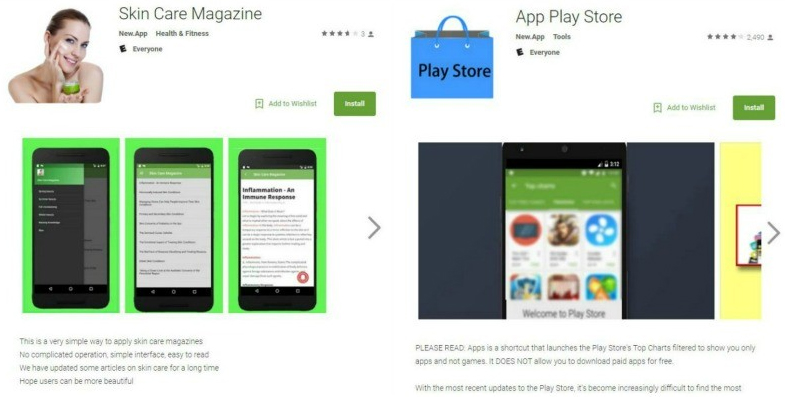
    Most Android phones are becoming victims of harmful apps and it has been drastically increasing. Though Google PlayStore is believed to be safe, such dangerous apps sometimes crawl unknowingly and create a space in the app store. Google Playstore has detected two harmful apps in the PlayStore- Skin Care Magazine and App Play Store.

    These apps are designed in a way that it can silently take away your text messages or the SMS. Certain scammers are waiting to steal your personal information, thus leading to identifying a theft or similar dangerous results.

    This is how a scam works: When an app is installed, it starts downloading certain harmful plugins from a local website. Safe apps retrieve plugins the same way via other sites. This way it seems quite difficult to identify the malicious apps.

    Prevent Malicious Spying Apps 

    Under this topic, we will look at some key points to stay away and be protected and Prevent malicious spying apps .

    • App Stores : It is important to keep your device away from certain third-party app stores as they assess certain apps so as to make it easier for scammers to spread the damage intended software. The safest way to download the apps is through Google Play & Apple’s App Store.
    • Have strong anti-virus software : Anti-virus software is indeed the best way to block the malware from harming your device.
    • Check the apps’ developer : It is very important to check the developer of the app you are trying to download. Duplicate apps will have a different developer name when compared to the actual app’s developer. Hence, it is ideal to check the details of the app’s developer via Google Search.
    • App Reviews : The app stores will always have reviews on popular apps from other users. There can also be reviews from experts, online. This way we can differentiate the malicious apps. If the review gives the warning of the app being malicious, do NOT download it.
    • Update your device : It is quite important to ensure of having the latest security and operating system updates. The updates include certain areas to protect the device from threats.

    Follow the things discussed to Prevent Malicious Spying Apps on your device .

    Prevent Malicious Spying Apps On Android

    Have you felt that someone is spying on u? Is your phone’s battery draining out?Are web pages taking time to load due to internet traffic? It is time to check if your phone’s data is protected by the latest security software. Privacy is quite a big issue and you realize that the personal data is no longer “personal”. If a person accesses your phone, it will be easier to spy on you via a hidden app on your phone.

    These malicious spying apps can control the camera on your phone, get your location through GPS tracker, check the contacts, read private text messages and also listen to your conversations over the phone.

    Read Also : Android: Prevent apps from running at startup(Stop/Disable Apps)

    Here, we will have a look at some free Android apps to prevent the phone from spying apps . If you follow these tips you can Prevent Malicious Spying Apps on Android –

    • Anti Spy Mobile Free : The Anti Spy Mobile app enables you to solve all the spying problems. It is a free anti-spyware scanner for checking and removing spyware apps hidden on your phone. Its professional version can be upgraded; thereby getting automatic background along with fast scanner plus status bar notification.This app uses the recently updated detection techniques that can check even the new Spywares found online.
    • Hidden Device Admin Detector : This is a scanning tool to detect malicious spying apps having the privileges of a device administrator and are hidden from being viewed. Malicious apps on Android devices can control the weaknesses so as to protect them from being found or removed.The app checks the device for the hidden harmful software help in removing the settings of device administrator and hence removing the malware completely.
    • Privacy Scanner (Antispy) : This app was designed to check the smartphone to know if you are being spied on. The parental controls and the surveillance apps are verified; as they are used to spy on your family members via GPS tracking techniques, read contacts, call history, calendar etc. The app checks SpyBubble, eBlaster Mobile, UonMap Spy, a few parental control apps and surveillance apps. It checks by using certain doubtful permissions such as reading SMS, profile, contacts etc.
    • Stop Spy:-Anti Spy Checker : The app enables to check if you installed the software as well the spy software, quickly safely and accurately. If the spyware is found, this Antispy checker enables to remove it from the device.
    • SMS/MMS Spy Detector : The app quickly scans those apps that send or write SMS/MMS/WAP messages automatically.

    Read Also : WannaCry Attack Security Tips- Protect computers from Ransomware

    By this way you can Prevent Malicious Spying Apps on Android phone

    Prevent Malicious Spying Apps on iPhone

    It’s not just the Android phones that are attacked by spyware. Even iPhones become the victims of such malware. These iPhones are connected to a remote iPhone spy app, which keeps a close watch on every move you make.

    Let us see how to find the spyware on iPhone , mean what are the ways to Prevent Malicious Spying Apps on iPhone –

    1. Can others spy on my iPhone ? Wondering if others can spy on your iPhone? Well, then it’s a YES. It is really easy to spy on iPhone without your knowledge. The best example is an ad, wherein you are asked to click on it to win prizes. A similar instance is a mail, saying that you have won prize money for a contest that you never took part in. If your data is really valuable, then you need to be alert to such ads. Once you click on these ads, you never know in what ways would your data be exposed and to whom. Anyone can get spied on. The motive of spying varies from one person to another. This means that people spying on you will never have good motives. Hence, you need to watch out who has ‘Eye Spy’ on you.
    2. How to detect spyware on iPhone ? A very important fact you need to know is that a spyware spying on you will make sure you don’t catch the ‘culprit’. So the developers designing this spyware has to set it in a way that it is not caught easily. If you ever feel someone is really sneaking, you need to be more alert and not give too personal data to undeserving person.
    • Unexplainable Data usage : Did you observe that your data usage has been on the lower side recently? The core reason is the data consumption by spyware on the phone. Spywares send data to the spy, which means that every time you send a text message or talk over the phone, the spy automatically receives the information. So, you need to keep a record of the data all the time.
    • Phone Heating up : The main cause of the phone heating up is that there is an app working in the background without your knowledge. Spywares are apps that work in the background, no matter whether you are using or not. In such situations. you must refine the untrusted apps by removing them from the phone, thereby keeping only the relevant apps.

    Read Also : Battery Health : How to keep your phone or tablet battery healthy

    • Background noises : If you ever hear unbearable noises in the background while having a conversation, it shows that you have been spied on. Spywares are designed in a way that it interrupts your active calls with background noises. You should take steps to get rid of such apps on the first hand.
    • Cydia app : This app shows that your iPhone is not safe anymore. If you did not protect your iPhone from being spied on, then it is too late to have concentrated on your personal data. The main drawback of this app is that it is not easy to detect on your phone. The ultimate solution to protect your phone is to update the iOS system.
    • Encrypted Text messages : Spying apps are designed to control the phone via remote through certain encrypted text messages or commands. In case of spying apps designed with good quality, the messages or commands should not be viewable by the spied person. On the other hand, in some fake apps, these messages could be viewed. Hence, when you see funny messages on your phone, start planning about the privacy of your phone and the data.

    3. How to remove spyware from iPhone ? Considering the amount of information a spyware could retrieve from your phone, all you need to do is ensure that such apps are completely removed from your iPhone. You will be glad to hear that these spying apps can be removed like any other apps. Let us look at some ways to prevent malicious apps on iPhone.

    • Install Anti-spyware program : This is the simplest way to remove such harmful spyware apps. These programs examine the phone and remove them.
    • Update iOS System : This is yet another method of keeping the iPhone away from the spyware apps is by updating the iOS operating system on your phone. As a company, Apple makes out when the threats appear and that is the reason the programs are always up-to-date. Once the iPhone is updated, you can easily detect the spywares and can be deleted using the old operating system. Hence it is important to always update the iOS software.
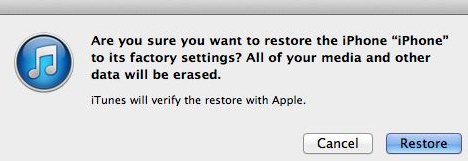
    • Restore your iPhone : Restoring your iPhone will also help you in removing the spyware. However, you may be reminded that the restoring process erases all the existing data from your iPhone. Hence you need to ensure that you have saved a copy via iTunes.

    Read Also : Factory reset iPhone without password or iTunes with data backup

    By this way you can Prevent Malicious Spying Apps on iPhone.

    How to Identify & Prevent Malware Apps on Phone

    A phone is said to be infected when you see the following symptoms:

    • Unexplained data usage
    • Poor performance
    • Low battery life
    • Unable to answer calls

    You can prevent Malware Apps on your phone in following ways –

    • 360 Mobile Security : Full scan of your device is essential to get rid of spyware. It can be set to Manual or automatic.
    • Avast! Mobile Security : This software checks the device, either manually or as per the schedule set. As you browse, it checks and blocks the infected links and also keeps a close watch on the traffic for threats.
    • AVG Antivirus Security : AVG’s app checks the new files and apps for certain possible threats like the malware, spyware and certain viruses. It also recognizes unsafe settings, thus giving suggestions to connect security holes

    Read Also : Google Datally App to Control Mobile Data & WiFi Finder

     Identify Apps That Spy Bank Details

    You can prevent your bank account from theft and protect bank account from spy apps by following the proper guidelines .

    Also it is mandatory to Identify Apps that Secretly Hack Bank Account.

    In this article, we have seen certain harmful spying apps, how it affects Android and iPhones. We also covered topics like how to Prevent Malicious Spying Apps. Moreover, we learned about certain spying apps that access the Bank account secretly.

    Read Also : Safe Online transactions Tips & top 12 safe online transactions methods

    Hope this article has been helpful to you. Enjoy a ‘hack-free’ time.

  • Pokemon Go Earning methods works for Pokemon Lets Go

    Pokemon Go Earning methods works for Pokemon Lets Go

    Damn sure that there is no such innovation like Pokemon Go !!! Now Pokemon Lets Go … So lets discover Pokemon Go Earning methods that really works for Pokemon Lets Go

    Pokemon Go have hit a change in the market trend and social trend all together.Pokemon Go , an augmented reality game . This is a recent trendsetter of this century. Niantic has released this Pokemon Go very recently on July 2016 . Surprisingly within the short period the game became viral enough. Hard to believe , but its true even Pokemon Go has reached a high number of users than Twitter or Facebook also.Pokemon Go is now officially available in some countries and consistently available in other countries. You can download Pokemon Go on any android mobile and iPhone .

    Now the upcoming on Pokemon series is Pokemon Let’s Go, Pikachu ! and Let’s Go, Eevee !

    This game can be played as both Single user and Multiple user.

    Pokemon Go AR + will be a better treat experience for all Android users now . Thus making Pokemon Gen 4 a better game experience to all the Pokemon lovers around globe . Now you can set the eye on not only to catch Pokemon Go shinies . You have something better to catch now , Meltan , the new Pokemon monster that is trending . But if you want to catch Meltan you must first discover the mystery box , if you haven’t find mystery box you would not see the Meltan .

    Android users who wanna experience the actual size of Pokemon creatures and monsters , download the latest Pokemon Go AR+

    Pokemon Go Earning Methods works for Pokemon Lets Go

    When the craze of Pokemon Go is high among people now its scope in economic way is equally increasing. Some people are getting benefited with Pokemon Go commercially. Pokemon Go is a game that have attracted every section of the society. This made everyone to run around the streets to hunt the monsters. It’s all crazy but it also opened up a new business market for many .Now Pokemon Go make money easily .

    Here we tell you How does Pokemon Go make money  –

    Pokemon Go is not all about fun !!!  It is a mixed platform where you get fun, you earn playing Pokemon Go , you buy services to play Pokemon Go and you sell services related to Pokemon Go .

    1. Boost your local Business / a new start up with Pokemon Go

    If you are a new local start up or a local business person looking to attract more customers. Now you can do it with Pokemon Go to increase your revenue. It’s a best way to make money with Pokemon Go .

    pokeman go for business

    Many restaurants, bars, family now make money with Pokemon Go by attracting people by placing a lure near any PokeStop . People now want to get a refreshment center where there is entertainment. So using Pokemon Go to attract is one way to earn money using Pokemon Go.

    1. Start a Recharging Station in PokeStop Parks

    People on their craze to hunt monsters come to parks to find the monsters and their phone battery will drop out with their great time of playing .Here it is a chance to make your business . Go to such PokeStops and place a table and start renting Portable chargers to Pokemon Go players.

    1. Start a Refreshment centre in PokeStop Parks

    POKESTOP REFRESHMENT

    Recharge the Pokemon Go players with your refreshment centre. Offer water bottles, soft drink cans, snacks. For sure this will not give you over stock if you place it on a good PokeStop and to avoid further complications check the terms of license at your place to set up your refreshment centre. This is a way to earn money using Pokemon Go .

    1. Sell your Pokemon Go account on High rates

    You have a Pokemon Go account with crossing about 15 to 20 levels then you are sure you can win it again. But some crazy Pokemon Go lovers want to play the game without touching fingers till the main levels. So you can sell your top account for a good amount of money.This is a way to make money by playing Pokemon Go.

    Note – According to Pokemon Go’s Terms and conditions selling your account is banned. So try to rent it. Why you kill a golden duck in one stab!!!

    1. Claim the best gigs

    TaskRabbit & Mechanical Turk are now your place to earn some extra money with Pokemon Go .Here you have to find out the high paying gigs.

    1. Drive With a Pokemon Go Player and earn

    pokeman go bus

    The 24/7 Pokemon Go bus is now hitting the business in Newyork and in every part of the country we can find freelance drivers who take the Pokemon Go players around for drive to help them find the monsters around the streets .It is a brilliant way to earn more money with Pokemon Go.

    1. Become a pet/kid caretaker

    Lovers of the game now look for a pet/kid caretaker as they need to make their time with their favorite game to hunt monsters. Irrespective of your educational background here a new world of opportunity is opened before you to earn more money with Pokemon Go.

    1. Be a Pokemon Go adviser to earn with Pokemon Go

    Help Pokemon Go lovers by giving them guidance to install, tips on playing Pokemon Go  and to find the monsters. You can earn by this and also by giving advice to new start up to use your idea of boosting their business with Pokemon Go & tell them how does Pokemon Go make money.

    1. Advertise your PokeStop and earn

    Advertise your PokeStop and get players gather there which will eventually give a market for your business. One multinational trick used by an American mobile company was brilliant to give free data plan on Pokemon Go app to attract more customers. So it’s equally a working plan for the small, big to Multinational companies to earn money with Pokemon Go.

    1. Sell rare Pokemon

    Again we remind you selling is banned but still you can rent your Pokemon Go account . In  case you are not willing to play much but you have the rare Pokemon captured then your account is still worth. It doesn’t matters how many levels you crossed . All that matters is how many rare Pokemon you have captured in the game.

    1. Become an egg hatcher to earn Playing Pokemon Go

    Those who are lazy to walk and run but curious to play the game look for someone who can walk for them and find the rare Pokemon Go Egg and hatch it for them. For this service you can charge well. It’s an easy way to earn playing Pokemon Go .

    These are the all possible ways to earn money with Pokemon Go .These are the  guidelines to reap money with your service , efficiency and how you can get benefit from a PokeStop . Near the PokeStop lucky you are to earn more.

    Earn with Fun & Pay for Fun !!!

  • How to Fix “Cannot Take Photo” Problem on iPhone and iPad

    How to Fix “Cannot Take Photo” Problem on iPhone and iPad

    Fix Cannot Take Photo Problem on iPhone and iPad Method 1:

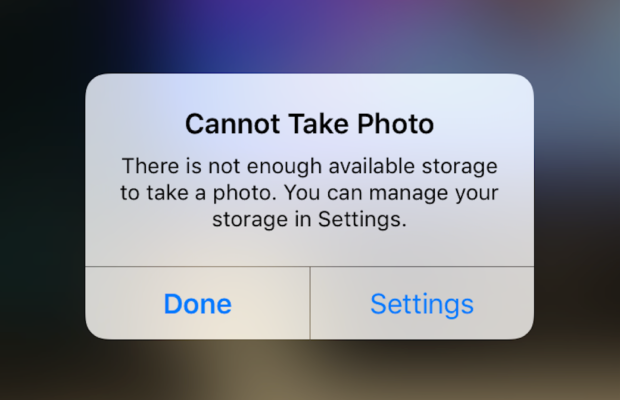
    When you go to take a photo using the Camera or any other app like Instagram, WhatsApp etc on your Apple iPhone or iPad but while doing so if you find an error message which says “Can’t Take Photo – There is not enough available storage to take a photo“.  You can manage your storage in Settings. Now you might get confused about what to do. Don’t worry because your savior(which is me by the way) can help you with this simple steps to Fix Cannot Take Photo.

    Why Can’t I Take Pictures on my iPhone

    I got an issue “my iPhone wont let me take pictures because of storage“. To fix this issue you need to remove some unwanted files and free up the storage. So choosing Settings on this message will provide you with a list of apps and the amount of storage they are using. You can also reach this screen at any other time by going to Settings > General > Usage.

    If you want you could select an app that is taking up a large amount of space(basically browse which apps take up the most space or an app that you can delete (deleting pictures or videos and music also creates extra space)) and then click on Delete app. That could or could not free enough storage to fit photos. Moreover you may not want to do this in case you like and value every single one of your apps.

    Read Also:

    How to Factory reset iPhone without password or iTunes

    Record iPhone iPad Screen on Windows & Mac

    Quick Fix Cannot Take Photo Problem on iPhone and iPad

    In majority of the cases iTunes(your culprit) is loading your device with music and regularly causing this message to appear when you use the Camera or any other app.

    You would free some space while you are out and by deleting some unwanted music from the device. What I to do is locate an entire album that I can live without and delete it using these steps(which is obviously hypothetical in my case ).

      • 1) Open the Music app on your iPhone.
      • 2) Select a particular artist (if you downloaded them legally) that has songs stored on the device you would like to delete.
      • 3)You can also locate a music track that is already stored on the device but if the track has a cloud icon that means it is not stored on the device(probably stored on iCloud). You will have to find tracks that do not have this icon.
      • 4) You then have to swipe left across the name of the song. A button is bound appear that says Delete.
      • 5) You than have to tap delete(putting a stone on your heart) and the song is gone forever. Repeat these steps any number of times unless you have freed enough space.

    Read Also : Best iTunes Cleanup Software for better iTunes experience

    Fix Cannot Take Photo Problem on iPhone and iPad Method 2:

    1) Connect your iPhone to a Mac or Windows PC which has iTunes installed already.
    2) Open iTunes(most complex step of this method so be careful :)).
    3) Select on your device then choose “Music“.
    4) Uncheck the ‘Automatically fill free space with songs‘ button(Though I think it would be a checkbox).
    5) Choose ‘Sync’.

    If these steps do not fix storage error message from regularly appearing then you might need to remove some apps, photos maybe even videos from the device(Unfortunately you have to set your priorities).

    Using iMyFone Umate

    iMyFone Umate is a special memory cleaner for mac and is highly recommended for increasing storage space on the device and cleaning up the unwanted phone memory. All I demand is that you have to follow these few simple steps and your phone will be new:

    • Connect your phone to open the cleaner.
    • iMyFone Umate will do a quick scan.
    • With one click, all the junk files and unwanted files will be removed.
    • It clean many hidden temporary files with a click
    • It clear’s the junk files to improve iPhone performance

    Some other programs are:

    • Photo manager

    It basically compresses the images/photos compressing the size of each photo.

    • App manager

    It has a one click mechanism to mass remove all the unwanted Apps.(If you have any)

    Hopefully the above given methods would serve your purpose but if you want something extra then below are some extra tips.

    To exchange information on one iPhone with other are extremely valuable for you on the high probability that you need to duplicate substance from old iPhone to new purchased iPhone /iPhone Plus. You might want to replicate information. For instance songs, photographs, from your personal iPhone to a new iPhone.

    iCloud goes down your iPhone once every day. Since it is a good idea to reinforcement your old iPhone to iCloud one last time before moving. So nothing is passed up as a major opportunity. In the Settings explore the iCloud storage and Backup opportunities and tap on Back up. This may require significant investment relying upon the measure of information to be replicated.

  • Roku Tricks-Must Try for streaming success (Roku user manual FAQ)

    Roku Tricks-Must Try for streaming success (Roku user manual FAQ)

    Roku Tricks 

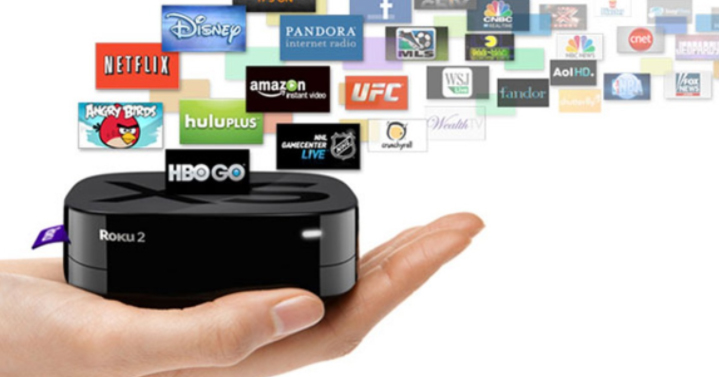
    Roku has been introduced as the fastest and the most powerful streaming player available. It has been loved by most youngsters to watch movies and their favorite TV series and also to play games on HD TV. If the space in the Roku player is insufficient, we can use an external memory card to store their most loved programs or games and can insert into the slot. Roku streaming stick avails 1500+ streaming channels, which can access more than 200,000 movies, games, sports and much more of entertainment.But there are so many things you don’t know about this streaming device so here is all the amazing Roku tricks.

    Roku is easy to connect to any system having HDMI port.

    Roku TV Setup: 

    To set up the Roku TV, at first, we need a Roku Set-top box and HDMI cable to which the device has to be connected.

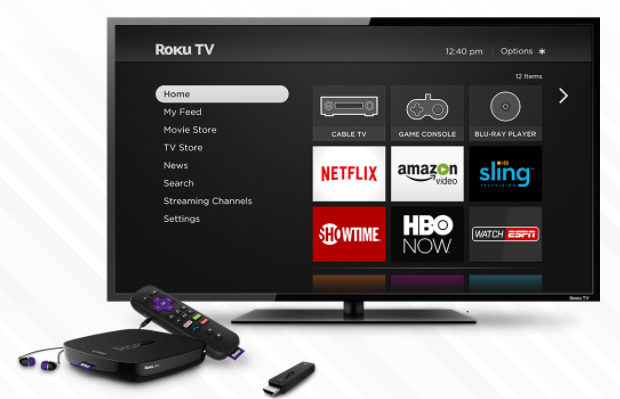
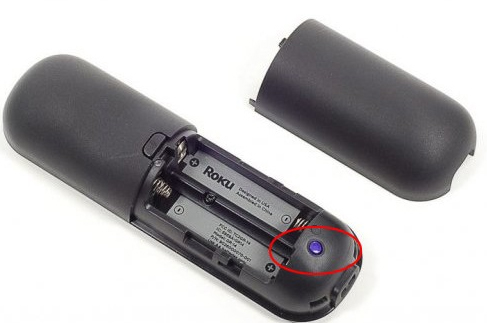
    Step 1As the Roku box gets connected, we get to see the following display on the TV screen:
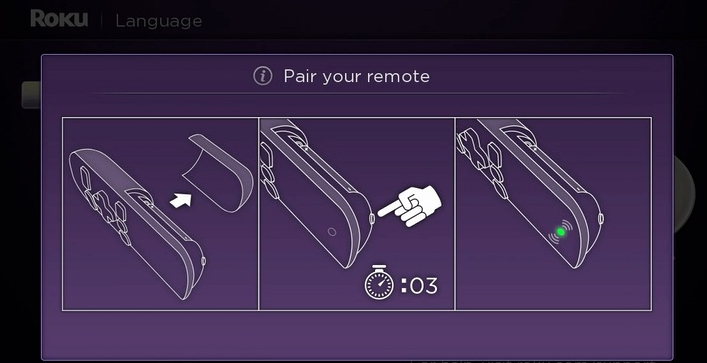
    There is a small button behind the Roku remote. When it is pressed, it gets connected as well.
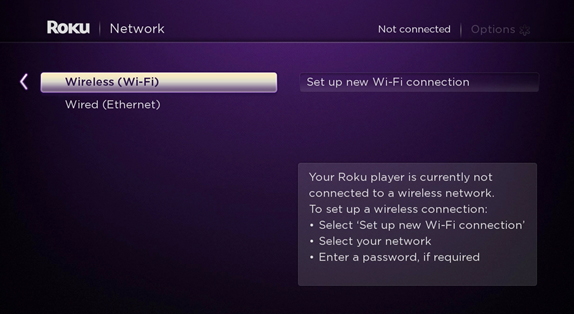
    Step 2: Make the Internet connection Settings. There are two options: Wireless(Wi-Fi) or Wired Connection;           which is Ethernet. 
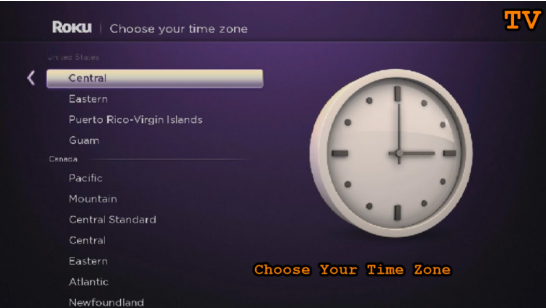
    Step 3: Set the Time Zone
    Step 4: Activate Roku by linking to its website
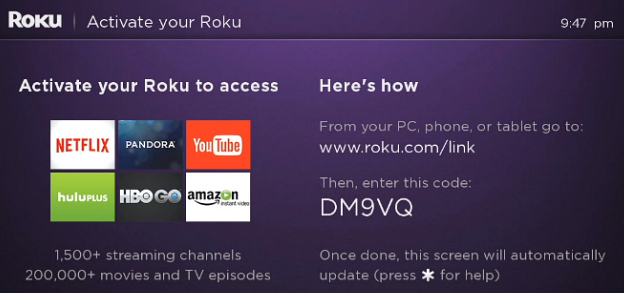
     

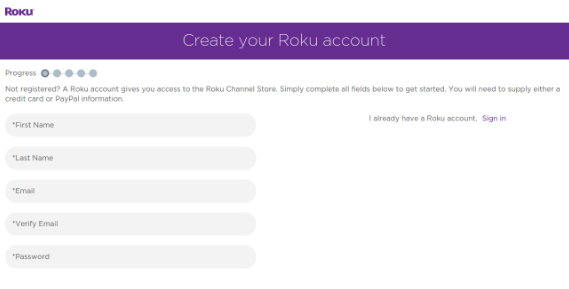
    This step is very important and necessary as it enables in importing the favorite channels on one page or  screen. One needs to create a new account if they have no existing accounts and to make payments.
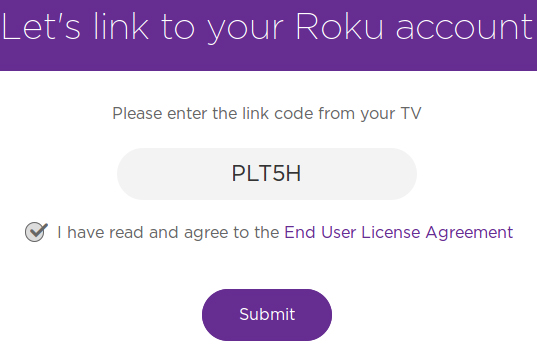
    The code is entered to link to the Roku account. Once the code is entered Submit button is clicked, it shows a page where we need to register, in case of a New User of Roku.
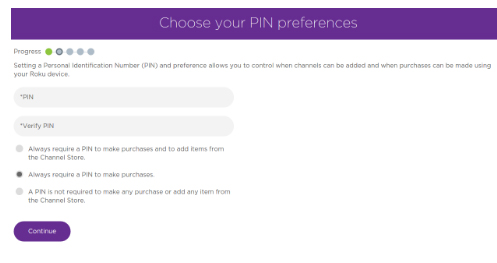
    PIN has a vital role in verification of authenticate installation of Roku channels.
    Step 5: Once the linking is complete, the Roku box setup procedure on TV is complete.

    There is another way, exclusively for the Developers, to enable Developers Mode, by pressing Home 3x,           Up 2x, Right, Left, Right, Left, RightThe whole set should be processed in 10 seconds.
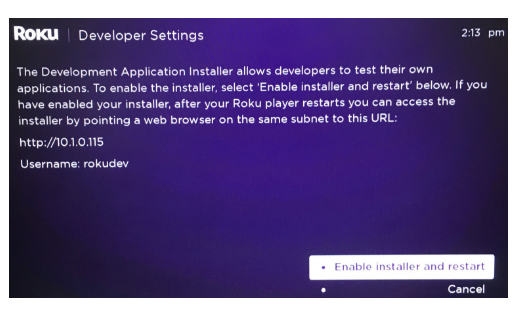
     

    The link further opens, from the Web browser, to install the channels into Roku, however it does not download    from the store. The link is based on the IP address generated as we connect to the Internet, and it changes from  time to time. A password has to be setup so as to make the Roku frame work through IDE.
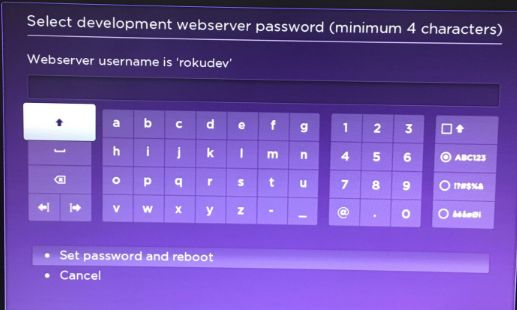
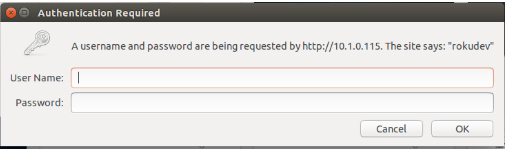
    Step 6: In the final step, a pop-up appears, as a the web browser is opened with the link; wherein the username,     by default being rokudev is entered.

    How Roku Works:

    Roku is a digital player, usually placed near the television. It receives the digital transmission from the broadband internet via Wi-Fi signal or Ethernet cable. The signal is processed and displayed onto the TV screen. A remote control is used to select the program and to control the signal.This is how roku works.

    To set up Roku, the device is plugged into the electrical socket . The device is then connected to the home data network, either with a wired connection or using the built-in WiFi receiver. Finally, it is connected to the television using different cable types. One can choose from the type of HDMI, composite, or in the top of the line model, component video. An audio can also be sent to the receiver using standard RCA stereo cords in all models, or      using an optical digital cable with their top of the line unit.


    Types of Roku Digital Video Players:

    Roku provides three different Roku types/models:

    1. Roku HD: This model being the base model costs $59.99, streaming the content to the television at 720p,   the lower of the two high-definition television standards.
    2. Roku XD: This Roku version falls in the middle of the line,selling at the price of $79.99 including free shipping. It has a better remote, with enhanced WiFi capability, and 1080p output. This model also facilitates instant replay.
    3. Roku XDS. The top of the line model costs $99.99 including free shipping; supporting component video     and optical digital audio outputs. With this model, USB port can also be used in playing back media from    memory sticks and other devices.
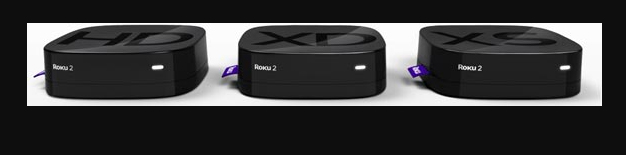
     

    Before buying this streaming stick one must be pretty clear about the Pros and Cons of Roku .


    Roku Tricks- A Few Top Chosen:

    If one has been using Roku for quite some time, but still have not known much about this amazing player, then you got to know that it can do more Roku Tricks that you ever would imagine! So, let’s get to know about the real magical things Roku could do.

    Roku could be just a streaming stick or a set-top box, it delivers incomparable video quality on your TV set, for instance, Netflix, HBO, Hulu etc. May it be the on-screen keyboard… or the default interface theme…. all these could be improved.

    There are ways to have a great experience with Roku as a media player, rather than just using the default   provisions. Here are a few Roku Tricks:

    Using Phone as Roku Keyboard

    Nothing is more annoying, than using remote to operate the on-screen  keyboard. For instance, to sign in to Netflix account, could be distressing as it would take time; in searching the movie or the actor’s name.
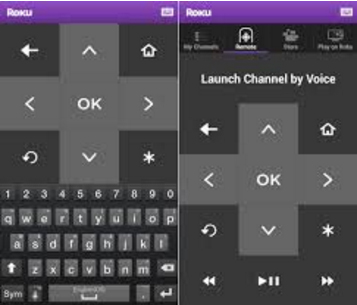
    Good news is that there is an easier way to fix this; using your phone as an alternative. Roku apps, either in    Android or iOS platform takes the role of Roku remote, and even providing a keyboard to make data entry in a   faster and easier way.This is the method to use mobile as Roku keyboard.

    Using phone for roku voice search 

    Did you know there is a faster way than than typing on the keyboard? Yes, it is our voice. If you have a Roku 3($79.85 at Amazon) or Roku 4, it gives us the joy of voice search on roku , which can be operated through Roku remote.
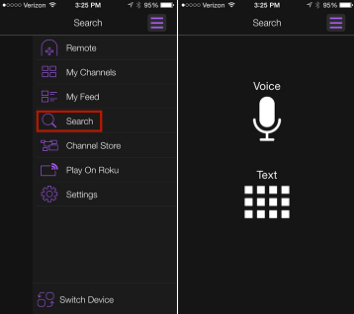
    If you don’t have these latest versions, don’t you worry; the Roku app avails its own voice-search capabilities. So,    for instance, you could rather choose to say, “Leonardo DiCaprio” than typing over the keyboard and wasting time, and find his available movies.

    Streaming media from phone or tablet

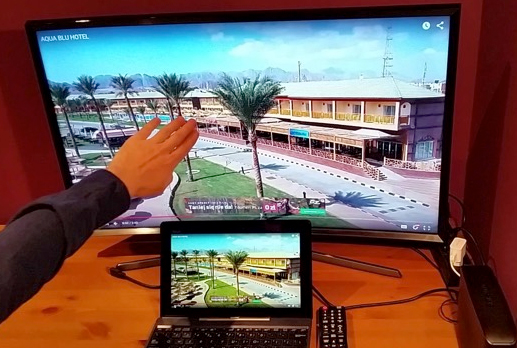
    If you wish to show the collection photos and videos taken at the recent wedding, graduation, soccer game or zombie escape room stored in the phone or tablet, show it BIG,on the  TV screen. The Roku app also enables to cast photos, videos and music from your mobile device to the Roku device. Just start the app and tap Play On Roku. One can choose the type of media to be streamed, then the specific media. BINGO! Watch it BIG from a Smaller device.

    If you want to advance the way of enjoying the media, have a copy or a Reflection of the phone or tablet onto the Roku device.
    Turning the Roku Remote into Universal Remote

    If you are a true fan of Roku, you would definitely love the design of the remote this device has, especially the shortcut buttons for Netflix & Amazon likes. However, the lagging point of the Roku remote is that it cannot control the TV.

    However, there is an option to program a Sideclick. Provisioned for the different streamers such as Apple TV      and Amazon Fire TV, this clever add-on, as described in the best possible way, puts itself beside your Roku    remote,  thus adding a row of readily available programmable buttons: power, volume up/down, channel up/down, input and A/B  last available for whatever functions you want.
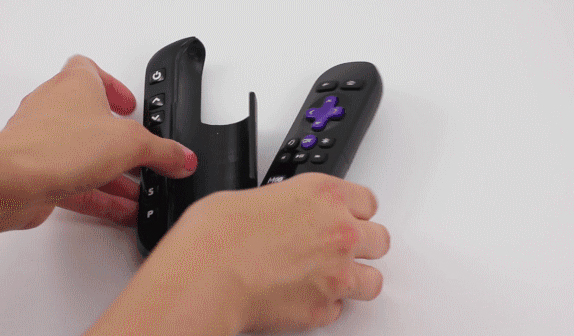
    The Sideclick starter kit for this streaming media player is sold at $29.99  comprising four adapter clips to accommodate the majority of Roku remotes. It’s a quite an option for those tired of use-and-throw remotes.

    Read Also : Connect dual displays / monitors to one computer on Windows & MAC

    Organizing Channels

    As the channels added to the Roku library gets more, there will more confusion in finding the favorite ones. Here is when one need to find some way to reorganize their library.
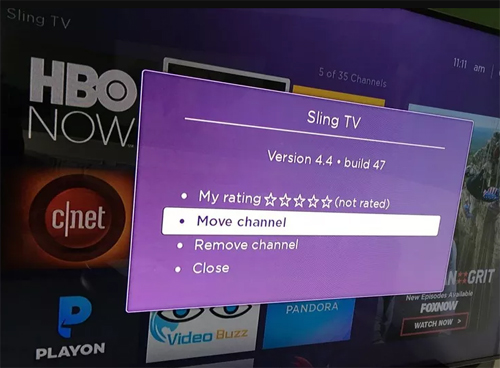
    The Know-how:  Find a roku channel to be relocated, e.g, HBO Now  and highlight it with the remote. Don’t select it completely; just move the cursor over it and it gets highlighted. Next, press the Option button on the remote-  looking like an Asterisk, then choose Move Channel. Now use the direction pad to move the icon accordingly, and observe as how others move out of the way.

    Once the location is set press OK to complete the procedure. Repeat when required.

    Reorganizing Channels in Roku App

    There has been an update of the Roku app with a great feature; it is the Channels screen, just like the one seen on TV, making a much faster access to the favorite channels.

    However, it cannot be easily understood as to how the channels are organised. This is because the app cannot be used to directly organize. One has to hit up the real Roku on TV. Then just follow the steps shown in Organize  your roku channels. Or, if you go through in detail, check out How to organize your channels in the new               Roku 4.0 app.

    Choosing A New Theme

    Not finding the default interface theme that attractive? No problem, everyone need not like the color Purple  If you venture into the Settings menu and choose Themes, you’ll see a handful of other options.                                                                                                  
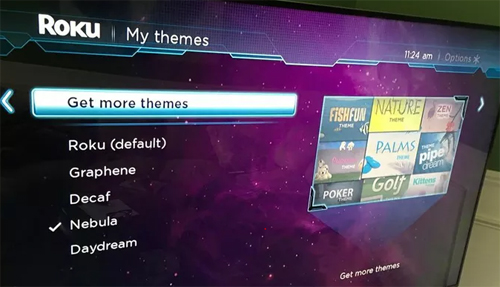
    To be even better, as you select Get more themes option, Roku Channel Store’s Themes collection is displayed.    Themes can be browsed online too. Here they have a huge collection ranging from Golf to Garfield to Star Trek.   The bad news is that, these extra-features are not for free. Their costs range from 99 cents to $2.99.

    Installing a Screensaver

    Are you really irritated by the boring logo of Roku playing over the idle screen?  Well, we shall have some interesting screensaver instead. When it comes to selecting the theme, get into the Settings menu and choose Screensaver, enabling a lot of options. When choosing a different theme on roku , there would be other screensaver options too. For instance, When Nebula theme is selected, it displays a Digital clock in place of the Roku logo.

    Renaming Roku

    There could be that a person owns more than one Roku device. In such a case, it would be more sensible in naming each of them differently. To make Roku being identified easily, based on where it is kept, it could be named as “Bedroom Roku” and “Living Room Roku”  rather than the simple Roku 1 & Roku 2.
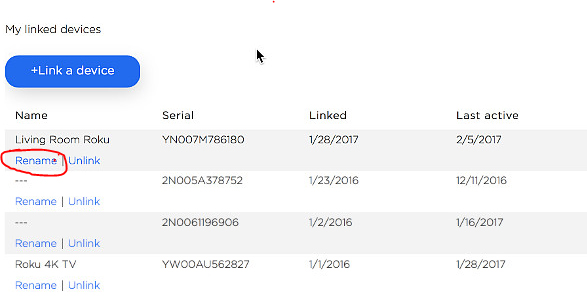
     

    There is a lagging point renaming the roku device. You cannot rename using the app. You have to sign in to my.roku.com, then go to MyAccount page.  Scroll down to see the list of connected devices; click Rename                  next to the one to be changed. If confused with the name, refer to the app regarding this,

    • tap Setting>Switch Device, to see the set of connected Roku
    • look for the serial number
    • match it with the one shown in the portal. 

    Read Also : The ultimate guide to make Windows run faster (Boost Computer Speed)

    Installing Private Channels

    Besides the usual mainstream channels such as Netflix and Hulu, Roku supports private channels too.Now, you would surely ask if it is coded as “Adult”. Answer could be Yes and No. Besides these private channels, there are a variety of family-friendly options at Roku-Channels.com, RokuGuide.com, StreamFree.tv and RokuChannels.tv. One great option is The Silent Movie Channel, enabling selections from the likes of Charlie Chaplin, Buster Keaton and Rudolph Valentino. To add a Silent    movie channel, head to Roku’s My Account page in your browser and click Add a Channel, then enter the code ROLLEM.

    The channel should be added automatically to the Roku device within 24 hours,; however you should force on it      by going to the Channel Store on your Roku, then exiting back out to the main menu.

    Read Also : Unavoidable Parental Control Apps ,Tools to monitor children

    Finding a Lost Roku Remote

    Although the design of the Roku remote is quite attractive, it could be easily  lost because of its size. If you are lucky to have a Roku 4 ($96.95 at BuyDig.com) or Roku Ultra, it is more easier  to find the lost remote. Both models have a button on top; when pressing it, the remote makes a sound.

    If you wish to know about the ways to choose the type of sound it makes, Check this: Quickly find a lost Roku remote with this trick.

    Here we have learnt a few amazing Roku tricks on how Roku device can be used.


    Roku Hacks- Top 10 :

    Roku has been the most popular and the demanded brand among all the set-top boxes, dongles and the        streaming sticks used. Imagine those stunning 4K and HDR picture quality with advanced remote control,                    fully loaded with movies, videos and television series episodes, 3,500+ channels, private listening system                and so on. If these could make you go ‘On the toes’ with excitement, we assure you, these Roku Hacks could make Home entertainment even more enjoyable.

    Let us explore a few interesting ways of enjoying Roku:

    Finding Hidden Roku  Channels

     There are a few “Deep Secrets” stored in Roku streaming player, which should be screened carefully with high privacy. Such channels are normally not shown in the Channel Store which is displayed by default. To view, go to Add Channel , which would connect to Account page. You need to log in using Roku username and password, add the access code for the private channel. Bingo! It gives a link to the updated private channel’s access code.

    Plex roku

    As Plex put off its sign-up rates,having a stand-alone server to the Roku device makes a great impact. Plex enables customization all your streaming content completely, along with summary and extracts for better understanding. It allows to arrange all contents, to watch them from the portable devices.You can share Plex with family and friends. To do so, download the app by going to Preferences > Connect Plex Account > verify PIN code. Here we go! It also avails a whole lot of skins and themes to choose from.

    Smart Control Roku

    Have you got enough of the same old remote? Feeling cozy hanging on to smartphone? It is time you catch hold onto the downloadable apps iOS,Android,Windows or Linux. It enables screen mirroring in most of the Roku models.

    Instant Notification

    Doesn’t this get you on nerves when an episode of your favorite program keeps you  waiting? Don’t lose your hair pulling them out with anger by checking the manuals every time.  Roku can be set to “notify” on a new available show, video or episode . Just go to the main menu, select My Feed, and search movies, shows, actors, singers, and directors you wish to follow. Roku would automatically inform on anything new coming up.

    Cloud Music

    Not interesting in listening to Pandora or Spotify? Get your own music media like MP3 and video files. MP3Tunes are easily installed into Roku Channel Store under MUSIC. It enables to stream directly from the MP3Tunes servers straight to television. Now enjoy 10GB for free— Time to party! So, when you want Full on entertainment at home, this channel could be set to link in the music straight from your TV set along with videos  or themes.

    Share Memories

    Have you gifted a Roku to your parents, girlfriend or your kid living elsewhere. Did you know that this streaming device lets you share memories with your loved ones? Your dear ones could be updated with new family photos and videos by simply downloading the Roksbox channel on Roku and Dropbox app on their PC or tablet. Folder can be shared through Dropbox and lets them instantly get to have a look at your photos, videos,  and other downloads which they can play directly to their Roku.

    Roku Live Feeds

    Now, you can directly watch the World Cup to UFC Fight Night, NFL, and other entertainment showcases LIVE!Directly from the stadium or arena somewhere, from your cozy couch in living room.These LIVE channels could be accessed by installing Ustream Channel (access code: IN4DN) and access the most watched    sports events, news updates, live concerts, gala and other live streams.

    Keep Track on Roku

    It is observed that the channels are arranged in the way they have been added. However, with Roku,      these most watched or frequently checked channels can be tracked. Choose Options on the Home screen and rearrange in a way that all the favorite channels would be on the top in the channel list.

    Roku Screensaver

    Have you ever imagined have the huge flatscreen as a Wall-art? Well, make this imagination come into life!There are a hundreds of channels to choose from, for those amazing screensavers- Christmas Winter, Weather4us, Aquarium, Cities At Night, Landscapes, Kittens and other animals, Beaches, Fantasy, and so on.  Just check the Screensavers and apps to get the ones you want.

    Read Also : Hard and Soft Reset Roku Manual – Fix Frozen Roku Streaming Stick

    Hope you have got the Best of Hacks. There have been many hacks launched everyday to make your Roku  experience far better than how it is for now. You can always update yourself with the latest of Roku Tricks & Hacks. 

    Enjoy Roku with more Tricks and get Hacked”. 
  • Roku Pros & Cons -Reasons to Choose Roku Streaming Stick

    Roku Pros & Cons -Reasons to Choose Roku Streaming Stick

    Roku Pros & Cons -Reasons to Choose Roku Streaming Stick

    Today Streaming sticks are really a craze but before you buy a streaming stick you must have a fair idea about the reviews , pros and cons of streaming sticks at the market.Here is the Roku Pros & Cons this will help you to take a decision whether to choose roku streaming stick or not to choose roku

    Roku Pros:

    These are the top reason to choose roku where it showcases all the Pros of Roku Streaming stick .

    Cost: Being priced below $100, one can enjoy online content on their television. Even when the paid channel subscription ends, one can retrieve the costs if the cable TV  or satellite television service is being cancelled.

    Read Also : Hard and Soft Reset Roku Manual – Fix Frozen Roku Streaming Stick

    Simplicity:  Before the introduction of Roku, there was a necessity to run some sort of video cable from the computer to the television. Later, a keyboard and a mouse were used to browse programming. The television and the computer could not be used at the same time. However, in case of Roku, it is easier and more simple to install this device and its use has no impact over the computer.

    Flexibility:  Every Roku models is supporting wired as wireless both kind of Internet connection, & most tv connection cable. Hence, it shows that, compatibility is not an issue.

    Remote Control: Roku has many advantages over the usage of computer, including the remote control.     The remote control makes it easy to control the programming without even moving out of the couch.

    Future proof: Roku promises to be updated with its software, hence supporting new channels and features.

    These are the advantages/pros of Roku to choose roku streaming stick.

    Roku cons:

    These are the top reason to not choose roku where it showcases all the Cons of Roku Streaming stick 

    1. No program storage: Certain people enjoy the ease of recording television shows and movies using a     Tivo, a DVR-enhanced cable or satellite box, a media server, or a home media center and network. The     Roku devices have a coupon instant replay feature, however, users are not provided with the library of their favorite programs or shows
    2. No inter-connectivity: Most people own more than one television. Modern media networks enable in starting and stopping programs from different locations, but Roku has not yet added this feature.
    3. Absence of High-definition Internet: Roku supports high-definition at 1080p, but few Internet sites actually support high-definition Internet. Even when a signal is sent at 1080p, certain users have Internet connection handling such a signal. There a few Internet service providers who limit the customers’ monthly usage, hoping to reduce the loss of cable television subscriptions caused by the use of digital video players.
    4. Another Box:  There may already be a DVD player as well as a cable box or satellite tuner. This could be another device placed near television and one more remote control on the coffee table.

    Thus now you can take a decision whether to buy or not to buy roku streaming stick based on Roku Pros & Cons.

  • How to reset iPod Nano or steps to unfreeze iPod Nano

    How to reset iPod Nano or steps to unfreeze iPod Nano

    Reset iPod Nano or unfreeze iPod Nano

    A thing you should note is that i am obviously telling you a how to reset iPod Nano or unfreeze iPod Nano and it may work for majority but obviously not for everyone who have an iPod Touch. So I will try to enlist out the guidelines for as many as I can and another thing to note is that if by any chance the resetting procedure does not work. You can also try to connect the device to a power source and then try again(Standard Indian remedy for repairing anything ).

    Hopefully if you follow steps carefully you would be able to reset iPod Nano quickly.

    How to Reset iPod Nano (6th and 7th Generation)

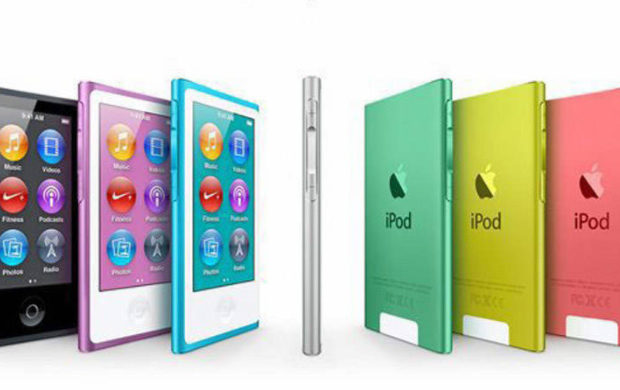
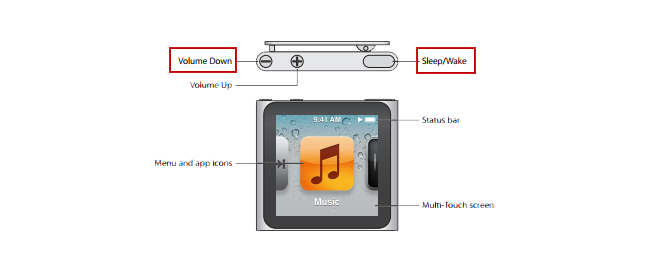
    For the latest editions of the iPod Nano the process is a bit different to reset iPod Nano. So let me start off with the sixth generation iPod Nano at first. So to reset iPod Nano perform the following steps:

    1) To reset the sixth generation of iPod Nano you have to press down the Sleep/Wake button and the Volume Down button simultaneously for minimum time of 8 seconds and for the iPod Nano seventh generation you have to press the Sleep or Wake button simultaneously with the Home button until the screen turns black and this would reset your iPod Nano.

    Read Also : Record iPhone iPad Screen on Windows & Mac

    How to Reset iPod Nano 1st to 5th Generation

    Method of resetting an iPod Nano is just same as it is for an iPod Classic. The procedure to reset iPod Nano are as follows:

    1. First step to reset iPod Nano is to toggle the hold switch to both on and off(You have to slide your hand to the Hold button and then then turn it off again). This finishes your first step to reset iPod Nano successfully.

    2. Now for the second step to reset iPod Nano you have to press and hold the Menu and until the Apple logo appears on the screen which could take time ranging from 6 to 10 seconds. If you don’t do it properly you might have to repeat this step to reset iPod Nano several times. Hopefully this will reset your iPod Nano.

    You can also reset an iPod Mini in the similar manner as the above steps.

    Read Also : Factory reset iPhone without password or iTunes with data backup

    How to unfreeze or reset an iPod classic

    1) The first step includes toggling the hold switch to on and off. (You can slide it to Hold and then turn it off again.)

    2) Now for the second step you have to press and hold the menu and select buttons simultaneously until the Apple logo appears. It may take the time of about 6 to 10 seconds and you might need to repeat this step.

    Take some notes to ameliorate your procedure as follows:

    Now read carefully if you are having any problems resetting the iPod then go ahead and adjust it on a plane flat surface. Then be sure about your finger is pressing the select button is not in contact with any other part of your device. Be sure that you are pressing the menu button in the outside of the click wheel and not near the center.

    Read Also : Best iTunes Cleanup Software for better iTunes experience

    What would you do in case resetting iPod Nano didn’t work

    The steps to restart an iPod nano are simple but what if they did not work. There are two things you should try at that point:

    • 1) First you plug your iPod nano into a reliable power source (just similar to your computer or a wall outlet) and then let it charge for almost 1 hour. There is a probability of the battery running down and maybe it just needs to recharge
    • 2) If you have for sure charged your nano and tried all the above given reset steps and your iPod nano still does not work. Then you may have a larger problem than it may seem and maybe you could not solve it on your own. Feel free to contact apple to get more help.

    This is what you have to do if resetting iPod nano doesn’t work This will help you to unfreeze your iPod nano any versions easily.

  • Android boot Fix – Steps to Try When Your Android Won’t Boot

    Android boot Fix – Steps to Try When Your Android Won’t Boot

    Android boot fix steps to try when your android won’t boot

    This article we will focus on the steps to fix android when it is not able to boot , so you can read step by step to do Android boot Fix

    If your favorite android device decided to take a vacation and  android not boot properly then this condition is not acceptable and the idea of troubleshooting it is in itself haunting. The solution to this puzzle could be related to either an errant app or a corrupted Android OS or in worst case bad hardware.

    Android boot Fix steps

    Here are the steps you can take if your Android won’t boot.

    1) Soft Reset Android boot Fix

    • Your android phone might need a soft reset to boot. On majority of the devices you can press and hold the Power button for about 15 seconds to soft reset/boot. This way you can do Android boot Fix.

    Read Also : Enable / Disable JavaScript : Mozilla Firefox Hacks

    2. Pull out the battery

    • For nearly every problematic issue where an android device would not start I always suggest to pull out the battery (only if it is removable so never go to extreme lengths at start) first and leave it sunlight for time nearly about 20 seconds and then reinstall the battery and see if the issue of boot persists.  

    Read Also : How to Use Google Assistant on Android Devices (Without Root)

    This particular step could seem like it would not work but I know for sure that it has helped numerous android users.

    3. Verify for Stuck Buttons

    •  In certain case it can cause the Volume,power,home buttons to stick which prevents the start up/boot. So try to remove this case of not being able to boot.

    4. Try a Soft Reset

    • On majority android phones you can simultaneously press and hold the “Volume Down” and “Power” buttons. Keep pressing them for a time of nearly 20 seconds to soft reset/boot the phone.

    Read Also : WhatsApp Exclusive Guide – Everything about WhatsApp Features

    5. Remove Connected Hardware

    • By any chance if you have an SD card, otg-cable or any other items plugged into the device then unplug them. A bad/corrupted SD card or headset could cause issues. Though this are on rare occasions it could stop your boot.

    6. Ensure Device Has Enough Power

    • In this case your device would not turn on at all or maybe is stuck in an infinite startup loop/boot. It may not have enough power so attach the power adapter to the your phone and then plug it into a wall outlet. Remember not to use a connection to a computer or any other device because the power you would get is not suffice to power majority of android devices in the right away and could affect the boot.Another issue could be the actual battery(about which we talked earlier). To see if you can borrow a battery from a friend with a similar specification and give that a try for a boot. Though you may want to purchase a new one or maybe try a used battery out. You can also return the battery to the store if it does not help(if it is in the warranty period).

    Read Also : Improve The World With Smartphone -Top 10 Hacks

    7. Start Android in Safe Mode

    • If you have installed a particular app that either is not compatible with your device or malfunctions then it could cause the system to hang at a blank screen or continually force to close items stopping the boot process. In any case you will want to find out how to start your device or boot in Safe Mode. Safe Mode will start the device with only the basic OS required to start the device. This will usually allow you to access the android OS so that you can remove whichever app that may be causing the issue for boot.Since most devices start in safe mode by simultaneously pressing and holding the Menu or Volume Down button while you power to the device is on. If you are not confident on how to start your particular phone in Safe Mode then search the google. You can also check the documentation provided with your Android phone especially for boot.

    8. Factory Hard Reset Android

    • Alas! if you have tried every of the above steps and no option seems to work then you might want to do a factory reset operation on your phone for a boot and mind you doing so will wipe all data from the memory of the phone(usually not SD card data like music or photos).There are many different ways to perform a factory reset with a hardware button combination just before your phone’s android system loads. Look in your manual or search for what the button combination is for your particular device. They are different for almost every different phone. Only if you are not confident on how to factory reset your device. Check the documentation provided with your phone(the manual you probably never read).

    9. Repair

    • After trying everything if none of the above steps work then there may be a hardware issue that you are most likely unable to solve for yourself which is stopping your boot process. At this point I would seek help from the manufacturer or the retail store that sold you the phone. It is

    These are the steps to try when android doesn’t boot and thus will help your android to work well smoothly .