Fix Cannot Take Photo Problem on iPhone and iPad Method 1:
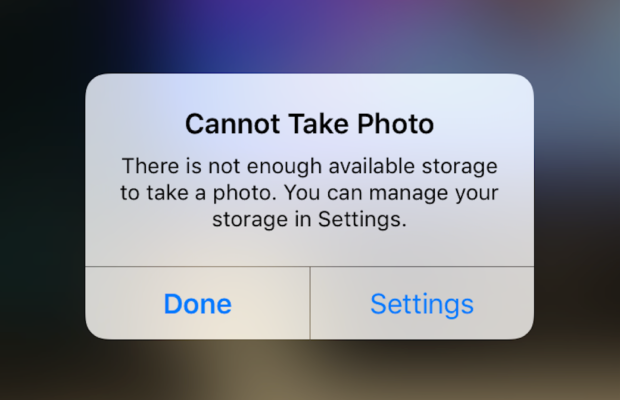
When you go to take a photo using the Camera or any other app like Instagram, WhatsApp etc on your Apple iPhone or iPad but while doing so if you find an error message which says “Can’t Take Photo – There is not enough available storage to take a photo“. You can manage your storage in Settings. Now you might get confused about what to do. Don’t worry because your savior(which is me by the way) can help you with this simple steps to Fix Cannot Take Photo.
Why Can’t I Take Pictures on my iPhone
I got an issue “my iPhone wont let me take pictures because of storage“. To fix this issue you need to remove some unwanted files and free up the storage. So choosing Settings on this message will provide you with a list of apps and the amount of storage they are using. You can also reach this screen at any other time by going to Settings > General > Usage.
If you want you could select an app that is taking up a large amount of space(basically browse which apps take up the most space or an app that you can delete (deleting pictures or videos and music also creates extra space)) and then click on Delete app. That could or could not free enough storage to fit photos. Moreover you may not want to do this in case you like and value every single one of your apps.
Quick Fix Cannot Take Photo Problem on iPhone and iPad
In majority of the cases iTunes(your culprit) is loading your device with music and regularly causing this message to appear when you use the Camera or any other app.
You would free some space while you are out and by deleting some unwanted music from the device. What I to do is locate an entire album that I can live without and delete it using these steps(which is obviously hypothetical in my case ).
1) Open the Music app on your iPhone.
2) Select a particular artist (if you downloaded them legally) that has songs stored on the device you would like to delete.
3)You can also locate a music track that is already stored on the device but if the track has a cloud icon that means it is not stored on the device(probably stored on iCloud). You will have to find tracks that do not have this icon.
4) You then have to swipe left across the name of the song. A button is bound appear that says Delete.
5) You than have to tap delete(putting a stone on your heart) and the song is gone forever. Repeat these steps any number of times unless you have freed enough space.
Fix Cannot Take Photo Problem on iPhone and iPad Method 2:
1) Connect your iPhone to a Mac or Windows PC which has iTunes installed already.
2) Open iTunes(most complex step of this method so be careful :)).
3) Select on your device then choose “Music“.
4) Uncheck the ‘Automatically fill free space with songs‘ button(Though I think it would be a checkbox).
5) Choose ‘Sync’.
If these steps do not fix storage error message from regularly appearing then you might need to remove some apps, photos maybe even videos from the device(Unfortunately you have to set your priorities).
Using iMyFone Umate
iMyFone Umate is a special memory cleaner for mac and is highly recommended for increasing storage space on the device and cleaning up the unwanted phone memory. All I demand is that you have to follow these few simple steps and your phone will be new:
Connect your phone to open the cleaner.
iMyFone Umate will do a quick scan.
With one click, all the junk files and unwanted files will be removed.
It clean many hidden temporary files with a click
It clear’s the junk files to improve iPhone performance
Some other programs are:
Photo manager
It basically compresses the images/photos compressing the size of each photo.
App manager
It has a one click mechanism to mass remove all the unwanted Apps.(If you have any)
Hopefully the above given methods would serve your purpose but if you want something extra then below are some extra tips.
To exchange information on one iPhone with other are extremely valuable for you on the high probability that you need to duplicate substance from old iPhone to new purchased iPhone /iPhone Plus. You might want to replicate information. For instance songs, photographs, from your personal iPhone to a new iPhone.
iCloud goes down your iPhone once every day. Since it is a good idea to reinforcement your old iPhone to iCloud one last time before moving. So nothing is passed up as a major opportunity. In the Settings explore the iCloud storage and Backup opportunities and tap on Back up. This may require significant investment relying upon the measure of information to be replicated.
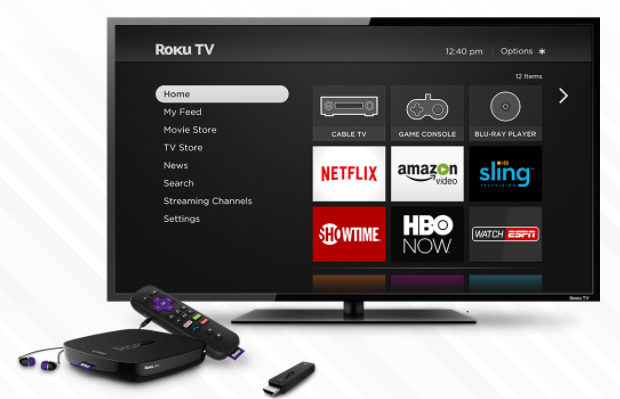
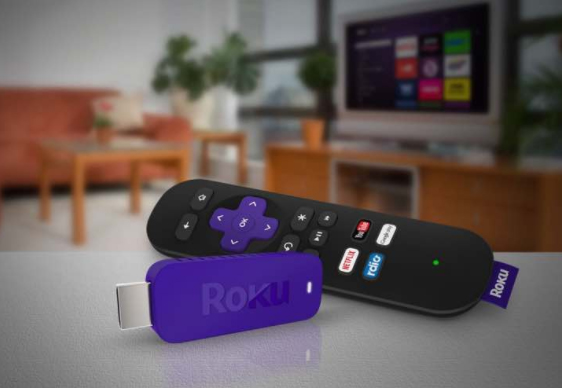
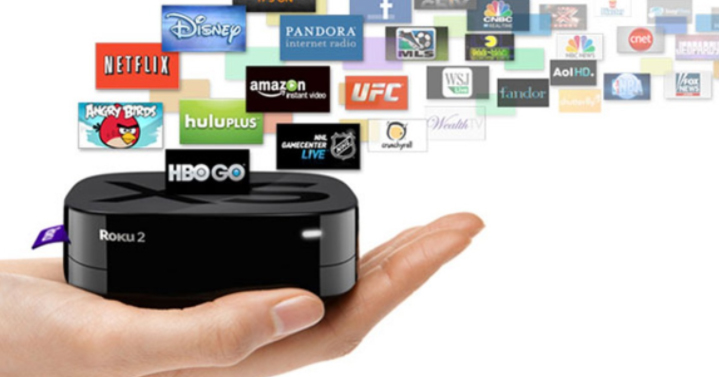
Rokuhas been introduced as the fastest and the most powerful streaming player available. It has been loved by most youngsters to watch movies and their favorite TV series and also to play games on HD TV. If the space in the Roku player is insufficient, we can use an external memory card to store their most loved programs or games and can insert into the slot. Roku streaming stick avails 1500+ streaming channels, which can access more than 200,000 movies, games, sports and much more of entertainment.But there are so many things you don’t know about this streaming device so here is all the amazing Roku tricks.
Roku is easy to connect to any system having HDMI port.
Roku TV Setup:
To set up the Roku TV, at first, we need a Roku Set-top boxand HDMI cable to which the device has to be connected.
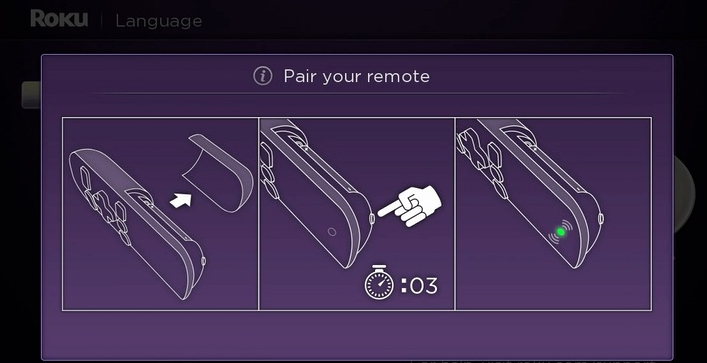
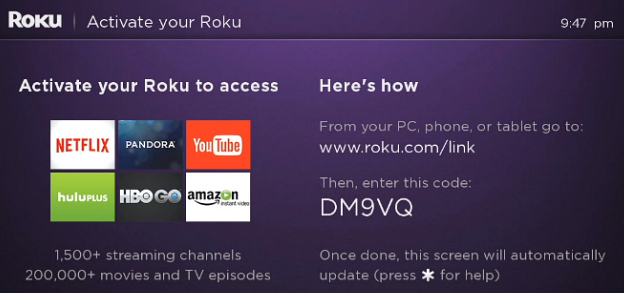
Step 1: As the Roku box gets connected, we get to see the following display on the TV screen:
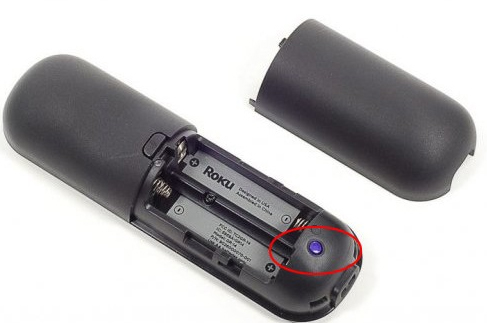
There is a small button behind the Roku remote. When it is pressed, it gets connected as well.
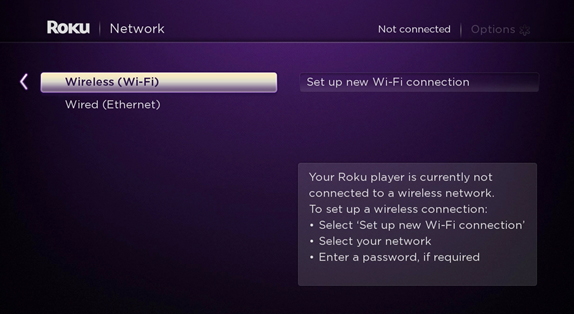
Step 2: Make the Internet connection Settings. There are two options: Wireless(Wi-Fi) or Wired Connection; which is Ethernet.
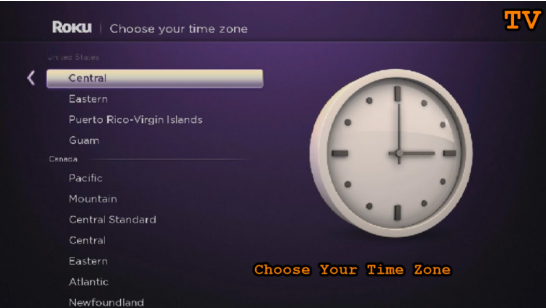
Step 3: Set the Time Zone
Step 4:Activate Roku by linking to its website
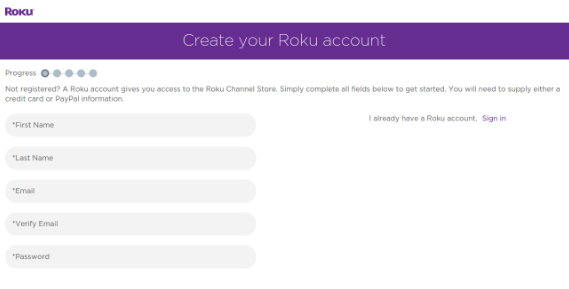
This step is very important and necessary as it enables in importing the favorite channels on one page or screen. One needs to create a new account if they have no existing accounts and to make payments.
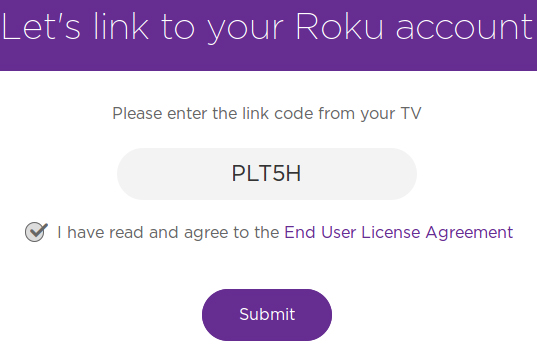
The code is entered to link to the Roku account. Once the code is entered Submitbutton is clicked, it shows a page where we need to register, in case of a New User of Roku.
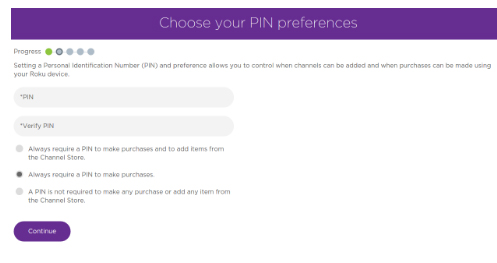
PIN has a vital role in verification of authenticate installation of Roku channels.
Step 5: Once the linking is complete, the Roku box setup procedure on TV is complete.
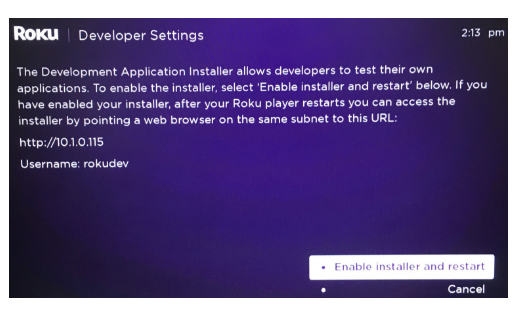
There is another way, exclusively for the Developers, to enable Developers Mode, by pressing Home 3x, Up 2x, Right, Left, Right, Left, Right. The whole set should be processed in 10 seconds.
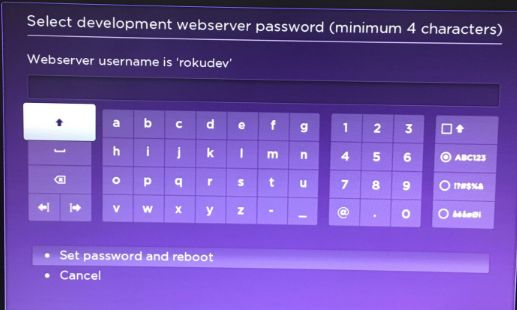
The link further opens, from the Web browser, to install the channels into Roku, however it does not download from the store. The link is based on the IP address generated as we connect to the Internet, and it changes from time to time. A password has to be setup so as to make the Roku frame work through IDE.
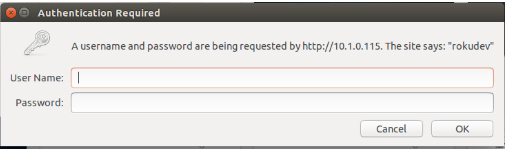
Step 6: In the final step, a pop-up appears, as a the web browser is opened with the link; wherein the username, by default being rokudev is entered.
How Roku Works:
Roku is a digital player, usually placed near the television. It receives the digital transmission from the broadband internet via Wi-Fi signal or Ethernet cable. The signal is processed and displayed onto the TV screen. A remote control is used to select the program and to control the signal.This is how roku works.
To set up Roku, the device is plugged into the electrical socket . The device is then connected to the home data network, either with a wired connection or using the built-in WiFi receiver. Finally, it is connected to the television using different cable types. One can choose from the type of HDMI, composite, or in the top of the line model, component video. An audio can also be sent to the receiver using standard RCA stereo cords in all models, or using an optical digital cable with their top of the line unit.
Types of Roku Digital Video Players:
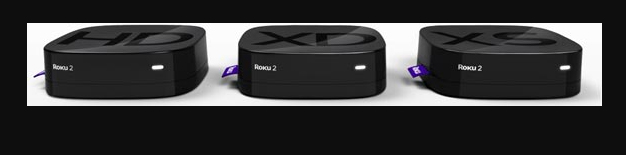
Roku provides three different Roku types/models:
Roku HD: This modelbeing the base model costs $59.99, streaming the content to the television at 720p, the lower of the two high-definition television standards.
Roku XD: This Roku version falls in the middle of the line,selling at the price of $79.99 including free shipping. It has a better remote, with enhanced WiFi capability, and 1080p output. This model also facilitates instant replay.
Roku XDS. The top of the line model costs $99.99 including free shipping; supporting component video and optical digital audio outputs. With this model, USB port can also be used in playing back media from memory sticks and other devices.
Before buying this streaming stick one must be pretty clear about the Pros and Cons of Roku .
Roku Tricks- A Few Top Chosen:
If one has been using Roku for quite some time, but still have not known much about this amazing player, then you got to know that it can do more Roku Tricks that you ever would imagine! So, let’s get to know about the real magical things Roku could do.
Roku could be just a streaming stick or a set-top box, it delivers incomparable video quality on your TV set, for instance, Netflix, HBO, Hulu etc. May it be the on-screen keyboard… or the default interface theme…. all these could be improved.
There are ways to have a great experience with Roku as a media player, rather than just using the default provisions. Here are a few Roku Tricks:
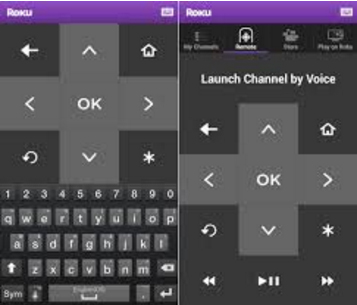
Using Phone as Roku Keyboard
Nothing is more annoying, than using remote to operate the on-screen keyboard. For instance, to sign in to Netflix account, could be distressing as it would take time; in searching the movie or the actor’s name.
Good news is that there is an easier way to fix this; using your phone as an alternative. Roku apps, either in Android or iOS platform takes the role of Roku remote, and even providing a keyboard to make data entry in a faster and easier way.This is the method to use mobile as Roku keyboard.
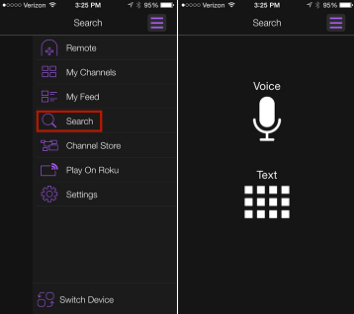
Using phone for roku voice search
Did you know there is a faster way than than typing on the keyboard? Yes, it is our voice. If you have a Roku 3($79.85 at Amazon) or Roku 4, it gives us the joy of voice search on roku , which can be operated through Roku remote.
If you don’t have these latest versions, don’t you worry; the Roku app avails its own voice-search capabilities. So, for instance, you could rather choose to say, “Leonardo DiCaprio” than typing over the keyboard and wasting time, and find his available movies.
Streaming media from phone or tablet
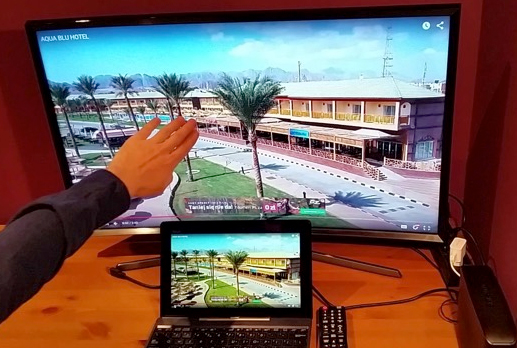
If you wish to show the collection photos and videos taken at the recent wedding, graduation, soccer game or zombie escape room stored in the phone or tablet, show it BIG,on the TV screen. The Roku app also enables to cast photos, videos and music from your mobile device to the Roku device. Just start the app and tap Play On Roku. One can choose the type of media to be streamed, then the specific media. BINGO! Watch it BIG from a Smaller device.
If you want to advance the way of enjoying the media, have a copy or a Reflection of the phone or tablet onto the Roku device.
Turning the Roku Remote into Universal Remote
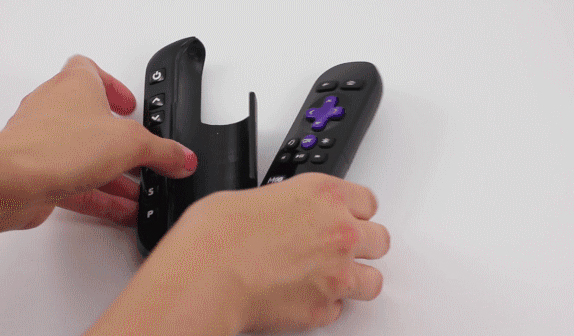
If you are a true fan of Roku, you would definitely love the design of the remote this device has, especially the shortcut buttons for Netflix & Amazon likes. However, the lagging point of the Roku remote is that it cannot control the TV.
However, there is an option to program a Sideclick. Provisioned for the different streamers such as Apple TV and Amazon Fire TV, this clever add-on, as described in the best possible way, puts itself beside your Roku remote, thus adding a row of readily available programmable buttons: power, volume up/down, channel up/down, input and A/B last available for whatever functions you want.
The Sideclick starter kit for this streaming media player is sold at $29.99 comprising four adapter clips to accommodate the majority of Roku remotes. It’s a quite an option for those tired of use-and-throw remotes.
As the channels added to the Roku library gets more, there will more confusion in finding the favorite ones. Here is when one need to find some way to reorganize their library.
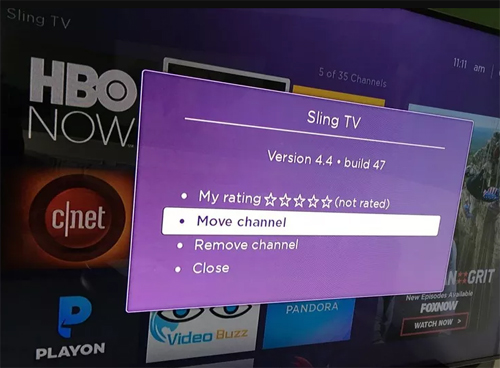
The Know-how: Find a roku channel to be relocated, e.g, HBO Now and highlight it with the remote. Don’t select it completely; just move the cursor over it and it gets highlighted. Next, press the Option button on the remote- looking like an Asterisk, then choose Move Channel. Now use the direction pad to move the icon accordingly, and observe as how others move out of the way.
Once the location is set press OK to complete the procedure. Repeat when required.
Reorganizing Channels in Roku App
There has been an update of the Roku app with a great feature; it is the Channels screen, just like the one seen on TV, making a much faster access to the favorite channels.
However, it cannot be easily understood as to how the channels are organised. This is because the app cannot be used to directly organize. One has to hit up the real Roku on TV. Then just follow the steps shown in Organize your roku channels. Or, if you go through in detail, check out How to organize your channels in the new Roku 4.0 app.
Choosing A New Theme
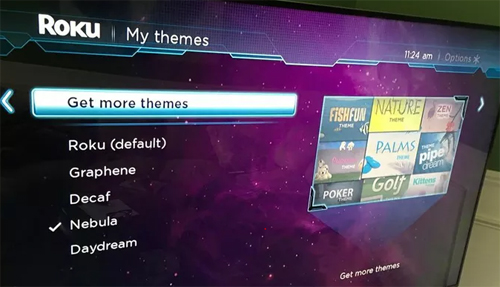
Not finding the default interface theme that attractive? No problem, everyone need not like the color Purple If you venture into the Settings menu and choose Themes, you’ll see a handful of other options.
To be even better, as you select Get more themes option, Roku Channel Store’s Themes collection is displayed. Themes can be browsed online too. Here they have a huge collection ranging from Golf to Garfield to StarTrek. The bad news is that, these extra-features are not for free. Their costs range from 99 cents to $2.99.
Installing a Screensaver
Are you really irritated by the boring logo of Roku playing over the idle screen? Well, we shall have some interesting screensaver instead. When it comes to selecting the theme, get into the Settings menu and choose Screensaver, enabling a lot of options. When choosing a different theme on roku , there would be other screensaver options too. For instance, When Nebula theme is selected, it displays a Digital clock in place of the Roku logo.
Renaming Roku
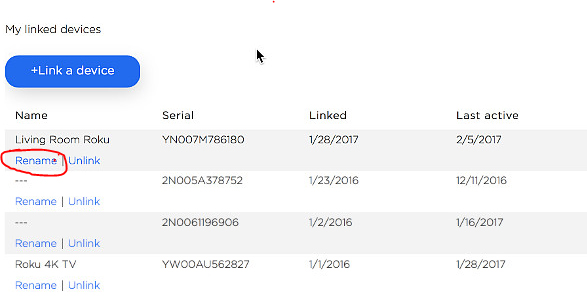
There could be that a person owns more than one Roku device. In such a case, it would be more sensible in naming each of them differently. To make Roku being identified easily, based on where it is kept, it could be named as “Bedroom Roku” and “Living Room Roku” rather than the simple Roku 1 & Roku 2.
There is a lagging point renaming the roku device. You cannot rename using the app. You have to sign in to my.roku.com, then go to MyAccount page. Scroll down to see the list of connected devices; click Rename next to the one to be changed. If confused with the name, refer to the app regarding this,
tap Setting>Switch Device, to see the set of connected Roku
Besides the usual mainstream channels such as Netflix and Hulu, Roku supports private channels too.Now, you would surely ask if it is coded as “Adult”. Answer could beYes and No. Besides these private channels, there are a variety of family-friendly options at Roku-Channels.com, RokuGuide.com, StreamFree.tv and RokuChannels.tv. One great option is The Silent Movie Channel, enabling selections from the likes of Charlie Chaplin, Buster Keaton and Rudolph Valentino. To add a Silent movie channel, head to Roku’s My Account page in your browser and click Add a Channel, then enter the code ROLLEM.
The channel should be added automatically to the Roku device within 24 hours,; however you should force on it by going to the Channel Store on your Roku, then exiting back out to the main menu.
Although the design of the Roku remote is quite attractive, it could be easily lost because of its size. If you are lucky to have a Roku 4 ($96.95 atBuyDig.com) or Roku Ultra, it is more easier to find the lost remote. Both models have a button on top; when pressing it, the remote makes a sound.
If you wish to know about the ways to choose the type of sound it makes, Check this: Quickly find a lost Roku remote with this trick.
Here we have learnt a few amazing Roku tricks on how Roku device can be used.
Roku Hacks- Top 10 :
Roku has been the most popular and the demanded brand among all the set-top boxes, dongles and the streaming sticks used. Imagine those stunning 4K and HDR picture quality with advanced remote control, fully loaded with movies, videos and television series episodes, 3,500+ channels, private listening system and so on. If these could make you go ‘On the toes’ with excitement, we assure you, these Roku Hacks could make Home entertainment even more enjoyable.
Let us explore a few interesting ways of enjoying Roku:
Finding Hidden Roku Channels
There are a few “Deep Secrets” stored in Roku streaming player, which should be screened carefully with high privacy. Such channels are normally not shown in the Channel Store which is displayed by default. To view, go to Add Channel , which would connect to Account page. You need to log in using Roku username and password, add the access code for the private channel. Bingo! It gives a link to the updated private channel’s access code.
Plex roku
As Plex put off its sign-up rates,having a stand-alone server to the Roku device makes a great impact. Plex enables customization all your streaming content completely, along with summary and extracts for better understanding. It allows to arrange all contents, to watch them from the portable devices.You can share Plex with family and friends. To do so, download the app by going to Preferences > Connect Plex Account > verify PIN code. Here we go! It also avails a whole lot of skins and themes to choose from.
Smart Control Roku
Have you got enough of the same old remote? Feeling cozy hanging on to smartphone? It is time you catch hold onto the downloadable apps iOS,Android,Windows or Linux. It enables screen mirroring in most of the Roku models.
Instant Notification
Doesn’t this get you on nerves when an episode of your favorite program keeps you waiting? Don’t lose your hair pulling them out with anger by checking the manuals every time. Roku can be set to “notify” on a new available show, video or episode . Just go to the main menu, select My Feed, and search movies, shows, actors, singers, and directors you wish to follow. Roku would automatically inform on anything new coming up.
Cloud Music
Not interesting in listening to Pandora or Spotify? Get your own music media like MP3 and video files. MP3Tunes are easily installed into Roku Channel Store under MUSIC. It enables to stream directly from the MP3Tunes servers straight to television. Now enjoy 10GB for free— Time to party! So, when you want Full on entertainment at home, this channel could be set to link in the music straight from your TV set along with videos or themes.
Share Memories
Have you gifted a Roku to your parents, girlfriend or your kid living elsewhere. Did you know that this streaming device lets you share memories with your loved ones? Your dear ones could be updated with new family photos and videos by simply downloading the Roksbox channel on Roku and Dropbox app on their PC or tablet. Folder can be shared through Dropbox and lets them instantly get to have a look at your photos, videos, and other downloads which they can play directly to their Roku.
Roku Live Feeds
Now, you can directly watch the World Cup to UFC Fight Night, NFL, and other entertainment showcases LIVE!Directly from the stadium or arena somewhere, from your cozy couch in living room.These LIVE channels could be accessed by installing Ustream Channel (access code: IN4DN) and access the most watched sports events, news updates, live concerts, gala and other live streams.
Keep Track on Roku
It is observed that the channels are arranged in the way they have been added. However, with Roku, these most watched or frequently checked channels can be tracked. Choose Options on the Home screen and rearrange in a way that all the favorite channels would be on the top in the channel list.
Roku Screensaver
Have you ever imagined have the huge flatscreen as a Wall-art? Well, make this imagination come into life!There are a hundreds of channels to choose from, for those amazing screensavers- Christmas Winter, Weather4us, Aquarium, Cities At Night, Landscapes, Kittens and other animals, Beaches, Fantasy, and so on. Just check the Screensavers and apps to get the ones you want.
Read Also : Hard and Soft Reset Roku Manual – Fix Frozen Roku Streaming Stick
Hope you have got the Best of Hacks. There have been many hacks launched everyday to make your Roku experience far better than how it is for now. You can always update yourself with the latest of Roku Tricks & Hacks.
Roku Pros & Cons -Reasons to Choose Roku Streaming Stick
Today Streaming sticks are really a craze but before you buy a streaming stick you must have a fair idea about the reviews , pros and cons of streaming sticks at the market.Here is the Roku Pros & Cons this will help you to take a decision whether to choose roku streaming stick or not to choose roku
Roku Pros:
These are the top reason to choose roku where it showcases all the Pros of Roku Streaming stick .
Cost: Being priced below $100, one can enjoy online content on their television. Even when the paid channel subscription ends, one can retrieve the costs if the cable TV or satellite television service is being cancelled.
Simplicity:Before the introduction of Roku, there was a necessity to run some sort of video cable from the computer to the television. Later, a keyboard and a mouse were used to browse programming. The television and the computer could not be used at the same time. However, in case of Roku, it is easier and more simple to install this device and its use has no impact over the computer.
Flexibility: Every Roku models is supporting wired as wireless both kind of Internet connection, & most tv connection cable. Hence, it shows that, compatibility is not an issue.
Remote Control: Roku has many advantages over the usage of computer, including the remote control. The remote control makes it easy to control the programming without even moving out of the couch.
Future proof: Roku promises to be updated with its software, hence supporting new channels and features.
These are the advantages/pros of Roku to choose roku streaming stick.
Roku cons:
These are the top reason to not choose roku where it showcases all the Cons of Roku Streaming stick
No program storage: Certain people enjoy the ease of recording television shows and movies using a Tivo, a DVR-enhanced cable or satellite box, a media server, or a home media center and network. The Roku devices have a coupon instant replay feature, however, users are not provided with the library of their favorite programs or shows
No inter-connectivity: Most people own more than one television. Modern media networks enable in starting and stopping programs from different locations, but Roku has not yet added this feature.
Absence of High-definition Internet: Roku supports high-definition at 1080p, but few Internet sites actually support high-definition Internet. Even when a signal is sent at 1080p, certain users have Internet connection handling such a signal. There a few Internet service providers who limit the customers’ monthly usage, hoping to reduce the loss of cable television subscriptions caused by the use of digital video players.
Another Box: There may already be a DVD player as well as a cable box or satellite tuner. This could be another device placed near television and one more remote control on the coffee table.
Thus now you can take a decision whether to buy or not to buy roku streaming stick based on Roku Pros & Cons.
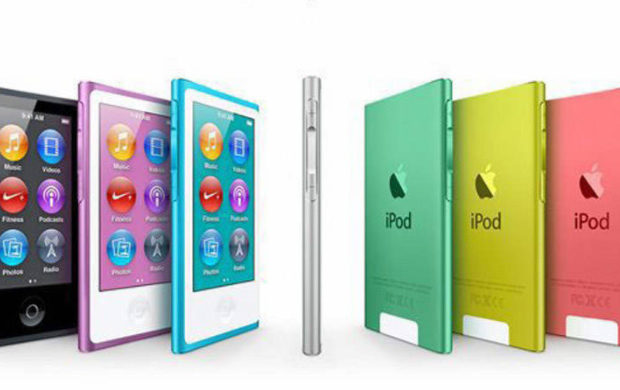
A thing you should note is that i am obviously telling you a how to reset iPod Nano or unfreeze iPod Nano and it may work for majority but obviously not for everyone who have an iPod Touch. So I will try to enlist out the guidelines for as many as I can and another thing to note is that if by any chance the resetting procedure does not work. You can also try to connect the device to a power source and then try again(Standard Indian remedy for repairing anything ).
Hopefully if you follow steps carefully you would be able to reset iPod Nano quickly.
How to Reset iPod Nano (6th and 7th Generation)
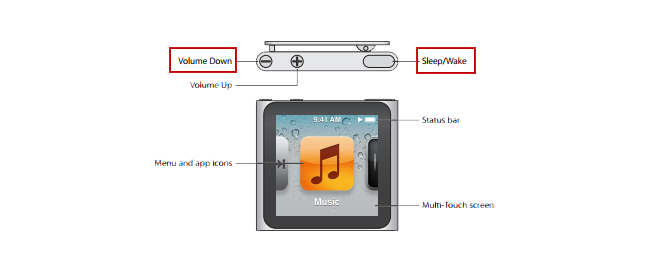
For the latest editions of the iPod Nano the process is a bit different to reset iPod Nano. So let me start off with the sixth generation iPod Nano at first. So to reset iPod Nano perform the following steps:
1) To reset the sixth generation of iPod Nano you have to press down the Sleep/Wake button and the Volume Down button simultaneously for minimum time of 8 seconds and for the iPod Nano seventh generation you have to press the Sleep or Wake button simultaneously with the Home button until the screen turns black and this would reset your iPod Nano.
Method of resetting an iPod Nano is just same as it is for an iPod Classic. The procedure to reset iPod Nano are as follows:
1. First step to reset iPod Nano is to toggle the hold switch to both on and off(You have to slide your hand to the Hold button and then then turn it off again). This finishes your first step to reset iPod Nano successfully.
2. Now for the second step to reset iPod Nano you have to press and hold the Menu and until the Apple logo appears on the screen which could take time ranging from 6 to 10 seconds. If you don’t do it properly you might have to repeat this step to reset iPod Nano several times. Hopefully this will reset your iPod Nano.
You can also reset an iPod Mini in the similar manner as the above steps.
1) The first step includes toggling the hold switch to on and off. (You can slide it to Hold and then turn it off again.)
2) Now for the second step you have to press and hold the menu and select buttons simultaneously until the Apple logo appears. It may take the time of about 6 to 10 seconds and you might need to repeat this step.
Take some notes to ameliorate your procedure as follows:
Now read carefully if you are having any problems resetting the iPod then go ahead and adjust it on a plane flat surface. Then be sure about your finger is pressing the select button is not in contact with any other part of your device. Be sure that you are pressing the menu button in the outside of the click wheel and not near the center.
What would you do in case resetting iPod Nano didn’t work
The steps to restart an iPod nano are simple but what if they did not work. There are two things you should try at that point:
1) First you plug your iPod nano into a reliable power source (just similar to your computer or a wall outlet) and then let it charge for almost 1 hour. There is a probability of the battery running down and maybe it just needs to recharge
2) If you have for sure charged your nano and tried all the above given reset steps and your iPod nano still does not work. Then you may have a larger problem than it may seem and maybe you could not solve it on your own. Feel free to contact apple to get more help.
This is what you have to do if resetting iPod nano doesn’t work. This will help you to unfreeze your iPod nano any versions easily.
Android boot fix steps to try when your android won’t boot
This article we will focus on the steps to fix android when it is not able to boot , so you can read step by step to do Android boot Fix
If your favorite android device decided to take a vacation and android not boot properly then this condition is not acceptable and the idea of troubleshooting it is in itself haunting. The solution to this puzzle could be related to either an errant app or a corrupted Android OS or in worst case bad hardware.
Android boot Fix steps
Here are the steps you can take if your Android won’t boot.
1) Soft Reset Android boot Fix
Your android phone might need a soft reset to boot. On majority of the devices you can press and hold the Power button for about 15 seconds to soft reset/boot. This way you can do Android boot Fix.
For nearly every problematic issue where an android device would not start I always suggest to pull out the battery (only if it is removable so never go to extreme lengths at start) first and leave it sunlight for time nearly about 20 seconds and then reinstall the battery and see if the issue of boot persists.
This particular step could seem like it would not work but I know for sure that it has helped numerous android users.
3. Verify for Stuck Buttons
In certain case it can cause the Volume,power,home buttons to stick which prevents the start up/boot. So try to remove this case of not being able to boot.
4. Try a Soft Reset
On majority android phones you can simultaneously press and hold the “Volume Down” and “Power” buttons. Keep pressing them for a time of nearly 20 seconds to soft reset/boot the phone.
By any chance if you have an SD card, otg-cable or any other items plugged into the device then unplug them. A bad/corrupted SD card or headset could cause issues. Though this are on rare occasions it could stop your boot.
6. Ensure Device Has Enough Power
In this case your device would not turn on at all or maybe is stuck in an infinite startup loop/boot. It may not have enough power so attach the power adapter to the your phone and then plug it into a wall outlet. Remember not to use a connection to a computer or any other device because the power you would get is not suffice to power majority of android devices in the right away and could affect the boot.Another issue could be the actual battery(about which we talked earlier). To see if you can borrow a battery from a friend with a similar specification and give that a try for a boot. Though you may want to purchase a new one or maybe try a used battery out. You can also return the battery to the store if it does not help(if it is in the warranty period).
If you have installed a particular app that either is not compatible with your device or malfunctions then it could cause the system to hang at a blank screen or continually force to close items stopping the boot process. In any case you will want to find out how to start your device or boot in Safe Mode. Safe Mode will start the device with only the basic OS required to start the device. This will usually allow you to access the android OS so that you can remove whichever app that may be causing the issue for boot.Since most devices start in safe mode by simultaneously pressing and holding the Menu or Volume Down button while you power to the device is on. If you are not confident on how to start your particular phone in Safe Mode then search the google. You can also check the documentation provided with your Android phone especially for boot.
8. Factory Hard Reset Android
Alas! if you have tried every of the above steps and no option seems to work then you might want to do a factory reset operation on your phone for a boot and mind you doing so will wipe all data from the memory of the phone(usually not SD card data like music or photos).There are many different ways to perform a factory reset with a hardware button combination just before your phone’s android system loads. Look in your manual or search for what the button combination is for your particular device. They are different for almost every different phone. Only if you are not confident on how to factory reset your device. Check the documentation provided with your phone(the manual you probably never read).
9. Repair
After trying everything if none of the above steps work then there may be a hardware issue that you are most likely unable to solve for yourself which is stopping your boot process. At this point I would seek help from the manufacturer or the retail store that sold you the phone. It is
These are the steps to try when android doesn’t boot and thus will help your android to work well smoothly .
Everything on earth has a need but to arise a need we need to advertise . For a small business advertisement expenditure is too high but a great method to attract customers . Here Facebook Small Business Advertisement makes it effective and budget friendly .So let’s look into detail about FB Advertisement for small and medium business owners.
Facebook Small Business Advertisement- Working &
Results
Internet and Social Media has been on the trend to promote small businesses. Surprisingly, they have shown great results. Among all the Social media websites, the most successful one is Facebook. Facebook Small Business Advertisement has helped youngsters to bring themselves up as an Entrepreneur. No matter what business it is, you can always advertise your small business on Facebook.
Let us learn more about Facebook Small Business Advertisement.
If you are avoiding this chance by choosing paid Facebook ads, then it is a loss to you guys .
Ever since people started Advertising Small business on Social Media, a majority of the marketers say that Facebook has given them the best returns when compared to other social platforms.
Are you new to creating a Facebook ad for a small business? We are here to help you out. Let’s begin :
Have you tried boosting a post on Facebook? If Yes, you are already on the track of advertising. However, if you are completely new, you could activate the advertising tool to get accustomed.
You can see a dashboard, wherein ad campaigns can be created and monitored, called the Ads Manager. There is a Power Editor tool, browser plugin giving access to certain advanced features thus making it easier to edit bulk ads.
In case of beginners, we will consider the standard interface. Facebook has a three-level structure, comprising Campaign, Ad Sets, and Ads. As you go to the advanced level of advertising on Facebook, the structure gets more importance. In Power Editor, it is more built-in, to advertise your small business on Facebook.
Defining Ad’s Objectives ( Advertisement objective on Facebook )
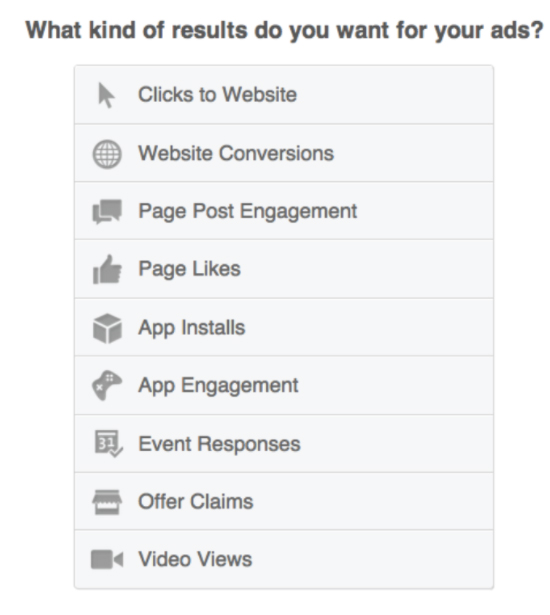
Facebook Ads are different types, and goals should be set based on these types. Wish to drive traffic to the website? Enable apps to be installed? Wanna increase the number of Likes on the page to have a larger community on Facebook? You need to understand that, there would be certain objectives as a part of the total marketing plan, and as a result, there will be advertisers on Facebook who would run more than one ad type.
The ads mentioned here can be easily explained. Website conversion ads such as tracking actions taken by people after seeing the ad, other tasks like buying a product, registering for an event or just viewing some Pages. For all these, you have to create a conversion-tracking pixel through Facebook, which is put on specific pages on Facebook.
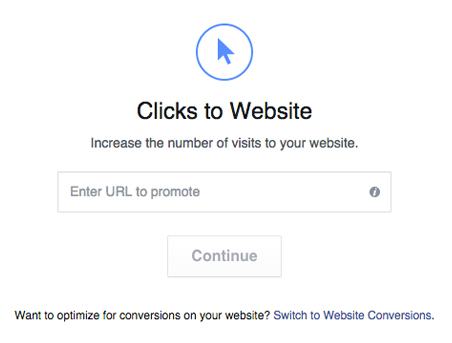
When you choose ‘Clicks to a website’, you can add Call to Action button to the ad like “Shop Now”, “Learn More” or “Download”.
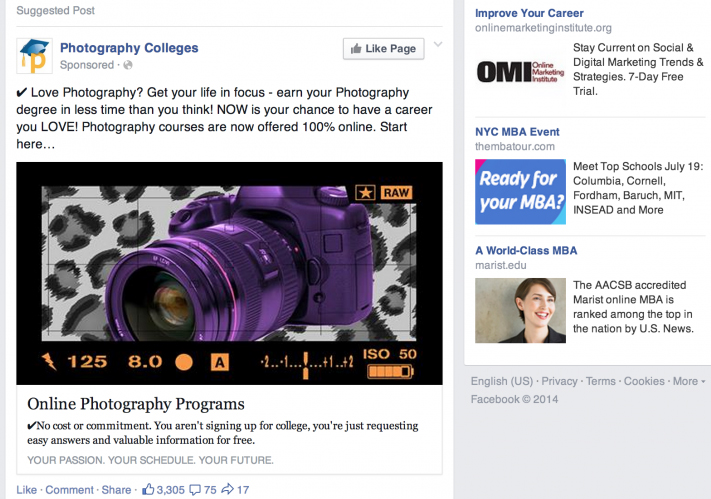
These ads appear in the News Feed section on Facebook, both – within the Feed as well as on the right sidebar. These News Feed ads receive more engagement are will be effective for the beginners in posting Facebook ads for small business .
No matter what type of ad is chosen, to have the ads shown up in the News Feed, it is very important that you link it to specific Facebook Page. On the other hand, if you do not have a Facebook Page, the ads can only be placed on the right-hand side of the News Feed.
It is ideal to test on different versions of the ads, like changing the images and the copy to check how they work, These tests would surely bring a huge impact to the success of an ad.
Targeting the Right Demographics for Fb Ad
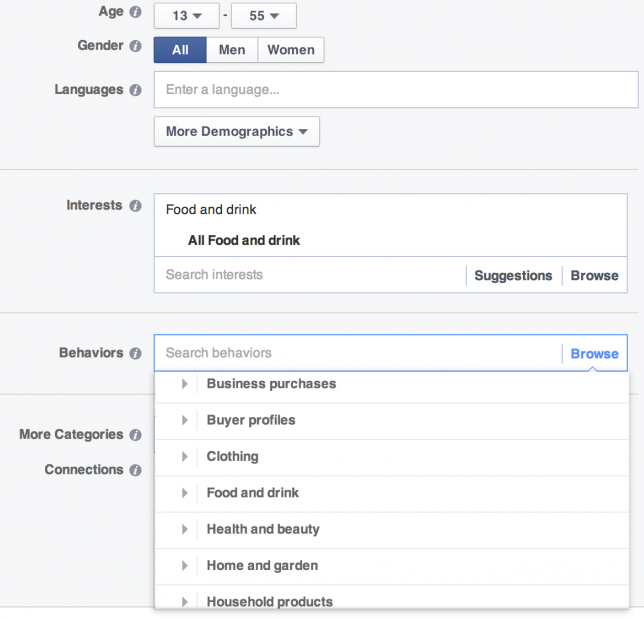
After creating the ad, you can find different ways to target the audience. You must always be focused about the way to target the right demographics for Facebook Advertisement . Choosing a wrong customer makes you to loss the chance of spreading the ad to the right customer .
By Geographic Area and Adding Filters for Age and Gender
You can see a “More demographics” drop-down list, allowing you to target by additional descriptors, like Number of children in a family, Marital Status or even industry in which person works.
‘Interests’
An ad can be targeted on Facebook users based on the Likes and interests of the audience, including the options from which they can choose categories like “Health”, “Music”, “Technology”, “Home Decor” and so on.
It is really effective to target specific Interests sharing people on Facebook advertisement to get more result .
User interaction with other Pages
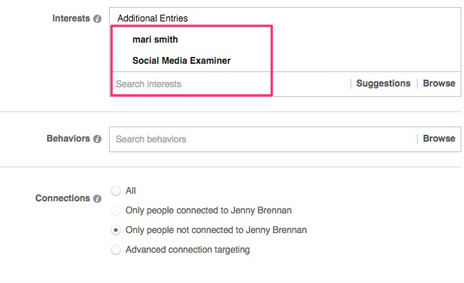
This option can be related to the above strategy. For instance, if the target is on people interested in Arts & Culture in London, you could select the location Tate Modern or the SouthBank Center. For this, all you need to do this, enter the name of the company or brand, and if there is a related Facebook Page, it has to be enabled as one of the options in the list. Other options to find specific Facebook Pages are
Custom Audiences
Look-alike audiences
Custom Audiences option enables in targeting the existing customers from people, generally on Facebook. You can find different ways to create Custom Audiences. For instance, You can create via email Newsletter list, or place a tracking pixel on the website so as to advertise to people already visiting the site.
Look-alike Audiences are a set of Facebook users, suggested by Facebook, making it similar to one of the Custom Audiences. According to the words of Facebook, Look-alike audiences “let you get in touch with new people who would be interested in your business, since they are similar to Customer audience.
Set Budget Limitations
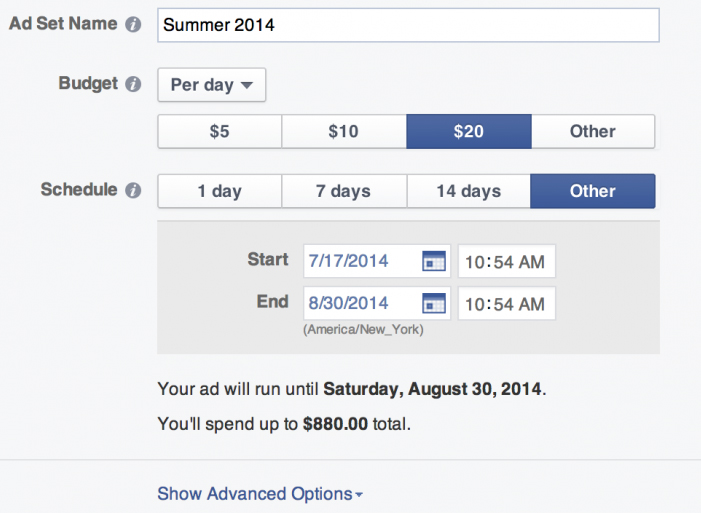
Once the ad is created the target audience is selected, you now have to specify the budget. There is no such budget which fits all the ads. It is ideal to find out the value of the desired action; i.e.the value of each new Facebook fan in the business, the money you wish to spend so as to increase visits to sites or conversions.
If you plan to start funding, the ideal way is to set a small budget and test different tricks. Once it proves effective you feel confident in the response, you can gradually increase the budget. With most of Facebook Small Business Advertisement, there is an option of Pay Per Click (PPC). There are advanced options, but finally, the decision is yours. Thinking about which one to choose ? Well, it is the right time to think about the objective in total. It is recommended that you provide the link to your website so that they visit the site, the Pay Per Click would make more sense rather than just an impression.
But if the cost per click you going to receive is less than the pay per click then the profit from Facebook ad is reversed to loss .
so you must be always having a knowledge about ideal Facebook advertisement budget
Setting up Facebook Ads
As you specified the budget and set the Start-End dates, or let it run till you manually stop, your Facebook Ad for Small Business is ready to work its magic. The performance of the ad could be monitored using Ads Manager dashboard. Besides, if you want to bring in more visitors to the website, you need to track the links using Campaign Tracking in Google Analytics to gain more understanding.
Over the past couple of years, Facebook has helped to advertise small businesses for free. And, to the surprise, it has been a huge success. Free Facebook ads on small business have been a great help to the new entries in the marketing field.
Facebook marketing truly is a powerful instrument to promote small businesses. It is found that after setting up, most of the owners are not too keen on promoting the business via the Facebook page. This is because they have no clue of what news to post or feel that spending time on Facebook Ads is not worth it.
Are you among these people with similar thoughts?
If yes, think it on the other side. Advertise your small business on Facebook and make yourself feel that it is fun, connecting with current as well as potential customers, and stop thinking it as a nuisance or a waste of time.
When you take the first step into the Facebook Small Business Advertisement, you need to make sure that making optimum use of Facebook by organizing all the social media profiles into one program.
For those who feel that Facebook Small Business Advertisement is not worth, we shall let them know the important advantages of using Facebook advertisement for small business and medium business :
It is FREE: No cost involved in setting a Facebook Business page; besides it is free to post and share content . If you have been looking for ways to get Free advertisement on Facebook then you must utilize this .
Products and services can also be promoted: As you get a fan group, your products can be sold to them without any cost of marketing. Your fans could be updated with some upcoming events or deals in your business
Interact and stay connected with your customers: Facebook is an effective platform to interact with your customers, get to know their views and opinions and respond accordingly. Post pictures and status messages to inform people about the business updates. This way, you can stay connected with your existing as well as potential customers, and you can keep a hope that your customers will always rely on you for their next purchase, and not think about the competitor.
Facebook Small Business Advertisement – How to Enhance Facebook Page
The first step you would take before you advertise your small business on Facebookis creating a business profile page in the most impressive way possible. This not only helps you get people to like the page but also have an extra benefit, thus enhancing chances of getting higher rank in Google Search’s results.
In Facebook Small Business Advertisement, your page should be set in a way that when people visit your Business page, they should get the relevant information such as the upcoming events, new stalls opening up, sales coming up in town and so on.
When considering Facebook Ads for Small business, there are some steps to set a strong business profile. Let us look at them.
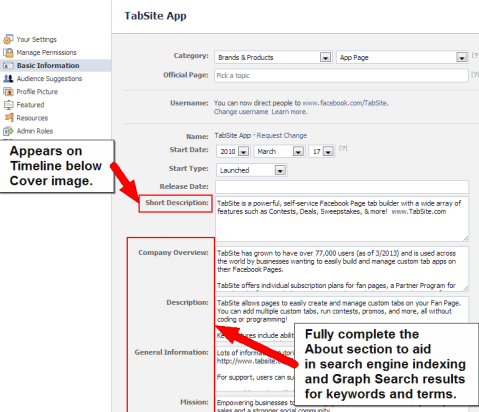
Use keywords in the “About” section : Keywords let people about your business with more clarity. For instance, if the Facebook ad for Small business is a Pizza Restaurant, then the apt keyword will be “pizza” and “Italian food”. Describe in detail and use maximum characters as allowed by Facebook. Completion of the section not only allows the visitors know more about the business but also informs certain search engines like Google. Let us look at an example of a Facebook Ad for Small Business. This is an important method to increase your Facebook page views and reach .
Claim a Vanity URL : When a business page is created, a web address is chosen, like www.facebook.com/yourbusiness , which gives a professional and branded feel to the page and the URL can be easily recognized by customers. Unless it is changed, this URL remains as a set of numbers which creates confusion and the customers will not able to identify your business page. You may be reminded of this important fact that the URL can be changed only once, so make it impressive and easy to identify.
Say our brand facebook page is named as https://www.facebook.com/maccablo/ . Like this you can create facebook page for your brand .
Choose the right category : When you begin to advertise your small business on Facebook, you need to make sure that the category mentioned, represents your business. In case of local businesses, there should be a category as “local business” and then be more specific about the business type by selecting 3 categories. For instance, a Beauty Salon can have 3 subcategories like Ladies Salon & Spa, Men’s Salon and Unisex Salon.
Get Reviews : As you advertise a small business on Facebook , getting more positive reviews is an ideal method to get more visitors to your business page. You could ask the regular and loyal customers to drop in a review, you could provide discounts to people who regularly write reviews on your page. You may note having reviews posted could take your page into Google or similar search engine result pages.
Choose appealing pictures : In Facebook Small Business Advertisement , setting a cover photo and a profile picture will be the first things that would catch the eye of the visitor. Hence, it is very important to have uniqueness in choosing the images. You can also change the pictures according to the present context to make the customers feel that your business is creative. Change the profile picture based on the upcoming events or the recent milestone crossed. For instance, if your business is an online bakery, you can have a cover page like something that is related to a variety cake or pastries in your bakery .
How Facebook Small Business Advertisement Works ?
Advertising a small business on Facebook helps you reach any audience. Social Media is not a mere thing that you can easily ignore. Hence, Social Media is on trend for promoting small businesses, and the most popular one is the Facebook Small Business Advertisement. Here we will see how Facebook small business advertisement works .
If you have been avoiding an opportunity to free small business advertisement by choosing paid ads, it shows you have been out-smarted before. This is one common problem faced by entry-level advertisers with a false belief that getting to know the basics of Facebook ads for small businessis an easy task. Well, the truth is that it is not quite easy.
Facebook’s introductory Ad products have created a trouble due to its ease and directness, that any motivated Social Media Business owner can enter Facebook and get to know about boosting a post. However, there will not be any improvement in the sales if you use a default or a normal feature of “Boost post“. The result is that of an unprofessional Facebook advertiser having a feeling of overreaching $5 and a $10 here and there. This would leave others to drop their jaws asking- How did this happen?
Facebook Ad For Small Business : How the Magic works
When it comes to advertising a small business on Facebook, boosting the post more reactions, shares and comments are accepted. However, if your goal is to get the sales with the efforts on Facebook ads, then you will have to offer something which is free, or something priced well in a way that is sold easily to the target market.
Setting up an audience
This is performed within Power Editor option in Facebook, wherein audience can be customized by including or excluding the users on the basis of Age, Location, Relationship Status, Job Title, Page Empathy (user “likes” pages similar to yours) and so on. You may note that Power Editor is an area where the real advertising takes place. On the other hand, Boost post would only increase the reach among the people who Liked your page. Power Editor can do much more- Create a custom audience, Advertising on Instagram and also test many versions of the same ad.
Creating a free offer for the audience
This would easily earn the customer’s trust. It could be a free eBook, a course, membership for a free trial, or even a physical product. The goal of the Facebook ad for small business is to bring the user to your page and get their email address so as to avail them a free offer.
Offering small boost ups
As the user responds to the free offer, you can show a boost-up product. The profit margin on this boost-up should be priced in a way that it covers the actual cost of the Facebook ad. With an assumption of having the right conversion rate, the result would be acquiring a free lead.
Selling through Email, Re-targeting , etc
As you earn the lead’s trust, it is time to sell the actual product. This could be done through email, phone or similar direct methods available from free offer. you could also use Facebook Pixel to retarget the user with ads. With the usage of Facebook Pixel, when a user visits a page, for instance, the completion page from the free offer, they can be tracked, thus enabling to serve the ads mainly set for them.
Facebook Small Business Advertisement : Results of Advertising Small Business on Facebook
If you are thinking whether Facebook ads really work or not . Then here we are detailing about the result of Facebook Ad .Here you can know whether the free Facebook advertisement for small business really work or no .
Also how to get good result from free advertisement from Facebook .
Setting Proper Goals
Before spending money on Facebook ads for Small business , you need to think about the objectives of the ad promotion. Once the goals are set, you can evaluate a better budget.
The main goals of a Facebook Ad promotions are:
Building a targeted fan-base
Promoting owned content
Setting conversions
Promoting a local business
Building a Targeted Base
As you begin with the Facebook ads for small business, your initial step is to grow the audience for your Facebook Page. Your fans would read the content and would buy from you than the non-fans. In order to get the best out of a small budget, you need to concentrate on pulling those people whom you know really well.
Targeting Email List
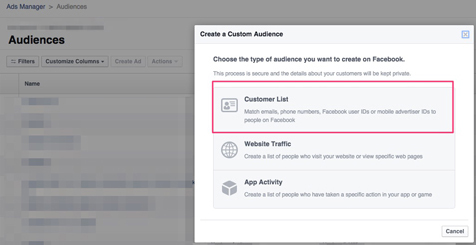
If a Custom audience has to be created based on Customer Email list, go to Audiences in Facebook Ads Manager. From the top right-hand corner of the page, click on Create Audience and select Custom Audience from the drop-down menu.
Now, click Customer List from Create a Custom Audience dialog box. when creating a custom audience, you need to upload a CSV file along with the customers’ email addresses. Later, Facebook fills the audience and prepares to target with the Facebook Ads for small business.
Target Interests
If you are a beginner in Facebook Small Business Advertisement, with a small customer list and a limited website traffic, you might question as to how the Facebook ads are targeted. This is because when a page or an interest is targeted, Facebook provides an audience, including those expressing their interest or liked the page related to the audience.
Split-Testing the Audiences
After setting up the audiences , it is ideal to test each, for about three days or a period of 72 hours. The right way to advertise a small business on Facebook is spending some dollars a day experimenting each test ad. However, the number could vary according to the size of the audience and corresponding results from them.
Let’s look at an example cost breakdown for Facebook Small Business Advertisement.
There is an expression which says “Promote your best content“. Pulling people to your website and having shared the best content with them help them know more about you, like you and trust you. Knowing about you and the content will result in buying the product or service from you.
There are opportunities to go deeper into specific topics, thus letting the audience know about your blog.
There are 3 types of website content promoted only to fans are:
Testimonial pages
Blog content
Sales messages or special offers
Facebook ads for small business can be used to promote a video every week, thus helping the audience to know you well.
Facebook Small Business Advertisement does not happen in one day. It definitely takes times to connect with people. You need to have a lot of patience and not to give up on the first video. If you frequently post videos to advertise the small business on Facebook, people will surely get attracted to your Facebook Page.
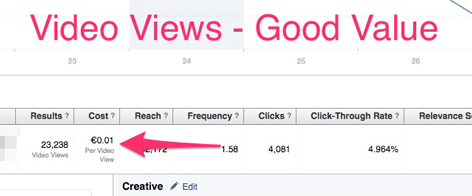
Let’s look at the example of advantages of the video advertisement.
For best results, you need to test promotion activities on different content types. You will be surprised to see the response:
Video Ad Tips
Make the content short and sweet.
Within three seconds,make the viewers feel convinced visiting your website regularly
Use a strong call to action.
Be genuine, fun, educational or informative.
Increasing Conversions & Sales:
There are some businesses or brands, who avoid some important steps in advertising and directly hop into conversions being their main goal in Facebook ads for Small business. This is quite obvious in the case of small budget ads. As mentioned in the examples, it is ideal to concentrate on the audiences which are more probable to convert.
Leads Generation is a strong concept in Facebook Small Business advertisement, provided you target the right audience.
Before you begin to test the ad types, you will have to check your News Feed for the lead generation shown up. Note the ad copy, Call-to-action buttons as well as visuals on other ads so as to improve your conversions.
Let’s look at some examples.
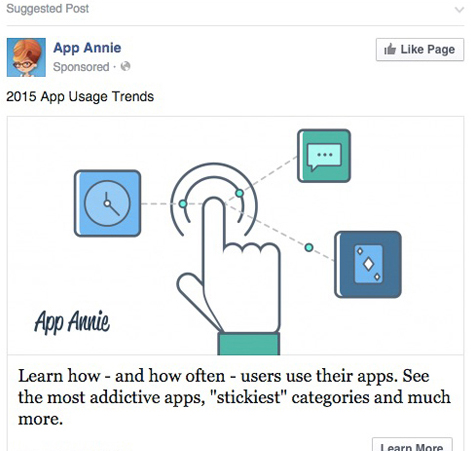
The example here is a Page describing an addictive app. If you are a fan of this page or have visited the website.
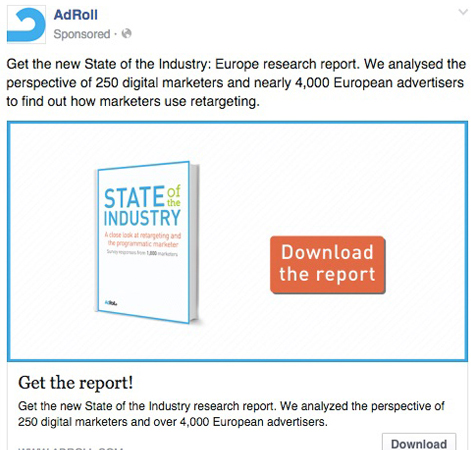
The example here is a page where you can download a report if you are a fan of this page.
However, if the budget set for the Ad is limited, you could make full use of the conversions at the best price. As Facebook knows its users really well, you bet the results will top.
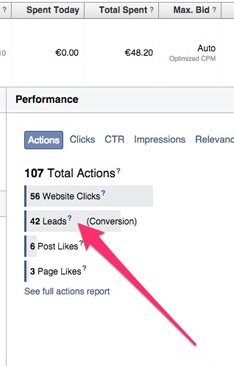
For instance, the test Ad here cost $11.3 per day and the lead generated was 42. The target was a Custom Audience for a website.
Promoting a Local Business
Facebook Ads for Small Business is used to promote a local business, with small budgets comprising some challenges. If you own a local business, chances are that the promotions will be limited to one for every week. Perhaps, it is quite a good idea when it comes to promoting regular contents so as to let people know of the new products and services. This would definitely be a great added advantage to your fans, even without directly selling to them. So with this you can promote local business on Facebook .
When you advertise a small business on Facebook with a small budget, it will surely produce great results. It is equally important that you survive the expectations of the promotion.
Review of Facebook Small Business Advertisement
This article has covered all the relevant topics related to Facebook Small Business Advertisement. We also came across how Facebook Ads for Small Business work and the results yielded from the tests done on each ad. How to set a small budget for a new business.
Hope this article has been helpful to people who are beginners in Facebook Small Business Advertisement.
Today wherever you look you can find a great number of Smule fans and Smule videos and Karaoke . But for some quite reasons people look for alternative to everything and anything . So here is the TOP 8 Smule alternatives you shouldn’t miss out .
TOP 8 Smule alternatives
Singing is more than a hobby for many people. Music as such is a medium which soothes the soul. We all sing in our own ways , some are professionals and some are still perfecting their art. Our Voice is as unique as our self, just like our finger print. Karaoke is one of the easy way to bring out the singer in you. Smule is the one popular known name when it comes to singing apps with karaoke . You can download smule song ,smule sing karaoke . And to the best thing to your knowledge you can also get Smule on laptop.
If you have a smart phone why you don’t record a karaoke? Just think about it! Sing a song from your favourite Artists such as Taylor Swift, Ariana Grande, EdSheeran or with Sonu Nigam etc.
Sing ! Karaoke by Smule is one of the finest and the most innovative music-related apps which enables you to sing your favourite songs, use audio effects, sing privately or duets with celebrities as well.
There are few other Smule alternatives Playstore and iStore . They are listed below
Yokee : Karaoke Sing and Record ( Android)
One of the most popular apps with good decent UI enables you to SING, RECORD, SHARE. It is really a good Smule alternatives for Android also a smule alternative for iPhone .
Using this app, record your vocal track as you sing to the lyrics and once done, you can share it with world using Facebook, Twitter, Whatsapp etc..
Yokee leverages with the YouTube unlimited library and access to videos and songs. This app allows to auto-enhance voice with echo and a little reverb to help you sound like a star on the radio.
This app allows to sing and record yourself a audio or video and can choose from 100000+ songs and can share videos and make fans.
This app allows to record duets add sound effects and balance the music. You can add themes and video effects also!
Karaoke on TV : If you want to throw a karaoke party at your house . You just need a Chromecast or Fire Stick or Fire TV. First karaoke app developed to sing on your TV.
There is a huge catalog of songs and a wide range of effects which allows you to edit records and share with your friends in the future.
It features a wide range of special effects, which allow you to edit audio tracks, improvement of voice by new technologies and flexibility of recording songs. This is a free app similar to Smule and is a good alternatives for iOS .
The Musixmatch application caters to both music and karaoke. With this app you can listen to songs, like a music player. Sing, Practice and Record songs in karaoke mode with Musixmatch.
Your favourite music as a Karaoke track which can be shared! This app does just that. It downloads from your phone and the program converts it while maintaining its quality.
It allows you to record your performance and has an option of creating tracks in two modes. The program allows you to adjust the sound with the volume control function and voice. Involve your friends and family through various social media accounts like YouTube, Facebook, etc and join in the fun!
This app is a Smule alternative for PC (Windows 10 / Mac),only requirement being the supporting app(like BlueStack or Andy app) is already installed.
Features of Singplay Karaoke
sing with the original vocals or without it
compose a song of your own performance and mix with the original in the background
SingPlus : Sing and Record Karaoke Songs by Eagle Mobi
This smule alternative allows users to sing and record, save and publish, share and discuss their favourite songs with those who have the similar taste.
SingPlus ( Sing+ ) offers the option to indulge yourself no matter online or offline,
in its vast collection of karaoke tracks and mp3 songs. This is an App like Smule but allows its users to download for free and are unlimited.
WeSing – Sing Karaoke & Karaoke Record & Sing Song by Tencent Music Entertainment
Sing along to new and classic songs with music and lyrics. Search through an enormous catalog of music videos from varied genres and themes to your favourite artists and songs. The playlists are updated regularly. Record and edit your karaoke songs with a large selection of special effects such as the use pitch correction and reverb to get real-time feedback on your singing, apply video filters to make your recording more professional and duet with your friends and favourite artists.
Smule is a very popular application which has over 100 Million downloads. In addition to Sing! Application, there are other supporting apps by Smule like AutoRap, MagicPiano and Songify.
In short Smule has emerged as a top contender to address the need for customization and uniqueness in catering to the needs of Music to all with their wide range of applications for smartphone users.
Hope this will serve useful for all singers who are in search for best smule alternatives for iPhone and smule like app for android and smule alternatives for PC.
Google launched a new app that will help android users . The new Google Datally App is the talk of the android users now.
What is Google Datally App
Google Datally App is a new android application from the giant brand Google itself . Datally App helps to reduce mobile data usage on android devices . Datally is known to assist users and make them understand about their mobile data usage and Datally will control and save mobile data .
Datally App will also track mobile data usage of android devices . Google Datally App is generally a data tracking , monitoring and controlling app .
Datally App also acts as a WiFi Finder App for android .
Features of Google Datally App
Saves mobile data upto 30%
Data saver bubble tracking real time data usage of each app
Understanding your data usage trends and history.
Personalized recommendation to save data.
WiFi finder with the strength and distance of available WiFi network
In future google may add more features for sure but still 2 more known features as of now that are upcoming on Google Datally App are –
Balance Checking and reminders
Proactive control and warning on data usage.
How to Download Google Datally App
You can download Google Datally App developed by Google Inc from Playstore .
Go to playstore
Search for Datally App
Click on the Install button
There you go , you have successfully installed Google Data app .
How Google Datally App Works
Google Datally apps works by controlling and tracking your mobile data usage . Google datally gives your data usage by hour to hour and day to day history of data usage . It shows the near by WiFi availability and also the user ratings of available nearby WiFi networks. This apps helps you to block data usage for particular apps . You get personalized recommendation on how to save more mobile data .
Datally App is launched as part of Google Next Billion users initiative .
Guess this will help the android users to reduce their mobile data usage to a large extend .
A spyware can affect every single personal data stored on your phone. Then why neglect the Bank details? You may not be aware that your certain Apps Spy your bank details and Apps Spy all information on Smartphone . Identifying this is very important to make your personal and official data safe . So here is the method to Identify Spy Apps on Mobile that Hacks Bank Account .
It is said that more of Android users are haunted down when it comes to using Internet Banking apps on smartphones. They store details like Bank Account number, Credit/Debit Card details and similar confidential data.
It has been warned by the Cybersecurity researchers that there are a few messenger apps that can steal the data from the infected devices. An IT security product company has identified 3 cases of “sonic-spy” enabled apps in Google Play, the official app store for Android gadgets. According to one of the security researchers, these sonic-spy enabled apps have the capability to record audio, take pictures with the device’s camera, make calls, take out the contact details and call logs.
There are so many mobile phone spy apps and spy software which you must be beware .
These kind of Spy apps are threat for mobile users – iPhone spy apps and android spy apps are the devils to invade your privacy and steal information.
Identify Spy Apps on your Phone – List of Spy Apps that hack your phone
Once detected, Google removed these malicious spying apps from the store.
When this researcher was asked about how consumers Identify Spy Apps in the first instance, he said that a person downloads an app without knowing that it is malicious. An app would have a “look and feel” of Whatsapp program, they feel they need it or finds an app having a good collection of music, and its unknown to the user that a code is added to these apps, letting the “bad guys” spy on your contacts, access your phone camera, read through text messages and finally using the banking apps.
A normal Android user cannot identify the techniques used by the malware to get into the device, however, they can do things that stop it from entering. The users have been advised to continue using Google Play Store, avoid installing less reputed apps and most importantly, to keep the system software up-to-date as regularly as possible.
Recently, the cyber security researchers in a company had found a malware, which had the potential to put most of the customers’ Bank account details at high risk. This malware could copy the top banking apps from different countries. Thus, the malware would display an overlay screen on the affected apps, thereby showing duplicate username and password fields to secretly take personal details. The malware was so powerful that it could avoid two-step authentication security of the app, hence passing on the details to the hackers. Later in the same year, Kaspersky researchers also had found a similar but a changed version of Trojan malware, that had the ability to cross the security features of Android . This way, it was easy for the hacker to steal the Bank account details of the users having online banking apps.
Another malicious app is BankBot, a mobile Trojan, which has been hiding and pretending to be trustworthy flashlight apps, fooling the users to download them. Meanwhile, in another campaign, besides BankBot, there were Solitaire games and certain cleaner apps that have been creating different types of malware called Mazar and Red Alert. These malicious apps had a bad intention of spying on users, collecting their login details of online banking and robbing the money.
Apps Secretly Hack Bank Account -Identify Spy Apps
As said by some cyber security researchers, the hackers use some regularly accessed apps and add certain spyware coding into existing code snippets which help them spy on the users. Here, we talk about some apps which secretly hack Bank accounts.
Are you a hardcore fan of Starbucks? Well, people who know about it are all set to spy on you.
“Bad guys” find that you love Starbucks and find Starbucks app on your phone. The hacker secretly adds the spyware code to this app so they can easily hack your Bank account.
It’s very important to have strong passwords when you log in to Bank accounts and personal emails. However, the recent fraud emails show that you should not use senseless passwords, even if it is to just sign up a normal franchise coffee house reward card. Research says that Bank accounts of the Starbucks app users are “hacked” by password thieves.
People having rewards from this franchise coffee house can payment app to their Bank accounts, credit cards or Paypal accounts. This means hacking into the Starbucks app gives them access to the thieves to easily load up new gift cards and sell them illegally. It is acknowledged by Starbucks that such fraud is prevailing. However, they did not mention that it’s hacked but stated that the app user or the hacked customer has used a senseless password.
Starbucks will have to set a two-level authentication to keep the app going ahead, and the users should be reminded of using strong passwords to protect their accounts from being hacked.
Hope this will help you to Identify Spy Apps and this will definitely create a cautiousness in your mind before downloading any apps.
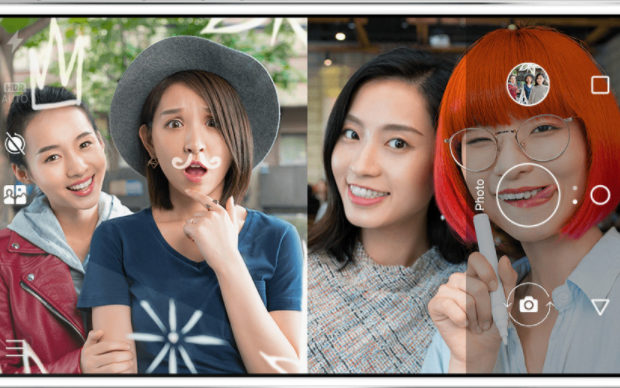
From normal camera click to Selfie was the trend . You know the trend is moving to Bothie now. For selfie lovers , this is a must thing you must know . What is this Bothie feature but only you get bothie by buying latest Nokia smartphone. If that is your worry here we guide to use Bothie feature on any Smartphone.
Nokia is back in the market with Android OS. This is what the world was looking out for from Nokia amidst so much competition in the world of smartphones. After a lot of ups and downs, Nokia has come up with the best phone with the best technology ever for a smartphone.
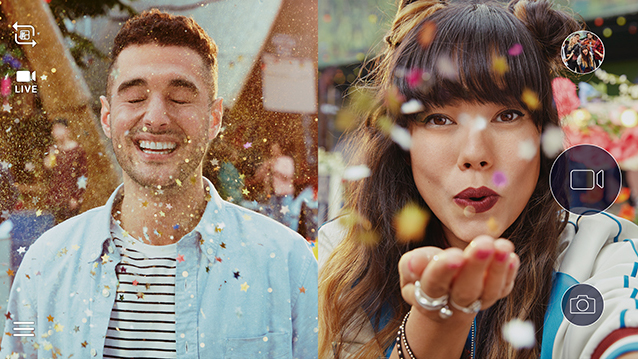
A smartphone does a lot and a new one is expected to do more than what the existing ones already are doing. So is the Bothie feature of the Nokia 8. Bothie – Means both cameras unlike the word ‘Selfie’. You can take pictures both on the front and rear camera simultaneously using this feature on Nokia 8. The Nokia 8 Bothie camera replaces selfies by its awesome ability to capture those perfect pictures together. It can live-stream a selfie while taking a pic from the rear camera.
Bothie Feature – Best Features of Nokia 8
A rival / competitor to the high end and expensive android phones such as Galaxy S8, OnePlus5, Oppo F3 Lite and VIVO X20 Plus, Nokia 8 has the best and signature features in its first ever android version launched in the market. If you had loved holding your Nokia some years ago and have been missing it, here is the good news of using a Nokia again with the best feature called Bothie camera
This is the key feature of Nokia 8 which sets it apart from other smartphones. The company boasts of revolutionising bothie above selfie. The Bothie camera is developed with Zeiss and has a dual lens 13MP camera on both sides.
With bothie camera feature, front and back dual selfie can be clicked at a time. It can be used for live video streaming and messaging apps. Also video calling can be best enjoyed using the bothie camera.
The Bothie feature is both interesting and unique and promises everyone in on the fun. Bothie replaces selfie and ensures everyone is in on the ‘picture’. Nokia 8 has an impressive 13 MP dual camera in Carl Zeiss optics. Bothie image quality is assured to be top rated with features like f/2.0, laser & phase detection autofocus, 1.12µm pixel size, geo-tagging, touch focus, face detection, HDR, panorama.
Bothie is a collaging tool – to help you combine two separate photos. You can zoom and pan your images to create the perfect composition which can be shared with friends and family.
Bothie camera is an interesting feature which many others will try to emulate and will try to get Bothie features on any smartphone. There are few apps in this regard which are available on Android and iOS platforms. Let’s look at few of the Best Bothie apps in detail.
Dual Camera : Bothie by Ak Web Designer
This app is compatible on all devices. The Dual camera app will enable you to take photos using the front and back cameras. The options menu allows the user to decide on the image size for the front camera and auto/manual format to take pictures. It even has a time delay for the pictures taken from the front camera through the auto mode, which gives you more options to get the optimum light and if need be to select a larger time delay.
Split Lens 2 – Clone Yourself in Photo & Video by Bigger Lens LLC
This app uses Split lens to produce interesting photos. It gives users a wide option like Face Bombing, Cloning Yourself, Swapping Body Parts and faces in your photos, makes you appear to float in air, and make Your Own Ghost or allows you to capture a series of photos to tell a unique story. The quality of the photos of Split Lens is pretty incredible and enables you to produce easy and amazing photos on iPhone.
This app has a vast selection of existing layouts which allows the users to adjust the split bar for the photos. It even has the option of adding photos from your library allowing users to blend and adjust. Users can also make use of the pre defined high quality filters.
This app divides your camera to several frames and blends it all together.
This app also has a feature to export pictures of different resolutions and utilize the same to create a masterpiece which can be shared on various social media outlets like Facebook, Twitter, etc. This is one of the best bothie app.
Frontback is amongst the newest social photo community and which allows you to start taking photos together with your friends. The app allows the photos to always be full screen and let you capture multiple sides of the same story at once. It allows users to explore their artistic side and combine your front and back cameras, show more details and make before/after shots.
Users can make use of this app without signing up and on intending to share the created photos to social media, it is required to login.
Users can curate albums where friends and family can contribute to it and share amongst themselves in the group. This app is compatible on Android and iOS.
Split Camera by Wombatica Labs
This app which is compatible on all devices creates a fun photo which allows users to clone oneself. Pictures can be adjusted and blended to suit user preferences and can be shared anytime.
Front & Back Camera : Effects by Rich Media Apps
This camera lets you take a picture from front and back dual selfie camera and combine them into a single photo.
This is Bothie on android phones only and this is free to use as well. This is very simple use and there are photo effects like Vintage and Retro which can be applied to photos which can be captured in both Portrait and Landscape options.
phoTWO – selfie collage camera by VicMan LLC
The main marketing strategy of this app is that “You are too important to be excluded from your own Photos” and it is correctly said that your emotions and reactions should not be left out.
The highlights of this app are –
Make collages exactly the way you envisioned them with options to move, rotate and crop the front camera photo to achieve perfection.
Adorn your selfie with uniquely designed frames.
phoTWO can be used instead of the standard Camera app: you can utilize the rear camera to take normal photos and this app to make beautiful collages which is automatically saved to your Gallery and can be shared on social media outlets like Facebook, Twitter, Instagram, Pinterest and more easily.
With this Bothie app nobody is omitted and everyone is captured in a single picture. This app captures both front and back view in single image and merges it to create a single photo and is saved into image library.
Bothie 2 by Frontline Tech
Bothie helps in combining 2 separate selfies into one single photo.
Bothie is a collaging tool in which you can zoom and pan your images to create the perfect composition. This app is free to download and be shared on social media.
These kind of apps can help you to use bothie on iOS phones and Bothie on any Android phone .
Conclusion
The mobile phone market is ever changing and will always favor those who bring a reliable, safe, innovative, unique and cutting edge technology to the masses which are also affordable. With the reach of Social media influencing our everyday lives, and fierce completion in global markets to stake claim, more number of companies are investing in applications which would provide with a greater exposure and utilization to the general populace. Apps like Bothie which are innovative for sure are targeted towards the younger generation who use all Social media platforms like Facebook, Twitter, Instagram, Pinterest, etc. Bothie will prove to be a major hit amongst the targeted audience, as there is more inclusion in the picture which ultimately tells a bigger and unique story.

 If you plan to start funding, the ideal way is to set a small budget and test different tricks. Once it proves effective you feel confident in the response, you can gradually increase the budget. With most of Facebook Small Business Advertisement, there is an option of Pay Per Click (PPC). There are advanced options, but finally, the decision is yours. Thinking about which one to choose ? Well, it is the right time to think about the objective in total. It is recommended that you provide the link to your website so that they visit the site, the Pay Per Click would make more sense rather than just an impression.