Author: Vandana Pradeesh

  • Kindle & Nook versions : Digital Device Trends (eBook Readers)

    Kindle & Nook versions : Digital Device Trends (eBook Readers)

    Kindle & Nook versions

    Youngsters these days have their eBooks kept always accessible. These eBooks could be readable either from their tablets, or smartphones with larger screens. Smartphones would have apps into which eBooks could be downloaded and read anytime and anywhere.There have been certain digital devices in trend, such as the eReaders Kindle and Nook . We would now see the Kindle & Nook versions.

    # Kindle

    These are an array of e-Readers, created and marketed by Amazon. These devices allow the users to browse, buy, download, and read e-books, newspapers, magazines and other digital media through wireless networking, to the Kindle Store. Although the device is quite light-weight and easily portable, you could keep a large number of eBook   in the Kindle. Most people use WiFi connection to download eBooks to the Kindle. However, the advanced models comprises 3G mobile phone technology, so as to enable the downloads, from wherever you are located.

    How did the name ‘Kindle’ evolve ?

    The hardware of Kindle was developed from the original Kindle launched in 2007 and the Kindle DX, having larger screen was announced in 2009. There were devices with a Kindle Keyboard, touch sensitive high resolution and contrast screens called Kindle Paperwhite, a tablet with the Kindle app called the Kindle Fire, and a low-priced model with a touch-sensitive screen called Kindle.

    The software of Kindle device is designed for the use in multiple platforms like Microsoft Windows, iOS, Mac OS X (10.5 or later, Intel processor only), Android, web OS and Windows Phone. Kindle has a”cloud” reader, which allows to read, as well as buy Kindle books at read.amazon.com.

    Kindle contents are bought online; also downloaded via wireless networks in certain countries-either standard WiFi or Amazon’s 3GWhispernet” networkWhispernet is easily usable without any monthly fee or wireless subscription, although  fees are drawn for the delivery of journals and other content when travelling beyond the customer’s home country. A service called “Whispersyncenables customers to synchronize reading progress, bookmarks, and other information across Kindle hardware and other mobile devices.

    Read Also : Download free eBooks For My Nooks or Kindle -Read eBooks

    Kindle Devices 

    Here is the different versions of Kindle device.

    • E-link versions
    • LCD Versions

    Now we will see he different Kindle E-link versions

    First Generation Kindle :

    The first e-reader of Amazon, Kindle, was developed which costed about $400. The pieces of this amazing device were sold in just five and a half hours. Unfortunately, they had run out-of-stock.

    The device sized to a 6 inches (diagonal) 4-level gray-scale E Ink display, internal storage to 250 MB , enabling to have approximately 200 non-illustrated titles.

    This device also comprised a speaker and a headphone jack,allowing the user to listen to audio files on Kindle. It has been the only Kindle which could have expandable storage, with an SD card slot.
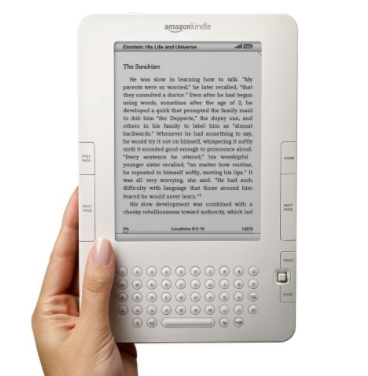
    The Whispernet feature was co-designed with Qualcomm and Kindle being the first device with free 3G data throughout the U.S enabling browsing and to download free eBooks from Amazon’s Kindle Store.

    These First generation Kindle devices were not sold outside U.S.

    Read Also : Use Kindle Fire as Second PC Screen / Display Ultimate Guide

    Second Generation Kindle :

    The Kindle 2 had features such as text-to-speech option; wherein the text would be read aloud, and 2 GB of internal memory,out of which 1.4 GB was allowed to be used by the user. According to the evaluation by  Amazon, the Kindle 2 could hold up to 1,500 non-illustrated books. However,the limitation of the second generation devices was that they did not have an external memory card slot. It was slimmer than the original Kindle. The Kindle 2 had Freescale 532 MHz, ARM-11 90 nm processor, 32 MB main memory, 2 GB flash memory and a 3.7 V 1,530 mAh lithium polymer battery.

    Amazon then reduced the price of the Kindle 2 from $359 to $299.The price was further reduced to $259. The Kindle 2 had priced manufacturing materials to an estimate of $186 by iSuppli . Amazon had stopped selling the initial model of Kindle 2 and sold the Kindle 2 international version worldwide. Later, Amazon claimed a software update for the device with enhanced battery life to 85% and hosted the original PDF file support.

    Kindle 2 International 

    Amazon released  Kindle 2 International, where users could download free eBooks wirelessly in over 100 countries. The looks of International Kindle 2 was the same as the U.S.-only Kindle 2, however, it had used a regular mobile network .

    The primary model of Kindle 2 had CDMA2000 on the Sprint network. Meanwhile, its international version used standard GSM and 3G GSM, allowing to be used on AT&T‘s U.S. mobile network, as well as internationally in 100 other countries. The Kindle 2 International was considered, having a higher variation in its display,but it was not advertised by Amazon.
    Kindle DX

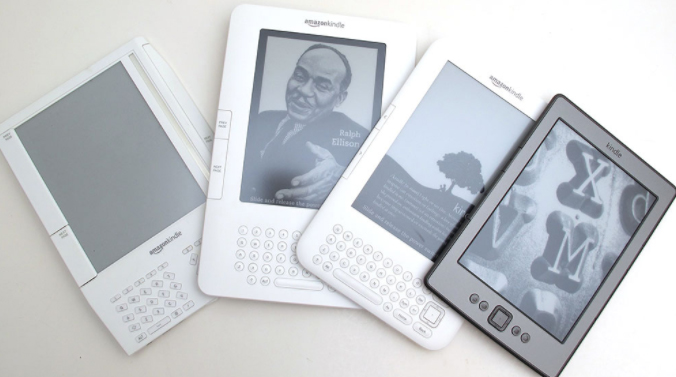
    Kindle DX was featured with a larger screen than the standard Kindle and supports PDF files. It comprised an Accelerometer allowing the user to consistently turn pages between landscape and portrait orientations as and when the Kindle DX is turned around. It was marketed with the ability to display newspaper, as well as contents of textbooks. The drawback was that it could be connected only by Whispernet, in the U.S

    Kindle DX International

    This version of Kindle DX was launched in 100 countries. The features of Kindle DX international is ‘ditto’ as that of Kindle DX, except for its support for international 3G data.

    Kindle DX Graphite

    The display on this device is of E Ink, having 50% better contrast ratio as E Ink Pearl technology has been used, which has only a graphite case color. It was figured out that, the change of color was to improve comparative ratio approach further,since certain users observed the prior white casing highlighted the E Ink background with light gray and not white. As in the Kindle DX, DXG too does not have a WiFi connection.

    The DXG is a combination of third-generation hardware second-generation software. The CPU works with the same speed as Kindle Keyboard; but the DXG having only half the system memory being 128 MB. These differences would cause the DXG running the same software as that of Kindle 2. Hence, DXG has not been able to display writings in international fonts, like the Cyrillic, Chinese, or any other non-Latin font; also that PDF support and the web browser are limited to matching the features of Kindle 2.

    The Kindle DX was taken off from sale; yet, was accessible again for another few months. 3G data usage has been made free with the access of Kindle Store and Wikipedia.Downloading personal documents via 3G data would be priced to $1 per megabyte. The Kindle battery life would last up to a week’s time along with 3G set ON and two weeks with 3G being OFF. Text-to-Speech and MP3 playback are supported too.

    Read Also : Gadget for e-book and book readers 

    Third Generation Kindle :

    Kindle Keyboard

    The third generation Kindle released by Amazon had been renamed as “Kindle Keyboard”.  The prior order of Kindle Keyboard was accepted soon after its launch, hence started shipping the devices. Amazon declared Kindle Keyboard as the fastest-selling Kindle ever. Since Amazon does not actually add numbers at the final stage of each Kindle by its generation; reviewers, customers and press companies often considered this Kindle as the “K3” or the “Kindle 3“.

    The size of Kindle Keyboard is 0.5 inches shorter and 0.5 inches narrower when compared to the Kindle 2. It holds up additional fonts and international Unicode characters along with a Voice Guide feature with spoken menu navigation. Experimental features comprise a browser working on the popular WebKit delivering engine (browser would be limited to 50 MB of 3G per month to websites excluding Amazon and Wikipedia in outside the United States), Text-to-Speech which reads the texts aloud from books and other content, and also holding an MP3 player. Extended internal memory would be to 4 GB, with almost 3 GB of content accessible for user. Battery life has been declared to be two months,provided the user would read about half an hour a day turning off the wireless, that would extend the battery life to roughly 30 hours.

    Fourth Generation :

    The fourth-generation Kindle and the Kindle Touch possess the 6-inch, 167-ppi e-ink display, similar to the 2010 Kindle model, having the additional feature of an infrared touch-screen control on the Touch. These also have Amazon’s trial version of web-browsing capability accompanied by WiFi.

    Kindle 4

    Kindle in the fourth generation was quite less expensive ($79 with ad support, $109 excluding ads) and comprising a slight reduction in weight and size, though with a lesser battery life and storage capacity, unlike the Kindle 3. It has a silver-grey holder, with nine hard keys, a cursor pad, an on-screen keyboard, a zipped storage capacity of 2 GB, with battery life up to almost one month  under optimal settings in reading.

    Kindle Touch

    There have been two versions of touchscreen Kindles, the Kindle Touch, having Wi-Fi ($99 ad-support, $139 without ads) and the Kindle Touch 3G, comprising Wi-Fi/3G connectivity ($149 ad support, $189 excluding ads). The latter version enables to connect via 3G to the Kindle Store, download free eBooks and journals, as well as access Wikipedia. Temporary web browsing (outside Wikipedia) using Kindle Touch 3G is available only via WiFi connection.(Kindle Keyboard has no restriction). The 3G data could be used only up to 50 MB per month. Just as in Kindle 3, the Kindle Touch has a capacity of 4 GB with two months of battery life under optimal reading circumstances, yet larger than the Kindle 4. The Kindle Touch started shipping out only in the U.S. It was declared that the device would be available in the UK, Germany, France, Spain and Italy. This Kindle version was the first Kindle that supported X-Ray, listing out the frequently used character names, locations, themes, or ideas in a book. Amazon launched the 5.2.0 version of software, wherein operating system was updated so as to match the interface of Paperwhite with that of the Touch’s MP3/audiobook features.

    Fifth Generation :

    Kindle 5

    Amazon released the Kindle 5  ($70 ad-supported,$90 no ads). The Kindle has a black ring holder, distinct from the Kindle 4 with silver-grey, accompanied by a better display contrast. It has also been declared that Kindle 5 had 15% faster page loads. It had a 167 PPI display and was the lightest Kindle at 5.98 oz until the release of Kindle Oasis.

    Kindle PaperWhite (First Generation)

    This version of Kindle was launched with a 6″, 212 PPI E Ink Pearl display (758×1024 resolution) and four built-in LEDs for screen illumination, Paperwhite 1st generation was accessible via WiFi and WiFi + 3G  models; with ad-supported versions available only in the U.S. One of the main features of PaperWhite is the light, wherein there is a manually adjustable light level. The access restrictions of 3G data usage are the same as in the Kindle Touch, and usage limit is set to 50 MB per month and only on Amazon and Wikipedia’s websites; and additional data ought to be purchased.

    Battery life could be set up to eight weeks of reading with half an hour per day without Wi-Fi and consistent usage of light totalling to 28 hours. The authentic leather cover for the Paperwhite enables the hall effect sensor,wherein device detects when the cover was closed/opened, turning the screen off/on respectively. This device was the first Kindle version to record reading speed thereby calculating  finishing point of a chapter or book; this feature was later added as per the Kindle updates as well as in Kindle Fire tablets.

    Unfortunately, Kindle Paperwhite does not have physical buttons to turn on the pages and does not carry-out auto-hyphenation.   Excluding the feature of lock screen/power button at its bottom, it mainly depends on the touchscreen interface. During November 2012, Amazon launched the 5.3.0 updated version enabling users to turn off certain content on the home screen in Grid View (can view two rows of content) and included common error fixes. The 5.4.4 updated version was launched later, wherein Goodreads integration was added , Kindle FreeTime which had limited child’s usage, Cloud Collections for association and Page Flip to scan the content without losing the location, that almost matched the features of Paperwhite 2’s software features. The Kindle Paperwhite was introduced in most of important international markets with a version from Japan comprising 4 GB storage capacity, also in China followed by non-Japan versions with 2 GB of storage (1.25 GB accessible to users).

    Read Also : How to reset iPod Nano or steps to unfreeze iPod Nano

    Sixth Generation :

    Kindle PaperWhite (2nd Generation)

    The Second generation of Kindle Paperwhite was brought out being named as the “All-New Kindle Paperwhite” and literally called as the Paperwhite 2, with the WiFi version launched in the US on ($120 ad-supported, $140 no ads), as well as the 3G/WiFi version in the US ($190 ad-supported, $210 no ads). The Paperwhite 2 comprises a higher contrast display technology – E Ink Carta with improved LED illumination, 25% faster processor (1 GHz) enabling faster page turns, and improved response to touch-input when compared to the standard Paperwhite. Paperwhite 2 also holds the 6″ screen with 212 PPI, ring holder and 28-hour battery life as in the initial version. The software has dictionary/Wikipedia/X-Ray look-up, Page Flip, enabling the user to skip ahead or back in the text in a pop-up window and go back to the previous page, and the Goodreads social integration.

    In Paperwhite 2 ,a trial version of web browser has been used with the 3G data usage restrictions as in previous Kindles; however there are restrictions in the usage of WiFi. The customary leather cover for the Paperwhite 2 is     the one as used for the initial Paperwhite. It would turn the screen on or off while been opened or closed. The Paperwhite 2 model of Kindle was launched covering up major international markets by the mid 2014 and this model included 4 GB of storage.Meanwhile, the US version of the Paperwhite 2 had included 4 GB of storage with the previous version of Paperwhite 2 had 2 GB.

    Seventh Generation :

    Kindle 7

    An upgraded version of primary Kindle and the Kindle Voyage were released.The Kindle 7 was launched ($80 ad-supported, $100 no ads). It had been the first ever Kindle model using a touchscreen to sail through books and had a 1 GHz CPU. Additionally, it had been the first Kindle available in international markets like India, Japan and China. Amazon also declared that a single charge would extend to a month if used half an hour a day without WiFi.

    Kindle Voyage

    The Kindle Voyage was launched in the US, comprising features like 6-inch, 300 ppi E Ink Carta HD display, which had been the highest resolution and contrast found in e-readers having six LEDs with an changeable light sensor that could automatically brighten the screen according to the environmental change. It had been available in WiFi ($200 ad-supported, $220 no ads) as well as WiFi + 3G ($270 ad-supported, $290 no ads) models. Its design includes a tint glass screen on the front with the rear glass having angular, raised plastic edges holding the power button, as in the Fire HDX model. The Voyage has used “PagePress”,  which is a navigation system with sensors on both sides of the screen which would turn the page when pressed. PagePress could be disabled, but the touchscreen would still be active.  The user storage would hold up to 3 GB. Amazon had declared that the battery life would last to 6 weeks, if used for 30 minutes a day without WiFi and brightness being set to 10, which would be about 21 hours.

    Kindle PaperWhite(3rd generation)

    The Kindle Paperwhite (3rd generation), named as the “All-New Kindle Paperwhite” and literally referred to as the Paperwhite 3 and Paperwhite , was launched in the US. It has been accessible through WiFi ($120 ad-supported, $140 no ads) and WiFi + 3G ($190 ad-supported, $210 no ads) models. The device comprises a 6-inch, 1440×1080, 300 ppi E Ink Carta HD display, which was twice the pixels of the typical Paperwhite having the same touchscreen, four LEDs and size being the same as previous model of Paperwhite. It also had over 3 GB of user accessible storage. This device had improved display of PDF files, with the accessibility to select text enabling the use of certain processes, like translation on a PDF’s text. It was also declared that the device had a battery life of 6 weeks when used for 30 minutes a day with wireless off and brightness set to 10, which is about 21 hours.

    The Paperwhite 3 has been the first e-reader to have added the Bookerly font, a new font designed by Amazon,  including updated formatting operations like the hyphenation and better spacing. The Bookerly font had been included in most of conventional models through a software update. The Paperwhite 2, Paperwhite 3, Kindle 7 and Voyage had updated to 5.7.2, wherein a new home screen layout, called an OpenDyslexic font choice, had improved book references and a new quick actions set of choices.

    On June 30, 2016, a white version of the Paperwhite 3 worldwide had been introduced; with the only distinct feature about this version being the color of the shell. During October 2016, Amazon launched the Paperwhite 3 “Manga Model” in Japan with 33% better pace in turning page along with storage capacity of 32 GB which could cover up to 700 Manga books. The Manga model had been launched at 16,280 Yen ($156) for the version with ad-supported WiFi or 12,280 Yen ($118) for Prime members.

    Eighth Generation :

    Kindle Oasis 

    Amazon introduced the Kindle Oasis and had been released worldwide. The Kindle Oasis was made available in WiFi ($290 ad-supported, $310 no ads) and WiFi + 3G ($360 ad-supported, $380 no ads) models. The Oasis comprised a 6-inch, 300 ppi E Ink Carta HD display with ten LEDs. Its lopsided design presented physical page having buttons on one side with an Accelerometer in a way that, the display would be rotated with either hands. It was thicker on one side and narrows towards an edge being 20% thinner than the Paperwhite. It comprised a removable leather battery cover for better protection and enhanced battery life available in either Black, Walnut (brown) or Merlot (red); the cover joining in the narrowed edge. The Oasis featured battery life of 28 hours provided it has been used with the battery cover without WiFi; however, without the cover, the Oasis battery would live up to seven hours. The user storage of 3 GB was another highlighted feature. The Oasis included the Bookerly (serif) font and it had been the first Kindle that included the Amazon Ember (sans-serif) font.

    Kindle 8

    Amazon’s upgrade of the basic Kindle was launched on the 22nd of June 2016 in both Black as well as in White   ($80 ad-supported, $100 no ads). The Kindle 8 comprised a new rounded design which was 0.35 inches (9 mm) shorter, 0.16 inches (4 mm) narrower, 0.043 inches (1.1 mm) thinner, and 1.1 ounces (30 g) lighter than the Kindle 7, and also had double the RAM (512 MB) than that of the previous Kindle version. The Kindle 8 had been the first Kindle that used Bluetooth to support VoiceView screen reader software for the blind people. It comprises the same screen display as of the previous model; a 167 ppi E Ink Pearl touch-screen display. Amazon declared that the device had a four-week battery life which could get all charged in just four hours.

    Kindle LCD Versions:

    Here is the Kindle LCD versions in detailed list.

    Kindle Fire

    Kindle Fire is an Android-based tablet using a component of Android. During the release of this device it had costed $200 and had a 7-inch IPS color touchscreen display. This was the first Kindle without an E Ink display. However unlike former versions of Kindles, it had no 3G option, but only WiFi.

    Kindle Fire HD

    The Kindle Fire HD, was second generation of Amazon’s color touchscreen Kindle Fire tablet line. It was made accessible in three component types- 6 inch, 7 inch and 8.9 inch screen sizes. Amazon introduced its latest version of Fire HD tablets, formally withdrawing “Kindle” from the device’s name.

    Kindle Fire HDX

    The Kindle Fire HDX was the third generation of Amazon’s Kindle Fire tablet series which previously used Fire OS 3 with screen sizes 7 inch and 8.9 inch. During the update, it was renamed as Fire HDX thereby removing the name “Kindle” from that device’s name.


    Read Also : Kindle Fire Silk Browser Alternatives


    #Nook

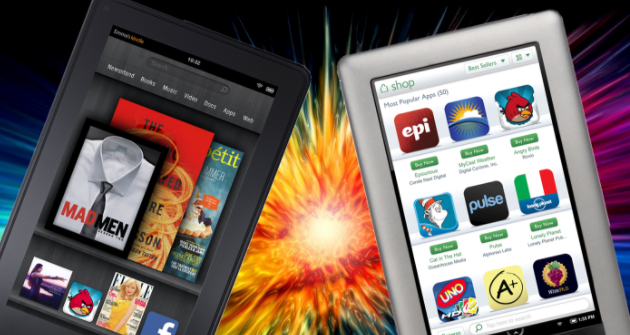
    Barnes & Noble Nook or stylishly named Nook is a brand of e-Readers, developed by American book retailer Barnes & Noble. with Android platform as the base. The original Nook version had 6 inch E-paper display and a separate, smaller color touchscreen serving as the primary input device and capable of WiFi and AT&T 3G wireless connectivity.

    How did the e-Reader get its name-‘Nooks’?

    This name was disregarded at first, by Barnes & Noble;  however, gradually Nook became a common place for reading, thereby being convincing enough for the company executives to accept the name. The original Nook version had 6 inch epaper display.
    Devices:

    Nook Glowlight Plus(E Ink)

    This version of Nook e-reader was launched, comprising a 6 inch 300 PPI Carta E Ink screen with front light and touchscreen, WiFi, aluminum shield at the back, six weeks battery life without Wireless connection, weighing  6 ounces and being water resistant up to maximum depth of 1 meter and dust-resistant. The software of Nook reader is Android 4.4 Kitkat with 2.8 GB of data available to user. With the software being Android 4.4, there could be third-party apps installed.

    Read Also : Convert 3G Phone to 4G Phone to support 4G Sim in 3G Mobile

    Samsung Galaxy Tab Nook

    Barnes & Noble had declared that there could be a newer Nook version and hence they claimed to join with Samsung so as to develop a dual-branded tablets, thus naming it as Samsung Galaxy Tab 4 Nook.                     This device would be a combination of features of Galaxy’s 7 inch display and personalized software of Nook.

    Samsung Galaxy Tab 4 Nook(7″ LCD)

    This version of Nook was launched in the U.S concentrating on firmware and the idea; and Samsung concentrating on hardware. The device runs on Android 4.4.2 Kitkat 1.2 GHz Quad-core Snapdragon with 1.5 GB RAM, WiFi and Bluetooth comprising 1.2 MP front camera and 3.2 MP back camera, screen resolution of 1280 x 800; accompanied   by SD card slot that would take cards with storage capacity up to 64 GB. This device was launched at the price of $199;eventually the price dropped to $149 during May 2015.

    Samsung Galaxy Tab S2 Nook (8″ LCD)

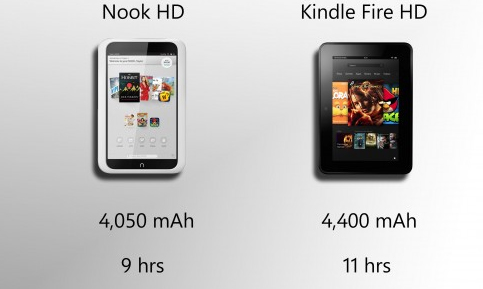
    This device was launched as Samsung Galaxy Tab S2 branded as Nook with 8 inch LCD, which comprised the software of both Samsung and B&N. This device runs on Android 5.0.2; comprising 8-core CPU (1.9 GHz Quad + 1.3 GHz Quad) accompanied by 3 GB RAM, 32 GB internal storage, a micro-SD card slot, dual-camera(2.1 MP front 8 MP back) and 4000 mAh battery, which would last up to 14 hours using video and costing up to U.S $399.99.

    Samsung Galaxy Tab E Nook(9.6″ LCD)

    This Nook version was launched which was Nook branded Samsung Galaxy Tab with 9.6″ LCD whose software was a combination of Samsung, B&N and Microsoft. This device operates with Android 5.1.1 on a 1.2 GHz Qualcomm Snapdragon 410 CPU with 16 GB of storage, micro SD card accessibility, weighing 547 grams, and dual camera (2 MP front and 5 MP rear); 9.6″ display having resolution of 1280 x 800 costing to $249.

    Nook Tablet 7

    B&N introduced Nook Tablet during November 2016, which was an exclusive Nook branded tablet with a 7″ screen and 600 x 1024 resolution costing up to $50. The operating system used in this device is Android 6.0 Marshmallow with Nook apps, accompanied by 1.3 GHz MediaTek CPU. It has 8 GB storage, a micro SD card slot, WiFi and Bluetooth; weighing 8.8 ounces and a battery life of 7 hours.

    Read Also : Android Oreo Vs Android Nougat Vs Android Marshmallow Vs Lollipop

    Conclusion

    We have looked at the different Kindle & Nook versions from where you could download free eBooks for these devices. Hope this article has won your hearts and helped you find your right e Reader. Have a Good Read.

  • Download free eBooks For My Nooks or Kindle -Read eBooks

    Download free eBooks For My Nooks or Kindle -Read eBooks

    Reading is never an old hobby , but the mode of hobby has moved away from conventional way to latest technology like e-books , audiobooks etc. What more to come is still clueless with rapid AI e-books and AI assisted reading technologies. Reading as a hobby we wish to spend less so always we end up searching in google “how to download free eBooks ? ” “download harry-potter ebook / download best seller novel pdf , download ebook comics pdf  etc ..

    To be honest , my greed for books never end , so as my search queries in google in this aspect is way more funny .

    Download Free eBooks:

    Everything around us has become digital and so we call this a “Digital Era”. Don’t you think even our hobbies got digitized these days? Certainly, from letters to emails; SMS to messenger apps , board games to online games .And what not; from normal library rooms,our reading too has reached levels ahead . So here we are, to give the best on about a digitized hobby- “Reading”. All the Book lovers are requested to turn your attention to the different ways to Download Free EBooks for their Nooks or Kindle.

    But, remember, the fun in reading the Real books, visiting the Real libraries will never fade away from us. How would kids these days ever know enjoyment from such books, as they are already glued their eyes onto virtual ones- eBooks … So if you are being searching for the ways to Download free eBooks for  My Nooks and Kindle here is the solution for that .

    Kids these days have their eyes on certain gadgets from which they can have ‘Virtual Libraries’. They demand for tablets, or something new called Kindle, a new product from Amazon. On Kindle,  they could download free eBooks, they could read it anytime, anywhere.

     Let us get to know more about these ‘Virtual Books’ or ‘Libraries’.

    How To Get Free eBooks For Kindle or Nook:

    Most of Kindle and Nook owners agree that having an e-Reader would tempt you to read more.  However, these are not cheap, costing almost equal to that of hard-copy. There are a few tips to find the free eBooks for Kindle or Nook:

    • Search for “0.00“: This has been the oldest trick. Go to the Barnes&Noble or Kindle bookstore and search for “0.00“. The result would generate a collection of free eBooks which you could directly download into the device.
    • Swap books with strangers: You could find some books with the “lending” feature. Amazon and B&N wished that  lending feature would be enabled among friends. However, there are sites such as BookLending.com and eBookFling.com enable the users to have a list of eBooks and exchange them with anyone else.
    • Check out eBooks from Library: They might seem primitive, as libraries are trending with the provision for services like Overdrive.
    • Find free books online: There are books, more specifically classics like “Frankenstein” under Public domain authorization and have been turned into eBooks for pleasure in reading.

    What is Kindle?

    The Kindle is a chain of e-readers created and marketed by Amazon.com. Kindle devices let the users to browse, purchase, download, and read e-books, newspapers, magazines and other digital media through WiFi from Kindle Store. The hardware,on the other hand, developed by a division of Amazon- Lab126, had started as a single device, presently holds a range of devices,such as e-readers with E Ink electronic paper displays, Android tablets having color LCD screens and Kindle applications supporting all major platforms. Every Kindle device coordinates with contents of Kindle Store and as on January 2017, the store holds over five million e-books available in the US.

    You know in amazon-kindle many a times we can get books for 1 dollar or sometimes amazon-kindle free books are waiting to excite us . This week i have got few of the magazines for 0$ in amazon-kindle . All that it takes is to create amazon-kindle account .

    Read Also : Kindle Fire Silk Browser Alternatives

    Where To Download Free eBooks 

    It has been easier to download free eBooks, than you could imagine; just need to know where exactly to search for  them. There are a few websites which would take you through finding and downloading free eBooks on Kindle to start reading.

    No Kindle? No worries. You could get a free Kindle reading app for the browser, smartphone or tablet. Once the app has been installed, you could download free eBooks.

    If you check into U.S public library, you could download Overdrive Media Console. Being accessible to users of both Windows and Mac PCs, it would link to a variety of public library index, thus allowing to download free eBooks through Amazon. You could view your library’s Overdrive website from www.overdrive.com.

    Read Also : uBlock Origin Replaces Adblock plus(Best Adblock Plus Alternative)

    Overdrive Through Public Library :

    If your public library has subscribed for Overdrive, you could download free eBooks just like checking paperbook. You could use the LibrarySearch option that allows you to find the nearest library giving away Overdrive.

    BookLending :

    This service is similar to Overdrive, used when the library has no Overdrive subscription. Here, you could borrow as well as lend books for Kindle without checking in to your library. You could borrow free Kindle books for 14 days and would be returned to the owner at that time.

    If the classics are preferred, you could check on Project Gutenberg for a start. This version has been there, ever    since the Internet was introduced, having almost 50000 copyright-free eBooks. In OpenLibrary, there are even more choices of downloadable eBooks. An added advantage of OpenLibrary is that it has a lending system as in the real library which would not be seen in Kindles. There is one more ‘virtual’ library called archive.org wherein you could access  historical and other academic texts.

    Goodreads :

    This has a collection of more than 2,500  recent free books, and mostly in Mobi format. ManyBooks.net   is a combination of classics and self-published titles, with around 30,000 in store. More classics and self-published works could be found at FeedBooks. If there are fans of science fiction, they could download free eBooks by the publisher Baen.

    ManyBooks.net :

    This is yet another free website, that has ruled over the internet in finding the greatest and the latest free Kindle books.  Presently, there are over 33000 free eBooks in this website. You could browse free eBooks by the author, title, genres or languages; and download free eBooks as Kindle file (.azw) or any preferred file type.

    Mobipocket :

    As you cannot find free Kindle Books on Amazon easily, Mobipocket is specifically for them. This has been owned by Amazon, listing over 11500 free eBooks. Mobipocket is the only website except Amazon, from where you could download free eBooks  for Kindle. This is quite simple, as all they do is listing the books. The books here are all of public domain and the last set of books added to the catalog was in 2006.

    Baen Free Library :

    This is an online eBook store, selling eBooks from a set of publishers operating Baen Free Library. This library was established since it was more expensive to buy the books and do the marketing for them, than it would cost for the eBook version. This is why you could find newly released title in Free Libraries, rather than the literature classics.

    Though Baen is an eBook store, you could download free eBooks, without having to register or drop-in the email address. There would be some books in the Free library, with their status changed as Paid, so you need to double-check before you would download.

    OpenLibrary :

    This too serves to lend and download free eBooks for Kindle, having over 1 million eBook titles accessible. They have specialized in Classic Literature they could be searched by keyword or could be browsed by subjects, authors or genre. Each book could be downloaded in a different file formats such as MOBI, DJVU, EPUB, plain text and PDF.  

    Smashwords : This has been a great choice from where you could download free eBooks of independent authors     and publishers. IT has almost 200,000 titles in the index. Smashwords has played a vital role as source of newly launched independent eBooks. Smashwords would be a perfect choice for those looking for eBooks in languages      other than English. Besides, you could find eBooks even in your mother tongue. That was quite a ‘smash’.

    DigiLibraries :

    These usually gather the free Kindle books, from independent authors and publishers.

    Read Also : Enable / Disable JavaScript : Mozilla Firefox Hacks

    Nooks:

    The Nook Simple Touch or the Nook Touch, is the second generation Nook e-reader created by Barnes & Noble. This device comprises 600×800 E-link screen with a touchscreen facility, using a grid of infrared strips    above the surface of the screen. The device has been wirelessly connected through Wi-Fi 802.11 and a mini USB    port to charge and connect to the computer.

    During April 2012Barnes & Noble introduced  a Simple Touch Reader enabled with “Glowlight” LED technology. Barnes & Noble released the Nook Glowlight, thus replacing the Simple Touch with Glowlight version in October 2013. The Simple Touch was sold out and it had been stopped during late February 2014.

    Read Also : Enable / Disable Internet Explorer Extensions and Add-ons

    Where To Download Free eBooks For Nook :

    If you prefer to have a Nook reader, you would be more curious to know the source to download free eBooks. However, there are a few vital things to remember before you download free eBooks for the Nook device.

    The most important point is DRM or the Digital Rights Management, which prevents opening of files on unauthorized devices. Barnes&Noble accesses DRM from Adobe. DRM is also used on eBooks available on B&N websites for free. It should also be remembered that, while collecting free eBooks for Nook, one should also read     the eBook DRM for the same. The most compatible format to access or download free eBooks; may it be eReaders, tablets or eReading applications is the epub. The pdf format is also supported; yet it would not be          as easily readable as in epub format, specially on small screens.

    You could find over than 2 million free eBooks in epub format on the Web.  Among these, there are a few classic ones accessible in public subset. Before purchasing an eBook, you could download a free sample.

    One interesting fact is that, to download free eBooks you need to purchase a Nook device. You could download free app to check on B&N’s eBook community. Different versions are accessible on iPad &iPhone, tablets working on Android as well as Windows 8 platform.

    Best Websites To Download Free eBooks :

    Now, in this session we shall look at some of the top website to download free eBooks for the Nook e Reader.

    There are over a million free Nook books for both children and adults. You could browse for the free eBooks by category or subjects like Nature, Biography,Poetry,Romance and Fiction. You could also find books by filtering based on the age so as to find books suitable for teens or readers of similar age group.

    • Nook Store :

    The primary task is to check for the available items; considering the demerit; that the DRM needs to be balanced with the ease of using and handling downloaded books. The books bought on the Nook Store would be linked across the devices making it more convenient, so that even if  you begin reading from a Nook Simple Touch, it could be completed on the Android Smartphone having the Nook app installed in it. Another point to be remembered is that the free eBooks could be synced; however the samples of the paid eBooks cannot.

    A trendy way among the Nook fans to download free eBooks is the Nook Free Fridays. A good set of books would be offered FREE only on Fridays. The subscription could be done on The Nook Blog to be updated about the free Friday offers.

    When one looks, not just for free deals, but also for the discounted ones, Nook Daily Find would be the right choice. Reading buffs wanting the discounted Books could grab them at almost 50% on the daily basis.

    • Project Gutenberg:

    This is the most commonly checked place to download free eBooks; particularly for the Classics. This is the primary warehouse for free public domain eBooks. When the title gets included in  public domain, the copyrights to this work would be removed; thus being publicly available. In this specific storage place, all the books are Free.

    If you were looking out for the classics by Mark Twain or Jane Austen, make Project Gutenberg the first choice for the search.

    • Book Rix :

    It is of German origin, being a self-publishing podium presently holding around Twenty thousand publications in deal. This German origin publisher has a collection of novels, short stories, children’s books and poetry. There is a thick group of authors and readers. Book Rix comprises books mostly written by European authors.

    • GoodReads :

    There is a section called Free Nook Books, where users have put up the free Nook books that they have found. These are based on popularity and it would broaden your smile when you would find more than 700 free Nook books to choose from.

    These are some of the top places to download free eBooks for your Nook as well as Kindle device.

  • Hard and Soft Reset Roku Manual – Fix Frozen Roku Streaming Stick

    Hard and Soft Reset Roku Manual – Fix Frozen Roku Streaming Stick

    Hard and Soft Reset Roku Manual

    Over years, we have been listening to music on devices like tape-recorders; have been watching movies on cassettes, which then evolved to what we called the ‘Walkman‘, which was portable. As years passed by and we entered the millennium-2000’s, we were fascinated to have the Media players- MP3 players. There has been a high competition among makers of these portable players- Philips with Audio-Video media players, Apple with their iPods, also   other companies like Touchmate. In recent times, certain companies have introduced set-top boxes where they can use USB drives to play movies. Another transformation in these digital media devices, wherein Streaming sticks came into existence.This article will mainly explain on Hard and Soft Reset Roku .

    What is Roku?

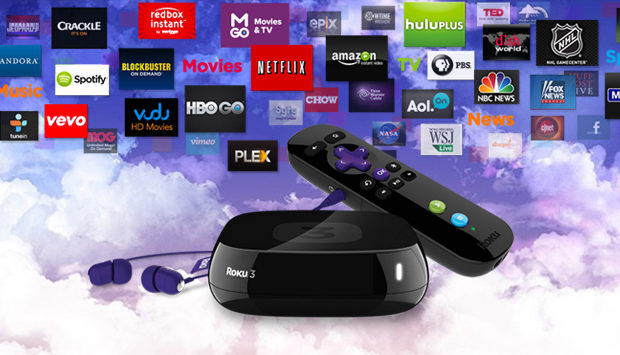
    Roku is a streaming media player, wherein the content is taken from the Internet and is displayed on the TV.      Roku has different models, with unique performance and features. All the models of Roku have access to more     than 3500 channels. We shall now see some general features of Roku models:

    • Full 1080p HD support
    • Shortcut buttons on the remote for popular channels, e.g. Netflix, Hulu, HBO GO, etc (buttons change by         the model)
    • Search across multiple content providers
    • Mobile app available for casting personal media to your TV and providing remote capabilities
    • Ability to use the app in locations wherein Wi-Fi has to be logged in places like hotels and dorm rooms

    Roku Models:

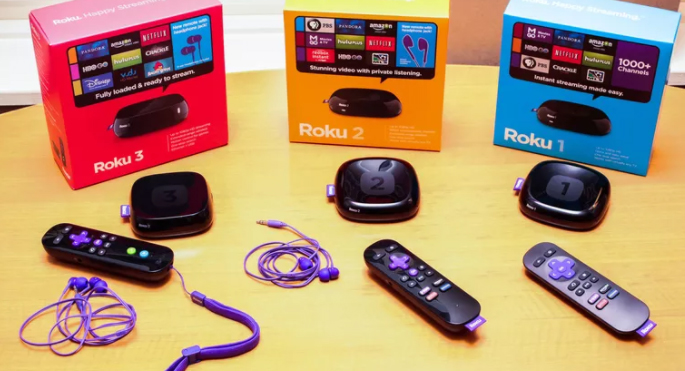
    In this section we shall have a look at the different models of Roku. These models have the features of less    expensive ones, unless it has certain unique additional features. Roku has a PDF Comparison chart, giving a      quick review of differences among these models.

    Roku Express/Roku Express+- Price $29.99/$39.99: 

    These are the base models and hence do not have the advanced features like others. However, Express+ has an added advantage of being played even on non-HD TVs. It also has an advantage over other streaming player rivals- Fire TV, Apple TV, Chromecast. 

    Roku Premiere: 

    The price of the Roku Premiere model ranges from $79.99. Its features are better than Express+ in different ways. For instance, it works on Quad Core processor dual band wireless connectivity of 802.11 ac.  It has an effective support for 4k videos. There is a Micro SD card slot for additional memory storage for additional apps and games if the box runs out of space. It supports screen mirroring from compatible PCs and mobile devices. A unique feature that makes the Premiere model to stand out is that it has a Night listening mode, which enables in enjoying even at night without disturbing others.

    Roku Premiere+-Price $99.99:

     Here are the advantages of this model over Premiere, Express+,Express  and other streaming sticks. It supports HDR video. It has an Ethernet port. It has a more complex remote control (but not so advanced as the Ultra model):

    • It includes a headphone jack, so the streamed content can be enjoyed without disturbing others
    • The remote need not be directly pointed to the Roku player as the Streaming stick censors the signal. 

    Roku Ultra- Price $129.99: 

    This is the most advanced model of Roku, supporting both 4K and HDR        videos.  The only lagging feature of this model is that the features are available only to those having 4K            or HDR TVs, and the streamed contents are available only in 4K/HDRs.

    There are a few added advantages of the Ultra model-

    • It comprises an Optical Out audio port to connect to home theater systems.
    • Presently the only model with a USB port to attach to a device to play your personal media files.
    • It has an improved version of remote providing voice search and has gaming buttons.

    What is Roku Used for?

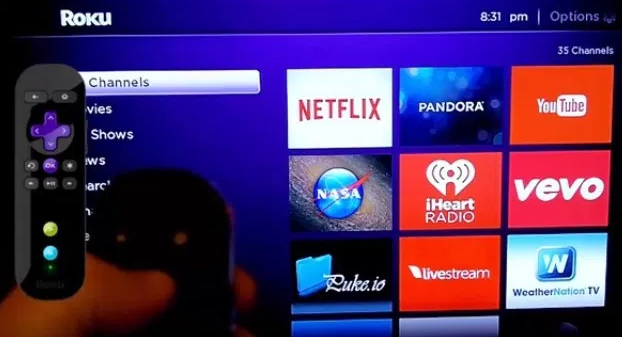
    1. Streaming Videos:  What makes Roku different from other media players is its incomparable number          of channels offered. By ‘Channels’, in Roku is defined as what is called Apps. There are over 2500 channels     in the public database, with a few top ones for movies and TV programming- Netflix, Amazon Video, Hulu, Google Play, HBO GO/NOW, PBS, Lifetime, YouTube, WatchESPN, WWE Network, etc. They also offer a     few popular channels for children; news, educational,fitness,food and a few other categories of videos; other   set of providers like ACORN TV(British series), Crunchyroll(anime) and so on. 
    2. Listening to streaming audio: Roku also has a good set of music services too, such as Amazon Music, Pandora, Spotify, iHeart Radio, and Sirius XM.
    3. Play Games: Roku has a great collection of free as well as paid games, in which the popular ones are      Angry Birds, Sudoku, Toons and so on. If one wishes to play on Roku. there need to be an extra storage   capacity included in model 2,3 and 4 models having a Micro SD card slot.

    Read Also : Kindle Fire Silk Browser Alternatives

    When should you reset Roku?

    Before taking you to the methods of Hard and Soft Reset Roku we will

    Roku is quite compact, replacing the usual cable TV and can be placed in the palm of your hand. It can be really         a useful device if one wishes to enjoy playing movies with the TV connected to internet. It   streams the video      through sites like Youtube, Netflix and a few others. However, like every device, Roku too has some limitations.       It does get stuck sometimes. When such situation occurs, like when Roku hangs, we need to reset streaming  stick, and the best option is to Soft Reset. If Soft Reset does not solve the issue, Hard Reset is done on this streaming stick.

    So now we will detail you the guidelines to Hard and Soft Reset Roku.

    Methods to Hard and Soft Reset Roku or Streaming Stick:

    Here are the exclusive methods to Hard and Soft Reset Roku by step by step guidelines.

    Hard and Soft Reset:

    Resetting this streaming stick to factory settings is quite easy. However, the lagging point is that one needs to           log in to all the accounts once again, its guiding manual is so informative like no other product could have, when      in difficulty. There are 2 basic methods to reset Roku Box or streaming stick-Hard and Soft Reset Roku

    Soft Reset Roku: 

    Assuming the navigation through Roku’s menu, reset the factory settings:

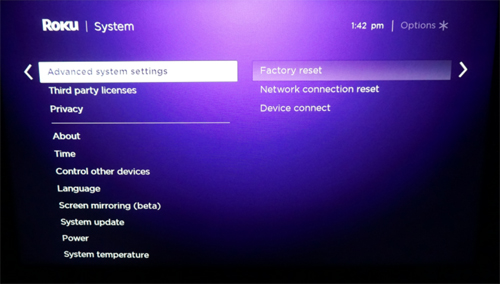
    1. Navigate to Settings menu
    2. Choose Advanced System Settings                                                                                                                             

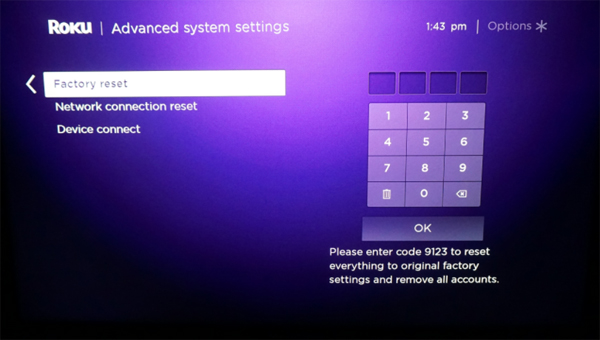
    3. Click Factory Reset                                                                                                                                                                         4. Enter the code                                                                                                                                                                                                                                                                                                                                                                                                             

    Roku provides a code, asking for a combination of button presses. By following the instructions, Roku gets             into the Factory settings in a short while.

    Read Also : uBlock Origin Replaces Adblock plus(Best Adblock Plus Alternative)

     Hard Reset Roku : 

    If all the steps in Soft Reset fail, the ultimate option is the Hard Reset. This is not the most ideal way;                 however if the device constantly has a hanging issue or some problem prevents from using the reset software,       then Hard Reset is the ideal choice.

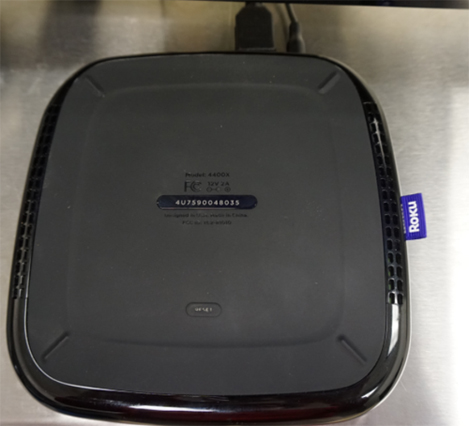
    • Locate the Reset button on Roku: This button would differ depending on the model of the streaming stick.         Earlier, these Roku boxes required a paper clip or a pin to reset as that in a digital watch. Newer models include the real reset buttons as in the Roku 4  and  Roku Streaming stick. 
    • Hold down the Reset button until the device really resets: Do NOT hold the button till the screen goes dark;    it restarts the device. Instead, hold the button for a few extra seconds until the Roku logo appears on the TV screen. From that point, the setup process can be resumed. If the process is successful, the device is ready to   be played on.

    Why Do We Reset Streaming Stick:

    Roku has become quite popular among youngsters who are movie buffs. It has won everyone’s hearts by its ease       of use, its looks- how compact and portable. However, This streaming stick gives trouble at times when it hangs or freezes. At this point, the device needs to be reset. We have already seen the ways to reset streaming stick–    Hard and Soft Reset. 

     Soft Reset:

     It is used to restart Roku without losing the data or settings.

    • On Remote: When Roku hangs, it can be reset using the Remote by pressing these buttons:
      • Press Home 5 times
      • Press Up 1 time
      • Rewind << 2 times
      •  Fast Forward >> 2 times

    These steps word in all Roku models.

    • On Menus(New models- 4, Premiere & Ultra): 
      • From the Home screen, select “Settings“->”System“->”Power“->”System Restart
    • On Buttons(Older types):
      • Reset button can be seen behind or at the bottom of the device. Certain models require a pin or a     paper clip to press this button
      • To reset streaming stick, press the Reset button and release it after a second.
    • Power Pull: If none of the above procedures work, Disconnect the power cord for 20 seconds and                   re-plug it.

    Read Also : Cancel / Reverse Venmo payment : When a Venmo payment goes wrong

     Hard Reset:

    It clears all the settings and reset streaming stick to factory settings by default.

    • Using Buttons- Older models: 
      1. Remove all cables except Power cord
      2. Press and hold “Reset” button for 20 seconds
      3. Continue holding “Resetbutton unplug the power cord from behind the unit
      4. Release the “Reset” button and re-plug the cords back to the device

    Roku box is reset to factory settings, thereby taking through the Setup process again.

    Guess now you are clear with the ways to Hard and Soft Reset Roku.

    Roku would be chosen as one of the top-rated streaming stick or media player for the next few years until something better comes! Let the youngsters in the upcoming generations get to enjoy every bit of Roku for    watching  movies and playing games in HD version. Let us hope that Roku would have lesser chances of freezing.

  • SBA Loan Detailed-Everything about Small Business Administration

    SBA Loan Detailed-Everything about Small Business Administration

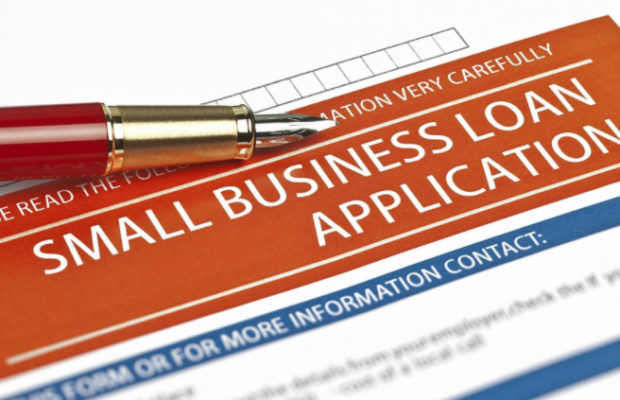
    SBA Loan

    The world has totally changed in every aspect- the people, government and their new rules, even updates on new career options. But, there are things beyond all these. Have you heard of SBA Loan? This has been a very helpful tool for the middle class people who would want to start their own business.

    This could be an option for those who just completed their education and would like to be in and around their hometown itself. However, If these belong to rural areas, do you think they could afford a big business? How would they get enough financial support? Here, comes the role of the so called SBA Loan. 

    People could start a small business in their hometown and they could request for a loan adequate to commence it. Isn’t that a fair deal? However, as every thing around us has its own good and bad sides.

    So, Let’s have a look at the pros and cons of SBA loans :

    SBA LOAN PROS: 

    # Minimum down payments

    # Longest duration for repayment

    # Reasonable interest rates

    # Suitable for a wide range of business needs 

    SBA LOAN CONS :

    • Lengthy paperwork
    • Takes longer time to get approved
    • Require security or warranty

    SBA Loan: Review 

    There are several SBA Loan programs under the US Small Business Administration, wherein money can be borrowed for absolutely any business needs, which includes additional working capital, purchase of inventory or equipment, taking loan for other debts, buying real estates or achieving funds for other businesses.

    Who are qualified for SBA Loan?

    There are basically three essential points that one must see . Inorder to analyse whether you are eligible for SBA loan . Given below are the following checklist for SBA Loan eligibility criteria :

    a) Should have 2+ years in business 

    b) 640+ credit score

    c) Annual revenue more than $100,000

    SBA Loans: Types

    SBA Loan has several programs. However, choosing a wrong loan type could result to losing a lot of relevant benefits.

    When purchasers talk about these loans, they refer to SBA 7a or the SBA 504 loan for the Commercial Real Estate.  SBA Loan is classified into 6 types:

    Here begins with SBA loan types and their eligibility and other details .

    TYPE 1  :  SBA 7(a) Loans

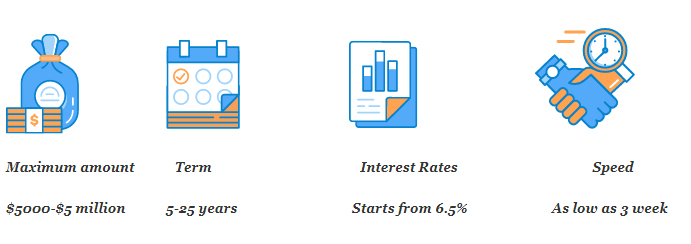
    These are the most common types of SBA Loan. The amount in this loan type could be upto $5,000,000 and could be used for the working capital, reapplying for debts; buy a business, real estate or a machinery. This loan program comprises SBA Express Loans and SBA Advantage Loans

    SBA 7(a) Loans can be given to both-startups as well as to the established small businesses.  To qualify for this loan type, one need to have the following:

    # A good credit score, preferably 680+

    # No recent indebtedness,mortgages or tax charges

    # Collateral : As SBA does not refuse to give loan due to insufficient collateral or warranty, there are less chances of a lender giving loan which does not have enough security or warranty. Loans under $25000   need not be warrantied. 

    # Down payment of 10% if the loan is to purchase a business, real estate or a machinery/equipment

    These are the basic eligibility for  SBA 7(A) Loans .

    Use of Loan Revenue 1. Working capital
    2.Equipment Purchases
    3. Refinance debt
    4. Purchase of Business / franchise
    5. Leasehold improvements
    6. Purchase of commercial real estate
    Minimum Requirementsa ) 680 + credit score
    b ) 10 -20 percent down payment
    c ) Securities ( Not mandatory in all cases)
    Interest Rates5.75 % -8.25 %
    Loan AmountUpto 5 million dollars
    Repayment Terms25 yrs – commercial real estate loans
    10 yrs – Working capital loans

    How To Apply for SBA 7(a) Loans : 

    The top 3 banks providing SBA Loan are: Wells Fargo, Live Oak Bank US Bank. These Banks, have done over 7500 SBA 7(a) Loans, summing to more than $2.8 billion in 2016. Almost all national and regional lenders would participate in this loan program. A Regional SBA office would refer its customer to the participating lenders in one’s area; or they could work with Nationwide SBA Loan provider like SmartBiz. 

    One can apply for SBA 7(a) Loans  in 4 steps:

    Determine Eligibility

    This step verifies if an individual or a business is eligible for the loan. Both, the general borrower requirements as well as the SBA eligibility requirements have to be met.

    SBA Loan Requirements :

    a ) 680+ FICO score for all primary business owners. 

    b ) Down payment of 10% or more loan is used to purchase a business or commercial real estate.

    c ) Collateral: SBA loans need not have 100% warranty. But the more business and/or personal security brought, the easier it will be to get the approval.

    d ) 2+ years in business: Startups can get SBA 7a loans, however it is more  complicated. If one needs SBA loan as a startup, they to have all the mentioned, along with business management & industry experience.

    e ) Business is profitable

    f ) No offenses or defaults on debt obligations to the U.S. government (including student loans).

    g ) Commercial real estate loans must be owner-occupied by 51% or more.

           Find SBA Loan Provider:

    As the above requirements are met, the next step is to find a provider of SBA Loan, distributing and servicing the loan. SmartBiz is fast and efficient. Their updated process would pre-qualify in a ‘Nick of time’ and get funded as fast as 30days.

    Finding SBA Loan provider would mean direct connection with the Bank and other direct lenders or brokers.

    a ) Finding a direct SBA lender- Banks, Credit Unions, Non-Bank Lenders:It is quite ideal to have a Bank which regularly provides SBA Loans. These loan providers easily approve the application and also know how to solve any issues that the borrower faces.

    One has to be sure that the lender is a part of SBA Preferred Lender Program(PLP)PLP lenders are those SBA Loan providers having great deal of experience and a strong record which could make SBA give them more flexibility in processing the loan faster. 

    b ) Finding SBA Loan broker : Loan brokers provide valuable service to people owning small businesses by influencing them through their knowledge. Brokers strongly understand who would easily approve the type of loan and business, as well as the style of presenting the request for business loan.

    Meanwhile, SBA Loan brokers could save a lot of time and irrelevant complications by coordinating lender’s document requests and similar communications. When a Bank is found, directly or through a loan broker, one should collect as much information regarding the SBA interest rates they provide and the fees. SBA sets a margin on the interest rates; however the rates may differ from one Bank to another. The borrower should read the article on SBA Loan rates before applying for the loan, and once being pre-approved, an SBA Loan Calculator to have the right estimations on the monthly payments.

    Assemble and Organize SBA Loan Paperwork: 

    Once the lender or the broker is selected, the next step is assembling the documents required for the application. SBA has a broad checklist of documents which are as follows:

     # Loan Request Amount & Detailed Allocation of Funds

    # Business Financials

    # Profit and Loss (P&L) Statement

    # Balance Sheet

    # Projected Financials (1-3 years)

    # Proof of Ownership

    # Business Certificate/License

    # Loan Application History

    # Business Tax Returns (last 2 years)

    # Personal Tax Returns (last 2 years)

    # Personal Financial Statement

    # Owner Résumés

    # Business Overview and History

    # Business Lease

    Complete SBA Forms:

    Besides the paperwork mentioned, there are certain forms to be filled so as to get the loan approved. Following are the broad guides on how to fill SBA loan form and complete the forms:

    # SBA Form 1919 Guide: Borrower Information Form – Used for all 7a loans, the form where basic borrower information is noted

    # SBA Form 912 Guide: Statement of Personal History – This form is used to evaluate the character of the borrower

    # SBA Form 413 Guide: Personal Financial Statement – This form is used to assess the personal financial status of the borrower,their spouse (applicable), and anyone who is a proprietor of the business.

    # SBA Form 159 Guide: Fee Disclosure Form and Compensation Agreement – This form is relevant only if an outsider is  hired  to help with SBA loan application. It comprises the details how much is paid and the services they provided. 


     TYPE 2 : CDC / SBA 504 Loan- Owner Occupied Commercial Real Estate Loans

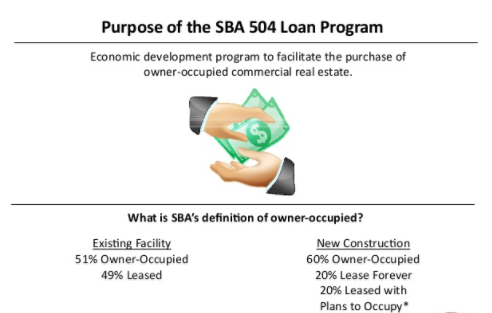
    The CDC (Community Development Corporation) or SBA 504 Loan Program is created to avail affordable long term loans for small businesses, trying to buy or build facilities, as well as provide facilities through heavy equipment with longer lifespans. 

    The program combines two lenders for funding these projects: 

    @ Bank, Credit Union, or Non-Bank Lender – Lending up to 50% of the project costs

    @ Community Development Corporation (CDC) – Lending up to 40% of the project costs

    The 10% is contributed by the borrower as down-payment.

    Use of SBA 504 Loan:

    Loan Revenue
    • Owner occupied commercial real estate purchase, construction, or renovation
    • Purchase of other fixed assets
    Minimum Requirements
    • 680+ Credit score
    • 10% Down payment
    • Meet job creation or public policy goals
    • Real estate must be occupied by owner with at least 51%
    Interest Rates3.78 – 5.39%
    Loan AmountsUp to $14 million
    Repayment Terms10 or 20 years

    For a business to be qualified to apply for this SBA Loan type, it should pass the following criteria:

    @ Credit Score to be 660

    @ 10% Down-payment of the project cost

    @ Job creation or Public policy goals to be met

    @ Have a reachable Net worth of less than $15 million; an average Net income less than $5 million after taxes during the previous 2 years

    @ Not to be engaged in any venture or Investment in rental Real Estate

    @ No funds to be taken from external sources

    @ Have the capability to repay the loan on time from the Operating Cash Flow of the business

    Interest Rates, Terms & Limits: 

    The SBA 504 Loan is classified to two types: One is for 50% or less of the deal issued by the lender like Banks, Credit Unions or Non-Bank lenders; others are issued by CDC for 40% or lesser to the deal. Both these loans    differ in terms, rates & limits. Together, these rates sum up to a total of 504 loan rates. 

    • CDC’s Role in SBA 504 Loan: 

    CDC type of SBA Loan covers up to 40% of total project cost.  SBA keeps limits on the interest rates,terms and    fees that must be followed by CDC. The loans must have terms- 10 or 20 years and the interest rate must be fixed.

    • Bank/Non-Bank Lender’s Role in 504 Loan:

     The Bank, Credit Union or the Non-Bank lenders issuing other loans cover up to 50% of total project cost. SBA    does not keep limits on the rates, terms and fees for the traditional lenders, thus leaving the loan details for negotiation. Interest rates would be between 4%-8% having a reset point. Usually, a loan has a term of 5-10 years   but would be repaid in 20-25 years. the repayment schedule refers to a lower monthly payment; however it can be higher when then loan matures. 

    • CDC/SBA 504 Loan Public Policy Goals:

     SBA has set certain rules for promoting job creation, community development and other Public Policy goals

    Job Creation is promoted by requiring businesses to make or hold on to a job for every $65000 loan, except             for small businesses who would receive $100,000 for every job created or held on.

    Community Development Goals comprise promoting business district recovery, expanding the exports, minority expansion, women or high-profile businesses, rural development or energy efficiency and many more.


     TYPE 3 : SBA CAPLines Program- SBA Line of Credit

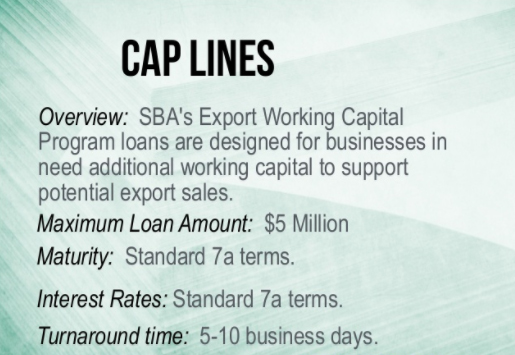
      This SBA Loan program is of 5 types, created to avail up to $5 million in helping small businesses to cover up    their short-term and seasonal Working Capital needs. Let us have a look at the types of CAPLines:

    Seasonal Line of Credit: Used for seasonal increase in Accounts Receivable, inventory needs, or related increased labor costs up to $5,000,000.

    Contract Line of Credit: Used for the materials and labor associated with assignable contracts.

    Builders Line of Credit: For contractors engaged in building or renewing residential or commercial buildings used for materials, equipment, permitting, labor, and even land related to a project.

    Standard Asset-Based Line of Credit: Allows small businesses in converting short-term assets             (such as pending invoices) into cash.

    Small Asset-Based Line of Credit: Allows small businesses in converting short-term assets                     e.g. pending invoices, into cash. Firm servicing requirements are removed by the SBA in return                      for offering a smaller credit line. Up to $200,000.

      Uses:

    Use of the Loan 
    • Short term or seasonal working capital needs
    • To fulfill contracts or purchase orders
    Minimum Requirements
    •  Credit score to be more than 660
    • Business must assure accounts receivable, inventory, purchase orders, or contracts   as security for loan
    • For the Seasonal line of credit program, the business must be at least 1 year old showing a seasonal pattern to revenue
    Interest Rates5.75 – 8.25%
    Loan AmountsUp to $5 million
    Small asset-based lines have a limit of $200,000
    Repayment TermsUp to 5 years

    Eligibility or Qualification:

    Eligibility criteria for CAPLines program of SBA Loan is the same as that of SBA 7(a) program, but with a few additional points. Criteria are as follows:

    # A good credit score, preferably 660+

    # No recent bankruptcies, mortgages, or tax charges

    # Short-term warranty, like invoices or assignable project contracts

    # Personal guarantee from owners of 20% or more

    # Some additional security (the more, the better)

    The Additional points vary according to SBA Line of Credit being applied for.

    SBA Seasonal Line of Credit requires a business having operated for at least 1 year and that they show up their varying nature of the business.

    SBA Contract Line of Credit requires a business that wins a contract or a subcontract, or having received a purchase order that can be used as a base on the line of credit.

    SBA Builders Line of Credit is for the small contractors or developers in constructing or re-establishing residential or commercial property sold to the third-party, who are not known at the time of construction or at the beginning of re-establishment. The purchase of a land cannot exceed 20% of the CAPLine revenue.

    How To Apply:

    The application process of this type of SBA Loan through CAPLines program is similar to SBA 7(a) loan. Lenders such as Banks and Credit Unions who get involved in SBA 7(a) loan program would also take part in CAPLines program. There requires other set of businesses to be taken to the lender so as to find the security for SBA Line of credit to be worthy of it.

    Read Also : Quickly increase credit score in just 12 months -Easiest hack

    READ ALSO : Survive high interest student loans – Amazing Tips

    Read Also : Exclusive Nest Egg building guide for painless millionaire dreamer


     TYPE 4 : SBA Export Loans

    This SBA Loan types is made to help the small businesses of Americans in expanding their export activities, be involved in international transactions and to enter new foreign markets. There are 3 types of Export Loans:

    SBA Export Express Loan: Updates funding up to $500,000 in working capital to promote small businesses having export activities. Terms up to 7 years.

    SBA Export Working Capital Loan: Funding up to $5 million in working capital to fund export transactions, while the small business having a purchase order from a foreign customer. Terms usually under 12 months, extending to 3 years.

    SBA International Trade Loan Program: Funding up to $5 million in working capital and/or fixed assets for export businesses or for businesses negatively influenced by imports. Terms up to 25 years.

    Use of Loan To develop or expand small business exporting
    Minimum Requirements
    • 660+ Credit score
    • Business must be involved in exporting goods or services to foreign      countries
    • For the Express Export loan, the business must be at least 1 year old
    Interest RatesSBA Export Working Capital Loan: No Limit (but monitored for authority)


    SBA Export Express Loan: 8 – 10%

    International Trade Loan: 5.75 – 8.25%

    Loan AmountsUp to $5 million


    SBA Export Express: up to $500,000

    Repayment TermsSBA Export Working Capital Loan: Up to 7 years


    SBA Export Express Loan: Up to 3 years

    International Trade Loan: Up to 25 years

    Eligibility or Qualification:

    The qualification criteria of this type of SBA Loan resembles that of SBA 7(a) loan program, with a few          differences depending on the type of Export Loan being applied for. Following are the criteria:

    • Credit Score of 660
    • No recent bankruptcies, mortgages, or tax charges
    • Personal guarantee from owners of 20% or more
    • Some additional security (the more, the better)

    Additionally, the Export Express Loan requires a business to be in existence for at least a year, with with an    overseas export. One need not have a necessary experience of a year in overseas export, as long as the principles show relevant exporting experience.

    The Export Working Capital loan does not have borrower requirements like that of SBA 7(a) program, except      that, a Short-term working capital need to be shown so as to enable export expansion.

    Lastly, the SBA International Trade Loan, where the borrower must show that they can develop new foreign markets, expand existing markets, and also show that the small business was adversely affected by imports and      the loan would increase the competitiveness.

    Read Also : Mutual Fund A Complete Guideline – All You should Know

    Read Also : Investment on Stocks and Shares -Pros and Cons


     TYPE 5  : SBA Microloan Program

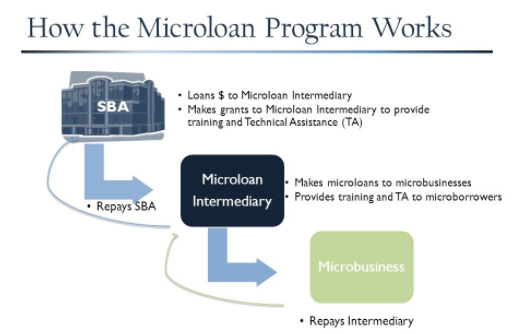
    This SBA Loan program offers loans to non-profit agent lenders who lend an mount under $50,000 to profit oriented small businesses and non-profit child care centers. The SBA does not assure any portion of loans made under this SBA Loan program. Microloans term up to 6 years with an average size being $14,215.

    Non-profit agents are allowed to borrow up to $750,000 during the initial year, followed by $1025 million each    year thereafter, however cannot borrow $5 million at once from any lender.

    Use of Loan Proceeds
    • To start or expand a small business
    • Can’t be used to refinance debt or buy real estate
    Minimum Requirements
    • 640+ Credit score
    • Typically need to have some collateral
    • Non-profit childcare centers are eligible in some cases
    Interest Rates8 – 13%
    Loan AmountsUp to $50K
    Repayment TermsUp to 6 years

    Uses:

    This SBA Loan type can be used as Working Capital to purchase the following:

    • Materials and supplies
    • Furniture and fixtures
    • Marketing and advertising
    • Inventory
    • Equipment
    • Labor

    The only limitation of SBA Microloan is that it cannot be used in real estate or reinvesting in debt.

    If one shows interest in SBA Microloan program, would also be interested in Community Development Financial Institution(CDFI) helping them.

    Eligibility or Qualification:

    The qualification for this SBA Loan type differs from agent to another. Unlike other SBA Loan programs,          SBA Microloan lets the agents have qualifications, who would keep their eligibility requirements and make        certain credit decisions. We shall now have a look at the basic eligibility requirements:

    • Credit score above 660
    • Some warranty or security 
    • Personal assurance

     How to Apply:  

    To apply for SBA Microloan, one must be working with SBA  approved agent in their area. As the name says,         SBA Microloan is smaller in size, taking time to obtain, as long as that of  SBA 7(a) loans, which could be    several months.

    One way of improving differences to be approved for SBA Microloan is the presentation of a professional  application. Gather all the financials and create a clear, respectable Business Plan with financial estimates.    Business plan software, LivePlan for instance, having a 6o day money back guarantee could ensure covering                all the bases.


    TYPE 6 : SBA Disaster Loans

    Generally, these SBA Loan types are for recovering from a stated disaster, or loss of a significant employee.        Each Disaster loan can be used in different ways and can apply for multiple types of this loan can be applied,            at the same time to meet the business needs. We shall have a look at the 3 types of Disaster Loans for small businesses:

    SBA Business Physical Disaster Loans (BPDLs):

    Long-term, low-rate loans made to help businesses suffering physical losses and damages due to a declared disaster, replacement or repair of that property not covered by insurance. It need not to be a profit oriented business.

    SBA Economic Injury Disaster Loans (EIDLs):

    Short- to medium-term working capital loans in helping businesses that suffer a major economic crisis, in meeting usual operating expenses. 

    SBA Military Reservists Economic Injury Loans (MREIDLs):


    Short- to medium-term working capital loans to help businesses who lost a significant employee being wanted for active military service;    meeting normal operating expenses.

    Use of
    Loan

    Proceeds
    • To repair or replace damaged property
    • Working capital
    • Operating expenses
    Minimum
    Requirements
    • 660+ Credit score
    • Business must have suffered a physical or economic damage from a disaster
    • Business must be located in an SBA declared disaster area
    • For Military Reserved member’s loans, an essential employee must have been called to active duty
    Interest
    Rates
    4 – 8%
    Loan
    Amounts
    Up to $2 million
    Repayment TermsUp to 30 years

    SBA Loan Eligibility or Qualification:

    The eligibility requirement for this SBA Loan eligibility program type differs slightly. A very significant difference is that  one may not be in a right state of health when applying for this SBA loan. However, they still have to fulfill their eligibility requirements:

    @ Applicants should have adequate credit history, which means that they should not have financial losses, mortgages or tax charges excessive load of liability

    @ Applicants can show the ability to repay the loan and other liabilities

    @ Security is required to protect the loans as much as possible through personal and business assets

    @ Need not be for a bprofit-oriented business except for MREIDL

    A person is eligible for SBA Business Physical Disaster Loan if their business has been physically damaged by a disaster within the disaster declared area.

     SBA Economic Injury Disaster Loan eligibility is for those small businesses that suffered massive economic            loss by the disaster and are not able to meet the usual operational expenses.

    A person is qualified for SBA Military Reservists Economic Injury Loan if the particular employee has been       called for active military duty and the loss leads to the inability to meet the usual operational expenses.

    How To Apply:

    Before the application for this SBA Loan program, it should be verified that the disaster affecting the business          is qualified for the SBA Disaster Loan support by checking SBA’s disaster database.

    Read Also : Short term Investment Plans – Pros & Cons


    SBA Loans Tips-  How to choose the right kind  of SBA loan

    Generally, these small businesses are great strength to the US economy. According to the US census record of     2010, there have been 27.9 million small businesses registered in the United States, where around 120 million         people were employed, that would be half of the nation’s manpower.

    We have gone through different types of SBA Loan and its uses and where they could be applied. Each type has      its own significance.

    When in a small business, requiring extra capital to take the business into the next level, a few key points can be considered. Here are the following:

    # Review the Business Finances: Before taking up a financial option, one must review the records thoroughly so as to make sure that the business is in the right place to get the loan approved. Many lenders would require a documentation showing the history of a strong performance, hence having more chances         of repayment. There are Book-Keeping tools such as Xero, Sage & QuickBooks enable in documenting the         incomes and expenses, thus providing detailed report of business performance.

    # Be Cautious Before Borrowing From Family and Friends: Earlier, in businesses, entrepreneurs    self-funded from their personal savings, credit cards, or borrowed capital from family and friends.

             PROS: While taking capital, these people are the ones who know us well, who would realize the talent                           and  passion, supporting in every step we take.

            CONS: Depending on the family and friends would bring limited funds. Combination of business and                            personal relationship needs gentle balance, being reminded of the risks involved.

            Conclusion: While having certain benefits in sharing successes with family and friends, there could be                          more risks involved in short-term financial gains.

    3. Use Credit Cards carefully: As these enable quick-funding and instant access for different business                         needs, the credit cards enable the entrepreneurs to fund emergency expenses in business.

               PROS: Easy to access for any business expenses from anywhere

             CONS: Some entrepreneurs have very low credit lines to make a significant effect on the business goals.                        Moreover, customers using more than 50% of credit line, would have lesser credit score, which not only                          reduces cost of personal borrowing, but also makes borrowing from Bank more expensive.

             Conclusion: Credit Cards could make a reliable instrument for cash management. They could be more                        useful during the initial phases of business growth, however could limit in the long term plans.

    4. Don’t Totally Rely on Bank Loans: In the Past, the small business entrepreneurs had only one option                 to depend on Banks for funding in their business, wherein long paperwork was involved and had taken long                 time.

          PROS: When a person goes for an SBA Loan, they usually pay a lower interest, when compared to other                     options.

         CONS: Banks maintain the biggest limits by lending larger amount than that sought by the entrepreneurs.                   Here is why the entrepreneurs lose their importance by many Banks. Banks taking longer time to review and                requesting the documentations, leading to the rejection most of the time, would not suit the small businesses                all this time on their businesses.

        Conclusion: If the business is new, and does not hold a well formed track record of strong performance,                     one  has to seek beyond the traditional Bank loans to fund into small business.

    5. Consider Online Lenders: As the number of entrepreneurs increases, who look out for funding that suits             the new age, there has been an awakening of newer, technology-based lenders, who offer better adaptability,                being faster than most traditional funding methods.

          PROS: Tech-enabled lenders don’t ask the borrower to make endless financial records or wait for a longer                  time for a decision. Once applied online, they have a decision on the basis of latest business data, with access                to capital instantly.

         CONS: Certain online loans hold a higher interest compared to the traditional Bank loans.

    Conclusion: If the business is not qualified for a traditional loan, there are a few innovative companies  like Kabbage would make it possible for small businesses to access the funding so they could grow.

    We have been through every aspect of SBA Loan, its types, the eligibility for each loan, how to apply for            specific type of loan, and finally about Choosing the right typeThese loans would always be a helpful medium          to keep their businesses grow to greater heights, especially after reading through the tips of choosing the suitable SBA Loan.

  • Best Apple Watch Alternatives-Affordable Gadgets

    Best Apple Watch Alternatives-Affordable Gadgets

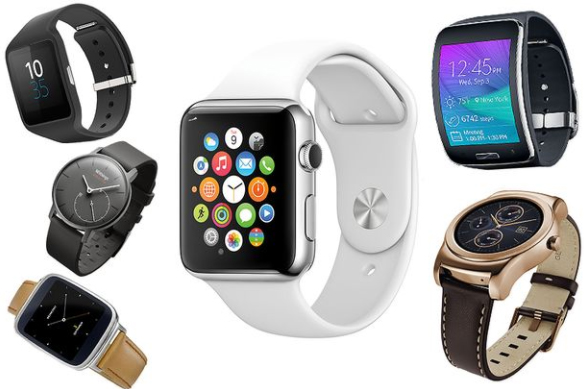
    Have you ever imagined a life without gadgets?Forget about gadgets, one cannot even breathe if they do not find their phones around.World around us has evolved latest technologies. Smartphones, tablets and what not! In these few years we have seen the young generation having a new technological invention- Smart-watches. One popular name in smart watch is definitely that of Apple watch but the range of apple watch differs so here is the exclusive list of Best Apple Watch Alternatives .

    Did you know? These smartwatches are used as alternatives for the bigger gadgets like Smartphones,tablets,PDAs etc. Apple has these watches available in different price range .

    Best Apple Watch Alternatives-The Compatibles: 

    Here is the various Best Apple Watch Alternatives that anyone can afford to stay upto the trend .

    Samsung Gear S3

    Samsung has wide range of gadgets which stands on top among all the best brand around the world. Even in smart watch trend samsung is never behind the competition. One of the Best Apple Watch Alternatives is Samsung Gear S3 . The dial looks bit bigger than the previous Samsung gear s2 watch model. Samsung Gear S3 looks more manly in its appearance but the bigger dial will hardly suit the skinny wrist hands . Added with many features like GPS support , 4G LTE Connectivity , water resistant , WIFI and bluetooth supportive , inbuilt speaker etc are the attractive features of this smart watch. Samsung Gear S3 has come with two brand models and the screen is absolutely scratch free . 

    Compatibility – Android and iOS

    Thus Samsung Gear S3 is best alternative smart watch for android and iPhone .

    These Best Apple Watch Alternatives have attractive features like the rounded rectangular looks,multi-faceted interface and iOS exclusivity, which makes them a unique wearable.

    This Apple watch alternative is a strong contender, worth considering if one is tightly gripped with Samsung phones. In comparison with the visuals of Apple watch, these are designed to work together offering specific benefits like the SamsungPay.

    The Greatest add-on about this smartwatch when comparing Apple watches is that it is compatible on both Android and iOS devices and this shows that people not happy with Apple watches could switch to Samsung Gear S3 anytime.

    The Gear3 having a 3-day battery life and an attractive AMOLED screen, suits most users for daily needs by being flexible and totally a smart choice for both the experienced and the newcomers to the Smartwatch market.

    Read Also : 38 Best iPhone games you should play

    Huawei Watch:

    Another alternative, phonetically called ‘Wah way’, is a Chinese manufacturing giant trying to make its space in the US market. Though it hasn’t made an impressive lead in US Smartphone, yet … it has surprised with its classic advent. While its extraordinary features are not in use, it takes the look of the classy analog kin.

    Running on the Android OS, this Apple watch alternative has the prominent smart watch functions one would expect, without  manufacturing showoffs. Now,  that does make this a unique piece of wonder.

    While the original Huawei watch being a total winner in its design challenging the premium quality of designer watches, yet there were things missing in terms of the functionality. And so, Huawei chose to have two other models developing second repetition- Huawei Watch2 comprises great specifications and features while its corresponding model Huawei Watch2 Classic holding onto the brilliant design of its ancestor.

    Both models work on Android Wear 2.0 which proves to be compatible with both iOS and Android devices.

    Read Also : Improve The World With Smartphone -Top 10 Hacks

    Garmin Fenix 5:

     These Best Apple Watch Alternatives  are the outdoor types coming in three models with a great set of features made specifically for the adventurous gang. These have features like Long Battery Life, Activity tracking, Heart rate tracking and other censors. Moreover, this feature of being water resistance upto 100 meters  would attract the swimmers and won’t make them take it off their wrists.

    Fenix 5 is the base model- ‘Jack-of-all-trades’, while Fenix 5S is a smaller model, designed for the feminine types having distinct version featuring the sapphire lens which makes it scratch resistant and with Bluetooth connectivity.

    Fenix 5X is the ‘Star of the show’ making it the most complex model. Being bigger in size it features protection by the stainless steel ring and strengthened make, also featuring LED backlight ensuring greater visibility all day long.

    All the models of Fenix watch have interchangeable straps, Gyroscope, Barometric Altimeter, Thermometer and a Compass. These can be connected to iOS, Android as well as Windows through a special application.

    These smart watches are easily paired with both iOS and Android devices, proving that the companies keep their customers on top priority thus offering them a Long lasting choice, which could be switchable from one platform to another as and when they wish thereby making them more attractive compared to Apple watches.

    Their Ratings based on the features: 

    • Functionality – 8/10
       
    • Design – 8/10
       
    • Connectivity – 8/10
       
    • Tracking – 9/10
       
    • Notifications – 9/10

     Overall rating: 8.4/10

    Read Also : All Possible ways to Make Money by Playing Pokemon Go

     Rival Comparison: Apple Watch V/s Android Wear:

    The Apple watch alternativesApple with Android, have been on tight war on its specifications, may it be looks, usability and more importantly the compatibility. However,the war between these Top Brands are not just on looks or the price, but beyond all- the Ideology. The single capability of Apple Versus the versatility of Android Wear; Apple’s set of fans, army of dedicated developers and accessory makers Versus Google’s strong partners powerful platforms.

    • DesignOne needs to decide if they need a rectangular or a circular face for the device, a choice Not available in an Apple watch. However, most Android Wear watches are in circular model and with Google’s software running perfectly on both the screen types  giving a tiny cut off texts. Though both Apple watch and Android Wear give an option to choose the best wearable design, it is the Google powered watches that provide the best customization and overall appearance options. With the Polar M600, Fossil Q Marshal and Nixon The Mission, there is certainly a wide choice of Android Wear for all.
    • Interface: If one is familiar with iOS and Android on smartphones or tablets, they would feel good for aesthetics of both Apple Watch and Android Wear, though the wearable versions are quite different in layouts. Apple Watch has a clean, unscrambled approach, accompanied by circular apps grid, that most people are not showing interest in. And so, Apple has included instant-loading apps in watch OS3. Two physical buttons on the side help in navigation. Android Wear on the other hand, is open to third-party  faces; however the options for the combination is quite awful! Android Wear2.0 is fixing this issue: one still has the access to list of existing faces, yet designers can include complexity in the designs making it more useful.  The working is similar to Apple Watch, though there is more on the screen at once in Android Wear. 

    [Conclusion: Android Wear has an important lesson learnt from Apple Watch]

    •  Apps:  Apple explored the Mobile App Store  concept with the Iphone and certainly, there a lot of companies and developers claiming to be on the faces of Apple watch. On both watchOS & Andorid Wear(post 2.0 update), developers are able to create stand-alone apps, which shows that lesser time is consumed with the smartphone and carefully tied up. One of the features of Android Wear that makes it stand out in the crowd is the support with notifications from any app in an innovative way, even if the app has not been updated for a long timeThere is still the need of more innovative apps for both platforms; however with the updates in Android Wear, more and better apps are developed so as to make the Google’s smartwatches stronger.
    • Price: As Apple was placed more towards high-end market; the release of more advanced versions of Android Wear devices, and the competition from Apple on its Sports models has seen the blend in the price level. For instance, Apple’s Ceramic Edition comes in an unbelievable and ridiculous price $1299 for 42mm. Series 2 starts at $269  upto $549 if one prefers the Stainless steel model. Advantage of having partnership with more manufacturers, shows that Android Wear has more fascinating options being more cost conscious; while a few bargains can be seen in older models and a few newer ones in a lesser price compared to the Apple devices. Price is definitely a feature where Android Wear has more to offer; yet, Apple has a better

    These Best Apple Watch Alternatives have greatly proved to be Better than The Best! The Next Gen is absolutely gonna be free from loading their bags with bulky devices to access important documents or schedule meetings and not to forget entertainment and leisure. They can also listen to favorite music;  as these latest gadgets are always gonna come in handy for them!

  • Best Drones On Different Budgets To Buy This Year

    Best Drones On Different Budgets To Buy This Year

    Drones or UAV(Unmanned Aerial Vehicle) is the ‘New Kid on the block’. UAV is more like a ‘Flying robot‘. These automated aircraft are either remote-controlled or fly on its own via software-controlled flight-plans in embedded systems while working parallel to on-board sensors and GPS. As drones make the trend of this era here is the list of most popular and best drones on different budgets to buy this year .

    Drones are more related to military activities so as to target the enemies, gathering data and in the form of weapon. They are also a great help among the civilians, like searching and rescuing, monitoring the traffic; also in videography, agriculture and delivery purposes.

    How Do Drones work ?

    These automated aircraft are made of a light combination of materials enabling to reduce weight and enhance flexibility. The strength of the material combination enables military drones to travel at extreme altitudes. Drones are geared up with the latest technology which includes Infra-red cameras and laser being used in military UAV, GPS.

    The nose of this automated aircraft comprises all the sensors navigational systems. Other parts comprise the drone technology systems, as no space is required to accommodate humans.

    Types of Drones & different drone sizes 

    Drones vary by sizes and the largest is the most widely used in the military which includes the Predator Drone. Next in line is the automated aircraft with large wings and need less space in runways. These cover larger areas, thus working in geographical surveying or to encounter wildlife trespassing.

    Yet another size related to drones are the VTOL [Vertical Take-Off and Landing]. These include certain quadcopters. These drone types can fly, hover, take-off and land vertically.

    Read Also : Must Have Smartwatch apps for Android and Apple watches

    Let us look at each section in detail:

    Best Drones for Beginners 

    Earlier, drones were quite expensive which were available to a small group of people. Later, they turned out to be very affordable. Drones for beginners could be as affordable as chips but sometimes they are not. The prominent features of these drones are that they are easy to use and are fun to fly.

    UDI 818A HD+

    Rate review: 4.6/5.0

    Flight time: 7 to 9 minutes

    flies up to 30 meters

    A great starter for kids and those new to the drones

    Parrot Bebop 2

    Rate review: 4.3/5.0

    Flies for 24 minutes up to 300 meters

    Gives the best flight time experience with a good quality camera worth paying


    DJI Mavic Pro

    Rate review: 4.6/5.0

    Flight time ranges up to 27 minutes for 7kms (4.3 miles)

    Is an ultra-portable type with a powerful 4k camera

    Best drones are quite cheaper as they comprise lesser bells or whistles. A few higher-end drones are apt for the new flyers.

    Budget Drones / Cheap Drones 

    Based on the budget, the best drones for beginners could be as follows:

    • Under $100
    • Under $150
    • Under $500
    • Under $1000

    Read Also : Best Baby Monitor systems – WiFi & Night Vision Video Monitors

    Drones for Beginners Under $100 

    If you are feeling down looking at this toy-like features of the drone for beginners, you are mistaken. In reality, these are the capable flying robots. It is obvious that you will learn to fly it so well. The cost of these drones for beginners start from $32 and would go up to $90.

    1. UDI 818A HD+ 

    This drone for beginners has not registered with FAA [Flight Aviation Administration].

    This is fun to fly, as the makers have focused on the beginners. One of the features is the elasticated blade guards to protect against the unavoidable beginner falls or crashes.

    It is designed with the crash-resistant feature, protecting from hitting the walls, trees, and other hard objects, and also while landing. If you wish to learn to pilot a UAV, this is the most preferred first drone for beginners. This drone assures you will never get bored. You have choices to flip it 360 degrees in any direction; also take pictures and record videos with sound.

    UDI 818A HD+ comprises a 2MP front camera attached to it. The optics quality is really good for the drone with this price range.

    One point that pulls this drone behind is the user manual. A user guide of drone for beginners should have written in a better way.

    Here are the features, advantages and the demerits of this drone for beginners.

    Features:

    • Weighs 130gms
    • Battery: 2 x 3.7v 500mAh Li-Po
    • Time to charge: 90+ min (more than 1.5 hours)
    • Can control its range up to 32 meters or 98ft
    • Can fly for 7-9 minutes

    Advantages:

    • Is a great drone for beginners
    • Can fly it easily
    • Quite responsive and robust
    • Flies steadily
    • Comprises a camera and controller
    • Affordable

    Drawbacks:

    • The user manual is not written well
    • Battery life is low
    • The range of flight is limited

    Read Also : How to make a fidget spinner – DIY Fidget Spinner

    2. Hubsan X4 H107 L

    A yet another drone for beginners, available at a price less than $40. The user manual for this drone is quite easy to understand. X4 flies really well and is quite fast. The remote control includes the default flight settings without any irrelevant information to put a beginner to confusion. You may also note that the batteries for the controller will not be included in the purchase.

    One of the drawbacks of this drone for beginners is the short flight time of 9 minutes. It is suggested that you have spare batteries to have fun flying it for a long time. This drone indicates a warning on low battery. Besides, there is a transmitter that enables safety as it warns when the drone is not in the range.

    Hubsan is an ideal drone to start developing piloting skills. Moreover, the size is small and is quite light to carry about and handles the crashes quite well. However, it does not have a camera and has no space allotted for it. One advantage is the Advanced Flying mode. If you are quite a pro at flying this drone, it would be fun to fly.

    As in UDI 818A HD+, Hubsan has no blade guards, thus making the drone weak. However, you can find the parts to replace them if broken.

    Here are the general features, advantages, and drawbacks of Hubsan:

    Features:

    • Weighs about 554gms
    • 240mAh Li-Po Battery
    • Takes about 30-40 minutes to charge
    • The range of control: 100 meters or 328ft
    • Can fly up to 6-9 minutes
    • Maximum speed is unknown

    Advantages:

    • Great drone for beginners
    • Gets charged faster
    • Small and weighs less
    • Responsive and can fly easily
    • Crashes are survived well
    • Is affordable
    • Spare parts available in budget prices

    Drawbacks:

    • Does not have blade guards
    • Lesser flight time

    Read Also : Roku Pros & Cons -Reasons to Choose Roku Streaming Stick

    3. Cheerwing Syma X5SW-V3

    Rate review: 4.0/4.5

    FAA Registration: Yes

    Unlike the other two drones, the Syma X5SW-V3 has more features enabled. Yet it is one of the best drones for beginners available at an affordable price. You may note that this drone would be in a dismantled state when opening the box. However, it is quite easy to assemble this amazing aircraft though you have never used it or fixed it before.

    If you wish to improve your photography or videography skills along with flying a drone, this UAV is an ideal one. Its Wi-Fi enabled camera enables to send photos as well as LIVE videos directly to an Android or an iPhone. The First Person View (FPV) feature allows you to see anything and everything that the camera takes the sight of. To do so, you will need an app. You will find a QR code on the side of the box which you could just scan and then download the application.

    Specifications:

    • Weighs about 635gms
    • Battery power is 3.7V 500mAh Li-po
    • Charge time: over 90 mins or more than 1.5 hrs
    • The range of control: 50 meters
    • Can fly for 7 minutes
    • Maximum speed is unknown

    Advantages:

    • Ideal drone for beginners
    • Good durability
    • can work in headless mode
    • Has battery on/off switch
    • Can carry easily
    • Suitable for practicing stunts
    • Affordable

    Drawbacks:

    • Has short flying time
    • Transmission range is low
    • Compatible only with Android 4.0 and above
    • Cannot fly in the wind


    Drones for Beginners Under $150

    These drones would be a bit costlier. However, the first one is the best seller on Amazon. The second one too is much preferred with loads of positive feedback from the users.

    Holy Stone F181 RC

    Rate Review: 4.8/5.0

    FAA Registration: Yes

    Though a 100 bucks more than the normal ones, these are still affordable UAV made of long-lasting elastic plastic. The material is quite important as it enables the protection of the aircraft from the beginner crashes. The F181 quadcopter comprises a set of blade guards. You need to attach them before flying it. It does a great job of protecting from the crashes. Short flight times is hated by the new users which would be a matter of concern for beginner drones. It flies for about 8 minutes. An added advantage of this aircraft is the bonus battery. It is not common in all the drones for beginners.

    These are the features/specifications, advantages, and the drawbacks.

    Specifications:

    • Weighs about 400g
    • Battery: 3.7V 750mAh Lipo (spares included)
    • Takes about 90 minutes (1.5hours) to charge
    • The range of control: 100 meters or 328 ft
    • Flies for about 8-9 minutes
    • Maximum speed: 4.4 meters/sec

    Advantages:

    • Ideal drone for beginners
    • Easy to catch
    • Good durability
    • Has a camera
    • Automatic controls
    • Soft landing pads

    Drawbacks:

    • Shorter flight time
    •  Motors get hotter after the flight
    • Creates noise

    Read Also : Bixby Vs Google assistant Vs Siri Vs Cortana – Popular AI Assistant

    Drones for Beginners Under $500

    The makers of these drones target these efficient flying robots at the more experienced followers. These are user-friendly with great beginner flying modes.

    If you really are ready to spend some good money and don’t wish to start from the scratch, you could choose the ones mentioned here. The former ones are the best drones for learning and the latter being more advanced aircraft.

    DJI Phantom 3


    Rate review: 4.4/5.0

    FAA Registration: No

    You may be looking an advanced drone for learning. However, drones for beginners would not be cheap always but should be easy to handle.

    DJI Phantom 3 could be one of the best drones. This is the buyer’s choice as it provides more than the ordinary which you would not get in the cheaper models. The controller is easier to use for the beginners, compared to the Pro and advanced models of DJI.

    DJI Phantom has a built-in camera, shooting a video in 2.7K. To be more precise, the quality of the video is about 3 times clearer than what would be seen on HDTV. You get better cameras but being more expensive. The core reason for choosing this drone is for the filming or photography features but being an awesome flyer and a splendid UAV to fly with.

    The most attractive benefit of this drone is its amazing battery life. Unlike other drones for beginners with a flight time of 7-8 minutes on charging, this has a bonus flight time of 25 minutes on charging. It has a unique Follow-me option too, which has been a sought-after feature.

    If you have a fear of losing this amazing drone, don’t panic. It has unique features like the GPS and the compass. A red flashing light indicates weak signal once the UAV starts flying out of range.

    The drone also has a warning beep notifying the craft going out-of-range. Unable to hear the beep? No problem- the UAV automatically turns and comes back to you.

    Let’s look at the specifications, advantages, and drawbacks.

    Specifications:

    • Weighs 1216g
    • Battery power: 15.2v, 4,480mAh
    • Charging time: over 60 minutes
    • control range: 1000 meters or 3281ft
    • Flies up to 25 minutes
    • Max speed: 16 meters/sec

    Advantages:

    • Great value for money
    • Beginners can easily fly
    • Making quality is robust
    • The app is rich with great features
    • Brilliant modes of flight
    • LIVE video feeds in HD quality
    • Great flight time.

    Drawbacks:

    • Price range is limited
    • No support for iPad
    • Cannot afford extra batteries
    • Has only 8GB SD card
    Parrot Bebop 2

    Rate review: 4.3/5.0

    FAA registration: Yes

    This is one of the best drones for beginners among the advanced flyers. Its battery lasts impressively for 25 minutes in favorable conditions. This would be a reward for the new pilots and it offers a great flying time!

    Bebop 2 does not include a controller. You need to fly it using the smartphone with the fly app. You could ignore the review, or prefer paying extra if you need a controller for your device. You could invest more in this. It includes an FPV kit. The comprises a Parrot Skycontroller 2 and a set of cockpit glasses for a great flying experience. However, these are not tools for beginners.

    Cheap & Best Drones

    The increase in demand has introduced new investors in the market. The brands offering cheap and best drones, as well as the level of difficulty in using, have been increasing rapidly. With a high range of new products, the choices have made an impact on the price of the drone to come down, which in turn is advantageous to the customers.

    In case of hobbyists enjoying the new skill of flying a UAV, such as an agency to a professional photographer, and YouTubers looking to add aerial photography to their photographic options, there are tons of choices open. Professional drones offer a 4K UHD video recording, more than 10MP photographic capability and 360 degrees directional devices, so as to steady the images.

    For the beginners, toy drones or a basic full-sized drone could be a good start. Hence you need not waste money on an expensive model. You would find more people buying the drones for beginners so as to avoid the risk of crashing due to lack of flying practice.

    Low-Cost Drones: Drones below $50

    SYMA X5C:

    This drone is available with a camera, in an affordable price under $50. The X5C is a conventional model and besides the Phantom from DJI, this is more respected and quite well-known.

    Syma is unique in the toy drone range, with more models reaching the top positions. It is more preferred by the newbies in piloting the UAV. The plastic used in X5C is strong and flexible, enabling to preserve its form. The X5C can fly up to 6 minutes, reaching a height of 100 meters depending on the topography. Though it has a camera, it does not offer quality images or videos. With a shorter flight-time, it is suggested to have an alternate battery.

    Conclusion

    The best drones, according to me, would be the one, which is cheap and best drones and also recommended for beginners. There are a few ideal ones available in the market. So make sure they are easy to use, affordable and most importantly a strong and long-lasting one.

    Enjoy The UAV Flight!