Diabetic Ketoacidosis is the most critical and serious condition that happens when a person suffers from diabetes for too long and their body starts releasing.
In this article, we are going to discuss the definition of diabetic ketoacidosis , causes, treatment, symptoms,complications, diagnosis, signs and other relevant information.
Diabetic Ketoacidosis definition
Diabetic Ketoacidosis happens when there is an increase of ketones acids in your blood and your blood sugar is high too. Insulin is very important for the energy of muscles and Diabetic Ketoacidosis arises when the body can’t produce sufficient insulin. Symptoms of Diabetic Ketoacidosis are mentioned below.
Diabetic Ketoacidosis symptoms
Some of the common symptoms of Diabetic Ketoacidosis are listed below:
1. The problem of seeing things clearly
2. The sudden huge loss in weight
3. Dehydration and Loss of appetite
4. Weakness and pain in the body
5. Increase thirst
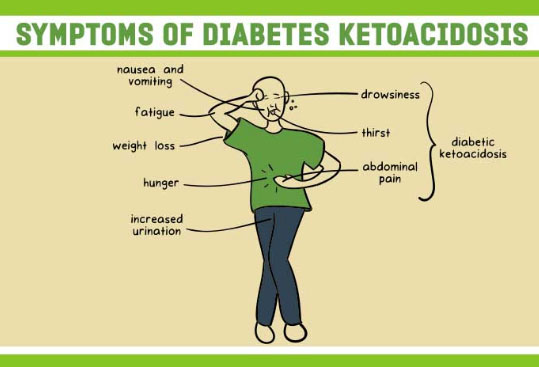
6. Problem in sleeping
7. Urination increase
8. Excessive pain in the stomach
9. Feeling fatigue or tiredness
10. Problem in breathing
These are the few common symptoms of Diabetic Ketoacidosis. The treatment of Ketoacidosis treatment is mentioned in the further section.
Diabetic Ketoacidosis treatment
The Ketoacidosis treatment includes three steps usually:
Replacement of Electrolytes: Our blood contains minerals which are Electrolytes and these Electrolytes contain a kind of electric current in the form of chloride, potassium sodium. These electrolytes keep on decreasing when the insulin is not present in the blood.So basically in this treatment, the electrolytes are transferred through the vein into the body so that the organs like the heart can work properly.
Replacement of fluid: In this treatment, fluid will transfer in your body through vein or mouth in order to rehydrate the patient’s body.
Read Also : Diabetic desserts Recipe – Yummy Sugar free Desserts
Read Also : Heart Healthy Recipes to reduce heart disease risks
Therapy: Insulin therapy is the most significant in the whole treatment process. In this therapy, insulin will be injected into your body through your vein. This therapy helps the body to work normally by balancing the insulin.
Diabetic Ketoacidosis complication
Below mentioned are some complications of Diabetic Ketoacidosis
1. Hypoglycemia implies Low blood sugar- In this complication, glucose levels of blood decreases to avoid this complication, glucose IV should be given to maintaining the blood sugar level.
2. Hypokalemia that is Low potassium- In this complication, the potassium level suddenly increases and decreases this sudden change in the potassium is very risky.
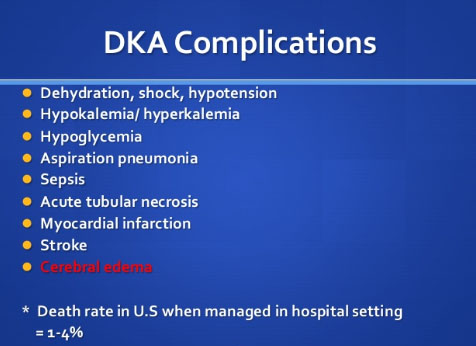
3. Swelling of the brain known as Cerebral Edema- This complication mostly occurs to children, and also proved to be the most threatening complication as it directly affects the mind.
Read Also : Cure Metatarsalgia – Causes, Diagnosis, Treatment and Therapies
4. Pulmonary edema means an increase of fluid in the lungs- This complication usually occurred with the patient of old age.
Diabetic Ketoacidosis pathophysiology
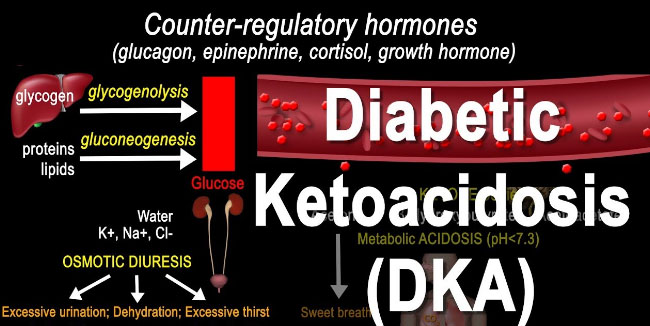
If we talk about the Diabetic Ketoacidosis pathophysiology then in the easiest and simple words you can understand it as the physiology changes that are consequences of the disease.
- Osmotic dieresis which means loss of electrolytes caused due to the deficiency of insulin.
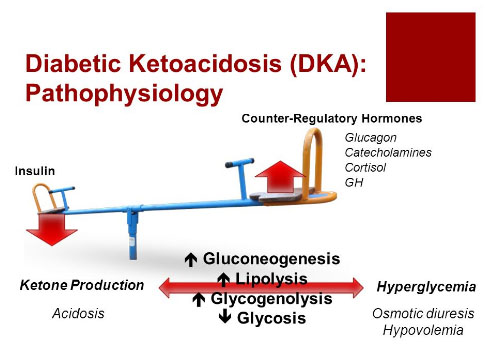
- Fall of serum sodium and potassium level due to the excretion of excess urine.
If serum sodium level doesn’t balance while the treatment can cause death also.
Diabetic Ketoacidosis affects which type of diabetic patients
Diabetic Ketoacidosis affects the patients whose blood sugar level is very high. If someone is suffering from Diabetic Ketoacidosis then they need an instant advice from the doctor, if late the disease can cause death. Diabetic Ketoacidosis is rare but it can usually happen to the patient of Diabetes who belongs to type 2.
Diabetic Ketoacidosis diagnosis
The diagnosis for Ketoacidosis is based on some medical tests; the patients who are suffering from the symptoms of Diabetic Ketoacidosis will be suggested by their Doctor to go for the following medical tests.
1. Test for checking Ketone level in the blood
2. Test for checking blood acidity level
3. Test for checking blood sugar level
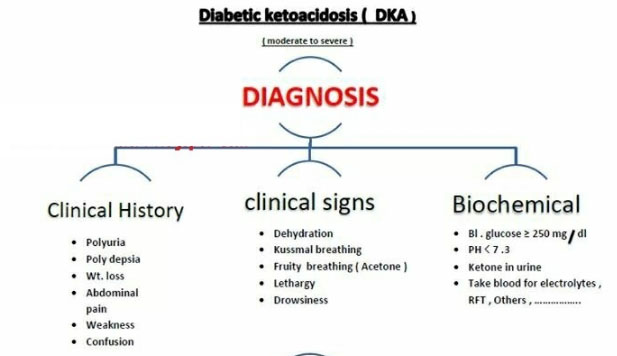
4. Test for checking the level of blood electrolyte
5. Chest X-ray
6. Urine test
These tests are necessary after these tests only the treatment process can begin. The laboratory value is also necessary to begin the process.
The Diabetic Ketoacidosis laboratory values are mentioned below:
1. Test in every 2 hours for checking blood sugar level of the patient.
2. Test in every 2 hours for checking serum electrolyte level of the patient.










 On Whatsapp you can send pictures, videos, gifs and you can also create group. It also allows you the options of like voice calling and video calling.