Blog

  • Disable Instagram Activity Status Feature – Privacy Tip

    Disable Instagram Activity Status Feature – Privacy Tip

    Internet lurkers , social media introverts and privacy focusing social media users , hope you are aware of the new Instagram feature that is the ” Active Status ” Green dot . So here we are going to help you with that by giving you tips to toggle off activity status on Instagram , that is on how to disable Instagram Activity Status Feature .

    What is the Instagram Activity Status 

    So this is just a newly added Instagram feature ” Activity Status ” . This green dot will be shown whenever you are using Instagram app , whenever your Instagram app is running on mobile .

    Read Also : Instagram for PC – How to use Instagram for Desktop ?

    Read Also : Contact Instagram Help Center Support for Any Assistance

    Read Also : Instagram tips and tricks to be a Pro Instagrammer

    Sometimes it can be seriously affecting your privacy online . Because you may get disturbed when you are just there on Instagram to browse the insta-stories .

    How annoying it can to get messages from random followers whenever you are online . And often there are situations where we are online just to stalk and not let others know we are online on Instagram.

    So if you want to stay relaxed and not let anyone know when you are online on Instagram then you have to toggle off / Disable Instagram Activity Status .

    How to  toggle off / Disable Instagram Activity Status ?

    When you toggle off activity status on Instagram remember that you can’t also see other’s Activity Status on Instagram . So once you disable activity status on Instagram you are safe locking your online presence and not able to find who is online also.

    So let’s see how to  toggle off / Disable Instagram Activity Status –

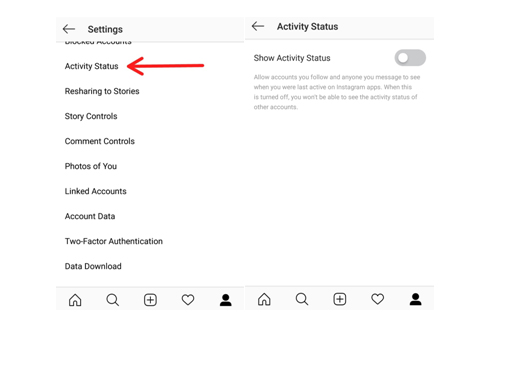
    It is basically a privacy option on Instagram to toggle off Activity status . You can enable Instagram Activity Status anytime you want .

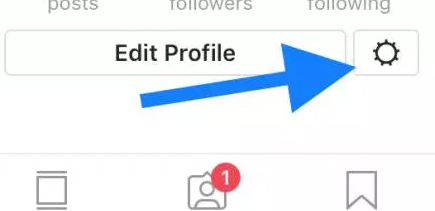
    •  Do you see a gear icon on your Instagram page on right end corner .
    • So click on that Instagram settings button.

    • Now click on the “Privacy and security ” option that you find there.
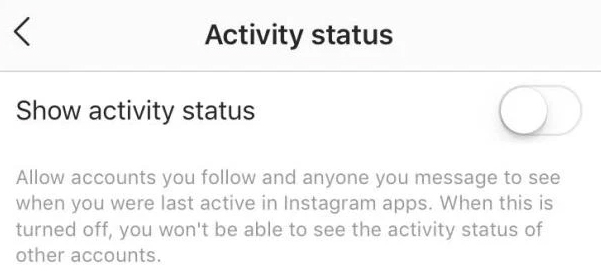
    • Now from that click on the “Show activity status ” option.

    • Toggle it off to Disable Instagram Activity Status.
    • Toggle it on to Enable Instagram Activity Status.

    Hope this privacy feature on Instagram helps most of the users to hide your online status on Instagram .

  • Instagram for PC – How to use Instagram for Desktop ?

    Instagram for PC – How to use Instagram for Desktop ?

    Even though many things are easy when it can be done in  mobile , there are some times we need things to be done from our PC . So if you have ever felt to access Instagram from Computer then lets take a look at Instagram for PC and how to use Instagram for Desktop .

    Some people who might have felt this situation will be when transferring DSLR photos to Instagram , where they needed to work twice – edit on PC , transfer to mobile then upload photos on Instagram . For them this can be useful but we will even give a post especially to transfer Photos from DSLR to Instagram directly .

    Now back to the topic Instagram for PC .

    Instagram for PC – How to use Instagram for Desktop ?

    We know that Instagram is popular social media app for mobile so how to use Instagram on PC . Let’s sort it out here.

    You can use Instagram on Windows and Instagram on Mac on different ways so let’s discuss

    Read Also : Instagram tips and tricks to be a Pro Instagrammer

    Read Also : Contact Instagram Help Center Support for Any Assistance

    Access Instagram for PC – Set up Instagram for Chrome ( Instagram on Windows)

    If you are using Chrome browser then to use Instagram for PC there is an easy method . First you have to download a chrome extension ” Instagram for Chrome ” . Now on the chrome toolbar click on the  button . Now it access your Instagram account on Desktop . Log in / sign in to you Instagram account thus you can use Instagram on web .

    Another way by which you can access Instagram on windows is from Instagram Windows store app from Microsoft store .

    Access Instagram for PC – Set up Instagram for Safari (Instagram on Mac)

    You can use Instagram on PC using Safari Browser . If you want to use Instagram on Mac then set Safari as your default browser and follow the steps .

    • Open your Safari browser
    • Click on Advanced option from Preferences
    • Now on the bottom find the option “Show develop menu” on the menu bar .
    • Next step is you have to open up a private safari browsing window
    • Select User agent from Head to develop and select Safari — iOS 10 –iPhone
    • Go to the website instagram.com
    • And now sign in to your Instagram account

    Now you can upload photos from desktop on Instagram by clicking on the camera button you find on the button of the screen .

    By this method you can access Instagram for Desktop or PC thus allowing you to use Instagram on Windows & Mac.

  • Contact Instagram Help Center Support for Any Assistance

    Contact Instagram Help Center Support for Any Assistance

    You can contact anyone , anywhere but getting back response is difficult . So if you are in search of how to Contact Instagram Help Center Support for Any Assistance and get response from Instagram team then here we reveal you all the essential methods in-order to Contact Instagram team .

    How to Contact Instagram Help Center Support for Any Assistance

    You can contact Instagram in two ways either by their phone number or by mail and the their way is by postal .

    Instagram Contact Phone Number & Instagram Email Address 

    You can contact Instagram support by means of connecting through Instagram Contact phone number , that is  by dialing to 650-543-4800 .

    Secondly you can contact Instagram email support by sending a mail to their official Instagram support mail id , that is – support@instagram.com . And for press related inquiries you can contact press@instagram.com.

    But most often you will not get response from Instagram support via mail of phone . 

    So how can you contact Instagram to get Response back ?

    Let’s dig out the ways to learn it !!!

    Why Instagram doesn’t respond to mail ?

    Let’s deal it with a practical mathematics to answer this out . You know that Instagram is a fastest growing social media app that is popular among more than 242 million users around the globe . This number is even likely to grow in even every next second .

    So now let’s answer this question why Instagram doesn’t respond or why Instagram support doesn’t respond to your query/ ticket with a simple math . Let’s assume that on a day at least a lakh of people in one million has some queries. So multiply it to 242 so it goes to approx of 242 lakh queries on a day average , even if the real actual is 1/4th of the calculation also it is a big figure of queries reaching out to Instagram in a day . So practical impossibility of answering all the tickets is one of the reason for not getting reply for your mail to Instagram .

    Read Also : Instagram tips and tricks to be a Pro Instagrammer

    How to Contact Instagram Help Center Support for Any Assistance 

    You can contact Instagram support as normal user by submitting a request on help center .

    • First go to the official website of Instagram  ( https://www.instagram.com/ )
    • Now scroll down you can find Click support at bottom of the Instagram Home page .
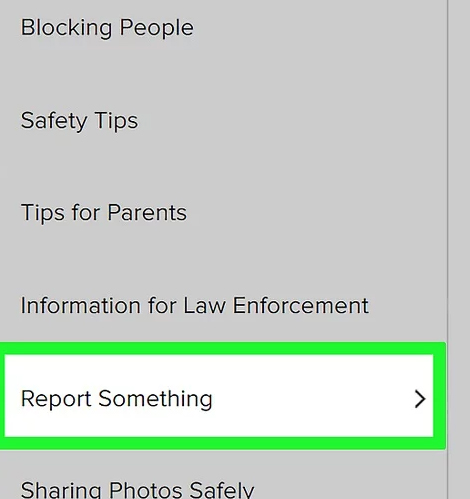
    • Click on Privacy & Safety Center from the left hand menu.
    • Click on Report Something option and enter your issue that you are facing . This is a way to report issues on Instagram .
    • Now select the link for reporting it .

    • Based on your issue type fill out the required form .

    How to contact Instagram on Social Media 

    This way can really work if you are popular on twitter or Facebook . You can get response from Instagram on Social media sites like Twitter and Facebook .

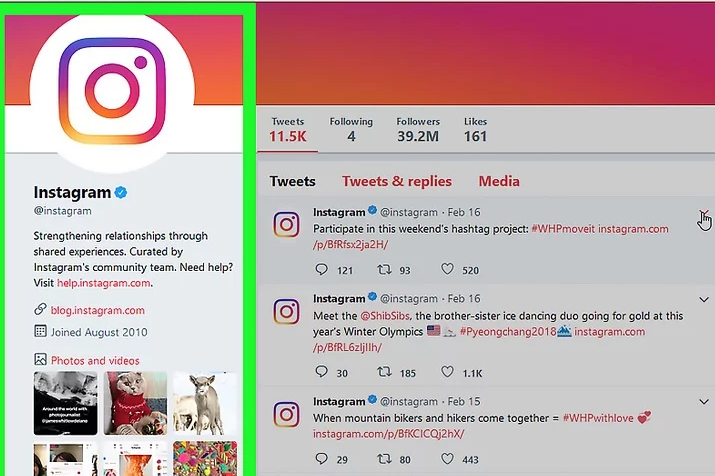
    You can contact Instagram on their official twitter profile and Instagram official Facebook profile .

    Twitter can be more preferred option .

    How to contact Instagram Support as an Influencer 

    I am sure that you would have at least once come across Instagrammers posts on how to reclaim Instagram accounts that are stolen , hacked etc .

    You can increase your chances of getting response from Instagram support team if you have a huge number of active Instagram followers . Then the other way is to find an individual who has contact in Instagram . Going for unofficial Instagram support providers are expensive and may be not secure as well .

    So this is the way to contact Instagram support team for any of your queries .

  • Instagram tips and tricks to be a Pro Instagrammer

    Instagram tips and tricks to be a Pro Instagrammer

    Most of the Instagrammers around the globe is disappointed with  Instagram Global Outage recently ( At least to some countries) , Social Media is a rage these days. Almost everyone is active on social media. Moreover the internet connections have also become cheap, boosting the social media usage even more. Well with the increased use of Instagram here we bring out – Instagram tips and tricks to be a Pro Instagrammer .

    One such quite popular, well known social media platform is Instagram. Instagram announced that it achieved the milestone of 1 Billion users in June 2018. It has now become popular not only among the youngsters but also among the adults. New Instagram updates are being rolled out time to time adding new Instagram features, improving the interface and much more. A number of celebrities are also active on Instagram and you get to follow your favorite star as well.

    The picture & video sharing app has a lots of filters for the editing of the pictures to be posted. You can post minute long videos as well. There are Insta stories which are visible to your followers up to 24 hours of you posting it. All these features attract masses of people towards Instagram.

    You all must be knowing that most of the brands staring from the smaller ones and to all the leading brands, every brand uses Social Media Marketing to reach their customers. Instagram has become one of the leading platform for social media marketing. Instagram has also helped teenagers in following their passion. Many of them try to promote their work such as photography, art, food blogging and fashion blogging and much more. Love from followers keep giving them the boost required for following their passion.

    But you must know some good and secret Instagram tips and tricks to be a popular Instagrammer .

    Instagram tips and tricks to be a Pro Instagrammer

    Here are some of the best Instagram tips and tricks:

    Read Also : Contact Instagram Help Center Support for Any Assistance

    Read Also : Instagram for PC – How to use Instagram for Desktop ?

    Turn on Post Notifications on Instagram

    If you want to see every Instagram picture, video or Instagram stories your best friend, you favorite celebrity or your favorite brand, just turn on the post notifications for that profile. This way Instagram will push a notification to you whenever they post.

    To get Notification of your Favourite Instagram user –

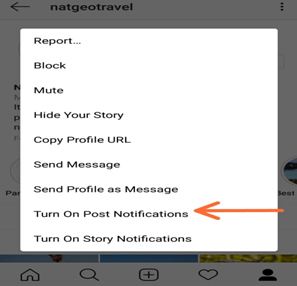
    • Go to their Instagram profile
    • On top of the right side corner , tap that three dots
    • Turn on Post Notification , just enable it .

    This way you can make yourself to Never Miss a Instagram Story Again ! If you want to stay updated on Instagram then this Instagram tips is ideal for you .

    Read Also : WhatsApp Data Sharing Disable Methods to Protect WhatsApp Data

    Read Also : Best Facebook Ad management tool – Facebook Advertising

    Add & Manage Multiple Accounts

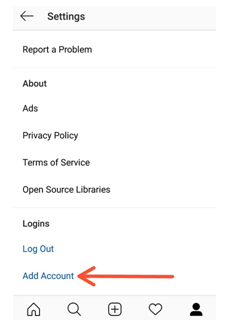
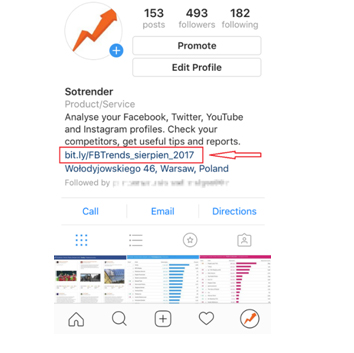
    If you have an Instagram account for your pet or you have some business of your own to promote you can manage two Instagram accounts from a single Instagram app. From your profile click on gear button (for apple) or three vertical dots (for android), scroll down and click on add a new account and then you can access it easily as well.

    This is the Instagram tips to use multiple Instagram accounts on one mobile app .

    Use as a Photo Editor

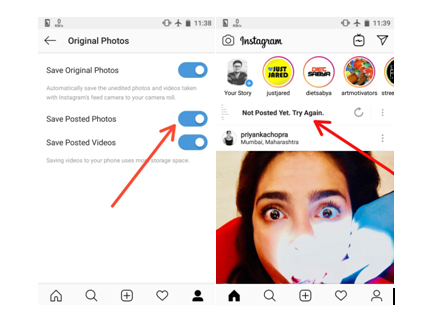
    Instagram has some amazing filters giving you a gorgeous picture to share. So, the Instagram app can also be used as one of the best Photo Editor & Photo editing apps . For doing so put your phone on Airplane mode and carry out whatever editing you want to do and post. Since your phone is on airplane mode the post will be failed but the post will be saved in your gallery. Make sure that option ‘Save Posted Photos’ is enabled in your profile.

    Inserting Line Breaks in Bio and Captions

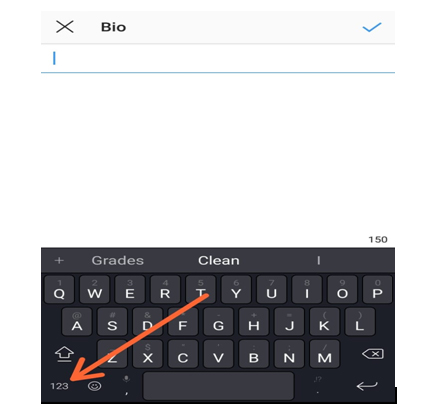
    Many keyboards don’t provide the enter or return key to introduce a line break in the caption to your posts or the bio of your profile. For doing so click on 123 button on bottom left corner of keyboard, the enter or return button appears on the bottom right. Another option is to write it some other app and then copy it to the Instagram app.

    Adjust Settings for Tagged Photos

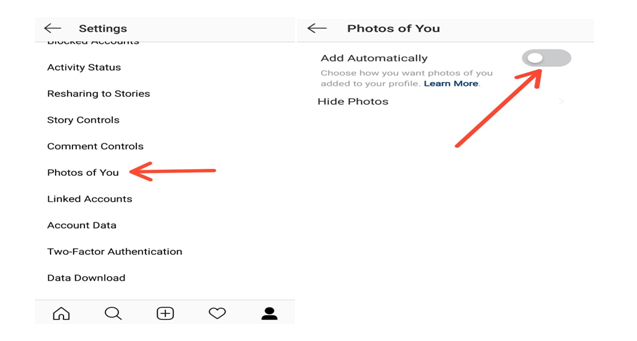
    All the posts that you are tagged can be seen by your followers in the Photos of You section of your profile. To control visibility of these posts select the Photos of You option in your profile. There you can hide the desired images and disable the Add Automatically option.

    This is yet another Instagram tips you must know .

    Drive traffic to another Website

    You know that these days social media is not just entertainment or to catch with friends alone . Its to get in touch with your customers on social media . Instagram for business is quite widely appreciated because of the results driven from it .

    If you have a website then you can drive Instagram traffic to website easily . You know that adding links in caption doesn’t work on Instagram .

    So what’s the way to add links on  Instagram ? Simple add it in your bio .

    Disable Activity Status on Instagram

    In the Instagram Direct Messaging or the DM section it appears to your followers that when were you last active on the platform as ‘Active 2h ago’. You can disable this activity status by going to your profile, select the Activity Status option and Disable it. So this way you can disable Instagram Activity status .

    Schedule your Instagram Posts

    Most of the Instagram users are quite active on the platform and put up new posts on daily basis and if you are promoting some brand then you definitely need to do so. By switching your account to Instagram Business mode you can schedule your posts by saving them earlier and then setting the time for posting it.

    Embed Posts on Instagram

    If you are a Blogger you might want to share your Instagram posts to your blog as well. This can be done using the embed option. On the Instagram web service, click on the icon with three vertical dots and then select embed option. A link to your post is created and then you share that link wherever you want to share that post.

    Archive posts on Instagram

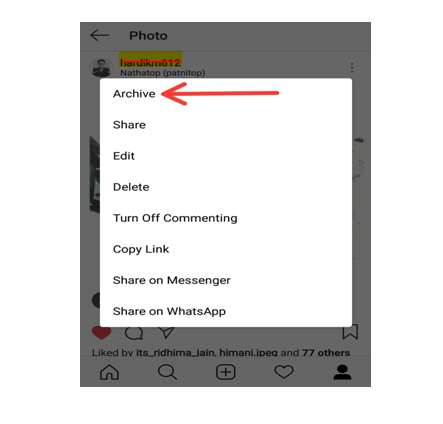
    If you don’t want your followers to see your certain post but you also don’t want to delete it permanently from your profile, then you can Archive Instagram post. This way they can only be viewed by you and you can undo your action any time you desire.

    Ignore posts from Users

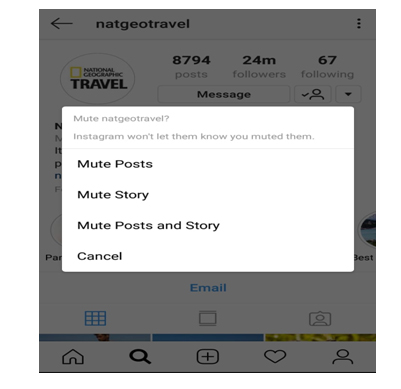
    If you want to ignore the posts or stories from someone without the of offending them by blocking them, just go their profile click on the vertical three dots on the top right corner and mute that profile. This way the posts and stories from that user won’t be shown to you.

    Save data option

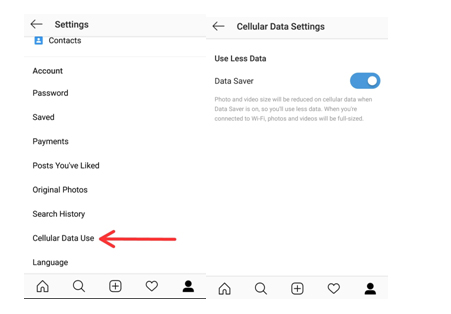
    You must be knowing that all the images and the videos in the Instagram app are preloaded and that to in HD quality. Thus if you are quite active on Instagram then using it can consume a large chunk of you mobile data. For saving your data, turn on Data Saver option which runs the app consuming a lot less data.

    Get Analytics, direct call and email Buttons

    By switching your profile to Business mode you can all the detailed analytics about your posts like the number of followers increase or decrease, how many people saved your posts, number of likes and impressions and much more. Also in business mode you can also add direct call and email options to your profile.

    Filter Instagram comments based on keywords

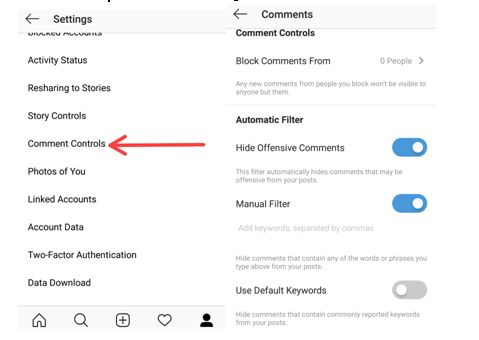
    You must be knowing that you can completely disable or delete comments on your insta post. But many of you won’t be knowing that you can hide offensive comments. Just go to your profile options and select comment setting Enable hide offensive comments and manual mode to hide comments with some specific word.

    Add hashtags to comments on Instagram

    Most of us create almost a separate para for putting up some interesting Instagram hashtags with our posts. But if you don’t want the hashtags when that post is posted on other social networks you can post them in the comments. This way people are still able to access your posts through the hashtags and they don’t appear on other social networks.

    Follow Instagram Hashtags

    The way you follow someone’s profile on Instagram, now you can follow a hashtag as well. If you want look at different posts having a certain hashtag just simply follow it and the posts appear in your feed like any other profile.

    Share someone’s Post in your Story

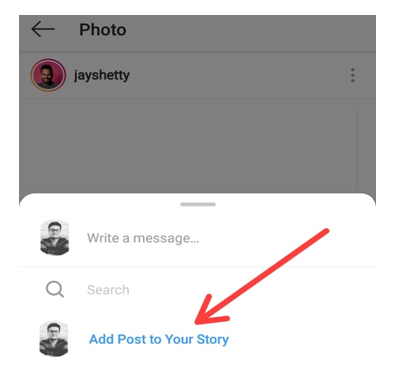
    To share a post from someone else’s post from to your story, just simply open that post and click on the arrow like icon below the post and click ‘Add post to Story’. If you have a public account and you want others to share your posts this way then select Allow Resharing to stories from your profile options and disable it.

    Highlights

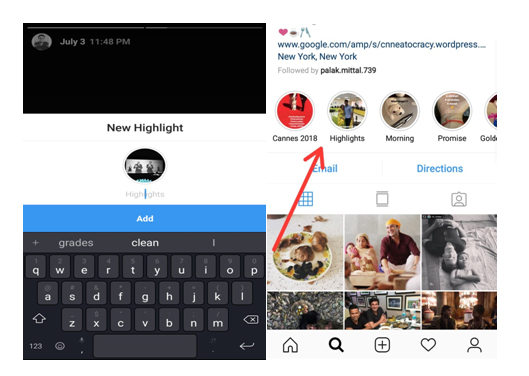
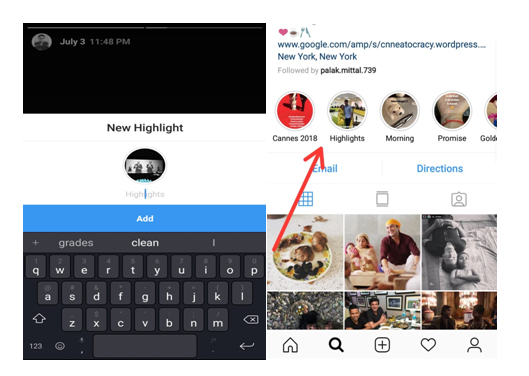
    Highlights are your stories which can be seen by your followers whenever they visit your profile unlike the normal insta stories which disappear after 24 hours of uploading. For adding Instagram highlights, go to your profile and click on time like icon and click on whichever story you want to add as a highlight.

    IGTV

    It is the latest feature to be rolled out by Instagram. Earlier you could only post a minute long videos on your profile but using the IGTV app you can post videos up to ten minutes longer or more than stories/feed videos but only in the vertical frame. You can install the IGTV app from app store and share longer videos with your followers and connect with them more.

    This is an Instagram tips to post long duration videos on Instagram .

    Hashtags

    The different hashtags you use with your pictures definitely have a direct effect on the number of your followers. Try using hashtags with your pictures which are popularly used so that a large number of people can easily access your posts. But use some unique hashtags which make your profile stand different from others.

    Follow Brands like your own on Instagram

    Having a brand of your own and promoting it on social media is a creative and thoughtful task for targeting the right person to get his/her attention towards your brand. For doing so look out for ways the brands similar to yours use for their marketing. Try drawing inspiration from those. Try interacting with their followers making them aware of your own brand. This is a good Instagram tips for Business and marketing .

    Promote other Instagram accounts

    Say if you are a food blogger in a certain city give shout outs to other food bloggers of your own or some other city. This way you can promote their account and they can promote yours. So instead of competing with each other, try helping each other.

    Hope these Instagram Tips and tricks will help you turning into a pro Instagram user. Being an active user of Instagram myself, it is my favorite social media platform as well for posting some cool pictures with some catchy captions and hashtags. Do tell us the reason for which you love Instagram and also don’t forget to tell us your favorite trick. If you know some other Instagram tips or tricks don’t forget to share those with us.

  • DuckDuckGo Tips and Tricks to Search Like a Pro

    DuckDuckGo Tips and Tricks to Search Like a Pro

    DuckDuckGo the name might sound unfamiliar to you, right but no problem. After reading this article you are going to be pretty familiar to this name. Here we will not only make you familiar about DuckDuckGo features but also about DuckDuckGo Tips and Tricks to Search Like a Pro.

    What is DuckDuckGo ?

    So, DuckDuckGo is a search engine like any other search engine such as Google, Bing or yahoo you might be using daily but still pretty different. Google kind of has a monopoly in its market, we rarely see someone using some other search engine and it does has some amazing DuckDuckGo features but that doesn’t mean there is not any other search engine present with such cool features. DuckDuckGo as odd the name might sound to you has some pretty cool and awesome features and can be the replacement as your primary search engine.

    Before we discuss about the DuckDuckGo Tips and Tricks , let’s take a look at the reason to choose DuckDuckGo .

    Read also : Best Web browsers for Computer & Smartphone

    Why DuckDuckGo ?

    So, you must be interested in knowing that what makes it different from other browsers. First reason is that the amazing DuckDuckGo shortcuts which prove to be really handy while browsing but wait that’s not the only reason. The reason that will attract you the most to switch to DuckDuckGo is Privacy.

    DuckDuckGo Vs Google 

    When you take a comparison between DuckDuckGo Vs Google then the key difference is that DuckDuckgo doesn’t tracks you , they don’t have personalized ads .

    Whether it is Bing , Yahoo or Google , You are tracked . For many of us having not someone tracking us down is a huge concern. If you belong also to such class of people then the DuckDuckGo search engine is your solution. But it isn’t the only cool thing about it, there are a lot more.

    Now let’s go the core topic – DuckDuckGo Tips and Tricks .

    Read Also : Best Torrent Managers for Computer & Smartphone

    DuckDuckGo Tips and Tricks to Search Like a Pro

    Here are some cool DuckDuckGo tips and tricks which will prove handy to you while using DuckDuckGo :

    1. Bangs!

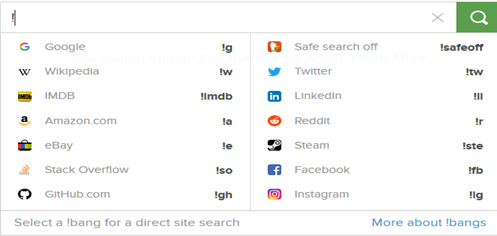
    Easily one of the best feature of the DuckDuckGo search engine is its !Bang  feature. All you need to do is use an exclamation mark on the address bar, followed by the supported bang you want to search for, and your desired keyword. It takes you directly to your desired website.

    For e.g. if you write !a shoes in address bar it will directly open the page of amazon website showing shoes.

    Some more examples of bangs are shown in the image below.

    2. Get Cheat sheets

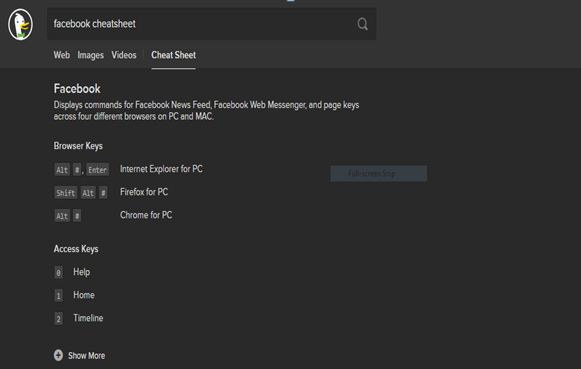
    While using any softwares or any operating system some shortcuts definitely prove to be very handy. DuckDuckGo provides an easy solution to this, all you are required to do is to enter the name of the software and keyword ‘Cheatsheet’ and you are shown the list of all the relevant cheat codes.

    For example, simply write Facebook cheatsheet and the result is :

    Read Also : Best File compression Tools for Computer & Smartphone

    Read Also : Best Email clients for Computer & Smartphone

    3. Stopwatch and Timer

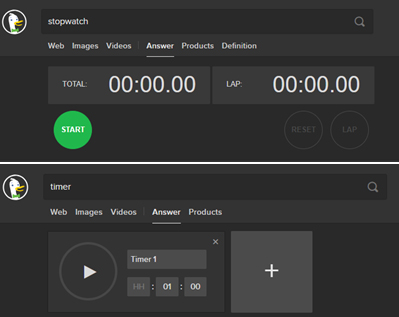
    Want to use a stopwatch or a timer in your computer or laptop itself, no need of any additional software DuckDuckGo browser can be to some use here. You can simply write stopwatch and timer in the address bar and there you go :

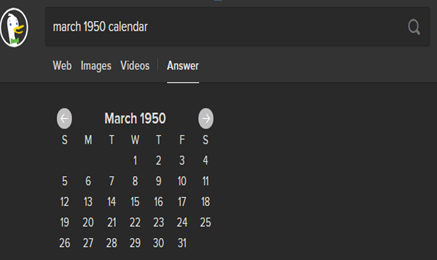
    5. View any Calendar

    On DuckDuckGo you just have to write the month followed by the year and type calendar and you are able to view the desired calendar :

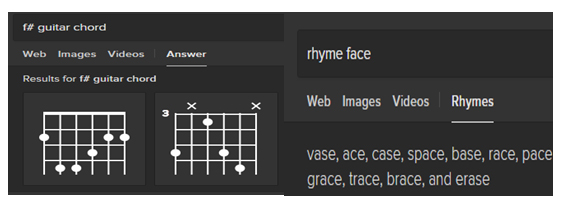
    6. Music Buffs

    If you are a budding music artist this search engine can be of tremendous help. You can look for chord diagrams. You can carry out frequency and mix pitches conversion. The most amazing feature for any artist is its rhythmic dictionary as while writing lyrics you can look for rhyming words.

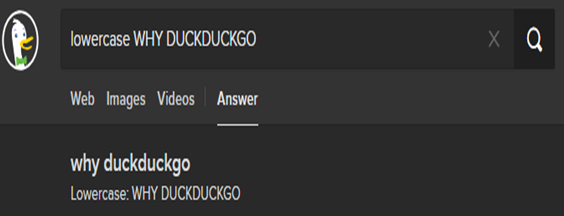
    7. Text Casing

    You can change the casing of any text by pasting it in the address bar and adding a prefix lowercase with a space and hit enter. You can get the desired results and paste them to the desired location. Same can be done for uppercase and title case.

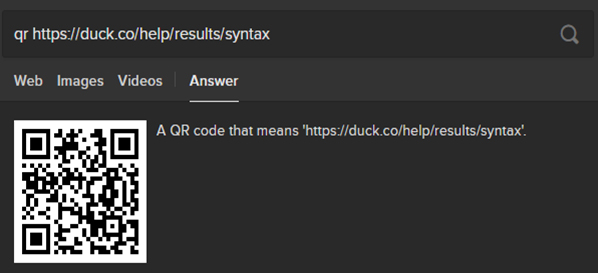
    8. Generate QR codes

    QR codes are a quick way of accessing any website. You can generate QR codes for a website by typing QR code and then paste the desired link and then through this qr code you can easily access the website on your phone.

    Read Also : Best Laptops of the Year – Buy the Right Laptop for You

    9. Filtering results

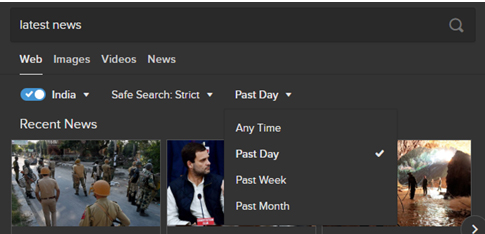
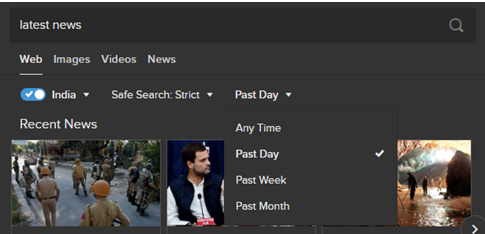
    If you want to find solution to your query but you want the results to be limited in a certain region over certain time period, you can easily set the locality and time filters in the DuckDuckGo search engine.

    10. Find app alternatives

    You can easily find some app replacements you might be using in your phone or your laptop. Simply write alternative to followed by the app name and there in you can find a number of alternatives :

    11. Remove some word from your search

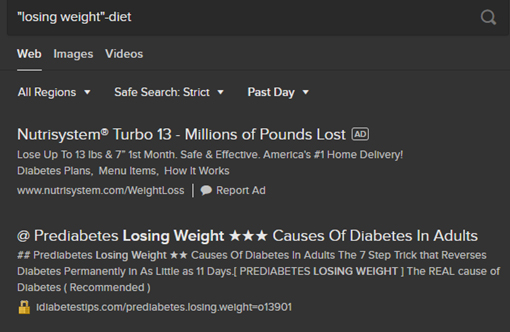
    If you are entering any query but want certain word that should be excluded from the results to be displayed use ‘-‘ sign and then the word you want to remove. For example “Losing Weight”-diet will show you results regarding losing weight without diet.

    12. Generate passwords

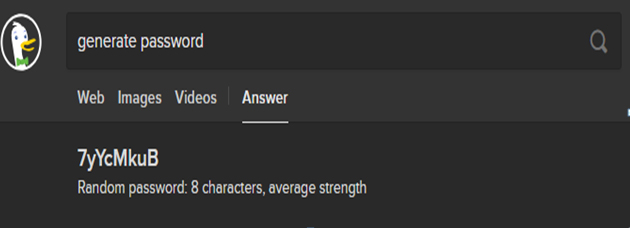
    These days you are to create accounts on like almost every website to get to use its service and thinking of different and secure passwords can be a bit tiring. Here DuckDuckGo can come to your rescue by generating strong passwords and all you need to is write generate password and there it is :

    13. Expand/ Shorten URL’s

    If you have any long link and want to shorten it or if you want to expand an already shortened link DuckDuckGo can help you in doing that.

    Use ‘shorten’ for shortening the link & ‘expand’ for expanding a shortened link.

    14. Search for social media info

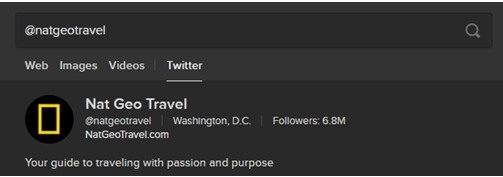
    If you want to search any person or page on any social media website, enter its name according to the syntax of that website. For example for searching something on Instagram use ‘@’ followed by page’s/person’s name.

    15. Generate Figlets

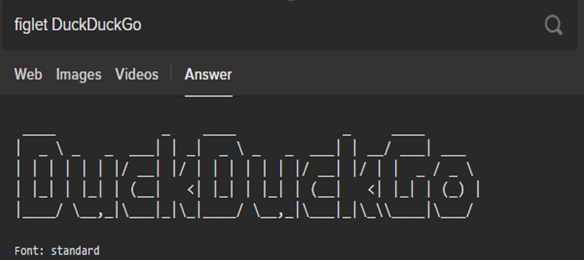
    For generating the figlets for your text all you need to do is type figlet followed by desired text.

    16. Check whether any website is down

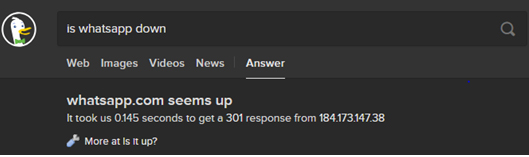
    You get to listen and experience that a popular website is down. You can easily check whether a website is down using DuckDuckGo. Just enter is followed by website name followed by down and you can get the answer instantly.

    17. Search for specific term in Title of Webpages

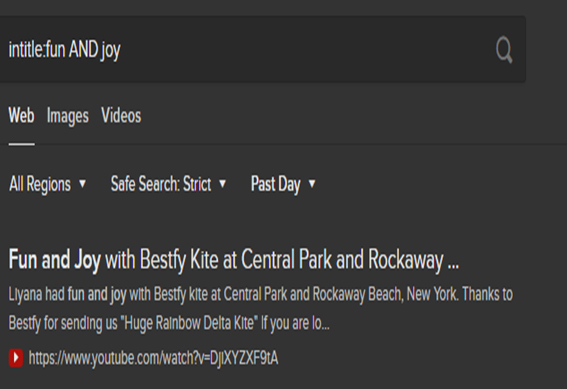
    When you want to find pages with a particular term in the title, use intitle: and then enter the terms you are looking for. For example intitle:fun AND joy will show those webpages in results which have both fun and joy in their titles.

    So, now you must be quite familiar with the DuckDuckGo search engine and there are a lot more besides the ones discussed above. After reading the different DuckDuckGo tips and tricks mentioned above you must feel that DuckDuckGo has loads of cool features and it deserves a fair chance to be your primary search engine. Moreover, it is available in all the leading browsers i.e. Chrome, Firefox and Safari as well. Do tell us about your experience of using the DuckDuckGo search engine and which feature do you find the coolest.

  • Best File compression Tools for Computer & Smartphone

    Best File compression Tools for Computer & Smartphone

    At your office or at home, at some point, you will need to compress your files to save because of the large size of the doc. Sometimes, you may not be able to attach files in the mail or any other documents because of the size of the document that you want to send. SO, what you need to know some of the best File compression tools and software for your computers and smart phones. To quickly compress file to send or save.

    You can save a lot of space in your smart phones or computers if you compress large files and save. You may have heard about many best file compression tools and software. But let us discuss a few here that can help you in minimizing your work time.

    Best File Compression Tools for Computers and Smart Phones

    So here are the list of some of the best file compression tools and file compression softwares for computer and Smartphone .

    1)     WinZip

    WinZip is one of the most commonly used file compressors by the users. There are different versions of Winzip and it has reached the version 21 at present. This file compression tool integrates with a number of programs to make zipping easy as the users work along. Hence, Winzip supports a wide range of archive format including ZIP, ZIPX, RAR etc.

    WinZip file compressor also includes features like splitting of large zip files that can easily fit variety of media, advanced file sharing features, cloud support and it also has n advanced zip management system. Winzip interface is compatible with both mouse and keyboard setups. It also adapts easily with any touch screen devices too. Your files will always be protected in WinZip since this file compressor has back up and security options. With WinZip, one can create and extract files via the program interface or even by using the program window.

    This is one of the best software for compressing large files .

    Read Also : Best Note taking apps for PC & Smartphone

    Read Also : Best VPN For the Future

    Read Also : Best free office software for Computer & Smartphone

    Read Also : Best Email clients for Computer & Smartphone

    2)     Hamster Zip Archiver

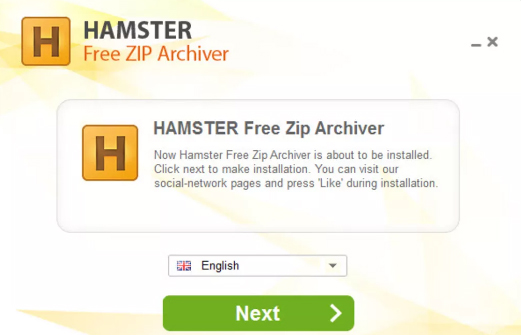
    Like WinZip, Hamster can also handle any files with any format. With excellent format support and interface, this file compressor is user-friendly and it is totally free to use. Hamster Zip includes cloud support and creating and extracting files to one format is very easy. All you have to do is jut drag and drop the files. Doesn’t that sound quick?   With its cloud support feature, the user can easily create a compressed file and the files can be easily uploaded into Dropbox, Google Drive etc.

    The users also get the option to have a sharable link which will created automatically. Using the Windows context menu too, a user can create and extract files rather than dragging and dropping the files to a folder. One of the major disadvantage of Hamster Zip Archiver is that this tool is only compatible with Windows, Max and Linux users.

    Read Also : Best Torrent Managers for Computer & Smartphone

    Read Also : Best Drones On Different Budgets To Buy This Year

    3)     WinRAR

    WinRAR is the only file compressor that can create RAR archives .Majority of the file compression tools can extract RAR files, but only WinRAR has the option to officially create RAR archives.Using WinRAR, compressing files can be done to other popular formats. Even though the interface does not look very attractive, you can find many features and options to choose from.  One of the major attractive feature of WinRAR is, it has a wizard mode which takes up all the hard work and gives you the result you want.

    As said earlier, the best feature of WinRAR is it RAR support and it is veruy fast since it creates small archives, resulting in more free disk space and transmission costs. This file compression tool is perfect to use for multimedia files since it automatically identifies and selects the best compression form.  Your files can be saved in different disks by splitting your archives if you need. You can get WinRAR free to use for 40 days as a trial. So why to waste such an opportunity. Go ahead and experience the trail pack of WinRar to find how good this tool would help you.

    4)     PeaZip

    PeaZip is one of the free file compression tool that works on its own or it also woks together with the tool WinRAR. Compatible with both Qwindows and Linux, this file compression tool is very powerful and it helps in converting archives to different format. PeaZip tool is safe to use as it is security conscious, having AES256- based encryption. It also has a two-factor authentication and a password manager which in fact will keep your archives safe.

    Like other file compression tools, you can easily use the main program interface or use the right mouse button and the context menu to create and extract files. PeaZip file compression tool is one of the tools that can sort,create and extract RAR files. Check if you have the use of PeaZip file compressor and then download it in your device.

    Read Also :  Best Web browsers for Computer & Smartphone

    5)     7 Zip

    If your main need is to compress large files like videos, then 7-Zip file compression tool will be the right pick for you. This tool can be used for free it supports majority of the compressed formats. This compression tool includes its own compressed file format – .7z with high-compression rate. This, it helps in compression extremely large files into archives.

    The interface of 7 zip is not very attractive to the users eyes and it also has a number of context menu which can be a little hassle. But if you cross this, then you might find this file compression tool very interesting. You can also change the number of context menu according to your choice.

    So these are some of the best File compression Tools that you can use for easy creation of files with less size. Read and try these tools to check which one will suit you the best for you work stream. Compressing the files will become easier for you to send large files using these file compression tools. Some of these tools also offer free trial which can be accessed easily to understand how ti works. Make use of it and choose the Best File compression Tools for your device.

  • Airbnb Holiday Rental Service – How to Earn Guide

    Airbnb Holiday Rental Service – How to Earn Guide

    Airbnb is a website that lets you to earn money in various countries by listing your property for rent. It is legalized in certain countries of the world. Airbnb has emerged as a great option to earn more money since it was founded in 2008.

    What is Airbnb ?

    Airbnb is a website designed to let people list their property or homes to be available for rent. It is similar to letting out rooms like the hotel rooms.  This is famous and being in use in more than 190 countries over the globe.

    The entire process of listing your home on airbnb is a simple task and does not charge anything extra.

    Read More : Investment on Stocks and Shares -Pros and Cons

    Read More : Exclusive 1st home buyers checklist – Must read

    Read More : Forex trading beginner’s Guide to Earn without Loss in Forex

    Read More : Short term Investment Plans – Pros & Cons


     How to get started with Airbnb ?

    Getting started with airbnb is a simple task. It includes initial setting up of an airbnb profile. This is to attract guests towards your listing. Sharing the host’s culture as well as the guest expectations is required. Share all the guest reviews and apologize for the negative reviews to your guests. Add some photographs of your property to give your guests a better understanding. Price your listing as per the competitive rates in the airbnb market.

     Basic rules to rent room, apartment or house on airbnb

    No matter how big or small your house is, you can still list your room or even your apartment or house on airbnb. Initially know the rental arbitrage that is prevalent in your local airbnb market. Then list your property on airbnb. Be realistic, natural and have expectations that can be met. Before you rent out your home, get the proper insurance coverage needed to secure your property. Keep your landlord and neighbours in mind. Prior permission from your landlord is a basic requirement. Then start looking out for customers and be appealing towards them. As a host to maintain the sanity of your property set basic ground rules for your guests.

     Countries on which airbnb works :

    Airbnb has spread its wings of business to more than 190 countries all around the world. The countries where airbnb has not been operating are Iran, Sudan, North Korea, Syria and Crimea.

    Read Also : Best Travel Credit Cards with low annual fee

    Read Also : Best Drones On Different Budgets To Buy This Year

    How much you earn with airbnb ?

    Airbnb earning can be a 6 digit earning. It all depends on how your property is listed on the website. Explain all the important points pertaining to your property under proper subheadings. Highlight all the basic features and amenities provided by you to keep your guests comfortable and happy. Provide photo descriptions along with the facilities provided. List all the guest reviews of your property. Keep the positive as well as negative feedback on the site. For the negative feedback, apologize and accept your faults. Price the property in par with other listings of that area.

    The key to earn more on Airbnb  is by not chasing away customer for being full or over booked. Improve your property to attract more guests and thus increase your income.

    Read Also : Types of Insurance You Must Know to Secure Life

    Read Also : Top Birth Tourism Countries and birth tourism benefits Exclusive

     What is the risk involved in airbnb earning ?

    There are risks involved in listing your house or apartment on airbnb. Some of them are:

    1. Personal safety: How safe is it to rent out a room of your apartment to a stranger? If you are not staying in the house then it is safe to rent out by securing your valuables in a safe place. But in case you stay there and just letting out a room, you are physically vulnerable for danger.
    2. Scams: Scams and scammers are very common with airbnb. Be suspicious when something turns out to be too good to believe.

     Is airbnb revenue taxable ?

    Airbnb income is generally subject to tax deductions. But that depends on your income generation from the listings. If your earning is less then tax exemption will be automatic. This does not let you pay any tax. If your earning is higher than the threshold, then you have to file income tax.

     What is the benefit of airbnb earning ?

    Airbnb has its own set of benefits. Many tourists prefer airbnb since they have the following benefits:

    1. Airbnb has helped in developing the interest in culture of another country. By renting out an entire house or just an apartment airbnb has provided the option to the tourists to enjoy the local architecture, to taste the local cuisine and also to know the lifestyle and way of living.
    2. With airbnb tourists get the feel of staying at home. The feeling of staying within the four walls of a hotel or even a hostel can be avoided to a maximum extent with airbnb.
    3. The price with the airbnb properties is comparatively cheaper as compared to hotels or hostels. There is no seasonal variation in the price with airbnb.

    These were the pros of Airbnb / benefit of Airbnb .

    On the other hand, airbnb has cons attached to it like:

    1. Most of the times your host may not know your language. It would be difficult to communicate with your host if any problem arises.
    2. Planning is very much essential to enjoy the services of airbnb. Checking in and meeting the host should be planned well. The place of meeting as well time should be all decided in advance. Or else get a local SIM card and that will save all the trouble.
    3. If you do not like the property allotted to you, it is little risky to walk out and start looking for another accommodation in a foreign land. In a short notice span it is not possible to arrange for a replacement option to stay.
    4. Any scams related to airbnb are difficult to bring it to the notice of the concerned authority.
    5. The properties of airbnb are all scattered throughout the place than being close to the sightseeing places. This is a common problem as these are houses of the locals.

    So these were the Cons of Airbnb .

    Airbnb is an easy way to make some money by renting out your property. It is also an advantage for travellers to foreign lands to get the best facilities with this kind of facility.

  • Best Drones On Different Budgets To Buy This Year

    Best Drones On Different Budgets To Buy This Year

    Drones or UAV(Unmanned Aerial Vehicle) is the ‘New Kid on the block’. UAV is more like a ‘Flying robot‘. These automated aircraft are either remote-controlled or fly on its own via software-controlled flight-plans in embedded systems while working parallel to on-board sensors and GPS. As drones make the trend of this era here is the list of most popular and best drones on different budgets to buy this year .

    Drones are more related to military activities so as to target the enemies, gathering data and in the form of weapon. They are also a great help among the civilians, like searching and rescuing, monitoring the traffic; also in videography, agriculture and delivery purposes.

    How Do Drones work ?

    These automated aircraft are made of a light combination of materials enabling to reduce weight and enhance flexibility. The strength of the material combination enables military drones to travel at extreme altitudes. Drones are geared up with the latest technology which includes Infra-red cameras and laser being used in military UAV, GPS.

    The nose of this automated aircraft comprises all the sensors navigational systems. Other parts comprise the drone technology systems, as no space is required to accommodate humans.
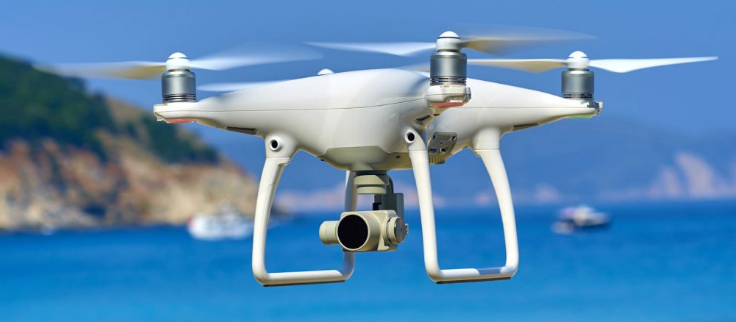
    Types of Drones & different drone sizes 

    Drones vary by sizes and the largest is the most widely used in the military which includes the Predator Drone. Next in line is the automated aircraft with large wings and need less space in runways. These cover larger areas, thus working in geographical surveying or to encounter wildlife trespassing.

    Yet another size related to drones are the VTOL [Vertical Take-Off and Landing]. These include certain quadcopters. These drone types can fly, hover, take-off and land vertically.

    Read Also : Must Have Smartwatch apps for Android and Apple watches

    Let us look at each section in detail:

    Best Drones for Beginners 

    Earlier, drones were quite expensive which were available to a small group of people. Later, they turned out to be very affordable. Drones for beginners could be as affordable as chips but sometimes they are not. The prominent features of these drones are that they are easy to use and are fun to fly.

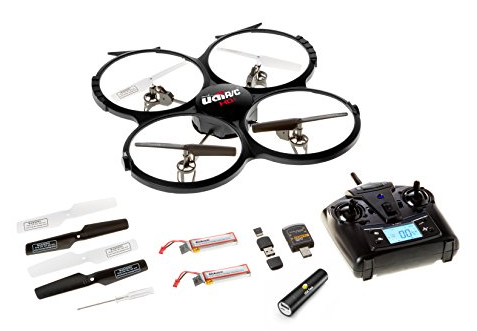
    UDI 818A HD+

    Rate review: 4.6/5.0

    Flight time: 7 to 9 minutes

    flies up to 30 meters

    A great starter for kids and those new to the drones
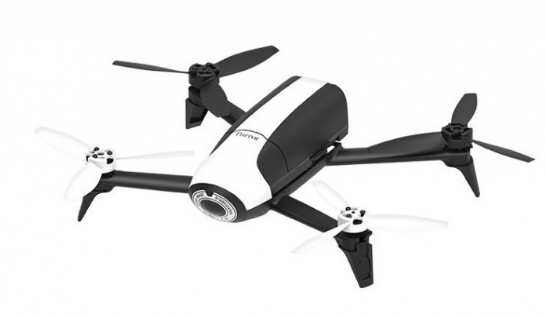
    Parrot Bebop 2

    Rate review: 4.3/5.0

    Flies for 24 minutes up to 300 meters

    Gives the best flight time experience with a good quality camera worth paying
     

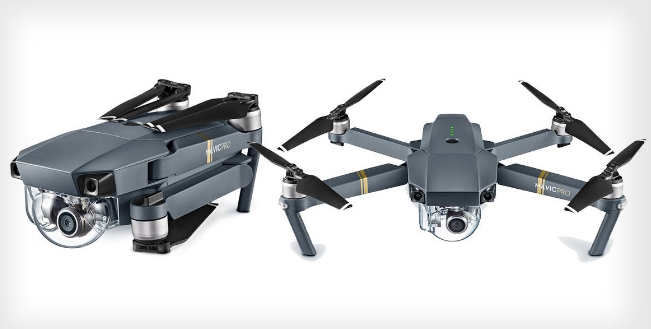
    DJI Mavic Pro

    Rate review: 4.6/5.0

    Flight time ranges up to 27 minutes for 7kms (4.3 miles)

    Is an ultra-portable type with a powerful 4k camera
    Best drones are quite cheaper as they comprise lesser bells or whistles. A few higher-end drones are apt for the new flyers.

    Budget Drones / Cheap Drones 

    Based on the budget, the best drones for beginners could be as follows:

    • Under $100
    • Under $150
    • Under $500
    • Under $1000

    Read Also : Best Baby Monitor systems – WiFi & Night Vision Video Monitors

    Drones for Beginners Under $100 

    If you are feeling down looking at this toy-like features of the drone for beginners, you are mistaken. In reality, these are the capable flying robots. It is obvious that you will learn to fly it so well. The cost of these drones for beginners start from $32 and would go up to $90.

    1. UDI 818A HD+ 

    This drone for beginners has not registered with FAA [Flight Aviation Administration].

    This is fun to fly, as the makers have focused on the beginners. One of the features is the elasticated blade guards to protect against the unavoidable beginner falls or crashes.

    It is designed with the crash-resistant feature, protecting from hitting the walls, trees, and other hard objects, and also while landing. If you wish to learn to pilot a UAV, this is the most preferred first drone for beginners. This drone assures you will never get bored. You have choices to flip it 360 degrees in any direction; also take pictures and record videos with sound.
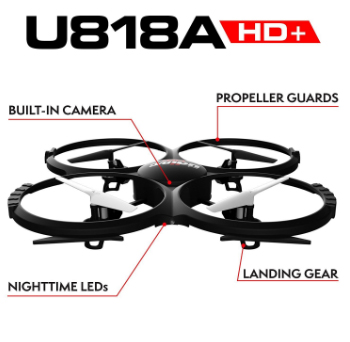
    UDI 818A HD+ comprises a 2MP front camera attached to it. The optics quality is really good for the drone with this price range.

    One point that pulls this drone behind is the user manual. A user guide of drone for beginners should have written in a better way.

    Here are the features, advantages and the demerits of this drone for beginners.

    Features:

    • Weighs 130gms
    • Battery: 2 x 3.7v 500mAh Li-Po
    • Time to charge: 90+ min (more than 1.5 hours)
    • Can control its range up to 32 meters or 98ft
    • Can fly for 7-9 minutes

    Advantages:

    • Is a great drone for beginners
    • Can fly it easily
    • Quite responsive and robust
    • Flies steadily
    • Comprises a camera and controller
    • Affordable

    Drawbacks:

    • The user manual is not written well
    • Battery life is low
    • The range of flight is limited

    Read Also : How to make a fidget spinner – DIY Fidget Spinner

    2. Hubsan X4 H107 L

    A yet another drone for beginners, available at a price less than $40. The user manual for this drone is quite easy to understand. X4 flies really well and is quite fast. The remote control includes the default flight settings without any irrelevant information to put a beginner to confusion. You may also note that the batteries for the controller will not be included in the purchase.

    One of the drawbacks of this drone for beginners is the short flight time of 9 minutes. It is suggested that you have spare batteries to have fun flying it for a long time. This drone indicates a warning on low battery. Besides, there is a transmitter that enables safety as it warns when the drone is not in the range.
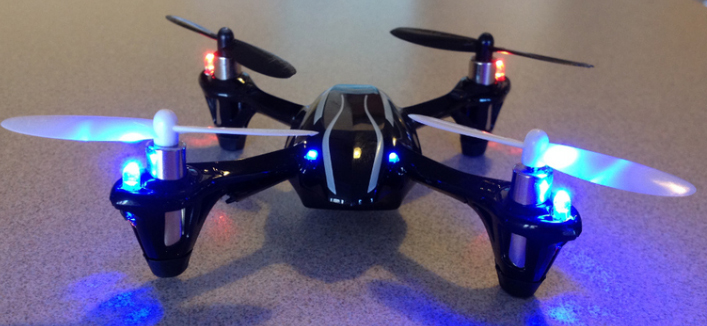
    Hubsan is an ideal drone to start developing piloting skills. Moreover, the size is small and is quite light to carry about and handles the crashes quite well. However, it does not have a camera and has no space allotted for it. One advantage is the Advanced Flying mode. If you are quite a pro at flying this drone, it would be fun to fly.

    As in UDI 818A HD+, Hubsan has no blade guards, thus making the drone weak. However, you can find the parts to replace them if broken.

    Here are the general features, advantages, and drawbacks of Hubsan:

    Features:

    • Weighs about 554gms
    • 240mAh Li-Po Battery
    • Takes about 30-40 minutes to charge
    • The range of control: 100 meters or 328ft
    • Can fly up to 6-9 minutes
    • Maximum speed is unknown

    Advantages:

    • Great drone for beginners
    • Gets charged faster
    • Small and weighs less
    • Responsive and can fly easily
    • Crashes are survived well
    • Is affordable
    • Spare parts available in budget prices

    Drawbacks:

    • Does not have blade guards
    • Lesser flight time

    Read Also : Roku Pros & Cons -Reasons to Choose Roku Streaming Stick

    3. Cheerwing Syma X5SW-V3

    Rate review: 4.0/4.5

    FAA Registration: Yes

    Unlike the other two drones, the Syma X5SW-V3 has more features enabled. Yet it is one of the best drones for beginners available at an affordable price. You may note that this drone would be in a dismantled state when opening the box. However, it is quite easy to assemble this amazing aircraft though you have never used it or fixed it before.
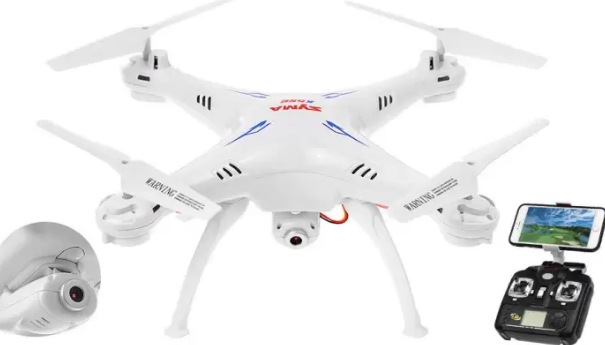
    If you wish to improve your photography or videography skills along with flying a drone, this UAV is an ideal one. Its Wi-Fi enabled camera enables to send photos as well as LIVE videos directly to an Android or an iPhone. The First Person View (FPV) feature allows you to see anything and everything that the camera takes the sight of. To do so, you will need an app. You will find a QR code on the side of the box which you could just scan and then download the application.

    Specifications:

    • Weighs about 635gms
    • Battery power is 3.7V 500mAh Li-po
    • Charge time: over 90 mins or more than 1.5 hrs
    • The range of control: 50 meters
    • Can fly for 7 minutes
    • Maximum speed is unknown

    Advantages:

    • Ideal drone for beginners
    • Good durability
    • can work in headless mode
    • Has battery on/off switch
    • Can carry easily
    • Suitable for practicing stunts
    • Affordable

    Drawbacks:

    • Has short flying time
    • Transmission range is low
    • Compatible only with Android 4.0 and above
    • Cannot fly in the wind


    Drones for Beginners Under $150

    These drones would be a bit costlier. However, the first one is the best seller on Amazon. The second one too is much preferred with loads of positive feedback from the users.
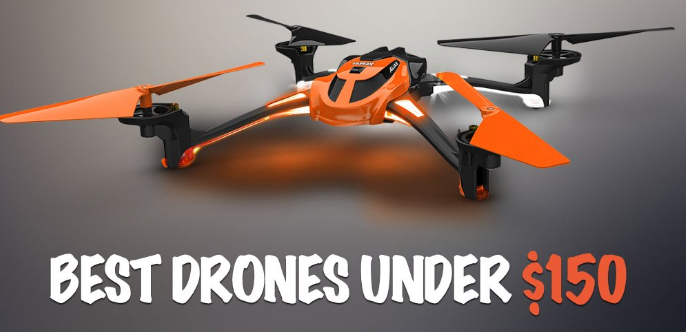
    Holy Stone F181 RC

    Rate Review: 4.8/5.0

    FAA Registration: Yes

    Though a 100 bucks more than the normal ones, these are still affordable UAV made of long-lasting elastic plastic. The material is quite important as it enables the protection of the aircraft from the beginner crashes. The F181 quadcopter comprises a set of blade guards. You need to attach them before flying it. It does a great job of protecting from the crashes. Short flight times is hated by the new users which would be a matter of concern for beginner drones. It flies for about 8 minutes. An added advantage of this aircraft is the bonus battery. It is not common in all the drones for beginners.
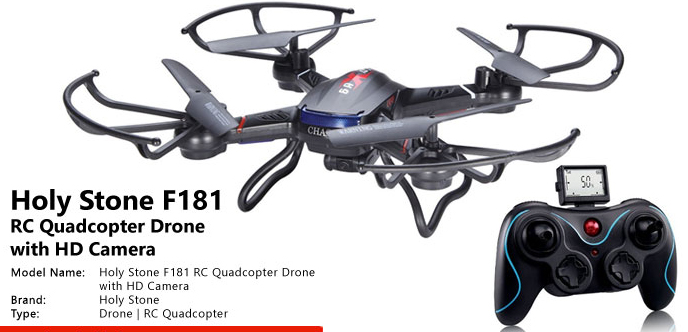
    These are the features/specifications, advantages, and the drawbacks.

    Specifications:

    • Weighs about 400g
    • Battery: 3.7V 750mAh Lipo (spares included)
    • Takes about 90 minutes (1.5hours) to charge
    • The range of control: 100 meters or 328 ft
    • Flies for about 8-9 minutes
    • Maximum speed: 4.4 meters/sec

    Advantages:

    • Ideal drone for beginners
    • Easy to catch
    • Good durability
    • Has a camera
    • Automatic controls
    • Soft landing pads

    Drawbacks:

    • Shorter flight time
    •  Motors get hotter after the flight
    • Creates noise

    Read Also : Bixby Vs Google assistant Vs Siri Vs Cortana – Popular AI Assistant

    Drones for Beginners Under $500

    The makers of these drones target these efficient flying robots at the more experienced followers. These are user-friendly with great beginner flying modes.
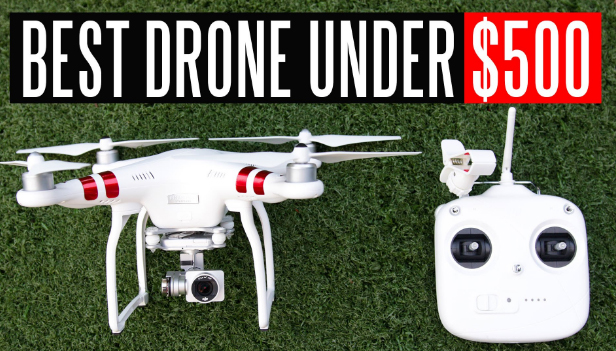
    If you really are ready to spend some good money and don’t wish to start from the scratch, you could choose the ones mentioned here. The former ones are the best drones for learning and the latter being more advanced aircraft.

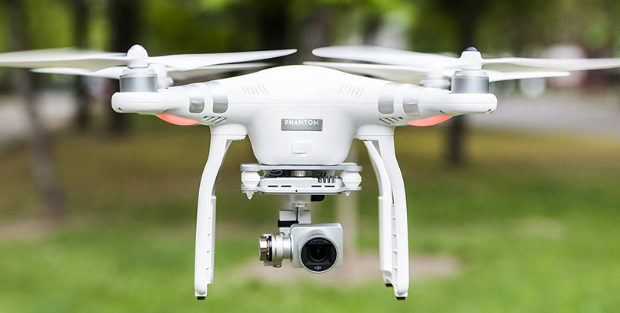
    DJI Phantom 3


    Rate review: 4.4/5.0

    FAA Registration: No

    You may be looking an advanced drone for learning. However, drones for beginners would not be cheap always but should be easy to handle.

    DJI Phantom 3 could be one of the best drones. This is the buyer’s choice as it provides more than the ordinary which you would not get in the cheaper models. The controller is easier to use for the beginners, compared to the Pro and advanced models of DJI.
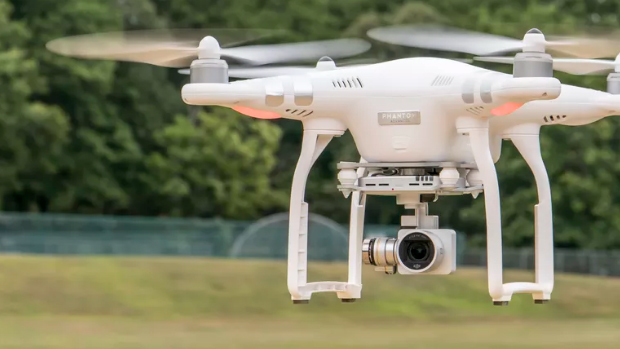
    DJI Phantom has a built-in camera, shooting a video in 2.7K. To be more precise, the quality of the video is about 3 times clearer than what would be seen on HDTV. You get better cameras but being more expensive. The core reason for choosing this drone is for the filming or photography features but being an awesome flyer and a splendid UAV to fly with.

    The most attractive benefit of this drone is its amazing battery life. Unlike other drones for beginners with a flight time of 7-8 minutes on charging, this has a bonus flight time of 25 minutes on charging. It has a unique Follow-me option too, which has been a sought-after feature.

    If you have a fear of losing this amazing drone, don’t panic. It has unique features like the GPS and the compass. A red flashing light indicates weak signal once the UAV starts flying out of range.

    The drone also has a warning beep notifying the craft going out-of-range. Unable to hear the beep? No problem- the UAV automatically turns and comes back to you.

    Let’s look at the specifications, advantages, and drawbacks.

    Specifications:

    • Weighs 1216g
    • Battery power: 15.2v, 4,480mAh
    • Charging time: over 60 minutes
    • control range: 1000 meters or 3281ft
    • Flies up to 25 minutes
    • Max speed: 16 meters/sec

    Advantages:

    • Great value for money
    • Beginners can easily fly
    • Making quality is robust
    • The app is rich with great features
    • Brilliant modes of flight
    • LIVE video feeds in HD quality
    • Great flight time.

    Drawbacks:

    • Price range is limited
    • No support for iPad
    • Cannot afford extra batteries
    • Has only 8GB SD card
    Parrot Bebop 2

    Rate review: 4.3/5.0

    FAA registration: Yes

    This is one of the best drones for beginners among the advanced flyers. Its battery lasts impressively for 25 minutes in favorable conditions. This would be a reward for the new pilots and it offers a great flying time!
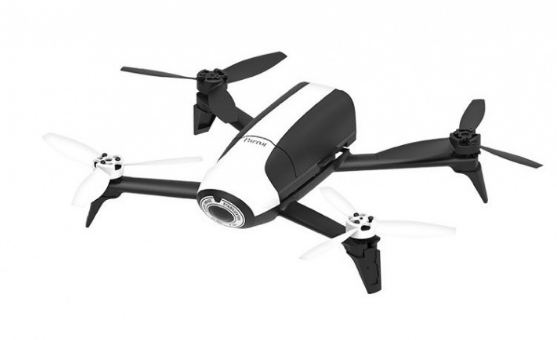
    Bebop 2 does not include a controller. You need to fly it using the smartphone with the fly app. You could ignore the review, or prefer paying extra if you need a controller for your device. You could invest more in this. It includes an FPV kit. The comprises a Parrot Skycontroller 2 and a set of cockpit glasses for a great flying experience. However, these are not tools for beginners.

    Cheap & Best Drones

    The increase in demand has introduced new investors in the market. The brands offering cheap and best drones, as well as the level of difficulty in using, have been increasing rapidly. With a high range of new products, the choices have made an impact on the price of the drone to come down, which in turn is advantageous to the customers.

    In case of hobbyists enjoying the new skill of flying a UAV, such as an agency to a professional photographer, and YouTubers looking to add aerial photography to their photographic options, there are tons of choices open. Professional drones offer a 4K UHD video recording, more than 10MP photographic capability and 360 degrees directional devices, so as to steady the images.

    For the beginners, toy drones or a basic full-sized drone could be a good start. Hence you need not waste money on an expensive model. You would find more people buying the drones for beginners so as to avoid the risk of crashing due to lack of flying practice.

    Low-Cost Drones: Drones below $50

    SYMA X5C:

    This drone is available with a camera, in an affordable price under $50. The X5C is a conventional model and besides the Phantom from DJI, this is more respected and quite well-known.

    Syma is unique in the toy drone range, with more models reaching the top positions. It is more preferred by the newbies in piloting the UAV. The plastic used in X5C is strong and flexible, enabling to preserve its form. The X5C can fly up to 6 minutes, reaching a height of 100 meters depending on the topography. Though it has a camera, it does not offer quality images or videos. With a shorter flight-time, it is suggested to have an alternate battery.

    Conclusion

    The best drones, according to me, would be the one, which is cheap and best drones and also recommended for beginners. There are a few ideal ones available in the market. So make sure they are easy to use, affordable and most importantly a strong and long-lasting one.

    Enjoy The UAV Flight!
  • Best Torrent Managers for Computer & Smartphone

    Best Torrent Managers for Computer & Smartphone

    Are you in search for the best Torrent Managers for your computer or smartphones? Then you are on the right page where you can get the necessary details regarding the best torrent managers that are compatible with both computers and Android phones.  It is always good to do a good research on the torrent managers that are available to the customers. Once you have studied about a torrent manager, you will be able to easily identify if that will suit your needs or not.

    Best Torrent Managers for Computer & Smartphone

    So, here I am going to brief about the best Torrent Managers that are available. Hope this article will help you all to choose the best torrent manager.

    Best Torrent Managers For Mac

    Here is the list of the mos secure and fast torrent managers for Mac computers this year

    1. qBittorrent
    2. Deluge
    3. Vuze

    Best Torrent Managers For Windows

    Given below are the torrent managers for Windows system .

    1. qBittorrent
    2. Deluge
    3. Transmission
    4. uTorrent

    Best Torrent Managers For iPhone

    iTransmission is the best torrent downloader app for iPhone .

    Read Also : Best free office software for Computer & Smartphone

    Read Also : Best Laptops of the Year – Buy the Right Laptop for You

    Read Also : Best Web browsers for Computer & Smartphone

    Best Torrent Managers For Android

    Here we have listed out the best torrent managers apps for Android . These are the most rated torrent apps and torrent downloaders for Android

    1)    uTorrent

    This Torrent Manager is compatible with Windows, Android, Linux, and Mac and this is used by many people worldwide. uTorrent has a very simple user interface and it is lightweight on any platforms. The users can easily download files using the uTorrent.

    Once you start using uTorrent, you will realize that it has so many features you can use. To share data or files, first, the users have to create and share a torrent. To do that, you go to File and create a new torrent. A dialog box will appear on your screen in which you can select the source and add a file to share.

    Read Also : Best Note taking apps for PC & Smartphone

    2)    Flud

    Flood is another best Torrent client which has both free and paid versions. Using Play Store, you can easily download the Flud torrent client. Both free and paid versions have the same features, so it is not necessary to pay and use this torrent manager. With Flud Torrent Client, you can download any number of files. There are really no limits for uploads and download with Flud.

    If you make a payment of $1.50, then you can use this Flud Torrent Client as ad-free. As I said earlier, you do not have to make any payment to start using Flud. Download the free version of Flud on your android phone or on your computer and give a trial to see how it works and if it suits your requirements.

    3)    Vuze BitTorrent Client

    This Torrent Client was earlier known as Azureus and this is totally free to use on several platforms. Vuze Bittorrent Client has many features which include: apps like metasearch, web remote, web playback, HD player, and faster downloads. These are very useful to the majority of the customers to save their time and stress.

    Vuze Bittorrent Client is compatible with Windows, Mac, Android and Linux OS. Using this Vuze Bittorest has a folder to sync directly with iTunes which helps the user to move the downloaded media files to iTunes library very easily and quickly. After downloading a particular file, this torrent client can enable sleep, hibernate mode, shut down and a run a program.
    Read Also : Best VPN For the Future

    4)    Deluge

    Deluge Torrent downloader is another option for the people which acts similar to uTorrent since the interface of both torrent clients is the same. This downloader is free to use and it is available on Ubuntu, Windows, Fedora, Mac OS X etc. This is a cross-platform torrent client which is free to use. Deluge has the common features of BitTorrent clients like Protocol Encryption, local peer discovery, peer exchange, proxy support, web seeds etc.

    The Deluge Torrent Manager runs as both normal standalone desktop application and it also works as a client-server. This also has three main user interfaces which are: – GTK UI for the desktop, Web UI for the browser and console UI for the command line.
    5)    BitTorrent

    Our next option of torrent manager is the BitTorrent which is free to download. BitTorrent also comes from the same company that offers uTorrent and thus it has almost the same features of uTorrent. The BitTorrent comes with top-level features and the users can easily download small to large torrent files without any hassle.

    Both uTorrent and BitTorrent looks similar when you check their design and settings. The only difference you can find is the colour change between the two. BitTorrent comes in purple colour, whereas the uTorrent is green. The Bit Torrent is configured with P2P connections, helping in data transfer via UDP port.
    6)    Frostwire

    Frostwire is a cloud downloader which also acts as BitTorrent client and media player. With this torrent manager, you can easily search for torrent files from any number of websites. This Bit Torrent client offers filter option which helps in searching the files according to their file size and seed count. Another attractive feature of Frostwire is that it has many radio stations on the website.

    One of the main features of Frostwire is, the users can communicate with other Frostwire users through its community chat option. This torrent downloader is compatible with Mac, Windows and Ubuntu OS. It is not suitable for androids.

    7)    BitLord

    This is one of the easiest torrent downloaders and it comes with a password encryption for security reasons.  BitLord is no compatible with Android phones at the moment, but it is a good alternative for uTorrent compatible with Windows and Mac.  With BitLord, a user can easily search videos, text, audio and other torrents among many files. Another main feature of BitLord is, you can instantly watch videos in the in-built player. It also offers video and audio streaming while the files are being downloaded.

    If you have an Apple TV, then you can even watch the video while the process of downloading is ongoing. Moreover, when you use BitLord, you can easily get access to subtitles in your language inside the BitLord.
    8)    Transdrone or Transdroid

    With Transdrone you can manage your torrent with Android Phones. This torrent manager has features like trackers and file priorities, searches integration with a number of torrent sites,  SSL, alarm service and tweak maximum transfer rates.

    Transdrone is compatible with various other torrent clients such as uTorrent, transmission, Vuze, Deluge etc. Some of the sites from which you can search files are Bitsnoop, ExtraTorrent, Kickass torrents, Lime Torrents, Mininova, Nyaa Torrents and Pirate Bay. The users can add a custom web search function for any private or public tracker on your browser.
    9)    tTorrent Lite

    BitTorrent is the other torrent downloader which comes with an inbuilt search menu that supports all the magnet links. The user can download torrents using WiFi connection only. This torrent downloader is free to use, so you can give it a try to check out how it works and if it will suit all your needs.

    10)    aTorrent

    This torrent downloader comes with outstanding material design and the users can download magnet links using this downloader. This torrent client is a free app which you can download on your android phone from Play Store. aTorrent cannot be used in Windows and Mac but, if you use an emulator, then it will be compatible with both Windows and Mac.

    To download various files to our computer or smartphones, use an of these torrent managers that will surely make our work easy without wasting much time of ours. So, download the best torrent manager that you want right now and enjoy downloading movies, music and a lot man files.