Tag: Smartphone

  • Best Web browsers for Computer & Smartphone

    Best Web browsers for Computer & Smartphone

    Best web browsers are need of the hour for every internet users . Web browsers are used these days in both computers , tablets and smart phones. With the web browsers, the users can collect any data by simply browsing. You can take any details from the web browsers very quickly. Web Browsers help people to easily collect any information required, by just typing in the tab what they are looking for. Let it be any subjects related to your studies, games, music, and art, movies etc, all you have to do is just type and enter what you are looking for. You will get all the necessary information about any topics using the web browsers. But what are the most reliable web browsers or the best web browsers any idea ? 2020 onwards we see rise of AI-powered browsers . To stretch more about it in 2024 we could see the user has wise choice to choose among the Fastest AI-powered browsers . With AI coming into the segment the entire browsing experience has been taken to a new level. 

    Web browser is nothing much just a software that we can download and with an active internet connection this software helps you to browse anything and everything.

    It is always important to choose the right web browser for your computer or smart phone to work efficiently. It is not just the features that you have to look for when selecting a web browser. You should also check browser speed (Browser speed test can help with it) and compatibility before your download the software.

    Best Web browsers for Computer & Smartphone

    Here are some of the best web browsers you can install in your computers and smart phones. You should also test these browsers to understand how it works and to check if it is user-friendly. Read the features of each and pick the right one for you. Let us see what are the best Web browsers are available for us to use.

    Best Web browsers for Windows

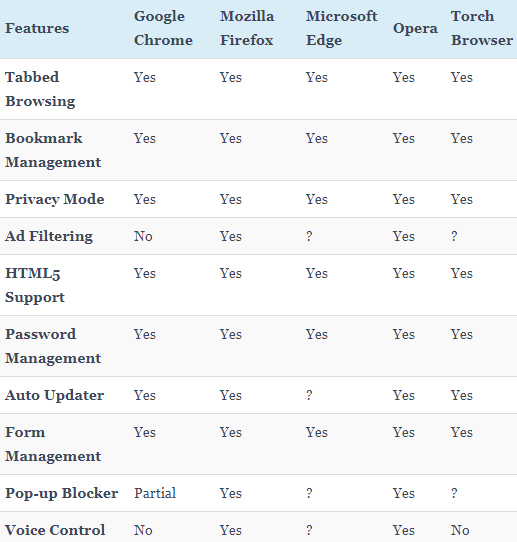
    Given below table compares most of the features of the given list of best web browsers for Windows .

    So the best web browser for Windows are –

    1. Google Chrome
    2. Mozilla Firefox
    3. Microsoft Edge
    4. Opera Browser
    5. Torch Browser

    Best Web Browsers for Mac

    Here is the best sorted list of the best web browsers for Mac Computers that is being preferred by most of the people.
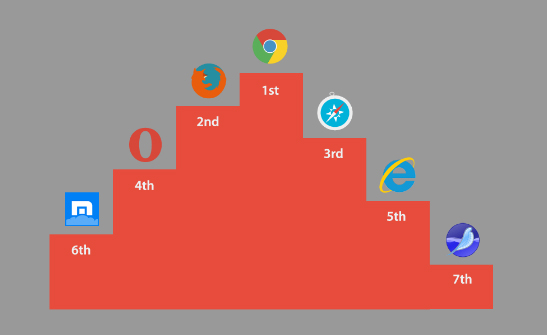
    1. Google Chrome
    2. Mozilla Firefox
    3. Internet Explorer
    4. Opera browser
    5. Maxthon
    6. Yandex
    7. Safari

    Best Web browsers for Android

    Here is the list of the some of the most popular and best web browsers for Android mobile Phone that is being preferred by most of the people.
    1. Chrome
    2. Opera Mini
    3. Firefox Focus
    4. Firefox
    5. Puffin
    6. Dolphin
    7. UC browser

    Read Also : Kindle Fire Silk Browser Alternatives

    Best Web browsers for iPhone

    Here is the list of the top rated best web browsers for iPhone that is being preferred by most of the people.
    1. Safari
    2. Chrome
    3. Puffin browser
    4. Opera Mini
    5. Dolphin Browser
    6. Ghostery
    7. Firefox focus
    8. Adblock Browser

    Read Also : uBlock Origin Replaces Adblock plus(Best Adblock Plus Alternative)

    Most Fastest Web browsers

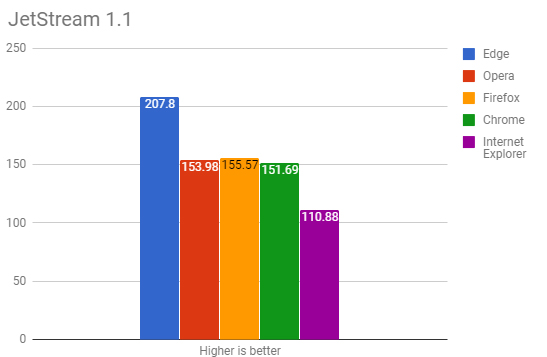
    When considering browsing the speed is a factor of browsing . So here is the list of fastest web browsers.

    If you are using Windows , then the fastest browser for windows includes –

    • Microsoft Edge Browser
    • Opera
    • Chrome
    • Firefox Quantum
    • Internet Explorer

    Read Also : Best Laptops of the Year – Buy the Right Laptop for You

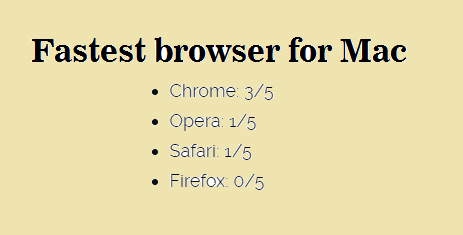
    If you are using Mac , then the fastest browser for Mac includes –

    • Google Chrome ( This is the best on different browser speed test for Mac)
    • Opera
    • Safari
    • Firefox

    If you are using Android , then the fastest browser for Android includes
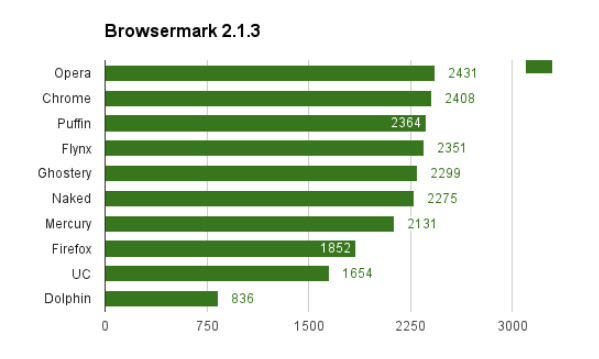
    • Puffin
    • Opera
    • Chrome
    • UC browser
    • Flynx
    • Naked
    • Mercury
    • Firefox
    • Dolphin browser

    Read Also : Best Note taking apps for PC & Smartphone

    If you are using iPhone , then the fastest browser for iPhone includes

    • Safari
    • Chrome
    • Puffin browser
    • Opera Mini
    • Dolphin Browser

    Best Web browsers for Computer & Smartphone

    Here we details the best web browser for computers and smartphone that fits as the fastest browser , safest web browser and low memory consuming browser .

    1)      Google Chrome

    One of the most user-friendly browsers that a lot many people use these days is Google Chrome. This browser is compatible with both computers and smart phones and it has an app size of 182.0 MB and 59.4 MB (IOS). When you normally get computer or a smart phone, Google Chrome will be already set since it is very friendly to the users and is also compatible with computers and android phones. Google chrome saves the history, you can give bookmarks etc.
    Moreover, Google Chrome also has the translator icon on tab which can be used to translate any language to English. Recently in some android phones, Google brought a new app that can detect your voice. If you want to set an alarm, you just have to say “OK Google” – then this app opens up and you can ask to set an alarm for you. OK Google will set the alarm and let you know that it is done. Isn’t this amazing? You do not have to type, our set an alarm by selecting the clock.

    Read Also : Best free office software for Computer & Smartphone

    2)      Mozilla Firefox

    Compatible with both computers and smart phones, Mozilla Firefox is an alternative to Google Chrome. This web browser has the same cross-platform that syncs just like the Google Chrome. One of the attractive features of Firefox is that it has a toggle switch to stop a video. Apart from this, Mozilla Firefox has a lot of extensions that can be added to your mobile. This can be done using the ad blockers to plug–ins by changing the feel of the web.
    The visual aesthetics of Mozilla Firefox is extremely good and customizability also can be done easily. This may be one reason that users choose Mozilla. This web browser works perfectly well in computers, but in android phones it does not work efficiently as Google Chrome.

    Read Also : Enable or Disable Superfetch for Windows

    3)      Opera and Opera Mini

    Opera is one of the web browsers, that are compatible with Android, iOS, Windows, Mac Os etc. The iOS users only get the light weight and data compressing Opera Mini to call, whereas the full opera on Android has a Google Now-Esque news feed. This news feed can be disabled if the user does not need it.   It also has a speed dial in which you can select your favorite sites quickly without searching much.

    Opera and Opera Mini offers a slick and clean browsing and searching for the users. You also get the option to create an Opera account through which you can sync the bookmarks and the history of the browsing with various devices. Data saving option is also possible with the main Opera App and it also supports compressing sites visa Opera’s servers. In Opera Min, the speed and data compression are the most attractive features that the users note. Like the main Opera, Opera Mini also includes ad blocking, offline pages, news feed etc.

    Read Also : Perfect Guide to Know All About Web server

    4)      Apple Safari

    Well, this browser will be familiar with all the users of Apple iPhone. Apple tries to add more features to this browser to make it easier for the users to get their work done. Some of the most recent add-on to it is – ad blocking and tighter Siri integration. The users can sync a lot of their work with other using the Apple Safari. When it comes to syncing the files, the users prefer Safari than Google Chrome.
    Apple Safari is compatible with iOS and is a favourite browser for all iPhone users. Unlike Google, Apple Safar shows no interest in tracking your browsing history which I find a good thing to do. Why do you need to get all your browsing history? Wait and watch to see more of their attractive features.

    Read Also : Best VPN For the Future

    5)      Puffin

    With 32.6MB (Android) of app size and 41.9MB (iOS), this web browser is compatible with computers and smart phones. But majority of the people might not even have heard about this browser. The main attraction of using Puffin is the speed. In just one click the page will open up and you can even see all the elements popping out quickly right in front of your eyes.

    This web browser is good for surfing in your computers since it is very fast. But it has problems in connecting with android phones. The disadvantage of Puffin is this – it struggles to cope with the newer technologies. One the other side, Puffin comes with features like gamepad overlay which helps in web gaming and it also has the advanced data saving tool with settings for image and video excellence. So if you want excellent speed to load pages, then Puffin is a good option.

    6)      Microsoft Edge

    Compatible with both computers and smart phones, Microsoft Edge is a very new web browser that has launched in beta form with App size of 66.9MB (iOS). You can test this web browser by signing up with then necessary details required. All you need to do is, install Test Flight on iOS. If you want it in your android phones, then join the waiting list of Microsoft Edge.
    Since this is a very newly launched web browser, you can expect change and added features by Microsoft. The major attracting of Edge is that it syncs with the desktop easily. Soon, you will be able to get access to Microsoft Edge in you androids and computers with efficient features.

    So, these are some of the web browsers that are compatible with both computers and smart phones. Every user would want different features to complete their work. While choosing an option from these web browsers, check the features and efficiency to meet your needs. Make your work easier by picking the right web browser and save your valuable time with these technologies.
  • Android boot Fix – Steps to Try When Your Android Won’t Boot

    Android boot Fix – Steps to Try When Your Android Won’t Boot

    Android boot fix steps to try when your android won’t boot

    This article we will focus on the steps to fix android when it is not able to boot , so you can read step by step to do Android boot Fix

    If your favorite android device decided to take a vacation and  android not boot properly then this condition is not acceptable and the idea of troubleshooting it is in itself haunting. The solution to this puzzle could be related to either an errant app or a corrupted Android OS or in worst case bad hardware.

    Android boot Fix steps

    Here are the steps you can take if your Android won’t boot.

    1) Soft Reset Android boot Fix

    • Your android phone might need a soft reset to boot. On majority of the devices you can press and hold the Power button for about 15 seconds to soft reset/boot. This way you can do Android boot Fix.

    Read Also : Enable / Disable JavaScript : Mozilla Firefox Hacks

    2. Pull out the battery

    • For nearly every problematic issue where an android device would not start I always suggest to pull out the battery (only if it is removable so never go to extreme lengths at start) first and leave it sunlight for time nearly about 20 seconds and then reinstall the battery and see if the issue of boot persists.  

    Read Also : How to Use Google Assistant on Android Devices (Without Root)

    This particular step could seem like it would not work but I know for sure that it has helped numerous android users.

    3. Verify for Stuck Buttons

    •  In certain case it can cause the Volume,power,home buttons to stick which prevents the start up/boot. So try to remove this case of not being able to boot.

    4. Try a Soft Reset

    • On majority android phones you can simultaneously press and hold the “Volume Down” and “Power” buttons. Keep pressing them for a time of nearly 20 seconds to soft reset/boot the phone.

    Read Also : WhatsApp Exclusive Guide – Everything about WhatsApp Features

    5. Remove Connected Hardware

    • By any chance if you have an SD card, otg-cable or any other items plugged into the device then unplug them. A bad/corrupted SD card or headset could cause issues. Though this are on rare occasions it could stop your boot.

    6. Ensure Device Has Enough Power

    • In this case your device would not turn on at all or maybe is stuck in an infinite startup loop/boot. It may not have enough power so attach the power adapter to the your phone and then plug it into a wall outlet. Remember not to use a connection to a computer or any other device because the power you would get is not suffice to power majority of android devices in the right away and could affect the boot.Another issue could be the actual battery(about which we talked earlier). To see if you can borrow a battery from a friend with a similar specification and give that a try for a boot. Though you may want to purchase a new one or maybe try a used battery out. You can also return the battery to the store if it does not help(if it is in the warranty period).

    Read Also : Improve The World With Smartphone -Top 10 Hacks

    7. Start Android in Safe Mode

    • If you have installed a particular app that either is not compatible with your device or malfunctions then it could cause the system to hang at a blank screen or continually force to close items stopping the boot process. In any case you will want to find out how to start your device or boot in Safe Mode. Safe Mode will start the device with only the basic OS required to start the device. This will usually allow you to access the android OS so that you can remove whichever app that may be causing the issue for boot.Since most devices start in safe mode by simultaneously pressing and holding the Menu or Volume Down button while you power to the device is on. If you are not confident on how to start your particular phone in Safe Mode then search the google. You can also check the documentation provided with your Android phone especially for boot.

    8. Factory Hard Reset Android

    • Alas! if you have tried every of the above steps and no option seems to work then you might want to do a factory reset operation on your phone for a boot and mind you doing so will wipe all data from the memory of the phone(usually not SD card data like music or photos).There are many different ways to perform a factory reset with a hardware button combination just before your phone’s android system loads. Look in your manual or search for what the button combination is for your particular device. They are different for almost every different phone. Only if you are not confident on how to factory reset your device. Check the documentation provided with your phone(the manual you probably never read).

    9. Repair

    • After trying everything if none of the above steps work then there may be a hardware issue that you are most likely unable to solve for yourself which is stopping your boot process. At this point I would seek help from the manufacturer or the retail store that sold you the phone. It is

    These are the steps to try when android doesn’t boot and thus will help your android to work well smoothly .

  • Improve The World With  Smartphone -Top 10 Hacks

    Improve The World With Smartphone -Top 10 Hacks

    Decades ago, smartphones were used exactly for what they were supposed to do – for calling. But now the scenario has changed. World has improved a lot with the smartphones that are now like pocket PCs. Apart from the options for calls, smartphones now have options for high quality cameras and videos integrated with editing, compasses and GPS to know the location, Health and fitness apps, applications to monitor the daily activities, latest NFC technology and much more. We can use smartphones for calling, sending messages, for online payment of bills, reading and sending mails and messages. Furthermore, there are several Smartphone applications that help to monitor our health status. The GPS facility in our smartphones have made a revolutionary change by helping us to reach places without any prior knowledge of the path and also has helped in the positioning of  various objects and persons too. The way you can Improve The World With  Smartphone is amazing that, people cannot imagine a life without them.

    smatphone-apps-to-improve-your-world

    The way smartphones has changed the world around us is totally unbelievable and now they have become an integral part of our life.

    10 ways to improve the world with smartphone

    From education to entertainment, all fields of life have been benefited with smartphone applications. Years ago, if you needed to pay the phone bill or make a bank transaction, you have to go to the respective office and do the necessary. But, now with the smartphone applications you can quickly do all these within minutes anywhere at any time. The world and culture has evolved in a proud way with the use of smartphones.Here we are listing the top 10 way to Improve The World With  Smartphone.

    Web everywhere

    Browsing in web was earlier restricted to our Personal computers and later on to our laptops. But now as smartphone has come into the world, we can have access to the internet all the time irrespective of where we are and the time.browse-with-smartphoneSmartphone applications are now making the world around us smart by providing web access to every place. We can configure all the devices around us to our smartphones now that internet of things has come into role.So everything is at your finger tips now with smartphone . It is a great way on how to Improve The World With  Smartphone.
    Emailsemail-on-smarphone

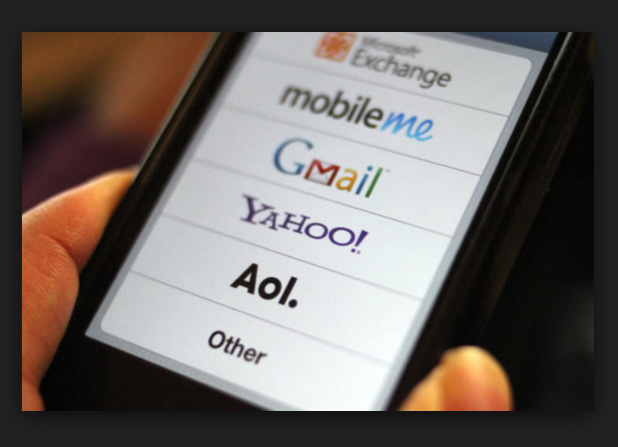
    Earlier if we need to send an urgent email, then it would take a lot of time as we need to switch on our PCs, connect the internet to it, log into the account etc…But now, we can use the smartphone to quickly read and send emails without any time delay.If you ask me i start my day by checking my emails as the first job i do . So its a great improvement to life.

    Updates news

    There are many smartphone applications that help to know the relevant news and that too, of the topic of our choice. The current affairs are all available at our fingertips.

    If you use android or iOS smartphones then my personal suggestion of smart phone news application is Flipboard ,CNN App,Google News & Weather .

    Reading books and dictionary

    We can read books in our smartphone by just downloading it or in online. And as per our need we can use the dictionary applications to check the words thereby improving the vocabulary and reading habit.Need not to go to library and check racks nor you don’t have to worry about the space that is occupied by your book collection.

    Translator

    We can use the Translator applications available in our smartphones to help us with  the meaning and explanation of languages which are quite foreign to us.It gives us the joy in understanding so many language . Sometimes the way translator can  help you will be to propose your crush on her native language . So its just awesome feature of smartphone in improving our world.

    Stop Watch/ Voice Recorder

    Instead of peering at our watch for the time limit we can just set our stop watch and carry on with other tasks. Also, the voice recorder helps us to record any important details so that we need not write it all. It saves our time.

    Remote Control

    While we make a presentation or if our television remote is not working, we can just use the smartphone application to control the whole thing. It helps us a lot in our daily activities.

    Sensors and health apps

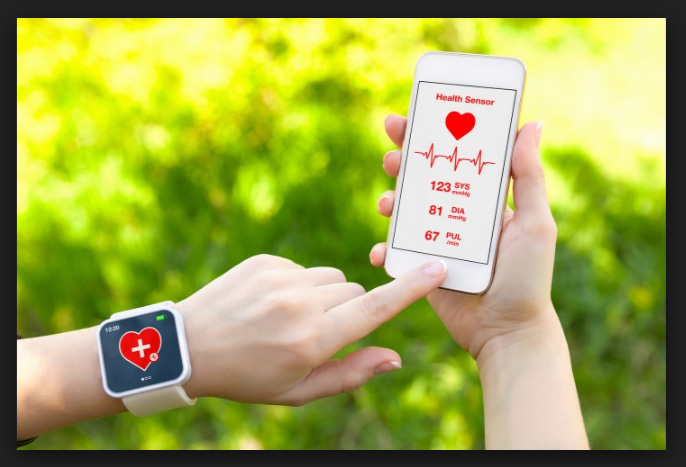
    There are hundreds of sensors built into our smartphones and they are used by the smartphones to know our health and fitness.

    health-appsThe calories that we have burnt or the amount of water that is to be consumed a day etc.. can all be monitored by the  smartphone applications. To know your heart rate you need not go to a doctor, instead you can use the smartphone application and know it in a minute.It is a best way to witness how to Improve The World With  Smartphone.
    Information apps

    There are several information apps for charity works that has a group of people as members. If a patient is in urgent need of any medical help, such applications can be used to pass the information. This way, smartphone applications for emergency medical situation too.

    Communication media

    The smartphone applications like whatsapp etc..can be used by millions of people to stay in touch with each other. Such smartphone applications have conquered the time and distance between people.

    Read Also : WhatsApp Data Sharing Disable Methods to Protect WhatsApp Data

     Real life applications

    There are many real life smartphone applications that help you to make your life better. You can check the reason for the engine leakage in your car, prevents drunken driving, helps you to improve your speaking skill as well as basketball skills and much more .The use of smartphones can definitely improve the world around us. Whether it be for education or entertainment smartphone applications can help us in a way that it totally unbelievable.

    Read Also – All Possible ways to Make Money by Playing Pokemon Go

    Smartphone applications save our time and effort and provides accurate and adequate amount of information and help Smartphones are like our friend whom we can carry around in our pocket. We never becomes lonely and rather smartphone applications would keep us updated always, reminds us if we have missed something and about important dates, keeps track of our medical conditions and a lot more. It has completely become an inevitable part of our life.Thus there is a great chase for the best smartphones in the world. 

    So just see how you Improve The World With  Smartphone , it is just the positive side of technology in our life .


  • Disable Developer Mode on Samsung Galaxy

    Disable Developer Mode on Samsung Galaxy

    If you are using Samsung Galaxy series and would like to Enable / Disable Developer Mode on Samsung Galaxy then here we will brief the steps for that process.

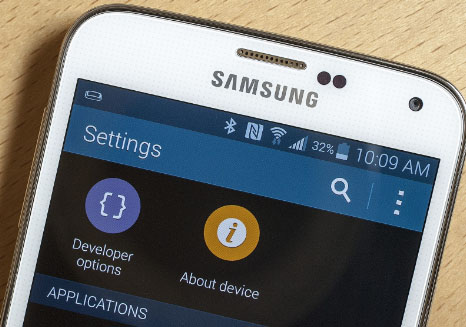
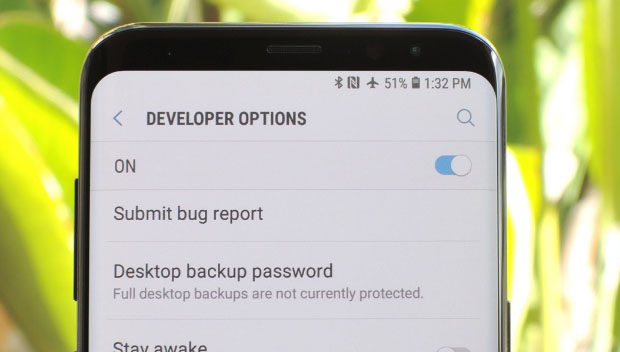
    Developer mode in Samsung Galaxy series , if enabled will allow the users to use Android SDK and other Android development tools within the device .

    How to Enable Developer mode in Samsung Galaxy 

    Enabling Developer mode in android will allow the android users to do Android USB debugging . So if you want to enable developer mode in Samsung via Settings then here is the steps to follow –

    1. First go to your Home screen
    2. Now select the Settings tab and open it
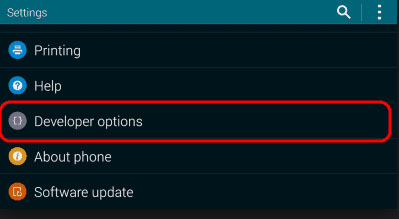
    3. On the Samsung Galaxy Settings button if you scroll down you can find out an option called About phone 
    4. Click on that and scroll down
    5. Now you can find Build number option
    6. You have to tap that build number for 7 times
    7. So finally your settings menu will display out the Developer mode option for Samsung Galaxy .
    8. Turn it on

    That is it , you have successfully enabled developer mode .

    Read Also : iPhone Vs Samsung which is better – iPhone Vs Galaxy Compared

    Read Also : Best Triple Camera Phones to Buy This Year

    How to Disable Developer mode in Samsung Galaxy 

    Now if you want to disable developer mode on Samsung Galaxy then you have to follow the certain steps as given below –

    1. First go to your device’s home screen
    2. Secondly go to the device Settings menu
    3. Now From the settings menu , choose the Developer mode
    4. Toggle it off

    You are done with it , in case if you want to completely Clear data on Settings app of Samsung Galaxy , that may not work . So your option is to factory reset your Samsung galaxy.

    There might be reasons to turn off developer mode or even to hide developer mode but there are strong reasons and benefits for enabling or toggle on developer mode on Samsung phones .

    • If you want to install custom Android ROM , then enabling developer mode for android is your cup of tea .
    • In order to enhance the device animation performance also , enable developer mode
    • Screen record android activity with developer mode enabled
    • Fake or duplicate your GPS location
    • Boost your gaming speed on device

    All the listed out points shows the merit of enabling developer mode option . So now its your decision how you want to operate .

  • Best Media players for Computer & Smartphone

    Best Media players for Computer & Smartphone

    When it comes to Media players most of us might know one common name that would be Windows Media player and few of us may know even VLC Media player . But know what there are so many which can be pointed out as the best media players and really the best free alternative to Windows Media Player .

    So let’s take a look at some of the best Media players available .

    Best Media players for Computer & Smartphone

    You all might be familiar with some of the media players that are commonly available. For the people who are still in search for the best free media players, please have a look at the following options.

    1. Windows Media Player
    2. VLC Media Player
    3. iTunes
    4. KM Player
    5. GOM Player
    6. Kodi
    7. Media Player Classic
    8. Winamp
    9. MPlayer
    10. Plex
    11. Real Player
    12. Serviio
    13. Boxee
    14. Dragon Player
    15. MPEG Audio Decoder
    16. JRiver Media Center
    17. Flip4Mac

    Now we’ll have a look at some of the Best Media players for Computer & Smartphone that are quite popular and most preferred .

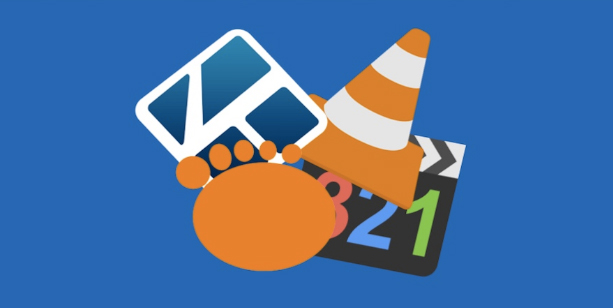
    1)      VLC Media Player

    This is one of the most commonly used best media players for both computers and smart phones. People who watch videos in their phone or computer will surely be aware of the VLC media player. This customizable media player is one of the most flexible players these days. The android app of VLC was launched in 2012 and it became very popular among the android users. Thus making it a best android media player .

    The users can easily play HD content with VLC media player since this player is supported by open source codec files which can be installed as an add-on. VLC Media Player is compatible with and Windows platforms too. Some of the key features of VLC media player are:

    1. a)      It supports files, Discs, webcams, devices and streams.
    2. b)      Codec packs not required
    3. c)       It runs on platforms like Linux, Mac, Windows, OS and UNIX
    4. d)      VLC media player also supports media conversion and streaming.

    2)      MX Player

    MX player , one of the best video players for android phone users. Also compatible with both iOS and Windows. The layout of MX player is very simple and this makes it easier for all the users to run it without much effort. Apart from this, MX Player has an advanced hardware decoder which helps in supporting playback of high quality videos. This is one of the best iOS Media player .

    MX player also works well with devices that have multiple core processors since it supports multi core decoding. One of the major highlighting features of MX player is that, it can transfer you old collection of movies into digital format. Once the transfer is done, you can easily play the movie in MX player without any issues.

    Read Also : Best Torrent Managers for Computer & Smartphone

    3)      KMPlayer

    When it comes to video streaming, KMP is one of the best options that can help you with high quality streaming. KMP Media Player with its floating screen allows the users to work on different windows, making it a perfect multitasking media player.

    KMP media player is compatible with Android, iOS and Windows. One of the major attraction of KMP player is its ability to support more than 30 languages which in inbuilt. Likewise, it also supports multiple audio tracks and subtitles without any lags and slowdowns.This is one of the Best Media players .

    KMP Media Player also supports 3D formats and it also has an option to add the quality of album and includes plug-ins and playback options. While playing any music track, KMP media player automatically supports the album art with changing colour themes for each new track.

    Read Also : Alexa Tips, Tricks and Commands

    4)      SM Media Player

    Developed by Mr. Ricardo Villalba, this media player has features like:

    1. a)      Switching of Audio Tracks
    2. b)      Mouse scrolling and multiple speed playbacks
    3. c)       Codec free playback
    4. d)      Remembers setting of the files you play

    SM Media Player is an open source player which is compatible with Windows, Linux and Androids. To use this media player, all you have to do is download it and start using. You will not need any external codes to pay the videos. SM media player also support YouTube videos and the user can easily download subtitles.

    SM media player consists of different skins and icon themes. So when the user wants to change the look for the player, they can do so by choosing the options of themes. This is one among the Best Media players and also has video and audio filters, changing the playback speed, video equalizer etc.

    Read Also : YouTube Dark Mode Android Version Without Rooting

    5)      DivX Player

    This is another media player which is compatible with both computers and android phones. You will have to download the DivX App in your android phone from Google Play Store to start using it. For iOS devices, you can make use of the Apple Store. To watch the videos that are saved in your phone, all you have to do is click the “My Videos” option and start watching by selecting a video. If you have stored the videos in your computer, then click “Media Servers” and select DivX Media Server.

    This media player support all file formats and it also helps in adaptive streaming. The DivX Player automatically adjusts the quality of a video you watch. In this player, the users can save videos according to title, genre, date or time. It acts as a fully featured video library manager. Moreover, the user can embed high quality videos with all its features in websites or blogs.

    Read Also : Apple Homepod Tips, Tricks and Review

    Read Also : Spotify Tips and Tricks to Enjoy Spotify Subscription More

    6)      Real Player

    Real Player is one the media players that allows users to download web videos and watch it offline. The user has all the control of this media player. To keep the videos safe, this player helps the user to create a unique pin to access the videos. This player is works very fast and it also adds mobile sharing of clips. Streaming is possible with Real Media Player and the user can convert the videos and watch it on TV, computers or android phones.

    Real Players comes with a downloader and trimmer, helping the users to edit the videos that way you want. This player also helps in sending photos, clips and videos with your friends easily. Real time offers two premium plans to the users to choose from and they include more space, better quality video, more music choices and last but not the least the ability to create unlimited real times with any music track. Apart from being a media player , this is an effective video editing tool and video trimmer tool to rely upon.

    Know these media players first and choose one that suits your needs.  Hope this article helps you to opt the right media player for your android phone or computers.  Enjoy watching videos with these high quality media player to keep you engaged during a holiday or while you travel.

  • Best Triple Camera Phones to Buy This Year

    Best Triple Camera Phones to Buy This Year

    Camera , Photography , Selfie , Bothie and so on has become one of the exciting features that the generation wants as the best in their Smartphone . Recent trend in Smartphone photography is hiking with new models of Smartphones with exciting features . Here comes the new trend setter Smartphone Camera feature after Nokia Bothie app .That is the rise of Triple Rear Camera feature , so let’s find out the list of Best Triple Camera Phones .

    Best Triple Camera Phones to Buy This Year

    You may be very much familiar with dual camera smartphones in market , but there are only few handpicked brands and smartphone models that fall under the category of Best Triple Camera Phones .

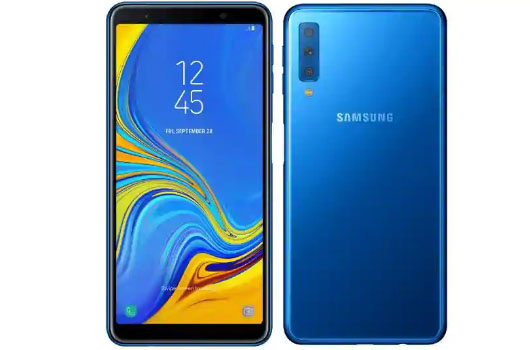
    Samsung Galaxy A7 

    Samsung will introduce their very first smartphone with triple cameras . Samsung Galaxy A7 will be one of the Best Triple Camera Phones .

    Samsung Galaxy A7 will be one of the best camera smartphone of the year to buy .

    Features of Samsung Galaxy A7

    Now let us analyse the features of Samsung Galaxy A7  –

    Memory –  6 GB RAM , 128 GB Storage & 4 GB RAM , 64 GB Storage with 512 GB expandable memory

    Colours –   Three colours will be available that is Black , blue and gold

    Dimension – 7 inches FHD

    Display – AMOLED screen

    Samsung Galaxy A7 price will range at Rs.28,990 for 6GB RAM and Rs.23390 for 4GB RAM . This is the first triple camera phone from Samsung brand . So the highlight of this phone is all about Camera .

    So what’s special about this best Triple Camera Phones –

    This will be one of the Best Triple Camera phone in the market right now and it offers higher camera quality then iPhone latest models also. Samsung A7 offers triple rear camera when all the old models offer dual camera . This will be a flipkart exclusive to buy .

    iPhone XR Vs Samsung Galaxy A7  Camera 

    Since the most pricey phone on market is iPhone XR , let’s take a look at the iPhone XR Camera Vs Samsung Galaxy A7 Camera . Also fingerprint sensor is a highlight to point out in Samsung Galaxy A7 . This will add more competition to Oppo F9 Pro , Xiaomi Poco F1 , Viv V11 Pro smatphones .

    Triple Camera Vs Dual Camera 

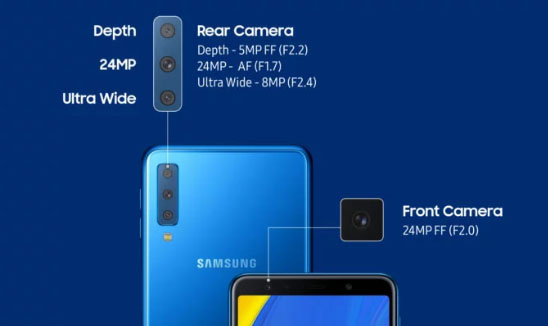
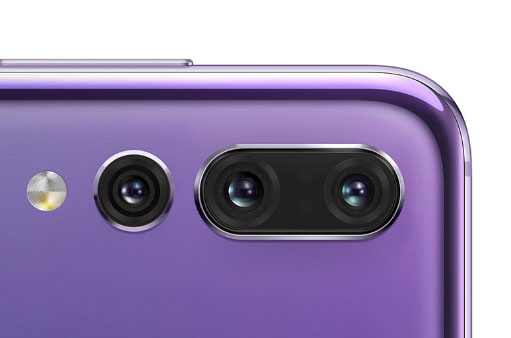
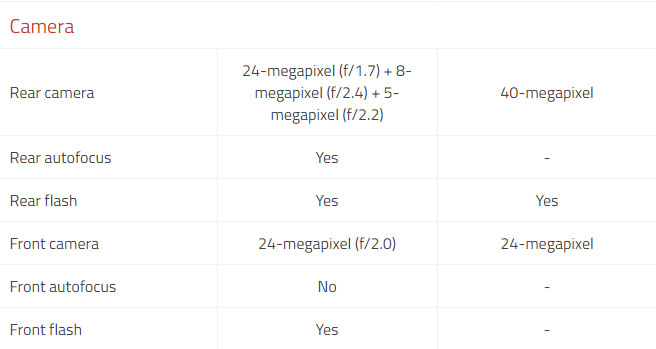
    The triple lens camera can be giving far better experience than dual camera . Best Triple Camera can be now witnessed in Samsung A7 and earlier Huawei P20 Pro . Samsung offers 24 MP low light front facing camera , 8 MP sensor  with 120 degree field view with its ultra wide lens . 5 MP depth Sensor with Live view sensing focusing on bokeh photography.

    Triple Camera / Multiple Camera Vs Dual camera in smartphones , i would say multiple cameras and triple cameras would be the trend in the future just because of this reasons –

    • Wide angled shots
    • Depth shots by detecting depths
    • Low light camera feature
    • Better HDR Experience with camera
    • Zoom high and zoom better

    Huawei P20 Pro

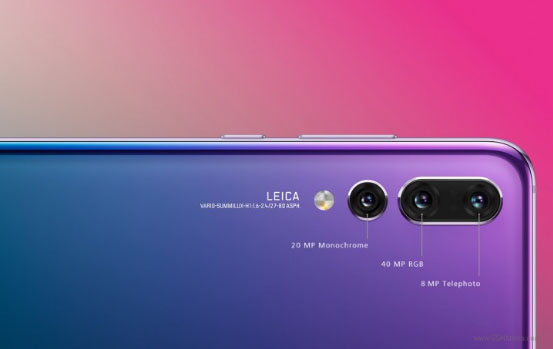
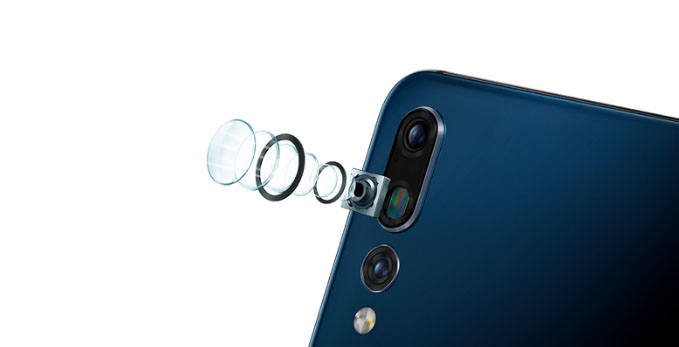
    The very first smartphone that came with triple camera was Huawei P20 Pro , this was a different experience to the camera lovers to use such an efficient smartphone.

    Huawei P20 Pro Vs Samsung Galaxy A7

    Here is the comparison between Huawei P20 Pro Vs Samsung Galaxy A7 Camera feature compared

    Also Huawei P20 Pro confirmed that its upcoming upgrade will come with large storage space and Huawei P20 Pro will disable AI Scene recognition and will disable

    Ulefone Gemini 4G Phablet 

    This is not a quite popular name in smartphone brands but , Ulefone Gemini 4G Phablet offers triple cameras  , take a look at the camera specifications of Ulefone Gemini 4G


    Multiple Camera Smartphones  

    On the saga of smartphones , many brands will pose competition to each other with their multiple rear camera smartphones .

    Upcoming on the list is –

    • Light Phone with 9 camera (To become the 9 camera smartphone on market)
    • After bothie feature , Nokia to come up with 5 lens camera smartphone , thus Nokia to offer 5 Camera smartphones
    • Also LG to come up with multiple camera smartphone soon with their LG V40 ThinQ 5 camera smartphone

    So let us know which one is your favourite and  Best Triple Camera Phones to buy . If you look for better camera then forget iPhone XR also .