Tag: Facebook

  • Best Facebook Ad management tool – Facebook Advertising

    Best Facebook Ad management tool – Facebook Advertising

    Facebook advertising is now the biggest trend so if you are planning for doing a Facebook advertisement then you must read this . Because here we are going to discuss about some of the Best Facebook Ad management tool

    Best Facebook Ad management tool

    Facebook Advertising is a new era of promoting the business. There has been a big difference in sales, may it be a new business, or expanding an existing one. Ever since Facebook Advertising started, companies have been investing a huge amount in creating ads. There are lot of time-saving Facebook ad tools as well as Free Facebook Ad Management Tools that would help you take the business to new heights.

    In this article, we will look into Facebook Ad management tool in detail.

    Facebook Ad Management Tool

    Are you a true fan of Facebook Advertising? Are you in search of the perfect technique to control the promotions on your website?

    Here we present the Facebook Ad management tool , which would surely bring in a lot of differences, as it helps in saving time and money. There are some time-saving Facebook Ad tools which can also increase your Return On Investments (ROI).

    Let us look at some tools for Facebook Advertisement.

    Read Also : View Facebook Full site – Facebook Desktop Version on Android

    Best Facebook Ad Manager App 

    Ads Manager has been in use since 2014, mainly for mobile and similar devices. Recently, an independent iOS Ad Manager app was launched comprising some really important features for advertisers. With the Facebook Ad management tool , we can record the ad performance, modify existing ads, improve Ad budgets and schedules, get push notifications and make Facebook advertisements using the app.

    It is quite exciting as you control Facebook advertisement with the initial repetition of Ads manager on mobile; however, this independent app is more convenient and robust. This Facebook Ad management tool is created for small to medium-sized advertisers letting you create Facebook Advertisement from existing page posts or from certain images and pictures present on your device.

    Facebook Ads Exclusion Targeting

    There are better-defined targeting options to be included on Facebook Advertising platform, thus enabling to trade with lumpy groups, directly to particular individuals. However, it is ideal to exclude some sections so as to present it before eyes of your audience.
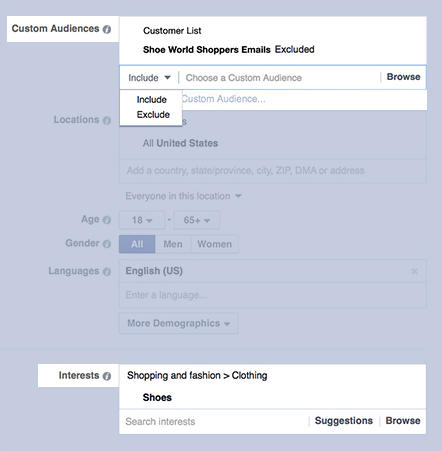
     

    In the Facebook Ad management Tool , enter Facebook’s exclusion targeting, which is a tool to avoid targeting a person twice. For instance, a set of existing customers can be excluded from a promotion related to lead generation, or you could target those who regularly visit your website (as the custom audience) however excluding those who already converted.

    Facebook assures that target exclusion enables to reduce the cost per action or Pay Per Click (PPC), reduce the cost incurred on wasted clicks and to reach the people who would buy or convert. This works with the usual Facebook Advertising as well as the newer roundabout ad format on both mobile and desktop.

    Read Also : Facebook Small Business Advertisement Working and Results

    Best Facebook Ad management tool – Facebook Advertising

    Here is the Best Facebook Ad management tool – Facebook Advertising.

    Qwaya

    Tests on Facebook Advertisement can be performed separately as you like. However, if your attempt is to extract certain intuitions, you would need a tool to process it automatically.

    Qwaya is a paid mechanism comprising a lot of features including scheduling the ad, setting rules based on the performance, automatic rotation of the Facebook Advertisement and an organizer for campaigns. However, the best feature that Qwaya has is that it can automate split testing – A/B testing of both creatives and audiences.
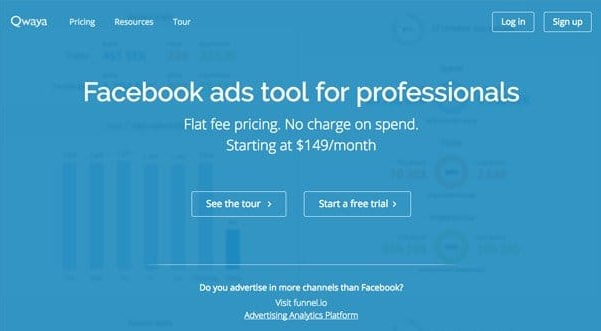
    If the Power Editor is already enabled, you would definitely be aware of the lack of Split testing ability in the image shown. Qwaya enables to evaluate which combination of images, test and targeting result to the best performance of Facebook Advertisement along with the split-testing feature.

    AdEspresso’s Facebook Advertisement Compass Report

    This resembles a report card for the Facebook Advertisement account. If you are an agent, do not worry, because it allows you to choose the account and the campaigns you would like to analyze so that you don’t get messed up with information from all the accounts at once.
    If this ad management tool is already in use to analyze the performance of the Facebook advertisement, the Compass report would seem irrelevant. However, this report could be quite useful for a small business and there has been a huge amount of Facebook Advertising maximization based on the analysis done manually.

    This ad management tool of Facebook has evaluated over $300 million on Facebook advertisements expenses to create organization standards on which the promotions are compared in the Compass report of Facebook Ad management tool.

    Read Also : uBlock Origin Replaces Adblock plus(Best Adblock Plus Alternative)

    Hootsuite Ads

    This is yet another ad management tool which had announced its partnership with Facebook to provide a new way of automatically Facebook advertisements, on the basis of existing basic posts on the Page.

    This management tool for Facebook Advertisement checks Facebook Page so as to find the best ads for the campaign, applying automated targeting and proposing a set of rules to introduce them as the Facebook advertisement.

    Best Facebook Ad Management Software

    Facebook has not only been the largest social media website on the planet, but also one of the most preferred ways chosen by the marketers to promote their Ads to different types of people.

    As we already know that Facebook provides some of the best Ads management tools to maximize the promotion, there are also some Ad Management software catalogs that let you utilize the Facebook Advertisements.


    Adspringr

    This Ad management tool can be of great help if there are so many promotions being run, as it enables you to have a control over whom is it directed to. Other features of this Facebook Ad management tool are:

    • It lets you have different and more meaningful record tracking system than those provided by Facebook.
    • Maximize those reports letting you discontinue the unsuccessful Ad promotions
    • Create reports enabling you to give feedback to the clients

    Facebook Ad Management Tool-Wishpond

    This free ad Management tool by Wishpond is an ideal method of personalizing Facebook Advertisement catalog. This Facebook Ad management tool comprises the following options:

    • Aim at the Facebook contact list to get through a particular population or audience.
    • Easy Ad making tools, allowing the beginners to make a captivating Ad
    • Offers immediate reporting of Ad traffic

    Accomplice.IO

    This Facebook Ad management tool has both free and paid version. The free version lets you maximize the returns in the best way possible. The provision to advertise on most social media websites like Facebook and Twitter makes this Ad tool very effective.

    Catvertiser

    This is another alternative to Facebook’s conventional Ad podium. This Ad tool has the following merits:

    • CPA (Cost Per Action) tender enables to implement the payment for specific pre-determined actions
    • Split Tests allow you to correlate multiple target groups to maximize Ad promotion.


    Facebook Ad Creator Software

    Have you been ‘pulling your hair out’ thinking of ways to create innovative and unique Facebook Advertisements ? Well, here is the solution to free you from the stress. We shall provide a step-by-step guide to create free Facebook Ad designs in a snap.

    Canva

    Using Canva free software you can easily create your own Facebook Ad graphic .

    Step 1: Open the Canva site and create an account

    If you are planning to create more Ad designs and pictures, you need to create an account with Canva. Canva allows saving the images on its site so that the work will not be lost, or to make changes to existing picture.

    Once the account is created you will enter the Home Page where all the design patterns are found on Canva.

    Step 2: Select the Facebook Ad Template

    Here, you choose the desired Ad template by scrolling down to the end of horizontal scrollbar and clicking on Facebook Ad.

    Before starting with the actual process it is important to know that the images in your Ad should not have more than 20% text as declared in Facebook’s Advertising Guidelines. However, there will not be a problem because there is a lot of space for the text in the Header, body and description fields in the final stages of designing the Facebook advertisement.
    Step 3: Deciding on the layout of Facebook Ad Design

    You begin with the Layouts section of the left tab and these layouts primarily used in greeting cards and invitations. However, if you wish to have more than one image in a wide choice of layouts along with multiple frames, you can scroll across the first column to reach the empty layout pattern.

    As you finish choosing the layout, click and move an image into the chosen layout frames from your files or the ones saved for Canva. An important point to be aware of is that the image you choose cannot be cut out, that means you cannot have a transparent background. It has to be a full image to be fit in the whole frame.

    Read Also : Exciting free Photoshop Alternatives for high quality photo edits

    Are you feeling lost without any images in your collection? That will not be a problem because this Ad creator tool has a great collection of images which are absolutely FREE of cost. If you are not contented with these images, there are another set of high-quality images you can have by paying a fee of $1. You could get a variety of images by checking the search tab, starting from Business executives in offices to brutal murdering clowns.

    Step 4: Creating Ads Headline/Slogan

    A heading, subtitle, and body can be added to the text tab or you could choose from a large set of text templates. You need to remember that only 20% of the text can be included in the Ad and hence the text should be of medium size with a slogan or the name of the product or business in the heading. The image should be captivating and bright; with no irrelevant and clumsy text to spoil the effectiveness.

    Yet, if you are using a cut-out image, then you can have a convenient background tab if a simple white background does not attract your eyes. For this, there are another free background templates used with patterns and essences. You can also find high-quality background images for a $1 fee.

    Step 5: Uploading Own Images

    By clicking on Uploads tab you can add your own pictures for use in the Ad. You need not worry about losing them even if you close the site for a while. You can see it later. All you need to do is click Upload your own images bar or pull them from the desktop and drop it into the site.

    Step 6: Finalizing Free Facebook Ad Design

    If you are happy with the final design of the Ad, go to the top right on the page and click on Link and Publish.

    If you want an image for the web, click Image for the web and once it is done it is automatically downloaded from the browser to the desktop. Now you are ready with the new design for the Facebook Advertisement, all using Canva software absolutely FREE.

    Read Also : Safeguard Facebook Pictures-Prevent profile picture downloading

    Facebook Ad Management Services 

    Facebook Advertising lets the advertisers have the capability to show the most targeted advertisements to over a billion active users of Facebook worldwide. Facebook is the second most accessed social media website and the most widely used application with an average of over 125 million distinct users in the U.S. A sample of pursuing options accessible via Facebook Advertising comprises the following

    • Location
    • Age
    • Gender
    • Language
    • Education Level
    • Nationality
    • Income
    • Net worth
    • Homeownership
    • Life Events
    • Parental Status
    • Political Leaning
    • User interests
    • Purchase behavior
    • Device usage
    • Employer

    Facebook can provide advertisers with distinct targeting alternatives via the First-party data disclosed by Facebook users accompanied by Facebook activities, and Third-party data purchased by Facebook.
    Another feature of Facebook Advertising is the Custom Audiences. This feature enables the advertisers in creating custom groups of Facebook users for marketing via:

    • Customer lists: Matching emails, contact numbers, user IDs on Facebook or the mobile advertiser IDs for people on Facebook
    • Website traffic (Remarketing): Creating a list of people visiting the website or certain web pages
    • App activity: Creating a list of people who took certain actions in the app or game

    The Custom Audience feature of Facebook Advertising is a robust technique to reach the people who have already shown interest in your products or services. This is a cost-effective way of Facebook Advertising.

    Let’s now look at one of the Ad management services of Facebook- Marketing Mojo:

    What makes Marketing Mojo Stand Unique in Facebook Advertising Technique 

    Marketing Mojo believed that Pay-Per-Click (PPC) over Custom Audiences has been quite competitive when compared to normal targeting in Facebook, hence leading to lower cost in conversion and higher Return On Investment (ROI).

    As other Social Media advertising groups focus the most on engagements such as the Likes received by an Ad or a Page, Marketing mojo focuses on the results influencing company’s end result. Being a part of Facebook Ad management approach, Marketing Mojo develops –

    • Strategic Alignment & Goal Development

    Marketing Mojo discusses with the clients to make sure that the marketing strategies are understood by them and how Facebook Advertising plays a vital role in achieving these goals.

    • Reaching Your Target Audience

    Developing a buyer role to allow overcoming careless and targetless expenses on Facebook, thus allowing more targeted advertising to the right audience.

    • Conversion Focused

    The concept of Marketing Mojo focuses more on direct-response rather than engagement focused. This involves optimizing volume conversion or the ROI by simultaneously reducing the cost of conversion.

    • Daily Optimization

    Facebook Ad management is not a form of advertising that you create today and forget the next moment. It requires a regular check and controlling the promotion so as to make improvements as and when required.
    • Test, Test & Test

    Developing and testing the changes in landing page and Ad innovations to influence the creative components delivering the best results

    • Reporting

    -Monthly reports set in detail, exhibiting the developments occurred till date on the Ad promotion standards as well as the present tasks implemented to enhance the performance.

    -Logical judgment to make sure the traffic and the ROI are correct

    • Innovative Thought Leadership in Pay-Per-Click

    Marketing Mojo performs more than being up-to-date on the latest changes as well as the available possibilities on Facebook Advertising. Marketing Mojo is in the limelight in developing totally new and unique techniques which could completely remodel the marketing performance of the clients.

    CyberMark

    This is another management service related to Facebook Advertising, whose Social Media Marketing based in Phoenix use Pay-Per-Click promotions for advertising so as to take the small business internet marketing to higher levels. Management services by CyberMark include the following:

    • Creating Landing Page
    • Call Tracking
    • Audience targeting
    • Facebook Advertising copy and pictures
    • Installing multiple advertising campaigns
    • Weekly scanning and support for the best ROI
    • Performance reports create on monthly basis

    Free Marketing Tools

    Ad promotions on Facebook and other Social media websites have turned smart in selling products and services and get more audiences quickly and through short steps. It’s more convenient with MailChimp, as it gives clarity on what Ads would get your money sack full and pull more customers to your website.

    The great advantage with MailChimp is that they do not charge you extra for posting Ads. In fact, it would be the same as you directly perform Facebook Advertising.

    Ad creation is Easier now

    With processes of Facebook Advertisement, the platform is the same to create the Ad. You can easily and quickly make Single image or roundabout Ads with certain photo-editing kit included within the app along with robust targeting preferences.

    Smart Targeting Supported by Your Contacts

    As you have email lists, subscription activity, customer purchase data, you could make them more useful. Focus on familiar details and make new customers. Make full use of Facebook’s existing users and audiences get more customers, people who have liked your products or services but haven’t subscribed to your email.

    Look what you get for the money

    Besides the standards such as reach, impact, clicks, and commitments, the returns on the Ads can be tracked so as to get guidance in spending. Users related to e-commerce can have an easily understandable report, showing the details about the items sold and the customers achieved.

    HootSuite Ads

    New advertising mechanism from Hootsuite enables businesses to easily and quickly benefit high performing contents on Facebook.

    In May 2015, Hootsuite, which is the most immensely used social relationship podium, launched Hootsuite Ads.

    Hootsuite Ads offers an easy method of broadening social influence. Social media consultants and content marketers realize that social media is a robust approach, however, making Ads and the process of managing is quite tough as well as time-consuming. Here, the real importance of Hootsuite Ads is revealed. HootSuite is the first tool ever to have provided mechanization to ease the advertising process.

    Let’s look at how HootSuite Ads prove to be helpful to its users.

    • Grow the business
    • Create high performing Ads
    • Find right audience
    • Simplify Ad management
    • Control Ad Spend

    Users of HootSuite can easily access HootSuite Ads for Free via a console to create Facebook campaign posts.

    Qwaya vs Adespresso

    In this section, we compare these Facebook ad management tools. As most people wanted we are here comparing between Qwaya Vs AdEspresso

    • Qwaya is the solution to create Ads in a short span of time.

    WHEREAS

    AdEspresso is used for performing detailed analysis and maximization on the basis of days and weeks.

    • In case of Qwaya, more focus is on the program along with the prospect to create a certain amount.

    WHEREAS

    AdEspresso focuses more on amateurs and bonuses.

    • When it comes to price plans, Qwaya has two plan packages. There is a Premium deal costing $149 for the user. If you choose a Business plan, $249 offers five distinct licenses. If you need to have a personalized package custom requests are also accepted.

    WHEREAS

    AdEspresso comes with three packages – Base, Premium, and Elite. With $49, $149, and $299 the required package depends on your budget. For instance, a budget between $10,000 and $50,000 need the Elite package. However, if you spend more than the present budget, there is a fourth plan called ‘Enterprise’. This package has no limits or restrictions and the cost is not above $500.

    This article has covered topics like Facebook Advertisement management tool, Facebook Ads manager apps, Free Marketing tool, Facebook Ad management services, the comparison between Qwaya and AdEspresso.

    Hope the article was informative and interesting. Have a great time advertising.
  • WhatsApp Data Sharing Disable Methods to Protect WhatsApp Data

    WhatsApp Data Sharing Disable Methods to Protect WhatsApp Data

    WhatsApp is one of the popular messaging app ever since it was launched. Now recently WhatsApp announced that it will be sharing its users data with Facebook . WhatsApp Data Sharing news has put all its users in confusion about how much their privacy is protected and how safe it is to use WhatsApp further.Here in this session you will be finding answers for your WhatsApp Data Sharing, Privacy and security concerns and Tips to be safe on WhatsApp.

    watsapp-data-sharing-disable-methods-to-protect-watsapp-data

    WhatsApp Data Sharing with Facebook – What Account Information is Shared.

    Taking into account of the latest news about WhatsApp. One top news on board is WhatsApp use data privacy policy earlier but now its parent Company Facebook have put an end to the data privacy on WhatsApp .

    By this Facebook will be getting certain information about You. WhatsApp will share these account information about your account –

    • Phone number which you have registered and verified with your WhatsApp account will be available for Facebook Family of Companies.
    • Your WhatsApp account activity like when was the last time you used WhatsApp and how you use the services of WhatsApp.

    Why Facebook wants your WhatsApp Account Information – Pros & Cons of Enabling WhatsApp Data Sharing 

    Facebook is a big data mining whale in the internet world . Facebook , the parent company of WhatsApp has changed their WhatsApp Terms & Conditions.

    Why Facebook wants your WhatsApp Account Data ?

    • The main reason that the Facebook spokesperson say is that this is for improving the services of both Facebook users and also WhatsApp users.
    • Secondly Facebook by interfering on the WhatsApp Privacy policy will have an eye on the data that they retrieve and it will be for monitoring the unique users and reduce spam and abuse on WhatsApp.
    • Your account info will be used to Improve ads on Facebook .

    WhatsApp Users Benefit on Data Sharing 

    • You can get better friend suggestions in facebook according to your WhatsApp contacts also you will get to know better advertisements based on your interest .

    This can be pros to someone while it will be cons to someone . So we say it as let this be your subjective aspect in deciding whether you want to enable/disable WhatsApp data sharing. 

    Your WhatsApp Account Information That will not be shared with Facebook.

    WhatsApp insists that certain account information of WhatsApp are safe and it will not be affecting WhatsApp users privacy . WhatsApp insists that the user account information like their phone number will not be sold to any advertisers or any other third party & your messages, photos and certain account information will not be shared with facebook.

    How to Opt out of Data Sharing on WhatsApp

    You cannot completely opt out from sharing your account information on WhatsApp with facebook. But still you can partially opt out of Data sharing on WhatsApp.

    If you are thinking what is this partial opt out and what is its effect on securing your WhatsApp data then i will explain it . Facebook will be monitoring your account but they will not be using your data for advertisement purposes . This is the only way on which all WhatsApp users have to move on . We cannot say that privacy is assured well as always facebook will be monitoring your account information on WhatsApp in the name of improving your experience on both Facebook & WhatsApp.

    Here are the top methods to opt out from Data sharing on WhatsApp- 

    Method 1 – If You haven’t Accepted WhatsApp Terms & Conditions

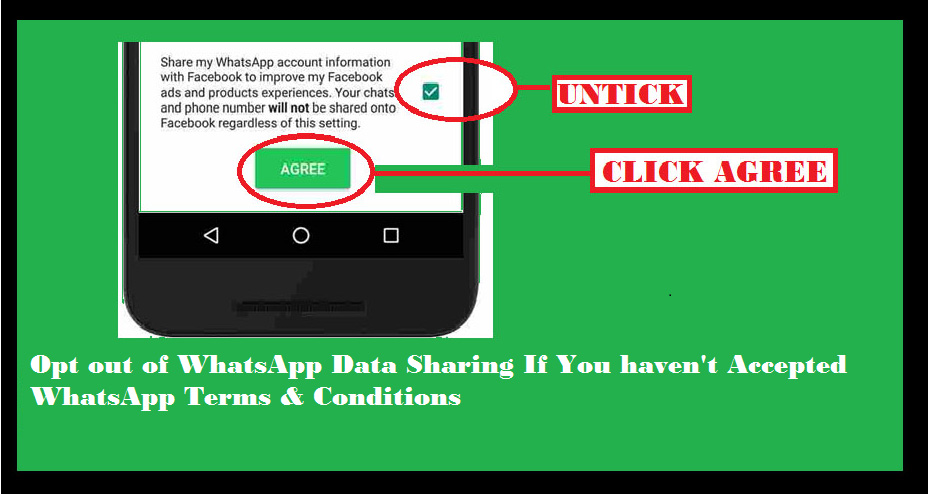
    If you haven’t already accepted the terms and conditions of WhatsApp then you have to follow this steps to opt out of Data sharing on WhatsApp.opt-out-of-data-sharing-on-whatsapp


    • Open WhatsApp on your device.
    • You can see the newly updated terms & services of WhatsApp.
    • Click on Readoption.
    • Scroll the terms & condition page until you find an option with check box.
    • If you are sure that you want to opt out from data sharing on WhatsApp then untick the check box .
    • Finally click the “Agree” button.

    That’s it , you have opt out of WhatsApp data sharing .This is the only available method to opt out of WhatsApp data sharing after accepting terms & conditions.

    Method 2 – If You have already Accepted WhatsApp Terms & Conditions

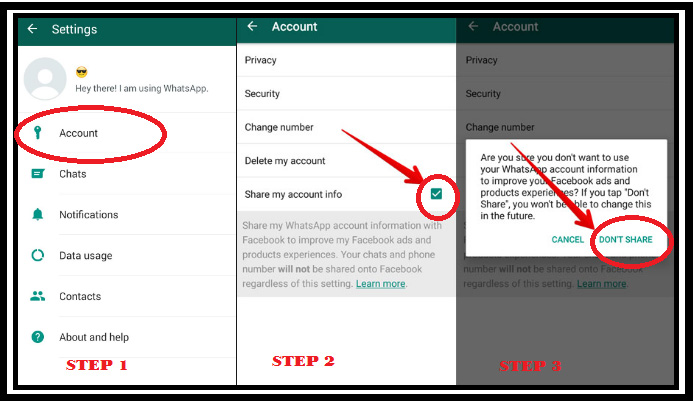
    If you have already accepted the terms and conditions of WhatsApp then you have to follow this steps to opt out of Data sharing on WhatsApp. You don’t have to worry if you have agreed to the latest terms & conditions because WhatsApp gives you a 30 days time to partially opt out of WhatsApp data sharing

    how-to-opt-out-of-watsapp-data-sharing-when-already-accepted-the-terms-and-conditions-of-watsapp

    • Open WhatsApp on your device.
    • Go to Settings option in WhatsApp.
    • Click on Account option.
    • There you can see an option with a check box as Share my account info 
    • Uncheck the option

    You are done with it .

    Method 3- Reinstall WhatsApp to Opt out of Data Sharing with Facebook

    If you are not able to solve the issue by following method 1 & 2 then here is the solution. Just uninstall WhatsApp application from your device and reinstall it.

    Now you can easily follow the steps of Method 1 . This will help you to opt out of WhatsApp data sharing. 

    You can do the necessary steps as we have given you a detailed idea to clear all the queries that was raised regarding the Safe way of using WhatsApp and how to opt out of WhatsApp data sharing with Facebook.

  • Facebook Small Business Advertisement Working and Results

    Facebook Small Business Advertisement Working and Results

    Everything on earth has a need but to arise a need we need to advertise . For a small business advertisement expenditure is too high but a great method to attract customers . Here Facebook Small Business Advertisement makes it effective and budget friendly .So let’s look into detail about FB Advertisement for small and medium business owners.

    Facebook Small Business Advertisement- Working &

    Results

    Internet and Social Media has been on the trend to promote small businesses. Surprisingly, they have shown great results. Among all the Social media websites, the most successful one is Facebook. Facebook Small Business Advertisement has helped youngsters to bring themselves up as an Entrepreneur. No matter what business it is, you can always advertise your small business on Facebook.

    Let us learn more about Facebook Small Business Advertisement.

    If you are avoiding this chance by choosing paid Facebook ads, then it is a loss to you guys .

    Read Also  : Safeguard Facebook Pictures-Prevent profile picture downloading

    Facebook Small Business Advertisement

    Ever since people started Advertising Small business on Social Media, a majority of the marketers say that Facebook has given them the best returns when compared to other social platforms.

    Are you new to creating a Facebook ad for a small business? We are here to help you out. Let’s begin :

    Have you tried boosting a post on Facebook? If Yes, you are already on the track of advertising. However, if you are completely new, you could activate the advertising tool to get accustomed.

    You can see a dashboard, wherein ad campaigns can be created and monitored, called the Ads Manager. There is a Power Editor tool, browser plugin giving access to certain advanced features thus making it easier to edit bulk ads.

    In case of beginners, we will consider the standard interface. Facebook has a three-level structure, comprising Campaign, Ad Sets, and Ads. As you go to the advanced level of advertising on Facebook, the structure gets more importance. In Power Editor, it is more built-in, to advertise your small business on Facebook.

    Read Also : View Facebook Full site – Facebook Desktop Version on Android

    Defining Ad’s Objectives ( Advertisement objective on Facebook ) 

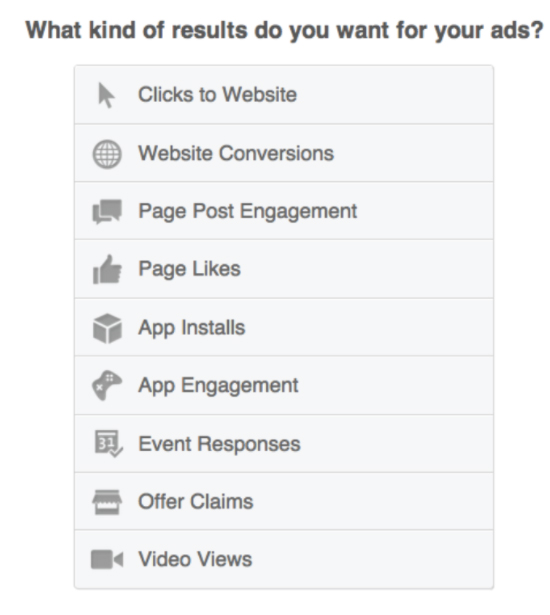
    Facebook Ads are different types, and goals should be set based on these types. Wish to drive traffic to the website? Enable apps to be installed? Wanna increase the number of Likes on the page to have a larger community on Facebook? You need to understand that, there would be certain objectives as a part of the total marketing plan, and as a result, there will be advertisers on Facebook who would run more than one ad type.

    The ads mentioned here can be easily explained. Website conversion ads such as tracking actions taken by people after seeing the ad, other tasks like buying a product, registering for an event or just viewing some Pages. For all these, you have to create a conversion-tracking pixel through Facebook, which is put on specific pages on Facebook.

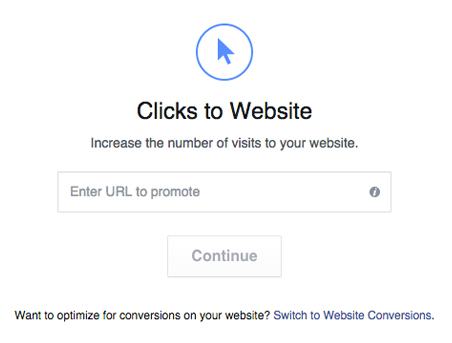
    When you choose ‘Clicks to a website’, you can add Call to Action button to the ad like “Shop Now”, “Learn More” or “Download”.

    Read Also : Google Maps List Create, Share and Edit on Desktop & Mobile Now

    Placement of Facebook Advertisement 

    These ads appear in the News Feed section on Facebook, both – within the Feed as well as on the right sidebar. These News Feed ads receive more engagement are will be effective for the beginners in posting Facebook ads for small business .


    No matter what type of ad is chosen, to have the ads shown up in the News Feed, it is very important that you link it to specific Facebook Page. On the other hand, if you do not have a Facebook Page, the ads can only be placed on the right-hand side of the News Feed.

    It is ideal to test on different versions of the ads, like changing the images and the copy to check how they work, These tests would surely bring a huge impact to the success of an ad.

    Targeting the Right Demographics for Fb Ad 

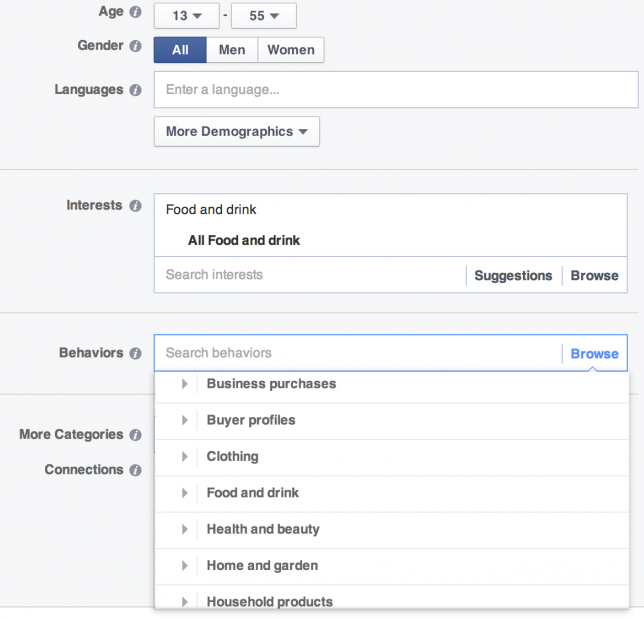
    After creating the ad, you can find different ways to target the audience. You must always be focused about the way to target the right demographics for Facebook Advertisement . Choosing a wrong customer makes you to loss the chance of spreading the ad to the right customer .

    • By Geographic Area and Adding Filters for Age and Gender

    You can see a “More demographics” drop-down list, allowing you to target by additional descriptors, like Number of children in a family, Marital Status or even industry in which person works. 


    • ‘Interests’

    An ad can be targeted on Facebook users based on the Likes and interests of the audience, including the options from which they can choose categories like “Health”, “Music”, “Technology”, “Home Decor” and so on.

    It is really effective to target specific Interests sharing people on Facebook advertisement to get more result .

    • User interaction with other Pages

    This option can be related to the above strategy. For instance, if the target is on people interested in Arts & Culture in London, you could select the location Tate Modern or the SouthBank Center. For this, all you need to do this, enter the name of the company or brand, and if there is a related Facebook Page, it has to be enabled as one of the options in the list. Other options to find specific Facebook Pages are

    • Custom Audiences
    • Look-alike audiences

    Custom Audiences option enables in targeting the existing customers from people, generally on Facebook. You can find different ways to create Custom Audiences. For instance, You can create via email Newsletter list, or place a tracking pixel on the website so as to advertise to people already visiting the site.

    Look-alike Audiences are a set of Facebook users, suggested by Facebook, making it similar to one of the Custom Audiences. According to the words of Facebook, Look-alike audiences “let you get in touch with new people who would be interested in your business, since they are similar to Customer audience.

    • Set Budget Limitations

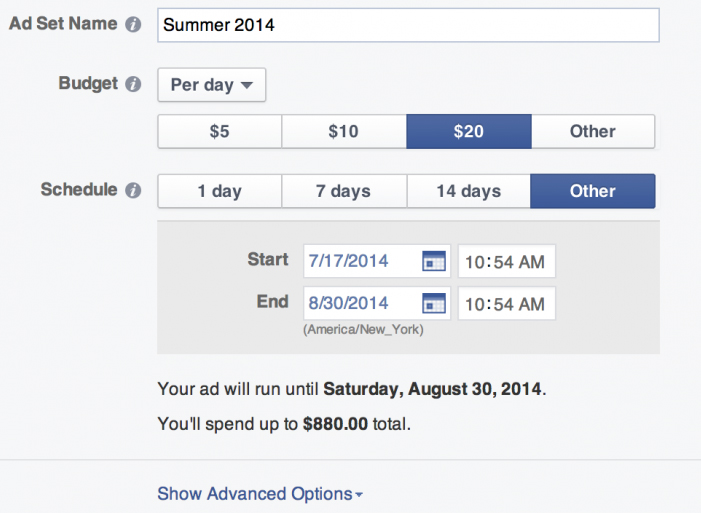
    Once the ad is created the target audience is selected, you now have to specify the budget. There is no such budget which fits all the ads. It is ideal to find out the value of the desired action; i.e.the value of each new Facebook fan in the business, the money you wish to spend so as to increase visits to sites or conversions.


    If you plan to start funding, the ideal way is to set a small budget and test different tricks. Once it proves effective you feel confident in the response, you can gradually increase the budget. With most of Facebook Small Business Advertisement, there is an option of Pay Per Click (PPC). There are advanced options, but finally, the decision is yours. Thinking about which one to choose ? Well, it is the right time to think about the objective in total. It is recommended that you provide the link to your website so that they visit the site, the Pay Per Click would make more sense rather than just an impression.
    But if the cost per click you going to receive is less than the pay per click then the profit from Facebook ad is reversed to loss .

    so you must be always having a knowledge about ideal Facebook advertisement budget

    Setting up Facebook Ads 

    As you specified the budget and set the Start-End dates, or let it run till you manually stop, your Facebook Ad for Small Business is ready to work its magic. The performance of the ad could be monitored using Ads Manager dashboard. Besides, if you want to bring in more visitors to the website, you need to track the links using Campaign Tracking in Google Analytics to gain more understanding.

    Read Also : Google Datally App to Control Mobile Data & WiFi Finder

    Free Small Business Advertisement on Facebook

    Over the past couple of years, Facebook has helped to advertise small businesses for free. And, to the surprise, it has been a huge success. Free Facebook ads on small business have been a great help to the new entries in the marketing field.

    Facebook marketing truly is a powerful instrument to promote small businesses. It is found that after setting up, most of the owners are not too keen on promoting the business via the Facebook page. This is because they have no clue of what news to post or feel that spending time on Facebook Ads is not worth it.

    Are you among these people with similar thoughts?

    If yes, think it on the other side. Advertise your small business on Facebook and make yourself feel that it is fun, connecting with current as well as potential customers, and stop thinking it as a nuisance or a waste of time.

    When you take the first step into the Facebook Small Business Advertisement, you need to make sure that making optimum use of Facebook by organizing all the social media profiles into one program.

    For those who feel that Facebook Small Business Advertisement is not worth, we shall let them know the important advantages of using Facebook advertisement for small business and medium business :

    • It is FREE: No cost involved in setting a Facebook Business page; besides it is free to post and share content . If you have been looking for ways to get Free advertisement on Facebook then you must utilize this .
    • Products and services can also be promoted: As you get a fan group, your products can be sold to them without any cost of marketing. Your fans could be updated with some upcoming events or deals in your business
    • Interact and stay connected with your customers: Facebook is an effective platform to interact with your customers, get to know their views and opinions and respond accordingly. Post pictures and status messages to inform people about the business updates. This way, you can stay connected with your existing as well as potential customers, and you can keep a hope that your customers will always rely on you for their next purchase, and not think about the competitor.

    Read Also : Identify Spy Apps on Mobile that Hacks Bank Account

    Facebook Small Business Advertisement – How to Enhance Facebook Page

    The first step you would take before you advertise your small business on Facebook is creating a business profile page in the most impressive way possible. This not only helps you get people to like the page but also have an extra benefit, thus enhancing chances of getting higher rank in Google Search’s results.

    In Facebook Small Business Advertisement, your page should be set in a way that when people visit your Business page, they should get the relevant information such as the upcoming events, new stalls opening up, sales coming up in town and so on.

    When considering Facebook Ads for Small business, there are some steps to set a strong business profile. Let us look at them.

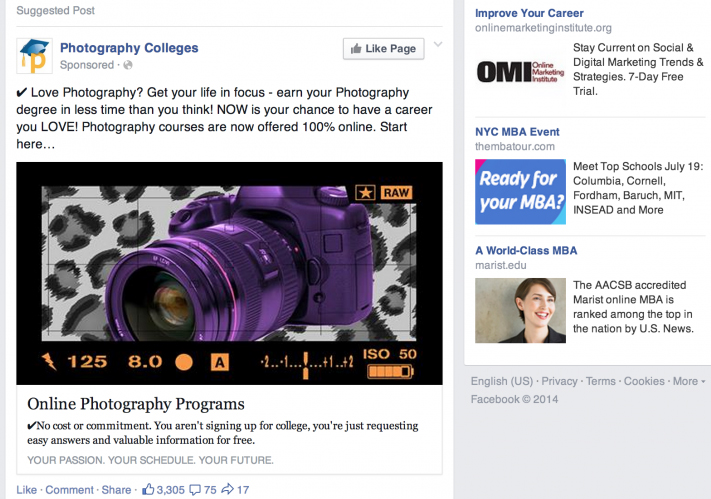
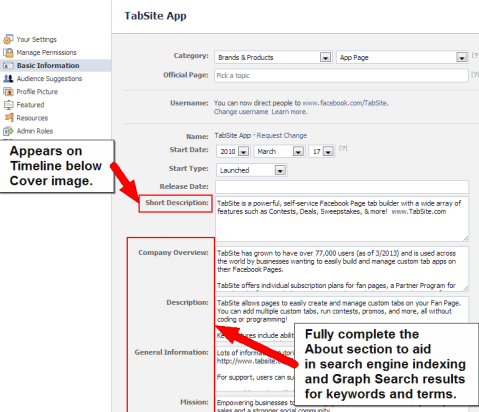
    • Use keywords in the “About” section : Keywords let people about your business with more clarity. For instance, if the Facebook ad for Small business is a Pizza Restaurant, then the apt keyword will be “pizza” and “Italian food”. Describe in detail and use maximum characters as allowed by Facebook. Completion of the section not only allows the visitors know more about the business but also informs certain search engines like Google. Let us look at an example of a Facebook Ad for Small Business. This is an important method to increase your Facebook page views and reach .

    • Claim a Vanity URL : When a business page is created, a web address is chosen, like www.facebook.com/yourbusiness , which gives a professional and branded feel to the page and the URL can be easily recognized by customers. Unless it is changed, this URL remains as a set of numbers which creates confusion and the customers will not able to identify your business page. You may be reminded of this important fact that the URL can be changed only once, so make it impressive and easy to identify.

    Say our brand facebook page is named as https://www.facebook.com/maccablo/ . Like this you can create facebook page for your brand .

    • Choose the right category : When you begin to advertise your small business on Facebook, you need to make sure that the category mentioned, represents your business. In case of local businesses, there should be a category as “local business” and then be more specific about the business type by selecting 3 categories. For instance, a Beauty Salon can have 3 subcategories like Ladies Salon & Spa, Men’s Salon and Unisex Salon.

    Read Also : Bothie feature on any Smartphone – Best Bothie apps

    • Get Reviews : As you advertise a small business on Facebook , getting more positive reviews is an ideal method to get more visitors to your business page. You could ask the regular and loyal customers to drop in a review, you could provide discounts to people who regularly write reviews on your page. You may note having reviews posted could take your page into Google or similar search engine result pages.


    Read Also : Samsung Pay Guide with Exclusive Samsung Pay FAQ

    • Choose appealing pictures : In Facebook Small Business Advertisement , setting a cover photo and a profile picture will be the first things that would catch the eye of the visitor. Hence, it is very important to have uniqueness in choosing the images. You can also change the pictures according to the present context to make the customers feel that your business is creative. Change the profile picture based on the upcoming events or the recent milestone crossed. For instance, if your business is an online bakery, you can have a cover page like something that is related to a variety cake or pastries in your bakery .

    How Facebook Small Business Advertisement Works ?

    Advertising a small business on Facebook helps you reach any audience. Social Media is not a mere thing that you can easily ignore. Hence, Social Media is on trend for promoting small businesses, and the most popular one is the Facebook Small Business Advertisement. Here we will see how Facebook small business advertisement works .

    If you have been avoiding an opportunity to free small business advertisement by choosing paid ads, it shows you have been out-smarted before. This is one common problem faced by entry-level advertisers with a false belief that getting to know the basics of Facebook ads for small business is an easy task. Well, the truth is that it is not quite easy.

    Facebook’s introductory Ad products have created a trouble due to its ease and directness, that any motivated Social Media Business owner can enter Facebook and get to know about boosting a post. However, there will not be any improvement in the sales if you use a default or a normal feature of “Boost post“. The result is that of an unprofessional Facebook advertiser having a feeling of overreaching $5 and a $10 here and there. This would leave others to drop their jaws asking- How did this happen?

    Facebook Ad For Small Business : How the Magic works

    When it comes to advertising a small business on Facebook, boosting the post more reactions, shares and comments are accepted. However, if your goal is to get the sales with the efforts on Facebook ads, then you will have to offer something which is free, or something priced well in a way that is sold easily to the target market.

    • Setting up an audience

    This is performed within Power Editor option in Facebook, wherein audience can be customized by including or excluding the users on the basis of Age, Location, Relationship Status, Job Title, Page Empathy (user “likes” pages similar to yours) and so on. You may note that Power Editor is an area where the real advertising takes place. On the other hand, Boost post would only increase the reach among the people who Liked your page. Power Editor can do much more- Create a custom audience, Advertising on Instagram and also test many versions of the same ad.

    • Creating a free offer for the audience

    This would easily earn the customer’s trust. It could be a free eBook, a course, membership for a free trial, or even a physical product. The goal of the Facebook ad for small business is to bring the user to your page and get their email address so as to avail them a free offer.

    • Offering small boost ups

    As the user responds to the free offer, you can show a boost-up product. The profit margin on this boost-up should be priced in a way that it covers the actual cost of the Facebook ad. With an assumption of having the right conversion rate, the result would be acquiring a free lead.

    • Selling through Email, Re-targeting , etc

    As you earn the lead’s trust, it is time to sell the actual product. This could be done through email, phone or similar direct methods available from free offer. you could also use Facebook Pixel to retarget the user with ads. With the usage of Facebook Pixel, when a user visits a page, for instance, the completion page from the free offer, they can be tracked, thus enabling to serve the ads mainly set for them.

    Read Also : View Twitter Full Site – Check Twitter Desktop Version on Android

    Facebook Small Business Advertisement : Results of Advertising Small Business on Facebook

    If you are thinking whether Facebook ads really work or not . Then here we are detailing about the result of Facebook Ad .Here you can know whether the free Facebook advertisement for small business really work or no .

    Also how to get good result from free advertisement from Facebook .

    Setting Proper Goals

    Before spending money on Facebook ads for Small business , you need to think about the objectives of the ad promotion. Once the goals are set, you can evaluate a better budget.

    The main goals of a Facebook Ad promotions are:

    • Building a targeted fan-base
    • Promoting owned content
    • Setting conversions
    • Promoting a local business

    Building a Targeted Base

    As you begin with the Facebook ads for small business, your initial step is to grow the audience for your Facebook Page. Your fans would read the content and would buy from you than the non-fans. In order to get the best out of a small budget, you need to concentrate on pulling those people whom you know really well.

    Targeting Email List

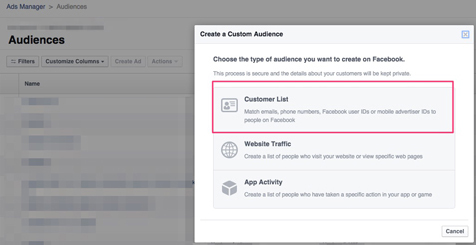
    If a Custom audience has to be created based on Customer Email list, go to Audiences in Facebook Ads Manager. From the top right-hand corner of the page, click on Create Audience and select Custom Audience from the drop-down menu.


    Now, click Customer List from Create a Custom Audience dialog box. when creating a custom audience, you need to upload a CSV file along with the customers’ email addresses. Later, Facebook fills the audience and prepares to target with the Facebook Ads for small business.

    Target Interests

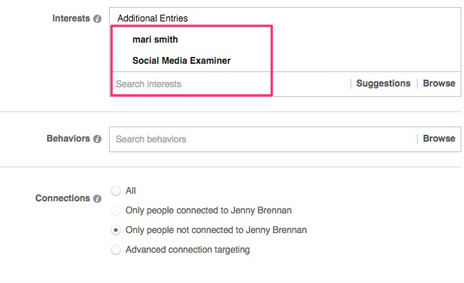
    If you are a beginner in Facebook Small Business Advertisement, with a small customer list and a limited website traffic, you might question as to how the Facebook ads are targeted. This is because when a page or an interest is targeted, Facebook provides an audience, including those expressing their interest or liked the page related to the audience.


    Split-Testing the Audiences

    After setting up the audiences , it is ideal to test each, for about three days or a period of 72 hours. The right way to advertise a small business on Facebook is spending some dollars a day experimenting each test ad. However, the number could vary according to the size of the audience and corresponding results from them.

    Let’s look at an example cost breakdown for Facebook Small Business Advertisement.


    • Interests: $1.18 per Like
    • Lookalike: $0.7 per Like
    • Custom Audience: $0.61 per Like

    Read Also : 25 Best Selfie Apps for every Selfie Lovers – Perfect Click

    Promoting Owned Content:

    There is an expression which says “Promote your best content“. Pulling people to your website and having shared the best content with them help them know more about you, like you and trust you. Knowing about you and the content will result in buying the product or service from you.

    There are opportunities to go deeper into specific topics, thus letting the audience know about your blog.


    There are 3 types of website content promoted only to fans are:

    • Testimonial pages
    • Blog content
    • Sales messages or special offers

    Facebook ads for small business can be used to promote a video every week, thus helping the audience to know you well.

    Facebook Small Business Advertisement does not happen in one day. It definitely takes times to connect with people. You need to have a lot of patience and not to give up on the first video. If you frequently post videos to advertise the small business on Facebook, people will surely get attracted to your Facebook Page.

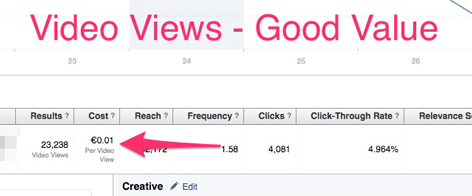
    Let’s look at the example of advantages of the video advertisement.


    For best results, you need to test promotion activities on different content types. You will be surprised to see the response:

    Video Ad Tips

    • Make the content short and sweet.
    • Within three seconds, make the viewers feel convinced visiting your website regularly
    • Use a strong call to action.
    • Be genuine, fun, educational or informative.


    Increasing Conversions & Sales:

    There are some businesses or brands, who avoid some important steps in advertising and directly hop into conversions being their main goal in Facebook ads for Small business. This is quite obvious in the case of small budget ads. As mentioned in the examples, it is ideal to concentrate on the audiences which are more probable to convert.

    Leads Generation is a strong concept in Facebook Small Business advertisement, provided you target the right audience.

    Before you begin to test the ad types, you will have to check your News Feed for the lead generation shown up. Note the ad copy, Call-to-action buttons as well as visuals on other ads so as to improve your conversions.

    Let’s look at some examples.

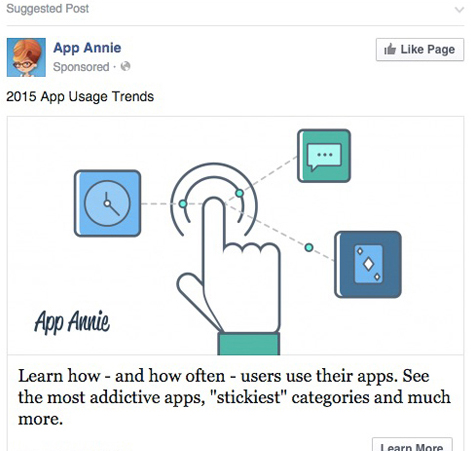
    The example here is a Page describing an addictive app. If you are a fan of this page or have visited the website.

    Read Also : Bixby Vs Google assistant Vs Siri Vs Cortana – Popular AI Assistant

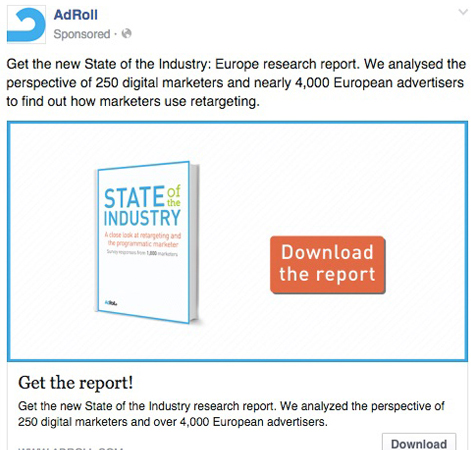
    The example here is a page where you can download a report if you are a fan of this page.

    However, if the budget set for the Ad is limited, you could make full use of the conversions at the best price. As Facebook knows its users really well, you bet the results will top.

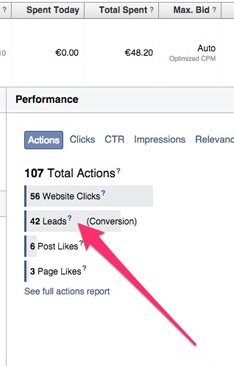
    For instance, the test Ad here cost $11.3 per day and the lead generated was 42. The target was a Custom Audience for a website.


    Promoting a Local Business

    Facebook Ads for Small Business is used to promote a local business, with small budgets comprising some challenges. If you own a local business, chances are that the promotions will be limited to one for every week. Perhaps, it is quite a good idea when it comes to promoting regular contents so as to let people know of the new products and services. This would definitely be a great added advantage to your fans, even without directly selling to them. So with this you can promote local business on Facebook .

    When you advertise a small business on Facebook with a small budget, it will surely produce great results. It is equally important that you survive the expectations of the promotion.

    Review of Facebook Small Business Advertisement

    This article has covered all the relevant topics related to Facebook Small Business Advertisement. We also came across how Facebook Ads for Small Business work and the results yielded from the tests done on each ad. How to set a small budget for a new business.

    Hope this article has been helpful to people who are beginners in Facebook Small Business Advertisement.

  • View Facebook Full site – Facebook Desktop Version on Android

    View Facebook Full site – Facebook Desktop Version on Android

    You may all know that its too much annoying to find that many features of Facebook Desktop version is missing on Facebook for Android Application . So here is the ways to tackle this problem by clearly explaining how to View Facebook Full site – Facebook Desktop Version on Android .

    That is all about how to view Full version of Facebook on Android or Facebook full site view on Desktop.

    View Facebook Full site – Facebook Desktop Version on Android

    There are three different ways to View Facebook Full site version on mobile .

    Direct Link Method to View Facebook Full site on Android

    Here is the first method to access Facebook full site version via direct link  ( www.facebook.com full site ).

    1. Login to Facebook account first by means of  Facebook mobile version site .
    2. Step two is to type out the direct link on your browser . The link is ” https://www.facebook.com/home.php “.

    That’s it now you can View Facebook Full site on Mobile . This will help you to access Facebook desktop version on your mobile itself .

    Browser Setting Method to View Facebook Full site on Android

    Now moving on to the next method to View Facebook Full site version on Android , follow these steps .

    You know almost all mobile browsers have the desktop view feature .

    1. Open your mobile browser that you are using .
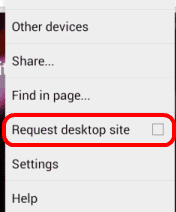
    2. Now you can find three dots on top just tap on it.
    3. From menu  you have to select the option Request Desktop Site .

    Else follow the below steps in case the above three steps didn’t give you access to Facebook full website on Android.

    1. Go to browser Settings
    2. Select Debug
    3. Change the UA string / UA Agent

    This steps will make you access facebook desktop version on mobile itself .

    Read Also : Safeguard Facebook Pictures-Prevent profile picture downloading

    Use Facebook Desktop version on Mobile Method

    This is very easy method to view facebook desktop version on mobile , as no much steps is involved here .

    1.  Go to mobile browser and open facebook  https://www.facebook.com/ ( facebook home page full site )
    2. Now scroll to the end of the page , you can find an option “Switch to desktop version “
    3. Click it , you are done .
    4. Rotate the mobile screen for further Desktop view experience .

    That’s it about the three different ways to View Facebook Full site Desktop version on Android or any mobile devices.

  • Safeguard Facebook Pictures-Prevent profile picture downloading

    Safeguard Facebook Pictures-Prevent profile picture downloading

    Safeguard Facebook Pictures-Prevent profile picture downloading

    Lucky for you that Facebook has introduced brand new protections for profile pictures for users especially in India. All this in a bid to stop people from downloading, sharing or illegally misusing their personal profile pictures. There is an option for users to Safeguard Facebook Pictures through the new system. It will ensure that others can not copy, share or download their personal profile images. This will prevent strangers from tagging themselves in the image.

    Notifications for Safeguard Facebook Pictures

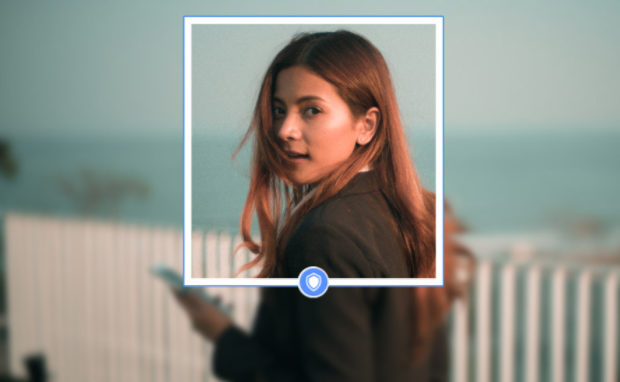
    Those individuals who will opt in will get a special blue shield border around their image. On android phones(which are most popular and widely used in majority of the Indian market) Facebook says it will prevent users from taking screenshots of individual’s profile images wherever and whenever possible.
    Facebook Safety on themselves posted on Wednesday, June 21, 2017 saying

    They say that it was inspired to offer this special tools after hearing from various different Indian social and safety organizations that some women especially in the country particularly elected not to upload personal pictures including their faces on the internet. These tools were developed with a joint effort with a range of those organizations and different tests indicating the kinds of things that would cut down on the misuse of profile images. For instance Facebook says that something as simple(mind you simple by Facebook standards) as adding a special design overlay to a picture means that others are almost 75% less possible to copy it.

    Read Also : WhatsApp Data Sharing Disable Methods to Protect WhatsApp Data

    So exactly how can design of overlays increase security

    Users have now power to add those layers quickly using Facebook’s system. The tools are less likely to cut out the copying of profile pictures overnight. While Facebook claims it is doing everything in it’s power to stop people from screenshot the profile pictures via Android. Users could still take screenshots on laptop or desktop and the new blue shielded border is a visual cue of protection rather than any other difficult barrier.

    Even though tests have shown that uniquely simple additions can deter opportunists. The tools are a potentially useful option for specific Indian users. As of now Facebook has not yet indicated whether similar measures will come to other countries.

    Read Also : Android boot Fix – Steps to Try When Your Android Won’t Boot

    Keeping your profile pic safe

    Soon after Facebook launched the profile picture guard in India. It would give users more control over who can download and share their personal images several women users have started protecting their display photos.

    Steps for safeguarding your profile

    On the Facebook mobile app you will see a new notification on the top of your News Feed asking to secure your profile picture. Refresh your news feed if it does not show when you log in.

    Once you accept the terms a box will pop up saying “The Profile picture guard would help keep your current photo more secure on Facebook in three ways.”

    1. Keep off creeps
    2. Keep off creeps
    3. Keep off creeps

    So now unknown stalkers would no longer be able to download or send your profile picture in a message anywhere on Facebook. Facebook also claims that it would virtually stop strangers from taking a screenshot of your profile image on Facebook wherever and whenever possible. Though the feature is currently only available for Android devices.

    Conclusion: Shield protection effectiveness

    So how trust worthy these tools are?
    You have to note that there is no 100% effective way as of now to hide your profile picture currently.It is always public by default(what’s the point of uploading if you don’t want to share). These latest methods by Facebook can surely discourage the misuse of the profile picture but would not weed out the problem from it’s root. So for undoubted safety add options to restrict the viewing of profile pictures just to friends and friends of friends only.