Tag: Venmo

  • PayPal Vs Venmo : Best Online Money Transfer System Compared

    PayPal Vs Venmo : Best Online Money Transfer System Compared

    PayPal Vs Venmo

    If you got ever confused which online platform of online payment service you should choose between then have a look at the differences between top 2 payment services that is PayPal Vs Venmo.

    If we take a look back at our lives, we notice how far we have come and how much we have grown as an individual and a human being. The world too has had a huge makeover. Hundreds of things have changed, technology has advanced, and by the looks of it, the world is moving into a digital era. Or should I say we have entered into the digital era?

    From shopping to dating everything is online. We sit in the comfort of our homes and enjoy these little luxuries. What about the payment? Yes, that too is online. Thanks to the online payment services who have made life easy for all of us. We don’t have to wait in long ATM queues or with cheques for them to be transferred. Online service is instantaneous and stress-free.

    A number of mobile wallet services have cropped up in the recent years. They compete with each other bringing out new and improved techniques the other doesn’t possess.

    PayPal is often the first choice; at the same, we have many other options like Amazon payments, Google wallets, Venmo etc.

    Here let’s take a look at PayPal and Venmo and their pros and cons.

    PayPal

    PayPal is a mobile payment app that is the fastest and safer way to buy and sell goods. A started online service in 2002 PayPal is an American company that deals with online payment solutions worldwide. They act as the mediator in processing the payments for auction sites, online vendors and other users at a minimal charge. Through PayPal users can donate money or receive donations, buy and sell goods.
    Venmo

    Another mobile payment app started by two friends in 2009 is a subsidiary of PayPal. Generally preferred by youngsters as the website claims it’s made ‘for friends and those who trust each other’.

    Read Also : Venmo User Guide for Safe Transactions – Venmo payment

    Read Also : Cancel / Reverse Venmo payment : When a Venmo payment goes wrong

    PayPal Vs Venmo

    We will now see the comparison between PayPal Vs Venmo.

    • PayPal is used worldwide, whereas Venmo can be used only in the U.S
    • Both have free to download apps from play store and iTunes. Only a data connection or a Wi-Fi is required along with a login.
    • PayPal and Venmo are free if using bank transfers or wallet balance. A 3% fee is charged in Venmo for credit card transaction and 2.9% in PayPal for debit and credit card transactions.
    • Weekly transaction limit for PayPal is nil, while a cut-off of $299.99 per week is seen with Venmo further if you provide ZIP code, link the Facebook account, last four digits of SSN number and birth date the limit is upped to $2999.99.
    • Handling money is the same with PayPal and Venmo. During a transaction, if there’s a wallet balance first that balance is used and then the remaining is retrieved from the primary linked source i.e. bank account, debit or credit card. These transactions are instant. However, if it’s through bank accounts then Venmo takes up to 2 days and PayPal 3-4 days.
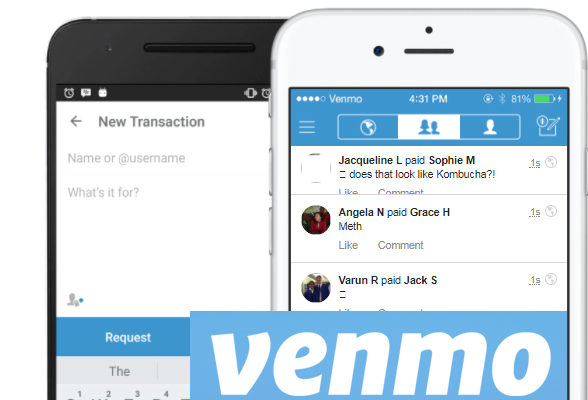
    • The main feature that stands out in Venmo is its ability for social connections through news-feed like format. The users can share a transaction they made that can be viewed and commented by other users. This has caused quite uproar with the teens.

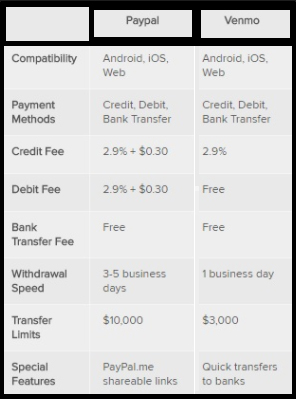
    The table gives the comparison between PayPal Vs Venmo based on their compatibility , payment methods , Credit fee , Debit fee , Bank transfer fee , Withdrawal speed , transfer limits , Special features.
    • An important feature in PayPal is their One Touch option. This allows the user to stay logged in for faster and easier log outs with different vendors.
    • And if you prefer to keep it low and simple PayPal is the option. It’s more of a formal way that is preferred by small time business groups and other e-commerce sites.
    • A danger than anyone can face with these mobile wallets is losing your phone and having some stranger access your accounts. Nonetheless, this can be avoided with these 2 apps for you can out a PIN lock for the apps apart from the phone lock. Venmo and PayPal also cater to an authentication process via SMS text message.
    • Speaking of security of Venmo and PayPal has the same standards as that of Visa, MasterCard, and American Express. They have a 24/7 risk protection and fraud service.
    • PayPal has also had an optional security key to strengthen against frauds. Apart from the login ID and password the user is prompted for a six digit security code shared via SMS. The user can change the code and use his/her personal code.
    • Whilst PayPal as secure systems for buyer seller, Venmo doesn’t offer buyer seller protection. Hence should be avoided for goods and services.

    With Venmo you can pay the other person even if they don’t have Venmo. The only drawback is supposed you send the amount to the wrong person it’s not retrievable. The only way to get it back is to ask politely, which again depends on the person on the receiving end.

    Read Also : Safe Online transactions Tips & top 12 safe online transactions methods

    Read Also : Purchase without credit card top hacks

    Conclusion

    Mobile wallets are quite essential for easy and stress-free transactions. We can travel anywhere in the world and not carry cash at all. It’s much lighter and secure. You don’t have the fear of leaving the wallet at home or not having enough cash. People love to travel light and this is the best option and also the best which many are following in the present day.

  • Cancel / Reverse Venmo payment : When a Venmo payment goes wrong

    Cancel / Reverse Venmo payment : When a Venmo payment goes wrong

    Mistakes are human nature but with technology we learned a word ‘UNDO’ .When it’s connected to money a mistake is so crucial to bear . Suppose you make an online payment to a wrong person then what can be done. So if you committed one such in Venmo then here is the way to Cancel / Reverse Venmo payment.Today,an individual can order a car through Uber,book a room through Goibibo, pay a friend through Venmo with just a 3G/4G mobile phone.

    The ubiquitous access to the internet afforded by laptops,smartphones & tablets has laid the groundwork for many startups .

    How does Venmo work ?

    Venmo carries out money transfers between persons/organizations ,permitting  consumers to pay back people in their contact for any so forth  reason. A linked credit card,debit card or bank account is required to use this service. Besides this, the beneficiaries i.e. the users  can sends money to  friends or receive payments that can then be stored as a Venmo balance for use at a later date or can be  cashed out immediately to a bank account.

    Is Venmo safe?

    A major drawback of being digitised  is that everything goes on the network ,even the person’s personal details, adhar card nos. etc, which can become a threat to someone, if went in wrong hands. Yes,Digitsation brings convenience,but it’s security is also a major concern.

    We know that applications that  are directly linked to one’s bank accounts must be held to the highest security standards . However, in 2015, Venmo became the target of criticism due to security breaches of user accounts. And hence as a result ,it uses bank level security  & data encryption to protect users against unauthorized transactions & allow users to set up a PIN for mobile application access for additional security.

    Read Also : Venmo User Guide for Safe Transactions – Venmo payment

    How to Cancel / Reverse Venmo payment

    When someone sends money to a Venmo user, the amount is directly added to his account balance . Since transfer of money through Venmo is so instantaneous that one can’t cancel a payment once its been made.

    Suppose you transferred a venmo payment to someone else by mistake instead of the actual person. Then you will worried about the ways to Cancel / Reverse Venmo payment.Here you can request to do a payback from the person to whom you transferred by mistake.

    In order to do this you should write to that concerned person requesting a pay back . If you don’t hear back from them or need help sending a charge request,contact the support team of Venmo & they will help you to Cancel / Reverse Venmo payment.

    When you contact Venmo support team to Cancel / Reverse Venmo payment, please be sure to include the following details to expedite the process:

    • Username of person to whom you sent the funds
    • Amount of payment
    • Date of payment
    • Username & phone number of person to whom you were about to pay

    Read Also : Credit Card Debt Myths – Top 8

    Some simple steps to Cancel / Reverse Venmo payment:

    You can Cancel / Reverse Venmo payment easily .

    Cancel / Reverse Venmo payment If you paid the wrong person:

    1. Open the Venmo app.
    2. Tap the Send/Request icon at the bottom right corner of the app.
    3. Search for the person to whom you accidentally sent money.
    4. Search the person’s name in the currently searched list.
    5. Type the amount to be sent,next to the dollar sign.
    6. Leave a message into the message box,mentioning what it is meant for & to whom(optional).
    7. Click “Request” icon.
    8. Click” Confirm Request” icon.
    9.  Set a reminder,so that you can be notified.
    10. Approach  Venmo help centre, if your request is not accepted.

    Cancel / Reverse Venmo payment If you paid someone who doesn’t possess a Venmo account :

    1. Open the Venmo  app.
    2. Click the menu icon.
    3. Choose “Incomplete” icon.
    4. Click” Payments” icon.
    5. Click “Cancel” icon near the payment. By doing this the entry will be removed from the list, and the money will be refunded to the card or account from which it was sent.

    Read Also : Exclusive Nest Egg building guide for painless millionaire dreamer

    How to secure a Venmo Account:

    As we all know,evolution of technology & its increasing applications in our day to day life had made life easier & convenient .

    Just with a click of button, we can carry out all important banking transactions ,pay our bills,can do important business conferences/meetings through Skype, can interview for job also & even with the introduction of MOOC’s one can learn any skill/subject of his interest at his residence only.

    But,in the case of carrying out financial transactions & other banking processes, we are a bit more concerned about security of that service provider,since its linked to someone’s personal details & monetary savings. With a single loophole in the service, it can become a threat to a consumer .

    So, let us learn here ,how to secure a Venmo Account from thieves,hackers & snoopers :

    1. Create a Very strong password & immediately log put of the app,when not in use.
    2. One can add a two step authentication like a password with a pin or some pattern etc.
    3. One can set a not to easy detectable authentication to the phone also,in addition to Venmo,so that an unknown can’t access your phone without your consent.
    4. One can set his account’s settings to “privacy”.
    5. Twice check whether you are sending money to the right person/company.
    6. Timely keep an eye on notifications.

    Overview about Venmo security & service:

    With the recent introduction of Venmo’s Multi-factor  authentication feature, is now more secure to use , it automatically adds an extra step authentication to the user,when you attempt to login from a new device.

    It will send an OTP to the registered phone no. of the user & only after submitting that OTP, you can access the account.

    This feature is designed to maximize security while continuing to provide a quick and easy sign in experience to the users. If you have any query, you can contact Venmo team or can approach the help centre.

    So this is the overview of Venmo online payment and its security along with methods to Cancel/Reverse Venmo payment & Venmo account security tips.

  • Venmo User Guide for Safe Transactions – Venmo payment

    Venmo User Guide for Safe Transactions – Venmo payment

    Gone are the days when you shuffle your pockets for cash or run frantically for a cheque or DD to be cleared for transaction. Now it’s the time for Venmo, a mobile payment app where you can transfer money on the go. So this will be all about making you familiarize with this mobile payment , in detail a  Venmo user guide.

    WHAT IS VENMO?

    “Necessity is the mother of invention”. Same was the case with the founders of Venmo. Started out in 2009 by two friends, the idea of a digital wallet came up when one of the two friends forgot his wallet on a trip. The tension and hassles that followed led them to create Venmo. It’s a mobile wallet that helps the masses to transfer money to each other through the website or the app.

    HOW DOES VENMO WORK?

    Venmo works like a virtual bank. Thus the working of Venmo is too simple .Users can connect to Venmo through their Facebook profile or create a new account in the Venmo app. They can link their bank accounts, debit or credit cards or use their Venmo balance for transactions. A 3% fee is charged for each credit card transaction while it’s free when done through bank or debit cards. Venmo will first use your venmo balance, In case there is a shortage of funds the app will automatically retrieve the remaining amount from the bank or card linked.

    HOW TO TRANSFER MONEY USING VENMO?

    If you want to transfer money using Venmo then it is very simple as the normal transaction.

    On the top right corner of the screen is a pen and paper icon. Click on it to get a payment and request form; fill the necessary amount and details and. You can decide to pay one or many friends the amount with a note. Once done select “pay”. If your requesting for money click “charge”.

    HOW TO ADD DEBIT/CREDIT CARD ON VENMO?

    It’s the same method as all websites.If you want to add debit/credit card on venmo then follow these simple steps.

    Click on “Add debit/credit card” and provide your card information.

    If using Venmo app:

    1. Tap the drop down icon on the upper left corner of the screen
    2. Go to “settings”, click “Bank & Cards”
    3. Click “Add Debit/Credit card” and provide the card information.

    Once completed you can set a primary funding source from Settings

    “Bank & cards”

    One important thing to keep in mind is that 3% is charged for credit card transactions while for bank and debit cards it’s free. The processing fee is generally applied for all credit cards.

    Read Also : Pros and cons of credit cards – All the Hidden Facts on Credit cards

    Read Also : Purchase without credit card top hacks

    IS IT SAFE TO USE VENMO?

    Security and privacy are two main points that tops our checklist during an online transaction. It is quite risky to provide bank and card details on an app at a time now when there’s a lot of hacking happening. However, if you have checked their app they have mentioned the precautions taken such as: data encryption, encryption and storage, account protection. As a safety measure always monitor your accounts and opt for notifications/alerts. With proper privacy settings Venmo is safe to use.

    Read Also : How to secure bank account from hackers

    Read Also : Safe Online transactions Tips & top 12 safe online transactions methods

    PROS AND CONS OF USING VENMO

    Like the two sides of a coin every man-made material has a good and bad side to it.

    The pros of Venmo are that it is free to use, easy and friendly in terms of understanding the app. It is a fun way to pay friends or contacts in the list with quick payments. You can also split the bills with friends while on an outing.

    The Venmo cons or the disadvantages include questionable security claims along with transactions to be made through an email ID which is unsafe considering hacking while the details are open. Transaction takes up several days though you pay 3% fee for credit card transactions. The transfer limit is restricted and does not work outside the US. Once a payment is done, it can be cancelled and there is no seller and buyer protection. Thus it is avoided for goods and services.

    HOW TO CANCEL A VENMO PAYMENT?

    Once a transaction is done the amount is available in the venmo account of the other person to use. While you have no way to cancel a wrong payment in venmo you can send a request for the money back. The only exception is if it was sent to an address or number that’s not signed up on Venmo.

    You can send reminders. If you still haven’t heard from them after a day or two contact the Venmo support team will help out. Though this is a disadvantage for sellers, Venmo has the option of cancelling a venmo payment.

    HOW TO REVERSE A PAYMENT?

    A completed payment means the amount as reached the receiver. The only time when a payment is reversible is if the amount is still in Venmo systems. The support staff at Venmo can reverse it only with the recipient’s permission.

    Few details you need to provide the support staff to reverse Venmo payment :-

    • Username of the person you sent the funds
    • Amount sent
    • Date it was sent
    • Username and phone number of the person you originally had to pay

    HOW TO USE A CARD ON VENMO?

    We have discussed above how to add a debit/credit card to Venmo. Once the card details are added you can set the primary funding source for all your transactions. Go to settings  –>    Banks and cards –> Add card.

    Conclusion

    Depending on the features and feasibility many would suggest Venmo is more user-friendly since we live in a digital world. Nonetheless PayPal has its own set of followers. Venmo is easier to use for peer to peer transactions and Paypal is better for person to business transactions. Venmo, as an App is easy to use and a very friendly app. Any common person can use it if you have a smartphone and a valid email ID since the transactions are done through email.