Tag: mac

  • Best Web browsers for Computer & Smartphone

    Best Web browsers for Computer & Smartphone

    Best web browsers are need of the hour for every internet users . Web browsers are used these days in both computers , tablets and smart phones. With the web browsers, the users can collect any data by simply browsing. You can take any details from the web browsers very quickly. Web Browsers help people to easily collect any information required, by just typing in the tab what they are looking for. Let it be any subjects related to your studies, games, music, and art, movies etc, all you have to do is just type and enter what you are looking for. You will get all the necessary information about any topics using the web browsers. But what are the most reliable web browsers or the best web browsers any idea ? 2020 onwards we see rise of AI-powered browsers . To stretch more about it in 2024 we could see the user has wise choice to choose among the Fastest AI-powered browsers . With AI coming into the segment the entire browsing experience has been taken to a new level. 

    Web browser is nothing much just a software that we can download and with an active internet connection this software helps you to browse anything and everything.

    It is always important to choose the right web browser for your computer or smart phone to work efficiently. It is not just the features that you have to look for when selecting a web browser. You should also check browser speed (Browser speed test can help with it) and compatibility before your download the software.

    Best Web browsers for Computer & Smartphone

    Here are some of the best web browsers you can install in your computers and smart phones. You should also test these browsers to understand how it works and to check if it is user-friendly. Read the features of each and pick the right one for you. Let us see what are the best Web browsers are available for us to use.

    Best Web browsers for Windows

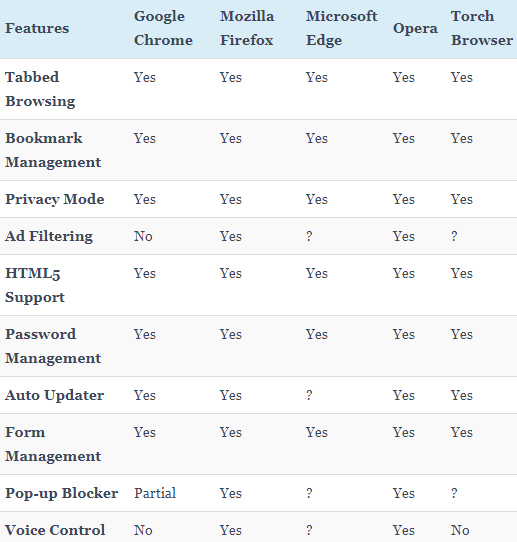
    Given below table compares most of the features of the given list of best web browsers for Windows .

    So the best web browser for Windows are –

    1. Google Chrome
    2. Mozilla Firefox
    3. Microsoft Edge
    4. Opera Browser
    5. Torch Browser

    Best Web Browsers for Mac

    Here is the best sorted list of the best web browsers for Mac Computers that is being preferred by most of the people.
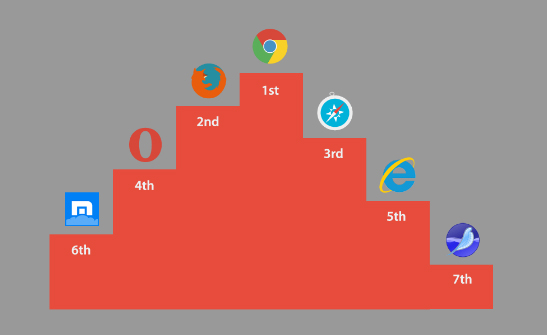
    1. Google Chrome
    2. Mozilla Firefox
    3. Internet Explorer
    4. Opera browser
    5. Maxthon
    6. Yandex
    7. Safari

    Best Web browsers for Android

    Here is the list of the some of the most popular and best web browsers for Android mobile Phone that is being preferred by most of the people.
    1. Chrome
    2. Opera Mini
    3. Firefox Focus
    4. Firefox
    5. Puffin
    6. Dolphin
    7. UC browser

    Read Also : Kindle Fire Silk Browser Alternatives

    Best Web browsers for iPhone

    Here is the list of the top rated best web browsers for iPhone that is being preferred by most of the people.
    1. Safari
    2. Chrome
    3. Puffin browser
    4. Opera Mini
    5. Dolphin Browser
    6. Ghostery
    7. Firefox focus
    8. Adblock Browser

    Read Also : uBlock Origin Replaces Adblock plus(Best Adblock Plus Alternative)

    Most Fastest Web browsers

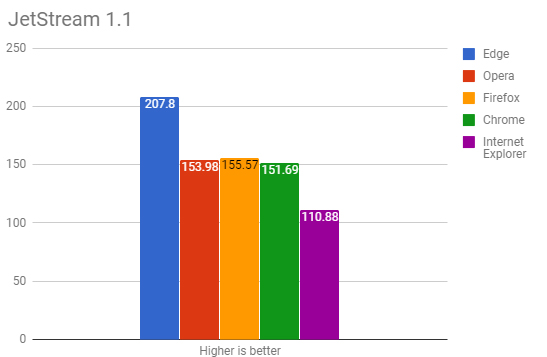
    When considering browsing the speed is a factor of browsing . So here is the list of fastest web browsers.

    If you are using Windows , then the fastest browser for windows includes –

    • Microsoft Edge Browser
    • Opera
    • Chrome
    • Firefox Quantum
    • Internet Explorer

    Read Also : Best Laptops of the Year – Buy the Right Laptop for You

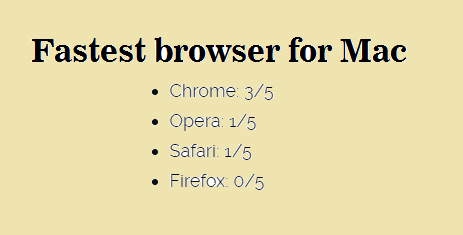
    If you are using Mac , then the fastest browser for Mac includes –

    • Google Chrome ( This is the best on different browser speed test for Mac)
    • Opera
    • Safari
    • Firefox

    If you are using Android , then the fastest browser for Android includes
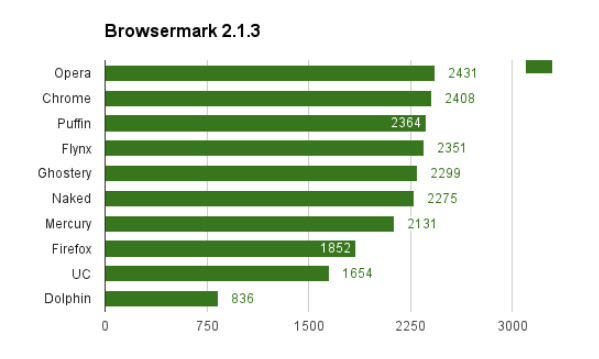
    • Puffin
    • Opera
    • Chrome
    • UC browser
    • Flynx
    • Naked
    • Mercury
    • Firefox
    • Dolphin browser

    Read Also : Best Note taking apps for PC & Smartphone

    If you are using iPhone , then the fastest browser for iPhone includes

    • Safari
    • Chrome
    • Puffin browser
    • Opera Mini
    • Dolphin Browser

    Best Web browsers for Computer & Smartphone

    Here we details the best web browser for computers and smartphone that fits as the fastest browser , safest web browser and low memory consuming browser .

    1)      Google Chrome

    One of the most user-friendly browsers that a lot many people use these days is Google Chrome. This browser is compatible with both computers and smart phones and it has an app size of 182.0 MB and 59.4 MB (IOS). When you normally get computer or a smart phone, Google Chrome will be already set since it is very friendly to the users and is also compatible with computers and android phones. Google chrome saves the history, you can give bookmarks etc.
    Moreover, Google Chrome also has the translator icon on tab which can be used to translate any language to English. Recently in some android phones, Google brought a new app that can detect your voice. If you want to set an alarm, you just have to say “OK Google” – then this app opens up and you can ask to set an alarm for you. OK Google will set the alarm and let you know that it is done. Isn’t this amazing? You do not have to type, our set an alarm by selecting the clock.

    Read Also : Best free office software for Computer & Smartphone

    2)      Mozilla Firefox

    Compatible with both computers and smart phones, Mozilla Firefox is an alternative to Google Chrome. This web browser has the same cross-platform that syncs just like the Google Chrome. One of the attractive features of Firefox is that it has a toggle switch to stop a video. Apart from this, Mozilla Firefox has a lot of extensions that can be added to your mobile. This can be done using the ad blockers to plug–ins by changing the feel of the web.
    The visual aesthetics of Mozilla Firefox is extremely good and customizability also can be done easily. This may be one reason that users choose Mozilla. This web browser works perfectly well in computers, but in android phones it does not work efficiently as Google Chrome.

    Read Also : Enable or Disable Superfetch for Windows

    3)      Opera and Opera Mini

    Opera is one of the web browsers, that are compatible with Android, iOS, Windows, Mac Os etc. The iOS users only get the light weight and data compressing Opera Mini to call, whereas the full opera on Android has a Google Now-Esque news feed. This news feed can be disabled if the user does not need it.   It also has a speed dial in which you can select your favorite sites quickly without searching much.

    Opera and Opera Mini offers a slick and clean browsing and searching for the users. You also get the option to create an Opera account through which you can sync the bookmarks and the history of the browsing with various devices. Data saving option is also possible with the main Opera App and it also supports compressing sites visa Opera’s servers. In Opera Min, the speed and data compression are the most attractive features that the users note. Like the main Opera, Opera Mini also includes ad blocking, offline pages, news feed etc.

    Read Also : Perfect Guide to Know All About Web server

    4)      Apple Safari

    Well, this browser will be familiar with all the users of Apple iPhone. Apple tries to add more features to this browser to make it easier for the users to get their work done. Some of the most recent add-on to it is – ad blocking and tighter Siri integration. The users can sync a lot of their work with other using the Apple Safari. When it comes to syncing the files, the users prefer Safari than Google Chrome.
    Apple Safari is compatible with iOS and is a favourite browser for all iPhone users. Unlike Google, Apple Safar shows no interest in tracking your browsing history which I find a good thing to do. Why do you need to get all your browsing history? Wait and watch to see more of their attractive features.

    Read Also : Best VPN For the Future

    5)      Puffin

    With 32.6MB (Android) of app size and 41.9MB (iOS), this web browser is compatible with computers and smart phones. But majority of the people might not even have heard about this browser. The main attraction of using Puffin is the speed. In just one click the page will open up and you can even see all the elements popping out quickly right in front of your eyes.

    This web browser is good for surfing in your computers since it is very fast. But it has problems in connecting with android phones. The disadvantage of Puffin is this – it struggles to cope with the newer technologies. One the other side, Puffin comes with features like gamepad overlay which helps in web gaming and it also has the advanced data saving tool with settings for image and video excellence. So if you want excellent speed to load pages, then Puffin is a good option.

    6)      Microsoft Edge

    Compatible with both computers and smart phones, Microsoft Edge is a very new web browser that has launched in beta form with App size of 66.9MB (iOS). You can test this web browser by signing up with then necessary details required. All you need to do is, install Test Flight on iOS. If you want it in your android phones, then join the waiting list of Microsoft Edge.
    Since this is a very newly launched web browser, you can expect change and added features by Microsoft. The major attracting of Edge is that it syncs with the desktop easily. Soon, you will be able to get access to Microsoft Edge in you androids and computers with efficient features.

    So, these are some of the web browsers that are compatible with both computers and smart phones. Every user would want different features to complete their work. While choosing an option from these web browsers, check the features and efficiency to meet your needs. Make your work easier by picking the right web browser and save your valuable time with these technologies.
  • Connect dual displays / monitors to one computer on Windows & MAC

    Connect dual displays / monitors to one computer on Windows & MAC

    Connect dual displays/monitors to one computer

    A much more screen space is provided by dual displays/monitors to one computer and it can be very useful for increasing efficiency and productivity. The two monitors can be easily configured to show either the same image or give you a much larger screen. Follow this article to get your monitors set up right the first time.Here will discuss methods to connect dual displays

    Method One of Two to connect dual displays:Windows

    Here is the first method by which you can connect dual displays or monitor in one computer where here the step by step guide for connecting dual system to one windows computer.

    For Windows Users to connect dual displays

    1)

    First step to connect dual displays is that you need to check your ports and also you will need two video out connections on the back of your computer one for each monitor.

    Basically there are mainly four types of connections which are listed here from oldest to newest: VGA, DVI, HDMI and Display Port. So for the best results we can use two of the same connectors to connect dual displays.

    The monitors are directly connected to the motherboard or the graphics card and most graphic cards support two or more monitor connections. Although most motherboards support one and sometimes two if you have a monitor with a VGA cable and if your port is DVI then you can purchase an adapter that will connect to your VGA connector and allow you to hook it up to a DVI port.

    Though the ability to connect dual displays depends completely on the power of your graphics card and CPU, running a second monitor puts more strain on your system. A more capable graphics card means the display has more pixels which makes a connect to dual displays possible and this ends your first step to connect dual displays on your computer.

    Read Also : The ultimate guide to make Windows run faster (Boost Computer Speed)

    2)

    Now for the second step to connect dual displays you can connect the 2nd monitor to the open port on your computer and in most cases the Windows OS will intrinsically detect the new monitor but if it does not restart the computer then to connect a another monitor there is only one port on your motherboard or graphics card. You will need to install a brand new and latest graphics card in order to attach the secondary monitor. Whatever monitor you wish to choose has no compulsion to be from the same vendor or the same size but for a reasonable viewing both the monitors should be of the same size so that your desktop stays consistent and this ends the second step to connect dual displays on your computer.

    3)

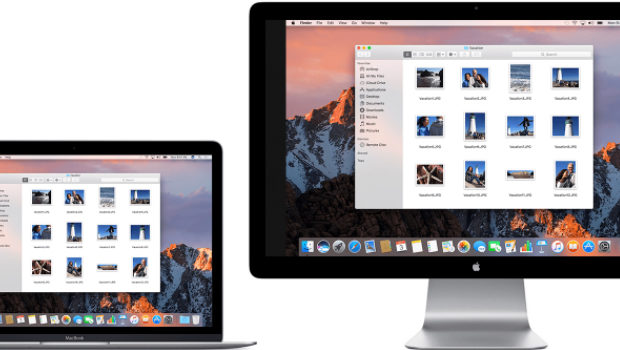
    Now in the third step to connect dual displays you need to follow the monitor setup wizard. In majority of the cases this will automatically start when a new monitor is plugged in and you will be given options to either mirror or extend your desktop depending on your wish. The option of mirroring mirror’s what is shown on your original monitor and this is most useful for giving seminars,presentations etc wherever your machine may be connected either to a projector or a TV.

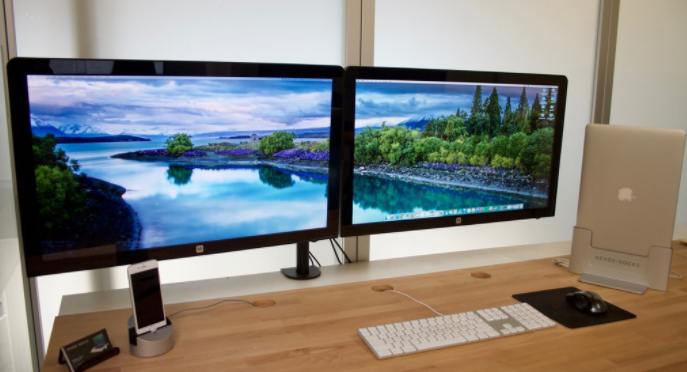
    The protraction makes the secondary monitor another screen for your desktop allowing you to drag and drop different windows and icons onto the other monitor which would give you more space to multitask.You can even set the second monitor as your primary desktop monitor and this is really useful if you attach a monitor to a laptop and want to use it instead of your laptop’s display so this ends your third step to connect dual displays on your computer.
    Read Also : uBlock Origin Replaces Adblock plus(Best Adblock Plus Alternative)

    4)

    This is the last step to connect dual displays manually. If either your monitor wizard does not automatically start or you want to change the settings for yourself you can use the display Settings tool. The procedure is to right-click the desktop and then select Properties or Personalize. You then decide to click on display settings from the list of available options and now you would see icons with various different numbers representing your attached monitors but if by any chance, if one is not working then that would look grayish in color. Now you can select the second monitor and choose to protract your desktop or replicate your desktop. Your options may rely on the graphics card that you have installed and you may need to make these changes from within your nVidia or ATI control panels. If you have these already installed then they can be found in your start up menu and this ends your final step to connect dual displays on windows .

    Method Two of Two to connect dual displays:MAC

    Here is the second method by which you can connect dual monitor in one computer where here the step by step guide for connecting dual system to one MAC computer.

    For Mac OS X Users to connect dual displays

    1)

    The first step to connect dual displays for the Mac users is that your Mac must have available video connectors to attach a second monitor. Since each display will need its own video cable, so to facilitate it there are several types of connectors that you may come across. Depending on the age of your Mac:

    VGA – This is one of the the oldest analog standard and most monitors support being connected via VGA cables and DVI – This is a core step up from VGA in quality. Although it is being replaced by HDMI and display port there are very few MacBooks that use the Mini-DVI which requires an additional adapter to connect to a standard DVI cable.
    Display port or Thunderbolt – This is one of the most common connectors found on newer Macs because Thunderbolt is the newer version of Display port and can carry both audio and video signals . By any chance if your monitor only supports HDMI then you will need a Thunderbolt-to-HDMI adapter.

    HDMI – This is the standard for all digital display devices and majority of every new display manufactured in the last few years supports HDMI connections because HDMI can carry both audio as well as video signal.
    All the above given information was necessary for upcoming steps to connect dual displays on your computer.

    Read Also : Kindle Fire Silk Browser Alternatives

    2)

    The second step to connect dual displays is similar as of windows because most displays will be recognized automatically and you will be prompted to choose your choice of settings and if you choose to mirror then the same image will be shown on both monitors. If you decide to choose extend then your desktop will stretch across both monitors but if the display is not recognized then open the Displays preferences and click Detect Displays and this ends your second step to connect dual displays on MAC.


    Read Also : Record iPhone iPad Screen on Windows & Mac

    3)

    The third step to connect dual displays requires you to adjust your settings manually. If you would like to change the settings yourself then you can do so through the display’s preferences menu. Now get there and click on the the Apple menu and select System Preferences and open the Displays tool. Now to extend the desktop you can click on Arrangement and then follow the simple instructions on the screen. Now to mirror the image you have to set both your displays to the same resolution. Now finally click on Arrangement and then click on Mirror Displays and this ends your final step to connect dual displays on your computer.

    These are the ways to connect dual displays on both Windows and MAC computers.

  • Best Garage Band Alternatives for Windows and Mac

    Best Garage Band Alternatives for Windows and Mac

    ­In this reforming & evolving world,almost everything can be accomplished with few computer clicks. This article will be on the Best Garage Band Alternatives.

    You can do video calling,audio calling via internet,can do online chatting ,photo editing,paying bills online,transferring Money online,filling FIR online ,booking hotels or cabs online too,even shopping all the groceries online too.

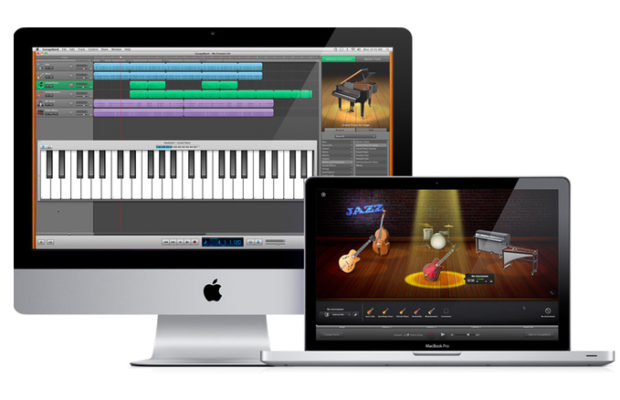
    Similarly , Garage Band is one of the professional & popular software manufactured by Apple to record audio,edit music etc

    What is a GarageBand?

    GarageBand is a line of apple’s digital audio workstations for mac OS & iOS. It includes a full fledged sound library that involves instruments,presets for guitar & voice & so on. It enables users to create audio files via instruments,podcasts & many more. It assists & works well on Apple devices such as ,mac,macbooks,iPads & iPhones . Although an apple device does not contain incorporated GarageBand & hence can be downloaded from the app store.

    So,let us frame a list of some of the Best Garage Band Alternatives both for devices which supports GarageBand and not.

    In the techno era of advancement,when every single pupil desires to become technically /digitally superior.

    Who don’t want to try anything new ?

    Practicing anything new gives you a great deal of amusement,deed & evidently makes us do better judgement among all obtainable software /gadgets & if you’re missing your garage band & still want to amend than here’s a list of some astounding ,foremost suited Best Garage Band Alternatives for you to choose:

    Read Also : Best iTunes Cleanup Software for better iTunes experience

    Best garage band alternatives for Mac:

    Although GarageBand is a colossal tool to create audio files on your Mac. Its perfect for a fresher since it provides straightforward to use interface & the best part is its completely free.

    But if you wanna try out something new then there are huge number of best alternatives to garage band for Mac –

    1. Audacity:

    • Its paid.
    • Can be downloaded from Audacity

      Attributes:

    • Its an open source project raised & perpetuated by volunteers.For the freshers,it might look like a basic ,no ruffle product,but in fact, Audacity is a very competent system that can attain efficient outcomes.
    • Besides the widespread recording & editing functions,there are also the options to record multiple channels at once,add cross fades & even overdubs a stirring track- for clever vocal harmonies or so.
    • You can also exert filters to a track after you vanished background hums using noise ejection feature.It might not eradicate everything , but its still a great amendment.
    • It also holds the ability to advancing the pitch of a track without altering the tempo & vice versa,in addition,a reasonable  amount of built in effects that can be applied to recordings    

    Accessibility :

    • Although ,its dynamic ,but it assuredly isn’t pretty. It has not a majestic user interface,whereas garage band offers neat,study user interface & supports a modern design.
    • Menus & buttons are somewhat colorless,enforcing an initial impression that can be a bit menacing.

    Supported formats:

    • WAV,AIFF,AU,FLAC & Ogg vorbis,mp3,AC3,AAC & mp4 are also available via free downloads.

    Supported 3rd party hardware:

    • No official list,but many USB devices & microphones are compatible with it.LogicPro X:
    • Its a paid service.
    • Can be downloaded from mac app store

    Read Also : Top Satellite Car Radio Installation and specification guide


    2. Logic Pro X:

    • Its paid.
    • Can be downloaded from Mac App store

      Attributes:

    • Its the premier music suite available.
    • Its a full fledge executive level software studio.
    • Its lodged with quality implicit appliances -a huge library of loops,synthesisers & other audio tools .
    • It has a prodigious physical modelling synth ,ultrabeat drum synth & sequencer.
    • Plus it incorporates EXS 24 sampler which is particularly splendid .
    • It has an aptness of recording up to an utmost of 255 tracks in all,for each composition with ability to lay down multiple tracks at once.
    • It propounds complex & dynamic editing features ,offering you control over MIDI patterns,audio tracks ,in addition you can automate changes on the fly.
    • You can also correct any erring vocalists or dawdling guitar solo through a sort of a tone,Flex pitch.
    • It also authorizes you to switch between playlists & editing on any track making it uncomplicated to paddle with imaginative ideas.

    Accessability:

    • It offers a graceful layout ,uncomplicated comprehend & operate  some hidden advanced controls which can be unhidden with simple steps.
    • Recently, apple presented the option for ipad & iPhone users to upload logic files to icloud.

    Supported formats :

    • AAF,OMF,open TL,XML(final cut pro) projects. Plus AIFF,WAV,CAF,SDII,mp3,mp4 & MIDI output options.

    Supported third party hardware:

    • Core audio device are compatible

    Read Also : Best Apple Watch Alternatives-Affordable Gadgets


    3. Ableton live 9:

    • Its paid
    • Avaibale at Ableton

      Attributes:

    • DAWS(digital audio workstations )
    • Its quite distinctive ,usually you’ll useca music program to record & dispose parts sequentially in a timeline .
    • It also contains a mode called session which permits you to create shorter clips of music that are held in banks
    • You can also demonstrate with creating textures & riffs
    • If you’re satisfied with the various elements you then press a global record button & trigger the clips alive,generally via a MIDI controller.

    Accessibility:

    • The erudition curve it proffers ,can be a little abrupt. You cab be required to invest in some sirf of control device as well but a computer keyboard can be portrayed to trigger various clips.
    • It possesses a wealth of sound creation modules & sample libraries, plus unconventional editing controls that are executed in real time . After mastering the controls,you’ll find it an easy to use program.

    Supported formats:

    • WAV,AIFF,mp3,Ogg,Vorbis,FLAC

    Supported 3rd party hardware:

    • Various MIDI controller,plus a bespoke Ableton control surface(push 2) that is paid.

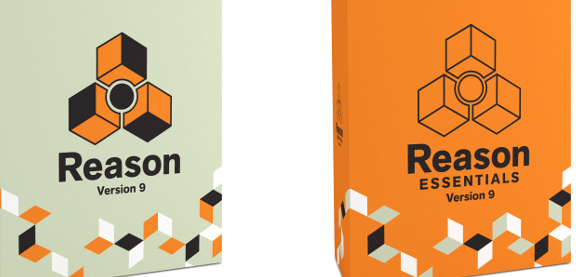
    4.Reason Essentials 9:

    • Its paid.
    • Can be downloaded from reason essentials 9

      Attributes:

    • Its one of the most favoured music creation platform around. Its one of the best paid alternative to Garageband .
    • It involves standout features which is generally of the nature of exceptional synthesisers ,sound modules & virtual instruments .
    • Each one comes complete  with dials & sliders that look emphatically analogous in nature .
    • It is boosted with glorious effects that can create sonic landscapes ,mangle audio into enchanting new textures & authorizes one to build detailed & stomping drum motifs .

    Accessability:

    • User need to learn firstly, how to operate ,however its almost analogous to Ableton live.
    • Users finds it exciting to experiment with due to high calibre sounds .

    Supported formats:

    • AIFF,WAV,REX

    Supported 3rd party hardware :

    • Pretty much any media controller .
    • You can check out other astonishing  garage band alternatives too like-
    • Cubase elements 9(paid )
    • Reaper 5 (paid)
    • MuLab 7(free or paid both)
    • Ardour (free )
    • Ohm studio (free for 1st 10 projects)

    Best garage band alternatives for Window

    Now ,look at best garage band alternatives for your windows users :

    1. Audio tool:

    • Its a web browser based tool that authorizes you to incorporate music online & it also unites some dynamic attributes.

      Attributes:

    • Its a web browser based tool that authorizes you to incorporate music online & it also unites some dynamic attributes.
    • It allows you to store all your sample tracks in the cloud ,so that one can retrieve it from any where when necessary.
    • It requests no singular software to be installed ,you can instantly work upon it .
    • The final product can be dispensed  on social media like Fb,YouTube etc
    • Its an ideal tool for alliance & it works with a diversity of applications & devices.
    • It also grants you to remix all downloadable sample tracks available.
    • It is built with numerous musical instruments,mixing options,effects & many more.

    2. Mixcraft 7:

    • Its paid with free trial.
    • Like garage band ,it proffers a use friendly interface & a boundless hub of loops that could help you to create music in an attainable manner.
    • Its an easy to use tool,that permits one to consolidate down the tracks.
    • Even a fresher, who don’t have any idea or experience  of using any such software can assimilate  very easily. All you are entailed to do,is to drag & drop the loops to start petitioning them.
    • It also sanctions you to edit videos as well & it comes with a great assortment of plugins that authorizes you to add astounding effects .

    Other best garage band alternatives for window users are-

    • Soundation studio
    • Music Maker Jam(free with in app purchases)
    • FL studio 12(paid)
    • Reaper(paid )
    • LMMS(free,open source)
    • Stage light(paid)

    Yes, there are several Best Garage Band Alternatives that proffers an analogous set of features to GarageBand that you can install on your PC. Whether you want to work methodically instead of getting up with some loops,these apps will be a great platform for it.