Tag: Internet

  • Private Search Engine That Doesn’t Track You Online – Top 5

    Private Search Engine That Doesn’t Track You Online – Top 5

    Privacy is becoming an illusion these days as we are being tracked anywhere & everywhere . This becomes really tough when your Online privacy is like a Utopian concept .You search something online your Browser tracks you , but you can skip it with Incognito mode search . But this doesn’t mean that your searches online is not being tracked . Most of the search engines tracks your search and even your ISP provider tracks your search . How to prevent search engines track your searches ? Simple , get used to the Private search engine that suits you best .

    You might consider using the incognito mode or mend the settings such that you are not tracked but still you can’t be sure that you are not tracked. And most of the times you are tracked in the incognito modes as well. The best way to prevent yourself from being tracked is to use private search engine. There are a number of engines which ensure that you are not tracked.

    Private Search Engine That Doesn’t Track You Online

    Let us take a look at some of the privacy ensuring search engines that doesn’t track you . So what are those best private search engine on the list is given below –

    DuckDuckGo

    It is always counted among the best private search engines. It is the most secure private browser. It does not tracks you hence you are relieved of the tons of advertisements on the webpages. Not only that along with the privacy, it has lots of other cool features.

    It has a number of shortcuts like using right keywords directly open the webpages instead of the search results. Directly perform calculations or open calendar. So overall it is an awesome search engine which provides you with security and cool shortcuts. We have already discussed a lot about this private search engine , if you are new to this search engine , then take a look at the DuckDuckGo Search Engine Tips and Tricks .

    Metager

    Metager provides you with utmost privacy while surfing the internet. The way it ensures your privacy is that it is uses proxy server. This way you can surf any website anonymously means that the site you visit is unable to track your actual address.
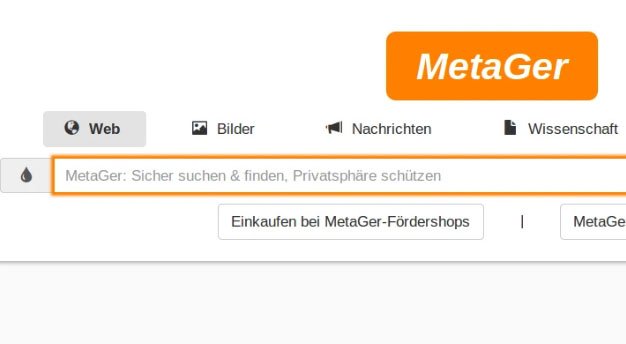
    It is based in Germany so was initially launched in German language but was launched in English in 2013. Also it search your queries in 50 search engines and then sort them and then show you all the results.

    Hulbee

    Hulbee also ensures you with complete privacy while surfing the web. It does not tracks your keywords or anything so that you get any customized adds.
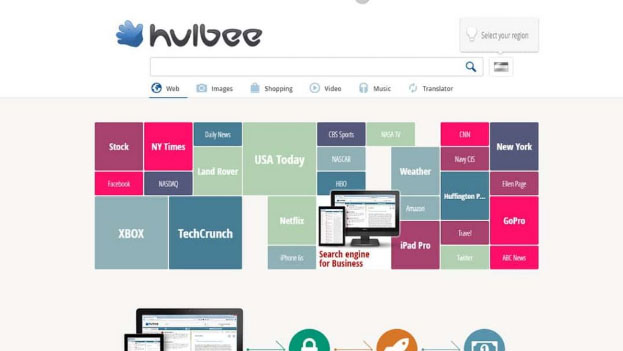
    It also encrypts your data this way even if anyone in middle steals the data is not able to utilize it and hence providing extra security to your data. It comes with an option clean your activity letting you remove your search history completely .

    Disconnect Search

    Disconnect search find answers to your queries from other search engines like Google and yahoo and then display the results to you. You can set the locations for the search to find results which are region specific.
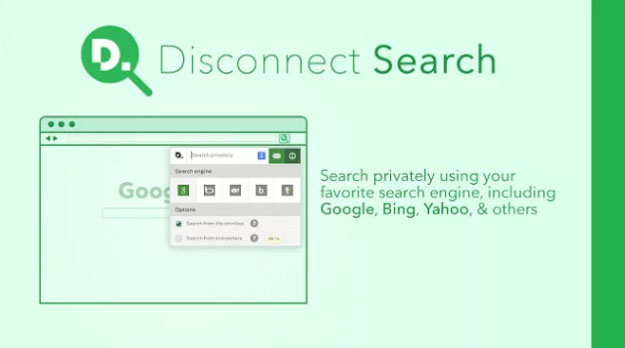
    The best thing about it is informs you which tool is protected or unprotected thus you can use them accordingly. It also never tracks or stores your data or IP address, providing complete security.

    Oscobo

    Oscobo ensures privacy as it never keeps IP address saved after your browsing .Secondly is that they don’t use cookies which is very unusual hence ensuring even better privacy and ensures that no third party is getting my data.

    And it is nearly as efficient as Google and simple to use and adding more features with time. Its extension can be added to the chrome browser.

    Hope you find these list as useful for private browsing . These are best search engine Alternative to Google .


  • Improve The World With  Smartphone -Top 10 Hacks

    Improve The World With Smartphone -Top 10 Hacks

    Decades ago, smartphones were used exactly for what they were supposed to do – for calling. But now the scenario has changed. World has improved a lot with the smartphones that are now like pocket PCs. Apart from the options for calls, smartphones now have options for high quality cameras and videos integrated with editing, compasses and GPS to know the location, Health and fitness apps, applications to monitor the daily activities, latest NFC technology and much more. We can use smartphones for calling, sending messages, for online payment of bills, reading and sending mails and messages. Furthermore, there are several Smartphone applications that help to monitor our health status. The GPS facility in our smartphones have made a revolutionary change by helping us to reach places without any prior knowledge of the path and also has helped in the positioning of  various objects and persons too. The way you can Improve The World With  Smartphone is amazing that, people cannot imagine a life without them.

    smatphone-apps-to-improve-your-world

    The way smartphones has changed the world around us is totally unbelievable and now they have become an integral part of our life.

    10 ways to improve the world with smartphone

    From education to entertainment, all fields of life have been benefited with smartphone applications. Years ago, if you needed to pay the phone bill or make a bank transaction, you have to go to the respective office and do the necessary. But, now with the smartphone applications you can quickly do all these within minutes anywhere at any time. The world and culture has evolved in a proud way with the use of smartphones.Here we are listing the top 10 way to Improve The World With  Smartphone.

    Web everywhere

    Browsing in web was earlier restricted to our Personal computers and later on to our laptops. But now as smartphone has come into the world, we can have access to the internet all the time irrespective of where we are and the time.browse-with-smartphoneSmartphone applications are now making the world around us smart by providing web access to every place. We can configure all the devices around us to our smartphones now that internet of things has come into role.So everything is at your finger tips now with smartphone . It is a great way on how to Improve The World With  Smartphone.
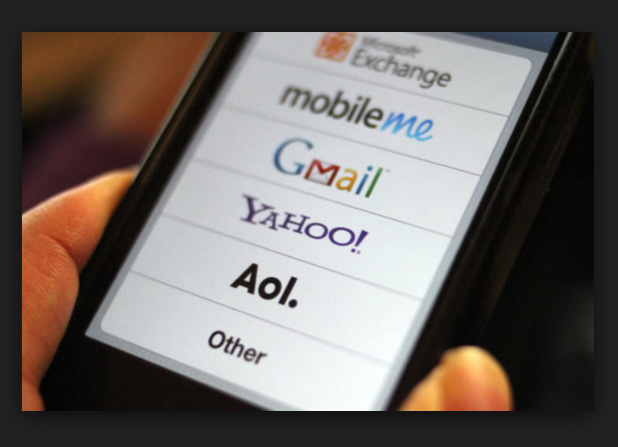

    Emailsemail-on-smarphone

    Earlier if we need to send an urgent email, then it would take a lot of time as we need to switch on our PCs, connect the internet to it, log into the account etc…But now, we can use the smartphone to quickly read and send emails without any time delay.If you ask me i start my day by checking my emails as the first job i do . So its a great improvement to life.

    Updates news

    There are many smartphone applications that help to know the relevant news and that too, of the topic of our choice. The current affairs are all available at our fingertips.

    If you use android or iOS smartphones then my personal suggestion of smart phone news application is Flipboard ,CNN App,Google News & Weather .

    Reading books and dictionary

    We can read books in our smartphone by just downloading it or in online. And as per our need we can use the dictionary applications to check the words thereby improving the vocabulary and reading habit.Need not to go to library and check racks nor you don’t have to worry about the space that is occupied by your book collection.

    Translator

    We can use the Translator applications available in our smartphones to help us with  the meaning and explanation of languages which are quite foreign to us.It gives us the joy in understanding so many language . Sometimes the way translator can  help you will be to propose your crush on her native language . So its just awesome feature of smartphone in improving our world.

    Stop Watch/ Voice Recorder

    Instead of peering at our watch for the time limit we can just set our stop watch and carry on with other tasks. Also, the voice recorder helps us to record any important details so that we need not write it all. It saves our time.

    Remote Control

    While we make a presentation or if our television remote is not working, we can just use the smartphone application to control the whole thing. It helps us a lot in our daily activities.

    Sensors and health apps

    There are hundreds of sensors built into our smartphones and they are used by the smartphones to know our health and fitness.

    health-appsThe calories that we have burnt or the amount of water that is to be consumed a day etc.. can all be monitored by the  smartphone applications. To know your heart rate you need not go to a doctor, instead you can use the smartphone application and know it in a minute.It is a best way to witness how to Improve The World With  Smartphone.


    Information apps

    There are several information apps for charity works that has a group of people as members. If a patient is in urgent need of any medical help, such applications can be used to pass the information. This way, smartphone applications for emergency medical situation too.

    Communication media

    The smartphone applications like whatsapp etc..can be used by millions of people to stay in touch with each other. Such smartphone applications have conquered the time and distance between people.

    Read Also : WhatsApp Data Sharing Disable Methods to Protect WhatsApp Data

     Real life applications

    There are many real life smartphone applications that help you to make your life better. You can check the reason for the engine leakage in your car, prevents drunken driving, helps you to improve your speaking skill as well as basketball skills and much more .The use of smartphones can definitely improve the world around us. Whether it be for education or entertainment smartphone applications can help us in a way that it totally unbelievable.

    Read Also – All Possible ways to Make Money by Playing Pokemon Go

    Smartphone applications save our time and effort and provides accurate and adequate amount of information and help Smartphones are like our friend whom we can carry around in our pocket. We never becomes lonely and rather smartphone applications would keep us updated always, reminds us if we have missed something and about important dates, keeps track of our medical conditions and a lot more. It has completely become an inevitable part of our life.Thus there is a great chase for the best smartphones in the world. 

    So just see how you Improve The World With  Smartphone , it is just the positive side of technology in our life .


  • Wikipedia Tips and tricks to be a Wiki Master

    Wikipedia Tips and tricks to be a Wiki Master

    Wikipedia is globally popular site ranking among top 10 websites . Basically, Wikipedia acts as a free encyclopedia and also allow users to participate and contribute to Wikipedia in order to improve the quality of information. In this article, we are going to throw some light on the tips and tricks of Wikipedia. Hope these Wikipedia Tips and tricks will help you to to become a Wiki Master / Wikipedia Expert .

    Wikipedia is discovered by Jimmy Wales and Larry Sanger on 15th January 2001 and is owned by Wikipedia Foundation.

    Wikipedia is an encyclopedia that is available in multiple languages and is free of cost. The best feature of Wikipedia is that anyone can edit or donate on Wikipedia information to make the information more informative. Wikipedia can be used in various ways just have a look at some Wikipedia tips and tricks that can help you to use Wikipedia more effectively.

    Wikipedia Tips and tricks to be a Wiki Master

    So let us see some of the popular Wikipedia tricks and Wikipedia tips to be a Wikipedia expert .

    Registration on Wikipedia 

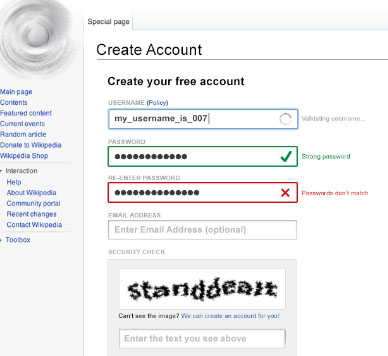
    Users can work as an admin after they register themselves on Wikipedia, after registration they can create content, and access options like edit and rename content, socialize with others. Like this you can become Wikipedia contributor .

    Steps to do the registration:

    • Do Sign up it is free
    • Log in to your account
    • A personal account will be open
    • Edit your profile
    • Ready to use

    Wikipedia Offline Reading 

    Wikipedia, offers a feature that allows users to create books which they can read or use offline on their devices. Suppose you are travelling for hours and there is no guarantee of the network then you can use this book creating option at its best. You can create an offline book of web pages in which you are interested.

    Read Also : Apple Homepod Tips, Tricks and Review

    Read Also : Keylogger detector & Anti-Keyloggers to Protect your data

    Use Wikipedia to read the news

    On Wikipedia you can read about all the current news and events that happen across the world. You can read old news as well as latest news on Wiki. You can read all the latest news by using the Current event option.

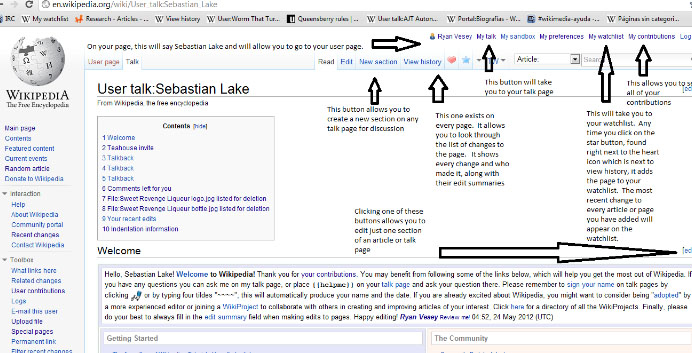
    Wikipedia Talk Page

    Wikipedia offers its user to contribute by editing the information so the information can become more informative. Users can simply edit the information. But before editing users must check the online debate that is going on the Talk page one of the best examples of this is the Smashing Pumpkins. Basically, the Smashing Pumpkins is one of the most debated topics as there are many different arguments, reviews, are given by different users. So, reading all these once will give a better thought to the user in doing the better editing.

    Wikipedia Vision

    This is the most interesting feature of Wikipedia. Wikipedia Vision allows its users to see the changes made on encyclopedia on the map. This feature helps users to see the background work and from which part of the world the editing is been done. This feature is there for users to check the list of recent edits as well as the location. This recent edit list can be sort by time, date, internet protocol address.

    Wiki Suggest Bot 

    As the name suggests the Suggest Bot option is used for solving the confusion faced by the users. When the users face problem as what to edit next then they Suggest bot can suggest them a topic according to the user’s history of editing.

    Wikimedia commons

    Wikimedia common is a feature that gives the user to free access to media, multimedia and picture files. The multimedia files can be used easily by users on any project they want. It is known as Wikimedia common because all the media it offers can be used by anybody.

    Read Also : DuckDuckGo Tips and Tricks to Search Like a Pro

    Read Also : Facebook Small Business Advertisement Working and Results

    Wikimedia mobile

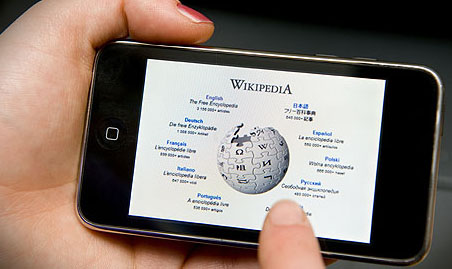
    Wikimedia mobile is a feature that allows users to use Wikipedia on their mobile devices without paying any charges. The main purpose of inventing Wikimedia mobile is that it allows users to access knowledge without paying anything.

    These are some of the Wikipedia tips that can help users to use Wikipedia efficiently.

  • DuckDuckGo Tips and Tricks to Search Like a Pro

    DuckDuckGo Tips and Tricks to Search Like a Pro

    DuckDuckGo the name might sound unfamiliar to you, right but no problem. After reading this article you are going to be pretty familiar to this name. Here we will not only make you familiar about DuckDuckGo features but also about DuckDuckGo Tips and Tricks to Search Like a Pro.

    What is DuckDuckGo ?

    So, DuckDuckGo is a search engine like any other search engine such as Google, Bing or yahoo you might be using daily but still pretty different. Google kind of has a monopoly in its market, we rarely see someone using some other search engine and it does has some amazing DuckDuckGo features but that doesn’t mean there is not any other search engine present with such cool features. DuckDuckGo as odd the name might sound to you has some pretty cool and awesome features and can be the replacement as your primary search engine.

    Before we discuss about the DuckDuckGo Tips and Tricks , let’s take a look at the reason to choose DuckDuckGo .

    Read also : Best Web browsers for Computer & Smartphone

    Why DuckDuckGo ?

    So, you must be interested in knowing that what makes it different from other browsers. First reason is that the amazing DuckDuckGo shortcuts which prove to be really handy while browsing but wait that’s not the only reason. The reason that will attract you the most to switch to DuckDuckGo is Privacy.

    DuckDuckGo Vs Google 

    When you take a comparison between DuckDuckGo Vs Google then the key difference is that DuckDuckgo doesn’t tracks you , they don’t have personalized ads .

    Whether it is Bing , Yahoo or Google , You are tracked . For many of us having not someone tracking us down is a huge concern. If you belong also to such class of people then the DuckDuckGo search engine is your solution. But it isn’t the only cool thing about it, there are a lot more.

    Now let’s go the core topic – DuckDuckGo Tips and Tricks .

    Read Also : Best Torrent Managers for Computer & Smartphone

    DuckDuckGo Tips and Tricks to Search Like a Pro

    Here are some cool DuckDuckGo tips and tricks which will prove handy to you while using DuckDuckGo :

    1. Bangs!

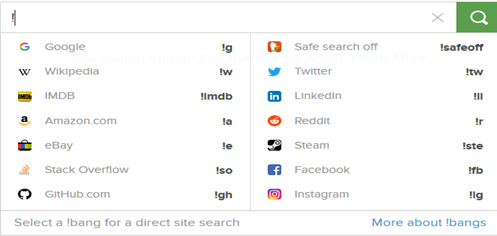
    Easily one of the best feature of the DuckDuckGo search engine is its !Bang  feature. All you need to do is use an exclamation mark on the address bar, followed by the supported bang you want to search for, and your desired keyword. It takes you directly to your desired website.

    For e.g. if you write !a shoes in address bar it will directly open the page of amazon website showing shoes.

    Some more examples of bangs are shown in the image below.

    2. Get Cheat sheets

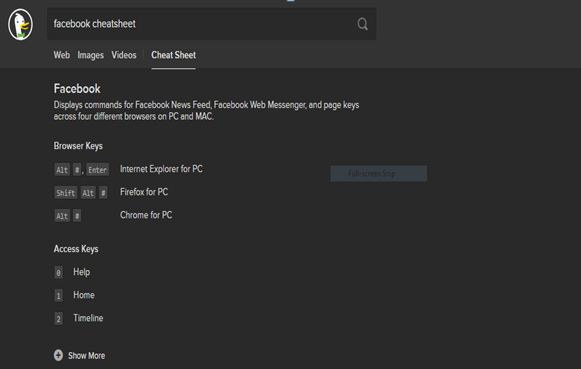
    While using any softwares or any operating system some shortcuts definitely prove to be very handy. DuckDuckGo provides an easy solution to this, all you are required to do is to enter the name of the software and keyword ‘Cheatsheet’ and you are shown the list of all the relevant cheat codes.

    For example, simply write Facebook cheatsheet and the result is :

    Read Also : Best File compression Tools for Computer & Smartphone

    Read Also : Best Email clients for Computer & Smartphone

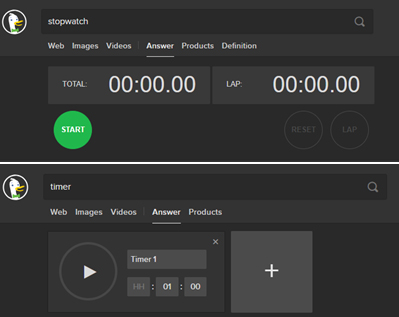
    3. Stopwatch and Timer

    Want to use a stopwatch or a timer in your computer or laptop itself, no need of any additional software DuckDuckGo browser can be to some use here. You can simply write stopwatch and timer in the address bar and there you go :

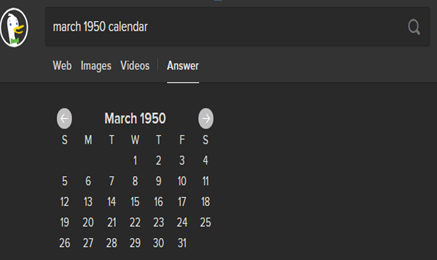
    5. View any Calendar

    On DuckDuckGo you just have to write the month followed by the year and type calendar and you are able to view the desired calendar :

    6. Music Buffs

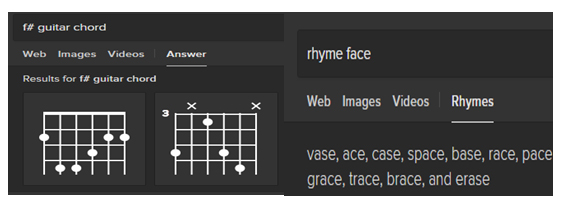
    If you are a budding music artist this search engine can be of tremendous help. You can look for chord diagrams. You can carry out frequency and mix pitches conversion. The most amazing feature for any artist is its rhythmic dictionary as while writing lyrics you can look for rhyming words.

    7. Text Casing

    You can change the casing of any text by pasting it in the address bar and adding a prefix lowercase with a space and hit enter. You can get the desired results and paste them to the desired location. Same can be done for uppercase and title case.

    8. Generate QR codes

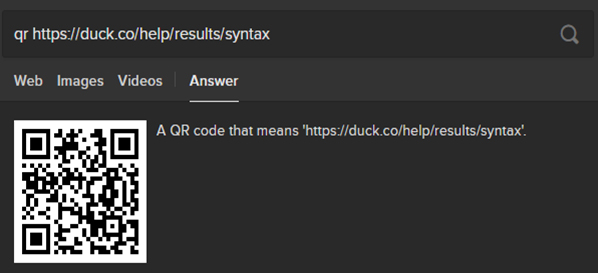
    QR codes are a quick way of accessing any website. You can generate QR codes for a website by typing QR code and then paste the desired link and then through this qr code you can easily access the website on your phone.

    Read Also : Best Laptops of the Year – Buy the Right Laptop for You

    9. Filtering results

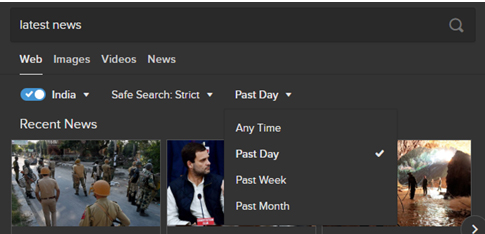
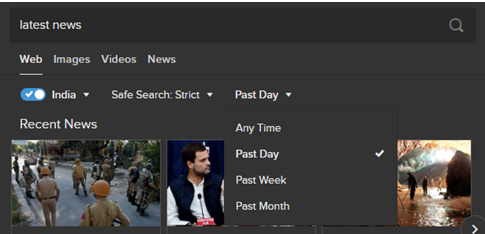
    If you want to find solution to your query but you want the results to be limited in a certain region over certain time period, you can easily set the locality and time filters in the DuckDuckGo search engine.

    10. Find app alternatives

    You can easily find some app replacements you might be using in your phone or your laptop. Simply write alternative to followed by the app name and there in you can find a number of alternatives :

    11. Remove some word from your search

    If you are entering any query but want certain word that should be excluded from the results to be displayed use ‘-‘ sign and then the word you want to remove. For example “Losing Weight”-diet will show you results regarding losing weight without diet.

    12. Generate passwords

    These days you are to create accounts on like almost every website to get to use its service and thinking of different and secure passwords can be a bit tiring. Here DuckDuckGo can come to your rescue by generating strong passwords and all you need to is write generate password and there it is :

    13. Expand/ Shorten URL’s

    If you have any long link and want to shorten it or if you want to expand an already shortened link DuckDuckGo can help you in doing that.

    Use ‘shorten’ for shortening the link & ‘expand’ for expanding a shortened link.

    14. Search for social media info

    If you want to search any person or page on any social media website, enter its name according to the syntax of that website. For example for searching something on Instagram use ‘@’ followed by page’s/person’s name.

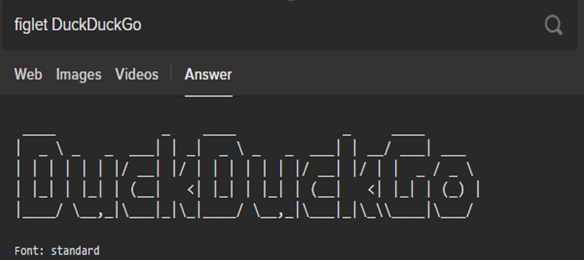
    15. Generate Figlets

    For generating the figlets for your text all you need to do is type figlet followed by desired text.

    16. Check whether any website is down

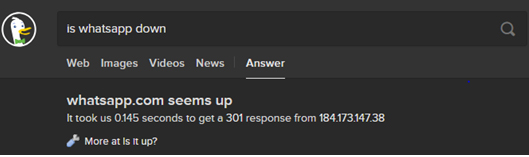
    You get to listen and experience that a popular website is down. You can easily check whether a website is down using DuckDuckGo. Just enter is followed by website name followed by down and you can get the answer instantly.

    17. Search for specific term in Title of Webpages

    When you want to find pages with a particular term in the title, use intitle: and then enter the terms you are looking for. For example intitle:fun AND joy will show those webpages in results which have both fun and joy in their titles.

    So, now you must be quite familiar with the DuckDuckGo search engine and there are a lot more besides the ones discussed above. After reading the different DuckDuckGo tips and tricks mentioned above you must feel that DuckDuckGo has loads of cool features and it deserves a fair chance to be your primary search engine. Moreover, it is available in all the leading browsers i.e. Chrome, Firefox and Safari as well. Do tell us about your experience of using the DuckDuckGo search engine and which feature do you find the coolest.