Category: Tech

  • Best free office software for Computer & Smartphone

    Best free office software for Computer & Smartphone

    Computers and smartphones are one of the greatest creations made by humans. These electronic devices always make the work simpler and easier for everyone. With the help of some of the best free office software for Computer and Smartphone, all are able quickly finish their work on time.  There are different office suits that are compatible with various kinds of computers and smartphones.

    You should always choose the best office software that is easy for you to do your work. Sometimes the office software that is compatible with Mac, will not be compatible with other computers. Some of the best free office software for computers and smartphones are listed below. Choose the most compatible software for your device.

    Best free office software for Windows , Mac , Linux , Android and iPhone

    Here we are giving the top picks of free office softwares for windows , Mac , Linux , Android & iPhone .
    Best Free Office Software for Mac

    Microsoft Office is the most popular free office software used world wide . Here is some of the best microsoft office alternatives for computers .  Below is the list of free office softwares for Mac –

    1. Google Suite ( Google Docs , Sheets & Slides )
    2. Libre Office
    3. iWork Suite
    4. Quip
    5. Office Online

    Best Free Office Software for Windows

    Here is the best free office softwares for windows users .

    1. Google Docs
    2. Microsoft office
    3. Libre Office
    4. WPS Office
    5. Zoho Docs

    Read Also : The ultimate guide to make Windows run faster (Boost Computer Speed)

    Read Also : Enable / Disable Windows File Protection & Fix Windows File errors

    Best Free Office Software for Linux

    Given below are the Microsoft office alternatives for Linux which are the best Office software for Linux.

    1. Libre office
    2. Apache Open Office
    3. WPS office
    4. Softmaker Office
    5. Google Docs
    6. Zoho Docs

    Read Also : Record iPhone iPad Screen on Windows & Mac

    Best Free Office Software for Android

    Here is the free office software apps for Android users that can help you to do your office stuffs on phone or tablet from anywhere , anytime .

    1. Office Suite
    2. Polaris Office
    3. Google Drive
    4. Quip
    5. Smart Office
    6. WPS office and PDF

    Read Also : Android boot Fix – Steps to Try When Your Android Won’t Boot

    Best Free Office Software for iPhone /iPad

    Here is the list of Free office sftware for iPhone/iPad users to try .

    1. Polaris Office
    2. Good Reader
    3. Documents
    4. Pages
    5. Google Drive

    Read also : 38 Best iPhone games you should play

    Best free office software for Computer & Smartphone

    Here we picked out the best for all devices free office softwares .

    1)     Google Docs, Sheets and Slides

    This is one of the best free office software for everyone to share files, sheets and slides. Google docs or Google Sheets are very useful for employees to share their work sheet with higher authorities or with their co-workers. Using Google Free Office Software, you can make your work easier. It does not take a lot of time of yours to share works with your subordinates or for you to keep a track of your team’s work.
    Moreover, you will never have to worry about losing any of the files created in Google Software. Once you have created a file in the Google drive, it will automatically get saved. Even when you make changes to the document that you have created, the changes will be saved automatically too. This free Google Office Software is compatible with both computers and smart phones.

    Read Also : Connect dual displays / monitors to one computer on Windows & MAC

    2)     Microsoft Office Online

    Microsoft office fully compatible with desktop apps and it works with one drive. Every individual will require the help of Microsoft office Online to make work simpler. Microsoft, word, excel and PowerPoint are the most commonly used apps by everyone.

    With the help of Microsoft Word Online, you can create attractive resume, select templates with various formatting tools and you can also add functionalities to the word document by adding Wikipedia for quick and easy online search.
    In Microsoft Excel Online, you can organize all your data as workbooks. Whatever you type in the excel sheet online, it will be saved automatically. Moreover, you also get a chance to use the modern charts and graphs to make your work report more attractive and precise.

    Read Also : Battery Health : How to keep your phone or tablet battery healthy

    Power point Online helps you to create attractive presentation with various templates and styles. You can also add videos, photos, animations and even transitions, making your presentation look professional and neat. Co-authoring is also available with power point online where your co-worker can also use the same.

    3)     Libre Office

    This huge software suite is fully compatible with Microsoft formats and is totally free to use. Libre office has almost all the necessary features like word, excel and power point. This software suite also consists of other programs like writer, calculator, math, base, draw and impress. Likewise templates and extensions can be selected from various options given in this suite.
    The next highlight of Libre Office is that, anyone can save and open any number of files with different formats like ppt, pptx, doc and a lot more. The coders of Libre always try to enhance the software and bring more features. The latest version of LiberOffice has a number of bug fixes and other features including the new single toolbar for writers. LibreOffice is compatible with Windows, Mac, and Linux since its cross-platform is written in Java.

    Read Also : Must Have Smartwatch apps for Android and Apple watches

    4)     WPS Office Free

    Compatible of Windows, Linux and Android, this free office software has cross-platforms and supports all Microsoft file formats. This a small version of  he premium office suite and has some similar features. It is difficult to find the difference between the premium office suite and the WPS Office Free.
    In WPS, you cannot find a database software, but, an addition has been made with free PDF reader perfect for windows built-in app. The work you do with WPS Office Free Software can be saved easily in the native Microsoft formats and can be shared quickly with office users.

    5)     Softmaker Free Office

    Softmaker free office supports all Microsoft formats and it also includes PDF reader. This software also offers analogs for Ms Word, Excel and Power Point just like the WPS Office. One of the major feature missing in Softmaker is that, it does not have thesaurus. For the people who are writers, it will be very difficult to write an article or an essay without thesaurus. Apart from these features, an addition of PDF conversion and Epub format can be found in Softmaker Free Office.

    6)     Polaris

    Compatible with both computers and smart phones, Polaris offers a cross-platform suite in which the data will be stored in the 1 GB cloud storage. It is important to open a free account since Polaris is cloud-based office software. You can either log in to Facebook or Google to create your Polaris account.  Once you have opened the account, you get a 60MB monthly data transfer along with 1GB storage. This software can be used in three devices out of which one is your desktop and two mobile phones.
    If you need more space, then you can connect the Polaris Office Software with Google Drive Drop Box, Amazon Cloud Drive etc. You can also save your documents or data in your devices too. Polaris free office software is compatible with Mac OS, Android IOS and Windows.

    7)     Office 365

    Office 365 is a full cloud desktop with open source software. This free office software also includes the major components of LibreOffice . This software is easy to use and all the necessary office software like word, excel, power point etc that are required to use at home, school, college or at work are available.
    In Office 365, the desktop client handles all the file transfers and mirroring the cloud storage to the hard drive. But you will still have to run your office 365 software in the browser. This software is perfect for people who use a variety of hardware in the system.

    These are some of the Free Office Software that are compatible with computers and smart phones. Choose the best software that suits your work to enhance the speed and accuracy of the work you do. You can save all the necessary documents or files in these software’s safely and can be accessed from anywhere in your computer or android phones. Make your daily work easy and never lose any important documents or files with the use of these office free softwares.


  • Java Tutorial – Introduction to Java Programming Beginner’s Guide

    Java Tutorial – Introduction to Java Programming Beginner’s Guide

    We already draw your attention about basic of programming for all upcoming programmers through Introduction to Programming Languages : Programming Tutorials . Now we begin with our Java Tutorial Officially from here .

    Where to begin this Java Tutorial From , i was wondering . Then thought to give you a basic introduction about Java. It is not mandatory to read the introduction section unless and until you have got interest to know about the beginning of java programming , i mean evolution of java programming language etc .

    History bores some , while History excites some . So the choice is yours . Here we go with Introduction to Java Programming Beginner’s Guide .

    Introduction To Java – Beginning with History of Java Tutorial 

    In 90s, Sun Microsystems Inc. (US) has developed a new language to build software for various electronic devices that could be controlled remotely. This language is known as JAVA today. Its first draft was developed by James Gosling and his team members. They named it JAVA after ‘JAVA ISLAND’ – from where coffee was exported to the whole world. In mid 90s  Naughton and Jonathan Payne developed this further under the name WebRunner (Java based Web browser) later renamed as HotJava.

    HotJava as a browser had all the features of implementing applets (programs that run dynamically on Web browser). After officially announcing JAVA and HotJava announced by Sun at Sunworld Conference, Netscape Inc. also incorporated support of support in its browser (named Netscape Navigator). Sun Microsystems Inc later acquired by Oracle Corporation. Soon after Microsoft also incorporated support of Java in their Internet Explorer. Java became very popular due to its simple way of programming, compiling and debugging. Right now more than 3 billion devices run java.

    Enough of History…

    Other conventional languages are generally designed to be compiled machine language Or they are interpreted from source code at runtime. Java language first get compiled to  bytecode and this bytecode runs by a Java Virtual Machine(JVM).

    So, Java is a class-based, concurrent, object-oriented computer language designed to let application developerswrite once, run anywhere”. This means that if the given line of code successfully runs on one machine, there is not need to recompile it to run on another machines. Java code is compiled as a class file which can run on any Java virtual machine irrespective of computer architecture.As information technology word is very dynamic, everybody was looking for very scalable language and due to its robustness, Java has become one of the most popular and programmer friendly language. Java is very flexible and can be enhanced as per the requirements to develop different kind of client-server web applications (or desktop applications) with having high volume of users. Java has more inhouse libraries and plugins than any other programming language.

    Java is one of the most developer friendly and most in demand programming language . It is specially design to serve client-server web applications with having huge number of users. Most of the syntax in java is derived from C and C++ with more in-build features (libraries).

    What is Java ?

    On Java tutorial the most important section begins from here . Yes first let’s know What is Java ?

    Features of Java Programming Language

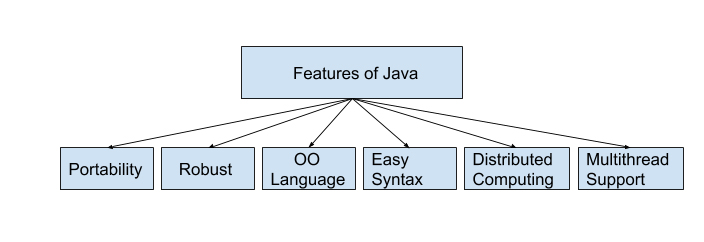
    Here is the pictorial description of features of java programming language given below and it is very well detailed in the section of uses of java programming language .

    Uses of Java Programming Language

    Guys you are here to learn Java programming language with our easy Java Tutorial right ? But do you know the uses of java programming language .There are many reasons and usage of Java programming language. Some major points are listed below . In one section very soon we will also throw light on scope of Java programmer .

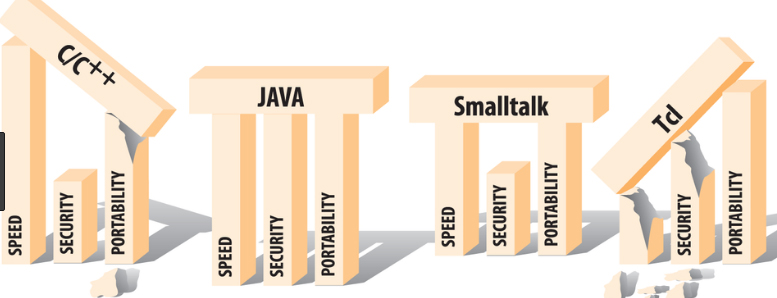
    • The Java programs are portable in a network (platform independent). The code written by programmer is compiled into bytecode. This bytecode can run anywhere in a network (server or client) with JVM which interprets the bytecode into computer understandable code. The JVM have an optional JIT compiler which compiles the given bytecode into m/c readable code.
    • Programs written in java language are robust. Java programs is different from other languages e.g. C++ as it contain no references to data external to other object(s). The JVM ensure integrity by applying a number of checks on each object.
    • Java is object-oriented language where objects are thought of as “nouns” with which we relate to. A method of a class renders object’s behaviors.
    • As compared to other languages java is relatively easy to learn and easy to write, specifically for developer with background in C. Also finding errors is very easy in java.
    • Java language is designed to work on distributed computing which means all programs in Java are same as sending and receiving data from a file.
    • Java supports multi-threaded environment which help user to write program to perform several tasks simultaneously.

    Now let’s know more on Java Tutorial .

    Java editors

    As Java is getting very popular among the developers, many IDEs (Integrated Development Environments) have been developed to help programming in writing code effectively and quickly. Following are some very popular java IDEs

    • Very old yet effective tool to write java program is Notepad . Developers working Windows machine can take the help of simple text editor like Notepad or TextPad. They can use java command for compiling and running java code e.g. java etc.
    • Netbeans is also quite popular Java IDE. It is available as an open-source and free bundle at https://www.netbeans.org/index.html.
    • Last but very popular IDE is Eclipse. This IDE is getting developed and maintained by the eclipse open-source community. Users can download Eclipse IDE at https://www.eclipse.org/.

    Java Editions

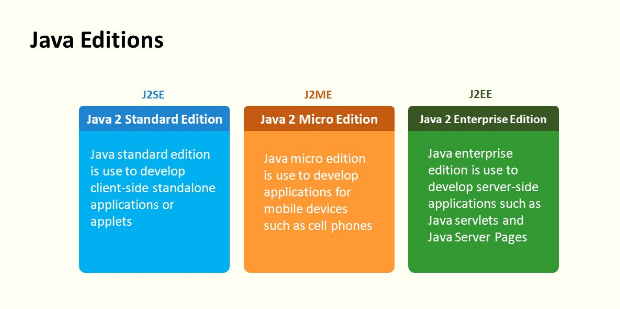
    The Journey of Java is continuously getting matured  with time in both functionality and reachability to all services. The Java platform has mainly three different Java editions which are defined below:

    Here is the Java editions list –

    J2SE(Java 2 Service Edition) is first edition of Java which was developed for writing applets  and other Java-based applications based on applets.

    J2EE(Java 2 Enterprise Edition) is the second edition of Java architecture for developing multi-tier enterprise applications. The basic development in J2EE was JSP pages with access to all J2EE components, including JavaBeans and servlets. These JSP pages at the end compiled into servlets and have all the benefits of server-side Java applications.

    JavaFX is a inbuilt Java library which helps users to build Rich Internet Applications. Multiple platforms can run this applications consistently using this library. These developed application JavaFX can run on various type of electronic devices such as Desktop Computers, TVs,  Mobile Phones, Tablets, etc.

    J2ME(Java 2 Micro Edition) is the third edition of Java architecture with the help of which programmers use java programming language to develop programs for mobile wireless information devices such as cellular phones and personal digital assistants devices.There are many devices where Java application are getting used. Some of them are:

    1. Web Applications such as irctc.co.in etc.
    2. Desktop Applications such as video players, document readers, media player, antivirus applications etc.
    3. Enterprise Applications such as financial applications.
    4. Mobile applications
    5. Million of Games

    Type of Java applications

    Next important section of our Java Tutorial is about Types of Java Applications .There are basically four types of Java applications which are explained below:

    Standalone Applications

    A standalone application is a program which is installed in your PC and runs only on your computer. In case you want to use this application, you need to explicitly install it into your m/c.

    Applets

    An applet are compatible with Internet can share information over it. These are to be executed on the client machine which should have Java-Compatible web browser like Internet Explorer or Mozilla. Applets themselves are Java programs which reside on server side. Applet can be implemented by embedding it into an HTML page (image or sound file) and they cannot be executed alone. To run applet one should need to access an HTML page which has embedded applet. Whenever web browser downloads respective HTML page, it also downloads the installable file. This file contains Applet which executes it on the local machine.

    Web Applications

    As the name suggest, Web applications run on the Web Server over the internet. Web applications can be accessed with the help of web clients (web browsers). Whenever user open any web page by specifying the URL (Universal Resource Locator), he/she actually access some web application.

    The main components of a web application in Java are Java Servlets, Java Server Pages (JSP) and HTML.

    Java Servlets are server side Java programs which send the result (also called response) to the client side java program. JSP pages can be thought client side java program which are combination of HTML and Java Code. The Web Server then converts the JSP pages into Java Servlets before execution of the program.

    User access the web application by specifying the URL and the respective URL corresponds to an HTML page. This desired HTML page is returned by the server when the user send request. In case the respective URL corresponds to the Servlet or JSP then it is executed on the Server side and the corresponding response will be returned to the client for rendering.

    Distributed Applications

    Java application is composed of different components (or Java programs). These Java components run on different machines and can easily communicate with each other. To be more specific we can say that Java Objects on one machine can use methods of the Java Objects from another machine. This make Java more suitable for distributed processing in the language.

    Our Next section on Java Tutorial will be Java Virtual Machine (JVM), Difference JDK, JRE & JVM .

  • Student Credit Card Alternatives – Better than Credit Card

    Student Credit Card Alternatives – Better than Credit Card

    Is there any alternative to credit cards ? Oh you are wondering then take a took here is the Best Student Credit Card Alternatives that are Better than Credit Card .

    Credit cards are not just meant for working people, businessmen or parents only even students can apply for credit card. Even if you are below 21 and unemployed and get no full time income, you can register yourself and apply for credit card under certain rules and regulations and policy. Even the students have their own expenses that they have to pay in their everyday life to fulfill their needs and requirements.

    Student Credit Card Alternatives – Better than Credit Card

    We have listed down few best credit card alternatives for college students which are as follows:

    1. Secured Credit Cards
    2. Student Charge Cards
    3. Checking Account
    4. Gift Cards
    5. Checking Account Alternative Cards
    6. Prepaid cards
    7. Cash
    8. PayPal debit card

    So now let’s take a deep look on each of the Student Credit Card Alternatives .

    Read Also : Survive high interest student loans – Amazing Tips

    Secured Credit Cards

    When you open account you make it with a cash deposit that backs the secured credit card. It mainly reduces your credit risk thus helps to maintain good credit score . Because you can spend only within your credit limit that equals to your deposit amount.

    It is important to spend within the credit line so as to bear from risks like debt or interest charges. You have to deposit money in advance every month timely or you will have to pay interest charges. The great thing is that the money you deposit can be refunded. So the credit limit for secured credit cards is limited to the amount that the cardholders have deposited so as to minimize the chances to pay interest charge.

    Secured credit cards is not just a Student Credit Card Alternatives but also a smart way to stay out of debt .

    Read Also : Credit Card Debt Pay Off- 5 Things to Consider About Debt Pay Off

    Read Also : Credit Card Debt Myths – Top 8

    Student Charge Cards

    Student charge card is also one among the best alternative credit card for the college students . This card helps the students to earn rewards as well enjoy it on short term basis , interest free money . You know how significant it is to maintain a good credit history . So if you are worried about credit history then opt for student charge cards , this helps to make a good credit history and thus gives excellent credit score .However, charge cards are not at all the  viable option to rely upon if your credit history is not good.

    Checking account

    There are various banks either traditional bank or online bank which offers less or no fee student checking account. Checking accounts usually come with standard debit card as well as ATM access. The best thing is that with such accounts there are no or less chances for students to incur debt. Either parents can deposit in money or even set up a joint checking account that lets them keep track on how much their child spends.

    Gift Cards

    Though Gift cards aren’t best for spending on daily basis But, gift cards can be helpful for students to make decent emergency fund. For example, the student could buy a $200 gift card in case he/she needs to make an urgent situation trip home or anywhere or a $500 gift card for other types of emergencies that require more money.

    All you have to take care is to know that the gift card doesn’t charge any fees for the money left or not used after a certain period of time.

    Read Also : Purchase without credit card top hacks

    Read Also : Safe Online transactions Tips & top 12 safe online transactions methods

    Checking Account Alternative Cards

    Checking account alternative card is one of the best Student Credit Card Alternatives. It can take a track on your spending as well as on your savings , Even parents can access the account of their ward .If you opt for the American express and Walmart provided Bluebird , then that serves much better . On this parents can drop money to the account whenever in need . They can keep an account separately for students and set limit on your daily spending .

    Prepaid cards

    Prepaid cards are the best alternative credit card for college student as they are specially created for them. Prepaid card allows parents to have control over student spending and also for them to deposit more money onto the card for their children to spend.

    Read Also : Pros and cons of credit cards – All the Hidden Facts on Credit cards

    PayPal debit card

    PayPal debit card provides notifications to parents about the transaction and allows accessing the account as well as tells the spending limit. It also has a feature that allows parents to transfer money in the account quickly in an emergency.

    Read Also : PayPal Vs Google Wallet : Best Online Money Transfer / Payment System Compared

    Read Also : PayPal Vs Venmo : Best Online Money Transfer System Compared

    Cash

    Yes of course, carrying cash along with us all the time that too heavy money is risky that is why our parents suggest to use debit or credit cards along with us while going for shopping or any other kind of payment or transaction. But the students can carry cash along with them as they would not need much cash to spend. They have less expense so they can carry cash with them.

    So these are the some of the widely used Student Credit Card Alternatives that serves better than credit card for students in their life . Handling finance at college age is not an easy task , the more wise you begin the more bright money management capacity you get.

  • Enable or Disable Superfetch for Windows

    Enable or Disable Superfetch for Windows

    Well some of you who launched to read this may have fairly an idea about super fetch in windows. Due to some reasons most of you would be looking out for how to enable or Disable Superfetch for Windows . If yes, then this is exclusively written to assist you. First of all for some of the non tech people let me introduce this term elaborately. Those who know please skip to next subheading don’t mind my lecture.

    What is super fetch ?

    Well superfetch technology is part of Window OS right from its vista version. It’s not a big deal to say that superfetch technology is one of the parts in windows memory manager.

    Read Also : The ultimate guide to make Windows run faster (Boost Computer Speed)

    Why Superfetch – Enable superfetch for windows

    Know what ? You should Enable Superfetch for Windows for particular reasons like these we gonna discuss .

    Basically Superfetch has two aims firstly it reduce boot time and secondly to makes sure that the applications that you use the most loads fast and more efficiently. Superfetch adapts your usage patterns.

    Let’s elaborate the first goal that is decreasing boot times. All through the Windows boot process, the same files need to be access at various different period of time. Superfetch also track record on which data along with files need to be accessed and when. It also stores all the track record data inside a trace file. During following boot, this information is used and helps to make the loading data/files faster and well-organized.

    Superfetch performs more tasks to make the boot process more efficient. It also helps to increase the access speed by rearranging the files stored on the disk in order to occupy the contiguous storage locations during the boot process. Basically it performs this as a schedule task on all three day and the some of the specific file layout gets stored in the Windows/Prefetch/Layout.ini.

    Read Also : Record iPhone iPad Screen on Windows & Mac

    Let’s elaborate the second goal that is to make applications open or load faster. Superfetch simply does this by pre-loading the applications that are used mostly by you in your main memory, based on not only the usage patterns but also when one access or use it. For example, if you have the same daily routine of opening the chrome – gmail, SuperFetch will pre-load these into memory in the morning and help to load fast.

    Superfetch for applications basically operates similarly as the boot variant does like, it traces what files are opened by an application during the first ten seconds that the application start up. It helps to load the proper data in memory at right times.

    Read Also : Best Garage Band Alternatives for Windows and Mac

    Superfetch & RAM

    Superfetch really serves great to make you use fullest capacity of your RAM. The high you’re RAM the more you reap super fetch benefit. Superfetch helps in maintains and improves system performance overtime. Superfetch is actually a feature introduced back on the windows vista and it will constantly analyze & adapt the RAM usage pattern and apps you run most often. Superfetch is something that every operating system must have.

    Enable or Disable Superfetch for Windows

    Now lets see the methods to Enable or Disable Superfetch for Windows step by step .

    Enable or Disable Superfetch in Services

    1. Press the Win+R keys to open Run, type services.msc into Run, and click/tap on OK to open Services.
    2. Double click/tap on the Superfetch service.

    Read Also : Create Virtual Desktop without Upgrading to Latest Windows OS

    Now to Enable Superfetch then

    • Firstly click to Change the Start-up type to Automatic.
    • Now click on the Start button and tap ok.
    • And now simply close services.

    One strong reason to disable superfetch for windows is that people experience enormous disk usage due to superfetch so if you want To Disable Superfetch then

    • Click and tap on the stop button appearing on your screen.
    • Now simply click on to Change the Start-up type to Disabled and after that click on
    • And now you can simply close Services.

    Read Also : Best Baby Monitor systems – WiFi & Night Vision Video Monitors

    How to turn on/off Superfetch in Windows 10 ?

    For latest Windows turn on/off superfetch with these steps

    1. Click on Run msc to open the Services Manager.
    2. Now simply Scroll down to Superfetch service.
    3. After that double tap on super fetch service to open Properties box.
    4. Now Click on Stop so as to end the process.
    5. Now simply make the start-up type Disabled by simply clicking on Apply.
    6. You can exit the Services Manager once you click to ok.
    7. You may have to restart your Windows 10 PC to end the process

    So we hope you guys found it useful either to enable windows superfetch or to disable windows superfetch technology .

  • Best Baby Monitor systems – WiFi & Night Vision Video Monitors

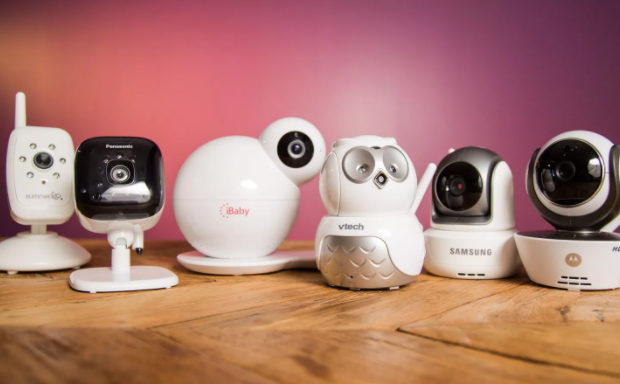
    Best Baby Monitor systems – WiFi & Night Vision Video Monitors

    Haven’t you ever thought as a parent , if there was a chance to monitor your kid from anywhere . May be to ensure their safety , sometimes to see their activity , sometimes to see your baby sleeping comfortably without waking up them . Yea it is all possible with some of the Best Baby Monitor systems

    Why you Need Best Baby Monitor systems – Reasons to prefer baby monitors

    There are so many Best Baby Monitor systems that can be useful for those who face these situations . This reasons can be the answer to why prefer baby monitor systems .

    Parents of an infant or toddler may have experienced those days and nights of silently peeking into the room where your baby is taking nap . But in most cases you will end up waking up your baby because of any noise or disturbance.

    Yes, Not only when your baby is sleeping but also when you try to see your baby’s actions or behavior maybe when alone in the room or with nanny.

    You have a babysitter who makes your kid more worried , simple monitor the baby from anywhere . Even from office so the babysitter can’t be pity .

    Well, we have got the best way to easily watch your baby even if you are alone at home or far from your baby like maybe in the kitchen preparing food or milk for your baby or maybe some other work. You can simply keep an eye on your baby through best innovation called baby monitor which includes a camera to watch over your baby, as you carry a handheld device that lets you know what is your baby doing or what is happening with your child at any particular moment, regardless of in whichever corner of home you are in.

    With the help of these excellent baby monitors you’re free to even take rest or even move around your home and get household tasks or other responsibilities done during babies sleeping time.

    You may find that few baby monitors are expensive enough as compared to other baby monitor while buying. Well, with no hesitation you can go for expensive baby monitors not just because they will have more and better features but also that you will be using it regularly and for a longer time specially all through the baby and toddler years. So you must make up your mind to go for the best baby monitor with best features even if at little higher price as these baby Monitors are a valuable investment and worthwhile as it can offer you peace of mind and do other tasks also help you get some peaceful sleeps.

    Read Also : Unavoidable Parental Control Apps ,Tools to monitor children

    Lot of baby monitors may come with great features like HD video quality ,  have wireless capabilities like WiFi.these baby monitors is also best recommended as it include basic sound monitors that comes with numerous execution  for e.g. Digital Enhanced Cordless Telephone. it will help to remove the obstruction and the need of security that occurs from monitors while using the 2.4 GHz frequency band.

    Read Also : Disinfect Baby Toys Naturally With these Top 3 Methods

    Best Baby Monitor systems – WiFi & Night Vision Video Monitors

    Here is the list of Best Baby Monitor systems – WiFi & Night Vision Video Monitors that can be really helpful to you as parents

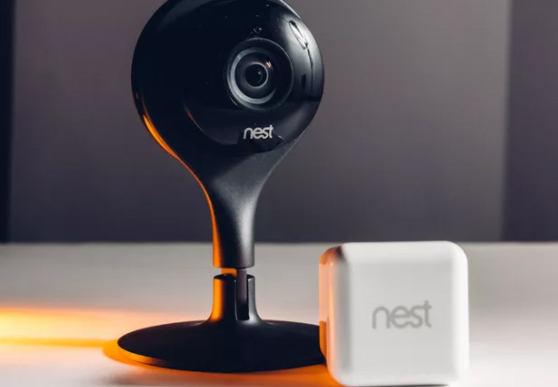
    Nest Cam

    Nest cam is a baby monitoring device which has 130 degree wide-angle lens. This device uses an app and your WiFi to flow video to your Smartphone be it iOS or Android, tablet, or computer. With a super clear picture and two-way audio that lets you calm your baby even if you are in the other room that helps put your baby back to sleep if accidentally your baby gets awake. The nest camera is the best recommended baby monitoring device.

    Read Also : Baby Straw drinking – How Teach Your Toddlers (baby) to Drink from a Straw

    Read Also : Healthy Baby Food Recipes In Nutshell – Homemade

    Samsung SafeView

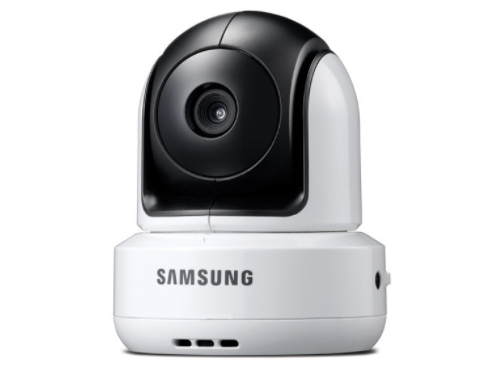
    The SafeView baby monitor is a standalone system that has various features specially like ability to zoom in and zoom out, tilt 100 degree up or down and pan movement 300 degree left and right, allowing you to look inside the room for the toddler while play with toys instead of sleeping also track who all enters the room. It also has a built-in mic that lets you communicate with your child through which you talk and also tell to get back in their bed and stay inside the room. The SafeView baby monitor will also provide notifications as soon as the rechargeable battery is low so that you can immediately recharge the battery or you’re out of receiving range.

    Read Also : Best Smart Home Gadgets for Home automation- Smart home

    Infant In View

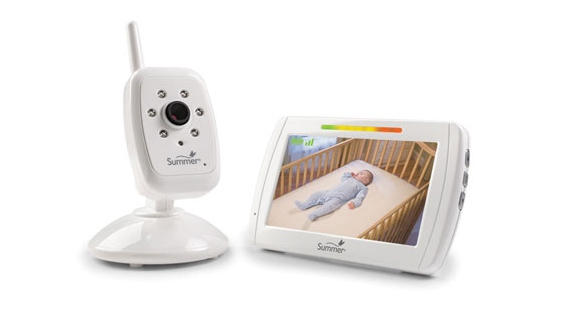
    Infant In View is another best baby monitor with amazing features. So, you now will not have to gaze when you have this best baby monitor the Infant In View at your home. You can clearly and easily watch your child on the 5 inches big screen and the feature to zoom in on your child. It also includes features of standalone systems like:
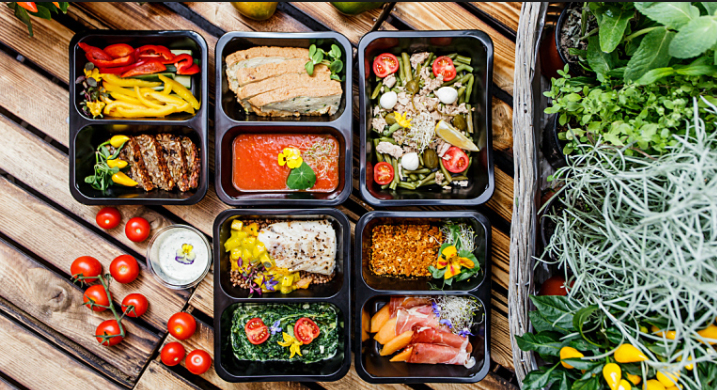
    Low-battery notification

    Notification while Out-of-range

    Sound-activated lights

    Rechargeable batteries

    Read Also : Best play time idea for your one year old toddler

    Read Also : Toddler Separation Anxiety Overview – Preschool Age

    BabyPing Video Baby Monitor

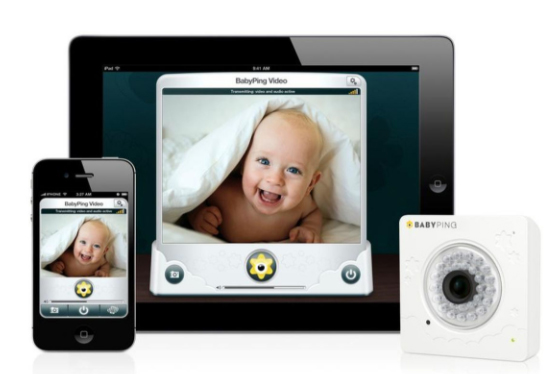
    BabyPing monitor can be easily get connected through apple devices like I phone, I pad or I pad touch which would require 3G/4G and Wi-Fi networks to be able to get started and see your baby. parents or grandparents can easily watch and hear their baby. you can easily hear clear voice of your baby without any intrusion of background noise with help of amazing feature called the unit’s Smart Filter. BabyPing monitor provides clear night vision that helps the parents to see their infant or toodler even in the dark room specially at night while their baby is taking nap.

    Read Also : Internet Safety Rules for Kids – Online Safety Tips

    Philips Avent DECT Baby Monitor

    Philips has been the brand of trust from ages now the company is part of your parenting life as well.Yeah , Philips has one of the best baby monitor system which can make your parenting life smart.
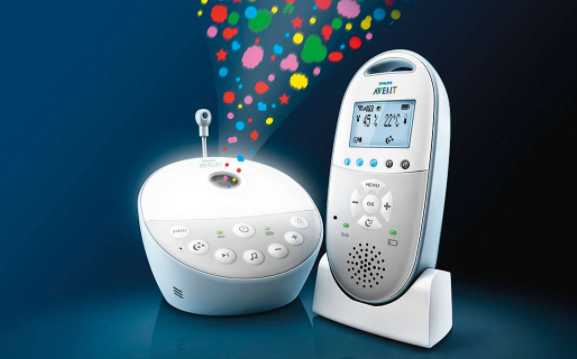
    Philips Avent DECT baby monitor is a reliable baby monitor system to buy . This baby monitor system comes with temperature sensor also This is a great feature because it allows you to understand the kind of temperature in your baby’ room so its a handy alert for you as a responsible parent Added more with lullabies and calm pleasant night light for babies . Within 330 meters range it makes your connection with baby easy.

    So these are some of the Best Baby Monitor systems having WiFi & Night Vision Video Monitors which ensures to monitor you baby anytime tension free.

  • Best Meal Delivery Services – Plated Vs Sun Basket Vs Martha & Marley Spoon

    Best Meal Delivery Services – Plated Vs Sun Basket Vs Martha & Marley Spoon

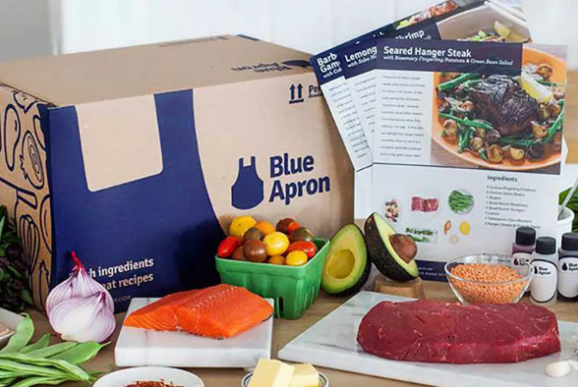
    From 2012, online sites started marking their spots in the online food industry to offer Best Meal Delivery Services to the customers. These meal kits were accepted by the customers with utmost interest. Meal kits started being available with many online sites and people were confused to book their meal box from which online site. All working people started purchasing these meal kits of various cuisines because the meal kits come with the exact amount of ingredients for a meal.

    The meal kits are all designed for two, four or 6 persons by expert chefs of these companies. Each site has their own variety of menus for the customers to choose from. These companies made the customer’s life less stressful and easy going. With these Best Meal Delivery Services, you can prepare your meal within no time. Book your meal kit online and you will receive the box at your doorstep. All you have to do is just add the ingredients and cook your meal according to the recipe given in the kit.
    Best Meal Delivery Services – Plated Vs Sun Basket Vs Martha & Marley Spoon

    Earlier we have compared the Meal Kit Delivery services online such as – Amazon Meal Vs Walmart Meal Vs Blue Apron Vs Hello fresh

    Now let us see a few sites that present a best meal delivery services to the customers.
    1)      Plated

    From lunch to dinner and desserts, Plated offers their customers, the best quality products and ingredients for your meal kit. The menu of Plated look deliciously mouth-watering and some of their cuisines are Mushroom Ragout, Turkey Shepherd’s Pie, Beer Braised Chicken, Broccoli Cheddar Soup etc. They offer vegetarian, non-vegetarian and seafood cuisines. Their meal kits are packed to serve 2, 3 or 4 persons.
    You can book your meal kits for a week and you also have the option of skipping a week if you are going out-of-town. They change their menu every week and you will have 20 options for dinner meal kits to choose from. Moreover, you can add you dessert too. Their plans include meal kits for 2, 3 and 4 servings per night. You can choose your favourite meal kit. Their prince range starts from $9.95 per serving.

    All plated products are fresh and organic. They do not add any hormones or antibiotics to the meat, poultry or seafood. You will receive the fresh meal kit at your doorstep in an insulated package which will keep the ingredients fresh until you cook.

    Read Also : Amazon Go Store – Grocery Store of the Future

    2)      Sun Basket

    This is another online service to offer best work meal kits to the public.  Sun Basket brings sustainable and organic products to arrange your meal kit. Like Plated Meal Kit, Sun Basket has an attractive menu with both vegetarian and vegan options.  The seafood is arranged from the fishermen and the poultry and meat products of Sun Basket never come with any added hormones.

    All the cuisines of Sun Basket are approved by an expert nutritionist and their chef Mr. Justin Kelly always makes sure that they pick the right ingredients for the meal kits. Sun Basket Menu includes Chicken breasts and muhammara with apple-celery salad, Roasted salmon with pearl couscous and date-apple salad, Shrimp tacos diabolic with pickled cabbage and lime, Sweet potato and black bean chili and a lot more delicious meal kits. The signature item of Sun Basket is the sauce and blend of spices Justine Kelly makes. The package in which the meal kits are transferred is sustainable and can be recycled too. There are two sets of menus, designed as Classic Menu and Family Menu. As the name says, family menu kit will include the ingredients to prepare dinner for 4 and the classic menu is for 2 – 4 persons. Sun basket’s Classic Menu starts from a price range of $11.99 per serving and family menu will be $10.99 per serving.

    3)      Martha and Marley Spoon

    The woman behind Martha and Marley Spoon is Martha Stewart who has brought diverse cuisines for the customers to choose from. From classic to creative dishes, Martha and Marley’s spoon collect their products from farms and fishermen. All the products they buy are organic and friendly. She brings the easiest recipes to her customers.

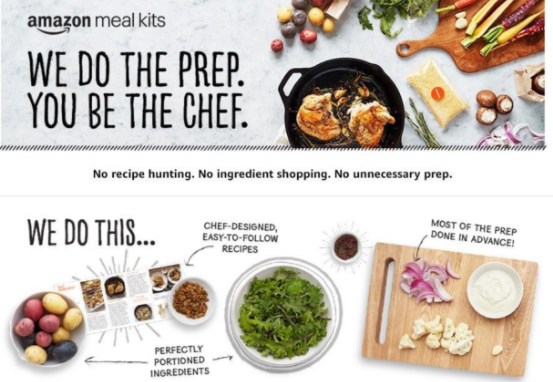
    The recipe cards will be added to the meal kit and the customers can prepare their dish in a restaurant style. The ingredients for your dinner will be proportioned correctly so that you will not have any wastage of food items. The ingredients in boxes will stay fresh until you cook since the boxes are chilled. Also, the ingredient comes in small packs with its name, making it easier for the customer to pick an item from the box and add to the dish you are cooking.

    Martha and Marley Spoon’s current recipes include Chicken Schnitzel & Potatoes with Braised Red Cabbage, Peruvian Beef Stir-Fry with Potatoes and Cilantro, French Onion Grilled Cheese with Caper Tarragon Green Beans, Spicy Honey Shrimp with Garlicky Kale & Grits. They also offer vegetarian, vegan and gluten-free meal kits for their customers to be healthy. The recipes change every week with 7 items on the menu along with 3 customer favourites. Martha and Marley Spoon also tag a few of their menu’s like kid-friendly, under 30mins and one pot meal. Their major attraction is a plan which includes three meals for two persons for $10.25.

    In a survey conducted by experts to find the best meal kit delivery services, they ordered the kits online from various sites. They wanted to check and rank these service providers on the basis of quality, quantity, and price. The found the top six companies and that list includes Martha and Marley Spoon, Plated and Sun Basket.

    Apart from these the other companies that ranked high are Blue Apron, Hello Fresh, and Green Fresh. On a scale of 100, Plated was ranked with 90, Sun Basket with 85 and Martha and Marley scored an 80 on 100. All these service providers give you the best meal delivery services at your door to cook your lunch, dinner or even to make a dessert. Cooking will be fun and innovative with these meal kits.

  • Must Have Smartwatch apps for Android and Apple watches

    Must Have Smartwatch apps for Android and Apple watches

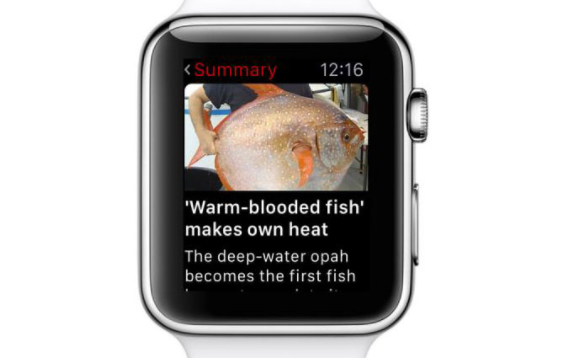
    If you have just bought an android or apple smartwatch or already have any of these smartwatches then you all must be wondering what all apps are there . And which one are especially the most useful and best ones to download and make use of it. Well in this article we would help you out by recommending the best must download apps on your smartwatch that will be very useful for you. These Smartwatches are found as the only companion to smartphones when it comes to pairing and sharing the features and wireless connectivity. With lot of innovation and technology people are moving faster and better in their life. So here are some of the must have smartwatch apps for android and apple watches –

    Smartwatch apps for Android and Apple watches

    Here is the list of must have smartwatch apps for android watches ( Android wear apps ) and smartwatch apps for Apple watches as well.

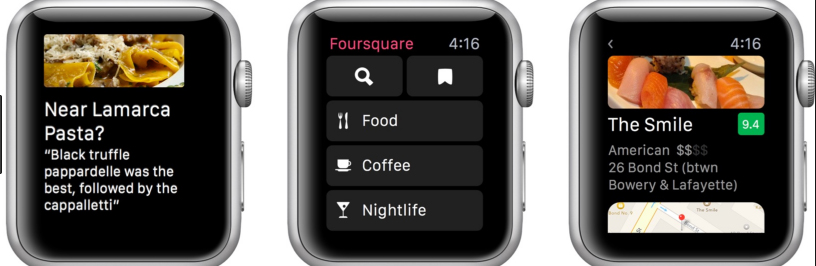
    Foursquare app

    The foursquare app is the best smartwatch app for  Android Wear 2.0 smart watch and it feels pleasure to use its amazing features like easy navigation that helps you find the best food, drink and activities according to your location. You can easily find the best coffee shop or restaurants with just an easy tap. It is regarded as one of the best Android wear apps .

    Read Also : Best free calling Apps for all Smartphones

    Foursquare App Supports on Apple Watch : Yes

    Foursquare app Supports on Android Wear : Yes

    App in the air

    I am sure that a lot of you must often fly from one place to another for different purpose like business meets , personal trips etc , for amazing destination vacation, meeting your friends or family. Well, in that case App in the air will be your best personal assistant app to help you provide with all right flight information.

    Read Also : Android: Prevent apps from running at startup(Stop/Disable Apps)

    It provides you all & everything about flight information on your wrist , Yea it’s true that on your smartwatch you can get details on real-time boarding and flight status.

    App in the air app will also provide you airport tips and maps. It is best recommended for all the android & iphone smartwatch owners and users as it works offline and of course, there’s another amazing feature that it would help you update your check in status automatically.

    Supports on Apple Watch : Yes

    Supports on Android Wear : Yes

    Strava

    Strava app is an app that helps you to record and track your workout session even with your phone so you can definitely leave your phone at home and say all thanks to Strava app downloaded on your smart watch. Strava is available for both android as well as apple users.

    Read Also : Prevent Malicious Spying Apps on Both Android & iPhone

    Read Also : Identify Spy Apps on Mobile that Hacks Bank Account

    Strava for Wear 2.0 syncs with included heart rate monitors, along with that some Wear 2.0 watches also allows you to listen to your favourite music or even take a call in between your workout session.

    You can now easily track your running and cycling sessions without Smartphone. Strava app also provides you one more fitness platform to choose from besides the default Google’s Fit app.

    Supports on Apple Watch : Yes

    Supports on Android Wear : Yes

    Wear Casts

    Wear casts is the first standalone podcast app for Android Wear as it will allow you to download podcasts to your watch. The app will create playlists and would notify when the latest episodes of your favourite apps are available.

    Wear casts Supports on Apple Watch : No

    Wear casts Supports on Android Wear : Yes

    Uber

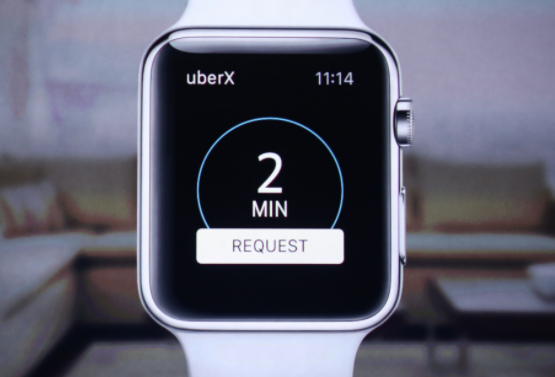
    Uber app is amazing must have app for all the android & apple smartwatch owners and users. If you have LTE connectivity then you will not have to pair your smartwatch to your phone but if you don’t have LTE connectivity then you will have to pair your smartwatch Uber app with your phone.

    The Uber app lets track your cab that you have booked also call a cab as well as check the status of your ride.

    Read Also : Unavoidable Parental Control Apps ,Tools to monitor children

    Uber for Apple Watch : Yes

    Uber for Android Wear : Yes

    CloudPlayer

    You may find various music player apps for android smartwatch wear but amongst all of them we would recommend CloudPlayer as must have app. CloudPlayer can be used offline or by One Drive, Drop box as well as Google Drive. It basically lets you build your own personal with your own MP3 files. The Android smartwatch Wear CloudPlayer app gives you instant control from your wrist.

    Read Also : Top 8 Smule alternatives – Best Karaoke Singing Apps

    CloudPlayer for Apple Watch : Yes

    CloudPlayer for Android Wear : Yes

    Asana Rebel

    Asana Rebel is the best and only yoga and fitness based app designed especially for women. This fitness based app helps and makes it easy to track your workout sessions. Asana Rebel is a free app but you may also subscribe if you want to access to the coach and fitness expert plans to see best yoga poses etc.

    Read Also : Best Apple Watch Alternatives-Affordable Gadgets

    Supports on Apple Watch : Yes

    Supports on Android Wear : Yes

    Nike + run club

    Nike+run club application comes as pre-installed on the special Nike edition of the Apple Watch Series 2, and supports GPS on the Series 2 and is your best running partner. This amazing app motivates you to run better and helps you reach your running goals and target every day.

    Read Also : Best fitness gadgets to help you stay fit and healthy

    Read Also : Amazing Fitness Apps To Track Calories & Keep You Motivated

    Supports on Apple Watch : Yes

    Supports on Android Wear : Yes

    BBC

    The BBC app on your smartwatch would flash latest, breaking news and would keep you updated with daily important news. You can read the latest news easily right on your wrist. So you can have quick look on your wrist with just one touch tap rather than reading newspaper or searching on news portals for latest update.

    Supports on Apple Watch : Yes

    Supports on Android Wear : Yes

    Shazam

    Shazam helps you to identify the unknown song that you might just heard somewhere just by letting Shazam take a listen to that song. After that the Apple smartwatch app will provide you with all the information of the song and uses Handoff so you can buy that song through iTunes.

    It will also display a list of previous songs identified. Shazam is the best recommended as must have app on your smartwatch.

    Shazam for Apple Watch : Yes

    Shazam for Android Wear : Yes

    So here are the some of the best Smartwatch apps for Android and Apple watches . For your android watch the best android wear apps and for your apple watch some of the must have apple wear apps are detailed here .

    We hope this helps many of the apple watch and android watch users about different Smartwatch apps , in case if we missed your favorite Smartwatch apps do let us know in comments .

  • Meal Kit Delivery – Amazon Meal Vs Walmart Meal Vs Blue Apron Vs Hellofresh

    Meal Kit Delivery – Amazon Meal Vs Walmart Meal Vs Blue Apron Vs Hellofresh

    When you are back home from a few days trip and you find nothing in your kitchen to prepare your dinner, then you would be really frustrated. You are tired and you just want to eat some home cooked meal and just slosh off. What are your options? Why not buy some food from outside? No, you do not feel like eating from outside too. Since you were on a trip you had to have your food from restaurants. You are also too tired to go and shop groceries. So, here are your life savers – The meal kits. To be Honest Meal Kit Delivery is a boon for the generation and future .

    Meal Kit Delivery

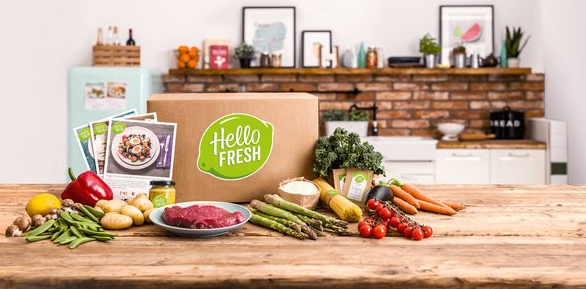
    Amazon, Walmart, Blue Apron , Hellofresh , Plated are some of the online sites through which you can book a home delivery of groceries for a meal.  These online sites work in the morning as well as in the evening. You can easily choose Meal Kit Delivery option from their menu and buy it online. Your meal box will arrive at your door step quickly.

    All the meal boxes are made by their chefs. He chooses the right ingredients for a meal for two or four and then it will be delivered at your home. These meal kits include both vegetarian and non-vegetarian. You can prepare your meal with fresh veggies and meat.

    Amazon Meal Vs Walmart Meal Vs Blue Apron Vs Hellofresh

    Now let’s have a look at what these Meal Kit Delivery stores have. Here is the comparison on best Meal Kit Delivery services online like Amazon Meal Vs Walmart Meal Vs Blue Apron Vs Hellofresh .

    Blue Apron Meal Kits

    Blue Apron brings in all farm fresh produce according to seasons. The meat and poultry have no added hormones. They bring in fresh produce to the store from the farmers to enhance the quality of their products. Fresh ingredients can always make your food yummy and healthy. Blue Apron only delivers sustainable seafood recommended by the higher authority. They bring the fresh produce and delivers to you. There are no other middlemen involved. So you imagine that Blue Apron only gives you farm fresh ingredient to cook a tasty meal.

    Moreover, by delivery the right amount of ingredients for meal, they are reducing the food waste. The customers will have to just add all the ingredients completely for a meal. Wastage does not occur.

    Blue Apron Meal Kits Menu

    The menu normally includes items like glazed chicken, French Bread Style Pizzas, Korean Rice Cakes, Roasted Veggies, seared chicken and pan sauce, pork chops etc. The names sound so mouth-watering. Try out the Blue Apron Meal Kit and enjoy a day.

    Amazon Meal Kits

    Amazon.com brought in variety of meal kits for their customers to enjoy. When they first launched, their menu included 17 meal kits, like Steak Au Poivre, Roasted Cod and Cannellini Bean, Ragout and Pesto etc. Their price range was much more favourable, when compared to other online sites.

    Amazon also launched the Amazon Go Store in Seattle for their customers to enjoy the hassle-free shopping. They have also brought ready to eat in snacks,lunch,dinner and meal kits in their store. Their menu also attracts the customers because of their cuisines and fresh products.

    Walmart Meal Kits

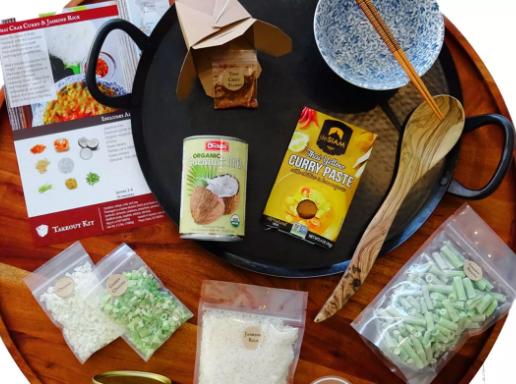
    Walmart launched in after Blue Apron and Amazon Meal Kits and they brought in meals like chicken tikka masala, thai crab curry with jasmine rice Spanish paella etc. The Walmart works with several brands to offer their customers different cuisines. Walmart Meal Kit Delivery was a challenge to other sites. Amazon and Walmart are trying to be better than the other. They also made the customer’s life easier with their amazing meal kits.

    There is a tight competition between Meal Kit Delivery services of Amazon Meal Kit Vs Walmart Meal Kit

    Hello fresh Meal Kits

    Our next site is Hello fresh and they offer diverse meal kits for their customer with easy recipes. The customers can pick and plan show on their website and their expert chefs will select the ingredients and send for delivery. You can make weekly booking, and hello fresh will deliver your meal kits at your door.

    Hellofresh Meal kits are available in various cuisines like Balsamic Fig Chicken, South Western Stuffed Peppers, Moo Shu Pork Tacos, Sizzling Shrimp etc. The ingredients for the meal kits are picked by directly from the producers and their chefs arrange the meal kits.

    With these magical meal kits, you can cook your meal for a family with ease and comfort. All the ingredients are right in front of you and you do have to search for any other ingredient. The recipes are also there for you in the meal boxes and you can cook any dish that they offer. All these sites change their menu every week and you can book a week’s meal kits at a time by selecting their plans.

    The package comes in high quality boxes with ice bag if required to keep the ingredients fresh till the delivery. Customers are really happy these companies who made their life easier.  They do not have to waster a lot of time in kitchen. Cooking becomes super fun and quick with these meal kits and all can spend the rest of the day with their family.

    Blue Apron was launched earlier and they had built a good market. When the Walmart started, these two sites where on the same ground with varieties in meal kits and with a little price range. Then pops in the Amazon with very reasonable rates for their meal kits. This surely made the other two to struggle. Hellofresh the next competitor arose with attractive meal kits with their own varieties and styles. If these sites come to a reasonable rate for their fresh products, the customers will surely increase and we can have healthy new generation consuming farm fresh produce for the cuisines.

    So we have seen the comparison between the best online meal delivery services such as -Amazon Meal Vs Walmart Meal Vs Blue Apron Vs Hellofresh

  • Amazon Go Store – Grocery Store of the Future

    Amazon Go Store – Grocery Store of the Future

    The trend of the town now is this tech grocery store – Amazon Go store !

    During your busy life, shopping seems to be a task that takes a lot of time. Especially when you have to stand in a long queue in the supermarkets to pay your bill is very tiring and time-consuming. Have you ever thought about a grocery store where you do not have to stand in a queue to pay for what you purchased?  It would be easy for you to buy groceries any busy day if there is a store like that.

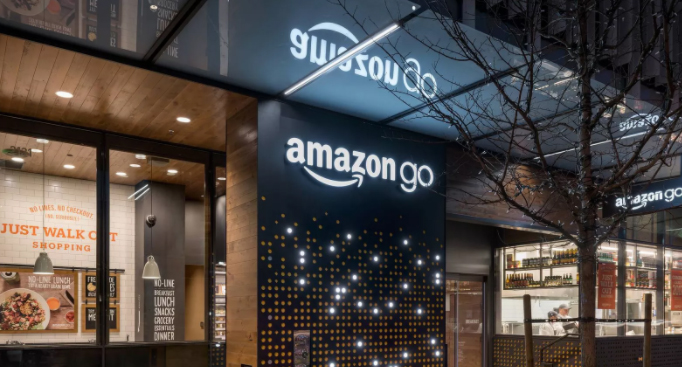
    So, here it is. A grocery store is opened recently where there are no cash counters and no more queues to pay the bills. Amazon.com, one of the famous online shopping sites is the master brain behind this grocery store. They have named it as Amazon Go Store and this grocery store is situated in Seattle, Washington. The store is open from 7 AM to 9 PM, Monday – Friday.

    Now recently Amazon has started Expanding their Amazon Go stores . Also new Amazon Go stores for  New York is coming up and it is expected that Amazon Go Chicago and Amazon Go for San Francisco is expected .

    Amazon Go store for India is not yet available but still Indians have made Watasale in kerala which can be called as the India’s Amazon Go store .

    What exactly is Amazon Go ?

    Amazon Go Store is a grocery store in Washington, opened up for the public in 2018. This new technology grocery store can be easily accessed and at the same time, shopping becomes simpler. Why does it say that shopping is easy? Because the customers visiting the Amazon Go Store does not have to stand in a queue to pay their bills. The Amazon people call this experience as – “Just walk out” shopping experience.

    Doesn’t that sound too good to you too? Yes, it is true, you can pick your groceries and just walk out of the Amazon Go Store and your purchase bill will be debited from your Amazon Account. You will only need to have the Amazon Go App on your android phone or iPhone to shop here.

    How to Download Amazon Go on iPhone ?

    You can download amazon go for iPhone from Apple’s iOS Store .

    How to Download Amazon Go on Android ?

    You can Download Amazon Go for Android from Google’s Playstore

    Products inside the Amazon Go Store

    From ready to eat breakfast, lunch, dinner, and snacks, you can find almost all the necessary grocery items you will need. There are varieties of soft drinks, juices, bread, bakeries and a lot more. Amazon Go Store has its own chefs who prepare the ready to eat meals. Moreover, the chefs here make meal kits that are suitable or two persons. These meal kits are designed by the chefs with all the ingredients to cook a meal. This Amazon Meal Kit is the right pick for couples who are working and does not have much time to spend in their kitchen.

    Read Also : Best Smart Home Gadgets for Home automation- Smart home

    How Amazon Go Works ?

    You should have an Amazon Account to start shopping from the Amazon Go Store.

    Follow these simple steps to enter the Amazon Go store.

    • Download the Amazon Go App in your new generation Android phone / iPhone .
    • Register an account with Amazon and enjoy cashless shopping.
    • To enter the Amazon Go Store, you just need to open the app and scan it on the baffle gate at the entrance.
    • Start picking your groceries from staples, non-veg items, meal kits, wines and beers, juices etc.
    • The sensors on the shelves will track what you have picked.

    They have set cameras everywhere in the store that will watch all your movements and once you finish shopping, you can just walk out of the store.

    In case if you want to put back an item on Amazon Go store on to the shelf, you can do so and the Amazon Go App will deduct that item from your account. You will be only charged for the products that you have selected from the shelves. When you walk out of the store through the turnstile, automatically the sensors will track the products you have with you. You will then receive your bill as a message with the number and name of the products along with prices and sum-total. It will be deducted from your Amazon Account. Moreover, there are many staffs available at Amazon Go Store to guide you if you need any assistance.

    Read Also : Best Streaming Devices – All Top Media Streaming Box on Market

    Reviews about Amazon Go Store

    This Amazon Go Store of 1800 sq ft is spacious and the shelves are made in a way that customers can see all the products easily.  At first, the store was open only for the employees of Amazon in 2016. This was a test to check how well their technology is working. With utmost care and modern technological inputs, Amazon Go Store was successful and they decided to open it for the public in Jan 2018.The Amazon employees did a trial run for a year with only Amazon employees and customers were eagerly waiting for it grand opening. All the customers who shopped from the Amazon Go Store were extremely happy.

    This techy-cool shopping experience is sure to become every individual’s favourite since Amazon Go Store makes shopping effortless in Seattle. People are expecting more outlets in many places. But, surely it will take some time to have outlets of such kind. Let us all hope to see more Amazon Go Store outlets that makes every customer’s to have a hassle free and miraculous shopping experiences.

  • Best Programming Languages to learn This Year

    Best Programming Languages to learn This Year

    There are hundreds of programming languages and it is important to know which one to learn. Now there are lots of languages like C, C++, but some of them are new and mostly all of them have gone old. So you must know the Best Programming Languages that are best fit for you to learn.

    Especially Most In demand Programming languages which can give you job .

    Since the last decade there have been a lot of changes in the programming field. For example, C++ came after 2000, so a lot of products in the market are based on this technology.

    Let’s now look at the Best Programming Languages to learn this year . This depends on what the market projects want and what the users want?

    Best Programming Languages to learn This Year

    So here is a list of Best Programming Languages to learn to grab demanding job opportunities in IT field ranked on different criteria :

    JavaScript

    Top companies using JavaScript-Almost every company since it is a client side language . According to the surveys future of JavaScript learning is more high than any of the languages

    JavaScript is used for first class functions and it is best known as a scripting language which is used in web browsers. But it is, like other Best Programming Languages used in non web-based browsers as well. It is a prototype based scripting language that is dynamic, support object oriented imperative and functional programming styles.

    It is on the client side of an object which decides the occurrence of an event on a user’s click, thus widely used for controlling webpage behavior.

    Read Also : Enable / Disable JavaScript : Mozilla Firefox Hacks

    Java

    Top companies using Java-Google,Facebook,YouTube,Twitter,eBay,LinkedIn

    Java came into existence in 1995. It is the most used language out of all the Best Programming Languages all over the world. All of the server side applications, games and reliable sensitive applications are coded in java. Projects written in java brings dis-owner because of many reasons one of which is that it is slower,consumes more memory than other Best Programming Languages.

    Python

    Top companies websites using python – Google , Facebook ,YouTube

    To serve the purpose of testing microchips, python language is used. It appeared in 1980s and now it is used by thousands of people because it is one of the Best Programming Languages to easy to understand and due to its interpreted nature.

    It is easier than Java or JavaScript. It is also advised to start a programming career with python since OOPS concepts are easy to understand through this, on which every other Best Programming Languages are based.

    Read Also :  Introduction to Programming Languages : Programming Tutorials

    C#

    Top companies websites using C# as coding language – Google ,YouTube , Amazon ,Twitter

    C# is an evolution of C/C++. Several web based applications or web related projects are developed in C#. For example, all the desktop applications that are used are coded in C#. It is one of the languages that would run in dot net CLR. C# has been created by Microsoft to work with the dot net platform.

    It is one of the Best Programming Languages to develop applications depending on web.


    Swift

    Swift is a universally constructed programming language used globally. Furthermore, it is a way to deal with different security system, execution. The objective of the swift task is to make the best accessible language. But it is expected as a trait of C based language. Thus it is the Best Programming Language to make the code simpler to pursue and compose.

    C++

    Top companies using C++-Google,YouTube,Amazon,Twitter

    Though C++ is a downgrade of the C# language developed by Microsoft, still it is known as generalized language in the list of Best Programming Languages. It has two important component parts- First, immediate mapping of equipment highlights and secondly, zero overhead reflections based on those mappings. The advantage of C++ over C is it has more libraries.

    PHP

    Top companies using PHP-Facebook, Yahoo,Wikipedia

    PHP is a language for web development and server side applications. It has been widely used in 2017 and would be one of the Best Programming Languages in 2018 because almost all the work on the web development is based on HTML and PHP. The reason PHP is preferred is because the database of this language is stronger than any of the Best Programming Languages that claim to have good databases in the market. Its development actually started in 1995.

    Ruby

    Ruby is the object oriented programming in which everything is an object and every object can be operated and used to read and learn. Coming from 1995, it is still a booming language in 2018.

    So now when you have so many languages to choose from, it might really get confusing which one to go for to learn. Pay attention to this summary here-

    Which Programming language You should Learn ?

    Python: easiest coding is your priority . It is an ideal programming language to begin with .

    C,C++: being a master coder is a priority

    Java: If back end development is what you would like to do

    JavaScript: If front end development is what  you would like to do

    HTML & PHP: Website Developer is what you aim . One good programming language for job .

    To sum up as a whole, for one to be coder in IT field, he needs to understand the languages as a whole than just cramming them up. For one to be a coder, requires hard work. Keep coding.