Most of the Instagrammers around the globe is disappointed with Instagram Global Outage recently ( At least to some countries) , Social Media is a rage these days. Almost everyone is active on social media. Moreover the internet connections have also become cheap, boosting the social media usage even more. Well with the increased use of Instagram here we bring out – Instagram tips and tricks to be a Pro Instagrammer .
One such quite popular, well known social media platform is Instagram. Instagram announced that it achieved the milestone of 1 Billion users in June 2018. It has now become popular not only among the youngsters but also among the adults. New Instagram updates are being rolled out time to time adding new Instagram features, improving the interface and much more. A number of celebrities are also active on Instagram and you get to follow your favorite star as well.
The picture & video sharing app has a lots of filters for the editing of the pictures to be posted. You can post minute long videos as well. There are Insta stories which are visible to your followers up to 24 hours of you posting it. All these features attract masses of people towards Instagram.
You all must be knowing that most of the brands staring from the smaller ones and to all the leading brands, every brand uses Social Media Marketing to reach their customers. Instagram has become one of the leading platform for social media marketing. Instagram has also helped teenagers in following their passion. Many of them try to promote their work such as photography, art, food blogging and fashion blogging and much more. Love from followers keep giving them the boost required for following their passion.
But you must know some good and secret Instagram tips and tricks to be a popular Instagrammer .
Instagram tips and tricks to be a Pro Instagrammer
Here are some of the best Instagram tips and tricks:
Read Also : Contact Instagram Help Center Support for Any Assistance
Read Also : Instagram for PC – How to use Instagram for Desktop ?
Turn on Post Notifications on Instagram
If you want to see every Instagram picture, video or Instagram stories your best friend, you favorite celebrity or your favorite brand, just turn on the post notifications for that profile. This way Instagram will push a notification to you whenever they post.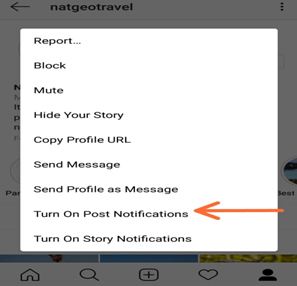
To get Notification of your Favourite Instagram user –
- Go to their Instagram profile
- On top of the right side corner , tap that three dots
- Turn on Post Notification , just enable it .
This way you can make yourself to Never Miss a Instagram Story Again ! If you want to stay updated on Instagram then this Instagram tips is ideal for you .
Read Also : WhatsApp Data Sharing Disable Methods to Protect WhatsApp Data
Read Also : Best Facebook Ad management tool – Facebook Advertising
Add & Manage Multiple Accounts
If you have an Instagram account for your pet or you have some business of your own to promote you can manage two Instagram accounts from a single Instagram app. From your profile click on gear button (for apple) or three vertical dots (for android), scroll down and click on add a new account and then you can access it easily as well.
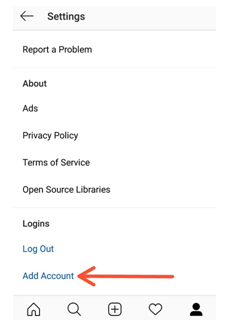
This is the Instagram tips to use multiple Instagram accounts on one mobile app .
Use as a Photo Editor
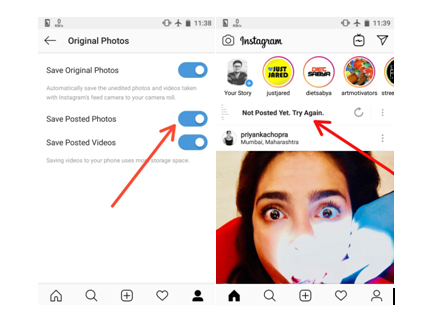
Instagram has some amazing filters giving you a gorgeous picture to share. So, the Instagram app can also be used as one of the best Photo Editor & Photo editing apps . For doing so put your phone on Airplane mode and carry out whatever editing you want to do and post. Since your phone is on airplane mode the post will be failed but the post will be saved in your gallery. Make sure that option ‘Save Posted Photos’ is enabled in your profile.
Inserting Line Breaks in Bio and Captions
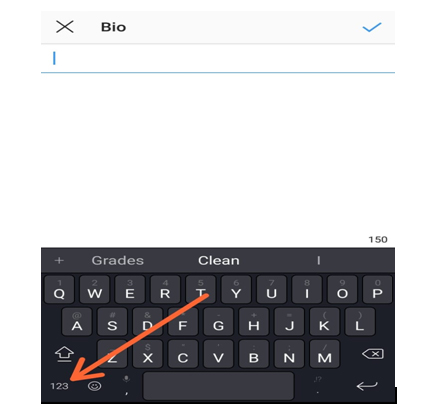
Many keyboards don’t provide the enter or return key to introduce a line break in the caption to your posts or the bio of your profile. For doing so click on 123 button on bottom left corner of keyboard, the enter or return button appears on the bottom right. Another option is to write it some other app and then copy it to the Instagram app.
Adjust Settings for Tagged Photos
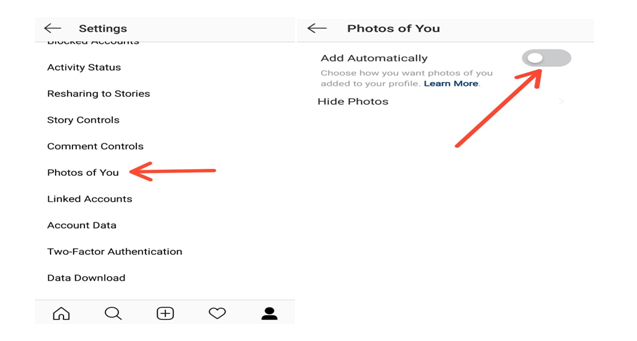
All the posts that you are tagged can be seen by your followers in the Photos of You section of your profile. To control visibility of these posts select the Photos of You option in your profile. There you can hide the desired images and disable the Add Automatically option.
This is yet another Instagram tips you must know .
Drive traffic to another Website
You know that these days social media is not just entertainment or to catch with friends alone . Its to get in touch with your customers on social media . Instagram for business is quite widely appreciated because of the results driven from it .
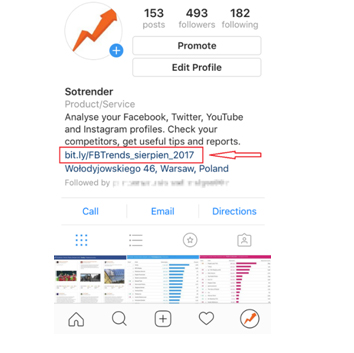
If you have a website then you can drive Instagram traffic to website easily . You know that adding links in caption doesn’t work on Instagram .
So what’s the way to add links on Instagram ? Simple add it in your bio .
Disable Activity Status on Instagram
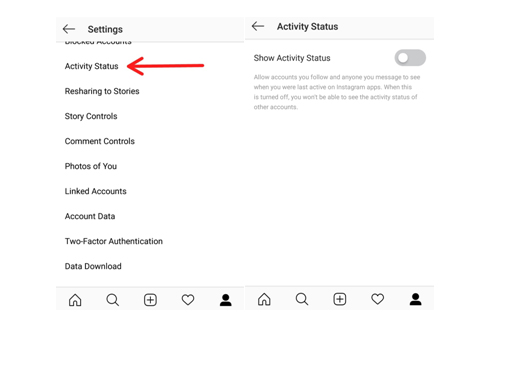
In the Instagram Direct Messaging or the DM section it appears to your followers that when were you last active on the platform as ‘Active 2h ago’. You can disable this activity status by going to your profile, select the Activity Status option and Disable it. So this way you can disable Instagram Activity status .
Schedule your Instagram Posts
Most of the Instagram users are quite active on the platform and put up new posts on daily basis and if you are promoting some brand then you definitely need to do so. By switching your account to Instagram Business mode you can schedule your posts by saving them earlier and then setting the time for posting it.
Embed Posts on Instagram
If you are a Blogger you might want to share your Instagram posts to your blog as well. This can be done using the embed option. On the Instagram web service, click on the icon with three vertical dots and then select embed option. A link to your post is created and then you share that link wherever you want to share that post.
Archive posts on Instagram
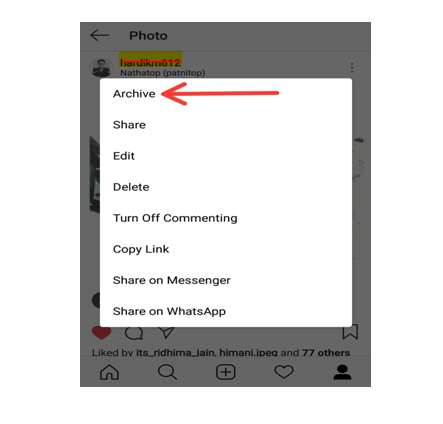
If you don’t want your followers to see your certain post but you also don’t want to delete it permanently from your profile, then you can Archive Instagram post. This way they can only be viewed by you and you can undo your action any time you desire.
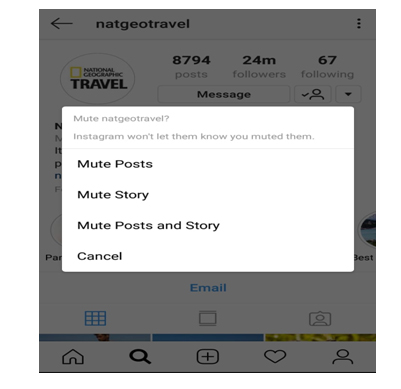
Ignore posts from Users
If you want to ignore the posts or stories from someone without the of offending them by blocking them, just go their profile click on the vertical three dots on the top right corner and mute that profile. This way the posts and stories from that user won’t be shown to you.
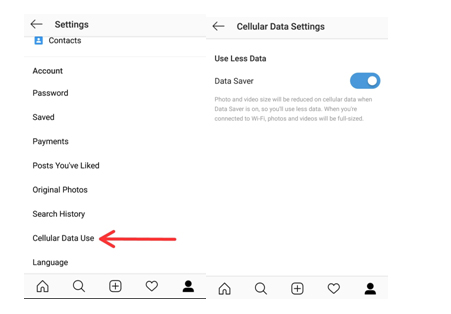
Save data option
You must be knowing that all the images and the videos in the Instagram app are preloaded and that to in HD quality. Thus if you are quite active on Instagram then using it can consume a large chunk of you mobile data. For saving your data, turn on Data Saver option which runs the app consuming a lot less data.
Get Analytics, direct call and email Buttons
By switching your profile to Business mode you can all the detailed analytics about your posts like the number of followers increase or decrease, how many people saved your posts, number of likes and impressions and much more. Also in business mode you can also add direct call and email options to your profile.
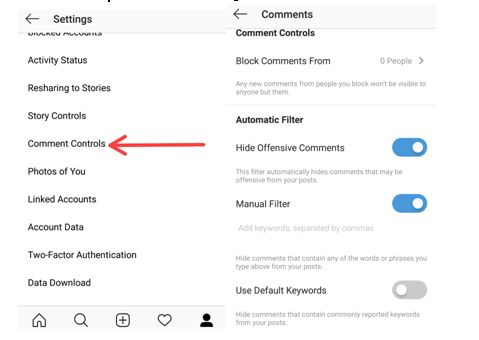
Filter Instagram comments based on keywords
You must be knowing that you can completely disable or delete comments on your insta post. But many of you won’t be knowing that you can hide offensive comments. Just go to your profile options and select comment setting Enable hide offensive comments and manual mode to hide comments with some specific word.
Add hashtags to comments on Instagram
Most of us create almost a separate para for putting up some interesting Instagram hashtags with our posts. But if you don’t want the hashtags when that post is posted on other social networks you can post them in the comments. This way people are still able to access your posts through the hashtags and they don’t appear on other social networks.
Follow Instagram Hashtags
The way you follow someone’s profile on Instagram, now you can follow a hashtag as well. If you want look at different posts having a certain hashtag just simply follow it and the posts appear in your feed like any other profile.
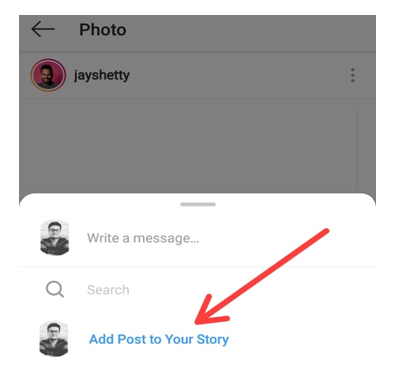
Share someone’s Post in your Story
To share a post from someone else’s post from to your story, just simply open that post and click on the arrow like icon below the post and click ‘Add post to Story’. If you have a public account and you want others to share your posts this way then select Allow Resharing to stories from your profile options and disable it.
Highlights
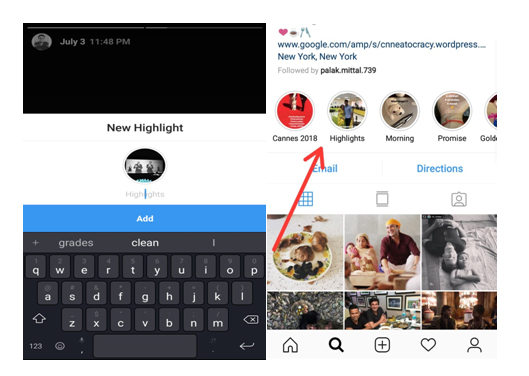
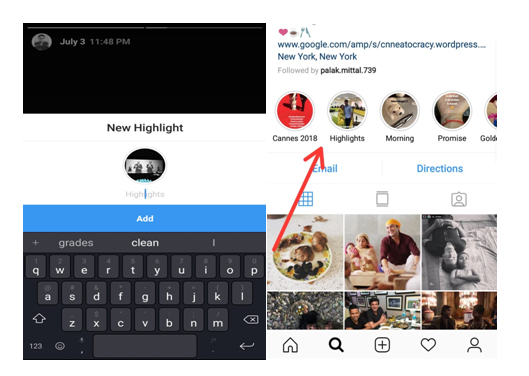
Highlights are your stories which can be seen by your followers whenever they visit your profile unlike the normal insta stories which disappear after 24 hours of uploading. For adding Instagram highlights, go to your profile and click on time like icon and click on whichever story you want to add as a highlight.
IGTV
It is the latest feature to be rolled out by Instagram. Earlier you could only post a minute long videos on your profile but using the IGTV app you can post videos up to ten minutes longer or more than stories/feed videos but only in the vertical frame. You can install the IGTV app from app store and share longer videos with your followers and connect with them more.
This is an Instagram tips to post long duration videos on Instagram .
Hashtags
The different hashtags you use with your pictures definitely have a direct effect on the number of your followers. Try using hashtags with your pictures which are popularly used so that a large number of people can easily access your posts. But use some unique hashtags which make your profile stand different from others.
Follow Brands like your own on Instagram
Having a brand of your own and promoting it on social media is a creative and thoughtful task for targeting the right person to get his/her attention towards your brand. For doing so look out for ways the brands similar to yours use for their marketing. Try drawing inspiration from those. Try interacting with their followers making them aware of your own brand. This is a good Instagram tips for Business and marketing .
Promote other Instagram accounts
Say if you are a food blogger in a certain city give shout outs to other food bloggers of your own or some other city. This way you can promote their account and they can promote yours. So instead of competing with each other, try helping each other.
Hope these Instagram Tips and tricks will help you turning into a pro Instagram user. Being an active user of Instagram myself, it is my favorite social media platform as well for posting some cool pictures with some catchy captions and hashtags. Do tell us the reason for which you love Instagram and also don’t forget to tell us your favorite trick. If you know some other Instagram tips or tricks don’t forget to share those with us.