Tag: Music apps

  • Top 8 Smule alternatives – Best Karaoke Singing Apps

    Top 8 Smule alternatives – Best Karaoke Singing Apps

    Today wherever you look you can find a great number of Smule fans and Smule videos and Karaoke . But for some quite reasons people look for alternative to everything and anything . So here is the TOP 8 Smule alternatives you shouldn’t miss out .

    TOP 8 Smule alternatives

    Singing is more than a hobby for many people. Music as such is a medium which soothes the soul. We all sing in our own ways , some are professionals and some are still perfecting their art. Our Voice is as unique as our self, just like our finger print. Karaoke is one of the easy way to bring out the singer in you. Smule is the one popular known name when it comes to singing apps with karaoke . You can download smule song ,smule sing karaoke . And to the best thing to your knowledge you can also get Smule on laptop.

    If you have a smart phone why you don’t record a karaoke? Just think about it! Sing a song from your favourite Artists such as Taylor Swift, Ariana Grande, EdSheeran or with Sonu Nigam etc.

    Sing ! Karaoke by Smule is one of the finest and the most innovative music-related apps which enables you to sing your favourite songs, use audio effects, sing privately or duets with celebrities as well.

    Read Also : Garageband Alternatives- iPad / iPhone / Android

    There are few other Smule alternatives Playstore and iStore . They are listed below

    1. Yokee : Karaoke Sing and Record ( Android)

    One of the most popular apps with good decent UI enables you to SING, RECORD, SHARE. It is really a good Smule alternatives for Android also a smule alternative for iPhone .

    Using this app, record your vocal track as you sing to the lyrics and once done, you can share it with world using Facebook, Twitter, Whatsapp etc..

    Yokee leverages with the YouTube unlimited library and access to videos and songs. This app allows to auto-enhance voice with echo and a little reverb to help you sound like a star on the radio.

    Read Also : Best Garage Band Alternatives for Windows and Mac

    1. Red Karaoke Sing and Record by Red Karaoke

    This app allows to sing and record yourself a audio or video and can choose from 100000+ songs and can share videos and make fans.

    This app allows to record duets add sound effects and balance the music. You can add themes and video effects also!
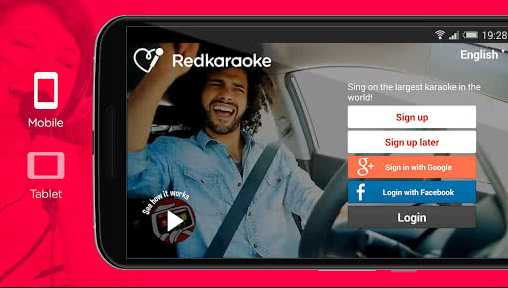
    Karaoke on TV : If you want to throw a karaoke party at your house . You just need a Chromecast or Fire Stick or Fire TV. First karaoke app developed to sing on your TV.

    It is really an excellent Smule alternatives.

    Read Also : Best Lifestyle Apps for Android and iPhone

    1. The Voice : On Stage by StarMaker Interactive

    The Voice is the one of the best Musical Karaoke app you have seen. Because using this you can sing over 2000000+ songs.

    You can COLLAB with favourite artists and more than 40 Lakh users.

    This app can give you experience how it is to sing on stage and also the official partner of the The Voice Worldwide hit TV show

    Sing like a star with awesome features such as Auto tune, Vocal Guide and lot of audio effects.

    Read Also : Top Satellite Car Radio Installation and specification guide

    1. StarMaker by StarMaker Interactive

    There is a huge catalog of songs and a wide range of effects which allows you to edit records and share with your friends in the future.
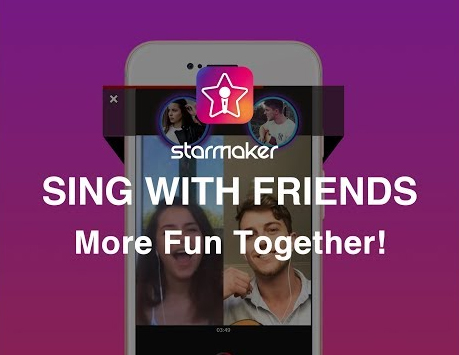
    It features a wide range of special effects, which allow you to edit audio tracks, improvement of voice by new technologies and flexibility of recording songs. This is a free app similar to Smule and is a good alternatives for iOS .

    Read Also : Best iTunes Cleanup Software for better iTunes experience

    1. Musixmatch Lyrics and Music

    The Musixmatch application caters to both music and karaoke. With this app you can listen to songs, like a music player. Sing, Practice and Record songs in karaoke mode with Musixmatch.

    Read Also :  Find the best radio station for iPod or iPhone FM Transmitter

    1. SingPlay Karaoke Your MP3s by NexStreaming Corp

    Your favourite music as a Karaoke track which can be shared! This app does just that. It downloads from your phone and the program converts it while maintaining its quality.

    It allows you to record your performance and has an option of creating tracks in two modes. The program allows you to adjust the sound with the volume control function and voice. Involve your friends and family through various social media accounts like YouTube, Facebook, etc and join in the fun!

    This app is a Smule alternative for PC (Windows 10 / Mac),only requirement being the supporting app(like BlueStack or Andy app) is already installed.

    Features of Singplay Karaoke 

    • sing with the original vocals or without it
    • compose a song of your own performance and mix with the original in the background
    • the ability to adjust the tempo and tact
    • recording of only your favourite song segment
    • Will work offline

    Read Also : Fast Forward , Rewind , Scrub Music in iPhone & iPad Music Player

    1. SingPlus : Sing and Record Karaoke Songs by Eagle Mobi

    This smule alternative allows users to sing and record, save and publish, share and discuss their favourite songs with those who have the similar taste.
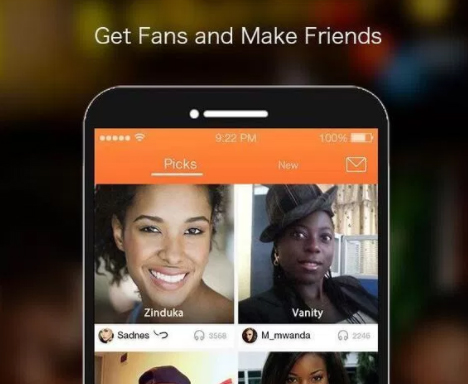
    SingPlus ( Sing+ ) offers the option to indulge yourself no matter online or offline,
    in its vast collection of karaoke tracks and mp3 songs. This is an App like Smule but allows its users to download for free and are unlimited.

    1. WeSing – Sing Karaoke & Karaoke Record & Sing Song by Tencent Music Entertainment

    Sing along to new and classic songs with music and lyrics. Search through an enormous catalog of music videos from varied genres and themes to your favourite artists and songs. The playlists are updated regularly. Record and edit your karaoke songs with a large selection of special effects such as the use pitch correction and reverb to get real-time feedback on your singing, apply video filters to make your recording more professional and duet with your friends and favourite artists.

    Smule is a very popular application which has over 100 Million downloads. In addition to Sing! Application, there are other supporting apps by Smule like AutoRap, MagicPiano and Songify.

    In short Smule has emerged as a top contender to address the need for customization and uniqueness in catering to the needs of Music to all with their wide range of applications for smartphone users.

    Hope this will serve useful for all singers who are in search for best smule alternatives for iPhone and smule like app for android and smule alternatives for PC.


  • Spotify Tips and Tricks to Enjoy Spotify Subscription More

    Spotify Tips and Tricks to Enjoy Spotify Subscription More

    Spotify is one of the trending in chart , so let’s discover some of the exciting Spotify features , Spotify Tips and Tricks to Enjoy Spotify Subscription More .

    What is Spotify 

    Spotify, many of you must have heard this name as it is one of the leading platforms for music streaming online. Spotify was founded in Sweden in 2008. As per May 2018, it had as huge as 175 million active monthly subscribers.

    Spotify has come a long way from Sweden now has expanded to most parts of the world. Over 35 million songs can be played using Spotify.

    Spotify is available for all leading platforms including Windows, Mac OS and even Linux. It has mobile applications for android, apple and Windows. It can also be used to play songs on play stations and Xbox.

    Everyone loves listening to music, music can be our best companion under any kind of circumstances whether happy or harsh or sad, and Spotify can be just the perfect way for you to meet your best companion.

    With Spotify app we can access to huge number of songs from all genres and from a number of artists. We can share our listening sessions and playlists with your followers and on other social media networks as well.

    Read Also : Top 8 Smule alternatives – Best Karaoke Singing Apps

    Spotify Tips and Tricks to Enjoy Spotify Subscription More

    Here are the features and some of the Spotify Tips and Tricks which justify why Spotify is one of the leading music streaming platforms:

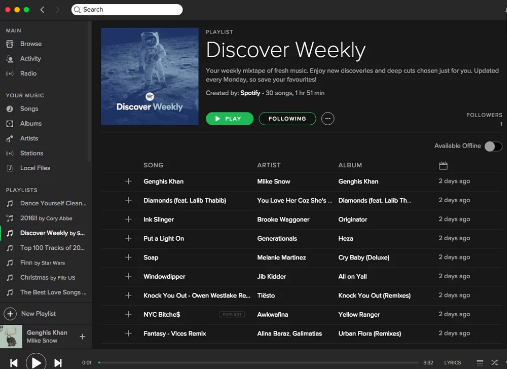
    Discover Weekly Playlist

    It is a personalized playlist created by Spotify for each of its user. The playlist is updated every Monday. The playlist is based on the type and genre of songs you listen on Spotify, means that study your recent music choices on spotify then create a playlist of similar songs it thinks you will love to listen to.

    For accessing this playlist you simply go to the Playlists section and can find it there. You can thumps up or down the songs in this playlist to help spotify further create even more awesome playlists for you.

    Read Also : Best Garage Band Alternatives for Windows and Mac

    Read Also : Garageband Alternatives- iPad / iPhone / Android

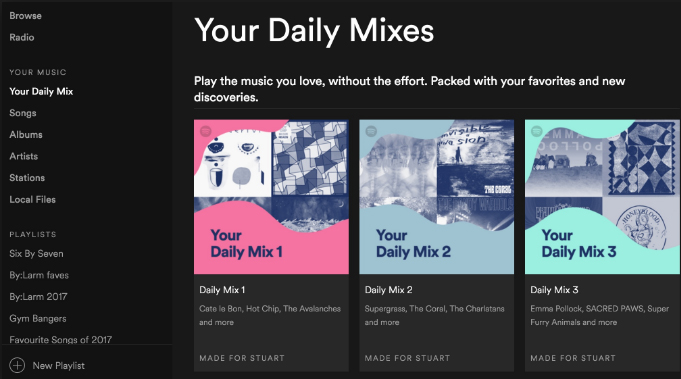
    Daily Mixes

    These are also personalized playlists created by the Spotify like the Discover Weekly playlists. The only difference that these are updated on a daily basis rather than weekly basis. Use like and dislike for improving the playlists as per your interests.

    Add tracks from Shazam

    If you discover some new track on some other app like Shazam you don’t need to go search it separately in Spotify app to add it to your playlist or library, you can directly add it using the Shazam app only.

    For this you need to link your Spotify account to Shazam. After this whenever you identify some new song click on the arrow along the song and select the Spotify option. This plays the song in the Spotify app.

    Read Also : Best Streaming Devices – All Top Media Streaming Box on Market

    Read Also : Streaming Services – Netflix Vs Prime Vs Hulu Vs Sling Vs Directv Now etc

    Private Listening Sessions

    Sometimes you might be in a mood that you don’t want to share whatever you are listening to with your followers, or you want to stop sharing for a while then you can use the Spotify Private listening mode. Just go to the settings and enable this option. It is the perfect way of enjoying your guilty pleasures.

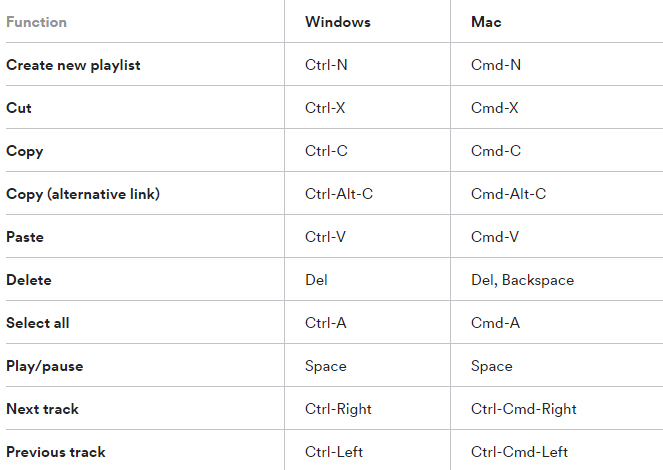
    Spotify Keyboard’s shortcuts

    Some Spotify shortcuts always come in handy so why not some for the Spotify application. Here are some Spotify keyboard shortcuts which will help you master in using Spotify –

    Recover deleted playlists

    Sometimes you might have deleted some playlist accidentally or you just want to listen to a playlist you deleted earlier, no problem. Spotify creates backups and keeps them for a considerable time period. For accessing these simply go to the Recover Playlists in the Main menu on the desktop app of Spotify. Then select the desired playlist and click ‘Restore’.

    Your Personal Karaoke

    On the Spotify desktop app when you play a song you can read its lyrics on your screen without exiting the app. Thus it can be your very own personal karaoke, have fun and sing along with your favorites.

    Collaborative Playlist

    As the name for the feature a collaborative playlist with your friends on Spotify such that all of you can add and remove songs from the playlist. So go check out this feature and create some amazing playlists and for doing so, in your library select whichever playlist you want to collaborate and select ‘Make Collaborative’.

    Radio Station

    Radio stations are playlists based on the artist or the song used to create it. You can create radio stations for the artists you listen to and similar ones. A radio station can also be created using a single song containing songs from the same artist and similar to it. For creating radio playlist click on the three dots and from the options select ‘Go to Radio’ and the radio playlist appears.

    Read Also :  Find the best radio station for iPod or iPhone FM Transmitter

    Read Also : Top Satellite Car Radio Installation and specification guide

    Discover about live gigs

    You can discover about all the concerts in and around your location. Just go to the browse section and then to concerts. There you can find about the live gigs of the artists you listen to and all the top artists as well. You can get all the details with one simple click.This would be a least familiar Spotify Tips and Tricks for most of the readers .

    Learn more about Spotify Live gigs to make use of this Spotify tips .

    Smart Search

    You can search any song or album on Spotify using its full name on Spotify easily. Besides this you can search using keywords like genre: jazz for searching songs of particular genre, year: 1980-1985 for songs of this specific era. You can use keywords like AND, NOT for including and excluding certain artist from the search.

    This will be a familiar Spotify tips for most of you .

    Hear a quick Preview

    If you want to add new albums or songs to your library and playlists, Spotify can help you lessen your work. No need to listen to complete songs or albums, just long tap on whichever song you want to listen to then spotify will play a small section for you to decide whether you want to add it or not.

    Read Also : Fast Forward , Rewind , Scrub Music in iPhone & iPad Music Player

    Read Also : Best iTunes Cleanup Software for better iTunes experience

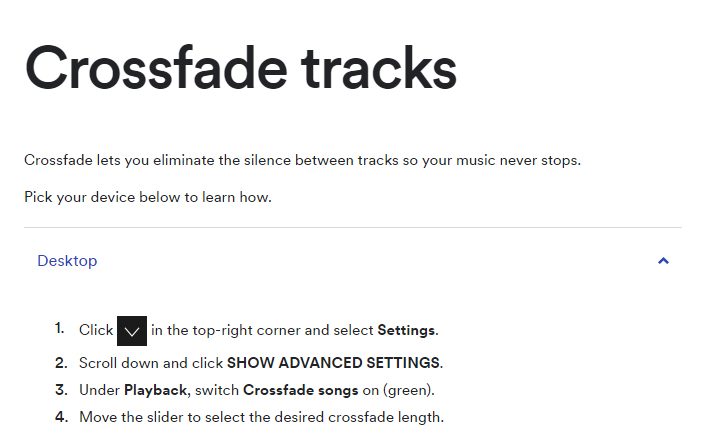
    Crossfade feature

    If you hate the time when one song ends and the next one begins to play, the crossfade feature is definitely there for your rescue. It simply blends the two songs and you can customize the Spotify crossfade time between 1-12 seconds.

    Just access the settings then go to Show Spotify Advanced features, scroll down enable and then customize this option the way you want.

    Running Playlist

    Spotify has this amazing feature where it plays songs which matches your tempo while you are running. For this select any running playlist from the browse section. Then through your phone sensors it will find your tempo and play songs with similar tempo, thus taking your running experience to next level.

    Listen to Spotify on your Uber ride

    You can listen to any of yours Spotify playlists by linking your Spotify account with your Uber account. If the feature is allowed by your Uber driver then you can have the access the stereo of the uber car and enjoy your ride to its fullest with your favorite music playing.

    But this feature is not available in all countries yet, for checking if it’s available in your country, check it in the uber app.

    Behind the Lyrics

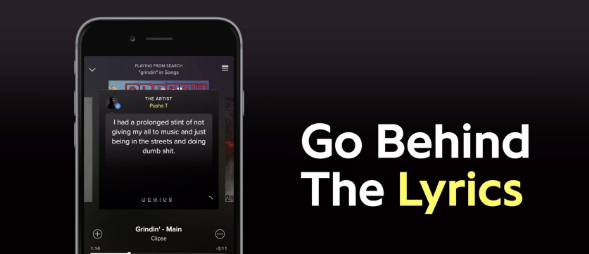
    This feature was launched by Spotify in collaboration with Genius. What this features actually does is that provides the listener with the meaning of the lyrics or some facts and trivia about that song. Although behind the lyrics is not available for all the songs in the App or website but still is definitely an amazing feature

    Be picky

    Be picky in whatever music you add to your library since spotify allows you to add only a finite number of songs to your library. Once the limit is reached you will have to clean your library by going through all of it, instead add carefully initially. You can also save you some space by adding songs to your playlist instead of the library. This Spotify tips is a must to avoid messy situation in future.

    By reading the loads of cool stuff you can do on spotify all your doubts that why Spotify is one of the leading music streaming platform among the music lovers across the globe. But many of the above Spotify features mentioned only for Spotify Premium Accounts. There are offers for complete family subscription or Student discounts are also available. You can opt for these ways for a cheaper subscription.

    Do tell us which feature do you find the coolest and don’t forget to share any of your favourite Spotify tips and tricks with us in the comments below.