Tag: cyber security tips

  • Prevent Malicious Spying Apps on Both Android & iPhone

    Prevent Malicious Spying Apps on Both Android & iPhone

    Today Hacking news is nothing new on the board . This could be due to weak or no firewalls for the systems. In case of emails, they might not have strong passwords. In the recent years, there have been hacking even on Bank accounts. The high number of hacking on personal computers or phones is due to misuse of internet and visiting unsafe or irrelevant websites and even downloading not so reputed apps which have some secret hacking enabled on them. So it is really a must to do list on your devices to Prevent Malicious Spying Apps .

    In this article, we will thoroughly study about :

    • What are the Malicious spying apps
    • How to Prevent malicious spying apps
    • How to Prevent malicious spying apps on Android
    • How to Prevent malicious spying apps on iPhone
    • How to Identify & prevent malware apps on phone
    • How to Identify apps that spy Bank details
    • Apps secretly hack Bank account

    Let us learn each topic in detail.

    What are the Malicious Spying Apps

    The devices which are always online are normally the victims of the so-called malicious spying apps. For example, certain social networking apps were caught for silently absorbing the user’s complete contacts to other servers.

    It is safe to download apps from both Apple’s App Store and Google PlayStore. However, there are some malignant apps hiding in these official stores.

    Most Android phones are becoming victims of harmful apps and it has been drastically increasing. Though Google PlayStore is believed to be safe, such dangerous apps sometimes crawl unknowingly and create a space in the app store. Google Playstore has detected two harmful apps in the PlayStore- Skin Care Magazine and App Play Store.

    These apps are designed in a way that it can silently take away your text messages or the SMS. Certain scammers are waiting to steal your personal information, thus leading to identifying a theft or similar dangerous results.

    This is how a scam works: When an app is installed, it starts downloading certain harmful plugins from a local website. Safe apps retrieve plugins the same way via other sites. This way it seems quite difficult to identify the malicious apps.

    Prevent Malicious Spying Apps 

    Under this topic, we will look at some key points to stay away and be protected and Prevent malicious spying apps .

    • App Stores : It is important to keep your device away from certain third-party app stores as they assess certain apps so as to make it easier for scammers to spread the damage intended software. The safest way to download the apps is through Google Play & Apple’s App Store.
    • Have strong anti-virus software : Anti-virus software is indeed the best way to block the malware from harming your device.
    • Check the apps’ developer : It is very important to check the developer of the app you are trying to download. Duplicate apps will have a different developer name when compared to the actual app’s developer. Hence, it is ideal to check the details of the app’s developer via Google Search.
    • App Reviews : The app stores will always have reviews on popular apps from other users. There can also be reviews from experts, online. This way we can differentiate the malicious apps. If the review gives the warning of the app being malicious, do NOT download it.
    • Update your device : It is quite important to ensure of having the latest security and operating system updates. The updates include certain areas to protect the device from threats.

    Follow the things discussed to Prevent Malicious Spying Apps on your device .

    Prevent Malicious Spying Apps On Android

    Have you felt that someone is spying on u? Is your phone’s battery draining out?Are web pages taking time to load due to internet traffic? It is time to check if your phone’s data is protected by the latest security software. Privacy is quite a big issue and you realize that the personal data is no longer “personal”. If a person accesses your phone, it will be easier to spy on you via a hidden app on your phone.

    These malicious spying apps can control the camera on your phone, get your location through GPS tracker, check the contacts, read private text messages and also listen to your conversations over the phone.

    Read Also : Android: Prevent apps from running at startup(Stop/Disable Apps)

    Here, we will have a look at some free Android apps to prevent the phone from spying apps . If you follow these tips you can Prevent Malicious Spying Apps on Android –
    • Anti Spy Mobile Free : The Anti Spy Mobile app enables you to solve all the spying problems. It is a free anti-spyware scanner for checking and removing spyware apps hidden on your phone. Its professional version can be upgraded; thereby getting automatic background along with fast scanner plus status bar notification.This app uses the recently updated detection techniques that can check even the new Spywares found online.
    • Hidden Device Admin Detector : This is a scanning tool to detect malicious spying apps having the privileges of a device administrator and are hidden from being viewed. Malicious apps on Android devices can control the weaknesses so as to protect them from being found or removed.The app checks the device for the hidden harmful software help in removing the settings of device administrator and hence removing the malware completely.
    • Privacy Scanner (Antispy) : This app was designed to check the smartphone to know if you are being spied on. The parental controls and the surveillance apps are verified; as they are used to spy on your family members via GPS tracking techniques, read contacts, call history, calendar etc. The app checks SpyBubble, eBlaster Mobile, UonMap Spy, a few parental control apps and surveillance apps. It checks by using certain doubtful permissions such as reading SMS, profile, contacts etc.
    • Stop Spy:-Anti Spy Checker : The app enables to check if you installed the software as well the spy software, quickly safely and accurately. If the spyware is found, this Antispy checker enables to remove it from the device.
    • SMS/MMS Spy Detector : The app quickly scans those apps that send or write SMS/MMS/WAP messages automatically.

    Read Also : WannaCry Attack Security Tips- Protect computers from Ransomware

    By this way you can Prevent Malicious Spying Apps on Android phone

    Prevent Malicious Spying Apps on iPhone

    It’s not just the Android phones that are attacked by spyware. Even iPhones become the victims of such malware. These iPhones are connected to a remote iPhone spy app, which keeps a close watch on every move you make.

    Let us see how to find the spyware on iPhone , mean what are the ways to Prevent Malicious Spying Apps on iPhone –

    1. Can others spy on my iPhone ? Wondering if others can spy on your iPhone? Well, then it’s a YES. It is really easy to spy on iPhone without your knowledge. The best example is an ad, wherein you are asked to click on it to win prizes. A similar instance is a mail, saying that you have won prize money for a contest that you never took part in. If your data is really valuable, then you need to be alert to such ads. Once you click on these ads, you never know in what ways would your data be exposed and to whom. Anyone can get spied on. The motive of spying varies from one person to another. This means that people spying on you will never have good motives. Hence, you need to watch out who has ‘Eye Spy’ on you.
    2. How to detect spyware on iPhone ? A very important fact you need to know is that a spyware spying on you will make sure you don’t catch the ‘culprit’. So the developers designing this spyware has to set it in a way that it is not caught easily. If you ever feel someone is really sneaking, you need to be more alert and not give too personal data to undeserving person.
    • Unexplainable Data usage : Did you observe that your data usage has been on the lower side recently? The core reason is the data consumption by spyware on the phone. Spywares send data to the spy, which means that every time you send a text message or talk over the phone, the spy automatically receives the information. So, you need to keep a record of the data all the time.
    • Phone Heating up : The main cause of the phone heating up is that there is an app working in the background without your knowledge. Spywares are apps that work in the background, no matter whether you are using or not. In such situations. you must refine the untrusted apps by removing them from the phone, thereby keeping only the relevant apps.

    Read Also : Battery Health : How to keep your phone or tablet battery healthy

    • Background noises : If you ever hear unbearable noises in the background while having a conversation, it shows that you have been spied on. Spywares are designed in a way that it interrupts your active calls with background noises. You should take steps to get rid of such apps on the first hand.
    • Cydia app : This app shows that your iPhone is not safe anymore. If you did not protect your iPhone from being spied on, then it is too late to have concentrated on your personal data. The main drawback of this app is that it is not easy to detect on your phone. The ultimate solution to protect your phone is to update the iOS system.
    • Encrypted Text messages : Spying apps are designed to control the phone via remote through certain encrypted text messages or commands. In case of spying apps designed with good quality, the messages or commands should not be viewable by the spied person. On the other hand, in some fake apps, these messages could be viewed. Hence, when you see funny messages on your phone, start planning about the privacy of your phone and the data.

    3. How to remove spyware from iPhone ? Considering the amount of information a spyware could retrieve from your phone, all you need to do is ensure that such apps are completely removed from your iPhone. You will be glad to hear that these spying apps can be removed like any other apps. Let us look at some ways to prevent malicious apps on iPhone.

    • Install Anti-spyware program : This is the simplest way to remove such harmful spyware apps. These programs examine the phone and remove them.
    • Update iOS System : This is yet another method of keeping the iPhone away from the spyware apps is by updating the iOS operating system on your phone. As a company, Apple makes out when the threats appear and that is the reason the programs are always up-to-date. Once the iPhone is updated, you can easily detect the spywares and can be deleted using the old operating system. Hence it is important to always update the iOS software.
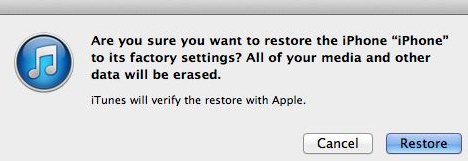
    • Restore your iPhone : Restoring your iPhone will also help you in removing the spyware. However, you may be reminded that the restoring process erases all the existing data from your iPhone. Hence you need to ensure that you have saved a copy via iTunes.

    Read Also : Factory reset iPhone without password or iTunes with data backup
    By this way you can Prevent Malicious Spying Apps on iPhone.

    How to Identify & Prevent Malware Apps on Phone

    A phone is said to be infected when you see the following symptoms:

    • Unexplained data usage
    • Poor performance
    • Low battery life
    • Unable to answer calls

    You can prevent Malware Apps on your phone in following ways –

    • 360 Mobile Security : Full scan of your device is essential to get rid of spyware. It can be set to Manual or automatic.
    • Avast! Mobile Security : This software checks the device, either manually or as per the schedule set. As you browse, it checks and blocks the infected links and also keeps a close watch on the traffic for threats.
    • AVG Antivirus Security : AVG’s app checks the new files and apps for certain possible threats like the malware, spyware and certain viruses. It also recognizes unsafe settings, thus giving suggestions to connect security holes

    Read Also : Google Datally App to Control Mobile Data & WiFi Finder

     Identify Apps That Spy Bank Details

    You can prevent your bank account from theft and protect bank account from spy apps by following the proper guidelines .

    Also it is mandatory to Identify Apps that Secretly Hack Bank Account.

    In this article, we have seen certain harmful spying apps, how it affects Android and iPhones. We also covered topics like how to Prevent Malicious Spying Apps. Moreover, we learned about certain spying apps that access the Bank account secretly.

    Read Also : Safe Online transactions Tips & top 12 safe online transactions methods

    Hope this article has been helpful to you. Enjoy a ‘hack-free’ time.

  • Unavoidable Parental Control Apps ,Tools to monitor children

    Unavoidable Parental Control Apps ,Tools to monitor children

    Are you planning to gift your kid an Android phone or iPhone? Well, you want to have them a smartphone Well if you want them to have a smartphone so that they can stay in touch with you. Then, it is a good idea to make them in control by how they use the device. Making the calls in the smartphone is just one thing but accessing inappropriate content, inappropriate apps, and running up the bills in app purchases is just another. So there is a strong need to have certain Parental Control Apps.

    Trust me the internet is a much scary place and the danger of it can rattle the adult so it can also traumatize the child. On your desktop. you can employ the parental control software to watch the activity of your child, and same is true for the mobiles. Here with this article, I will discuss the apps for the parental control apps for Android and iPhone. Nowadays for the all individuals smartphones are just like toys, they use it for surfing the internet or to download other apps. But these activities can sometimes open up some serious online nastiness.

    What does Parental Control Apps do?

    Well before starting about what does this app do, it is important that you are aware of such software or you are unable to find that you felt was suitable. On the Android smartphones and tablets, if the parental control apps are installed then you can easily watch the activities performed by your child. Remember that using the parental control app software is basically for your offspring safety. This may not be much popular way, depending on the age of your children. Understanding the parenting control app can help you in making more informed decision.

    Read Also : Internet Safety Rules for Kids – Online Safety Tips

    Read Also : Improve The World With Smartphone -Top 10 Hacks

    Some of the Best Parental Control App for Android:

    Here is the list of Parental Control Apps for Android device is listed here.

    1. Kids Place:

    This is one of the best parental control apps which creates the safe environment in which the younger kids can experience the fun of technology. This app protects data as well restricts your kids have which is been approved by you. The kid’s place app prevents the kid from installing any new apps, making phone calls, texting or performing any other action which costs the money. This app allows your kid to have some fun time and also allows you to have some peace.

            Features of this app:

    • Custom home screen display which is authorized by the parents
    • Restrict to download the apps which cost money
    • It has timer feature which locks the app after some specified time
    • Block the incoming call too when it is running
    • Toddler lock gets restart which accidentally stopped by your kid
    • Has custom wallpaper which can customize child experience

    Read Also : Best free calling Apps for all Smartphones

    2. Net Nanny:

    This app gives your kid a freedom to surf the web without any fear of the inappropriate content. This app becomes your child default browser as it is a custom mobile browser. From the web based console, you can easily manage settings if your child device and other tasks such as viewing activity reports or adding the users, Also this app enable s you to receive the notification when a site is a block or a block is been overridden.

            Features of this app:

    • Show the apps being installed
    • See when new apps being install and block unwanted apps
    • offers the appropriate filtering through age
    • The filtering categories allow to allow, block or warm the specific content
    • Set the time controls when kid browse the web

    Read Also : Best Apple Watch Alternatives-Affordable Gadgets

    3. Screen Time:

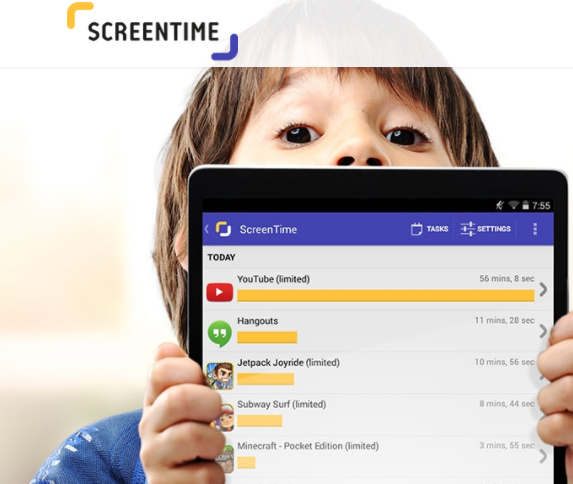
    This app helps you to manage the time which your kids spend on their tablets and smartphones. This app gets a level of specificity which allows some useful apps such as reading apps certain time but blocks the games. This app also lets you activate a full shut down of child’s device when needed with a push button from your device.

           Features of this app:

    • This app allows kid to earn extra time to complete tasks
    • Get the reports what your kid is looking
    • Block some apps completely
    • Provide an alert when your kid install any new app
    • Manage easily various no of kid through this app

    Read Also : Survive high interest student loans – Amazing Tips

    4.Toddler Lock App:

    This app is just perfect for the parents to download on their device if they occasionally use their device for help distract and engage their toddler. This app provides a colorful screen lock graphics and pleasing sound which keeps your kids entertained without being worry about them to delete any content of your device. This app also helps your kid to learn shapes and colors.

          Features of this app:

    • The airplane mode is optional and ensures no cell radiation
    • Your child can move their finger on the screen to make different shapes and colors
    • The time they touch the screen, they will listen some peaceful sound which varies in the pitch

    5. Norton Family:

    This app is for the teens and helps for safe online browsing as it allows the parents to supervise the activity of their child. This app blocks inappropriate content and teaches good internet browsing. This app offers a range of monitoring features for the parents to connect with kids.

          Features of this app:

    • Track the online activities done by your child
    • Keep whole track of site they visit or what they search
    • Block inappropriate content
    • Gives the alert if kid breaks any rule and thus you can have conversation to stay safe
    • This app provides the location of your child

    These are best apps to monitor kids for any android device.

    Best Parental Control Apps for iPhone/iPad :

    In the iPhone, you can use the restrictions which are also known as the parental control which is been used to block or limit the specific apps ass well as features on your iPhone or iPad.

    To turn on restrictions use:

    Go to settings> General> Restrictions

    After tapping on restrictions enable it

    Then, create a restriction passcode, which you need to change your settings or to turn off the restrictions.

    If you have forgotten your restriction passcode, then you need to erase the device and set up the passcode again. Change your Restrictions passcode and set up the passcode again. Change your Restrictions passcode

    To change the restriction passcode, follow these steps after turning on the restriction:

    • Go to the settings> =Click on General> Restriction
    • Enter the current restriction passcode
    • Click on disable restriction and enter the restriction passcode again
    • Again click on the enable restriction and enter new passcode restriction
    • Turning on the restrictions might make you unable to see some apps, features, and services. Also, check that you have not removed any built in apps.

    Features and Apps you can Restrict in iPhone:

    For seeing the list of the features which you can restrict, click on the settings> General>Restrictions to turn on or off just touch the slider next to app or feature.

    To check which app or feature is enabled, just check the checkmark if it enables the app or feature can be used otherwise not.

    The businesses and schools most often use the profiles, which can turn on restrictions. To check that your device has profile go to settings> general profile. For more information contact your administration who set up a profile.

    Conclusion:

    Now controlling your child is in your hand if he/she is using the smartphone. Also, remember giving the good habits to your child is your responsibility. Download parental control apps and keep the control in your hand.

  • WannaCry Attack Security Tips- Protect computers from Ransomware

    WannaCry Attack Security Tips- Protect computers from Ransomware

    Every year there will be a breakout of some cyber attack cases all around the world . This makes a sense to think about ways of protecting our computers from different cyber attacks. Recent breakout of WannaCry Attack  demand us to think about ways to Protect Computers from Cyber Attack at all possible ways .

    Now everyone of you who is not a cyber security geek will be wondering about what is a cyber attack and what is this ransomware and of-course the name like WannaCry Ransomware are absolutely novel to many of us .

    So this article will focus on making you understand what are these novel terms and how to protect computers from cyber attack with our tips to defend ransomware attack.

    WannaCry Attack Security Tips- Protect computers from Ransomware

    At the alarming spread of the new cyber attack popularly known as WannaCry Attack here we are going to give you the best security tips to keep your computer safe from a vulnerable cyber attack. Before heading to the article let me tell you something about cyber attack , ransomware etc …

    Cyber Attack – What is That ? 

    We can simply say that a cyber attack or CNA (computer network attack) is a intentional or deliberate action of exploiting networks , computer system and other tech- dependent enterprises. With the use of malicious codes the actual data , logic and computer codes are disrupted . Cyber attacks are mainly aimed for the information and identity stealing or to cause disruption to the system.

    Consequences of cyber attack 

    • Fraudulence ,identity theft ,blackmailing
    • Sniffing passwords
    • Infiltrating System
    •  Data breach
    • Defacement of website
    • Service Denial
    • Malware , Spyware , Trojan , viruses , phishing etc
    • Unauthorized access
    • IP Theft

    Read Also : Internet Safety Rules for Kids – Online Safety Tips

     Ransomware 

    Guess you all know the meaning of the English word “ransom” , then its very simple you can now relate it to ransomware . To say precisely ransomware hold your PC from functioning , it will may your PC stop working.

    Ransomware is a kind of malicious software that will prevent your PC from functioning . It makes a cryptoviral attack and blocks the system data which will be unlocked only when a ransom is paid. Some ransomware attack can be reversed easily but while some will puzzle all techies .

    The most hot trend news in all over the world is the WannaCry ransomware Attack which break out on 12th may 2017 . Similarly Locky Ransomware was the another major global attack that just vanished but for everyone’s notice its again coming back .

    So this article is going to focus on how to protect your system from Locky Ransomware and WannaCry Attack.

    WannaCry Attack Security Tips

    Ongoing global cyber attack popularly known as WannaCry Attack ,WannaCrypt ,WannaCry Ransomware attack , WannaCryptor 2.0 , Wanna Decryptor which broke out on 12th may 2017. This ransomware attack also has the same goal as the other ransomware attacks , they just block access and demand a ransom amount to unblock our system.

    WannaCry is having components mainly – worm and ransomware package . This encrypts the  files and data on the infected windows system and demands to pay a ransom in bitcoins . Especially the older versions of Windows system is more prone to risk of getting affected by WannaCry attack.

    Reason for WannaCry attackers demand in bitcoin is that bitcoin is known for its anonymity and the hackers can use the bitcoin currency in many ways they want .

    Read Also : 10+ Best Alternatives to Whatsapp you will love this year

    How to Check If your system is affected by WannaCry Attack 

    WannaCry affects only the Windows operating system that are not protected and updated. WannaCry is a global ransomware attack which locks the files of your system and asks for a ransom to be paid to get it open.

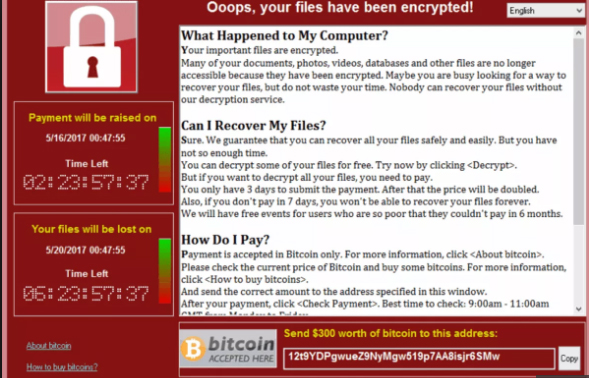
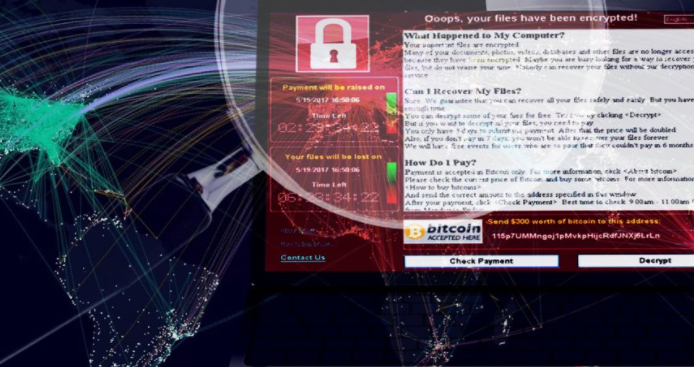
    You can check if system is affected by WanaCry Attack  easily . If your system is affected by this ransomware then you can find out a message on your display screen which will be having a count down timer and a ransom demand along with bitcoin wallet . It may warn you like if you do not pay it , your system will be locked .

    If your system is attacked by WannaCry then you can find such a message on your display screen.

    Read Also : How to secure bank account from hackers

    What to do If your System is infected by WannaCry Attack

    If your system is infected or got a cyber attack especially if your system is affected by WannaCry you have to do certain things to protect your data.

    Things to do WannaCry Attack infected System –

    • Do not pay the hackers the ransom they ask for , it is just going to be waste of your money and a motivation to continue the effort . You do not have to pay the WannaCry Ransom request.
    • Wipe out your hard drive literally what i mean is do a fresh installation of Windows . Unfortunately this will just give your system functioning but your data will be lost unless its saved in cloud or drive.Kindly note reset doesn’t mean a simple on and off.
    • One small hope of keeping your file safe and get your system clear from WannaCry attack is to reset the date in your windows system .
    • Download apps that promise to remove WannaCry from your system. You can rely on some trusted companies like AVG, Sophos ,Symantecand their apps that is promising to fix the WannaCry Ransomware attack on your system.
    • Find the good step by step manual ways to remove WannaCry fro your system .Kindly note to take only legitimate sources .

    Complete User Manual To Remove WannaCry From System – Step Wise Instructions

    If your system infected with WannaCry then you will be thinking how to remove it without paying the ransom . And it is very important to remove WannaCry very immediately if your system is infected. But still the ways to decrypt the files for free is to be digged out. But here we can help you with the instruction to recover files that got infected by ransomware. But it is not a full guaranteed steps as the global cyber attack just broke out , even the highly tech minds are working on to solve this issue.

    Here we will explain about how to remove WannaCry using Emsisoft and MalwareBytes. Now before proceeding for a brief knowledge of the reader , Emsisoft and MalwareBytes both will protect your system from all malware , ransomware and virus attacks.

    Read Also : Web Servers A detailed overview – Popular Webservers

    Steps to Remove WannaCry from your infected system –

    • Take a print out of our instructions and Read it carefully.
    • Download the essentials we mentioned here.
    • Once you have taken a print out and downloaded the tools we recommended then we advise you to close the browser .
    • Reboot the system.
    • Inorder to terminate the suspicious programs in your system we advise you to use RKill. So download Rkill and save it on your desktop.
    • Run the downloaded file and it will automatically stop any process that is associated with the Sysprotector Registry Cleaner Tech Support Scam and the other malware.
    • Wait till it detects all the malware and malicious files in your system.
    • Once the rocess is over it will automatically close down a black window .
    • A log file gets opened , you have to review that and  close it.
    • Continue to next step.

    Note : Rebooting system after RKill has run on your system is going to bring back all the malware programs once again. Don’t Reboot system  after this process .

    • Download Emsisoft Anti-malware on your system.
    • It will be working to remove the unwanted adware in your system.
    • Run the downloaded program.
    • Click Yes if you get an alert mentioning about the safe mode and continue the process.
    • Agree to the licence agreement and access it .
    • Start the installation process by clicking on the Install button now.
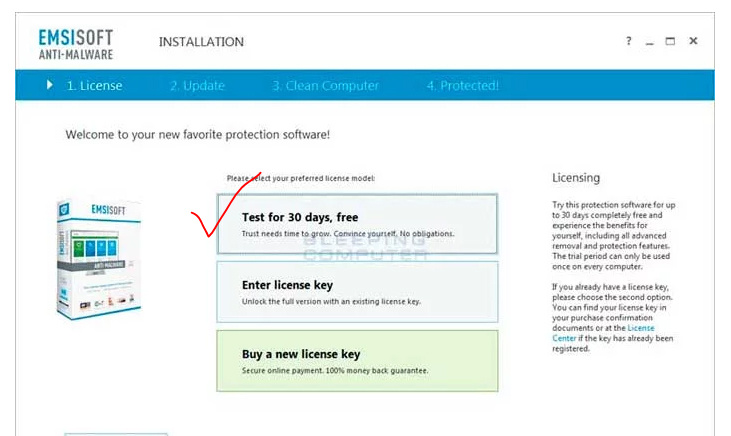
    • Now you have to choose the type of license you wish to choose.
    • Click on the test for 30 days, free if you do not have a purchased license key. By this you can use it for free trial .
    • Now you decide if you want to join their network or no . Its up-to you , nothing related to the process.
    • Now Emsisoft will be updating and detecting the virus in your system.
    • Once update is done click on Enable PUPs Detection . This will protect your system from adware and other unwanted programmes.
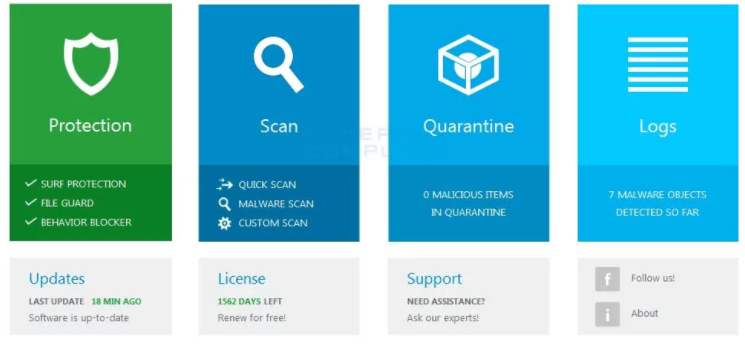
    • Click Finish Installation so the final installation process screen will launch the Emisoft Anti malware on your system. It will now display a start screen.
    • Now you can find 4 sections like in the image.
    • Go to the Scan section.
    • Now it will ask you to select the type of scan you want to do in your system .
    • Here you have to select malware scan.
    • Once the scanning is done , it will show you the results of infections detected on the system.
    • Now select quarantine selected option, once you select this the detected infections will be removed .
    • You are done with the process but sometimes Emsisoft can request a system reboot , if so please proceed system rebooting .
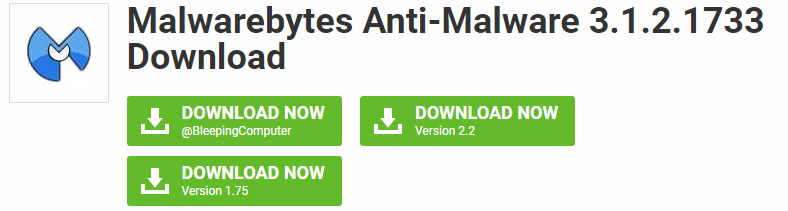
    • Now download MBAB ie, Malwarebytes anti-malware and check your computer by scanning to detect any infections , unwanted programs etc.

    • Run it on the system and Install it without making any default settings changes.
    • After the installation process check Launch Malwarebytes anti-malware and click on finish.
    • Reboot if it demand else leave it.
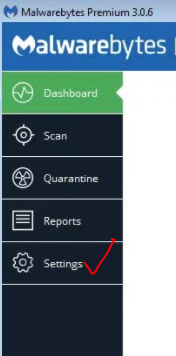
    • Now you can find settings like shown in the image.


    •  Click on Settings then click on Protection.
    • Now enable Scan for rootkits by toggling the switches to green.
    • Click on the scanning option.
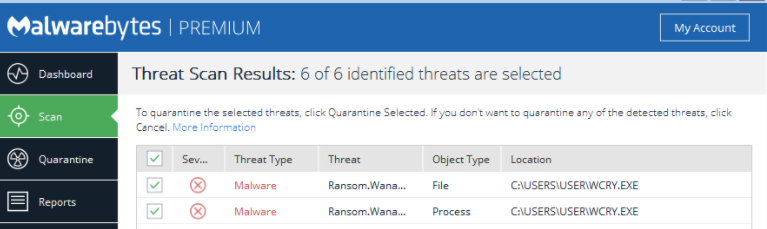
    • Now the scan result will show you the list of detected malware in your system.
    • Select all and quarantine selected option.
    • Your system may reboot and after the process is over you can continuw with further steps.
    • And finally you can exit the program.

    Though these are the ways to remove ransomware from your system , recovering of your file is still a strange possibility . At some lucky case you can recover those files that were saved in Dropbox .

    Ways to recover WannaCry Infected files 

    • You can restore from the shadow copy that Windows creates if you had enabled the System restore option.( Only for Windows XP service pack 2 , Windows Vista , Windows 7 and Windows 8)
    • You can restore the WannaCry attacked files that was encrypted on the DropBox folders in your system.Here you can’t do a restoring of all the files as a whole ,just one by one can be made possible.As it may be highly time consuming you can use dropbox restore python script to get restore all files . To run the script first make sure you have Python installed on your system.

    These two ways you can recover the files infected by WannaCry attack.

    Read Also : Safe Online transactions Tips & top 12 safe online transactions methods

    How to Prevent WannaCry Ransomware Attack – Tips to cyber security

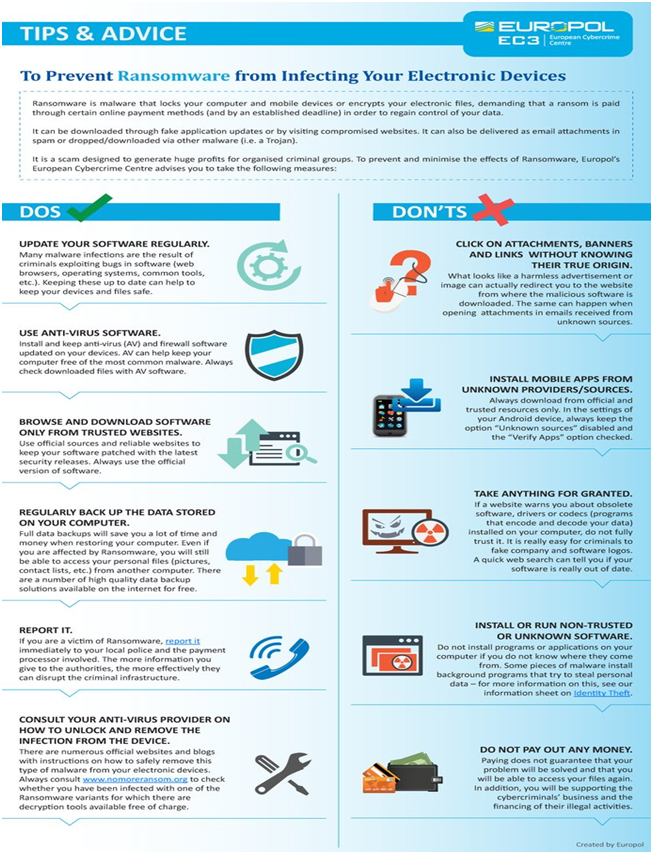
    The European Cyber Crime Centre has released the Do’s and Don’t to prevent WannaCry attack on the system.

    1.  Update Softwares regularly .
    2. Browse and download from only trusted sites that shows a green lock symbol along with the URL.
    3. Use an updated version of antivirus software in your system.
    4. Take Regular backups of the files and try storing in a pendrive or CD for important files that you can’t risk losing.
    5. Report ransomware attack to the nearby police station .
    6. Don’t pay the ransom money.
    7. Don’t open unknown mails , attachments , banners etc.Watch the video by NIC presented by the CERT about the WannaCry Attack to know more about the global cyber attack.

    I hope WannaCry Attack Security Tips to protect your system  is going to be helpful to all the readers .

  • Internet Safety Rules for Kids – Online Safety Tips

    Internet Safety Rules for Kids – Online Safety Tips

    The Internet has practically replaced the set of encyclopedias parents used to keep in the house or the multiple trips to the library for their kids’ school projects. Besides the fact that it’s an evergreen source of information, kids can use the Internet to submit homework, contact a teacher or communicate with friends. The Internet can also be a dangerous place for a naive child, as sexual predators often use this means to initiate contact with their victims. Although the Children’s Online Privacy Protection Act was created to protect children’s personal information while online but kids must be educated about Internet Safety Rules .

    Internet Safety Rules for Kids – Must Follow

    Here we are listing some important must follow Internet Safety Rules for kids to be safe in the web world.

    Don’t Download Stuff

    Teach your kids never to download files without parental consent. Kids can cause a lot of trouble for their parents by downloading music, games or any other files. They can unknowingly end up downloading viruses or other malware, infecting your computer in the process. Kids also don’t realize the seriousness of copy infringement laws, and if your Internet Protocol address is indicated in illegal downloading activities, you may face a law suit from the copyright holder. Peer-to-peer sharing software could also be very dangerous, as some programs share all the content on your computer with everyone else, by default.

    Don’t Be Nasty

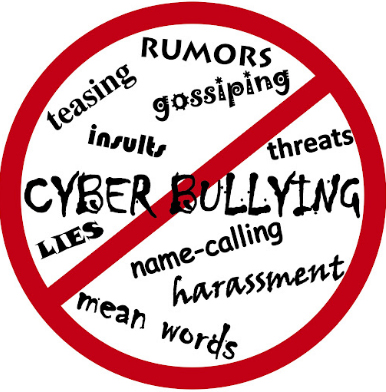
    Kids should be taught not to be nasty to others online, harmless as they think it might be. Cyber-bullying is viewed very seriously since several kids have committed suicide after being bullied online. So its a must Internet Safety Rules to be followed by our children . Kids do not always realize the consequences being nasty to another child can have. Besides the emotional and psychological harm done to the other person, a bully could end up having to face the law in juvenile court. It’s important to teach children that bullying is unacceptable.

    Read Also : 38 Best iPhone games you should play

    Don’t Reveal Anything Personal

    There’s simply nothing important enough on the Internet for children to reveal personal information about themselves on any website without a parent’s prior consent. Some online games, competitions, social networks or chat services require personal information to sign up. Kids should always consult with a parent before signing up for any of these. Teach them about their rights under the Children’s Online Privacy Protection Act, and always look at the website’s privacy policies. Report any websites that don’t comply to the FTC. Children shouldn’t reveal their location or any other information such as email address, name, photo, school or phone number to strangers they have met online.

    Visit Age-Appropriate Websites

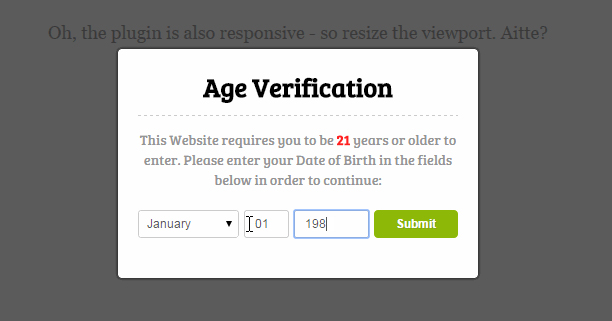
    Although there are many websites designed for children, the Internet is first and foremost an adult place. Teach your kids never to lie about their age when trying to enter a website or playing a game. Age restrictions are there for a reason. The moment a website asks for a birth date, kids should know that it’s not age appropriate for them. Consider using a safe search browser to ensure that kids don’t accidentally stumble upon inappropriate content.

    Read Also : WhatsApp Data Sharing Disable Methods to Protect WhatsApp Data

    Don’t Exchange Photos

    Kids should never exchange photos with others online without the permission of their parents, as it makes them vulnerable to people with ill intent. Predators may use a photo to identify their next victim, or your kids could fall prey to identity theft, where a fake profile gets opened with their photos. Cyberbullies can also use photos against your kids to humiliate them publicly.

    Read Also : Improve The World With Smartphone -Top 10 Hacks

    Don’t Meet Up

    A golden rule for children to keep is not to meet up with someone they have met over the Internet. It’s just too easy to create fake profiles, and your child may be thinking that he’s chatting to a peer, while it could in fact be a much older sexual offender. Even if you give consent to the meeting, be present at the meeting to ensure the safety of your child.

    Stay safe online because its easy to be webbed in web world.