Tag: Amazon

  • Meal Kit Delivery – Amazon Meal Vs Walmart Meal Vs Blue Apron Vs Hellofresh

    Meal Kit Delivery – Amazon Meal Vs Walmart Meal Vs Blue Apron Vs Hellofresh

    When you are back home from a few days trip and you find nothing in your kitchen to prepare your dinner, then you would be really frustrated. You are tired and you just want to eat some home cooked meal and just slosh off. What are your options? Why not buy some food from outside? No, you do not feel like eating from outside too. Since you were on a trip you had to have your food from restaurants. You are also too tired to go and shop groceries. So, here are your life savers – The meal kits. To be Honest Meal Kit Delivery is a boon for the generation and future .

    Meal Kit Delivery

    Amazon, Walmart, Blue Apron , Hellofresh , Plated are some of the online sites through which you can book a home delivery of groceries for a meal.  These online sites work in the morning as well as in the evening. You can easily choose Meal Kit Delivery option from their menu and buy it online. Your meal box will arrive at your door step quickly.

    All the meal boxes are made by their chefs. He chooses the right ingredients for a meal for two or four and then it will be delivered at your home. These meal kits include both vegetarian and non-vegetarian. You can prepare your meal with fresh veggies and meat.

    Amazon Meal Vs Walmart Meal Vs Blue Apron Vs Hellofresh

    Now let’s have a look at what these Meal Kit Delivery stores have. Here is the comparison on best Meal Kit Delivery services online like Amazon Meal Vs Walmart Meal Vs Blue Apron Vs Hellofresh .

    Blue Apron Meal Kits

    Blue Apron brings in all farm fresh produce according to seasons. The meat and poultry have no added hormones. They bring in fresh produce to the store from the farmers to enhance the quality of their products. Fresh ingredients can always make your food yummy and healthy. Blue Apron only delivers sustainable seafood recommended by the higher authority. They bring the fresh produce and delivers to you. There are no other middlemen involved. So you imagine that Blue Apron only gives you farm fresh ingredient to cook a tasty meal.
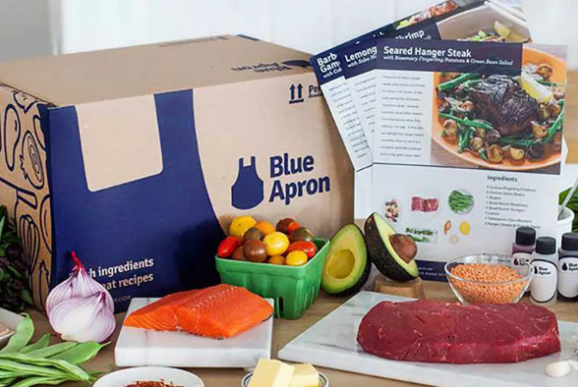
    Moreover, by delivery the right amount of ingredients for meal, they are reducing the food waste. The customers will have to just add all the ingredients completely for a meal. Wastage does not occur.

    Blue Apron Meal Kits Menu

    The menu normally includes items like glazed chicken, French Bread Style Pizzas, Korean Rice Cakes, Roasted Veggies, seared chicken and pan sauce, pork chops etc. The names sound so mouth-watering. Try out the Blue Apron Meal Kit and enjoy a day.

    Amazon Meal Kits

    Amazon.com brought in variety of meal kits for their customers to enjoy. When they first launched, their menu included 17 meal kits, like Steak Au Poivre, Roasted Cod and Cannellini Bean, Ragout and Pesto etc. Their price range was much more favourable, when compared to other online sites.
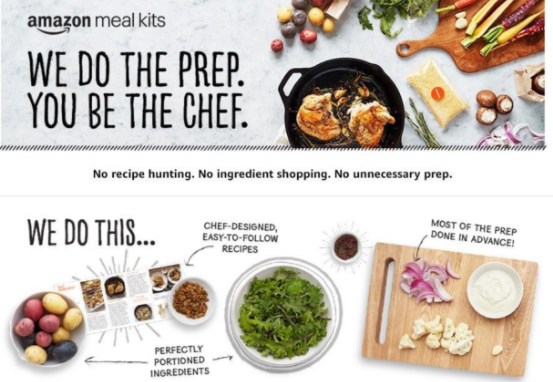
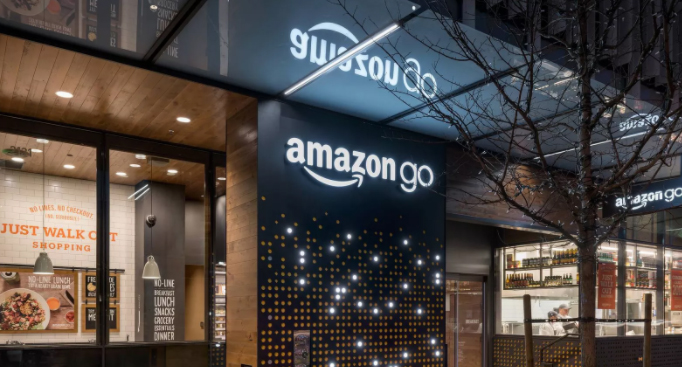
    Amazon also launched the Amazon Go Store in Seattle for their customers to enjoy the hassle-free shopping. They have also brought ready to eat in snacks,lunch,dinner and meal kits in their store. Their menu also attracts the customers because of their cuisines and fresh products.

    Walmart Meal Kits

    Walmart launched in after Blue Apron and Amazon Meal Kits and they brought in meals like chicken tikka masala, thai crab curry with jasmine rice Spanish paella etc. The Walmart works with several brands to offer their customers different cuisines. Walmart Meal Kit Delivery was a challenge to other sites. Amazon and Walmart are trying to be better than the other. They also made the customer’s life easier with their amazing meal kits.
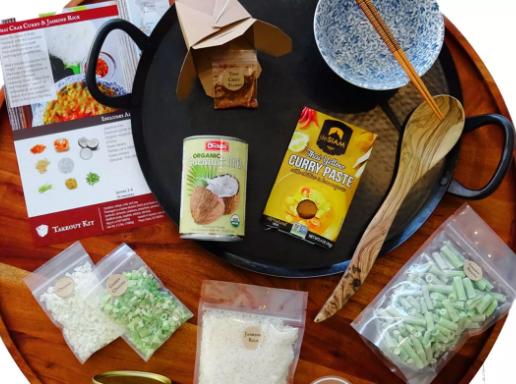
    There is a tight competition between Meal Kit Delivery services of Amazon Meal Kit Vs Walmart Meal Kit

    Hello fresh Meal Kits

    Our next site is Hello fresh and they offer diverse meal kits for their customer with easy recipes. The customers can pick and plan show on their website and their expert chefs will select the ingredients and send for delivery. You can make weekly booking, and hello fresh will deliver your meal kits at your door.
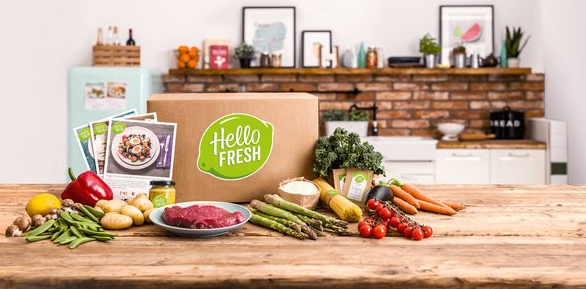
    Hellofresh Meal kits are available in various cuisines like Balsamic Fig Chicken, South Western Stuffed Peppers, Moo Shu Pork Tacos, Sizzling Shrimp etc. The ingredients for the meal kits are picked by directly from the producers and their chefs arrange the meal kits.

    With these magical meal kits, you can cook your meal for a family with ease and comfort. All the ingredients are right in front of you and you do have to search for any other ingredient. The recipes are also there for you in the meal boxes and you can cook any dish that they offer. All these sites change their menu every week and you can book a week’s meal kits at a time by selecting their plans.

    The package comes in high quality boxes with ice bag if required to keep the ingredients fresh till the delivery. Customers are really happy these companies who made their life easier.  They do not have to waster a lot of time in kitchen. Cooking becomes super fun and quick with these meal kits and all can spend the rest of the day with their family.

    Blue Apron was launched earlier and they had built a good market. When the Walmart started, these two sites where on the same ground with varieties in meal kits and with a little price range. Then pops in the Amazon with very reasonable rates for their meal kits. This surely made the other two to struggle. Hellofresh the next competitor arose with attractive meal kits with their own varieties and styles. If these sites come to a reasonable rate for their fresh products, the customers will surely increase and we can have healthy new generation consuming farm fresh produce for the cuisines.

    So we have seen the comparison between the best online meal delivery services such as -Amazon Meal Vs Walmart Meal Vs Blue Apron Vs Hellofresh

  • Amazon Go Store – Grocery Store of the Future

    Amazon Go Store – Grocery Store of the Future

    The trend of the town now is this tech grocery store – Amazon Go store !

    During your busy life, shopping seems to be a task that takes a lot of time. Especially when you have to stand in a long queue in the supermarkets to pay your bill is very tiring and time-consuming. Have you ever thought about a grocery store where you do not have to stand in a queue to pay for what you purchased?  It would be easy for you to buy groceries any busy day if there is a store like that.

    So, here it is. A grocery store is opened recently where there are no cash counters and no more queues to pay the bills. Amazon.com, one of the famous online shopping sites is the master brain behind this grocery store. They have named it as Amazon Go Store and this grocery store is situated in Seattle, Washington. The store is open from 7 AM to 9 PM, Monday – Friday.

    Now recently Amazon has started Expanding their Amazon Go stores . Also new Amazon Go stores for  New York is coming up and it is expected that Amazon Go Chicago and Amazon Go for San Francisco is expected .

    Amazon Go store for India is not yet available but still Indians have made Watasale in kerala which can be called as the India’s Amazon Go store .

    What exactly is Amazon Go ?

    Amazon Go Store is a grocery store in Washington, opened up for the public in 2018. This new technology grocery store can be easily accessed and at the same time, shopping becomes simpler. Why does it say that shopping is easy? Because the customers visiting the Amazon Go Store does not have to stand in a queue to pay their bills. The Amazon people call this experience as – “Just walk out” shopping experience.

    Doesn’t that sound too good to you too? Yes, it is true, you can pick your groceries and just walk out of the Amazon Go Store and your purchase bill will be debited from your Amazon Account. You will only need to have the Amazon Go App on your android phone or iPhone to shop here.

    How to Download Amazon Go on iPhone ?

    You can download amazon go for iPhone from Apple’s iOS Store .

    How to Download Amazon Go on Android ?

    You can Download Amazon Go for Android from Google’s Playstore

    Products inside the Amazon Go Store

    From ready to eat breakfast, lunch, dinner, and snacks, you can find almost all the necessary grocery items you will need. There are varieties of soft drinks, juices, bread, bakeries and a lot more. Amazon Go Store has its own chefs who prepare the ready to eat meals. Moreover, the chefs here make meal kits that are suitable or two persons. These meal kits are designed by the chefs with all the ingredients to cook a meal. This Amazon Meal Kit is the right pick for couples who are working and does not have much time to spend in their kitchen.

    Read Also : Best Smart Home Gadgets for Home automation- Smart home

    How Amazon Go Works ?

    You should have an Amazon Account to start shopping from the Amazon Go Store.

    Follow these simple steps to enter the Amazon Go store.

    • Download the Amazon Go App in your new generation Android phone / iPhone .
    • Register an account with Amazon and enjoy cashless shopping.
    • To enter the Amazon Go Store, you just need to open the app and scan it on the baffle gate at the entrance.
    • Start picking your groceries from staples, non-veg items, meal kits, wines and beers, juices etc.
    • The sensors on the shelves will track what you have picked.

    They have set cameras everywhere in the store that will watch all your movements and once you finish shopping, you can just walk out of the store.

    In case if you want to put back an item on Amazon Go store on to the shelf, you can do so and the Amazon Go App will deduct that item from your account. You will be only charged for the products that you have selected from the shelves. When you walk out of the store through the turnstile, automatically the sensors will track the products you have with you. You will then receive your bill as a message with the number and name of the products along with prices and sum-total. It will be deducted from your Amazon Account. Moreover, there are many staffs available at Amazon Go Store to guide you if you need any assistance.

    Read Also : Best Streaming Devices – All Top Media Streaming Box on Market

    Reviews about Amazon Go Store

    This Amazon Go Store of 1800 sq ft is spacious and the shelves are made in a way that customers can see all the products easily.  At first, the store was open only for the employees of Amazon in 2016. This was a test to check how well their technology is working. With utmost care and modern technological inputs, Amazon Go Store was successful and they decided to open it for the public in Jan 2018.The Amazon employees did a trial run for a year with only Amazon employees and customers were eagerly waiting for it grand opening. All the customers who shopped from the Amazon Go Store were extremely happy.

    This techy-cool shopping experience is sure to become every individual’s favourite since Amazon Go Store makes shopping effortless in Seattle. People are expecting more outlets in many places. But, surely it will take some time to have outlets of such kind. Let us all hope to see more Amazon Go Store outlets that makes every customer’s to have a hassle free and miraculous shopping experiences.

  • Alexa Tips, Tricks and Commands

    Alexa Tips, Tricks and Commands

    Alexa , switch on the lights and even sometimes i would say Alexa, play some music . You might think that I am talking to some person. Well yeah you can say that I am talking to someone but not exactly a person. I am talking to Alexa, it is a device not some person. Alexa is a virtual assistant developed by Amazon. Here we will be discussing Alexa Tips , tricks and Commands .

    Amazon Alexa was announced in June, 2014 and was inspired by the fiction series Star Trek. You might wonder that Alexa can perform loads of cool stuff. Alexa can be controlled using the Alexa app or from the site http://alexa.amazon.com/ .

    What is Alexa & What Alexa Can Do ?

    Before we go deep into the Amazonalexa tips , tricks and command let us understanding something more about Alexa .

    What is Alexa ?

    Alexa is the new generation’s virtual voice assistant that comes as built on many smart gadgets to ease your tasks in daily life.

    It’s the era of Smart devices and smart gadgets , and on the trend there lies the smart speakers. One of the best selling smart speakers is Amazon Echo series . You may be aware that Amazon echo first generation series which was only open for its Amazon Prime subscribers .Now Amazon Echo series comes up with build in voice assistant called Alexa .And Further in future you can expect Amazon Lex to come to the field as well . Alexa is a virtual assistants from the great brand Amazon .

    What Alexa can do ?

    Alexa can do a lot of basic stuff such as narrating news, weather and playing music. A lot more of stuff is available in the skills section. Just enable the desired skill and use it then. So now let us learn Alexa tips in detail.

    Note – Alexa is a vitual voice assistant like bixby , cortana , siri etc… Amazon echo ,Amazon Echo dot etc are smart speakers that use Alexa voice assistant .Not only the Amazon echo series make use of Alexa , but also Fire Tv use this smart virtual voice assistant.

    Now  moving on to the core topic about the smartest alexa tips and commands .

    Alexa Tips, Tricks and Commands

    Now we are going to discuss a number of Alexa tips, tricks and commands that will help you to use your Alexa to the best of its capability or tempt you to buy one right now:

    View Command History

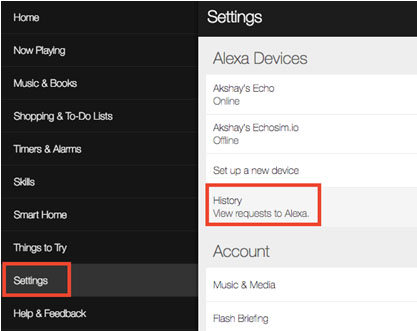
    Whatever commands you give to Alexa are recorded and saved as history. If Alexa is unable to fulfill any of your commands you can look for the issues in history that what Alexa actually heard when you gave the command. Moreover, anything that Alexa recognizes is saved here in the history. You can also delete and playback the recordings in history as well.

    For accessing Alexa command history just go to Settings and then click on History. Here you can view, delete and playback all the commands.


    Force Alexa Software Updates

    Usually, Alexa auto-updates itself whenever it gets time if you keep it connected to internet always. But if it is in usage continuously or that it doesn’t get time to update itself, then it might be working on some older update and you might be missing out on some latest alexa features.

    For doing all you have to do is go to settings and then your echo. Scroll and select ‘Device Software Version’. If an older version is being used, just mute Alexa for about half an hour to let it auto-update.

    Alexa Flash Briefing

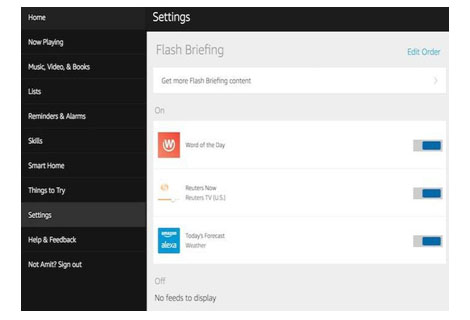
    If you ask Alexa commands like ‘Alexa, What’s up?’ or ‘Alexa, read me the news’ then Alexa reads you the latest news, however if you don’t like the content then you can simply listen to customized news.

    For this go to Settings and there select Flash Briefing and there you will see loads of options. Switch on the switches whosoever content you like to hear to in the customized news.

    Teach Alexa new responses

    There might be some alexa commands for which might Alexa not respond to, if you want Alexa to reply to your custom commands as well, this can be done using skill ‘Everyone Around’.

    Just say ‘Alexa, enable Everyone Around’. Then you will have to add custom commands in the app. For this use command ‘Alexa, open Everyone Around’ and you will receive a mail to add custom replies. This is one of the useful Alexa tips to try .

    Read Also : Bixby Vs Google assistant Vs Siri Vs Cortana – Popular AI Assistant

    Alexa as Kitchen Assistant

    Alexa can be your wonderful cooking companion as well. There are loads of Alexa commands which can be of great help to you in your kitchen. Some of these are ‘Alexa, Set timer for 10 minutes’, ‘Alexa, add flour to the shopping list’ or carry some conversions by saying ‘Alexa, how many cups are there in two pints?’. Smart devices for kitchen is an asset , so you can use some Alexa tips to make Alexa your kitchen assistant .

    Read Also : Meal Kit Delivery – Amazon Meal Vs Walmart Meal Vs Blue Apron Vs Hellofresh
    Read Also : Amazon Go Store – Grocery Store of the Future

    Alexa To do List manager

    Alexa can be an amazing to do list manager. You can create your own shopping lists, wish lists or simply a to do list consisting of your day to day tasks. Use commands like ‘Alexa, add ‘Call Boss’ to my to do list’ or ‘Alexa, add denims to my shopping lists’. You can review these lists on Alexa’s mobile application or http://alexa.amazon.com/.

    Add work location on Alexa 

    You can add your frequently visited locations such as your home and work. Just go to app Settings and select Traffic under account. There you can add your desired addresses.

    Then you can use commands like “Alexa, how is the commute to work?” and know about the traffic conditions for your way. This is an excellent alexa tips to use on a daily basis .

    Alexa Smart home – Control your home

    Amazon alexa can help you to control all your smart gadget easily.For every smart home alexa is the perfect manager . Just say “Alexa, switch off the fan”. You can also create a group for devices so as to turn them on/off together. For this your smart home devices need to be Alexa-compatible.

    Read Also : Best Smart Home Gadgets for Home automation- Smart home

    Link Alexa with other apps

    You can access a lots of services provided by other companies such as Uber, Pizza Hut, Dominos and more. Their services can be used by enabling their respective skills in the skill section. You can add your work place and say “Alexa, book a ride to work” and your ride will be booked in a pinch of time.

    Alexa’s Easter eggs

    If you have kids in your house then this is one of the most interesting features for you. Alexa can play a lot of games with you and you can expect a number of funny responses as well. For example you can play animal game, just say “Alexa, play animal game” and Alexa will ask you a bunch of questions to guess the animal you thought of. You can play a number of more such games like Bingo, rock paper scissor and much more or just say “Alexa, tell us a joke”.

    Alexa Calorie Tracker 

    If you are on a diet, Alexa can be your very own trainer to keep track of your intake of calories in a day. Food tracking service Nutritionix is present and you can use commands like ‘Alexa, tell food tracker to log a cup of ice cream’ will help you in tracking your eating.

    Listen to book using Alexa

    If you are doing super busy and are unable to finish the book you started, then Alexa can come to your rescue. You can listen to that book while you are driving or walking or cooking. Just say ‘Alexa, read the Kindle book [Book Title]’ and Alexa will read the book from kindle where you left it.

    Get skilled at adding skills

    There are literally huge number of skills that can performed by Alexa that a number of them can be overlooked by its user. So while using Alexa you also know how to activate the best skills available with Alexa. For doing so you can search them in proper categories and can also sort them in desired order.

    Alexa Alarm Clock

    Alexa can be your alarm clock as well. Just say ‘Alexa, set an alarm for 7:00 a.m.’ and for setting some celebrity’s voice as your wake up song just go to the Menu button, then select Timers & Alarms then Alarms and then select Manage alarm volume and default sound. Now go to the Alarm and then select Celebrity and choose the voice you want.

    Say things properly

    Whenever you give Alexa give some command you ought to say it properly else Alexa may not be able to perform your desired action. For example if you say ‘Play songs Alexa’, it will do nothing since ‘Alexa’ is its wake word and it for this it hears nothing after Alexa so it won’t play any songs.

    Alexa Routines

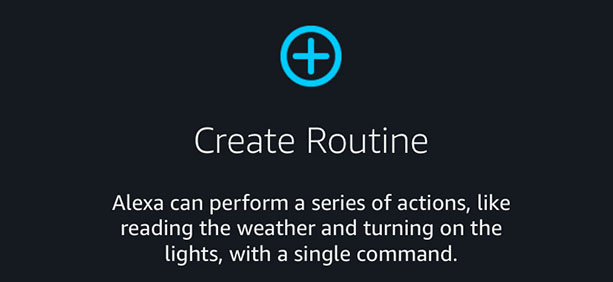
    Alexa is unable to implement multiple commands at a single moment but routines are a kind of a substitute to this. Routines implement a series of commands stored. For example a routine can be created for the command “Alexa, good morning” which first plays your flash briefing and then plays your favorite music.

    Disable/Change Alexa wake keyword

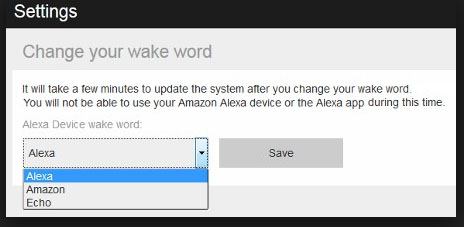
    If you want to resist Alexa from listening the wake keyword then you can mute Alexa by pressing the mute button on it and it will remain muted until that button is pressed again. For changing the wake keyword go to the settings and tap on [Device Name] and select Wake Word Alexa under general settings.

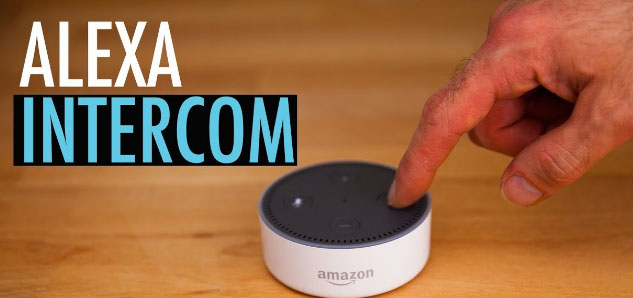
    Use Alexa as Intercom

    You can make use of Alexa to turn your Amazon Echo device into a home intercom .For example if you ever wanted to make some announcement in drawing room just say “Alexa, drop in on the drawing room”. You can use the multiple Alexa’s as speakers to play a single song.

    Create Voice profiles on Alexa 

    You can create separate voice profiles on Alexa for each of your family member, this helps Alexa to recognize who is making the commands and deliver personalized results. For “Alexa, what are my upcoming events”. It will tell you about your events from your calendar by recognizing your voice.

    Hope, these Alexa tips and tricks will help you to get the best from your Alexa. Do tell us which feature helped you the most and don’t forget to share with us any more features of Alexa you find cool.