Tag: safe online transactions

  • Cancel / Reverse Venmo payment : When a Venmo payment goes wrong

    Cancel / Reverse Venmo payment : When a Venmo payment goes wrong

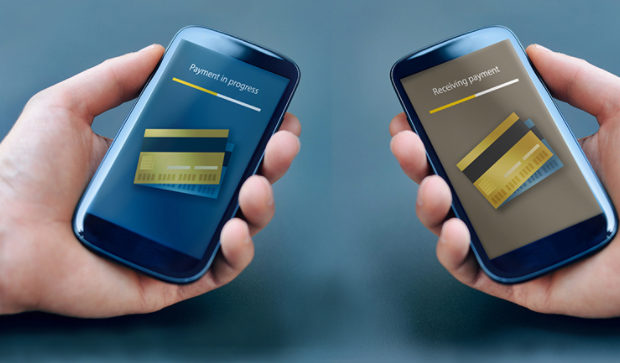
    Mistakes are human nature but with technology we learned a word ‘UNDO’ .When it’s connected to money a mistake is so crucial to bear . Suppose you make an online payment to a wrong person then what can be done. So if you committed one such in Venmo then here is the way to Cancel / Reverse Venmo payment.Today,an individual can order a car through Uber,book a room through Goibibo, pay a friend through Venmo with just a 3G/4G mobile phone.

    The ubiquitous access to the internet afforded by laptops,smartphones & tablets has laid the groundwork for many startups .

    How does Venmo work ?

    Venmo carries out money transfers between persons/organizations ,permitting  consumers to pay back people in their contact for any so forth  reason. A linked credit card,debit card or bank account is required to use this service. Besides this, the beneficiaries i.e. the users  can sends money to  friends or receive payments that can then be stored as a Venmo balance for use at a later date or can be  cashed out immediately to a bank account.

    Is Venmo safe?

    A major drawback of being digitised  is that everything goes on the network ,even the person’s personal details, adhar card nos. etc, which can become a threat to someone, if went in wrong hands. Yes,Digitsation brings convenience,but it’s security is also a major concern.

    We know that applications that  are directly linked to one’s bank accounts must be held to the highest security standards . However, in 2015, Venmo became the target of criticism due to security breaches of user accounts. And hence as a result ,it uses bank level security  & data encryption to protect users against unauthorized transactions & allow users to set up a PIN for mobile application access for additional security.

    Read Also : Venmo User Guide for Safe Transactions – Venmo payment

    How to Cancel / Reverse Venmo payment

    When someone sends money to a Venmo user, the amount is directly added to his account balance . Since transfer of money through Venmo is so instantaneous that one can’t cancel a payment once its been made.

    Suppose you transferred a venmo payment to someone else by mistake instead of the actual person. Then you will worried about the ways to Cancel / Reverse Venmo payment.Here you can request to do a payback from the person to whom you transferred by mistake.

    In order to do this you should write to that concerned person requesting a pay back . If you don’t hear back from them or need help sending a charge request,contact the support team of Venmo & they will help you to Cancel / Reverse Venmo payment.

    When you contact Venmo support team to Cancel / Reverse Venmo payment, please be sure to include the following details to expedite the process:

    • Username of person to whom you sent the funds
    • Amount of payment
    • Date of payment
    • Username & phone number of person to whom you were about to pay

    Read Also : Credit Card Debt Myths – Top 8

    Some simple steps to Cancel / Reverse Venmo payment:

    You can Cancel / Reverse Venmo payment easily .

    Cancel / Reverse Venmo payment If you paid the wrong person:

    1. Open the Venmo app.
    2. Tap the Send/Request icon at the bottom right corner of the app.
    3. Search for the person to whom you accidentally sent money.
    4. Search the person’s name in the currently searched list.
    5. Type the amount to be sent,next to the dollar sign.
    6. Leave a message into the message box,mentioning what it is meant for & to whom(optional).
    7. Click “Request” icon.
    8. Click” Confirm Request” icon.
    9.  Set a reminder,so that you can be notified.
    10. Approach  Venmo help centre, if your request is not accepted.

    Cancel / Reverse Venmo payment If you paid someone who doesn’t possess a Venmo account :

    1. Open the Venmo  app.
    2. Click the menu icon.
    3. Choose “Incomplete” icon.
    4. Click” Payments” icon.
    5. Click “Cancel” icon near the payment. By doing this the entry will be removed from the list, and the money will be refunded to the card or account from which it was sent.

    Read Also : Exclusive Nest Egg building guide for painless millionaire dreamer

    How to secure a Venmo Account:

    As we all know,evolution of technology & its increasing applications in our day to day life had made life easier & convenient .

    Just with a click of button, we can carry out all important banking transactions ,pay our bills,can do important business conferences/meetings through Skype, can interview for job also & even with the introduction of MOOC’s one can learn any skill/subject of his interest at his residence only.

    But,in the case of carrying out financial transactions & other banking processes, we are a bit more concerned about security of that service provider,since its linked to someone’s personal details & monetary savings. With a single loophole in the service, it can become a threat to a consumer .

    So, let us learn here ,how to secure a Venmo Account from thieves,hackers & snoopers :

    1. Create a Very strong password & immediately log put of the app,when not in use.
    2. One can add a two step authentication like a password with a pin or some pattern etc.
    3. One can set a not to easy detectable authentication to the phone also,in addition to Venmo,so that an unknown can’t access your phone without your consent.
    4. One can set his account’s settings to “privacy”.
    5. Twice check whether you are sending money to the right person/company.
    6. Timely keep an eye on notifications.

    Overview about Venmo security & service:

    With the recent introduction of Venmo’s Multi-factor  authentication feature, is now more secure to use , it automatically adds an extra step authentication to the user,when you attempt to login from a new device.

    It will send an OTP to the registered phone no. of the user & only after submitting that OTP, you can access the account.

    This feature is designed to maximize security while continuing to provide a quick and easy sign in experience to the users. If you have any query, you can contact Venmo team or can approach the help centre.

    So this is the overview of Venmo online payment and its security along with methods to Cancel/Reverse Venmo payment & Venmo account security tips.
  • Safe Online transactions Tips & top 12 safe online transactions methods

    Safe Online transactions Tips & top 12 safe online transactions methods

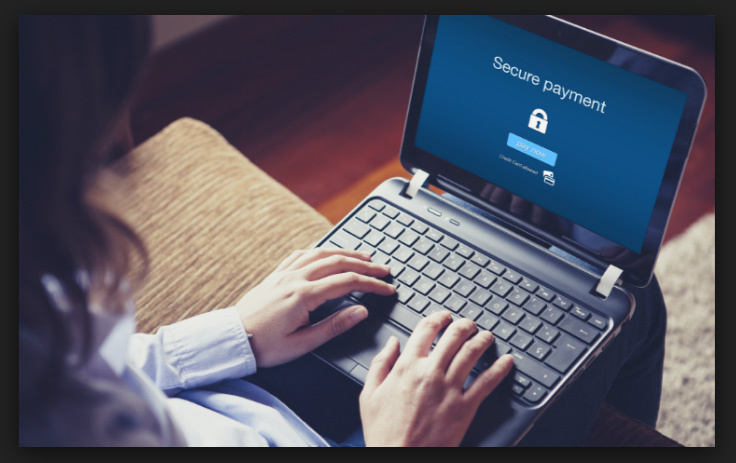
    Doing a safe online transactions is the ultimate need of today’s society. Our lifestyle and economy demands for an online transaction while how safe your transaction is the primary question in most of the people.

    Safe Online transactions – Detailed overview 

    Before heading towards the exact title you should know a brief about online transaction to get a clear idea . I am not going to say something which you don’t know , its all many of you will be knowing but i write this for those who are really newly to online transaction . They will surely have so much confusion along with fear of how to do safe online transactions.

    What is online transaction?

    Online transaction is nothing but a simple way to avoid longer queues, travel, transportation etc for doing our regular activities which includes sending money to someone, purchasing groceries, booking train/bus/air tickets etc. Online transaction can be accomplished by using our credit/debit card or payment support systems like PayPal.

    safe-online-transactions-tips

    Time saving is the major advantage of doing online transaction and it really helps working people as they don’t have much time for going in person. Even though online transaction is easy and comfortable, we have to take all the necessary steps so that our transaction is 100% safe and no information is stolen.

    Different kinds of online transaction

    The most common varieties of online transaction are –

    • Online Shopping
    • Paying Utility Bills (Electricity/Insurance)
    • Making reservations for travel (Air/Train/Bus)
    • Sending money (Local / Overseas)
    • Receiving money (Local / Overseas)
    • Net Banking ( Checking transactions with your bank account)

    How to do safe online transaction –Safety tips to online transaction

    Even though online transaction has many advantages, the major drawback is security as there is a chance that your information can be stolen and misused. To avoid that, please keep the following these points / safety measures in mind while doing online transactions to have a smooth and safe online transactions.

    • Say ‘No’ to public and shared computers

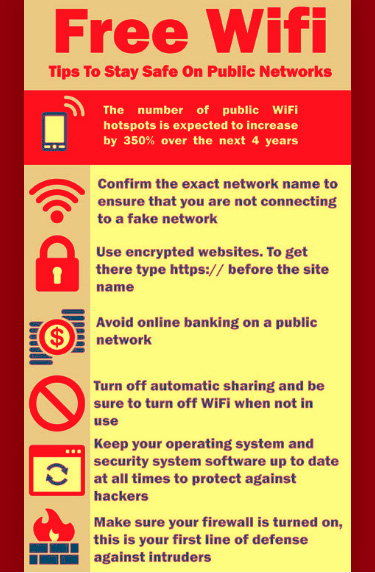
    tips-to-stay-online-on-free-wifi-and-public-networks

     This is the most important safety measure that you have to take while you want to have safe online transactions . Don’t do any online transaction using computers in internet browsing centers as the cookies, passwords etc. are stored in them. It is better to avoid doing online transactions using computers that are shared with your friends / relatives unless you trust them completely.

    Read Also : How to secure bank account from hackers

    • Review certificates –  

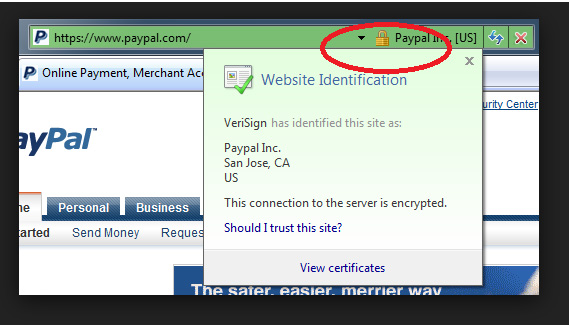
    If you are doing any online transaction in your bank or other financial websites, check the certificate of the website. You can find a small lock symbol on the address tab. Check it and make sure that the certificate has a valid expiry date and it is the original one as there are many false websites with same domain name and appearance are available.

    review-certificates If the certificate is valid, you can see a green color text which means extended validation. Red means the certificate has expired or invalid. Yellow means the certificate cannot be verified. White indicates that the certificate has normal validity.

    • Difficult Passwords

    difficult-passwords

    Keep your passwords a little bit difficult and complicated and not easily identifiable. Don’t use your name, age, date of birth etc… in your passwords. It is better to avoid any information about you which are known to others while creating passwords. Keep changing your passwords often. Many banks are offering 3D codes for doing safe online transactions. Subscribe for that.

    • Use Virtual keyboard

    use-virtual-keyboard

    Many banks offer virtual keywords for logging in to their website. You can make use of that as it is safer than normal keyboard even though it takes a little long to type with it.

    • Third party payment / VCC

    It is advisable to use third party payment systems like PayPal, AlertPay or Virtual Credit Card (VCC) for doing online shopping as there is no need to share your personal bank information with the merchants. VCC stands for Virtual Credit Card that can be created for any amount and can be used only once. Check with your bank whether they are offering VCC feature.

    Read Also : Best Low Cost Fund Transfer Methods An Overview

    • Use renowned websites

    If you want to shop anything online, make sure that the merchant site is popular and can be really trusted. Read customer reviews about the website and make sure they are genuine and delivers the goods as promised. Popular online shopping sites are Amazon.com, Ebay.com, Flipkart.com, Snapdeal.com etc.

    Watch this Useful Video for Safe Online Transactions Published by Axis Bank : –


    Top 12 ways to do safe online transactions

    Here are the Top 12 ways or payment gateways for doing safe online transactions.

    1. PayPal

    PayPal is the most popular and reliable way of safe online transactions for Money transfer / Shopping. It is accepted by majority of the merchants worldwide who sell their goods online.

    paypal-safe-fund-transfer-method

    PayPal is very good for shopping goods online and small money transfers. PayPal is not good for sending huge money because of its high transaction fees and wire or direct transfer is the best way for sending large amount.

    2. Google Walletgoogle-wallet

    Google Wallet is becoming popular these days and competing with PayPal in safe online transaction. But currently Google Wallet is used and accepted mostly in USA. There is no fee for sending money to someone else using Google Wallet. You can keep any amount of money in your google wallet by transferring from your bank account and use it for online transactions.

    1. Skrillskrill

    Skrill is previously known as Moneybookers and is being used worldwide for safe online transactions. It can be used to send money as well as for shopping online. The transaction fees of Skrill is very low when compared with other payment systems and is highly secured.

    1. Payoneerpayoneer

    Payoneer is also a good payment gateway for safe online transactions and is accepted globally. It is used to send / withdraw money but the transaction fees for withdrawal is little high. You can create an imaginary US based account with the help of Payoneer which helps users to do transactions with US based merchants or companies.

    5. Stripestripe

    Stripe is a good payment gateway for receiving money and it is really useful for freelancers or people who work online. But currently the sender should be only from the designated countries like USA, UK, and Canada etc. The receiver can be located anywhere in the world.

    6. Payzapayza

    Payza is nothing but the new name of the popular payment gateway AlertPay. It is widely accepted in many countries next to PayPal. It can be used to Send / receive money and has low transaction fees.

    7. Dwolladwolla

    Can you send money to someone using their Facebook or Twitter account? Yes. Dwolla is the best choice for doing such online transactions. The best part of Dwolla is zero transaction fee for small amounts. It is accepted worldwide in many countries.

    8. WePaywepay

    WePay is a popular payment gateway for receiving money and is very useful for anyone who sells their goods online. But it is currently available only in USA.

    1. Authorize. Netauthorize

    Authorize.Net is one of the oldest payment gateways available since the 90s. It is accepted worldwide for safe online transactions. It is widely used for payments with credit card.

    1. 2CheckOut2checkout

    2CheckOut is a very good option for receiving money and is most suited for the merchants or anyone who sell the goods online. It is accepted worldwide in many countries and has reasonable transaction fees.

    1. Amazon Paymentsamazon-payments

    From the name itself, we can trust this payment gateway as it is owned by the popular online giant Amazon.com. It offers different types of accounts for money transfer or shopping and a secure environment for safe online transactions.

    1. ACH Paymentsach-payments

    ACH Payments is a trusted and popular payment gateway for safe online transactions and is accepted worldwide in many countries. It can used for sending as well as receiving money.

    So that’s all on the brief section of safe online transaction methods and tips .