Tag: Online Privacy

  • WhatsApp Data Sharing Disable Methods to Protect WhatsApp Data

    WhatsApp Data Sharing Disable Methods to Protect WhatsApp Data

    WhatsApp is one of the popular messaging app ever since it was launched. Now recently WhatsApp announced that it will be sharing its users data with Facebook . WhatsApp Data Sharing news has put all its users in confusion about how much their privacy is protected and how safe it is to use WhatsApp further.Here in this session you will be finding answers for your WhatsApp Data Sharing, Privacy and security concerns and Tips to be safe on WhatsApp.
    watsapp-data-sharing-disable-methods-to-protect-watsapp-data

    WhatsApp Data Sharing with Facebook – What Account Information is Shared.

    Taking into account of the latest news about WhatsApp. One top news on board is WhatsApp use data privacy policy earlier but now its parent Company Facebook have put an end to the data privacy on WhatsApp .

    By this Facebook will be getting certain information about You. WhatsApp will share these account information about your account –

    • Phone number which you have registered and verified with your WhatsApp account will be available for Facebook Family of Companies.
    • Your WhatsApp account activity like when was the last time you used WhatsApp and how you use the services of WhatsApp.

    Why Facebook wants your WhatsApp Account Information – Pros & Cons of Enabling WhatsApp Data Sharing 

    Facebook is a big data mining whale in the internet world . Facebook , the parent company of WhatsApp has changed their WhatsApp Terms & Conditions.

    Why Facebook wants your WhatsApp Account Data ?

    • The main reason that the Facebook spokesperson say is that this is for improving the services of both Facebook users and also WhatsApp users.
    • Secondly Facebook by interfering on the WhatsApp Privacy policy will have an eye on the data that they retrieve and it will be for monitoring the unique users and reduce spam and abuse on WhatsApp.
    • Your account info will be used to Improve ads on Facebook .

    WhatsApp Users Benefit on Data Sharing 

    • You can get better friend suggestions in facebook according to your WhatsApp contacts also you will get to know better advertisements based on your interest .

    This can be pros to someone while it will be cons to someone . So we say it as let this be your subjective aspect in deciding whether you want to enable/disable WhatsApp data sharing. 

    Your WhatsApp Account Information That will not be shared with Facebook.

    WhatsApp insists that certain account information of WhatsApp are safe and it will not be affecting WhatsApp users privacy . WhatsApp insists that the user account information like their phone number will not be sold to any advertisers or any other third party & your messages, photos and certain account information will not be shared with facebook.

    How to Opt out of Data Sharing on WhatsApp

    You cannot completely opt out from sharing your account information on WhatsApp with facebook. But still you can partially opt out of Data sharing on WhatsApp.

    If you are thinking what is this partial opt out and what is its effect on securing your WhatsApp data then i will explain it . Facebook will be monitoring your account but they will not be using your data for advertisement purposes . This is the only way on which all WhatsApp users have to move on . We cannot say that privacy is assured well as always facebook will be monitoring your account information on WhatsApp in the name of improving your experience on both Facebook & WhatsApp.

    Here are the top methods to opt out from Data sharing on WhatsApp- 

    Method 1 – If You haven’t Accepted WhatsApp Terms & Conditions

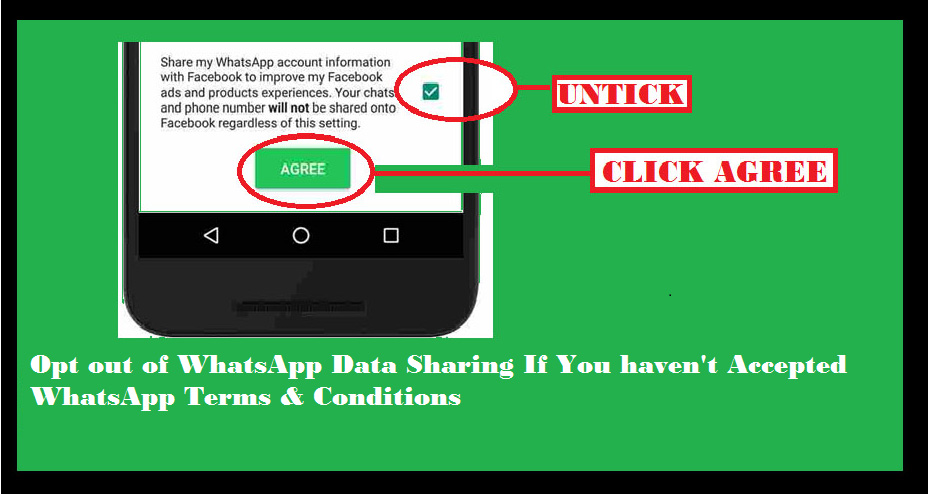
    If you haven’t already accepted the terms and conditions of WhatsApp then you have to follow this steps to opt out of Data sharing on WhatsApp.opt-out-of-data-sharing-on-whatsapp
     

    • Open WhatsApp on your device.
    • You can see the newly updated terms & services of WhatsApp.
    • Click on Readoption.
    • Scroll the terms & condition page until you find an option with check box.
    • If you are sure that you want to opt out from data sharing on WhatsApp then untick the check box .
    • Finally click the “Agree” button.

    That’s it , you have opt out of WhatsApp data sharing .This is the only available method to opt out of WhatsApp data sharing after accepting terms & conditions.

    Method 2 – If You have already Accepted WhatsApp Terms & Conditions

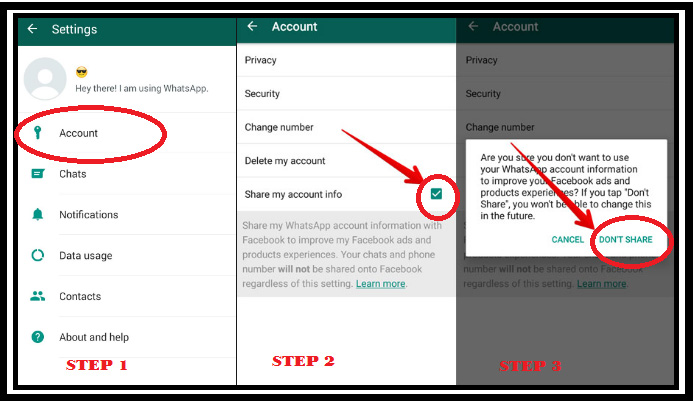
    If you have already accepted the terms and conditions of WhatsApp then you have to follow this steps to opt out of Data sharing on WhatsApp. You don’t have to worry if you have agreed to the latest terms & conditions because WhatsApp gives you a 30 days time to partially opt out of WhatsApp data sharing
    how-to-opt-out-of-watsapp-data-sharing-when-already-accepted-the-terms-and-conditions-of-watsapp

    • Open WhatsApp on your device.
    • Go to Settings option in WhatsApp.
    • Click on Account option.
    • There you can see an option with a check box as Share my account info 
    • Uncheck the option

    You are done with it .

    Method 3- Reinstall WhatsApp to Opt out of Data Sharing with Facebook

    If you are not able to solve the issue by following method 1 & 2 then here is the solution. Just uninstall WhatsApp application from your device and reinstall it.

    Now you can easily follow the steps of Method 1 . This will help you to opt out of WhatsApp data sharing. 

    You can do the necessary steps as we have given you a detailed idea to clear all the queries that was raised regarding the Safe way of using WhatsApp and how to opt out of WhatsApp data sharing with Facebook.
  • Password Checkup Chrome Extension to detect unsafe passwords

    Password Checkup Chrome Extension to detect unsafe passwords

    Are you using Chrome browser then you must know about this latest Chrome extension – Password Checkup .

    Google has always tried to improve user security and safety . We have seen google notifying us about our least secure passwords on google apps and products . This is the case that applies only to Google accounts , but what is the case with other non-Google website , apps and products which we use daily . How can we detect unsafe passwords used on websites / apps .

    We can make use of Password Check up Extension for chrome in order to detect unsafe passwords on other websites .

    Data breaches and black market of online credentials like username , passwords commonly used are a serious threat to data security . This puts any user under the threat or may even make users prey of a cyber attack , hijacking , hacking etc .

    Use of repeated and common passwords increase your risk . But how well we knew about the leaked and least secured password combinations ? To solve this issue Password checkup helps you out well .

    Password Checkup Chrome Extension

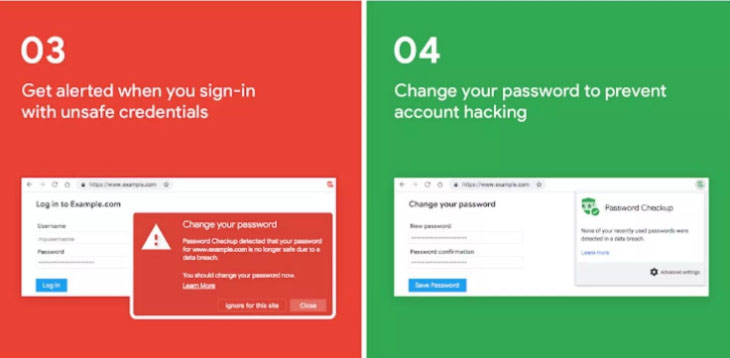
    One of the best chrome extensions for online safety . Password check up identifies unsafe passwords (least secure / repeated passwords ) . It doesn’t store or save your password and user credentials . I mean this is not a password manager , it just act as a adviser or checker to ensure you are entering each and every website with a safe password.

    How Password Checkup Extension Works ?

    Password Check up works for Chrome as a chrome extension . It works well for all websites not exclusively for google related accounts . It is not working as a password manager . It actually alerts unsafe passwords and unsafe user credentials without affecting your privacy . This extension doesn’t track user . In case you enter some random username and password the extension identifies if its no longer safe to use . If its unsafe then it alerts you to change / reset password . It check passwords and username have appeared on any third party data breaches as well .

    How to Use Password Check up Extension ?

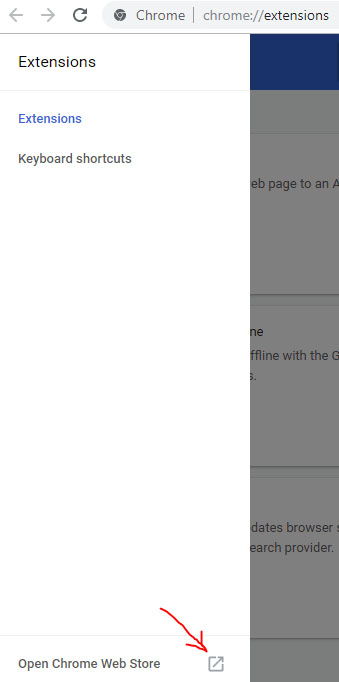
    Let us see how to install password check up chrome extension . First go to chrome extensions .

    Now as show in the image open chrome web store in a new tab .

    Open Chrome Web Store in new tab
    Open Chrome Web Store

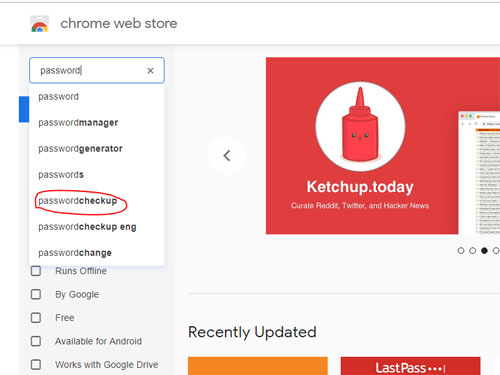
    Now in the search the store box type password checkup .

    search the store for Password checkup Extension
    Searching for Password checkup

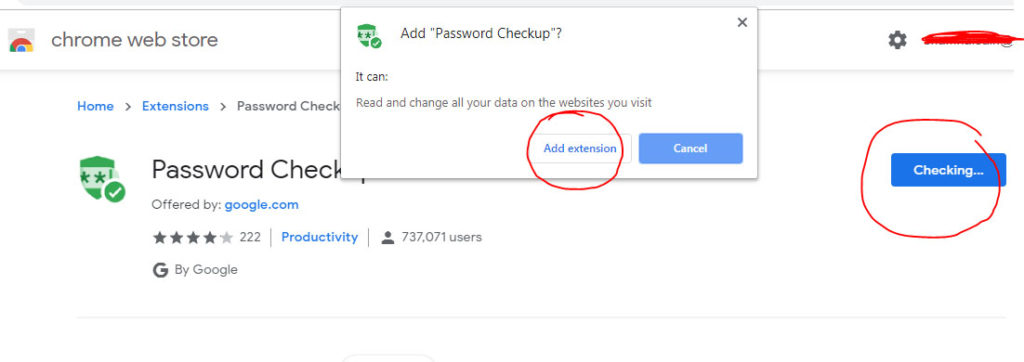
    Now click on Add to chrome .

    Now a dialog box pop ups there click on Add Extension .

    Add Extension for Password Checkup
    Add Extension for Password Checkup

    Now the extension is added to your chrome .

    In the password checkup extension settings you can make necessary setting change like you can limit the use of password checkup for particular websites or even extend it to all sites .

    That’s it hope this is useful to everyone .

  • Email tracking Prevention – How to detect mail tracking

    Email tracking Prevention – How to detect mail tracking

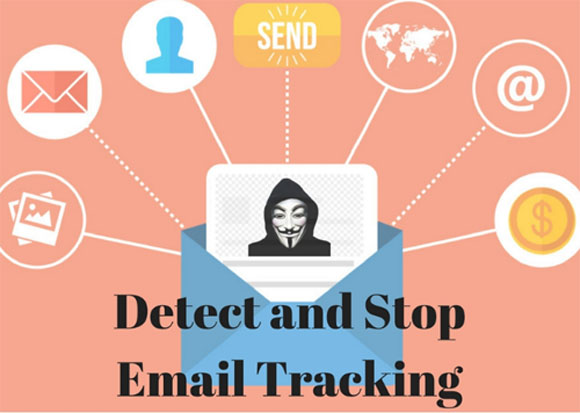
    Many of you might not be aware of the fact that you are being tracked using the mails you receive. We all know how user’s data is exploited these days and then used by some for targeting the customers while some just use to scam the users. So you are being tracked using your emails like when do you opened the mail, clicked on which links, your device’s info and sometimes even your current location as well. So we will discuss about how to prevent email tracking as well as how to detect email tracking .

    First of all no one should be tracking such information and that too is done without the permission of the user is even worse. It feels like a direct attack on your privacy. Here I have listed some methods of how you can protect yourself from such online tracking. But first learn how this email tracking works.

    How Email Tracking Works?

    So there are basically two ways in which you can be tracked using your emails, firstly by embedding images in your email and secondly using links.

    Email Tracked Using Images:

    In this way very small images of pixel size 1×1 is embedded in your email and because of this small size the image is invisible to the user. The image is called pixel-beacon. These images connect you to tracking server software without your knowledge.

    Email Tracked Using Links:

    Some external links are attached to your email and as soon as you open these links you current location and device info is sent to the tracker.

    How to detect Email Tracking ?

    Here we will discuss on how you can find out whether a email you received tracks you . Let’s understand how to detect email tracking in Gmail or any other email clients .

    1. Look for External Images

    Most of the leading email service providers ask for user’s permission whether to open external images or not. This way you can decline this request but should be careful as you may decline images containing some information. Also consider large number of images as an alarm to some kind to tracking.

    2. Don’t open the link

    Sometimes the sender sends you link to read the content of the email on that link. Beware never open such links as they are most of times to track your information. As soon as you open such link your location and info are sent to the desired party.

    Read Also : Send Anonymous Emails From these sites easily

    Read Also : Private Search Engine That Doesn’t Track You Online – Top 5

    3. Look for third party Email addresses

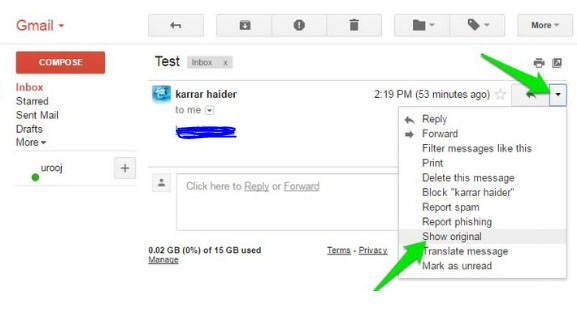
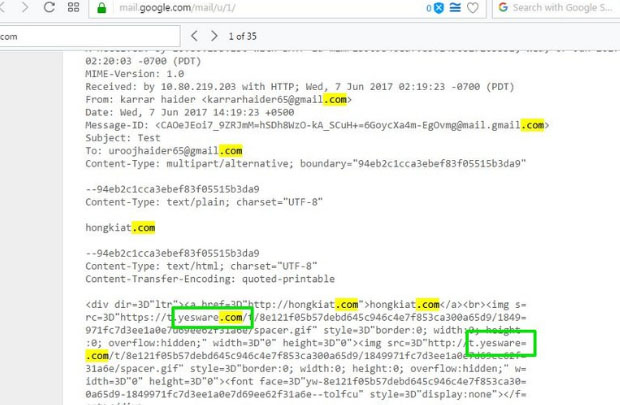
    Some of the trackers send you along with the email, the server’s side email or some website URL. Now click on the options for the email and Click on option Show Original Content. Here use the Keyboard shortcut Ctrl + F to find some keywords to judge whether email can be tracking you or not.

    The search for keywords can be like Track, Tracking, .com or Yesware (a quite well known email tracking service provider). This way you can judge the nature and purpose of the email yourself.

    Detect & Disable Email Tracking automatically :

    Detecting such fraud emails manually is neither foolproof nor quite easy. So we have a number of third party tools which can perform this task for us with much better accuracy. One such tool is Ugly email. It is available as an extension in Google Chrome.

    Ugly email automatically detects all the tracking emails and blocks them. It is one of the best tools available for this. It also tells you about the tracking service used in the tracking email. It forms an eye in front of the tracking emails.

    The only issue is that it is limited to Google chrome and Gmail users. But there are other tools as well such as PixelBloc and Trakbuster.

    There are also so many email tracking apps for Gmail , Outlook and other popular mail client services available . If you are someone who rely on chrome browser , then you can add chrome extension for Email tracking to detect & prevent email tracking .

  • Private Search Engine That Doesn’t Track You Online – Top 5

    Private Search Engine That Doesn’t Track You Online – Top 5

    Privacy is becoming an illusion these days as we are being tracked anywhere & everywhere . This becomes really tough when your Online privacy is like a Utopian concept .You search something online your Browser tracks you , but you can skip it with Incognito mode search . But this doesn’t mean that your searches online is not being tracked . Most of the search engines tracks your search and even your ISP provider tracks your search . How to prevent search engines track your searches ? Simple , get used to the Private search engine that suits you best .

    You might consider using the incognito mode or mend the settings such that you are not tracked but still you can’t be sure that you are not tracked. And most of the times you are tracked in the incognito modes as well. The best way to prevent yourself from being tracked is to use private search engine. There are a number of engines which ensure that you are not tracked.

    Private Search Engine That Doesn’t Track You Online

    Let us take a look at some of the privacy ensuring search engines that doesn’t track you . So what are those best private search engine on the list is given below –

    DuckDuckGo

    It is always counted among the best private search engines. It is the most secure private browser. It does not tracks you hence you are relieved of the tons of advertisements on the webpages. Not only that along with the privacy, it has lots of other cool features.

    It has a number of shortcuts like using right keywords directly open the webpages instead of the search results. Directly perform calculations or open calendar. So overall it is an awesome search engine which provides you with security and cool shortcuts. We have already discussed a lot about this private search engine , if you are new to this search engine , then take a look at the DuckDuckGo Search Engine Tips and Tricks .

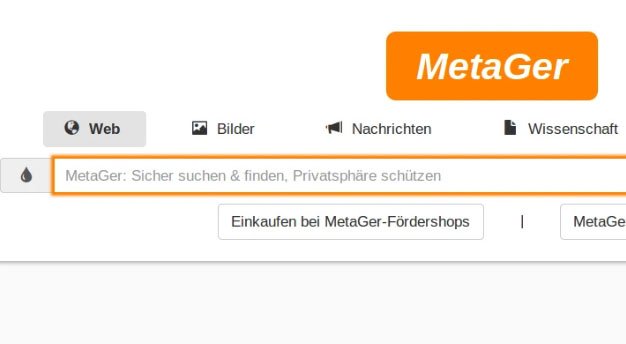
    Metager

    Metager provides you with utmost privacy while surfing the internet. The way it ensures your privacy is that it is uses proxy server. This way you can surf any website anonymously means that the site you visit is unable to track your actual address.

    It is based in Germany so was initially launched in German language but was launched in English in 2013. Also it search your queries in 50 search engines and then sort them and then show you all the results.

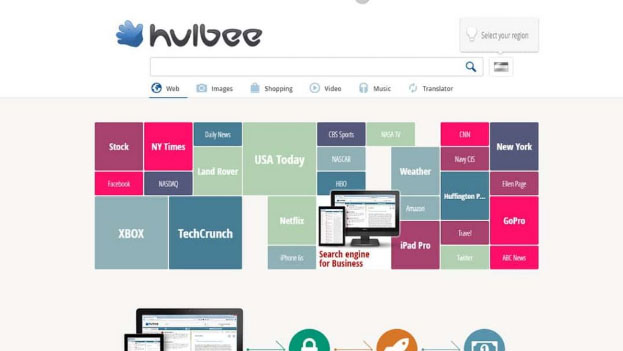
    Hulbee

    Hulbee also ensures you with complete privacy while surfing the web. It does not tracks your keywords or anything so that you get any customized adds.

    It also encrypts your data this way even if anyone in middle steals the data is not able to utilize it and hence providing extra security to your data. It comes with an option clean your activity letting you remove your search history completely .

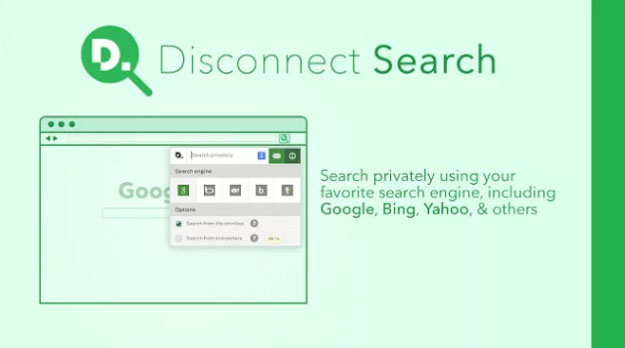
    Disconnect Search

    Disconnect search find answers to your queries from other search engines like Google and yahoo and then display the results to you. You can set the locations for the search to find results which are region specific.

    The best thing about it is informs you which tool is protected or unprotected thus you can use them accordingly. It also never tracks or stores your data or IP address, providing complete security.

    Oscobo

    Oscobo ensures privacy as it never keeps IP address saved after your browsing .Secondly is that they don’t use cookies which is very unusual hence ensuring even better privacy and ensures that no third party is getting my data.

    And it is nearly as efficient as Google and simple to use and adding more features with time. Its extension can be added to the chrome browser.

    Hope you find these list as useful for private browsing . These are best search engine Alternative to Google .

  • App Lockers for Android to Improve your Privacy

    App Lockers for Android to Improve your Privacy

    Smartphone , of course we can’t give it to somebody else’s hand even for five minutes . Why is it so , most of us have almost all personal stuffs in our phones . We always loved to protect our privacy , so as certain things need to be secret or hidden . There are ways you can stop worrying about this issue and feel free to give your phone to anyone . If you are using Android device then start using App Lockers for Android to improve your privacy .

    So you can hide your photos and personal things , keep your secrets locked using the App Lockers for Android . This is quite easy when you compare it with iPhone app lockers .

     Now let us take a look at the android app lockers one by one with their smart features .

    App Lockers for Android to Improve your Privacy & Secure Android device

    Here we have listed out the best apps for android device app locking feature .

    Norton App Lock

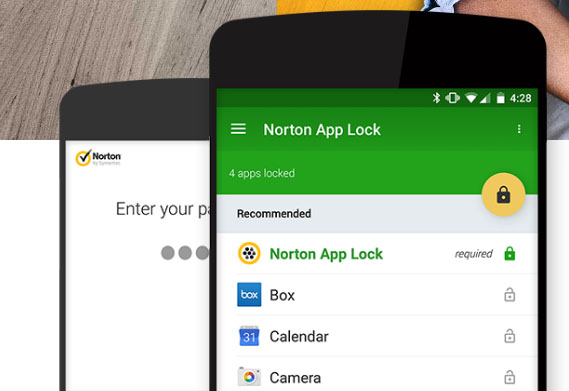
    Norton App lock for Android is one of the top rated app lockers for android devices . Norton app helps in protecting all your most sensitive personal information safe on your device . In case you left your phone somewhere or even if your phone is stolen . None of your apps can be accessed if its secured with the Norton App lock .

    Norton App Lock Android Screen Page
    Norton App Lock Android

    You can install this app from Google play store at your ease .

    Keepsafe App Lock

    Just like Norton , Keepsafe App lock is another android application that works absolute same as that of the Norton app locker .

    Keepsafe App lock download link
    Keepsafe App Lock for Android

    You can select the list of applications or folders in your android device which you want to keep it personal . Allows you to even lock your contact number and details on your device , so no one can now sneak peak into your mobile contact list even .

    App Lock 

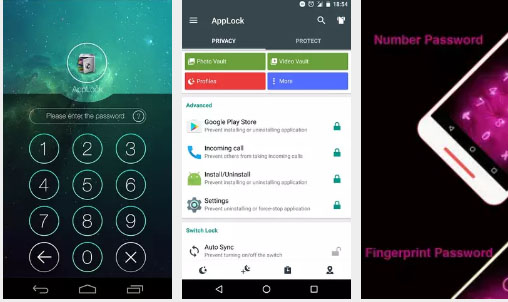
    One of the top most downloaded privacy protection app for android devices. AppLock is available on google playstore , this app can be accessed in almost 45 languages . Using this mobile app users an protect their apps by locking them with finger print lock for mobile apps such as Fb , SMS , Whatsapp , photos and so on .

    AppLock App Download screen and features
    AppLock App

    Something more interesting about Applock app is that it doesn’t drain your device battery power . So if you are on the search for Android App lockers that doesn’t drain battery then this is the best pick .

    This can be best choice of App lockers with power saving mode .

    Read Also : Mock location app for Android & iPhone to fake location

    Read Also : Android P Vs Android O Features compared

    HexLock App Lock

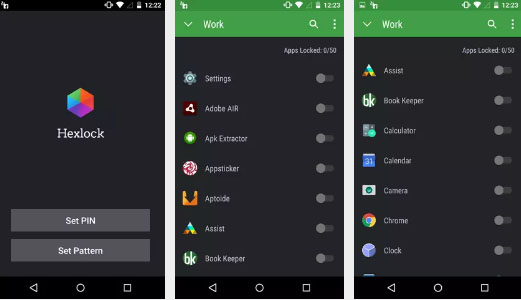
    Hexlock App lock is another app lockers for android that let you create your own profiles and lock it with pattern or finger print . Also depending on each WiFi network you can automatically get profiles enabled for easy access . This prevents app uninstall and protects your privacy . If you would like to use the Hexlock app without ads buy the paid version .

    Read Also : Share Google calendar with someone step by step guide

    Privacy Knight Applock

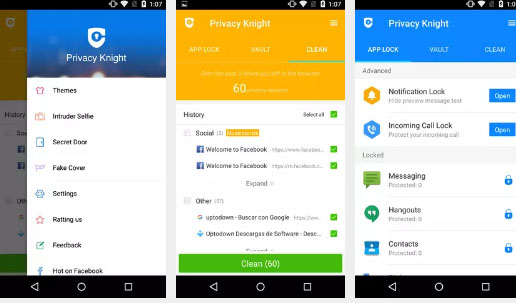
    This is developed by one big brand that is Alibaba group . Privacy Knight Applock for android can be downloaded from Google playstore easily .This app can secure all your sensitive data using password , face tracking etc .

    This app can even lock your on screen notification from apps like Whatsapp, Facebook etc . Also you can use the option to lock incoming calls.

    There are so many other android app lockers for fake crash , and protect your data . Here we have listed out the best picks among all the apps . Do let us know which one is your favourite app lockers for android .