Category: Programming Tutorials

Here we will begin to provide Computer Programming tutorials with detailed and simple guide on each Programming Languages .

  • Java Virtual Machine (JVM), Difference JDK, JRE & JVM

    Java Virtual Machine (JVM), Difference JDK, JRE & JVM

    Previously we had begin with Java Tutorial beginners guide featuring – What is Java , features of Java Programming Language , Java editors and different Java editions and Java Application Types . Now on Java tutorial we begin with the section 2 that is about JVM – Java Virtual Machine . And also about the difference between JDK Vs JRE Vs JVM including other aspects of Java Virtual Machine .

    Guys, to deep dive in java, let’s have a look how it works internally..


    A role of Java virtual machine (short form as JVM) is to execute Java bytecode. We can state that JVM is the component of the Java software platform where code execution happens. Right now over 5.5 billion computer are in the market which are  JVM-enabled. JVM lives inside our PC/computer and byte code is the language for JVM. With the introduction of JVM, job of compiler becomes very easy as it only generate byte code for JVM rather than generating different machine code for each m/c which is the reason why java language is platform independent.

    A JVM executes programs containing Java bytecode instructions and are generally  implemented to run on existing operating system (windows etc). A JVM provides a run-time environment which enables features such as exception handling which in turns provides debugging capability for every software exception. A JVM is a part of Java Class Library (some inbuilt java classes in the form of bytecode) to provide basic functions to developer while doing coding in Java. These libraries with the JVM together named as Java Runtime Environment (JRE).

    JVMs are compatible and available for almost all hardware and software platforms. Due to this feature of using the same bytecode for all JVMs on all platforms makes Java to be known as a write once and run anywhere language. This clearly describe that JVM is a crucial component of the Java language. Java bytecode is an machine language which is typically compiled from Java (or from other programming languages).

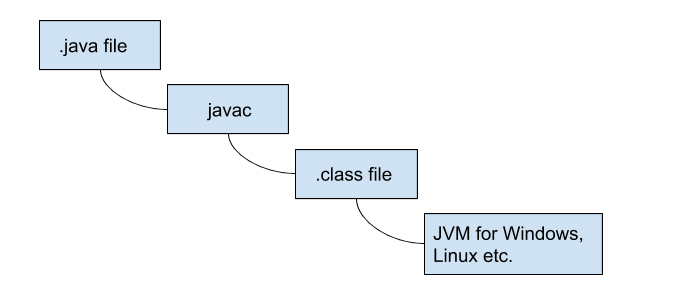
    HotSpot is the most used JVM which is written in the C++ programming language. JVM doesn’t understand Java code due to which we require java compiler that compiles source code and create .class file. This .class file is composed of byte code which JVM can understand. There are two main components of JVM – heap memory and garbage collector. We will discuss about both in detail in the upcoming discussion.

    How JVM works

    Now moving on with the Java tutorial section , we will see working of Java Virtual machine ie, how JVM works exactly.

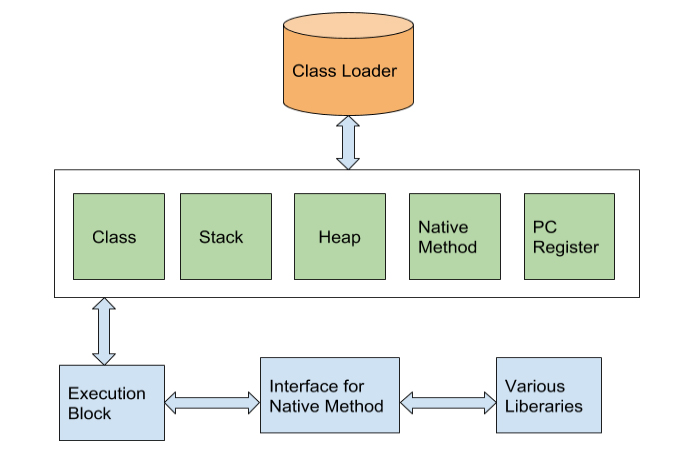
    Look at the pictorial format that explains the working of JVM.

    • After reading .class file, class loader save the corresponding byte code in the method area. Generally all JVMs have only one method area which is shared across classes which holds information related to each .class file.
    • Heap is an integral part of JVM memory in which the objects actually rests. JVM produces the Class object for each .class file.
    • Unlike Heap, Stack is used for storing temporary variables.
    • PC-Registers used to keep exact information of all instructions (which instruction is executing and which is going to be executed).
    • A native method used to access the runtime data of the JVM (java virtual machine). Native Method interface enables java code to call by the native applications (programs that are specific to the hardware and OS).
    • We will cover Garbage collection in the upcoming article


    JVM Vs JRE Vs JDK

    Now let’s sort out the difference between JVM ,JRE and JDK . How does these differ from each other – JVM Vs JRE Vs JDK .

    JRE ( Java Runtime Environment )

    Java Runtime Environment is within which the java virtual machine actually runs. JRE contains Java virtual Machine and other files except development tools (debugger and compiler). So developer can run the source code in JRE but he/she cannot develop and compile the code.

    JVM ( Java Virtual Machine )

    As per above discussion, JVM runs the program by using libraries and files provided by Java Runtime Environment.

    JDK ( Java Development Kit )

    Java Development Kit can be considered as the super-set of JRE.  JDK includes all features that JRE has and over and above it contains development tools such like compiler, debugger etc.

    Now we have discussed about what is JVM ( Java Virtual Machine ) and how JVM works . Also in depth we have discussed about the difference between JVM Vs JRE Vs JDK.

    On the third session of Java Programming Tutorials we will discuss about the Java Basic Syntax and Java Environment Setup .

  • Java Tutorial – Introduction to Java Programming Beginner’s Guide

    Java Tutorial – Introduction to Java Programming Beginner’s Guide

    We already draw your attention about basic of programming for all upcoming programmers through Introduction to Programming Languages : Programming Tutorials . Now we begin with our Java Tutorial Officially from here .

    Where to begin this Java Tutorial From , i was wondering . Then thought to give you a basic introduction about Java. It is not mandatory to read the introduction section unless and until you have got interest to know about the beginning of java programming , i mean evolution of java programming language etc .

    History bores some , while History excites some . So the choice is yours . Here we go with Introduction to Java Programming Beginner’s Guide .

    Introduction To Java – Beginning with History of Java Tutorial 

    In 90s, Sun Microsystems Inc. (US) has developed a new language to build software for various electronic devices that could be controlled remotely. This language is known as JAVA today. Its first draft was developed by James Gosling and his team members. They named it JAVA after ‘JAVA ISLAND’ – from where coffee was exported to the whole world. In mid 90s  Naughton and Jonathan Payne developed this further under the name WebRunner (Java based Web browser) later renamed as HotJava.

    HotJava as a browser had all the features of implementing applets (programs that run dynamically on Web browser). After officially announcing JAVA and HotJava announced by Sun at Sunworld Conference, Netscape Inc. also incorporated support of support in its browser (named Netscape Navigator). Sun Microsystems Inc later acquired by Oracle Corporation. Soon after Microsoft also incorporated support of Java in their Internet Explorer. Java became very popular due to its simple way of programming, compiling and debugging. Right now more than 3 billion devices run java.

    Enough of History…

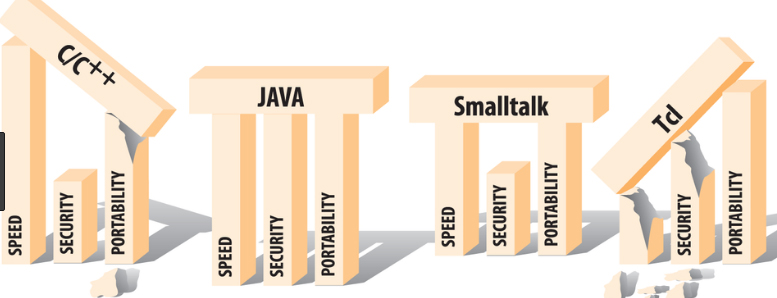
    Other conventional languages are generally designed to be compiled machine language Or they are interpreted from source code at runtime. Java language first get compiled to  bytecode and this bytecode runs by a Java Virtual Machine(JVM).

    So, Java is a class-based, concurrent, object-oriented computer language designed to let application developerswrite once, run anywhere”. This means that if the given line of code successfully runs on one machine, there is not need to recompile it to run on another machines. Java code is compiled as a class file which can run on any Java virtual machine irrespective of computer architecture.As information technology word is very dynamic, everybody was looking for very scalable language and due to its robustness, Java has become one of the most popular and programmer friendly language. Java is very flexible and can be enhanced as per the requirements to develop different kind of client-server web applications (or desktop applications) with having high volume of users. Java has more inhouse libraries and plugins than any other programming language.

    Java is one of the most developer friendly and most in demand programming language . It is specially design to serve client-server web applications with having huge number of users. Most of the syntax in java is derived from C and C++ with more in-build features (libraries).

    What is Java ?

    On Java tutorial the most important section begins from here . Yes first let’s know What is Java ?

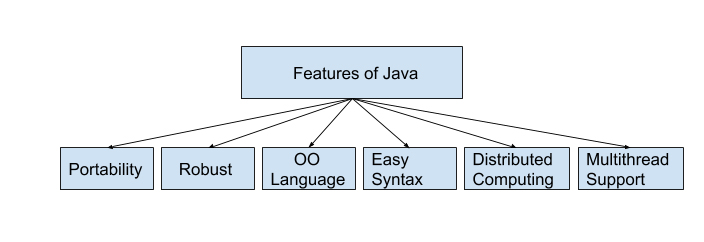
    Features of Java Programming Language

    Here is the pictorial description of features of java programming language given below and it is very well detailed in the section of uses of java programming language .

    Uses of Java Programming Language

    Guys you are here to learn Java programming language with our easy Java Tutorial right ? But do you know the uses of java programming language .There are many reasons and usage of Java programming language. Some major points are listed below . In one section very soon we will also throw light on scope of Java programmer .

    • The Java programs are portable in a network (platform independent). The code written by programmer is compiled into bytecode. This bytecode can run anywhere in a network (server or client) with JVM which interprets the bytecode into computer understandable code. The JVM have an optional JIT compiler which compiles the given bytecode into m/c readable code.
    • Programs written in java language are robust. Java programs is different from other languages e.g. C++ as it contain no references to data external to other object(s). The JVM ensure integrity by applying a number of checks on each object.
    • Java is object-oriented language where objects are thought of as “nouns” with which we relate to. A method of a class renders object’s behaviors.
    • As compared to other languages java is relatively easy to learn and easy to write, specifically for developer with background in C. Also finding errors is very easy in java.
    • Java language is designed to work on distributed computing which means all programs in Java are same as sending and receiving data from a file.
    • Java supports multi-threaded environment which help user to write program to perform several tasks simultaneously.

    Now let’s know more on Java Tutorial .

    Java editors

    As Java is getting very popular among the developers, many IDEs (Integrated Development Environments) have been developed to help programming in writing code effectively and quickly. Following are some very popular java IDEs

    • Very old yet effective tool to write java program is Notepad . Developers working Windows machine can take the help of simple text editor like Notepad or TextPad. They can use java command for compiling and running java code e.g. java etc.
    • Netbeans is also quite popular Java IDE. It is available as an open-source and free bundle at https://www.netbeans.org/index.html.
    • Last but very popular IDE is Eclipse. This IDE is getting developed and maintained by the eclipse open-source community. Users can download Eclipse IDE at https://www.eclipse.org/.

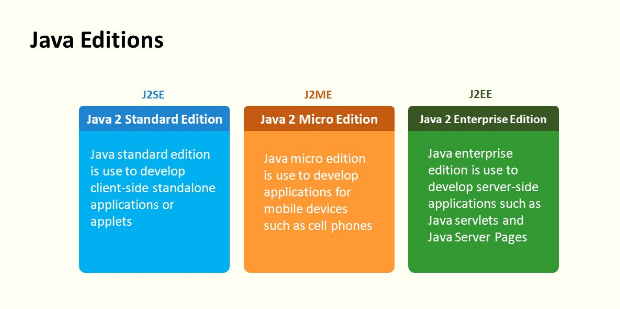
    Java Editions

    The Journey of Java is continuously getting matured  with time in both functionality and reachability to all services. The Java platform has mainly three different Java editions which are defined below:

    Here is the Java editions list –

    J2SE(Java 2 Service Edition) is first edition of Java which was developed for writing applets  and other Java-based applications based on applets.

    J2EE(Java 2 Enterprise Edition) is the second edition of Java architecture for developing multi-tier enterprise applications. The basic development in J2EE was JSP pages with access to all J2EE components, including JavaBeans and servlets. These JSP pages at the end compiled into servlets and have all the benefits of server-side Java applications.

    JavaFX is a inbuilt Java library which helps users to build Rich Internet Applications. Multiple platforms can run this applications consistently using this library. These developed application JavaFX can run on various type of electronic devices such as Desktop Computers, TVs,  Mobile Phones, Tablets, etc.

    J2ME(Java 2 Micro Edition) is the third edition of Java architecture with the help of which programmers use java programming language to develop programs for mobile wireless information devices such as cellular phones and personal digital assistants devices.There are many devices where Java application are getting used. Some of them are:

    1. Web Applications such as irctc.co.in etc.
    2. Desktop Applications such as video players, document readers, media player, antivirus applications etc.
    3. Enterprise Applications such as financial applications.
    4. Mobile applications
    5. Million of Games

    Type of Java applications

    Next important section of our Java Tutorial is about Types of Java Applications .There are basically four types of Java applications which are explained below:

    Standalone Applications

    A standalone application is a program which is installed in your PC and runs only on your computer. In case you want to use this application, you need to explicitly install it into your m/c.

    Applets

    An applet are compatible with Internet can share information over it. These are to be executed on the client machine which should have Java-Compatible web browser like Internet Explorer or Mozilla. Applets themselves are Java programs which reside on server side. Applet can be implemented by embedding it into an HTML page (image or sound file) and they cannot be executed alone. To run applet one should need to access an HTML page which has embedded applet. Whenever web browser downloads respective HTML page, it also downloads the installable file. This file contains Applet which executes it on the local machine.

    Web Applications

    As the name suggest, Web applications run on the Web Server over the internet. Web applications can be accessed with the help of web clients (web browsers). Whenever user open any web page by specifying the URL (Universal Resource Locator), he/she actually access some web application.

    The main components of a web application in Java are Java Servlets, Java Server Pages (JSP) and HTML.

    Java Servlets are server side Java programs which send the result (also called response) to the client side java program. JSP pages can be thought client side java program which are combination of HTML and Java Code. The Web Server then converts the JSP pages into Java Servlets before execution of the program.

    User access the web application by specifying the URL and the respective URL corresponds to an HTML page. This desired HTML page is returned by the server when the user send request. In case the respective URL corresponds to the Servlet or JSP then it is executed on the Server side and the corresponding response will be returned to the client for rendering.

    Distributed Applications

    Java application is composed of different components (or Java programs). These Java components run on different machines and can easily communicate with each other. To be more specific we can say that Java Objects on one machine can use methods of the Java Objects from another machine. This make Java more suitable for distributed processing in the language.

    Our Next section on Java Tutorial will be Java Virtual Machine (JVM), Difference JDK, JRE & JVM .

  • Best Programming Languages to learn This Year

    Best Programming Languages to learn This Year

    There are hundreds of programming languages and it is important to know which one to learn. Now there are lots of languages like C, C++, but some of them are new and mostly all of them have gone old. So you must know the Best Programming Languages that are best fit for you to learn.

    Especially Most In demand Programming languages which can give you job .

    Since the last decade there have been a lot of changes in the programming field. For example, C++ came after 2000, so a lot of products in the market are based on this technology.

    Let’s now look at the Best Programming Languages to learn this year . This depends on what the market projects want and what the users want?

    Best Programming Languages to learn This Year

    So here is a list of Best Programming Languages to learn to grab demanding job opportunities in IT field ranked on different criteria :

    JavaScript

    Top companies using JavaScript-Almost every company since it is a client side language . According to the surveys future of JavaScript learning is more high than any of the languages

    JavaScript is used for first class functions and it is best known as a scripting language which is used in web browsers. But it is, like other Best Programming Languages used in non web-based browsers as well. It is a prototype based scripting language that is dynamic, support object oriented imperative and functional programming styles.

    It is on the client side of an object which decides the occurrence of an event on a user’s click, thus widely used for controlling webpage behavior.

    Read Also : Enable / Disable JavaScript : Mozilla Firefox Hacks

    Java

    Top companies using Java-Google,Facebook,YouTube,Twitter,eBay,LinkedIn

    Java came into existence in 1995. It is the most used language out of all the Best Programming Languages all over the world. All of the server side applications, games and reliable sensitive applications are coded in java. Projects written in java brings dis-owner because of many reasons one of which is that it is slower,consumes more memory than other Best Programming Languages.

    Python

    Top companies websites using python – Google , Facebook ,YouTube

    To serve the purpose of testing microchips, python language is used. It appeared in 1980s and now it is used by thousands of people because it is one of the Best Programming Languages to easy to understand and due to its interpreted nature.

    It is easier than Java or JavaScript. It is also advised to start a programming career with python since OOPS concepts are easy to understand through this, on which every other Best Programming Languages are based.

    Read Also :  Introduction to Programming Languages : Programming Tutorials

    C#

    Top companies websites using C# as coding language – Google ,YouTube , Amazon ,Twitter

    C# is an evolution of C/C++. Several web based applications or web related projects are developed in C#. For example, all the desktop applications that are used are coded in C#. It is one of the languages that would run in dot net CLR. C# has been created by Microsoft to work with the dot net platform.

    It is one of the Best Programming Languages to develop applications depending on web.


    Swift

    Swift is a universally constructed programming language used globally. Furthermore, it is a way to deal with different security system, execution. The objective of the swift task is to make the best accessible language. But it is expected as a trait of C based language. Thus it is the Best Programming Language to make the code simpler to pursue and compose.

    C++

    Top companies using C++-Google,YouTube,Amazon,Twitter

    Though C++ is a downgrade of the C# language developed by Microsoft, still it is known as generalized language in the list of Best Programming Languages. It has two important component parts- First, immediate mapping of equipment highlights and secondly, zero overhead reflections based on those mappings. The advantage of C++ over C is it has more libraries.

    PHP

    Top companies using PHP-Facebook, Yahoo,Wikipedia

    PHP is a language for web development and server side applications. It has been widely used in 2017 and would be one of the Best Programming Languages in 2018 because almost all the work on the web development is based on HTML and PHP. The reason PHP is preferred is because the database of this language is stronger than any of the Best Programming Languages that claim to have good databases in the market. Its development actually started in 1995.

    Ruby

    Ruby is the object oriented programming in which everything is an object and every object can be operated and used to read and learn. Coming from 1995, it is still a booming language in 2018.

    So now when you have so many languages to choose from, it might really get confusing which one to go for to learn. Pay attention to this summary here-

    Which Programming language You should Learn ?

    Python: easiest coding is your priority . It is an ideal programming language to begin with .

    C,C++: being a master coder is a priority

    Java: If back end development is what you would like to do

    JavaScript: If front end development is what  you would like to do

    HTML & PHP: Website Developer is what you aim . One good programming language for job .

    To sum up as a whole, for one to be coder in IT field, he needs to understand the languages as a whole than just cramming them up. For one to be a coder, requires hard work. Keep coding.

  • Introduction to Programming Languages : Programming Tutorials

    Introduction to Programming Languages : Programming Tutorials

    For being a perfectionist in any of the programming languages once should dive down into the basics of Computer programming. In this article, we will cover basic introduction of all kind of programming languages used in the software industry. If one wants to be a good developer, his/her programming basics should be rock solid.

    Let start…

    Introduction to Programming Languages

    First let’s get introduced to programming languages by understanding what is a computer program .

    A computer program is basically the  set or the sequence of instructions written using certain Computer Programming Languages (Java, .net, python etc.) to perform some predefined tasks by the computer. A computer program (also called a computer software) is nothing but a set of rules given to the machine to perform specific tasks.

    Computer programming instructions are also considered as program source code and computer programming is also called program development or coding.

    The physical computer (to take input from developer) which executes these programming instructions is called hardware. A computer without a computer program is just a dump box and it is the program that makes computers active. Developers write the solutions in a given language that computer can understand to get the desired results. As a developer when he or she writes any programs, he/she should remember that the computer can only do or execute according to the instruction given by the developer.

    There are many programming languages, few are listed below:

    • Java
    • Python
    • C
    • C++
    • .Net
    • PHP
    • Perl
    • Ruby

    Do not panic in case you didn’t understand the above paragraph. We will take you through every important information in detail below.

    Types of Programming Languages 

    To understand programming languages further, we can logically divide these into below parts . These explains the types of programming languages . In many places you can find 5 or 6 types of programming language so we thought to give you in depth by covering all the types of programming languages .

    1. Machine And Assembly Languages 

    So let’s understand the key differences between  a machine language and Assembly Language . Here we will cross compare Machine Language Vs Assembly Language.

    Machine Language

    As the name suggest, machine language is the set of instruction a computer can understand. Generally we call it machine code that CPU understands (it understands very limited set of instructions). Each instruction is readable and understandable as numbers , binary digits (0 and 1).

    These binary numbers are generally called bits which is a short form for binary digit. Generated binary digits are translated into an instruction by the CPU that tells it to do a very specific job e.g. sorting, multiplying or dividing numbers etc. Machine code (or machine language) is difficult to read and write by humans as it is different from conventional mathematical notation or human language. Also its codes vary from computer to computer.

    Assembly Language

    Assembly Language came into picture as machine language was so hard to develop and understand by developers. Assembly language is one level above machine language. Programmer can introduce names for blocks of memory that hold data. Instead of bits, each instruction is identified by a short name and variables can be identified by names rather than numbers (0 and 1). This makes them much easier to read and write.

    The CPU is not capable to understand assembly language , So we have to convert it to machine language which is readable for it with help of an assembler .Assembly language is completely based on the computer in which it runs against the most high level programming languages, which are generally portable across multiple systems. Utility program is used to convert assembly language into executable machine code. These utility programs are MASM, NASM etc.

    Read Also : Web Servers A detailed overview – Popular Webservers

    2. Business Oriented Languages

    Business oriented languages were introduced to satisfy business level needs. Business analysts can directly write the rules to instruct computer to create set of result(s).

    Common business oriented language also known as COBOL is one of the oldest programming language. A committee of users and U.S. government organizations established CODASYL to develop and oversee its standard across systems in order to ensure its portability. The basic use of COBOL language is for development of business features. COBOL is not suitable for writing programs which are complex in nature.

    Unlike other languages like C, C++, COBOL language do not have in-build user defined variables or pointers. Also the scope of the methods used in COBOL is very limited. This language defines a simple and clear programming technique.

    COBOL as language has proven to be completely suitable for its targeted problems. All the features of COBOL operate in a the domain in which the difficulty of the program lies only in the business rules not in the algorithms or data structures. The places where the business demands complex algorithms, complex data structures, COBOL language take care the needs with an suitable text such as SORTING or SEARCH.

    So as we understood that COBOL is a simple and user friendly language with a quite limited scope of function but the with the beginning of Object Oriented COBOL, its dimension is now changed completely. It include all the benefits of previous versions and at the same time it  also provides –

    • User Defined Functions
    • Object Orientation
    • National Characters – Unicode
    • Multiple Currency Symbols
    • Cultural Adaptability (Locales)
    • Dynamic Memory Allocation (pointers)
    • Data Validation Using New VALIDATE Verb
    • Binary and Floating Point Data Types
    • User Defined Data Types

    3. Declarative Languages / Non Procedural Languages

    Also called non-procedural languages, declarative languages are programming languages in which a program specifies what needs to be done. It does not specify how to do it. Declarative languages have less visible difference between implementation of a program and its specifications. Below are basic kind of  declarative languages:

    Logic languages

    Logic Languages works on relationship between different entities sometime calls inter-dependency of the entities.  The relationship between entities are searched in a systematic way which will answer the desired queries. The best use case of logic programming is natural language processing and other Artificial Intelligence  programs.

    Functional languages

    Functional languages have a mathematical style and these are developed by facilitating different arguments to methods (also called functions). LISP, ML, and Haskel like functional languages generally used as automation of existing scenarios or research tools in language development.

    Structured Query Language (SQL)

    Structured Query Language is basically a medium to interact with the database to give request of desired operation(s). The basic database operations can be inserting, updating and/or deleting data. It also used to manipulate the metadata (Columns, data types etc.) of the table(s). Some database administrators call it non-procedural language because procedural languages needs the details of the action(s) to be specified e.g. dealing with indexes, querying tables, working with file I/O operations etc. All steps needed for SQL execution are taken care by SQL database explicitly. In structured query language, all instructions are given through the statements. Additionally parameters and operands are provided to these statement. SQL standards are being followed by statements and the respective parameters. Generally we group SQL  statements into the following categories:

    Data Definition Language (DDL)
    • CREATE – creating objects, tables, views etc
    • ALTER – modifying existing database object, table, views.
    • DROP – deleting table, view of a table or other object(s).
    Data Query Language (DQL)
    • SELECT – Fetch desired data from tables or views with the help of some conditions

                e.g. sort, order by, group by etc.

    Data Manipulation Language (DML)
    • INSERT – Inserting a record into a table
    • UPDATE – updating existing contents of the rows
    • DELETE – deleting desired records
    Data Control Language (DCL)
    • GRANT – Granting permissions to user(s)
    • REVOKE – removing permissions from user(s)

    Read Also : Enable / Disable JavaScript : Mozilla Firefox Hacks

    4.Object Oriented Languages ( OOP )

    OOP is a programming model which encourages the programmer to focus on ‘objects’ and their interactions with each other. These objects can be any of real life objects like school, employees, cities etc.

    Objects are generally described as their state and behavior (we call them methods).  As a practice, good programmer hides the state within the object and gives access to the object with the help of methods. This process is called encapsulation which is just  like an API to the object.

    In OOP, class is like a blueprint for an object. The next steps can be creating (or instantiating) the desired objects which also called instances of the class.

    Data and the methods are two separate entities which are merged together for the desired result. Object-oriented programming (OOP) enables developers with the ability to create objects that loosely couple both properties and behaviors into a reusable package.

    In OOP, developer define data types and the operations that could be applied to the data structure. In addition, developers can create relationships between two objects. With Object-oriented programming (OOP), many useful features comes along e.g. abstraction, inheritance, encapsulation polymorphism. Objects overlays the desired data and their operations in a sense that only the required operations are publicly available and the data structures behind the scenes are not accessible. This hiding of information made large volume programming much easier by enabling a developer to think in depth about each part of the program. Following are the most popular Object oriented Languages:

    • Java
    • C++
    • .Net etc.

    5.Scripting Languages 

    Scripting languages are also called small (or little) languages. They are intended to solve relatively very small set of programming requirements that don’t need the burden of data declarations and much functions required to make large programs effective.

    PERL (practical extraction and report language) is very popular scripting language which was developed in the late 1980s, for use with the UNIX operating system. It is used for writing utilities for operating system and programs related to file-manipulation. Its  are easy to learn and sometimes used for considerably larger programs. It has all the features of earlier scripting languages. PERL provided many different ways to define common operations and thus allowed  programmer to adopt any suitable style. In the early 1990s it became famous as a programming language for small applications programs and for prototypes of bigger programs. Also with combination of other languages, it became popular for programming computer Web servers.

    6. HIGH LEVEL LANGUAGE

    High-level languages enable the developer to think and write programs which are independent of what kind of computer the program is being run on. Programs developed in high level languages should be translated into a form that the CPU can understand before they can be executed. There are two steps in which this is done – compiling and interpreting.

    High-level languages mainly deal in objects, variables, arrays, boolean expressions, subroutines and functions, locks, loops, threads, and other computer science features rather than dealing with registers, memory addresses and call stacks. More features, like object-oriented language features, string handling routines and file input/output are also present. The main point to be considered for high level programming languages can be presented as no dependency of the programme from the machine.

    High-level languages permit faster development of large programs. The developed code as executed by the computer is not as efficient but the amount of time saving for developer is huge. The reason is that the cost of writing a program is nearly constant for each line of code, regardless of the language. Thus, a high-level language where every line of code translates to 1 and 0, machine instructions costs only 1/10 as much in program development as a low-level language where every program line represents only a single  machine instruction where the code is developed.

    High level languages are:

    • Computer (programming) languages that are easier to learn.
    • Uses English like statements.
    • Examples are C ++, Visual Basic, Pascal, Fortran and
    COMPILER

    A COMPILER converts any high level language to Machine language (or machine code) that computer’s processors understands (in binary format). After developer write a program, the source code is compiled into machine code. This m/c code is then stored as an executable file. Compilers for various languages needs to be installed as per the used programming language such as C, C++, Java and Pascal, etc.

    So in short we can state that compiler is a program that reads code and provides a stand-alone executable file that the CPU can understand. Once the program has been translated into an executable file, programmer do not need the compiler to run the program. At last, developer can execute binary file to perform the programmed task. Many a times, compiler do a better job than human programmers can do in assembly language.

    ASSEMBLER

    ASSEMBLER act as a medium to convert assembly language into computer readable language (machine language or machine code). So as the name suggests, assembler works by assembling and converting written code (java, .net etc) of assembly language into object code  that (zeros and ones) of machine language.

    INTERPRETER

    An interpreter is a type of computer program which executes the statement(s) at runtime. It does not require to convert the source code into machine language. For example any selected language(s) like python, PHP, LISP, Perl etc. do not require any conversion into machine code. An interpreter use to convert such programs line by line. Thus, in case you are writing your program(s) in PHP, Python, Perl, Ruby, etc., you should install interpreters of these languages before you start programming.

    As per above description, Interpreters are more flexible and at the same time they are not much efficient while running of programs because the interpreting process needs to be done every time the program is run. This means the interpreter is needed every time the program is run.

    Traditionally used languages like C, C++ etc are typically compiled, where modern languages e.g. scripting (Perl, Javascript etc.) are interpreted.

    Read Also : Perfect Guide to Know All About Web server

    7. Algorithmic Language 

    Algorithmic languages are purely based on the Algorithms. These are developed for describing computational processes and are so designed to express mathematical and/or symbolic computations. It is part of the group of portable programming languages for scientific computations that had a strong influence on other languages.With this language, algebraic operations can be rendered similar to maths which permit the use of subprograms for reusing common operations. They were the 1st high-level programming languages.

    ALGOL (elaborated as algorithmic language) was originally found by a collaboration European and American scientists in mid 19’s. They were used for doing computations as well as publishing algorithms. Starting versions of ALGOL were 58 and 60. ALGOL used recursive programs that could call internally to solve a problem. This solution was done by by reducing the problem into smaller part of the same kind. ALGOL also introduced block structure where the program is comprised of objects which might contain both data and methods and share the same data-structure as an entire program.

    Initially algorithmic language was widely used in Europe and computer algorithms were published based on this language only. Many other influential languages (Ada, Pascal etc.) are based on ALGOL language. The other important languages got popular with ALGOL are Fortran, COBOL, Lisp etc.

    8. World Wide Web Display Languages 

    WWW (also known as World Wide Web) language is an environment for rendering images, text, graphics and video/audio which are retrieved by using the Internet. Every part which got retrieved is considered as a Web page. These pages contain further web-links that allow its dependent pages to be retrieved. HTML (short form of hypertext markup language) is the one kind of WWW language for developing Web pages. HTML was initially designed by Tim Berners-Lee in Switzerland during the 80s.

    HTML use tags which specify various elements of the document e.g. tables, headings, paragraphs etc. HTML language markup the desired document/data for displaying by a Web browser. The web browser reads and convert the various tags in a predefined layout according to the screen size and fonts. Following are some basic tags with one liner description:

    <!DOCTYPE> Defines the document type

    <html> Defines an HTML document

    <head> Defines information about the document

    <title> Defines a title for the document

    <body> Defines the document’s body

    <h1> to <h6> Defines HTML headings

    <p> Defines a paragraph

    <br> Inserts a single line break

    <hr> Defines a thematic change in the content

    <!–…–> Defines a comment

    XML (extensible markup language) is a most trusted language used for documents that are published on the Web page(s). XML uses schema/DTDs to define data types and the description of tags used inside XML. By following these set of rules, usage of XML becomes very easy to carry data and its parsing.  An example can be that document entities should use both beginning and an ending tag, such as <body>…</body>. XML have more kinds of hypertext links as compared to HTML e.g. links relative to a document or bidirectional links etc. Because an developer can declare/define new tags it is required that XML schema should also contain rules that instruct a Web browser regarding how to convert them. Below are the basic rules for building standard XML:

    1. All XML should have root element.
    2. All tags should be closed.
    3. All tags should be properly nested.
    4. Tag names are case sensitive.
    5. Attribute should appear within quotes (“”).
    6. HTML tags should be avoided (optional).

    We hope you enjoyed the ride of learning basics of all computer programming languages which we have just discussed above. To conclude we can state that all languages have their pros and cons which needs to be considered while deciding the mode of development of your application. Some languages require complete infrastructure and licensed tools for development whereas some languages are very light and can be developed with minimum infrastructure.

    Keep following our upcoming posts for detailed discussion about each Programming languages. We hope to provide you with simple and easy programming tutorials from beginner level to advanced .