Category: Tech

  • Keto diet Foods – How to make a perfect keto diet plan

    Keto diet Foods – How to make a perfect keto diet plan

    Keto Diet is one of the diets being used by a large number of people these days. As everyone knows, the Keto diet is a new diet that lets you eat meat, poultry, fish, etc. Well, for the meat lovers this diet is surely motivational. Carbohydrates which is one of the major factors of gaining weight is limited to 20-50g per day in a Ketogenic Diet. Yes, that is a major attraction and is more effective in losing weight quickly.

    Usually, the Keto Diet will include foods with low carbs, healthy fats, proteins, fiber, and antioxidants. It is not very difficult to prepare keto meals for your diet plan. There are a lot of easy keto plans that will not take much time for you to cook your daily meals.

    Next, I am going to give you an idea about the various Keto Diet Foods that can be used for your diet plan.

    Keto diet Foods – A complete keto food planner for Vegetarians & Non Vegetarians

    Let us start first with non-vegetarian foods items followed by others for a Keto Diet.

    1) Poultry and Meat

    These two food items are rich in vitamin B, minerals, zinc, potassium, and high-quality proteins. Hence meat and poultry are considered as essential foods on a ketogenic diet. Such potentials of meat and poultry can help in protecting your muscle mass during the Keto Diet.

    When you are choosing the meat, make sure that you opt for grass-fed meat since such meat will have higher amounts of omega 3 fats and antioxidants.

    2) Seafood

    Seafood is considered as keto diet food since fish and most of the shellfish have either no carbs or very fewer carbs. Fishes such as Salmon, Sardine, Mackerel and other fatty fishes are extremely good for your health. Omega 3 fatty acids in such fish can lower the insulin levels and increase insulin sensitivity in people who are obese or overweight.

    It is highly recommended to consume seafood twice a week even when you are on a Keto Diet or not. If you include fish more in your meals, the chances of getting ill will be reduced and it can also give you good mental health.

    3) Vegetables (Low Carbs only)

    While picking the veggies for a Keto Diet Plan, you must choose the low carb vegetables. I say a big NO to potatoes, sweet potatoes, and carrots which are high in carbohydrate. But do not worry, there are other veggies that you can use a substitute for all these. So, here are some of the best low carb veggies / best veggies for keto plan you can consume when you are on a Keto Diet.

        a) Cauliflower – this can be used as a substitute for rice or potato mash. You can also make a puree with cooked cauliflower that can be added to your meat, poultry or fish.

        b)     Kale – one of the superfoods which consist of Vitamin A, vitamin K, vitamin C, vitamin B6, manganese, calcium, potassium copper, etc. So, now you know why Kale is known as a superfood and keto-friendly. Moreover, Kale helps in reducing cholesterol from your body which reduces the risk of a heart attack. Consuming Kale helps in preventing cancer, high blood pressure, and anti-depressant because of the antioxidants in it. Likewise, the protein and fiber in kale can help in reducing weight while you are on a Keto Diet.

       c)      Spinach – another green leafy vegetable loaded with vitamin c, vitamin a, calcium and iron. This leafy veggie can be used in any of your meals and is easily available in the market.

       d)     Bell Peppers – this pepper that comes in 3 different colors includes vitamin c and potassium and can be used in your meal very easily. All you have to do is cut them into slices or small pieces as you wish and just sauté them in olive oil and serve it along with your meat or fish. Baking or grilling with some poultry is also good options for a perfect meal.

      e) Arugula – this is also known as salad rocket, Italian cress, and rucola which is loaded with calcium, potassium, folate vitamin c, k and a. This veggie helps a lot in keeping a good healthy body. It can be used as a topping for your main dish, can be used in a salad, etc.

      f) Zucchini– a very tasty vegetable that can be used as a substitute for pasta. You can shred or slice the zucchini and bake them or even fry it to have a delicious crunchy snack. There are many ways you can cook this summer squash like baking, stuffed and steaming, deep-frying, etc. It consists of vitamin c, vitamin a and calcium.

      g) Broccoli – high in fiber and protein, this veggie can be used in soups, salads, casserole, etc. Broccoli is very filling, so adding this green veggie to your keto diet plan could be a wise decision.

     h) Celery – this green veggie is famous for high water content in it. Thus, it is very important to include such a vegetable to your keto diet. Dehydration is common when you undergoing a Keto Diet Plan.  So, apart from drinking enough water, it is also important to include a veggie that has high water content.

     i) Asparagus – delicious green veggie that can be added to your salads or as a side dish for your meat or poultry. You can sauté this in olive oil and sprinkle some pepper and salt to it. It just tastes so yummy and is also rich in fiber and folate.

    You can also include tomatoes, lettuce, mushroom, eggplant, bok choy, turnip, etc. to your keto diet plan.        

    4) Eggs

    Eggs can be added to your breakfast, lunch or dinner. If you are a person who loves to eat eggs, then go grab a carton of eggs and store in your fridge. Rich in protein, an egg is a perfect keto-friendly food item that you can consume daily. You should always eat the egg fully to get the whole protein from it. Avoiding the yolk cannot give you enough proteins that you require. Eggs can easily fill your stomach and it also keeps the blood sugar stable. It also includes antioxidants like lutein and zeaxanthin that helps in protecting your eyesight.

    6) Cheese

    There are 100 varieties of cheese available in the market and yes, you can add this delicious food item in your Keto Diet Meal Plan. Cheese is high in fat and low in carbohydrate; thus, it makes a perfect keto-friendly food item. It is rich in protein, calcium and other fatty acids including conjugated linoleic acid that helps in losing the fat and improving the composition of the body. You can use cheese in your keto diet foods quickly and easily by just shredding them as a topping or you can even bake your burger or meat with cheese, just the way you like it.

    7) Coconut Oil

    This is one of the best oils that can be used for cooking your keto diet foods. Coconut oil can reduce the belly fat and it also helps in reducing the weight for obese people. This oil is rich in medium-chain triglycerides which increases the ketone production. This oil is also good for your brain and nervous system. 

    8) Olives & Olive Oil

    Olives and olive oil are good for a keto diet plan since olives are high in heart-healthy monounsaturated fats and other antioxidants. You can use olives or olive oil in your salads, to fry any of your meat, poultry or fish or even you can sauté your veggies in olive oil that can add an extra flavor to your keto meal. Always shop extra virgin olive oil as it can protect your heart by avoiding any swelling and also progresses the function of your arteries.

    9) Nuts and Seeds

    You will surely feel like munching on something in the evening or when you are watching a movie. So, nuts or seeds are a healthy choice as a snack. Nuts and seeds are low in carbs but rich in fat. Consuming certain nuts can reduce the risk of heart attack, a certain type of cancers, depression and other serious illness.

    Some of the nuts that you can add to your keto diet are Almonds, Brazil Nuts, Pecans, Pistachios, Walnuts, Chia Seeds, Flax Seeds, Pumpkin Seeds, and Sesame Seeds. Out of these, chia and flaxseed help in reducing the belly fat and also helps in reducing weight. You should only consume grounded flaxseed and also you should not consume more than what is required. It applies to all the food that you eat. Do not overeat any food items.

    10) Coffee and Tea without Sugar

    Both Coffee and Tea are not bad for health. But if you add sugar and milk to it, then it becomes high carb drinks. So, avoid using milk and sugar and just have your black coffee. You can choose Green Tea as an option for keto diet foods which is better for your health and skin.

    Read Also :  Tea Vs Coffee – The Best Energy Drink Motivating Healthy Life

    The caffeine in these drinks can enhance your metabolism, resulting in improving your physical and mental performance. Drinking unsweetened coffee or tea can also reduce the risk of diabetes. If you do not like to have coffee without milk, you can use heavy cream to it as a substitute for milk.

    11) Dark Chocolate and Cocoa Powder

    I know it is difficult to stay away from desserts if you are a person who loves chocolates and ice-creams. So, for those dessert lovers, you can consume dark chocolate which is a keto-friendly food item. Dark chocolate can decrease blood pressure and can also keep your arteries healthy which results in reducing the risk of heart diseases. Cocoa is rich in antioxidants and thus a keto diet planner can add these to your diet.

    12) Fruits

    Avocado and Berries are the best choices for a keto diet.

    Avocado is rich in vitamins and minerals including potassium. It can be used in your diet as a salad or a smoothie or you can even include in your meal in any way you want. Consuming this can improve your good cholesterol and triglyceride levels. Strawberry, Raspberry, Blackberry are some of the berries that you can add to your meal.

     Make smoothies or eat them raw with your breakfast or dinner. Apart from berries, you can opt for watermelon, lemon, star fruit, etc. that are low in fat and carbs. Drinking warm lemon water first thing in the morning can help in reducing belly fat and weight. It also helps in easy digestion and avoids gastritis.

    13) Cottage Cheese & Plain Greek Yogurt

    Both cottage cheese and plain Greek yogurt are healthy and high-protein food and thus these 2 items can be added into your keto diet plan. Even though both have a small number of carbs, you can still include in your keto diet as these food items can easily fill your stomach.

    14) Butter and Cream

    When you are on a keto diet, both butter and cream can be used since they produce only good fat. Make sure that you do not eat a lot of it. The moderate use of these is healthy. A good dollop of cream in your unsweetened coffee can be a good option and you can sauté your veggies in butter.

    These are some of the Best Keto Diet Food that you can include in your diet for losing weight, to control the blood sugar and for other health-related benefits.

    7 Day Keto Planner

    You should follow a proper Keto Diet to get the result. When you decide that you need to undergo a Keto Diet, then start planning first. Make a list of keto diet food items that you can consume and go for purchasing the products. Make a Keto Diet Planner and save it on your phone or laptop or just write it down on a paper and stick it on to your fridge. I will be giving a few tips and 7-day Keto Diet Plan for you to start with.

    First and foremost, know what food items can be included in your keto diet plan and also their benefits. I have already shared a good number of foods you can eat on keto diet above. Still, you can research more if you like and learn about keto-friendly foods.

    Monday

    Breakfast: Scrambled eggs in butter with some sautéed green veggies

    Snack: a handful of almonds

    Lunch: Grilled salmon with the spinach salad

    Snack: Zucchini fries with mayonnaise

    Dinner: Pork chops with mashed cauliflower and red cabbage coleslaw

    Tuesday

    Breakfast: Veggie omelet with cheese

    Snack: Brazil nuts

    Lunch: Roasted chicken with broccoli and cream sauce

    Snack: Plain Greek yogurt with nuts as toppings.

    Dinner: Grilled shrimps with lemon and butter sauce and sautéed asparagus

    Wednesday

    Breakfast: Stuffed bell pepper with eggs and cheese

    Snack: a handful of berries

    Lunch: Grass-fed burger with shredded cheese wrapped in iceberg lettuce and salad.

    Snack: Kale chips

    Dinner: Grilled Sardine with avocado and tomato salad

    Thursday

    Breakfast: A smoothie with berries and almond milk with crushed nuts as toppings

    Snack: 2 hard-boiled eggs

    Lunch: Roasted turkey with cream-cheese sauce and salad

    Snack: Sliced salami and olives

    Dinner: Zucchini noodles with meatballs and cheese

    Friday

    Breakfast: Chia pudding in coconut milk topped with crushed almonds and pecans

    Snack: Pistachios

    Lunch: Salmon burgers (bunless) with pesto sauce. You can wrap your salmon in lettuce or add bok choy salad

    Snack: Unsweetened coffee or dark chocolate

    Dinner: Stuffed avocado with chicken and bacon salad

    Saturday

    Breakfast: Boiled eggs with mayonnaise and asparagus

    Snack: Macadamia Nuts

    Lunch: Caesar salad with chicken

    Snack: Sliced cheese and bell peppers

    Dinner: Zucchini fritters with a green salad

    Sunday

    Breakfast: Low carb berry smoothie

    Snack: Dried seaweed strips and cheese

    Lunch: Smoked salmon with fried kale and broccoli and avocado salad.

    Snack: Guacamole with low carb veggies

    Dinner: Artichoke and spinach stuffed chicken breasts

    Keto Diet Plan for Vegetarians

    For vegans, the same keto diet can be followed by avoiding any meat or poultry. You can follow the meal plan mentioned above but make substitutes for the non-veg food items. Here are some of the best keto diet foods for vegetarians.
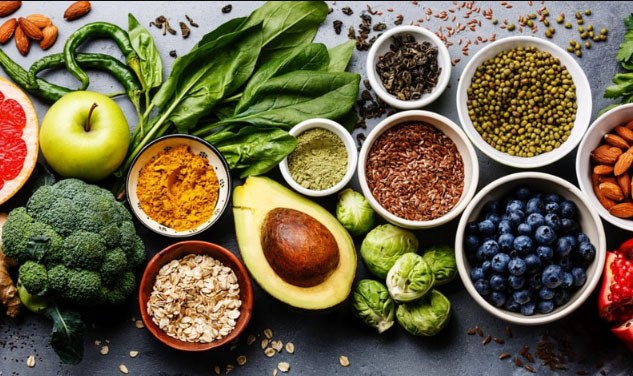
    a)      Tofu – you can substitute tofu for meat, poultry, and egg since tofu is high in protein. This is the best meat substitute on keto diet plan .

    b)     Vegan cheese – for pies, dips, and veg burger patties

    c)      Coconut – coconut milk, shredded/grated coconut can be used in your breakfast, lunch or dinner

    d)     All low carb veggies – as mentioned above

    e)     Cauliflower – can be made a rice or mash that can fill up your stomach easily.

    f)       Snacks – All the nuts mentioned in the above list can be included in your vegan keto diet plan.

    Now you have got an idea on how to move forward and make the best keto diet planner for weight loss. If you are a person who is suffering from blood sugar or any other kind of diseases, always consult your doctor before starting a keto diet plan. According to your health and body, your doctors can suggest what to eat and what to avoid. People with no blood pressure or sugar, you can go ahead with the meal plan mentioned above. For the best result, continue the keto diet for amount 6 weeks without any fail. I know a few people who had undergone a keto diet and lost all their fat and overweight. So, the keto diet is sure to reduce your weight and make you healthy. Stay tuned to our site and we will be discussing easy keto plans and recipes soon.
  • Password Checkup Chrome Extension to detect unsafe passwords

    Password Checkup Chrome Extension to detect unsafe passwords

    Are you using Chrome browser then you must know about this latest Chrome extension – Password Checkup .

    Google has always tried to improve user security and safety . We have seen google notifying us about our least secure passwords on google apps and products . This is the case that applies only to Google accounts , but what is the case with other non-Google website , apps and products which we use daily . How can we detect unsafe passwords used on websites / apps .

    We can make use of Password Check up Extension for chrome in order to detect unsafe passwords on other websites .

    Data breaches and black market of online credentials like username , passwords commonly used are a serious threat to data security . This puts any user under the threat or may even make users prey of a cyber attack , hijacking , hacking etc .

    Use of repeated and common passwords increase your risk . But how well we knew about the leaked and least secured password combinations ? To solve this issue Password checkup helps you out well .

    Password Checkup Chrome Extension

    One of the best chrome extensions for online safety . Password check up identifies unsafe passwords (least secure / repeated passwords ) . It doesn’t store or save your password and user credentials . I mean this is not a password manager , it just act as a adviser or checker to ensure you are entering each and every website with a safe password.

    How Password Checkup Extension Works ?

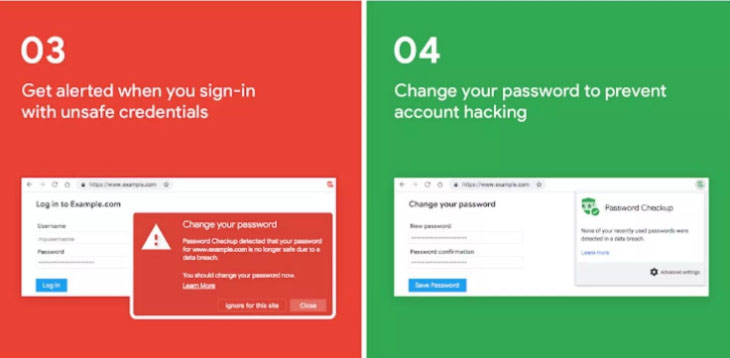
    Password Check up works for Chrome as a chrome extension . It works well for all websites not exclusively for google related accounts . It is not working as a password manager . It actually alerts unsafe passwords and unsafe user credentials without affecting your privacy . This extension doesn’t track user . In case you enter some random username and password the extension identifies if its no longer safe to use . If its unsafe then it alerts you to change / reset password . It check passwords and username have appeared on any third party data breaches as well .

    How to Use Password Check up Extension ?

    Let us see how to install password check up chrome extension . First go to chrome extensions .

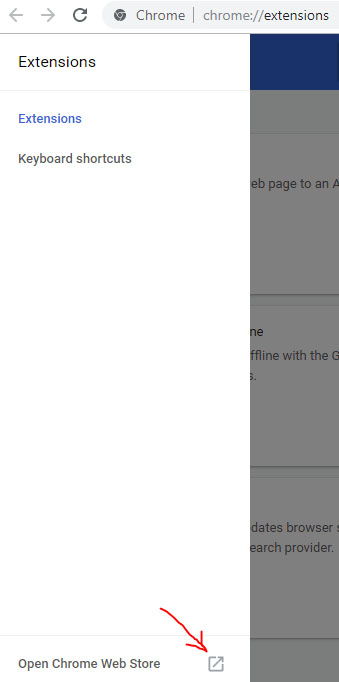
    Now as show in the image open chrome web store in a new tab .

    Open Chrome Web Store in new tab
    Open Chrome Web Store

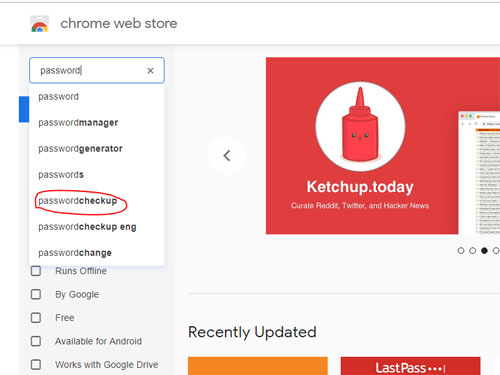
    Now in the search the store box type password checkup .

    search the store for Password checkup Extension
    Searching for Password checkup

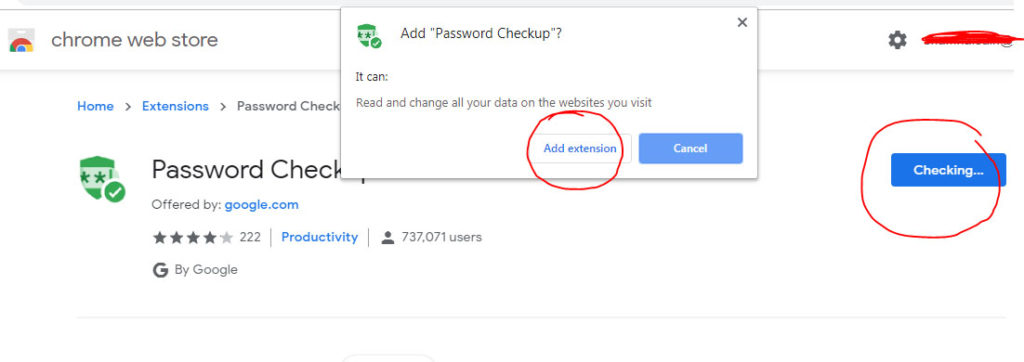
    Now click on Add to chrome .

    Now a dialog box pop ups there click on Add Extension .

    Add Extension for Password Checkup
    Add Extension for Password Checkup

    Now the extension is added to your chrome .

    In the password checkup extension settings you can make necessary setting change like you can limit the use of password checkup for particular websites or even extend it to all sites .

    That’s it hope this is useful to everyone .

  • Google Keep Dark Mode – Enable / Disable The Night Theme

    Google Keep Dark Mode – Enable / Disable The Night Theme

    Google Keep is quite popular among those who love note taking applications . Have you ever felt there is a need for Dark Theme for note taking apps .Then here we go with the Google Keep Dark mode .

    Enable / Disable Google Keep Dark Mode

    On to the main topic , let us see how we can enable Google Keep dark mode as well as the process to disable Google keep dark mode .

    First and foremost thing make sure you are you have updated your Google Keep app to its latest version .

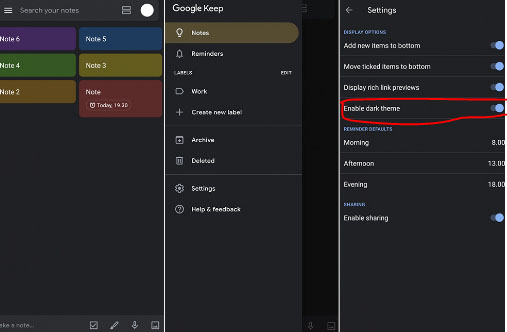
    As of now Google Keep is not offering the exact black theme for its Dark mode . It rather uses dark grey colour . Also Google keep as of now in its initial launch of dark mode is not completely a dark mode app as many of the ares still uses the old light theme .

    Now if you want to use Google Keep dark mode then follow these steps –

    • First launch to the Google Keep app . And make sure you run on the newest updated version of the Google Keep application .
    • Then Tap on to the settings section of the app .
    • Under the Display Options settings you can find that there is an option given to toggle on or toggle off between Dark theme “Enable Dark Theme “.

    Toggle it on if you would like to use Google Keep on Dark theme.

    It is expected that Google Keep dark theme might get more updates soon with the launch of Android Q . So at that time we can expect to use Google keep Night mode with full features on the dark theme .

    On desktop version to use the Google Keep in dark mode there isn’t any option displayed under the settings as of now . We will update you if there happens any changes in its web version settings . But using a chrome dark mode extension can allow users to enjoy the feel of dark mode to some extend on Google Keep as well .

  • Whatsapp Dark Mode – How to enjoy the Night mode Whatsapp

    Whatsapp Dark Mode – How to enjoy the Night mode Whatsapp

    We may be aware of the fact that there are so many apps that are having its dark mode / dark theme / night mode . Whatsapp being one of the popular messenger service used world wide . This application will also soon release its Night mode . So Whatsapp Dark mode may be a good experience for all its users .

    As of now those who would prefer the WhatsApp Night mode on their phone has some settings option to give you almost similar feel of Whatsapp dark mode on your Whatsapp chats .

    How to use Dark Whatsapp / How to change Whatsapp Background Colour to Solid Colour – WhatsApp Dark Mode

    Let us see how this is possible by analyzing the steps to get the desired night theme on Whatsapp –

    First go to your Whatsapp settings option , for this click on the three vertical dots that you see on the upper right hand corner of the Whatsapp . There you can find the settings option .

    Now you can see variety of options ranging from your profile name to Whatsapp Help . From the so called options pick out the Chats option .

    Now from the Whatsapp Chat settings click on the Wallpaper 

    There you get some option , from that click on Solid Color

    There you can see so many dark colour / solid colors . If you want the rich feel of dark mode then go for the black color . Check the same in preview before setting it .

    Click on the set option .

    This method is mainly for changing your Whatsapp wallpaper . This gives dark mode feel only on your chat page . Don’t worry you will soon be able to use the actual Whatsapp dark mode with its new update roll on.

    In case you want to use Whatsapp Web dark mode then that is possible with the help of using the chrome extension for the dark theme.

  • Google Calendar Dark Mode – Enable Night mode on G-Calendar

    Google Calendar Dark Mode – Enable Night mode on G-Calendar

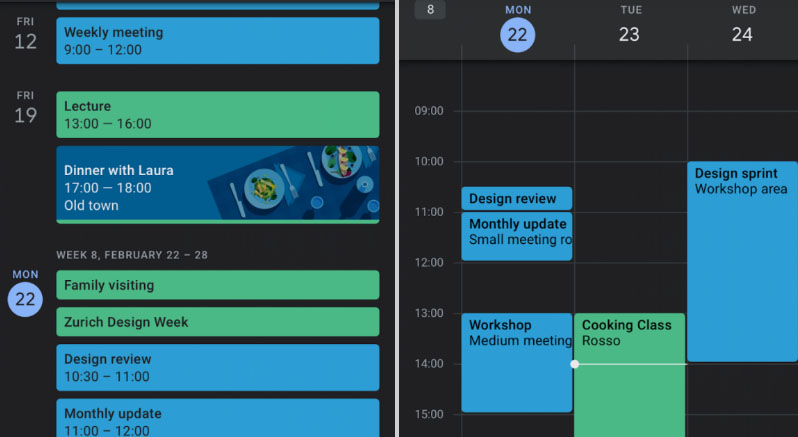
    Google was bringing the dark theme / dark mode to most of its applications and websites . Now with the arrival of Android Q nearing its release date . Google has enabled dark mode for different apps . One such we will discuss here is about Google Calendar Dark Mode .

    What is Google Calendar ?

    It is one of the popular online time management apps for managing your schedules , meetings , reminders etc . Almost we can call it as a e-calendar . But it has more features to offer you other than being a simple calendar .

    Now coming on to the point of Dark Mode / Night mode / Dark theme , we have already discussed on what it is .

    Google Calendar Dark Mode

    To be precise we will take a look at how to enable Google Calendar Dark Mode .

    • So as usual go to the General settings of Google Calendar in your Android Phone .

    ( SETTINGS — GENERAL )

    • Now go to the Theme option in Google calendar settings .
    • In this you get options to select three themes – Light theme , Dark theme and finally Set by battery saver .
    • Select Dark theme to turn on Google Calendar Dark Mode .

    In case you are not getting this feature on your Android device then try these settings option after updating Google Calendar App .

    Go to the Google play-store and update your G-Calendar application .Even after this if its not working out try to upgrade your Android OS . Because this dark mode wide update is mainly focusing on Android Nougat and its higher OS Versions .

    In case you want to use Google Calendar dark mode on Web , try to use Google chrome browser and get your browser installed with add-on for dark theme .

    In the Android Q operating system , it is clear that the users will have option to switch their phone to Dark theme by default settings . Thus the users who want to use all their apps on dark mode need not to focus on the dark theme settings of each apps.

    In case you want to disable dark mode for Google Calendar then work on the settings the same way and in Theme select the light theme .

    Dark theme is very good for vision and good for your eye health especially during the night time or during low light period . As well as using dark theme for applications can save your device battery to a great extend .

  • Types of Penetration Testing

    Types of Penetration Testing

    In the first session of Penetration Testing we have given the basic concept of defining What is Penetration testing and benefits of the Pen test. Now our second section will cover about the Types of Penetration Testing in detail .

    Three Types of Penetration Testing

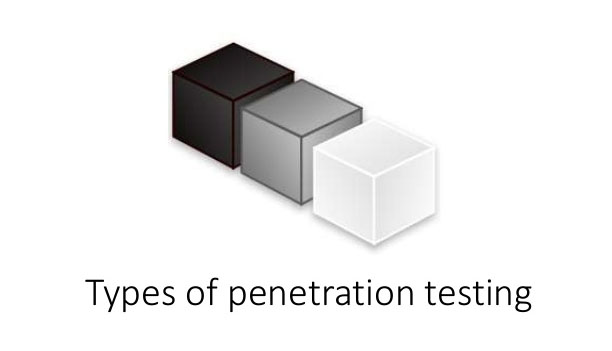
    Basically there are three types of Pen tests in existence . They are – White box Penetration Test , Black box Penetration Test and finally Grey box Penetration Test .

    Black Box Penetration Test

    First we will discuss about the Black box penetration testing and its features. Also about the merits and demerits involved in the black box penetration testing .

    What is Black Box Penetration Testing ?

    In Black box testing , the black box tester is not having any idea or knowledge about the internal source code or the internal structure . He is just like a hacker who doesn’t have any internal information about the system . He can do the pen test on the system with only the public information that is available .

    The black box penetration testers are not given any information about the architectural diagrams that are not open to public visibility . Thus this kind of pen test will help in identifying the security flaws in the system that can be attacked by any of the external person with no knowledge of the internal data .

    The black box tester will try to collect as much as information about the targeted network / System . The tester will not examine any of the codes . He will be aware about only the expected outcome not about how this outcome will arrive .

    Advantages of Black Box Pen Testing

    Now we will focus on the merits of back box pen testing / the advantages of Black box pen testing .

    • A black box pen tester need not to be an expert , nor is necessary for him to have any knowledge about languages .
    • Black box tested is supposed to verify the contradictions in the system.
    • Black box testing usually takes place from the perspective of the user . It has nothing to do with the designer aspect .
    Disadvantages of Black Box Testing

    As we all know everything has its own merits as well as demerits .So here we will point out some of the disadvantages of the black box testing process.

    • Difficulty in design is one of the drawback faced while conducting a black box pen test .
    • In case if the designer has conducted the test , then the black box test will not be worth in actual .

    Now on the Types of Penetration Testing , there are two more types left . Next we will focus on white box test .

    White Box Penetration Test

    The second Types of Penetration Testing is White box Penetration testing . We will discuss what is white box pen testing and its merits-demerits .

    What is White Box Penetration Testing ?

    In white box penetration test , the tester is given information about the system or its network . The white box tester is given idea about the source code , schema details , IP , OS and almost all necessary information needed . Its generally an attack from internal source itself .

    White box penetration testing is also known by different names such as – open box testing , auxiliary and logic-driven testing , clear box test , glass box testing etc .

    White box testing is straight opposite of black box test . Because here the tester has all necessary information regarding the architecture design , data , source codes etc . In White box penetration the pen tester will check path testing , data flow testing and loop testing . As well as he analyses the code coverage .

    Advantages of White Box Pen Testing

    Discussed below is the advantages of white box penetration testing .

    • White box test can help in finding out the internal and external security vulnerabilities in a system / network.
    • Ensuring all the independent paths of each module has been exercised.
    • Verification of all the logical decisions by means of accessing their true or false value is ensured in white hat pen testing .
    • Typographical errors can be found as well as there will be a syntax checking process .
    • Can help in finding out the design errors that has risen due to the difference between actual execution and logical flow .
    Disadvantages of White Box Testing

    Focusing on the disadvantages of white box penetration test let’s discus it in brief –

    • The tester has to sort out the flaws by knowing so much of internal information thus it might create some confusion as well .
    • Have to go through a huge amount of data that is time consuming .
    • They work on the basis of knowledge of system directly from the developer . A hacker will not have any idea about this information .So a white hat testers’s behaviour will be entirely different from that of a hacker who doesn’t’ have any idea about the system .

    So that’s all about the white box testing , now we will focus on the next Types of Penetration Testing that is Gray box test .

    Read Also : Penetration testing tutorial for beginners

    Grey Box Penetration Testing

    Now we will focus on the last session of Types of Penetration Testing . The third type of pen test is – Gray box penetration testing .

    What is Grey Box Penetration Testing ?

    Grey box pen testing is type of pen testing where the tester will generally provide partial information regarding the internal system or network .

    This generally works like an external attack by the tester who has some kind of access to the internal system / network infrastructure .

    Advantages of Grey Box Pen Testing

    Let us take a look at the advantages of grey box testing –

    • In this there is difference between the tester and developer so the chances of personal conflict is absent .
    • Doesn’t require access to the source code .
    • Doesn’t have to supplement them with knowledge of internal info about program functions etc .
    Disadvantages of Grey Box Testing

    Now let us take a look at the disadvantages of grey box pen test –

    • Grey box testers might miss out some of the vulnerabilities due to lack of idea about the source code .
    • For algorithm testing , grey box testing is proven to be not ideal .
    • Grey box pen test can be time consuming in its nature .

    Hope this section of Penetration Testing tutorial have given all our readers a clear idea about the Types of Penetration Testing .

  • Penetration testing tutorial for beginners

    Penetration Testing or very commonly known as Pen test in Online world . This might be a familiar team for all IT Security enthusiasts and tech companies . For those who are unfamiliar to this term , here we will give you an idea by defining the concept of Penetration test .

    Introduction To Penetration Testing

    Let us start with introduction to penetration testing by defining what is penetration testing .

    Then we will learn the importance of the pen test . And why it is necessary to perform these kind of tests and so on .

    Defining Penetration Testing ( Pen Test )

    Let’s go for a simple definition to understand the concept . Pen test / Penetration test is generally a Security test to find out the security threats and security risk on a system . 

    This test helps in detecting the security risk on a system and thus makes the security analyst teams vigilant to rectify the insecurities of a system .

    How Important is Penetration Test ?

    Now you may be thinking why penetration test , what is the importance of penetration test . Let’s discuss it in short –

    Imagine any software application or a website that has got security flaws . It can happen easily , when a developer develops an application or website errors can occur . Some of the minute errors like configuration errors , software bugs , design errors can lead to security threats . This can turn vulnerable when someone illegally enters into the site and make use of the security loopholes .

    So its always necessary to find out the security flaws by doing a pen test .

    • This helps in understanding the security loopholes in system .
    • Makes to alert about the data that are under security threat .
    • You get an idea about the weakest section of your system through which someone can attack your system .
    • Gives you idea about possible areas where white hat techniques can be used to exploit your system security .
    • Protection against black hat attacks.

    These reasons makes every company and its network to invest a good amount on their system security and network security . Especially government portals , agencies , big MNC’s , corporate companies and Banking sectors spend a good amount on ensuring cyber security .

    Benefits of Penetration Test / Pen Test

    Pen Test is to ensure a secured system . This can add more benefit to any organisation and not doing a pen test is risky business as well . Every company must ensure they do risk assessment of their system security as well . Sometimes your system insecurity can lead to financial insecurity of the firm and eventually may be into break of customer loyalty even.

    • Increases Efficiency of Management

    If your system is secure and you have understood the flaws in the security system and rectified it . Thus during any unexpected or intentional cyber attacks your management can function without any tensions . Because pen test would have given you risk analysis report of your system security .

    • Ensure your customer loyalty

    In case if your system’s security issues were not detected and rectified in a pen test then any time you can loose the trust of your customer on your brand . Because leak of customer data can be a serious problem .

    • Safe zone from Fines & Penalties

    Data breach and leak of confidential data can lead to legal issues thus make you end up with paying huge penalties . Penetration test saves you from all such legal issues by putting an end to the chance of any kind of attacks to your system.

    • No Fear Data leak

    Data leak is a serious threat of any insecure system , so doing pen test reduces the maximum chance of data leak.

    • Financial Safety

    In case of banking networks or any payment gateway related systems , insecure system can increase the chance of financial loss , this can be avoided . And in case of other organisations they can avoid financial loss due to hack attempts and customer loss and penalties .

    What are the Types of Pen Test ?

    There are basically three types of pen test available on practice . Then there are different areas on which pen test is applied .

    There are three types of pen testing , they are –

    White box pen testing

    Black Box Pen testing &

    Grey Box Pen testing .

    Now we have given a basic outline about pen testing and will continue more about the pen test like How pen test is performed and types of Penetration testing etc .

  • Best Emulators – How to Convert computer into Retro Console

    Best Emulators – How to Convert computer into Retro Console

    Believe me all the 90’s kids are going to love this article. Many of us these days thrive to live our childhood days again but that’s not practically possible, right? But you can definitely get to relive them a bit if you get to play all the cool video games you played in your childhood in same way you did earlier. There were a number of cool games we used to play like Super Mario, Tetris, Pacman and you can play them again. To have best gaming experience in your computer you can rely upon some of the Best emulators to convert computer into Retro Console .

    This can be done using emulators on your very own personal device a computer or a laptop. You may want to know what emulators actually are. So let me explain that first, emulator may be some software or a hardware which make a system behave and function like some other system.

    Best Emulators – How to Convert computer into Retro Console

    Here I have compiled a list of some of the best emulators that are going to make you refresh your memories of your childhood :

    RetroArch

    As an adult you must want to relive some moments from your childhood and Retroarch can help you in doing so since it is one of the best emulators using which you can play most of your favorite childhood games.

    Its not an ordinary emulator it is more than that since it makes your gaming experience even richer with cheats, filters and real time rewinding. Also that it is quite simple to use, has a light interface and is portable. Moreover it is available for Windows, Linux, Mac and mobile devices.

    ScummVM

    ScummVM is a quite a popular emulator and is most used for adventure games especially the classic click and point games. The major features for this emulator that it is very easy on the system you are using since it can work with a light processor and also with a low RAM.

    It provides you with a number of configurations for the audio and video. Also it auto saves your games. It is available for Windows, Mac and Linux. Also say a game is developed for MAC only using this emulator you can play it on windows platform as well.

    PCSX2

    PCX2 is simply the PlayStation 2 emulator so letting you play nearly all the games of PlayStaiton2 on your own computer. Besides the gaming experience is purely like the play station, it has a number of other features which are going to make your gaming experience even better like using custom resolutions, text filtering and anti-aliasing.

    Also it lets you record in game in HD and then you can share it with anyone you want. It uses plugins for adding different functionalities. It is available for Windows, Mac and Linux.

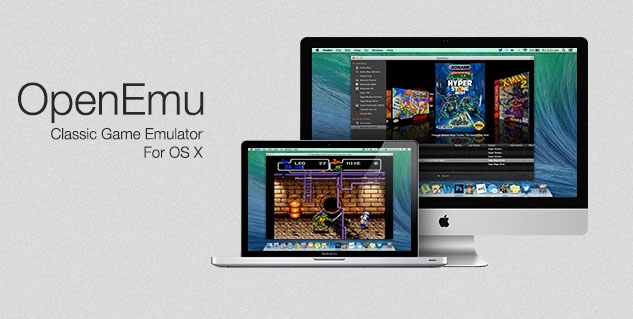
    OpenEmu

    OpenEmu is one of the best emulators for the MAC users. It has been designed keeping in mind the MAC interface and hence designed pretty similar to it.

    It is best known for its gallery like feature where you can easily organize your games under different categories making it easier for you to find them and browse them later on. Categorization can be automatic or you can do it yourself. The backup for the games is also created automatically by the emulator

    Dolphin

    It is an emulator for two of Nintendo’s consoles namely GameCube and Wii. The emulator is mainly known for its high compatibility rate and also a number of features.

    Such as it lets you play games in HD. Some people even say it makes the game better when played on dolphin emulator. Also it gets updates and hence is steadily increasing its features. It is available for all the platforms i.e. Windows, Linux, Mac and Android as well.

    These some of the best emulators according to me but there are lots of more out there. Do share with us your experience of playing your favorite video games using these emulators and also do tell us if you are using some other emulator.

  • Oculus Rift Setup Guide – Get Started with This

    Oculus Rift Setup Guide – Get Started with This

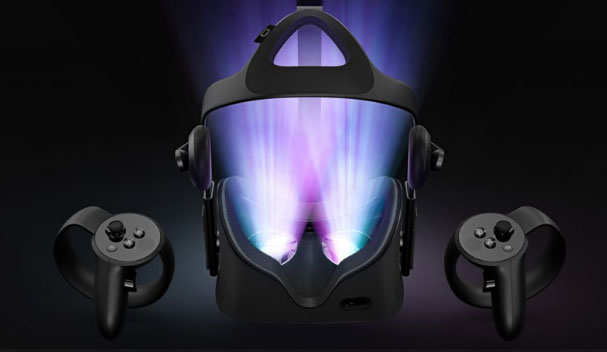
    Virtual Reality is the latest rage in the tech market and it is pretty awesome, right? You get to experience other worlds without being actually present there. In the gaming world this is even more awesome, you get some stunning visuals and get to perform your own action. Currently Oculus rift is the best VR gaming headset in the market. Here is a complete Oculus Rift setup guide made with simple step by step guide on How to setup Oculus Rift .

    Oculus Rift Setup Guide

    Let us take a look at the step by step user manual of Oculus Rift Guide Setup in detail –

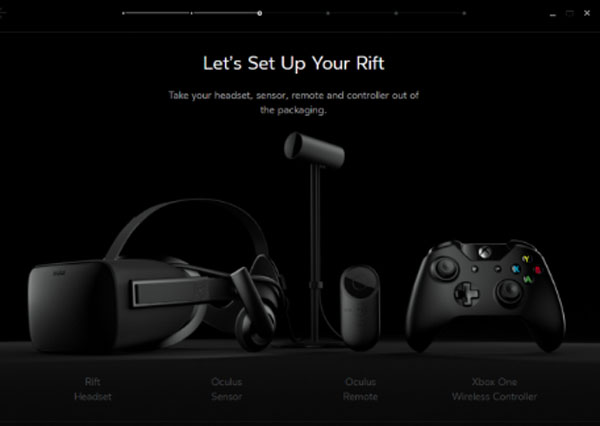
    To begin with one must have 2 hardware components essentially . First and foremost a Oculus Rift and secondly a computer with support for VR (Virtual reality ) .

    Install the Oculus Software

    Before doing anything you need to install the Oculus rift software on your device. While it is downloaded and installed you may begin with unboxing and making the connections. This is the first step in the process of
    Oculus Rift setup .

    In case you can’t download Oculus rift software then you can download Oculus Rift Patch .

    Check for the minimum specs :

    Running Oculus rift setup requires some minimum specs in your system which are as follows:

    • Nvidia GTX 1050 Ti / AMD Radeon RX 470 or better
    • Intel Core i3-6100 or better
    • 8GB of RAM or more
    • HDMI 1.3 output
    • 1x USB 3.0 port
    • 2x USB 2.0 ports
    • Windows 8.1 or newer

    Some of the best Oculus games require even higher specs than the minimum requirements but they still run if you have the minimum specs. It also requires proper physical space a minimum of 3 by 3 feet so that you may not knockout something while playing and thus you can play freely.

    The Unboxing of Oculus Rift

    Firstly create an Oculus account on the Oculus software. You may sign up with any mail or may use your existing Facebook account as well. Then take out all the components from the box and make sure to remove all the plastic wrappings since they can be a hurdle for the sensors and the controllers.

    Making the Connections

    The very first thing you need to do is connect your headset to the HDMI port in your graphic card remember not on the motherboard. Then connect your headset’s USB cable to a USB 3.0 port on your device (blue in color).

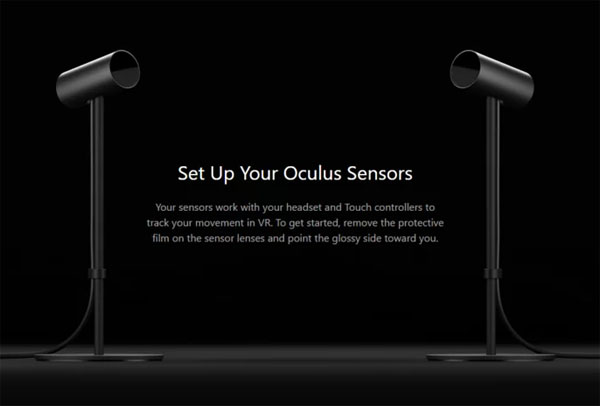
    Then connect the USB wires of the two sensors to two USB ports, make sure atleast one of them is 3.0 port. Once all these connections are made you will see a green colored OK on the software.

    Connecting Oculus Rift Remote –

    Pull out the plastic piece thus connecting the battery. Then simply hold the main button of the remote and it is automatically connected.

    Connecting Sensors  –

    In the software Click on Devices option in the menu then on Configure Rift and then Sensor setup. Now enter your height there.

    Then adjust the sensors with your eye level where your headset is going to be. Make sure that there should be no obstacle between the sensors and the headsets.

    Then move the headset in different directions assuring the connection and once connected you will be notified on the software. Do this for both the sensors.

    Connecting Touch Controllers –

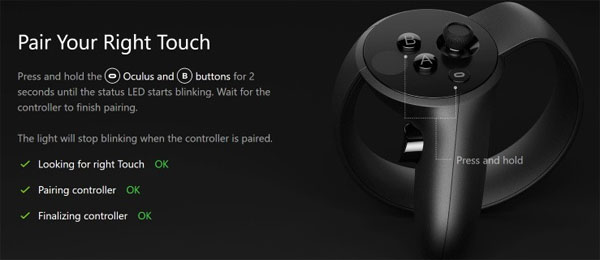
    In the software Click on Devices option in the menu then on Configure Rift and then Add left Touch. There the instructions will be displayed to configure the left touch. Follow them. Do the same for right touch.

    Setting up Guardian system –

    The guardian system means the place where you will be playing using the headsets. In the software Click on Devices option in the menu then on Guardian System. There follow the instructions to set up the guardian system.

    It is necessary since you require proper space for playing, you should not knock out something while playing and you can play freely.

    So you can see that setting up the Oculus rift is not that difficult but yeah it requires proper engagement and time. But once done you can play lots of awesome games and enjoy the VR experience. do share with us if you face any kind of problem.

  • Solar Charger and Solar Power banks to buy

    Solar Charger and Solar Power banks to buy

    We have got exclusively best solar charger and solar power bank options for our readers. So next time you go out for adventurous trip or trekking you need not worry about your gadget’s battery backup. 

    In case you are someone who knows the best power sharing apps you can still try these solar charger for a change . And some of you might be excited about Samsung power sharing mode with its new Samsung Galaxy S10 5G support phone . Then this can be best alternative and cost effective solution.

    Best Solar Charger and Solar Power banks

    Here are best power bank options for you to have one before you plan any adventurous trip

    Jetsun 16750mAh Solar Charger & Portable Solar Power Bank

    • One of the recommended power bank for camping is Jetsun Solar Charger 16750mAh Portable Solar Power Bank.
    • It is designed exclusively for outdoor camping so that people don’t have to worry about charging their gadgets.
    • It consist of 16,750mAh battery and compact solar panel.
    • With dual USB output ports, it’s easy enough to charge a smartphone and other portable devices while late night trekking as well.
    • A LED light helps it serve dual purposes as a nightlight also it shows how much battery left in the power bank.
    • Jetsun solar charger can charge a smartphone from 0 to 100 percent within two hours. Isn’t that so quick.

    Fuse 6W Solar Charger

    • The fuse 6W Solar Charger consist of 4,000 mAh battery and 6.15 Watts Solar panel.
    • The power bank comes with a universal attachment system, complete with a set of interlocking clips, which allows you to fasten the charger to the back of your current pack and help you adjust the straps for a firmer fit.
    • The most recommended Fuse 6W power bank charges an external battery, though you can also charge the latter component via an adapter or USB.

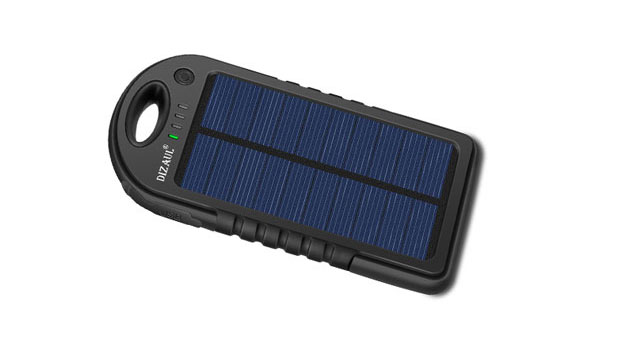
    Dizaul 5000mAh Portable Solar Power Bank

    • Dizaul 5000mAh portable solar power bank has an ultra-portable design which is an perfect solution for keeping your smartphone charged.
    • Simultaneous charging for 2 gadgets easily. It consists of dual-USB ports .
    • Dizaul portable solar power bank is water proof and shock proof so it makes it easy to travel and you can attach to the outside of a carry-on bag with the help of the hook attached in power bank.

    While night trekking you can also make use of the flashlight along with that the smart LED indicators alert you the battery status.

    It takes almost two hours to charge a smartphone whereas the charging time for AC with Dizaul is about six to seven hours

    You can also charge it through sunlight and it would take almost around 2 days to completely re-charge due to the smaller solar panel surface.

    Arc 20W Solar Charger Kit

    • The Arc 20 Watt Solar Charger with 19,800 battery capacity, simply fastens to a variety of canopies, packs, and tents, allowing for constant recharging throughout your adventurous trekking.
    • This kit also includes Voltaic‘s V72 Universal Laptop Battery, which is designed with a DC Output, you can easily charge maximum laptops at least once.
    • The best part is that the external battery of Arc 20W solar charger kit also consist of protection against short circuits and overcharging, so you need not worry about burning up your devices.

    Read Also : Battery Health : How to keep your phone or tablet battery healthy

    Yolk Station Solar Paper

    • Yolk Station Solar Paper is the thinnest solar charger available.
    • Display on the top of the unit informs you about the batter’s status.
    • The yolk station solar paper charger could last a long time.
    • It doesn’t have battery storage capacity.

    Anker Power Port Solar

    • Even though having no battery storage capabilities, Anker‘s Power Port Solar gives us with up to 21 watts of power production, which is more than enough to charge any portable handy device speedily.
    • PowerIQ is one of the feature that adjust the amperage of the power supplied to match your device, therefore ensuring that the device charges speedily and safely and you can stay relax.
    • The device’s is easy to store as it measures 11.1 × 6.3 inches when folded and 26.4× 11.1 inches when it is opened.

    Solio BoltBattery Pack + Solar Charger

    • The Solio Bolt power bank is one of the most compact solar chargers on the market and we also recommend you because of its great features.
    • This device is most recommended as it can hold a charge for up to a year.
    • The powerbank has 2,000 mAh battery capacity.
    • The Bolt make use of a central axis point, letting it to open into a pair of individual panels. The small hole in the center of the device is specifically designed to fit around a pencil, allowing people to firmly plant the solar panel in the ground in addition to then position it in the direction of the sun.

    Do let us know your favourite solar charger in comments .