We already draw your attention about basic of programming for all upcoming programmers through Introduction to Programming Languages : Programming Tutorials . Now we begin with our Java Tutorial Officially from here .
Where to begin this Java Tutorial From , i was wondering . Then thought to give you a basic introduction about Java. It is not mandatory to read the introduction section unless and until you have got interest to know about the beginning of java programming , i mean evolution of java programming language etc .
History bores some , while History excites some . So the choice is yours . Here we go with Introduction to Java Programming Beginner’s Guide .
Introduction To Java – Beginning with History of Java Tutorial
In 90s, Sun Microsystems Inc. (US) has developed a new language to build software for various electronic devices that could be controlled remotely. This language is known as JAVA today. Its first draft was developed by James Gosling and his team members. They named it JAVA after ‘JAVA ISLAND’ – from where coffee was exported to the whole world. In mid 90s Naughton and Jonathan Payne developed this further under the name WebRunner (Java based Web browser) later renamed as HotJava.
HotJava as a browser had all the features of implementing applets (programs that run dynamically on Web browser). After officially announcing JAVA and HotJava announced by Sun at Sunworld Conference, Netscape Inc. also incorporated support of support in its browser (named Netscape Navigator). Sun Microsystems Inc later acquired by Oracle Corporation. Soon after Microsoft also incorporated support of Java in their Internet Explorer. Java became very popular due to its simple way of programming, compiling and debugging. Right now more than 3 billion devices run java.
Enough of History…
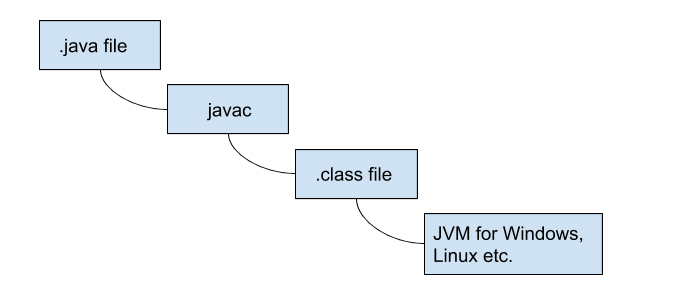
Other conventional languages are generally designed to be compiled machine language Or they are interpreted from source code at runtime. Java language first get compiled to bytecode and this bytecode runs by a Java Virtual Machine(JVM).
So, Java is a class-based, concurrent, object-oriented computer language designed to let application developers “write once, run anywhere”. This means that if the given line of code successfully runs on one machine, there is not need to recompile it to run on another machines. Java code is compiled as a class file which can run on any Java virtual machine irrespective of computer architecture.As information technology word is very dynamic, everybody was looking for very scalable language and due to its robustness, Java has become one of the most popular and programmer friendly language. Java is very flexible and can be enhanced as per the requirements to develop different kind of client-server web applications (or desktop applications) with having high volume of users. Java has more inhouse libraries and plugins than any other programming language.
Java is one of the most developer friendly and most in demand programming language . It is specially design to serve client-server web applications with having huge number of users. Most of the syntax in java is derived from C and C++ with more in-build features (libraries).
What is Java ?
On Java tutorial the most important section begins from here . Yes first let’s know What is Java ?
Features of Java Programming Language
Here is the pictorial description of features of java programming language given below and it is very well detailed in the section of uses of java programming language .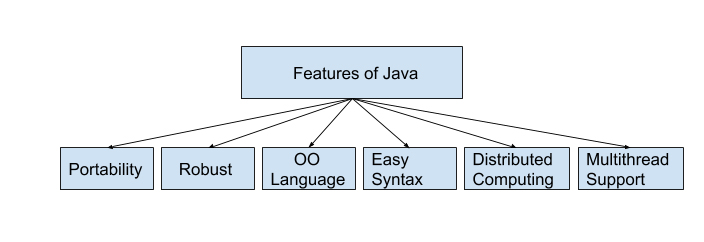
Uses of Java Programming Language
Guys you are here to learn Java programming language with our easy Java Tutorial right ? But do you know the uses of java programming language .There are many reasons and usage of Java programming language. Some major points are listed below . In one section very soon we will also throw light on scope of Java programmer .
- The Java programs are portable in a network (platform independent). The code written by programmer is compiled into bytecode. This bytecode can run anywhere in a network (server or client) with JVM which interprets the bytecode into computer understandable code. The JVM have an optional JIT compiler which compiles the given bytecode into m/c readable code.
- Programs written in java language are robust. Java programs is different from other languages e.g. C++ as it contain no references to data external to other object(s). The JVM ensure integrity by applying a number of checks on each object.
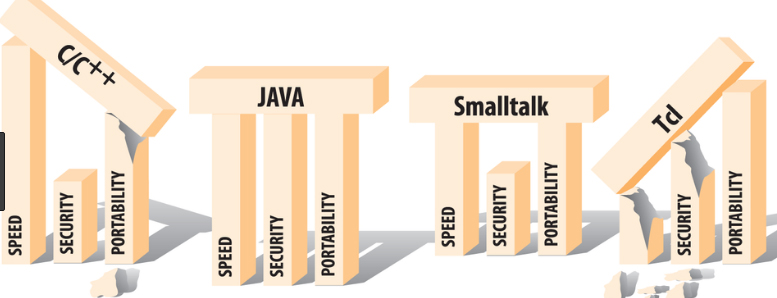
- Java is object-oriented language where objects are thought of as “nouns” with which we relate to. A method of a class renders object’s behaviors.
- As compared to other languages java is relatively easy to learn and easy to write, specifically for developer with background in C. Also finding errors is very easy in java.
- Java language is designed to work on distributed computing which means all programs in Java are same as sending and receiving data from a file.
- Java supports multi-threaded environment which help user to write program to perform several tasks simultaneously.
Now let’s know more on Java Tutorial .
Java editors
As Java is getting very popular among the developers, many IDEs (Integrated Development Environments) have been developed to help programming in writing code effectively and quickly. Following are some very popular java IDEs
- Very old yet effective tool to write java program is Notepad . Developers working Windows machine can take the help of simple text editor like Notepad or TextPad. They can use java command for compiling and running java code e.g. java etc.
- Netbeans is also quite popular Java IDE. It is available as an open-source and free bundle at https://www.netbeans.org/index.html.
- Last but very popular IDE is Eclipse. This IDE is getting developed and maintained by the eclipse open-source community. Users can download Eclipse IDE at https://www.eclipse.org/.
Java Editions
The Journey of Java is continuously getting matured with time in both functionality and reachability to all services. The Java platform has mainly three different Java editions which are defined below:
Here is the Java editions list –
J2SE(Java 2 Service Edition) is first edition of Java which was developed for writing applets and other Java-based applications based on applets.
J2EE(Java 2 Enterprise Edition) is the second edition of Java architecture for developing multi-tier enterprise applications. The basic development in J2EE was JSP pages with access to all J2EE components, including JavaBeans and servlets. These JSP pages at the end compiled into servlets and have all the benefits of server-side Java applications.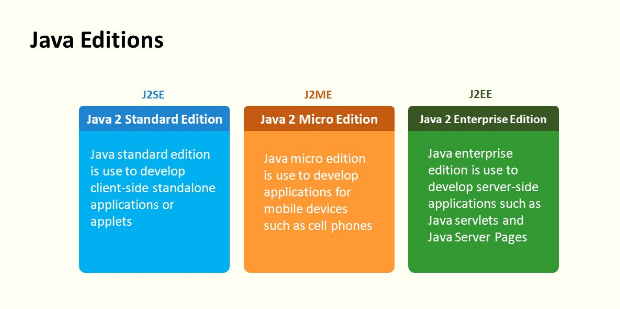
JavaFX is a inbuilt Java library which helps users to build Rich Internet Applications. Multiple platforms can run this applications consistently using this library. These developed application JavaFX can run on various type of electronic devices such as Desktop Computers, TVs, Mobile Phones, Tablets, etc.
J2ME(Java 2 Micro Edition) is the third edition of Java architecture with the help of which programmers use java programming language to develop programs for mobile wireless information devices such as cellular phones and personal digital assistants devices.There are many devices where Java application are getting used. Some of them are:
- Web Applications such as irctc.co.in etc.
- Desktop Applications such as video players, document readers, media player, antivirus applications etc.
- Enterprise Applications such as financial applications.
- Mobile applications
- Million of Games
Type of Java applications
Next important section of our Java Tutorial is about Types of Java Applications .There are basically four types of Java applications which are explained below:
Standalone Applications
A standalone application is a program which is installed in your PC and runs only on your computer. In case you want to use this application, you need to explicitly install it into your m/c.
Applets
An applet are compatible with Internet can share information over it. These are to be executed on the client machine which should have Java-Compatible web browser like Internet Explorer or Mozilla. Applets themselves are Java programs which reside on server side. Applet can be implemented by embedding it into an HTML page (image or sound file) and they cannot be executed alone. To run applet one should need to access an HTML page which has embedded applet. Whenever web browser downloads respective HTML page, it also downloads the installable file. This file contains Applet which executes it on the local machine.
Web Applications
As the name suggest, Web applications run on the Web Server over the internet. Web applications can be accessed with the help of web clients (web browsers). Whenever user open any web page by specifying the URL (Universal Resource Locator), he/she actually access some web application.
The main components of a web application in Java are Java Servlets, Java Server Pages (JSP) and HTML.
Java Servlets are server side Java programs which send the result (also called response) to the client side java program. JSP pages can be thought client side java program which are combination of HTML and Java Code. The Web Server then converts the JSP pages into Java Servlets before execution of the program.
User access the web application by specifying the URL and the respective URL corresponds to an HTML page. This desired HTML page is returned by the server when the user send request. In case the respective URL corresponds to the Servlet or JSP then it is executed on the Server side and the corresponding response will be returned to the client for rendering.
Distributed Applications
Java application is composed of different components (or Java programs). These Java components run on different machines and can easily communicate with each other. To be more specific we can say that Java Objects on one machine can use methods of the Java Objects from another machine. This make Java more suitable for distributed processing in the language.
Our Next section on Java Tutorial will be Java Virtual Machine (JVM), Difference JDK, JRE & JVM .