You may all know that its too much annoying to find that many features of Facebook Desktop version is missing on Facebook for Android Application . So here is the ways to tackle this problem by clearly explaining how to View Facebook Full site – Facebook Desktop Version on Android .
That is all about how to view Full version of Facebook on Android or Facebook full site view on Desktop.
View Facebook Full site – Facebook Desktop Version on Android
There are three different ways to View Facebook Full site version on mobile .
Direct Link Method to View Facebook Full site on Android
Here is the first method to access Facebook full site version via direct link ( www.facebook.com full site ).
- Login to Facebook account first by means of Facebook mobile version site .
- Step two is to type out the direct link on your browser . The link is ” https://www.facebook.com/home.php “.
That’s it now you can View Facebook Full site on Mobile . This will help you to access Facebook desktop version on your mobile itself .
Browser Setting Method to View Facebook Full site on Android
Now moving on to the next method to View Facebook Full site version on Android , follow these steps .
You know almost all mobile browsers have the desktop view feature .
- Open your mobile browser that you are using .
- Now you can find three dots on top just tap on it.
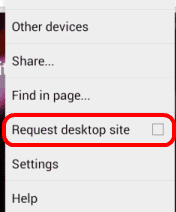
- From menu you have to select the option Request Desktop Site .
Else follow the below steps in case the above three steps didn’t give you access to Facebook full website on Android.
- Go to browser Settings
- Select Debug
- Change the UA string / UA Agent
This steps will make you access facebook desktop version on mobile itself .
Read Also : Safeguard Facebook Pictures-Prevent profile picture downloading
Use Facebook Desktop version on Mobile Method
This is very easy method to view facebook desktop version on mobile , as no much steps is involved here .
- Go to mobile browser and open facebook https://www.facebook.com/ ( facebook home page full site )
- Now scroll to the end of the page , you can find an option “Switch to desktop version “
- Click it , you are done .
- Rotate the mobile screen for further Desktop view experience .
That’s it about the three different ways to View Facebook Full site Desktop version on Android or any mobile devices.