Tag: Dark Mode

  • Google Keep Dark Mode – Enable / Disable The Night Theme

    Google Keep Dark Mode – Enable / Disable The Night Theme

    Google Keep is quite popular among those who love note taking applications . Have you ever felt there is a need for Dark Theme for note taking apps .Then here we go with the Google Keep Dark mode .

    Enable / Disable Google Keep Dark Mode

    On to the main topic , let us see how we can enable Google Keep dark mode as well as the process to disable Google keep dark mode .

    First and foremost thing make sure you are you have updated your Google Keep app to its latest version .
    As of now Google Keep is not offering the exact black theme for its Dark mode . It rather uses dark grey colour . Also Google keep as of now in its initial launch of dark mode is not completely a dark mode app as many of the ares still uses the old light theme .

    Now if you want to use Google Keep dark mode then follow these steps –

    • First launch to the Google Keep app . And make sure you run on the newest updated version of the Google Keep application .
    • Then Tap on to the settings section of the app .
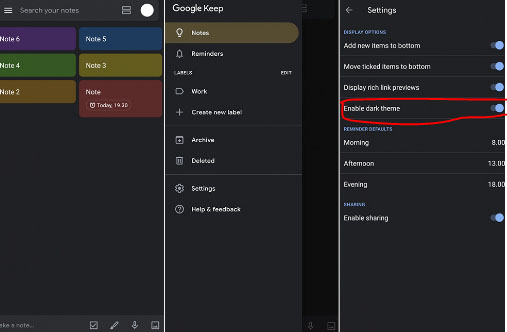
    • Under the Display Options settings you can find that there is an option given to toggle on or toggle off between Dark theme “Enable Dark Theme “.

    Toggle it on if you would like to use Google Keep on Dark theme.

    It is expected that Google Keep dark theme might get more updates soon with the launch of Android Q . So at that time we can expect to use Google keep Night mode with full features on the dark theme .

    On desktop version to use the Google Keep in dark mode there isn’t any option displayed under the settings as of now . We will update you if there happens any changes in its web version settings . But using a chrome dark mode extension can allow users to enjoy the feel of dark mode to some extend on Google Keep as well .

  • Whatsapp Dark Mode – How to enjoy the Night mode Whatsapp

    Whatsapp Dark Mode – How to enjoy the Night mode Whatsapp

    We may be aware of the fact that there are so many apps that are having its dark mode / dark theme / night mode . Whatsapp being one of the popular messenger service used world wide . This application will also soon release its Night mode . So Whatsapp Dark mode may be a good experience for all its users .

    As of now those who would prefer the WhatsApp Night mode on their phone has some settings option to give you almost similar feel of Whatsapp dark mode on your Whatsapp chats .

    How to use Dark Whatsapp / How to change Whatsapp Background Colour to Solid Colour – WhatsApp Dark Mode

    Let us see how this is possible by analyzing the steps to get the desired night theme on Whatsapp –

    First go to your Whatsapp settings option , for this click on the three vertical dots that you see on the upper right hand corner of the Whatsapp . There you can find the settings option .

    Now you can see variety of options ranging from your profile name to Whatsapp Help . From the so called options pick out the Chats option .

    Now from the Whatsapp Chat settings click on the Wallpaper 

    There you get some option , from that click on Solid Color

    There you can see so many dark colour / solid colors . If you want the rich feel of dark mode then go for the black color . Check the same in preview before setting it .

    Click on the set option .

    This method is mainly for changing your Whatsapp wallpaper . This gives dark mode feel only on your chat page . Don’t worry you will soon be able to use the actual Whatsapp dark mode with its new update roll on.

    In case you want to use Whatsapp Web dark mode then that is possible with the help of using the chrome extension for the dark theme.

  • Google Calendar Dark Mode – Enable Night mode on G-Calendar

    Google Calendar Dark Mode – Enable Night mode on G-Calendar

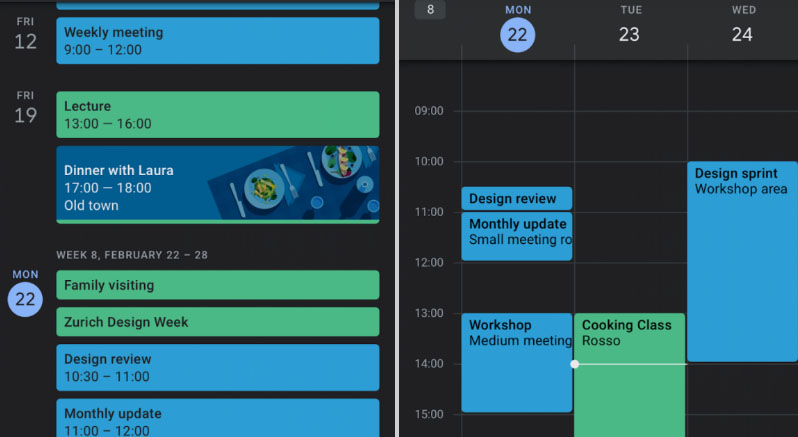
    Google was bringing the dark theme / dark mode to most of its applications and websites . Now with the arrival of Android Q nearing its release date . Google has enabled dark mode for different apps . One such we will discuss here is about Google Calendar Dark Mode .

    What is Google Calendar ?

    It is one of the popular online time management apps for managing your schedules , meetings , reminders etc . Almost we can call it as a e-calendar . But it has more features to offer you other than being a simple calendar .

    Now coming on to the point of Dark Mode / Night mode / Dark theme , we have already discussed on what it is .

    Google Calendar Dark Mode

    To be precise we will take a look at how to enable Google Calendar Dark Mode .

    • So as usual go to the General settings of Google Calendar in your Android Phone .

    ( SETTINGS — GENERAL )

    • Now go to the Theme option in Google calendar settings .
    • In this you get options to select three themes – Light theme , Dark theme and finally Set by battery saver .
    • Select Dark theme to turn on Google Calendar Dark Mode .

    In case you are not getting this feature on your Android device then try these settings option after updating Google Calendar App .

    Go to the Google play-store and update your G-Calendar application .Even after this if its not working out try to upgrade your Android OS . Because this dark mode wide update is mainly focusing on Android Nougat and its higher OS Versions .

    In case you want to use Google Calendar dark mode on Web , try to use Google chrome browser and get your browser installed with add-on for dark theme .

    In the Android Q operating system , it is clear that the users will have option to switch their phone to Dark theme by default settings . Thus the users who want to use all their apps on dark mode need not to focus on the dark theme settings of each apps.

    In case you want to disable dark mode for Google Calendar then work on the settings the same way and in Theme select the light theme .

    Dark theme is very good for vision and good for your eye health especially during the night time or during low light period . As well as using dark theme for applications can save your device battery to a great extend .

  • Google News Dark Mode – How to toggle on Dark Theme

    Google News Dark Mode – How to toggle on Dark Theme

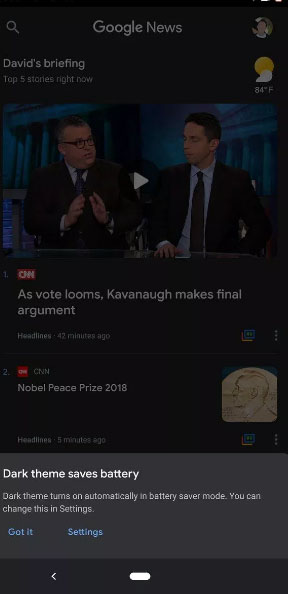
    Most of the websites are allowing users to access Dark theme , now Google news dark mode is available for certain device . As of now not all the device is getting this feature but  it is expected to be available for all devices soon .

    The tech giant Google’s one of the successful product is the news aggregation site and app . Now Google news Android will have dark theme as it is official from the sources . You may be aware that YouTube Dark Mode for Android was already released and we have discussed out the ways to use the same . Now here we will discuss on how to use Google News Dark Mode on Android .

    Google News Dark Mode – How to toggle on Dark Theme

    We already have discussed a lot about what exactly is the dark theme or dark mode for any website . Generally dark mode enables rich visual experience , that too especially in night or in low light time. Once you enable dark mode , then automatically the website or application goes to a reverse colour scheme . Thus turns to grey or black background giving more readability and visual experience than the white background . This can be good for your eyes as well just because it reduces the strain for eyes.

    Now Google News Dark mode Android is open for some of the devices , not sure the list of device name will be updated . As of now Pixel 2 XL Google News Dark mode is the confirmed device to discuss about the feature .

    Read Also : Enable Reddit Dark Mode : How to turn on Reddit Dark Theme

    Read Also : Google Datally App to Control Mobile Data & WiFi Finder

    Read Also : Google Maps List Create, Share and Edit on Desktop & Mobile Now

    What is Special about Google news dark theme ?

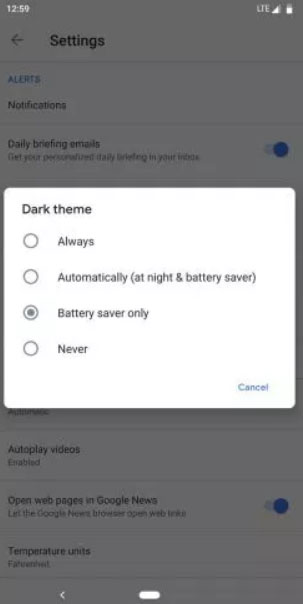
    Being tech giant Google always will give something more in all their features , same applies to this feature also . In Google news Dark mode it allows the users to pick up between 4 wide range of options such as –

    • Enable Dark Mode Always for Google News
    • Enable Dark Mode Automatically for Google News at night and battery saver time
    • Enable Dark mode only while on Battery saver mode .
    • Never Toggle on Dark mode ( Disable Google News Dark Mode )

    So the above listed out are the four options available where users can customize when do they really want to opt for google news dark mode as per their choice .

    Read Also : Google Pixel Haptic Feedback / Vibration Mode Enable or Disable

    Read Also : Disable / Enable USB Debugging on Google Pixel

    How to Turn on Google News Dark Theme

    You can turn on google news dark theme from the device settings with these steps –

    1. Go to device home screen
    2. Now select the setting option
    3. From settings find the Dark Theme
    4. Click on that
    5. Select the mode of Dark theme from the given four options
    6. Select Automatically / Always based on your choice to toggle on google news dark mode

    That is it , this is how you can use google news dark theme on android .

    How to Turn off Google News Dark Theme

    In order to turn off google news dark theme , you can disable it by following the same steps as given above up-to step 1 to step 5

    Step 6 – Click on Never 

    You have disabled Google news dark mode for your device

    So that is all about the Google news dark theme , do let us know your comments on this .

  • Enable Reddit Dark Mode : How to turn on Reddit Dark Theme

    Enable Reddit Dark Mode : How to turn on Reddit Dark Theme

    If you are a Reddit lover , who always wanted to use Reddit dark theme , then you are at the right place . Here we will tell you how to enable Reddit dark mode .

    So let me tell you that switching to Reddit dark theme / Reddit night mode is not a tech stuff as you have seen in the YouTube android night mode  .

    How to enable Enable Reddit Dark Mode

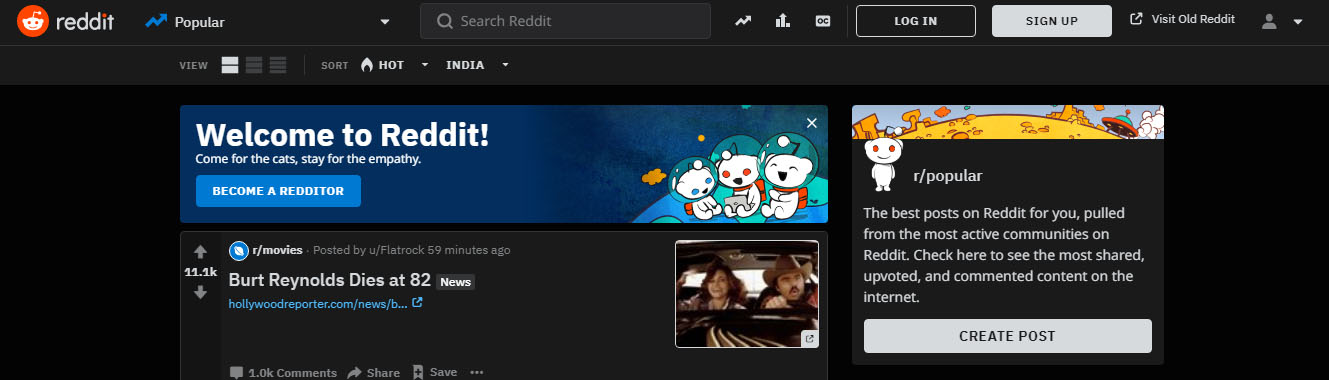
    As officially announced Reddit night mode theme is now open to the Reddit users around the globe. You can use this dark theme on both the Reddit desktop version as well as on the Reddit mobile app.

    Inorder to enable Reddit dark mode or Reddit dark theme you should be using the latest redesigned Reddit version . You may be aware that Reddit beta design is already out , if you haven’t taken a look to try new Reddit then you must do that first . Even though the new Reddit design is cool , some of the users prefer it in the old look .

    Don’t worry you can still use the old Reddit layout . But you cannot use Reddit dark mode with the old Reddit design. So in order to enable Reddit dark mode you must enable Reddit redesign .

    We have already discussed about how to switch back to old Reddit layout .

    Enable Reddit Dark Mode : How to turn on Reddit Dark Theme

    So now let’s learn how to enable Reddit Dark mode or Reddit Nigh mode . It is very easy to turn on Reddit Night Mode , not like the complex steps encountered with YouTube Dark mode on Android .

    Let us dive deep into the process of Turning on Reddit Night mode  –

    • In order to enable Reddit Dark mode you have to switch to New Reddit design . If you don’t know to switch to Reddit New layout , you can read it in our previous post or click on the enable Reddit redesign link inside the content.

    Assuming you are using the latest Reddit redesign, now follow the steps –

    • Log in to Reddit using your account username and Reddit password .
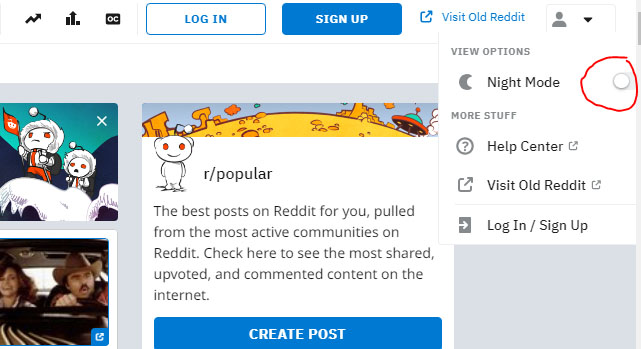
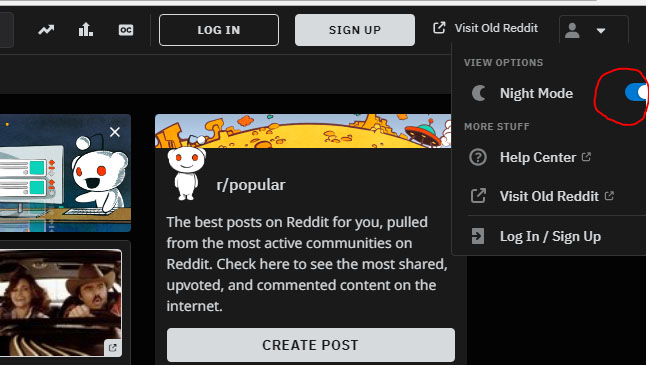
    • Now on the profile section , just click . You can now see View Option
    • Under the View Option you can find out the Night mode option with a toggle button
    • Toggle Night mode button on

    That’s it you are done with the process and successfully you can View Reddit Night mode now .

    In order to Disable Reddit Night Mode or to turn of Reddit Dark mode all you have to do is follow all the above said steps and the last step you have to toggle off Night mode in Reddit .

    You might be now comfortable about How to disable / Enable Reddit Dark mode .

  • YouTube Dark Mode Android Version Without Rooting

    YouTube Dark Mode Android Version Without Rooting

    For all the android YouTube app lovers who are equal lovers of dark mode apps / night mode apps . We know that one of the eagerly waiting Android update for YouTube is to use the night mode . So don’t wait , here we have discovered something exciting which will allow you to use / enable YouTube dark mode on Android without rooting.

    I guess all our readers know how to enable YouTube Dark mode on Windows / Mac . Even if you don’t know , then we are here to help you with . Moving on to YouTube Dark Mode Android Version Without Rooting let’s learn how to enable YouTube night mode on Android phones.

    YouTube Dark Mode Android Version Without Rooting / Modifying APK 

    If you want to use YouTube dark mode on Android without rooting your android device or even without modifying your Android Package Kit (APK) then read the steps and instructions given below very carefully .

    As per the reports that are rolling out on the web world , some of the android device users can use YouTube Dark mode for android with some simple settings change .

    Read Also : Streaming Services – YouTube Vs Netflix Vs Prime Vs Hulu Vs Sling Vs Directv Now etc

    Enable YouTube dark mode via Android Phone Settings 

    Follow these simple steps to turn on Android YouTube dark mode easily –

    • Go to YouTube App on your Android phone (make sure your YouTube app is updated )
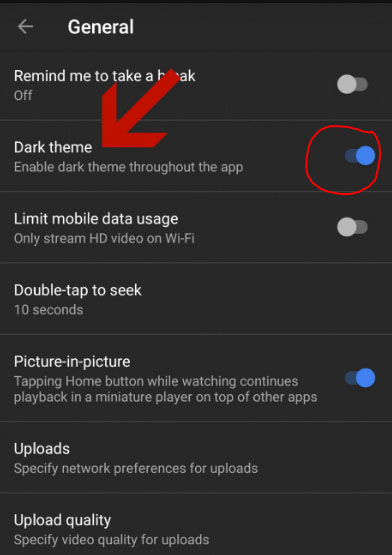
    • Go to your profile icon and launch into YouTube General Settings
    • You can find an option called Enable Dark Theme 
    • Toggle it on so that the dark theme works for the entire YouTube app till you disable dark theme for YouTube app.
    • In-order to turn off YouTube dark mode  toggle off the enable dark theme option

    So that’s it !!!

    If this doesn’t worked out for you then try this way (not too techy but not as easy as above ). Don’t worry let me try to make it more simple in my explanation.

    Read Also : Best Torrent Managers for Computer & Smartphone

    Enable YouTube dark mode YouTube ADB backup

    So you may be aware that the feature of YouTube dark theme mode is based on the already defined preference on the youtube.xml file . This is because XML files are the place where the app settings are set to the preference . To change this manually you have to do rooting . But there is a way to change XML file app settings without rooting , that is with the help of a ADB backup .So this involves a tool for assistance .

    • First setup an ADB (Android Debug Bridge ) access for your Android phone . This helps you to use so many debugging features .
    • Keep your YouTube app on android updated to the latest version from Google play store.
    • Now from AndroidFileHost download the zip file called YouTubeDarkTheme_XDA.zip
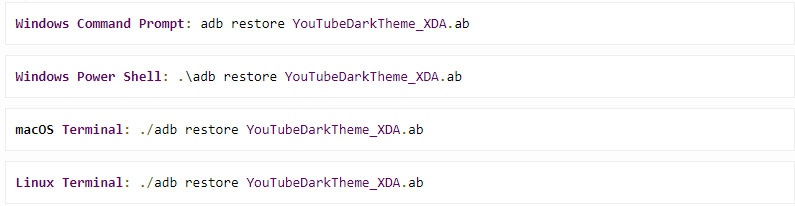
    • Open up command prompt window in ADB located directory .
    • Now depending upon the type of the Operating System enter the command .
    • You can read a message like this “Now unlock your device and confirm restore option”
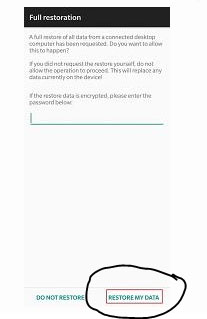
    • Now a Full restoration window appears and you be asked to enter a password.
    • Don’t give any password .
    • Just click on the Restore my data option
    • That’s it , the full restoration window disappears . If you are already in YouTube app you can find that it is working in dark mode . Else go to YouTube and enjoy YouTube Android dark theme

    Benefits of using YouTube Dark mode 

    YouTube has recorded a higher number of users around the world , also the number of android users are more high when you take in account of the ratio of Android Vs iPhone users statistics .Watching videos longer consumes your battery charge to a wide extend . So using dark mode can save your Battery life more . That’s why dark mode for YouTube app is highly beneficial and preferred .

    So we hope this tutorial on how to enable YouTube Dark Mode Android Version Without Rooting wa useful to all YouTube Dark theme Android lovers