
When it comes to Stickers , then we all like Hike Stickers which made our chats more interesting . But still Whatsapp has taken our hearts , and to impress their users WhatsApp also introduced the sticker feature . But we don’t have wide range of Stickers . You can get Hike Stickers on Whatsapp , here we will discuss how to download Hike Stickers for Whatsapp and step by step guide on How to share Hike Stickers on Whatsapp .
We have shared how to make custom stickers on WhatsApp , now in order to share Hike Stickers on WhatsApp , one must enable Stickey .
So What is this Stickey ?
Hike has got a new feature in its settings called Stickey . Using Stickey one can enable it and Share Hike Stickers on Facebook , Whatsapp , Wechat and so many messaging apps .
How to Enable Stickey to Share Hike Stickers on Whatsapp / Fb Messenger ?
Now we will look at the steps to enable Stickey –
- Go to your Hike messenger .
- Now go to the Hike Settings option and click that .
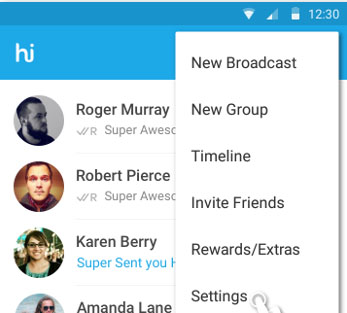
- Scroll to the end , you can find the Stickey option there in the bottom of settings .

- Now click on Stickey and to enable it just swipe to the right .Now Stickey will give you a list of other apps , Just check mark the apps on which you want to use stickey . Here i am enabling Stickey for WhatsApp and Facebook . In case your device has Wechat or any other apps , Stickey would show those apps also in the list .
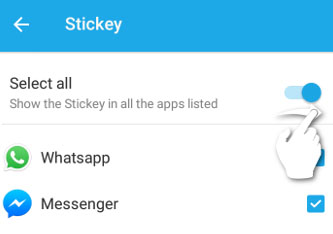
- Now you have successfully enabled Stickey for WhatsApp and Facebook .
How to Share Hike Stickers on Whatsapp with Stickey ?
We have discussed how to enable Stickey , now after enabling Stickey , you can share the stickers of Hike on any messenger apps . Now let us see how to send hike stickers on Whatsapp –
- Go to WhatsApp after enabling stickey for WhatsApp via Hike Settings.
- Now on You can find the Hike (hi) symbol on your whatsapp , just click that.
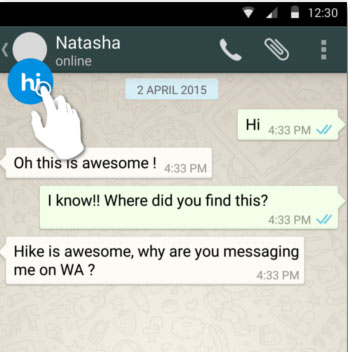
- There you can find all the exciting Hike Stickers , select that .
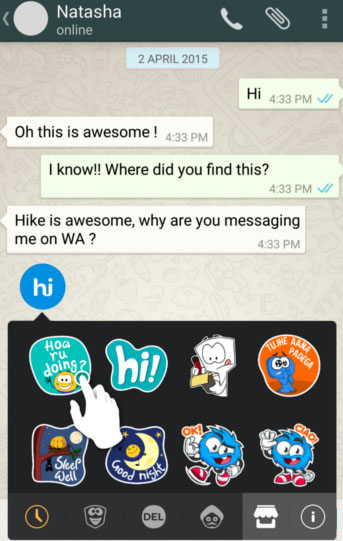
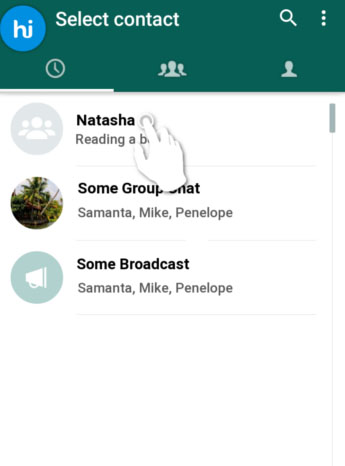
- Now choose the desired contact and select the contact on Whatsapp & Tap send .
- That’s it you are done .
This way you can share Hike stickers with your Whatsapp friends .