Tag: Computers

  • Best Web browsers for Computer & Smartphone

    Best Web browsers for Computer & Smartphone

    Best web browsers are need of the hour for every internet users . Web browsers are used these days in both computers , tablets and smart phones. With the web browsers, the users can collect any data by simply browsing. You can take any details from the web browsers very quickly. Web Browsers help people to easily collect any information required, by just typing in the tab what they are looking for. Let it be any subjects related to your studies, games, music, and art, movies etc, all you have to do is just type and enter what you are looking for. You will get all the necessary information about any topics using the web browsers. But what are the most reliable web browsers or the best web browsers any idea ? 2020 onwards we see rise of AI-powered browsers . To stretch more about it in 2024 we could see the user has wise choice to choose among the Fastest AI-powered browsers . With AI coming into the segment the entire browsing experience has been taken to a new level. 

    Web browser is nothing much just a software that we can download and with an active internet connection this software helps you to browse anything and everything.

    It is always important to choose the right web browser for your computer or smart phone to work efficiently. It is not just the features that you have to look for when selecting a web browser. You should also check browser speed (Browser speed test can help with it) and compatibility before your download the software.

    Best Web browsers for Computer & Smartphone

    Here are some of the best web browsers you can install in your computers and smart phones. You should also test these browsers to understand how it works and to check if it is user-friendly. Read the features of each and pick the right one for you. Let us see what are the best Web browsers are available for us to use.

    Best Web browsers for Windows

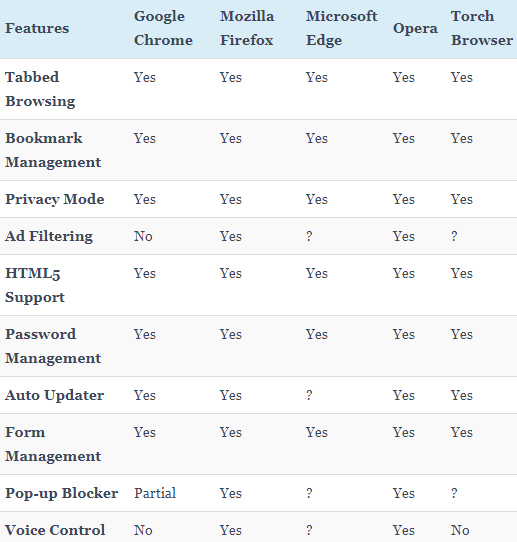
    Given below table compares most of the features of the given list of best web browsers for Windows .

    So the best web browser for Windows are –

    1. Google Chrome
    2. Mozilla Firefox
    3. Microsoft Edge
    4. Opera Browser
    5. Torch Browser

    Best Web Browsers for Mac

    Here is the best sorted list of the best web browsers for Mac Computers that is being preferred by most of the people.
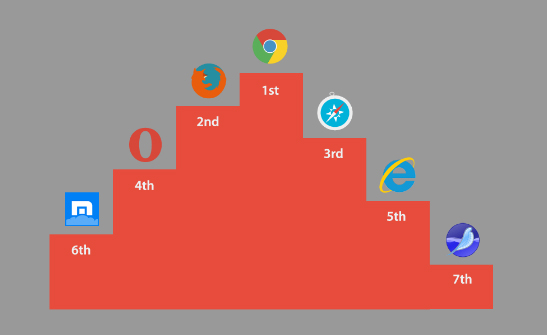
    1. Google Chrome
    2. Mozilla Firefox
    3. Internet Explorer
    4. Opera browser
    5. Maxthon
    6. Yandex
    7. Safari

    Best Web browsers for Android

    Here is the list of the some of the most popular and best web browsers for Android mobile Phone that is being preferred by most of the people.
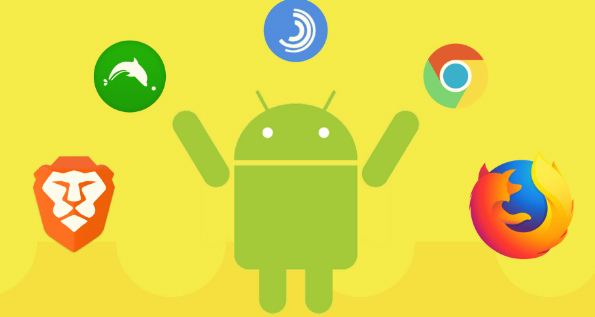
    1. Chrome
    2. Opera Mini
    3. Firefox Focus
    4. Firefox
    5. Puffin
    6. Dolphin
    7. UC browser

    Read Also : Kindle Fire Silk Browser Alternatives

    Best Web browsers for iPhone

    Here is the list of the top rated best web browsers for iPhone that is being preferred by most of the people.
    1. Safari
    2. Chrome
    3. Puffin browser
    4. Opera Mini
    5. Dolphin Browser
    6. Ghostery
    7. Firefox focus
    8. Adblock Browser

    Read Also : uBlock Origin Replaces Adblock plus(Best Adblock Plus Alternative)

    Most Fastest Web browsers

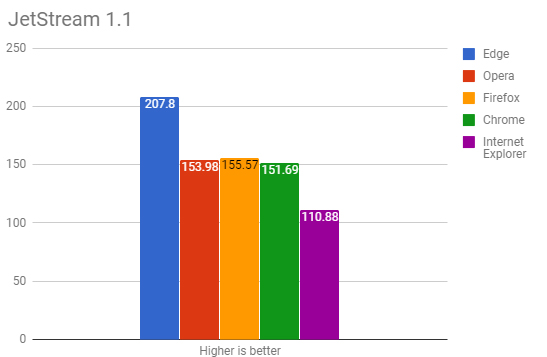
    When considering browsing the speed is a factor of browsing . So here is the list of fastest web browsers.

    If you are using Windows , then the fastest browser for windows includes –

    • Microsoft Edge Browser
    • Opera
    • Chrome
    • Firefox Quantum
    • Internet Explorer

    Read Also : Best Laptops of the Year – Buy the Right Laptop for You

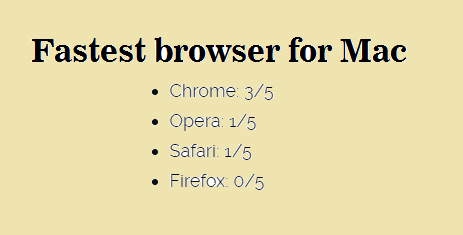
    If you are using Mac , then the fastest browser for Mac includes –

    • Google Chrome ( This is the best on different browser speed test for Mac)
    • Opera
    • Safari
    • Firefox

    If you are using Android , then the fastest browser for Android includes
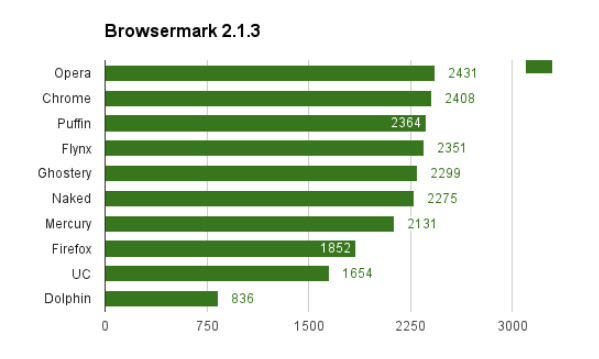
    • Puffin
    • Opera
    • Chrome
    • UC browser
    • Flynx
    • Naked
    • Mercury
    • Firefox
    • Dolphin browser

    Read Also : Best Note taking apps for PC & Smartphone

    If you are using iPhone , then the fastest browser for iPhone includes

    • Safari
    • Chrome
    • Puffin browser
    • Opera Mini
    • Dolphin Browser

    Best Web browsers for Computer & Smartphone

    Here we details the best web browser for computers and smartphone that fits as the fastest browser , safest web browser and low memory consuming browser .

    1)      Google Chrome

    One of the most user-friendly browsers that a lot many people use these days is Google Chrome. This browser is compatible with both computers and smart phones and it has an app size of 182.0 MB and 59.4 MB (IOS). When you normally get computer or a smart phone, Google Chrome will be already set since it is very friendly to the users and is also compatible with computers and android phones. Google chrome saves the history, you can give bookmarks etc.
    Moreover, Google Chrome also has the translator icon on tab which can be used to translate any language to English. Recently in some android phones, Google brought a new app that can detect your voice. If you want to set an alarm, you just have to say “OK Google” – then this app opens up and you can ask to set an alarm for you. OK Google will set the alarm and let you know that it is done. Isn’t this amazing? You do not have to type, our set an alarm by selecting the clock.

    Read Also : Best free office software for Computer & Smartphone

    2)      Mozilla Firefox

    Compatible with both computers and smart phones, Mozilla Firefox is an alternative to Google Chrome. This web browser has the same cross-platform that syncs just like the Google Chrome. One of the attractive features of Firefox is that it has a toggle switch to stop a video. Apart from this, Mozilla Firefox has a lot of extensions that can be added to your mobile. This can be done using the ad blockers to plug–ins by changing the feel of the web.
    The visual aesthetics of Mozilla Firefox is extremely good and customizability also can be done easily. This may be one reason that users choose Mozilla. This web browser works perfectly well in computers, but in android phones it does not work efficiently as Google Chrome.

    Read Also : Enable or Disable Superfetch for Windows

    3)      Opera and Opera Mini

    Opera is one of the web browsers, that are compatible with Android, iOS, Windows, Mac Os etc. The iOS users only get the light weight and data compressing Opera Mini to call, whereas the full opera on Android has a Google Now-Esque news feed. This news feed can be disabled if the user does not need it.   It also has a speed dial in which you can select your favorite sites quickly without searching much.

    Opera and Opera Mini offers a slick and clean browsing and searching for the users. You also get the option to create an Opera account through which you can sync the bookmarks and the history of the browsing with various devices. Data saving option is also possible with the main Opera App and it also supports compressing sites visa Opera’s servers. In Opera Min, the speed and data compression are the most attractive features that the users note. Like the main Opera, Opera Mini also includes ad blocking, offline pages, news feed etc.

    Read Also : Perfect Guide to Know All About Web server

    4)      Apple Safari

    Well, this browser will be familiar with all the users of Apple iPhone. Apple tries to add more features to this browser to make it easier for the users to get their work done. Some of the most recent add-on to it is – ad blocking and tighter Siri integration. The users can sync a lot of their work with other using the Apple Safari. When it comes to syncing the files, the users prefer Safari than Google Chrome.

    Apple Safari is compatible with iOS and is a favourite browser for all iPhone users. Unlike Google, Apple Safar shows no interest in tracking your browsing history which I find a good thing to do. Why do you need to get all your browsing history? Wait and watch to see more of their attractive features.

    Read Also : Best VPN For the Future

    5)      Puffin

    With 32.6MB (Android) of app size and 41.9MB (iOS), this web browser is compatible with computers and smart phones. But majority of the people might not even have heard about this browser. The main attraction of using Puffin is the speed. In just one click the page will open up and you can even see all the elements popping out quickly right in front of your eyes.

    This web browser is good for surfing in your computers since it is very fast. But it has problems in connecting with android phones. The disadvantage of Puffin is this – it struggles to cope with the newer technologies. One the other side, Puffin comes with features like gamepad overlay which helps in web gaming and it also has the advanced data saving tool with settings for image and video excellence. So if you want excellent speed to load pages, then Puffin is a good option.

    6)      Microsoft Edge

    Compatible with both computers and smart phones, Microsoft Edge is a very new web browser that has launched in beta form with App size of 66.9MB (iOS). You can test this web browser by signing up with then necessary details required. All you need to do is, install Test Flight on iOS. If you want it in your android phones, then join the waiting list of Microsoft Edge.
    Since this is a very newly launched web browser, you can expect change and added features by Microsoft. The major attracting of Edge is that it syncs with the desktop easily. Soon, you will be able to get access to Microsoft Edge in you androids and computers with efficient features.

    So, these are some of the web browsers that are compatible with both computers and smart phones. Every user would want different features to complete their work. While choosing an option from these web browsers, check the features and efficiency to meet your needs. Make your work easier by picking the right web browser and save your valuable time with these technologies.
  • Best Laptops of the Year – Buy the Right Laptop for You

    Best Laptops of the Year – Buy the Right Laptop for You

    Here is our top picks on the best laptops of the year ideal for everyone .

    Laptop is the first thing nowadays that comes to a person’s mind when we talk about portability and wireless mobility that freed one to travel any where . You can even work or enjoy watching any entertainment on your laptop while sipping coffee at their favorite coffee shop.

    Best laptops of the year in all around the world with the most in demand best features and light weight laptops and trendy laptops that are in demand are listed down below. We have got you exclusive top 10 best laptops which you can buy and enjoy working on these best laptops.

    Best Laptops of the Year – How to Buy the Right Laptop for You

    Here are the exclusive top 10 best laptops to buy : –

    Dell XPS 15

    The Dell XPS is the new arrival best laptop that has remained a commendable competitor to Apple’s Mac Book and this year also the more upgraded Dell XPS stands head and shoulders its competitor.

    Dell XPS 15 has got its place among the best laptops for college students . Whereas DELL XPS 13 is one of the best business laptops of the year even though the most recent is XPS 15.

    Dell Inspiron and Latitude are the best budget laptops which are in the affordable range so they fall into the category of best cheap laptops with super functions.

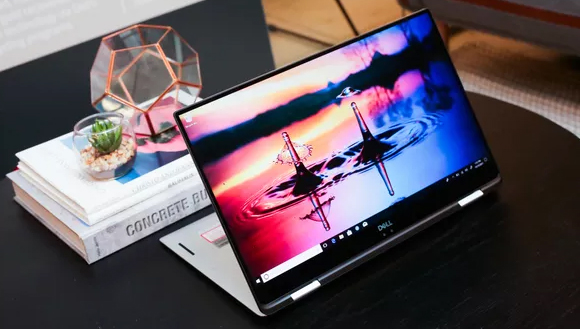
    This year, Dell launched its amazing 2-in-1 version of the best laptop Dell XPS 13, but it lagged behind the XPS 15 Touch in just about every way. The Dell XPS 15 screen size is big enough for an enriching gaming, surfing and video watching amazing experience. It supports an optical Drive, comes with the best features like Wi-Fi, Bluetooth. It also has Stereo and Dual Microphones, High Definition Audio with Waves MaxxAudio Pro for a great audio experience.
    Specification of Dell XPS 15

    Here is the specifications of latest Dell laptop

    • Model name – Dell XPS 15
    • OS (with version) – Windows 10 Home
    • Type of Laptop – Ultraportable
    • Display size (in inches) – 15.6
    • Display Resolution – 1920 X 1080
    • Connectivity – wireless connectivity
    • WiFi Available
    • Bluetooth Available
    • Memory RAM type – GDDR5
    • RAM speed (in mhz) – 2400
    • Laptop weight (in kgs) – 1.8
    • Processor model name – 7th Generation Intel Core i7-7700HQ
    • Graphics processor – NVIDIA GeForce GTX 1050
    • Hard drive type – SSD
    • Hard drive capacity – 256 GB
    • Power battery type – 56WHr
    • Sound technology
    • Dual Microphones
    • High Definition Audio with Waves MaxxAudio Pro
    • Pre installed software – McAfee® LiveSafe™ 12 month Subscription

    Read Also : Best VPN For the Future

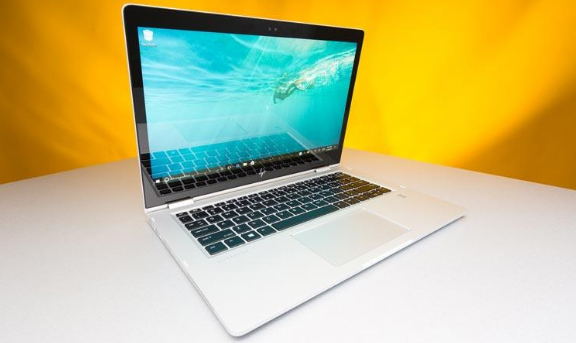
    HP Spectre x360

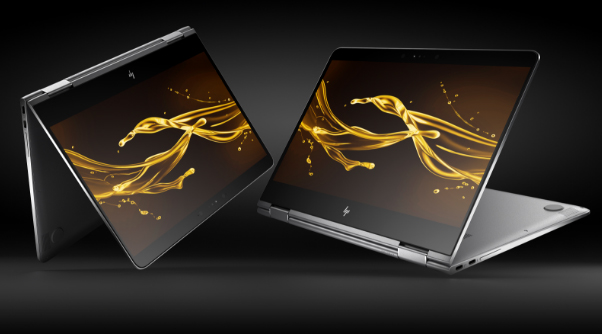
    HP Spectre x360 is another best laptop of the year with amazing features .If we talk about from the memory front, the laptop is equipped with a hard drive of 360 GB and a 8 DDR3 RAM, which makes it possible to store abundant amount of data. With All the above features it ensures that you breeze through all your tasks throughout your day anywhere and anytime.

    Specification of HP Spectre x360

    • Model name – HP Spectre x360
    • OS (with version) – Windows 10 Professional
    • Resolution – 1920×1080
    • Display size (in inches) – 13.3
    • Wireless connectivity
    • Memory ram included (in gb) – 8
    • Ram type – DDR3
    • Laptop weight (in kgs) – 1.3
    • Dimension (in mm) – 307 x 218 x 14
    • Processor model – Intel Core i5 (7th Gen )
    • Graphics processor – Intel HD 620
    • Hard drive capacity – 360 GB
    • Power battery backup (in hours) – 15
    • Sound speakers – Bang and Olufsen Audio

    Read Also : Enable / Disable Windows File Protection & Fix Windows File errors

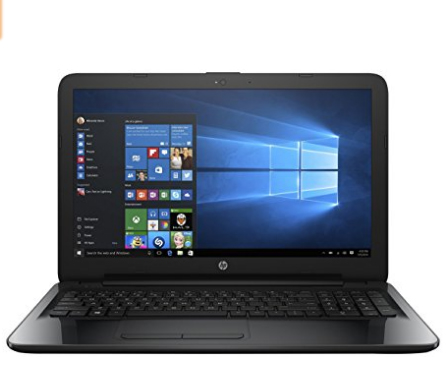
    HP 15-be015TX Notebook

    HP 15-be015TX Notebook is one among the best laptops because of its particular following features:

    • Latest 6th Generation Intel Core i5-6200U CPU
    • 2GB AMD Radeon R5 M430 GPU
    • The HP 15-be015tx (1HQ28PA) comes at a budget-friendly price
    • Great electric battery backup
    • Video calling at HD quality.
    • The manufacture is on the better part and the devoted images processor enables you to enjoy video gaming and run graphics related apps without any hassle.

    Specification of HP 15-be015TX Notebook

    • Intel Core i5 Processor (6th Gen)
    • 4 GB DDR4 RAM
    • DOS Operating System
    • 1 TB HDD
    • 15.6 inch Display

    Read Also : Connect dual displays / monitors to one computer on Windows & MAC

     Asus ROG GX800

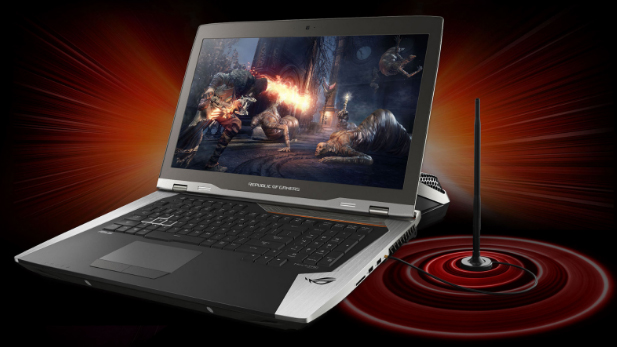
    The ASUS ROG GX800 is a the best laptop gaming device with two NVIDIA GTX 1080s in SLI, a 4K UHD show and a mechanical console with RGB backdrop illumination. It is controlled by quad-centre 2.9GHz Intel Core i7-7820HK processor, 64GB RAM and a variety of three 512GB PCIe SSDs stockpiles. It highlights 18.4-inch LED-illuminated 4K screen combined with Nvidia G-match up factor invigorate rate for a slack free gaming knowledge. These amazing laptops underpins three standard USB 3.0 ports, Gigabit Ethernet, a HDMI port, Mini-Display Port, Thunderbolt 3.0 and 10Gbps USB 3.1 (Gen 2) for fast network and to drive outer presentations. The water cooling module or Hydro Over clocking System is incorporated with the unit. It gives the cooling execution required to extraordinary over clocking of the processor and graphic designs.
    Read Also : The ultimate guide to make Windows run faster (Boost Computer Speed)

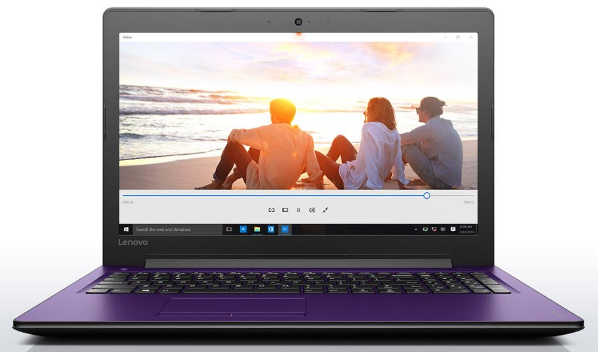
    Lenovo IdeaPad 310

    Lenovo IdeaPad 310 is a simple multimedia all-rounder:

    • The laptop runs on a Sky lake processor and the GeForce graphics card.
    • 6th generation Intel core i7 processor
    • 2GB NVIDIA GeForce N16V-GMR1 graphics
    • 8GB RAM
    • 1TB hard drive.
    • Great electric battery life

    Specifications of Lenovo IdeaPad 310

    • Intel Core i7 Processor (6th Gen)
    • 8 GB RAM
    • DOS Operating System
    • 1 TB HDD
    • 6 inch Display

    Read Also : Alt + Tab Windows Virtual Desktops / Multiple Desktop Function

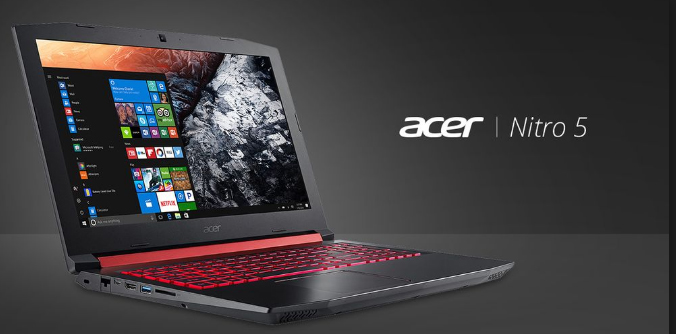
    Acer Nitro 5

    The Acer Nitro 5 is all about making gaming more interesting laptop:

    •  Intel Core i5-7300HQ processor
    • Ge Force GTX 1050 GPU inside
    • the Acer Nitro 5 is the best laptop as it allows you to enjoy game at 1080p at a steady 60fps if you keep the graphics settings at medium or on auto mode.
    • Easy to carry anywhere and anytime.

    Basic Information of Acer Nitro 5

    • launch date (global) – 31-07-2017
    • operating system (with version) – Windows 10 Home
    • laptop type – Gaming
    • display Resolution – 1920 x 1080
    • display size (in inches) – 15.6
    • display technology – Full HD LED Backlit IPS Display
    • Connectivity -wireless connectivity
    • Wi-Fi
    • Bluetooth
    • Connectivity
    • 1 x USB 3.0 port(With Power-off Charging)
    • 1 x USB 3.1 Type C port(1st Gen)
    • 2 x USB 2.0 ports
    • 1 x HDMI port and 2 in 1 card Reader
    • Features – Built in HD Webcam and bright red Backlit Keyboard
    • pointing device – Multi Gesture Touchpad
    • memory ram type – DDR4
    • ram included (in gb) – 8
    • laptop weight (in kgs) – 2.7
    • laptop dimension (in mm) – 390 x 266 x 26.75
    • processor model name – Intel Core i5 (7th Generation)
    • clock speed – 2.5 GHz with Turbo Boost Upto 3.5 GHz
    • graphics processor – 4GB GDDR5 Nvidia GTX 1050 Ti
    • storage hard drive type – SATA
    • hard drive capacity – 1 TB
    • hard drive speed (in rpm) – 5400
    • Power sound speakers – Dual Speakers
    • sound technology – Acer TrueHarmony Plus Technology and Optimized Dolby Audio Premium Sound Enhancement

    Read Also : Best Note taking apps for PC & Smartphone

    Asus Vivo book S15

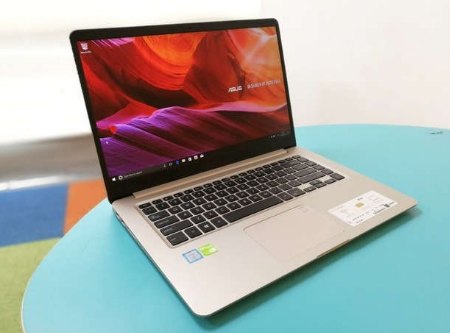
    Besides the Dell XPS 15, the Asus Vivo book S15 is one of the most exciting launches of the year in the mainstream category and most recommended as a best laptop in world. The laptop brought a beautiful bezel-less display in a more affordable package along with some really high-quality hardware. The laptop is powered by 8th gen Intel Core processors and offers reliable performance along with a premium looking design. Unfortunately The battery life is a little weak found in this device.

    ASUS ROG Zephyrus GX501 and Asus ROG Strix GL502 hits the market as one of the most in demand best gaming laptops of the year.

    Read Also : Best free office software for Computer & Smartphone

    Acer Spin 7 SP714-51

    If your choice is for the thinnest and slimmest laptop that is trendy for the style then this year the best laptops for you has the top list name as Acer Spin 7 SP714-51.

    Specification of Acer Spin 7 SP714-51

    • Display – 14.0″ (35.56 cm) display, 1920 x 1080 px
    • Storage – 256 GB SSD
    • Processor – Intel Core i7 (7th Gen) Processor
    • Ram – 8 GB LPDDR3 RA

    Read Also : Enable or Disable Superfetch for Windows

    HP Elitebook 1030G2

    Are you a business person who looks for the best laptops for business people then this year the top choice is HP Elitebook 1020G2 .

    Why Hp Elitebook 1020G2 is one among the best laptops is because of its travel friendly nature . I mean its thin and light so it gets comfy accommodation in your travel .

    Keyboards with greater typing experience makes it best laptop for work.

    Specification of HP Elitebook 1030G2

    • operating system (with version) – Windows 10
    • display Resolution – 1920 X 1080
    • display size (in inches) – 13.3
    • display technology – FHD UWVA
    • Connectivity pointing device – Clickpad with Multi-touch Gestures support
    • connectivity
    • Bluetooth
    • Wireless LAN
    • Memory ram included (in gb) – 16
    • ram type – DDR4
    • ram speed (in mhz) – 2133
    • laptop weight (in kgs) – 1.28
    • laptop dimension (in mm) – 316 x 218 x 14.9
    • processor model name – Intel Core i7-7600U (7th Gen)
    • clock speed – 2.9 GHz
    • graphics processor – Intel HD 620
    • hard drive type – SSD
    • hard drive capacity – 256 GB
    • Power battery type – Li-ion
    • sound technology – Bang and Oulfsen

    Read Also : Fix Excel Freezing or Slow -Excel not responding / hang issues

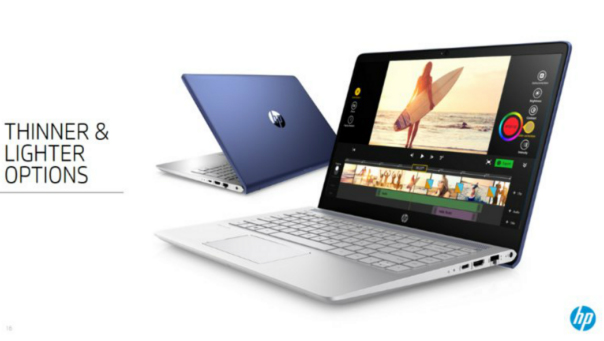
    HP PAVILION x360 14 BA-073tx

    The HP Pavilion x360 14 is one of the best laptop which has a perfect blend of  balance between battery life and performance . Rotating display is a highlight of this latest laptop edition . 8 hours of battery life as i mentioned before it has a good balanced battery life .

    So we have taken look at the list of best laptops of the year that suits different class of people according to their uses .

    If we left any good choice do let us know in the comment section .

  • Record iPhone iPad Screen on Windows & Mac

    Record iPhone iPad Screen on Windows & Mac

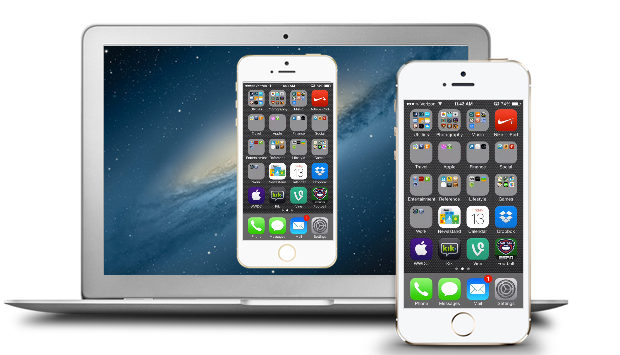
    Wondering how to Record iPhone iPad Screen on Windows or Mac? Capturing or Recording iPhone/iPad Screen on your computer is no longer impossible. Recording a high-quality video of a presentation, tutorial, or gaming you can easily record it. If you are going to record iPhone or iPad screen on Mac then, you can simply use the QuickTime which is an inbuilt application on the Mac. Record iPhone , iPad Screen, if you are using Windows then there is an availability of the easy to use iPad/iPhone recorder.

    Most of the individuals are aware of the QuickTime which supports Mac OS and allow the users to record iPad screen.  But when it comes to the windows only a few people know the method of the recording. Follow some simple steps and you will surely find it easy to record the screen on iPhone or iPad.

    Steps to Record iPhone iPad Screen on Mac

    QuickTime:

    • To start with the recording of the iPhone or iPad screen on your Mac OS, firstly make sure that you are running with OS X Yosemite and iOS 8.
    • Connect your iPhone or iPad to Mac using the Lightning cable. (Suggestion: You may need to “Trust” your Mac so before iPhone works.
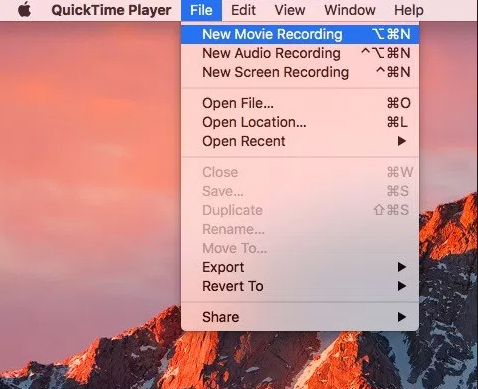
    • Launch QuickTime on Mac and select file then under file select New Movie recording which is available on the menu bar. Also, you can use an alternative option which is a shortcut given through the keyboard i.e. Option-Command-N. These all options will launch a new QuickTime window for the video recording. Now you can easily click on the small downward facing triangle which is just next to the record button. This button will let you just select an alternative which includes your iPhone or iPad now.
    • Now you can select your iPhone or iPad screen from the list and easily see the device screen which is just been replicated in the QuickTime window. The QuickTime recording acknowledges the iPhone or iPad screen rotation so do not ignore to see the preview window on your Mac switch aspect ratio as you rotate your device.

    The recording itself is a real time but some noticeable difference is seen between performing an action on the device and seeing the action being occurred on the window of QuickTime. But, for the actual iPhone recording, it is not an issue as the software will sync audio as well as the video for the final output. But, this does not mean that you don’t use this feature while playing live games or perform tasks which require less latency. For the audio, you can easily record iPhone or iPad screen on Mac and add the audio later during post and editing, or you can also record audio live with the video.

    Read Also : TeamViewer Alternatives – Top rated Remote Desktop Software

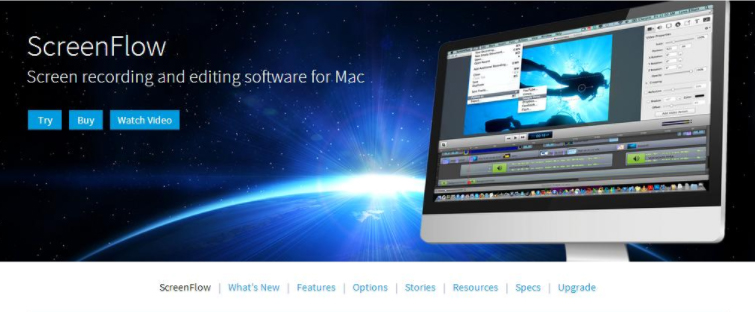
    ScreenFlow:

    This is a similar way to record the iOS device like the QuickTime. But ScreenFlow gives the advantage to edit video instead of open up another program. Sometimes, the ScreenFlow is better than the QuickTime in capturing the video. But, QuickTime is free and ScreenFlow is paid.

    To get started with the ScreeenFlow just connect your iOS device with Mac with lightning cable and open ScreenFlow. Automatically, your device will get detected and give you the option to record screen.

    Read Also : Best Truecaller Alternatives to find Caller Identity

    Tips to Record iPhone iPad Screen on Windows OS:

    You can Record iPhone iPad Screen on windows easily like as in MAC.

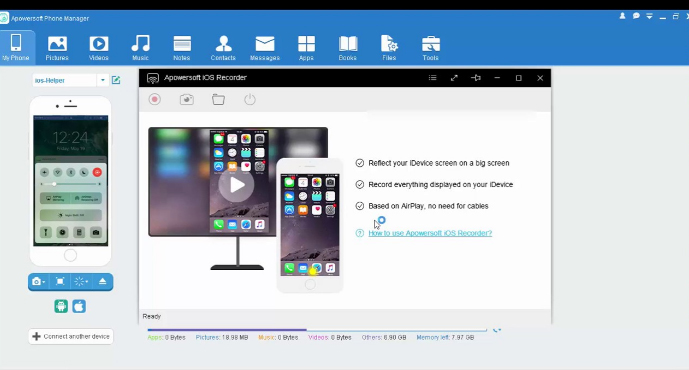
    Apowesoft Phone Manager:

    This phone manager is one of the most powerful apps that provide users to mirror the iOS devices screen to the Windows and record all content on the screen.

    • To simply achieve the recording follow the steps:
    • Download the app and then install
    • Mirror your iOS device to the PC
    • Record iPhone iPad Screen
    • Then, connect your iOS device and PC with the Wi-Fi
    • Run this phone manager on computer and click on “Tools” and then “iOS Recorder”
    • Swipe up from bottom on your device of screen to access control center
    • Tap on “AirPlay” and you will able to see a TV icon with its name. Click it and open up mirroring function.
    • Within some time, you will see the device screen is projected to the PC screen and both the screens will act simultaneously.

    Read Also : Best Apple Watch Alternatives-Affordable Gadgets

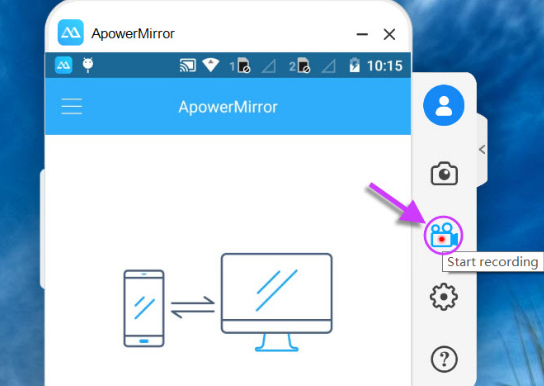
    ApowerMirror:

    ApowerMirror is an excellent tool of mirroring for recording iOS device by following some steps:

    • Install the application on the PC and afterward activate it
    • Then, on the iOS device just open AirPlay mirroring or AirPlay.
    • Select the device name and thus your device screen gets mirrored on PC.
    • Then, click on the recording icon or just simply press Ctrl + R to record screen

    Conclusion:

    So, this is the way you can easily Record iPhone iPad Screen on the Windows or Mac. Just follow the simple steps and you will surely be able to record the screen without any hassles.

  • Google chrome themes that you shouldn’t Miss

    Google chrome themes that you shouldn’t Miss

    Google Chrome , your favourite web browser from tech giant Google allows you to choose between a variety of Chrome themes . So here we will discuss out the best Google chrome themes that you shouldn’t Miss .

    Most of you must be an avid user of the Google chrome browser for your daily web browsing and if not you definitely will be aware of it. There are a plenty of options you can choose from as your web browser and Google chrome is one of the most popular options known for its lightweight and user friendly interface besides some amazing features. So Google chrome, your favorite web browser from the tech giant Google offers you a number of terrific and refreshing themes to choose from. Here we are going to discuss some of them but before there is some more information you will like to grasp.

    What is Google Chrome Theme ?

    Technically what themes are that these are additional extensions which you may add to your browser to change the way your browser looks. Also these are added like any other extensions but don’t contain any HTML or JavaScript codes. You can change the look of the browser completely starting from tabs, browser background, and color of the text and much more the way you want. Google Chrome Themes provide a new and refreshing look to your chrome browser.

    Why you should Change Google Chrome Theme ?

    Sometimes you may get tired the way your browser looks and just get bored of using it because of it same old appearance. Here changing theme provides it a new and refreshing look. Moreover you can set the colors of text, tabs, background and much more the way it comforts you, the way you want.

    Read Also : Best Web browsers for Computer & Smartphone

    Best Google Chrome Themes you shouldn’t Miss 

    Here is the list of the some of the best Google chrome themes :

    Google chrome Norwegian Fjord Theme

    Who doesn’t love nature, right? And this theme is definitely among the best landscape Google chrome theme. Capturing the picturesque view of this water body flowing through these mountains in its background is going fill you up with some happy and refreshing vibes every time you are going to use your browser.

    Google chrome Galaxy view Theme

    This is the best Google chrome theme capturing the amazing colorful night sky full of stars through the trees. This truly captures the essence of the beauty of the night and is just simply going to be stunning as a new theme of your browser. I must say this is one of the best Google chrome themes available .

    Google chrome Plumage Theme

    The vibrant colors in the background are definitely going to make you enjoy using your browser. The background image consists of some intricate and beautiful details and texture. You might think of the color to be too bright but it for sure deserves a chance.

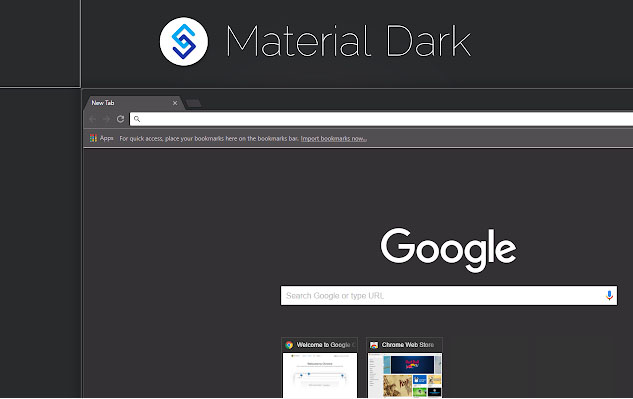
    Google chrome Material Dark Theme

    This theme is counted among the best minimalist Google chrome themes. The background image consists of very little graphics and dark shades of colors. The theme is simple and straightforward. The theme completely satisfies the saying less is more.

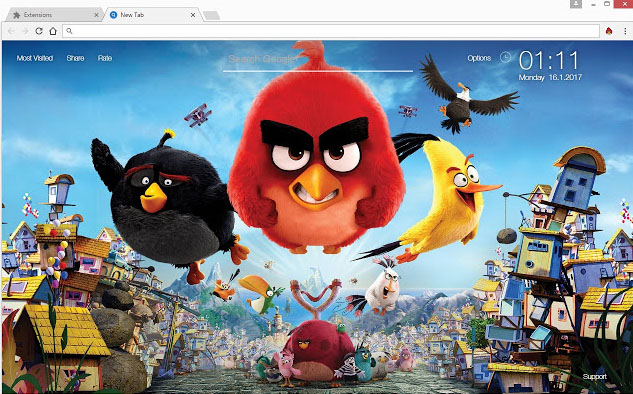
    Google chrome Angry Birds Theme

    This is the best theme for all the angry birds lovers out there. With this theme you can meet your favorite characters every time you will use your browser.

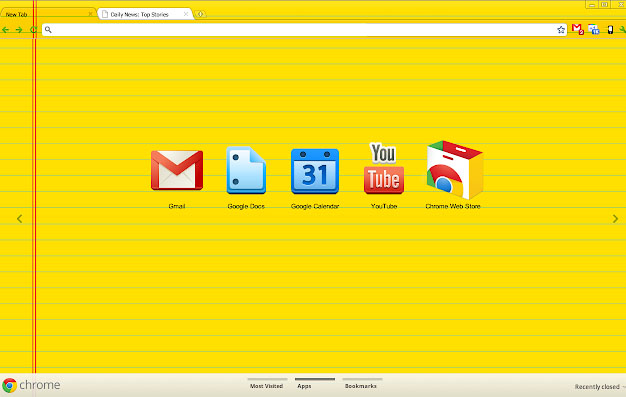
    Google chrome Legal Pad

    Laptops have somehow replaced the use of books and notebooks. With this theme you can get the feels of using some notebook. It’s the best theme for all the students for sure. If you love some bright and vibrant colors, then this theme is for you.

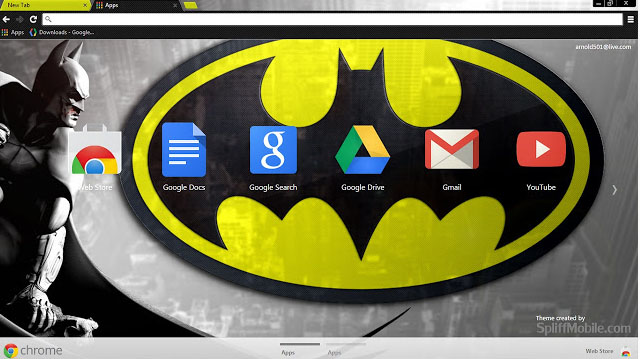
    Google chrome Batman Design

    Batman has a huge fan base across the globe. This is the best Google chrome theme for you if you are a part of this fandom. The theme is minimalistic and features dark colors. And is perfect way to show your love towards batman.

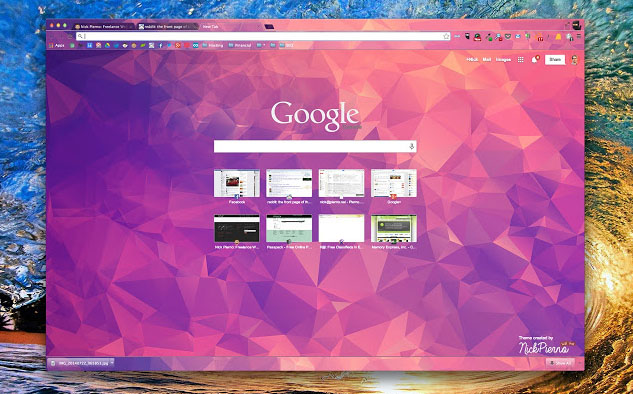
    Google chrome Polytheme

    This is the best Google chrome theme if you want a splash of colors on your browser’s background. The background features geometric designs in multiple but not too bright colors and can be simply beautiful and amazing theme for your browser.

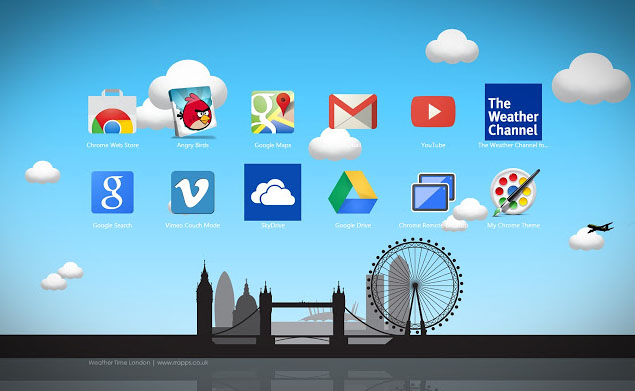
    Google chrome Weather time London theme – Daylight

    The theme captures the essence of London featuring the major attractions of the city. The colors are used in lighter shades and are comforting to the eyes. Indeed a beautiful theme and a must try.

    Google chrome Puppy Love

    If you are a dog lover then this is for sure the best Google chrome theme for you. The background features a top shot of a cute puppy lying on grass. The background is just too cute.

    How to download Google Chrome Themes ?

    You can add Google Chrome theme easily for which you have to download Google Chrome theme following the given steps –

    1. Click upon the three vertical dots present on the top right corner of your screen.
    2. Then click upon Settings.
    3. Scroll down the page that appears to Appearance. Now select Themes and then Chrome web Store.
    4. A new tab is opened displaying all the themes available for you to select.
    5. For information about each theme click its thumbnail.
    6. For installing any, simply click upon Add to chrome.
    7. You can undo it then and there if you don’t like it.

    So your desired Google chrome themes is installed in your browser and the changes can be seen on the browser window.

    Read Also : Best free office software for Computer & Smartphone

    Read Also : The ultimate guide to make Windows run faster (Boost Computer Speed)

    How to remove Google Chrome Theme ?

    The steps to install google chrome themes , let it be any theme its easy right? So are the steps to remove google chrome theme if you just in case want to restore to the default theme. Just follow the steps mentioned below:

    1. Click upon the three vertical dots present on the top right corner of your screen.
    2. Then click upon Settings.
    3. Scroll down the page that appears to Appearance.
    4. Now select Reset to default theme.

    How to Change Google Chrome Theme ?

    The whole purpose of applying a theme is to provide a new look to your browser and the day you get bored of your existing theme you ought to change it. In order to change google chrome theme all you need is to repeat the steps mentioned above under ‘How to install Google chrome theme’. Select the desired new theme and install it. The older one is removed and the newly installed Google chrome themes is put on display.

    Read Also : Connect dual displays / monitors to one computer on Windows & MAC

    How to customize Google Chrome theme (How to create own Google Chrome Theme )

    You can select the theme from the huge and amazing collection available on the chrome web store but still if you don’t like any or just want to create your own theme then that is possible as well.

    By following the given steps you can simply create your own customized theme for your browser using Chrome theme creator , so let us see how to make your own google chrome theme :

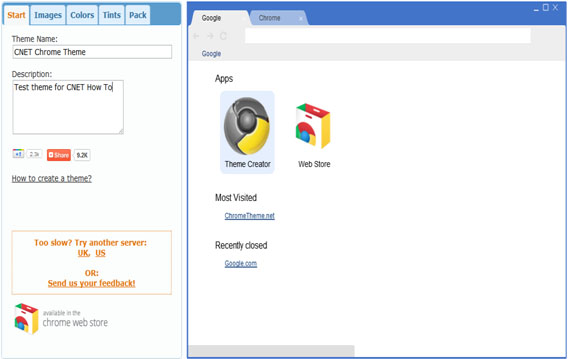
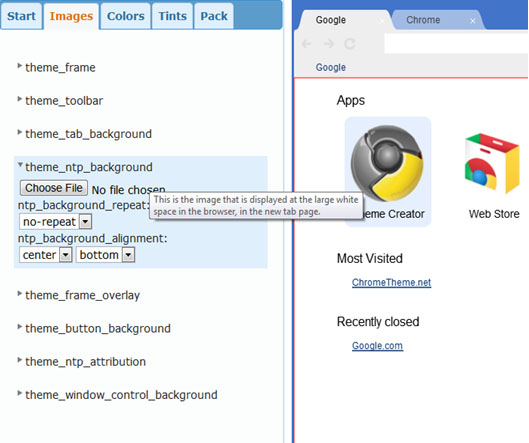
    • First you need to understand that the left feature all the settings required while on the right side the preview of the theme you are making can be seen. You can set the theme name and add a description whatever you want to
    • The next step is to set all the images for the different parts of the browser. Of you want to set image only for the background then you need to set only the Theme_ntp_background. You select the image file and adjust the alignments. If you want to set different images for the tabs, toolbar etc. then you can select separate image for each section as shown in picture.
    • In the next tabs you can set the colors and tints for the texts and the different sections as per your desire.
    • Once you are done with creating your theme click on the pack and install button. Its installs the theme and displays. If you don’t like the way it turned out then you can go back and modify again.
    • Once the theme is finalized you can download and save it for later use. You can even upload it on the chrome web store and let others use it as well.

    Best google chrome theme creator / google chrome theme makers

    Above you can understand how to create your very own theme using the Google theme creator. There are number of other amazing tools which can be used for the very same purpose:

    1. Theme Creator

    It’s a google extension application. Create some amazing and personalized themes with a lot of ease and share it with others as well.

    1. Theme beta

    Like theme creator, another theme creator tool. Select the images, color, text designs and your theme is ready.

    1. Google chromizer

    It is a web app for creating themes. Works mostly like other tools but there is a tiny restriction, it only accepts images in jpg, png or gif format.

    1. com

    It is another simple tool for creating your custom themes and makes the process quite easy and comfortable for the user.

    1. Canvas

    With all the features available with other tools it has a few add ons. You can set your own images for the tab section and also has a new feature named selfie mode for instantly clicking your pictures.

    1. Stylish

    It’s an extension where you get to edit any theme and get to choose from a huge collection of colors and skins.

    So we can see to provide a completely new and refreshing look to your browser the chrome web store provides you with a decent collection of a huge number of themes and you may now understand that the process to install, change or uninstall any theme is also pretty simple. Google also provide you with the ability to create your own personalized themes. So do tell us which one is your favorite theme and do also mention your experience if you try creating your own custom google chrome theme.

  • Best Media players for Computer & Smartphone

    Best Media players for Computer & Smartphone

    When it comes to Media players most of us might know one common name that would be Windows Media player and few of us may know even VLC Media player . But know what there are so many which can be pointed out as the best media players and really the best free alternative to Windows Media Player .

    So let’s take a look at some of the best Media players available .

    Best Media players for Computer & Smartphone

    You all might be familiar with some of the media players that are commonly available. For the people who are still in search for the best free media players, please have a look at the following options.

    1. Windows Media Player
    2. VLC Media Player
    3. iTunes
    4. KM Player
    5. GOM Player
    6. Kodi
    7. Media Player Classic
    8. Winamp
    9. MPlayer
    10. Plex
    11. Real Player
    12. Serviio
    13. Boxee
    14. Dragon Player
    15. MPEG Audio Decoder
    16. JRiver Media Center
    17. Flip4Mac

    Now we’ll have a look at some of the Best Media players for Computer & Smartphone that are quite popular and most preferred .

    1)      VLC Media Player

    This is one of the most commonly used best media players for both computers and smart phones. People who watch videos in their phone or computer will surely be aware of the VLC media player. This customizable media player is one of the most flexible players these days. The android app of VLC was launched in 2012 and it became very popular among the android users. Thus making it a best android media player .

    The users can easily play HD content with VLC media player since this player is supported by open source codec files which can be installed as an add-on. VLC Media Player is compatible with and Windows platforms too. Some of the key features of VLC media player are:

    1. a)      It supports files, Discs, webcams, devices and streams.
    2. b)      Codec packs not required
    3. c)       It runs on platforms like Linux, Mac, Windows, OS and UNIX
    4. d)      VLC media player also supports media conversion and streaming.

    2)      MX Player

    MX player , one of the best video players for android phone users. Also compatible with both iOS and Windows. The layout of MX player is very simple and this makes it easier for all the users to run it without much effort. Apart from this, MX Player has an advanced hardware decoder which helps in supporting playback of high quality videos. This is one of the best iOS Media player .

    MX player also works well with devices that have multiple core processors since it supports multi core decoding. One of the major highlighting features of MX player is that, it can transfer you old collection of movies into digital format. Once the transfer is done, you can easily play the movie in MX player without any issues.

    Read Also : Best Torrent Managers for Computer & Smartphone

    3)      KMPlayer

    When it comes to video streaming, KMP is one of the best options that can help you with high quality streaming. KMP Media Player with its floating screen allows the users to work on different windows, making it a perfect multitasking media player.

    KMP media player is compatible with Android, iOS and Windows. One of the major attraction of KMP player is its ability to support more than 30 languages which in inbuilt. Likewise, it also supports multiple audio tracks and subtitles without any lags and slowdowns.This is one of the Best Media players .

    KMP Media Player also supports 3D formats and it also has an option to add the quality of album and includes plug-ins and playback options. While playing any music track, KMP media player automatically supports the album art with changing colour themes for each new track.

    Read Also : Alexa Tips, Tricks and Commands

    4)      SM Media Player

    Developed by Mr. Ricardo Villalba, this media player has features like:

    1. a)      Switching of Audio Tracks
    2. b)      Mouse scrolling and multiple speed playbacks
    3. c)       Codec free playback
    4. d)      Remembers setting of the files you play

    SM Media Player is an open source player which is compatible with Windows, Linux and Androids. To use this media player, all you have to do is download it and start using. You will not need any external codes to pay the videos. SM media player also support YouTube videos and the user can easily download subtitles.

    SM media player consists of different skins and icon themes. So when the user wants to change the look for the player, they can do so by choosing the options of themes. This is one among the Best Media players and also has video and audio filters, changing the playback speed, video equalizer etc.

    Read Also : YouTube Dark Mode Android Version Without Rooting

    5)      DivX Player

    This is another media player which is compatible with both computers and android phones. You will have to download the DivX App in your android phone from Google Play Store to start using it. For iOS devices, you can make use of the Apple Store. To watch the videos that are saved in your phone, all you have to do is click the “My Videos” option and start watching by selecting a video. If you have stored the videos in your computer, then click “Media Servers” and select DivX Media Server.

    This media player support all file formats and it also helps in adaptive streaming. The DivX Player automatically adjusts the quality of a video you watch. In this player, the users can save videos according to title, genre, date or time. It acts as a fully featured video library manager. Moreover, the user can embed high quality videos with all its features in websites or blogs.

    Read Also : Apple Homepod Tips, Tricks and Review

    Read Also : Spotify Tips and Tricks to Enjoy Spotify Subscription More

    6)      Real Player

    Real Player is one the media players that allows users to download web videos and watch it offline. The user has all the control of this media player. To keep the videos safe, this player helps the user to create a unique pin to access the videos. This player is works very fast and it also adds mobile sharing of clips. Streaming is possible with Real Media Player and the user can convert the videos and watch it on TV, computers or android phones.

    Real Players comes with a downloader and trimmer, helping the users to edit the videos that way you want. This player also helps in sending photos, clips and videos with your friends easily. Real time offers two premium plans to the users to choose from and they include more space, better quality video, more music choices and last but not the least the ability to create unlimited real times with any music track. Apart from being a media player , this is an effective video editing tool and video trimmer tool to rely upon.

    Know these media players first and choose one that suits your needs.  Hope this article helps you to opt the right media player for your android phone or computers.  Enjoy watching videos with these high quality media player to keep you engaged during a holiday or while you travel.